Computer Vision Technology Professional Website Template
Perceive is a split-screen landing page template built for computer vision research labs. It pairs technical specification blocks with live-inference visuals across glassmorphic panels, guiding defense, medical, and industrial buyers from capability proof to a focused lead-capture form. The dark Data Command aesthetic signals precision from the first pixel.
by Rocket studio
Quick summary
Perceive is a single-page, split-screen landing page template for computer vision research labs. It uses a Spec Sheet scroll cadence to build a technical dossier, pairing monospaced metric blocks with segmentation masks and tracking visuals. A frosted glassmorphic lead form at scroll-end invites qualified buyers to scope a model.
Who this template is for
This template is built for technically sophisticated teams selling computer vision capabilities to equally technical buyers. It speaks the language of model performance before it ever asks for contact details.
- Computer vision research labs targeting defense, medical, and industrial clients
- Machine learning studios presenting object detection and segmentation work to procurement teams
- Applied AI consultancies pitching autonomous systems or satellite imagery analysis projects
What problem this template solves
Most technology landing pages bury the proof inside marketing copy. Technical buyers in defense, medical imaging, and manufacturing stop reading the moment they sense a lack of fluency. Perceive solves that by leading with the metrics, not the pitch.
- Visitors leave before trusting a lab that cannot show model performance data upfront
- Generic technology page designs fail to signal deep computer vision specialization
- Lead forms placed too early collect low-quality inquiries from unqualified contacts
What you get with this template
You get a fully designed, single-page layout that communicates serious computer vision capability. Every section is structured to build technical credibility section by section, scroll by scroll.
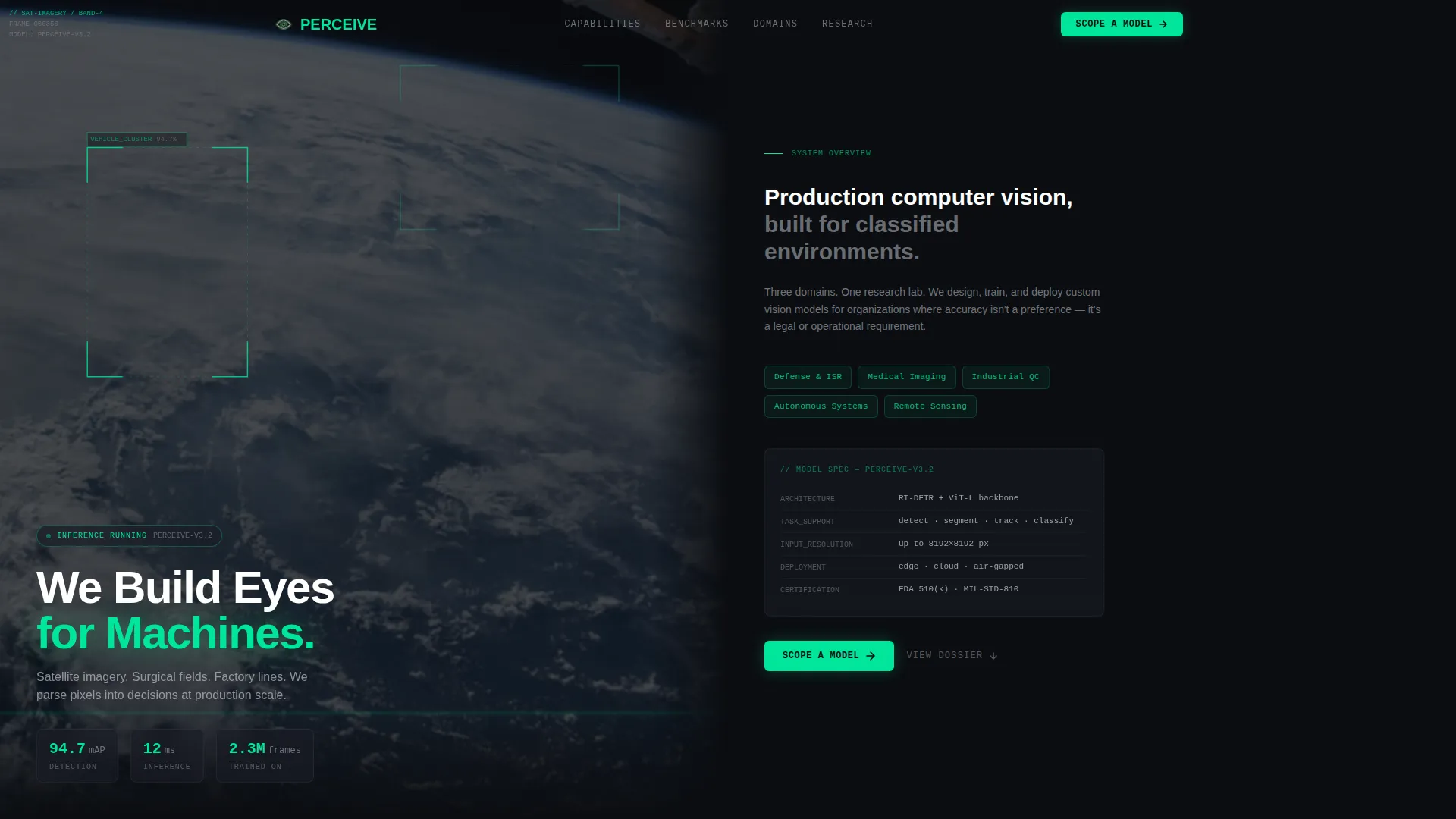
- A dark full-bleed header with an animated inference overlay showing bounding boxes, confidence scores, and segmentation masks drawing in phosphor green
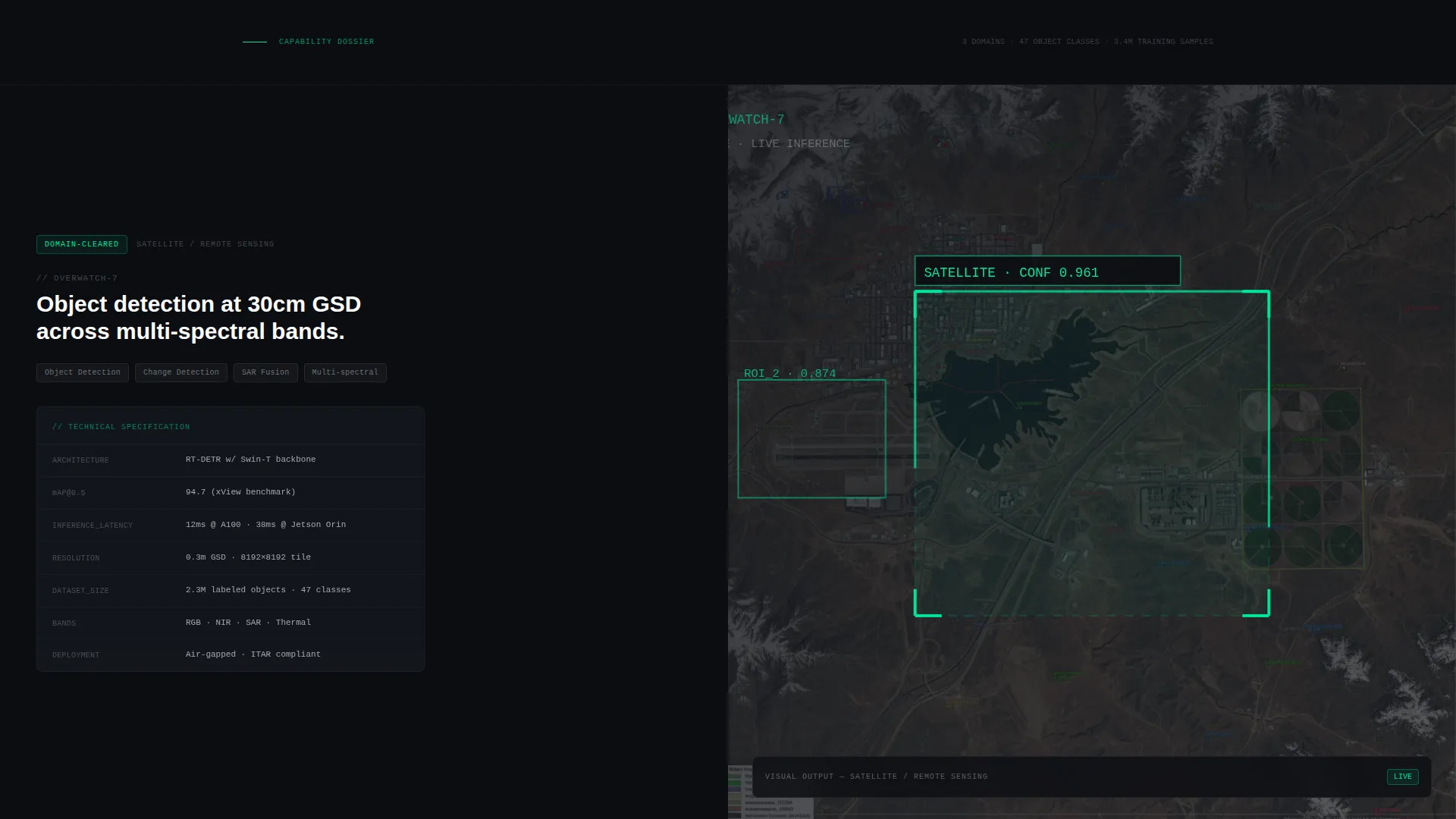
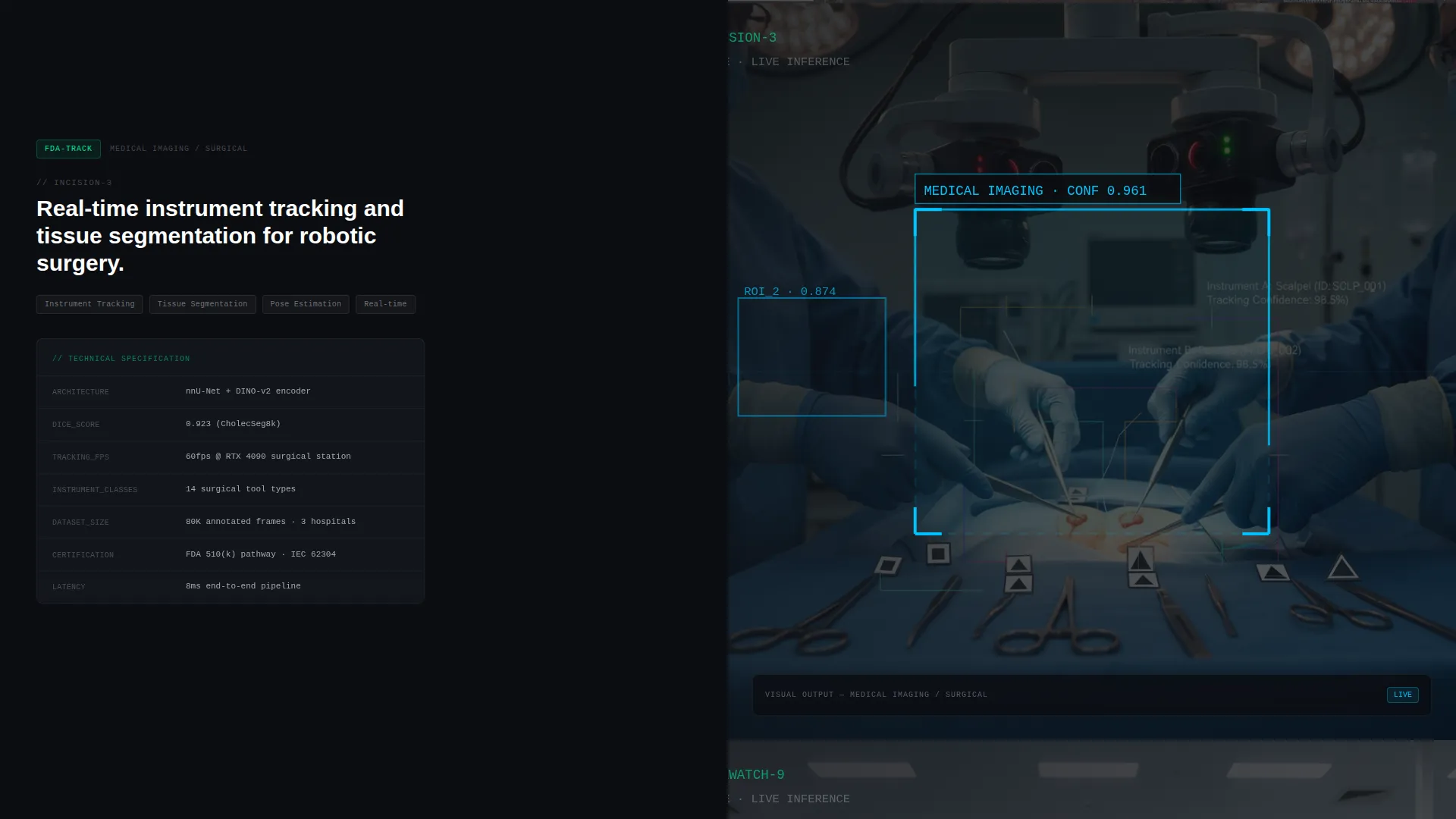
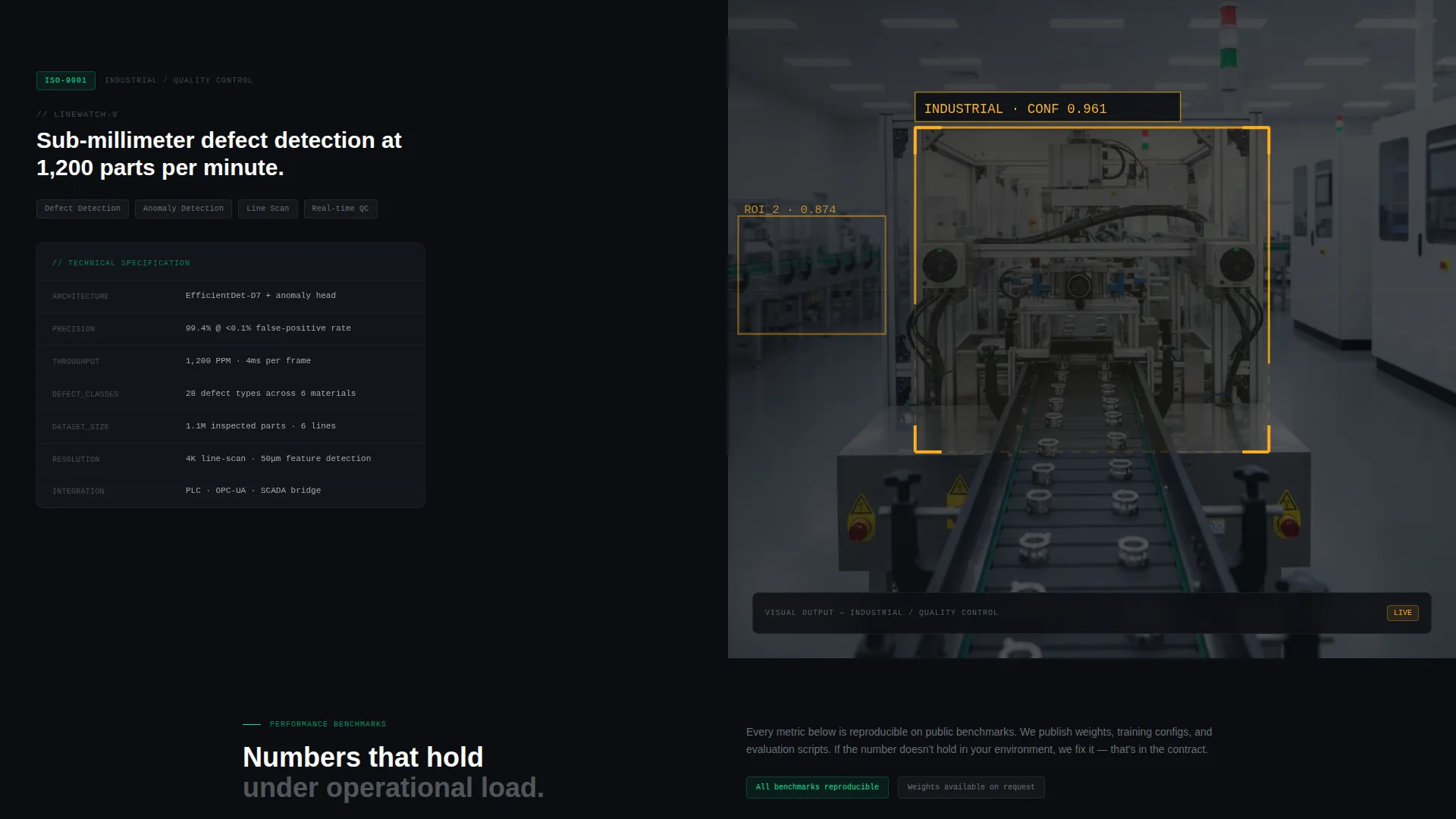
- A Spec Sheet scroll structure where each split panel pairs a technical specification block with a corresponding visual output such as a heatmap, tracking sequence, or segmentation mask
- A frosted glassmorphic lead-capture form with an application domain dropdown, a free-text field, a dataset availability toggle, and a work email input
Feature list
This template is built from a small set of high-impact components, each designed to earn the click from a technical buyer.
Animated Inference Header
The full-bleed header runs a slow-resolving computer vision inference animation. Bounding boxes, confidence scores, and segmentation masks draw themselves in phosphor green across aerial imagery, a surgical field, and a conveyor belt scene. The headline "We Build Eyes for Machines." fades in over the live-inference display, with glow bleeding outward from each bounding box into surrounding negative space.
Glassmorphic Split-Panel Layout
Every scroll section is a 50/50 split panel. The left side holds a technical specification block in monospaced type, showing model architecture, mean average precision (mAP) scores, inference latency in milliseconds, and dataset size. The right side displays the corresponding visual output. The layout rewards technical buyers who read every metric while letting executives skim the visuals.
Spec Sheet Scroll Cadence
The page does not tell a story. It builds a dossier. Each section is denser and more specialized than the last, creating a classified-document feeling that resonates with defense contractors, medical device engineers, and manufacturing teams.
Lead-Capture Form Panel
At scroll-end, a frosted glassmorphic form panel slides into the right split. The primary call to action reads "Scope a Model" in phosphor green. The form collects application domain via dropdown, a free-text model description field, a dataset availability toggle, and a work email. There is no phone field.
Phosphor Green Interactive States
Every interactive element uses phosphor green (#00E599) for hover states and live-data accents. Glassmorphic cards hover over the dark substrate with soft luminous borders, and interactive elements pulse faintly as if the interface itself is processing.
Page sections overview
| Section | Purpose |
|---|---|
| Full-Bleed Header | Animate live inference and introduce the lab's core capability |
| Headline Fade-In | Surface the primary value statement over the inference display |
| Spec Sheet Panel 1 | Present first model architecture and metrics alongside visual output |
| Spec Sheet Panel 2 | Deepen the dossier with a second capability block and tracking visual |
| Spec Sheet Panel 3 | Deliver the most specialized metrics block with heatmap output |
| Lead Capture Form | Qualify and convert visitors with the "Scope a Model" call to action panel |
Design & branding system
The visual identity follows a Data Command theme with a glassmorphic color system. Everything feels precise, backlit, and layered on translucent depth, like peering through smoked glass into a cleanroom.
- Core palette: void black (#0B0D11) as the substrate, frosted panel (#1A1D26 at 30% opacity with backdrop blur) for glassmorphic cards, phosphor green (#00E599) for accents and hover states, and cool quartz (#C8CDD5) for body text
- Typography uses monospaced type for all specification blocks to reinforce the terminal and instrument-readout aesthetic
- Glassmorphic cards float over the dark background with soft luminous borders and a faint pulse on interactive elements
Mobile & speed optimization
The template is designed with a lean visual stack to support a readable experience across screen sizes. The split-panel layout adapts so specification blocks and visual outputs remain clearly paired even on smaller viewports.
- Split panels reflow vertically on mobile so metric blocks appear directly above their paired visual outputs
- Glassmorphic overlays and blur effects are scoped to avoid overwhelming smaller device rendering
- The lead-capture form at scroll-end remains fully usable on touch devices with clearly tappable inputs and toggle controls
How this template helps you convert
Perceive earns the conversion by proving technical fluency before making any ask. The page is structured so that trust accumulates scroll by scroll.
- The animated inference header signals active capability in the first seconds, holding the attention of technical evaluators who would otherwise bounce from a static hero image
- The Spec Sheet scroll structure lets buyers self-qualify by reading deeper into the metrics, so the lead form receives contacts who have already absorbed the capability proof
- The "Scope a Model" form flow collects application domain and model description before asking for contact details, producing higher-quality, more specific inquiries from the right buyer profiles
Other information about this template
Perceive is a single landing page template, not a multi-page website. It is built for labs that sell a capability, not a product catalog. The template is well-suited for teams that need to present computer vision research work to technically literate procurement decision-makers.
- The template style is Split Screen (50/50), placing equal visual weight on technical data and visual model output throughout the scroll
- The lead-generation direction means every design decision, from the dossier cadence to the form placement, points toward one qualified conversion action
- The header concept is Dark Full-Bleed with Glow, using the inference animation as the primary engagement mechanism rather than a static photograph or illustration
- The template sits within the Computer Vision Technology subcategory under the broader Technology category, making it relevant for teams working on object detection, image segmentation, satellite remote sensing, and real-time video analysis
Theme
Data Command
Creative direction
Spec Sheet
Color system
Glassmorphic
Style
Split Screen (50/50)
Direction
Lead Generation
Page Sections
Animated Inference Header
Glassmorphic Split-panel Sections
Spec Sheet Scroll Cadence
Frosted Lead-capture Form
Phosphor Green Interactive States
Related questions
Who is the ideal buyer for this template?
Can I customize the specification metrics shown in each panel?
What does the "Scope a Model" form collect?
Is this template suitable for a lab that works in only one domain?
How does the animated inference header work?



