Pharmaceutical Digital Presence Provider Directory Website Template
Pharmaatlas is a precision directory landing page built for pharmaceutical and biotech audiences. The split-screen layout pairs a live-feel search interface with an animated results explorer, guiding procurement officers, business development managers, and regulatory consultants from first glance to a profile claim or directory access request, no credit card required.
by Rocket studio
Quick summary
Pharmaatlas is a single-page pharmaceutical directory template built on a 50/50 split-screen layout. It combines a glassmorphic search interface with an interactive, scroll-activated explorer. The design targets serious pharma professionals and moves them toward two conversion actions: claiming a company profile or requesting full directory access.
Who this template is for
This template is designed for teams building a pharmaceutical or biotech directory product. It speaks directly to the professionals who will use that directory every day.
- Procurement officers sourcing active pharmaceutical ingredient (API) suppliers under time pressure
- Business development managers mapping competitive landscapes before board presentations
- Regulatory consultants cross-referencing facility inspection histories across multiple jurisdictions
What problem this template solves
Generic directory templates cannot communicate the precision that pharmaceutical audiences demand. A procurement officer visiting at 2 a.m. needs to trust the tool within seconds. This template solves that trust gap immediately through its visual language and interactive design.
- Standard layouts fail to convey the depth and specificity of a pharma-grade dataset
- Visitors leave before converting because the value of the directory is not demonstrated upfront
- Most templates offer a single conversion path, missing both profile-claimers and access-requesters
What you get with this template
You get a fully structured, single-page landing layout that demonstrates directory value before asking for anything. Every section is designed to progress the visitor from curiosity to confident action.
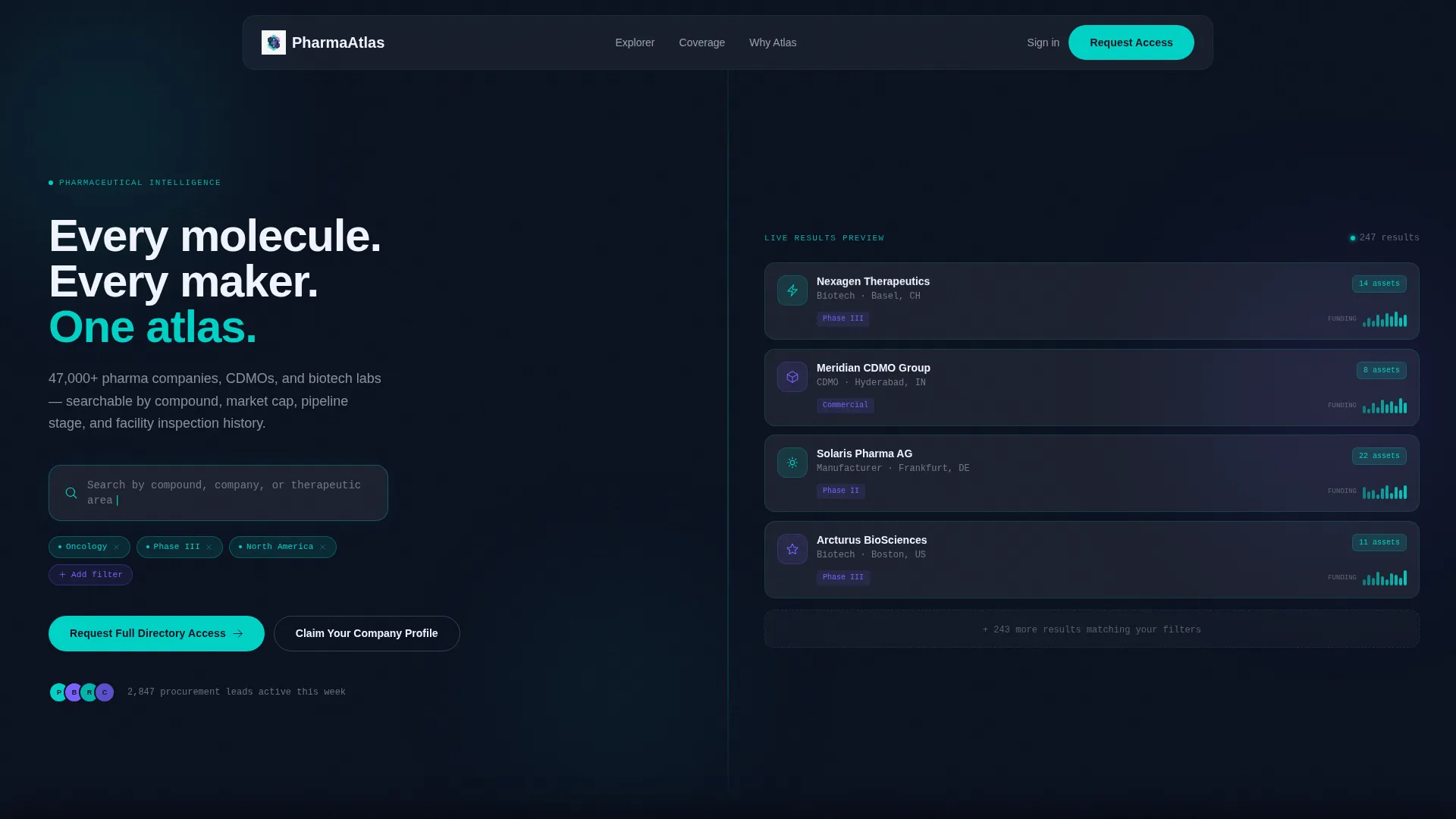
- A frosted-glass split-screen header with a live-feel search field and animated company card cluster
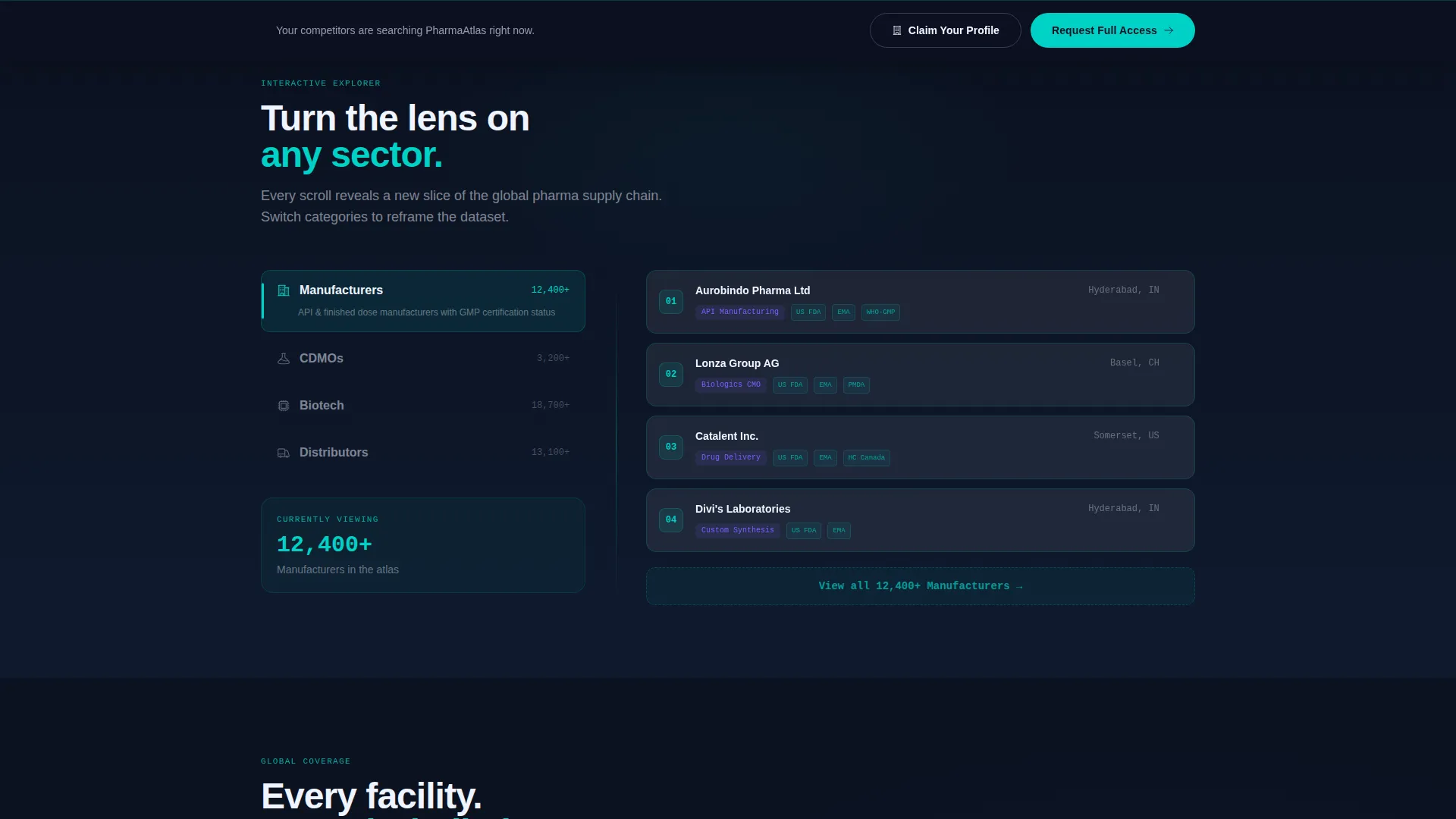
- A scroll-activated category navigator cycling through Manufacturers, Contract Development and Manufacturing Organizations (CDMOs), Biotech, and Distributors
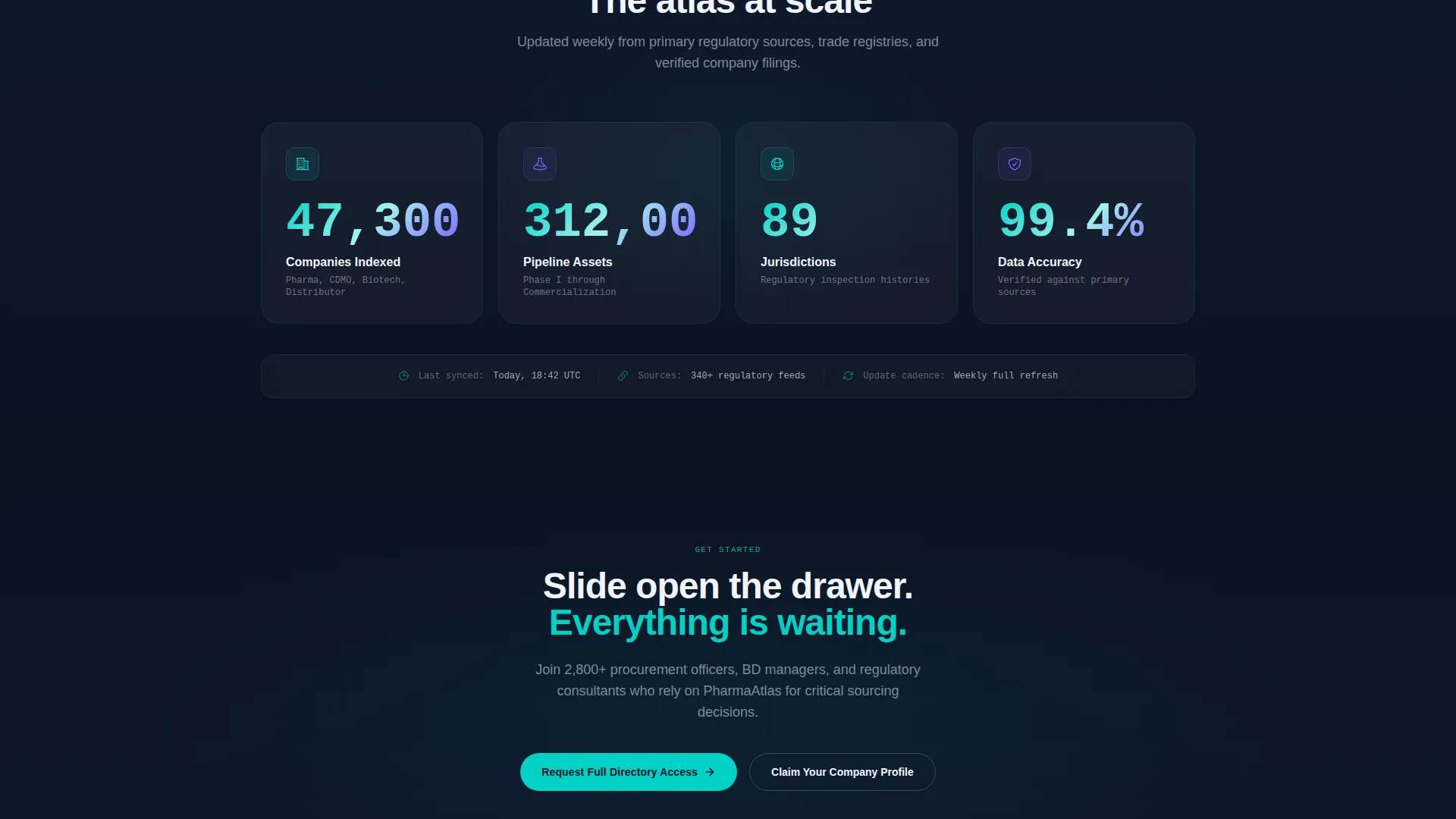
- Two conversion paths: a floating "Claim Your Company Profile" button and a glassmorphic modal for "Request Full Directory Access"
Feature list
This section covers the core functional and design capabilities built into the Pharmaatlas template.
Split-Screen Dashboard Header
The header divides the viewport into two equal panels. The left shows a frosted-glass search field with a blinking cursor and three pre-active filter chips for Oncology, Phase III, and North America. The right renders an animated cluster of company cards with logo silhouettes, teal pipeline count badges, and micro-sparklines of recent funding activity.
Scroll-Activated Category Navigator
As the visitor scrolls past the header, the left panel cycles through four directory categories: Manufacturers, CDMOs, Biotech, and Distributors. The right panel updates with matching directory card transitions, making each scroll feel like changing the lens on a live dataset.
Inverted Midpoint Layout
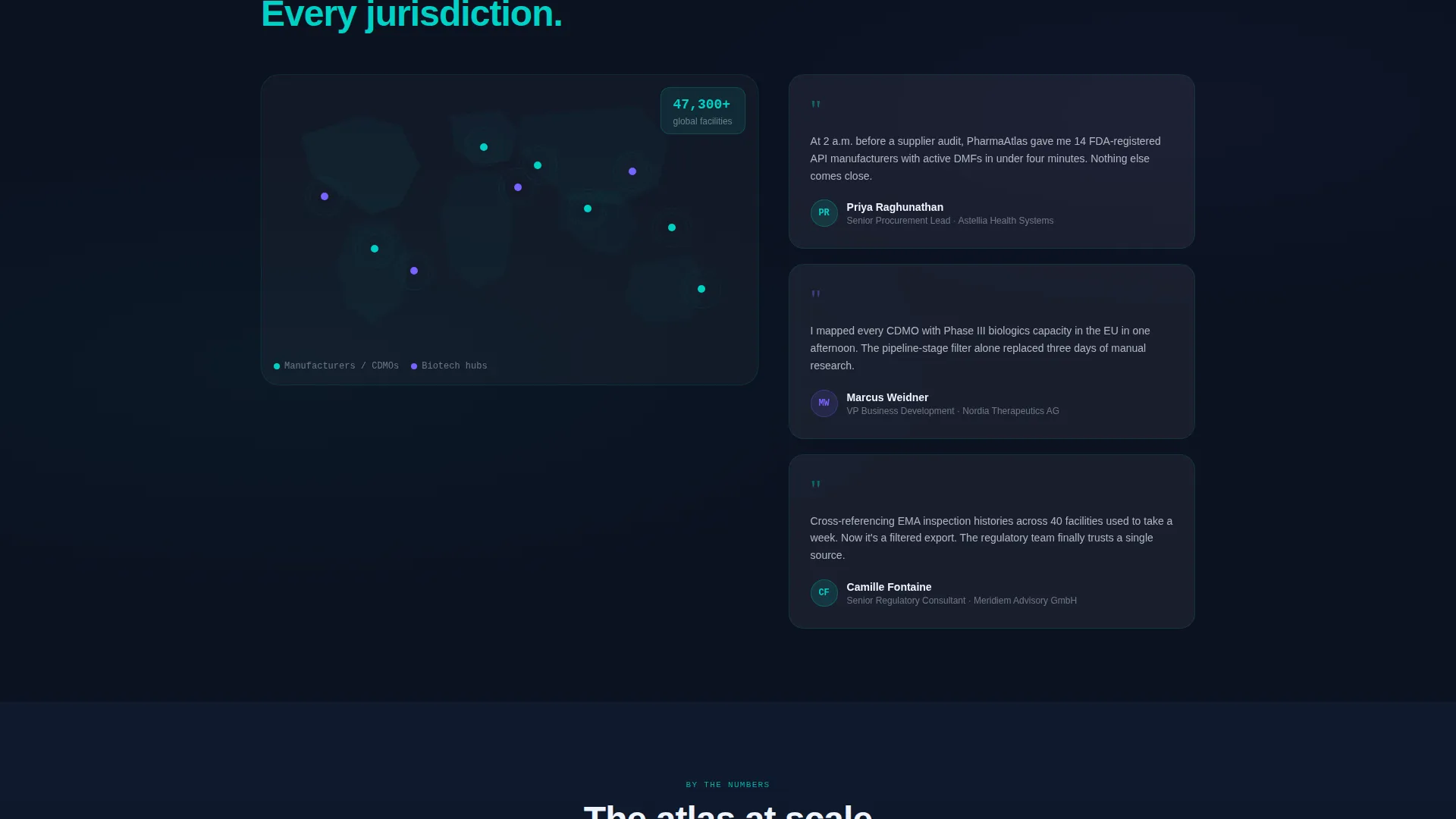
Midway through the page, the split layout inverts. A global facility map with glowing node clusters occupies the left panel. Frosted testimonial cards from procurement leads appear on the right, grounding the data visualization in real-world use cases.
Progressive Disclosure calls to action
The primary call to action, "Claim Your Company Profile," first appears as a floating frosted button after the second scroll section. It then anchors permanently in a bottom bar, ensuring it is always visible without being intrusive.
Glassmorphic Access Request Modal
The secondary conversion path opens a modal styled with the full glassmorphic treatment. It collects work email, company name, role via a dropdown, and therapeutic area of interest. The form carries no credit card or commitment language.
Dynamic Motion Visual System
All transitions use calibrated cubic-bezier easing curves. Cards parallax on scroll, filter chips pulse once on load, and a soft gradient aurora shifts behind the glass layers. Motion is continuous but clinical, with no bounce effects.
Page sections overview
| Section | Purpose |
|---|---|
| Split-Screen Header | Introduces search interface and live card results cluster |
| Active Filter Bar | Displays pre-set filter chips to signal directory depth |
| Category Navigator | Cycles directory types with animated right-panel transitions |
| Directory Card Grid | Shows company cards with pipeline badges and funding sparklines |
| Inverted Data Section | Pairs global facility map with floating procurement testimonials |
| Floating call to action Button | Surfaces "Claim Your Company Profile" after second scroll section |
| Permanent Bottom Bar | Anchors primary call to action in view for the rest of the page scroll |
| Access Request Modal | Collects lead details via glassmorphic form overlay |
Design & branding system
The visual identity follows a Dynamic Motion theme built on a Glassmorphic color system. Every surface feels layered and translucent, like looking through frosted partitions in a pharmaceutical cleanroom.
- Core palette: deep pharma navy (#0B1120) as the background, translucent panel white (#FFFFFF at 12% opacity) for frosted cards, and clinical teal (#00D2C6) for borders and active badges
- Interaction states use soft signal violet (#7B61FF) on hover and active filters, giving interactive elements a gentle pulse without breaking the clinical tone
- All motion uses cubic-bezier easing curves with no bounce, keeping transitions precise and laboratory-calibrated
Mobile & speed optimization
The template is designed with a responsive split-screen structure that adapts gracefully to smaller viewports. The parallax and motion system is built to scale without overloading the layout.
- The 50/50 split stacks vertically on mobile, preserving the search-first hierarchy on smaller screens
- Animation triggers are tied to scroll position, so content activates only when it enters the viewport
- The glassmorphic card system uses opacity and blur rather than heavy image assets, keeping the visual weight manageable
How this template helps you convert
The conversion strategy is built on progressive disclosure. Visitors are shown the value of the directory before any form appears, so by the time a call to action surfaces, trust is already established.
- The interactive search and filter experience in the header lets visitors simulate using the directory before signing up, lowering resistance to the first conversion action
- The scroll-activated explorer builds continued engagement across the page, so visitors who do not convert on the first call to action encounter a second, permanently anchored opportunity in the bottom bar
Other information about this template
This template is built for a pharmaceutical directory and listing site within the broader pharmaceutical digital presence space. It sits at the intersection of technology and life sciences, making it suitable for platforms that serve both commercial and scientific audiences.
- The template style is a Split Screen (50/50) layout, suitable for platforms that need to show a tool and its output side by side
- The header concept is a Dashboard Preview, which signals data richness and platform credibility to first-time visitors
- The creative direction is an Interactive Explorer, meaning the page demonstrates functionality through motion rather than static screenshots
- The lead generation direction supports two distinct user intents: companies wanting visibility in the directory and professionals wanting access to its data
Theme
Dynamic Motion
Creative direction
Interactive Explorer
Color system
Glassmorphic
Style
Split Screen (50/50)
Direction
Lead Generation
Page Sections
Split-screen Dashboard Header
Scroll-activated Category Navigator
Inverted Midpoint Data Layout
Progressive Disclosure Call to Action System
Glassmorphic Lead Capture Modal
Dynamic Motion Visual System
Related questions
What type of businesses should use this template?
Can I customize the filter chips and category labels?
Does the access request modal require a credit card?
How does the split-screen layout behave on mobile devices?
Is this a single landing page or a multi-page template?



