Advanced Pharmacy Software Cost Estimator Website Template
Pharmguard is a bento grid landing page template built for pharmacy compliance management platforms. It opens with an interactive compliance score calculator, then guides visitors through domain-specific tiles covering DEA, HIPAA, Board of Pharmacy, 340B, and more. The design uses a dark-mode Acid Digital palette that feels like a live monitoring console, urgent, precise, and professional.
by Rocket studio
Quick summary
Pharmguard is a single-page bento grid template designed for pharmacy compliance management platforms. Visitors arrive at an interactive risk calculator, move through data-rich compliance tiles, and reach a lead capture form, all without leaving the page. The visual identity borrows from dark-mode monitoring consoles, pairing void black with phosphor green and ultraviolet purple.
Who this template is for
This template is built for compliance-focused pharmacy software companies that need a landing page capable of earning trust fast. The target visitors already carry real regulatory pressure, so the page must meet them at that level of seriousness.
- Independent pharmacy owners navigating Drug Enforcement Administration audits, 340B program reviews, and state Board of Pharmacy requirements
- Regional chain compliance officers overseeing dozens of locations from a single operational view
- Hospital pharmacy directors preparing for Joint Commission surveys who need controlled substance logs fully documented
What problem this template solves
Pharmacy compliance platforms often struggle to communicate their value quickly to a technically skeptical audience. A generic feature list does not move a pharmacist at 2 AM who needs to know their operation is clean. This template solves that credibility gap by leading with proof instead of promises.
- Visitors can run a simulated compliance risk score before signing up, making the platform's value immediately tangible
- Compliance domain tiles show real data formats, audit trails, regulation timestamps, license expiration maps, so visitors recognize the tool as purpose-built for their workflow
- Two conversion paths (full audit request and checklist download) serve buyers at different stages of readiness
What you get with this template
The template delivers a fully structured bento grid landing page with a functioning interactive calculator at the top, a scrollable grid of compliance domain tiles in the middle, and a dual-path lead generation section at the bottom. Every section is ready to populate with your platform's real data.
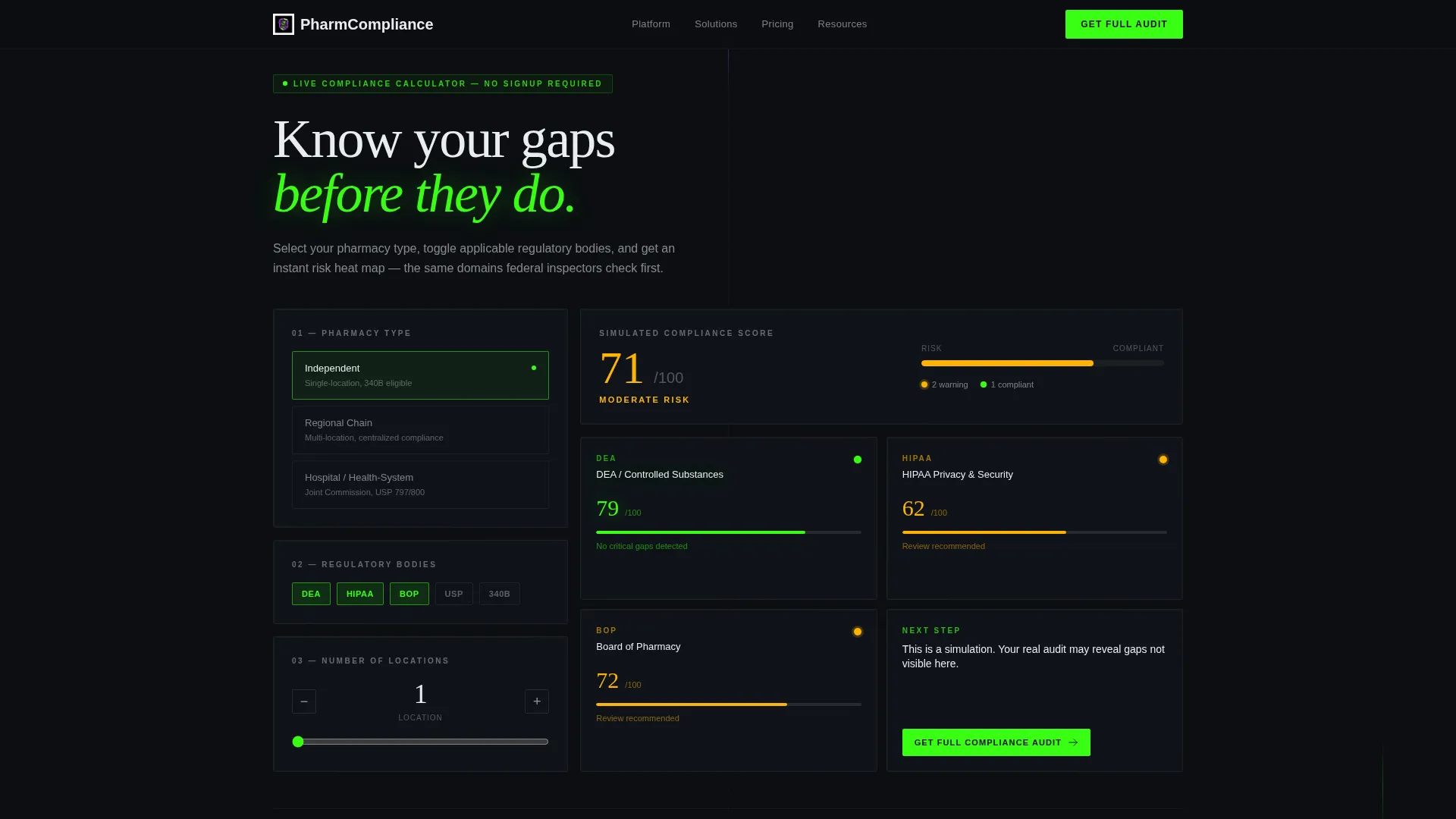
- An interactive compliance score calculator with pharmacy-type selector, regulatory body toggles (Drug Enforcement Administration, State Board of Pharmacy, HIPAA, USP 797/800, 340B), location count input, and a color-coded risk heat map output
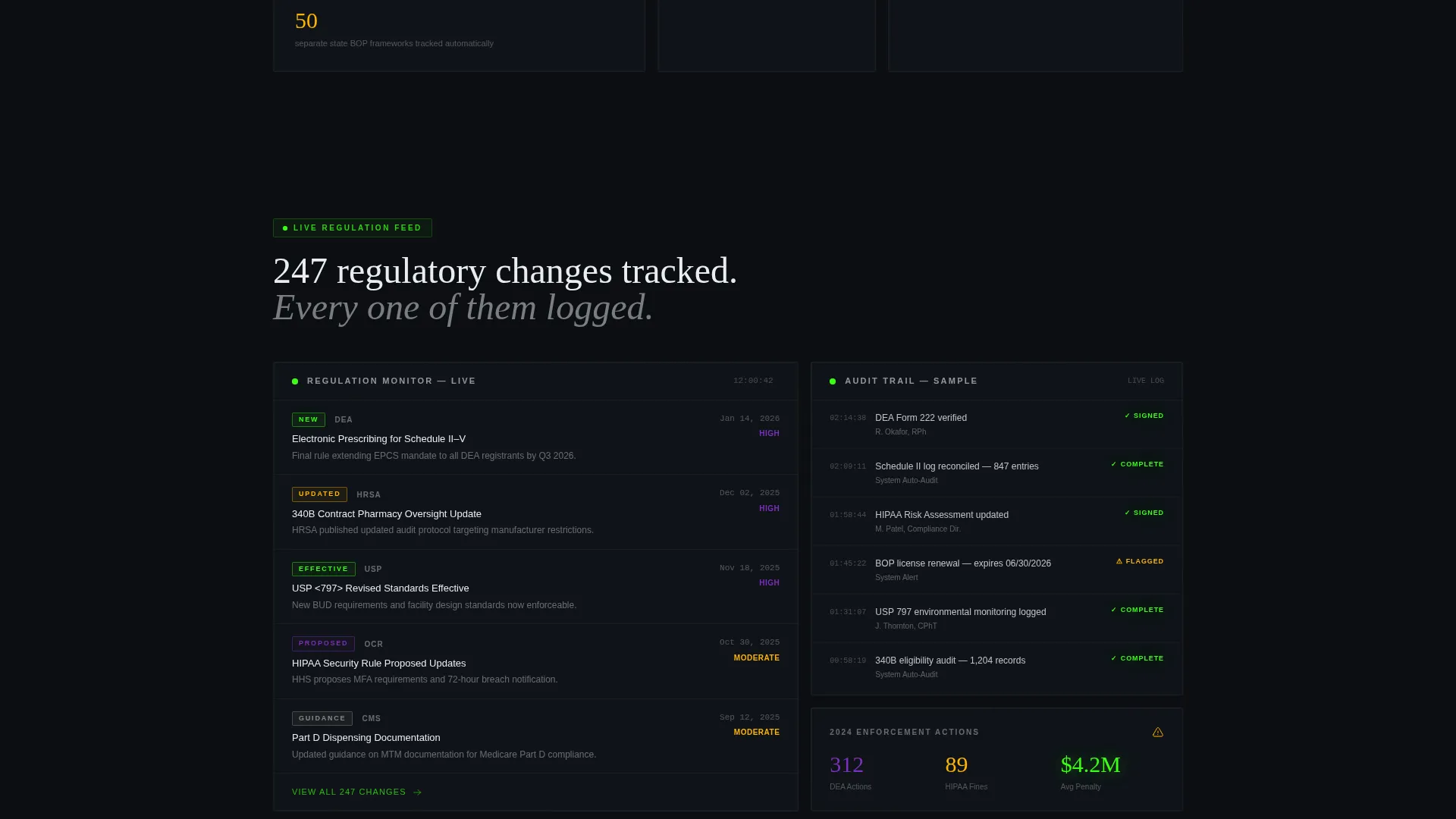
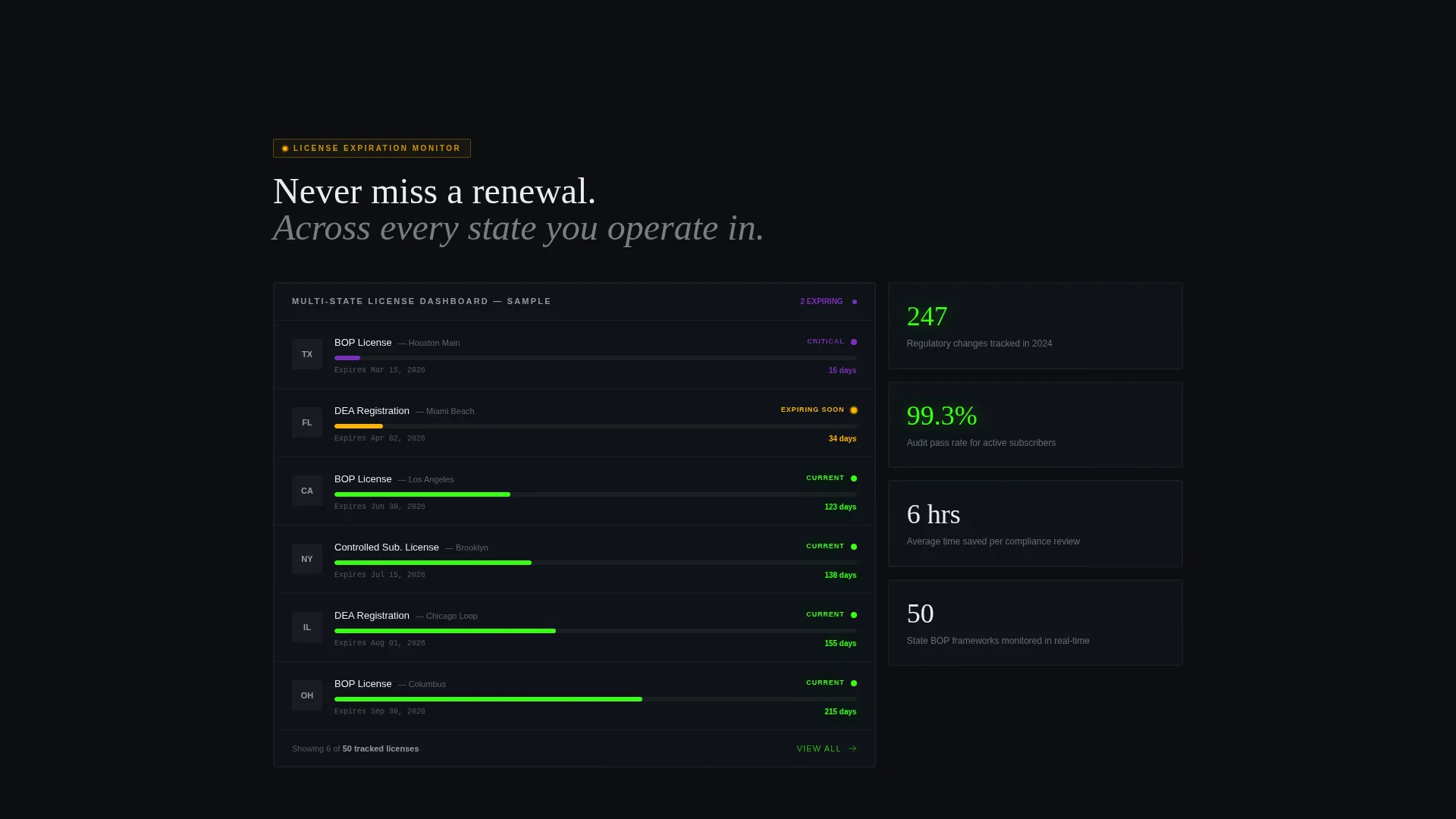
- Domain-specific bento tiles including a live regulation tracker, a sample audit trail with timestamps and electronic signatures, and a multi-state license expiration timeline
- A persistent floating call-to-action button and a final-section lead form collecting pharmacy name, National Provider Identifier number, state(s) of operation, and primary compliance concern
Feature list
This section covers the core functional components built into the Pharmguard template.
Interactive Compliance Score Calculator
Visitors select their pharmacy type, toggle which regulatory bodies apply, and enter their location count. The tool instantly renders a simulated risk heat map as a miniature bento grid, with tiles color-coded from phosphor green (compliant) through warning amber to ultraviolet purple (at risk). No account creation is required to run it.
Bento Grid Compliance Domain Tiles
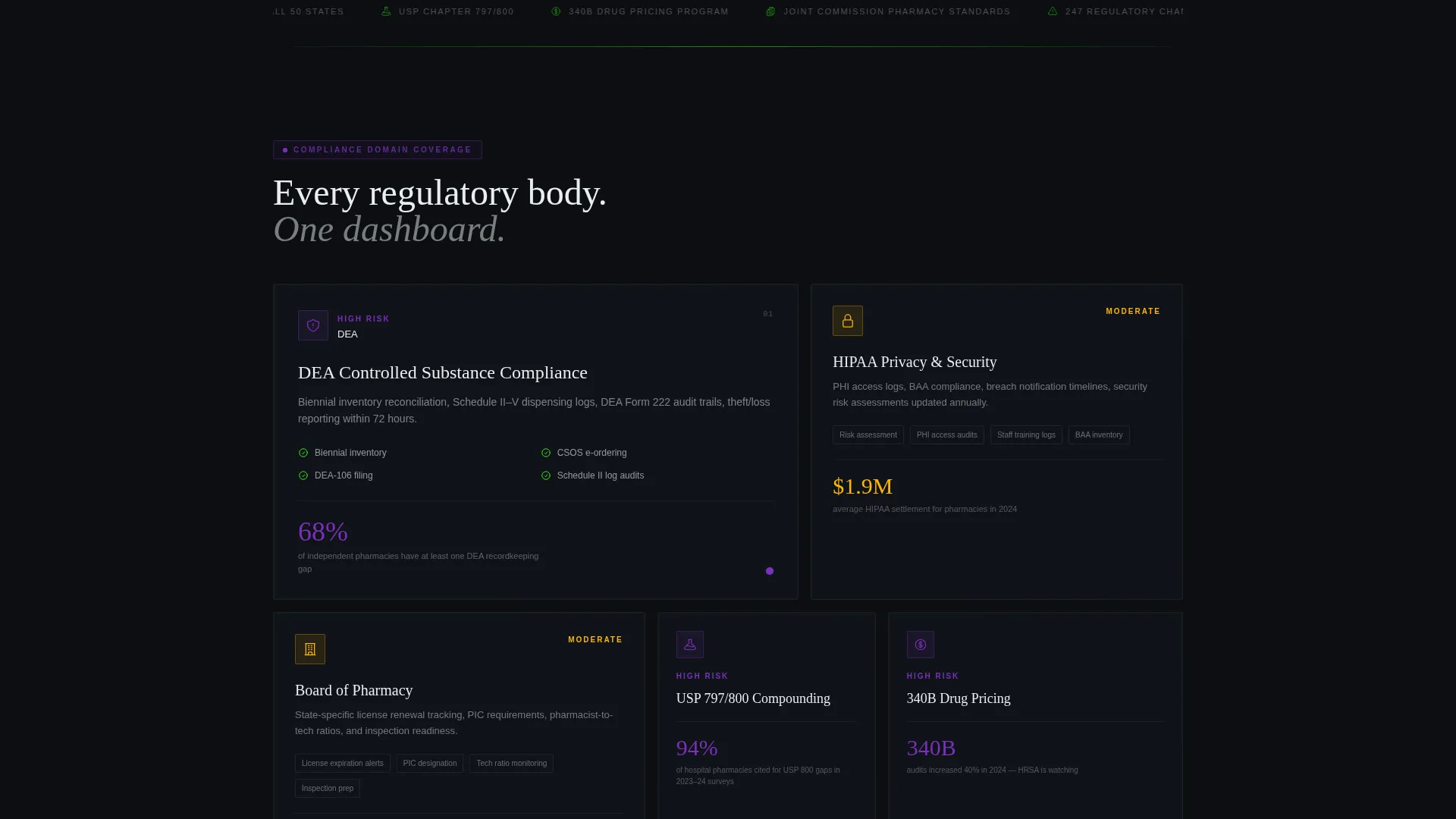
Each scrollable tile focuses on one compliance domain. Large hero cards display data visualizations such as a live-updating regulation tracker showing recent guidance dates. Tighter single-stat blocks surface figures like "247 regulatory changes tracked in 2024." The layout shifts from granular findings to a full operational picture as visitors scroll.
Dual-Path Lead Generation System
The primary call-to-action, "Get Your Full Compliance Audit," appears as a persistent floating button after calculator interaction and again as an expanded form at the bottom of the page. A secondary path offers a downloadable 2024 Pharmacy Compliance Checklist PDF gated behind an email address only, capturing leads who are not yet ready for a full audit.
Audit Trail and Regulation Tracker Tiles
One tile displays a sample audit trail complete with timestamps and electronic signatures, showing the documentation standard visitors can expect. Another tile shows a live-updating feed of recent regulatory guidance with source dates, reinforcing that the platform tracks changes in real time.
Multi-State License Timeline Tile
A dedicated bento tile maps license expiration timelines across multiple states in a visual format. This speaks directly to chain compliance officers and hospital directors who manage obligations across several jurisdictions simultaneously.
Page sections overview
| Section | Purpose |
|---|---|
| Interactive Calculator Header | Simulate compliance risk score before any signup |
| Risk Heat Map Output | Color-coded domain grid generated by the calculator |
| Regulation Tracker Tile | Show live regulatory guidance dates and recent changes |
| Audit Trail Tile | Display sample timestamped logs with e-signatures |
| License Expiration Map | Visualize multi-state renewal timelines |
| Single-Stat Blocks | Surface precise compliance coverage numbers |
| Floating call to action Button | Persistent audit request trigger post-calculator |
| Final Lead Form | Collect full audit leads with pharmacy details |
| Checklist Download Section | Capture email leads with free PDF offer |
Design & branding system
The template uses an Acid Digital color system built around a dark-mode monitoring console aesthetic. Every color decision reinforces the sense that the platform is actively watching, flagging, and resolving issues in real time.
- Core palette: void black (#0B0E11) for card backgrounds, terminal phosphor green (#39FF14) for compliant status indicators, ultraviolet purple (#7B2FBE) for risk alerts, and clinical white (#EAEDF0) for body text and card surfaces
- Typography renders in clinical white with generous letter spacing, and card hover states shift from void black to a deep purple tint (#12091E) to keep the grid feeling interactive and alive
- Warning states use amber (#FFB300) alongside the green-to-purple risk scale, giving visitors an immediate three-point visual language for compliance status
Mobile & speed optimization
The bento grid layout is structured to reflow cleanly at smaller viewport widths without losing the visual hierarchy that makes the calculator output readable at a glance.
- Hero calculator tiles and single-stat blocks are sized independently so both render legibly on mobile screens without overlap
- The floating call-to-action button is positioned to remain accessible on scroll without obscuring data content on smaller displays
How this template helps you convert
The Calculator/Tool First creative direction means the page builds trust through demonstration before it asks for anything. Every section below the calculator deepens that trust incrementally.
- The compliance score calculator creates a personal, data-backed moment of concern for the visitor. A simulated risk heat map tied to their own pharmacy type and regulatory context is far more persuasive than a testimonial.
- Domain tiles progressively reveal the full scope of what the platform covers, so by the time visitors reach the lead form they already understand what they would be auditing and why the depth matters.
Other information about this template
This template is built within the Directory and Discovery theme, which prioritizes quick information scanning and trust-building over decorative storytelling. The bento grid format suits compliance tools specifically because it mirrors the dashboard interfaces pharmacists and compliance officers already use daily.
- The template style is a bento grid, and the header concept is an Interactive Preview, both choices reinforce the Calculator/Tool First creative direction
- The Acid Digital color system is purpose-matched to the niche: a dark-mode console palette reads as technical credibility to a pharmacy software audience rather than a decorative choice
- The lead generation direction supports two distinct buyer stages: ready-to-audit prospects through the primary form, and research-stage visitors through the checklist email gate
- The page is scoped as a single landing page, not a multi-page site, so all conversion paths live within one scrollable flow
Theme
Directory & Discovery
Creative direction
Calculator/Tool First
Color system
Acid Digital
Style
Bento Grid
Direction
Lead Generation
Page Sections
Interactive Compliance Score Calculator
Bento Grid Domain Tile Layout
Dual-path Lead Generation
Audit Trail and Regulation Tracker Tiles
Multi-state License Expiration Map
Acid Digital Dark-mode Visual System
Related questions
Can visitors use the compliance calculator without creating an account?
What does the lead capture form collect?
Is there a lower-commitment conversion option for visitors who are not ready to request an audit?
Who is this landing page template designed for?
How does the bento grid layout work on this page?



