Push Notification Service Landing Page Template
Ping is a hub-and-spoke landing page template built for push notification services. It opens with an interactive cost estimator, then walks technical buyers through six spec-sheet modules covering throughput, latency, segmentation, analytics, integrations, and pricing. The Tech Glass visual identity and signal-orange calls to action guide mobile product managers, growth engineers, and e-commerce leaders toward a single confident click.
by Rocket studio
Quick summary
Ping is a single-page template designed to sell a push notification service to technical buyers. It leads with a live cost calculator, then anchors visitors to six focused spec modules. The Carbon Fiber color system and Tech Glass aesthetic make every section feel like a precision instrument dashboard. The entire layout builds toward one action: "Start Sending Free."
Who this template is for
This template is built for teams that need to convince technical stakeholders fast. It speaks directly to people who evaluate infrastructure tools on hard numbers, not marketing copy.
- Mobile product managers tracking user retention and opt-in performance
- Growth engineers running A/B tests on notification delivery flows
- E-commerce engineering leaders who rely on timed push alerts to drive conversions
What problem this template solves
Most push notification service pages bury their value in paragraph text. Buyers leave before they see the proof. Ping flips that structure by putting a working estimator front and center, so visitors get their own numbers before they read a single feature claim.
- Visitors arrive skeptical and leave before a standard hero section earns trust
- Technical buyers need delivery benchmarks and integration proof, not generic promises
- Decision-makers want to compare costs against their current stack without booking a demo
What you get with this template
You get a complete, single-page layout with a sticky anchor navigation system and six self-contained technical modules. Every section is designed to answer the next objection before it forms.
- An interactive calculator hero that returns delivery speed, monthly cost, and savings estimates
- Six spoke sections: Throughput, Latency, Segmentation, Analytics, Integrations, and Pricing
- A floating signal-orange call-to-action bar that stays visible after the visitor scrolls past the header
Feature list
This template packs a focused set of interactive and visual components that reflect what a real push notification service needs to close technical buyers.
Interactive Cost Estimator Header
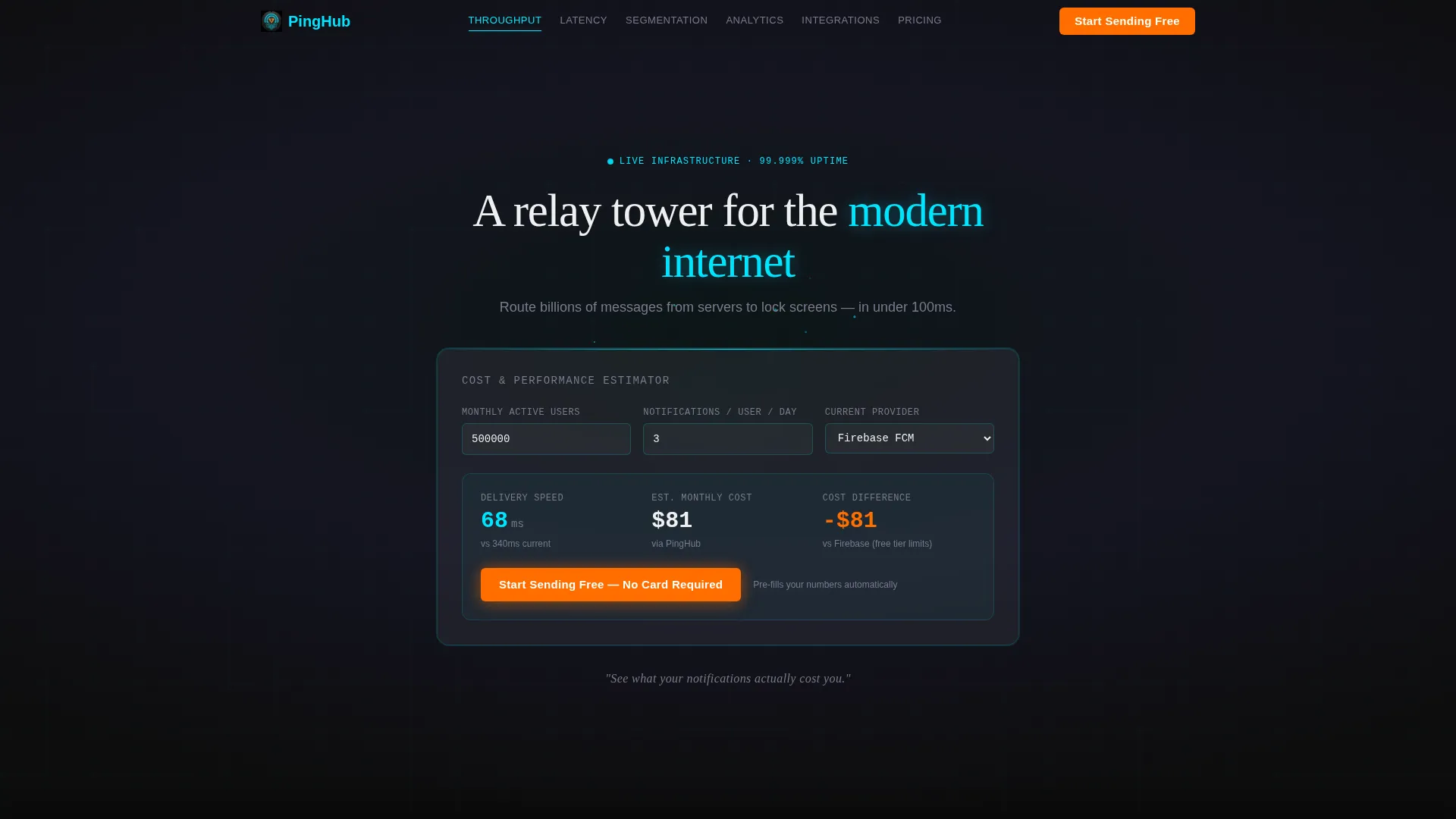
The header is a frosted-glass card floating over an animated particle field. Visitors enter monthly active users, average daily notifications per user, and their current delivery provider. The estimator instantly returns projected delivery speed in milliseconds, estimated monthly cost, and a savings delta versus their existing stack. Numbers animate on every keystroke.
Sticky Anchor Navigation
After the visitor scrolls past the header, the anchor navigation pins to the top of the viewport. It lists six labeled spokes: Throughput, Latency, Segmentation, Analytics, Integrations, and Pricing. Each label jumps directly to its module, letting technical buyers navigate like a spec sheet rather than a scrolling brochure.
Live Throughput Benchmark Module
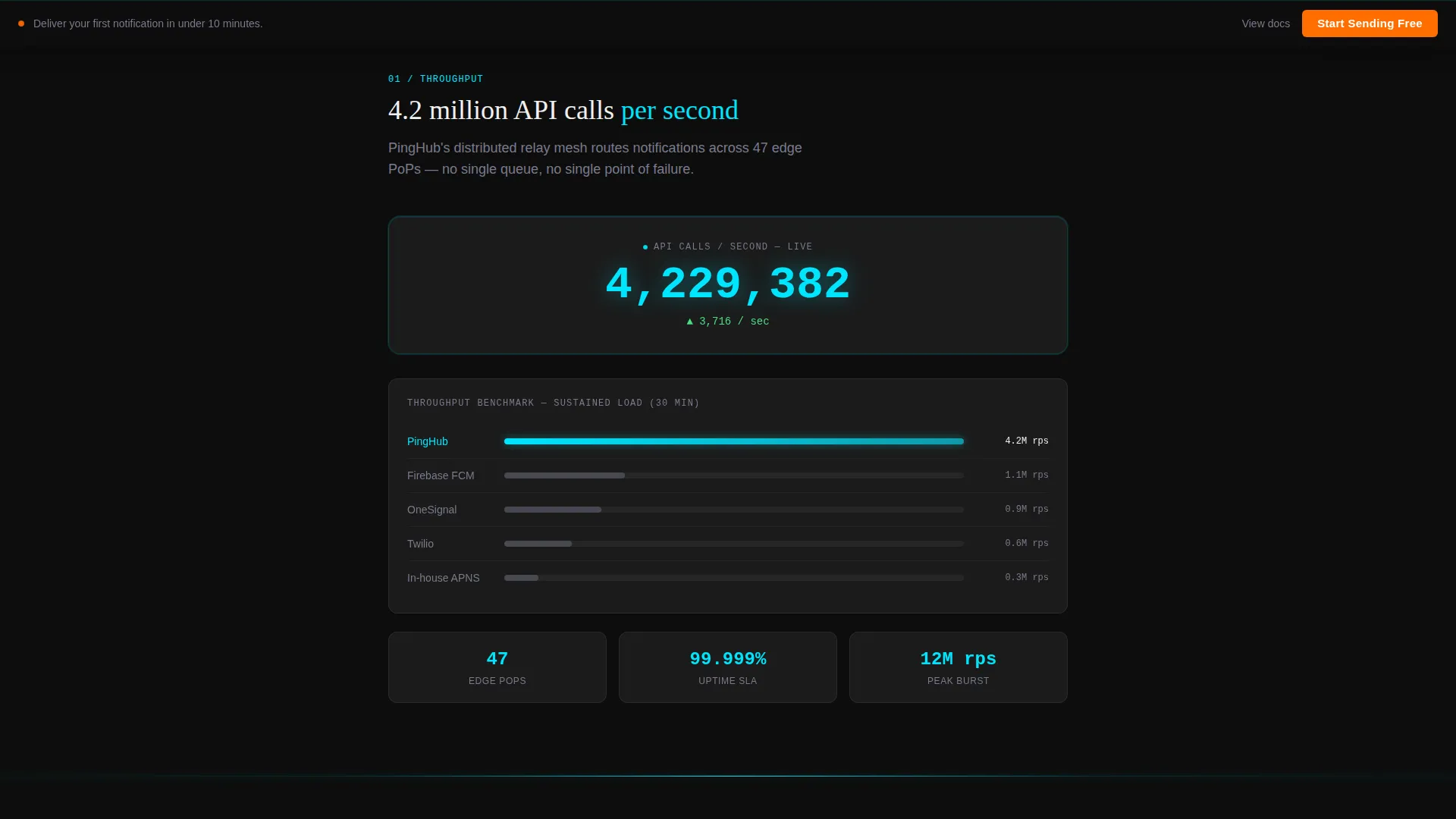
The Throughput spoke displays a live counter showing API calls per second alongside a benchmark comparison table. Visitors can see delivery performance in real numbers rather than marketing language. The module escalates specificity from the moment it loads.
World Latency Map with Regional Ping Rings
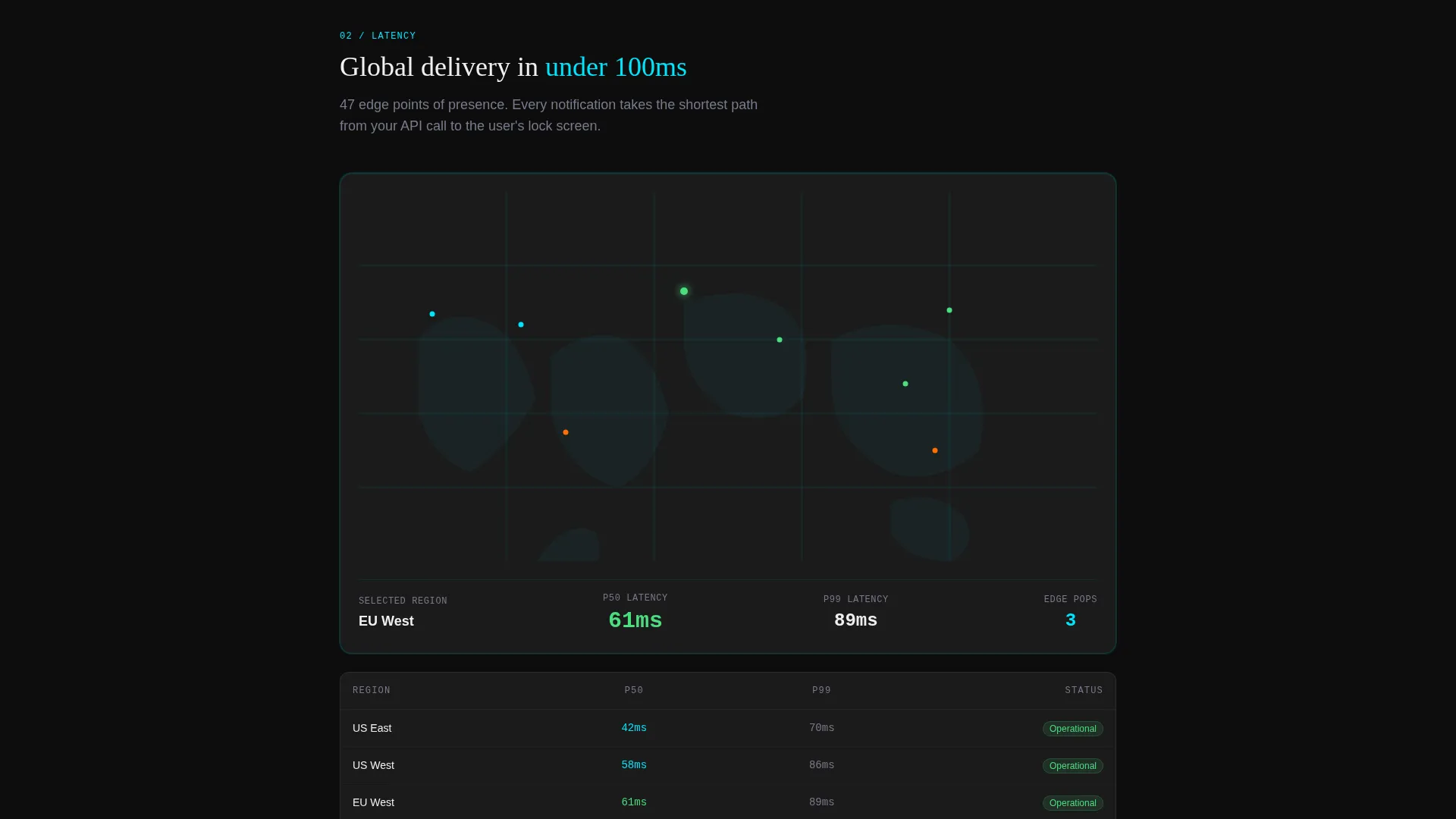
The Latency module renders a world map with regional delivery times shown as pulsing cyan rings. Each ring represents real geographic latency data. The visual immediately answers the question every global product team asks first: how fast does it reach my users?
Mock Segmentation Query Builder
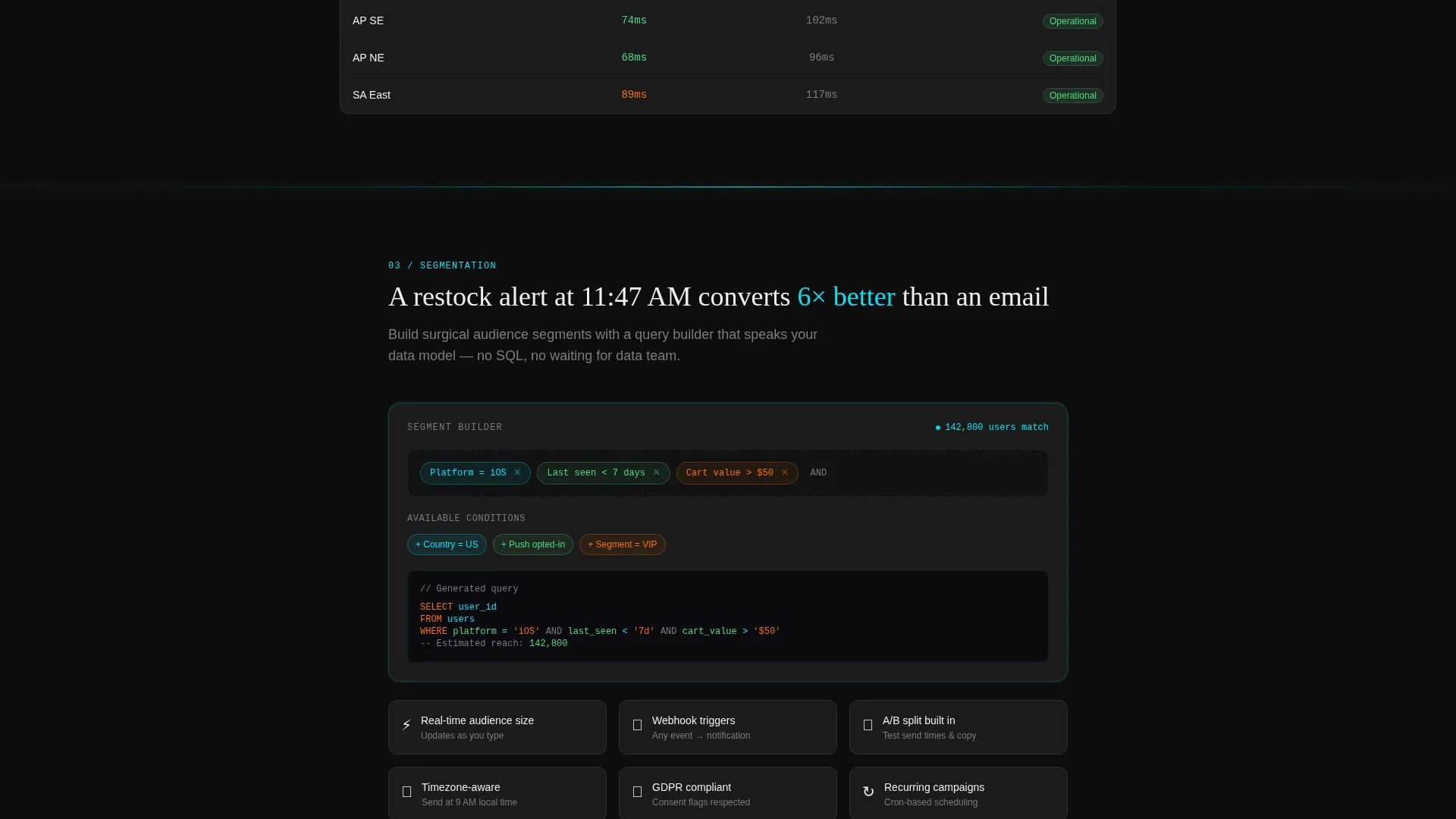
The Segmentation spoke presents a visual query builder with draggable condition chips. Buyers can see how audience filters are constructed without reading documentation. It makes complex targeting logic feel immediate and approachable.
Dark-Mode Integration Code Snippets
The Integrations module displays a grid of SDK logos paired with copy-paste code snippets inside dark-mode terminal panels. A secondary text link, "Read the docs," sits beside each snippet for technical evaluators who need deeper proof before committing.
Page sections overview
| Section | Purpose |
|---|---|
| Calculator Hero | Delivers personalized cost and speed estimates instantly |
| Anchor Navigation Bar | Pins to viewport top; links all six spoke sections |
| Throughput Module | Shows live API call counter and benchmark table |
| Latency World Map | Displays regional delivery times as pulsing cyan rings |
| Segmentation Builder | Presents draggable query chip interface for audience filters |
| Analytics Dashboard | Shows retention curves and open-rate histograms in glass panels |
| Integrations Grid | Lists SDK logos with terminal code snippets and doc links |
| Pricing Spoke | Closes the spec sheet with plan details and conversion call to action |
Design & branding system
The template uses a Tech Glass aesthetic built on a Carbon Fiber color palette. Every surface feels like smoked glass over a live circuit board, precise, dark, and quietly alive.
- Core palette: deep carbon black (#0D0D0D) base, woven graphite (#1A1A2E) section backgrounds, translucent panel gray (white at 6% opacity) for frosted cards, electric cyan (#00E5FF) for interactive edges and data points, and signal orange (#FF6D00) reserved exclusively for calls to action and live metric pulses
- Typography uses crisp white (#F0F0F0) for primary text and muted gray (#7A7A8E) for secondary labels, with 1-pixel cyan dividers that glow faintly between sections
Mobile & speed optimization
The layout is structured to translate cleanly from wide desktop viewports to smaller mobile screens. The floating call-to-action bar and sticky navigation remain functional at every breakpoint.
- The frosted-glass card hero and particle animation are built to scale without breaking the visual hierarchy on smaller screens
- The floating "Start Sending Free" bar stays fixed to the bottom of the viewport across all devices, keeping the primary action always reachable
How this template helps you convert
Ping earns the click by making the visitor feel they have already used the product before they reach the call to action.
- The calculator delivers personalized numbers in the first ten seconds, giving the visitor a concrete reason to stay and explore the rest of the spec sheet.
- Each successive spoke answers the next natural objection, moving from raw speed to targeting intelligence to integration ease, so the call to action at the bottom of the page feels like a logical next step rather than a sales push.
Other information about this template
This template is built as a hub-and-spoke single-page layout, making it well-suited for teams that want a focused, conversion-oriented presence without managing a multi-page site structure.
- The calculator pre-fills data into the signup flow on click, reducing friction between interest and registration
- The Spec Sheet creative direction means each module is self-contained and can be updated independently as service capabilities evolve
- The template is categorized under Technology and Mobile App, and is designed specifically for the push notification service niche
- The signal-orange call-to-action color is used nowhere else on the page, ensuring it always draws the eye without competing with the data-driven content surrounding it
Theme
Tech Glass
Creative direction
Spec Sheet
Color system
Carbon Fiber
Style
Hub & Spoke (Anchor Nav)
Direction
Click-Through
Page Sections
Interactive Cost Estimator Hero
Sticky Anchor Navigation Bar
Live Throughput Benchmark Display
Regional Latency World Map
Draggable Segmentation Query Builder
Dark-mode SDK Integration Snippets
Related questions
Who is the Ping template designed for?
Do I need a live data source for the calculator to work?
Can I change the color scheme or adjust the branding?
How does the floating call-to-action bar behave?
Can I add or remove spoke sections from the anchor navigation?



