Accounting Firm Software Professional Website Template
Ledger is a glassmorphic bento grid landing page template built for accounting firm membership management platforms. It features an interactive dashboard header with animated live data, stats-first scroll sections, and a three-field freemium sign-up form. The design uses deep obsidian, electric blue, and soft mint to make every member metric feel immediate and trustworthy.
by Rocket studio
Quick summary
Ledger is a single-page bento grid template designed for accounting firm membership management software. It opens with a live-data dashboard header, escalates through stats-first scroll sections, and closes with a low-friction trial sign-up. The glassmorphic visual system makes complex membership data feel effortless to read at a glance.
Who this template is for
This template is built for software teams and founders marketing a membership management platform to accounting professionals. It speaks directly to the people who run firm operations day to day.
- Managing partners at mid-size CPA firms handling 200 to 2,000 members
- State society directors coordinating annual CPE credit renewals
- Operations leads at regional offices managing inherited membership workflows
What problem this template solves
Practice managers at accounting firms often juggle spreadsheets, email chains, and manual invoice follow-ups to keep memberships current. This template gives their software a page that demonstrates clarity before asking for a sign-up.
- No clear visual proof that the platform handles onboarding, CPE tracking, and renewal billing in one place
- Visitors leave before understanding the platform's scale or automation depth
- Generic SaaS landing pages fail to speak the language of CPA firm operations
What you get with this template
You get a fully structured single-page layout built around bento grid panels and glassmorphic components. Every section is designed to show membership data in motion rather than describe it in words.
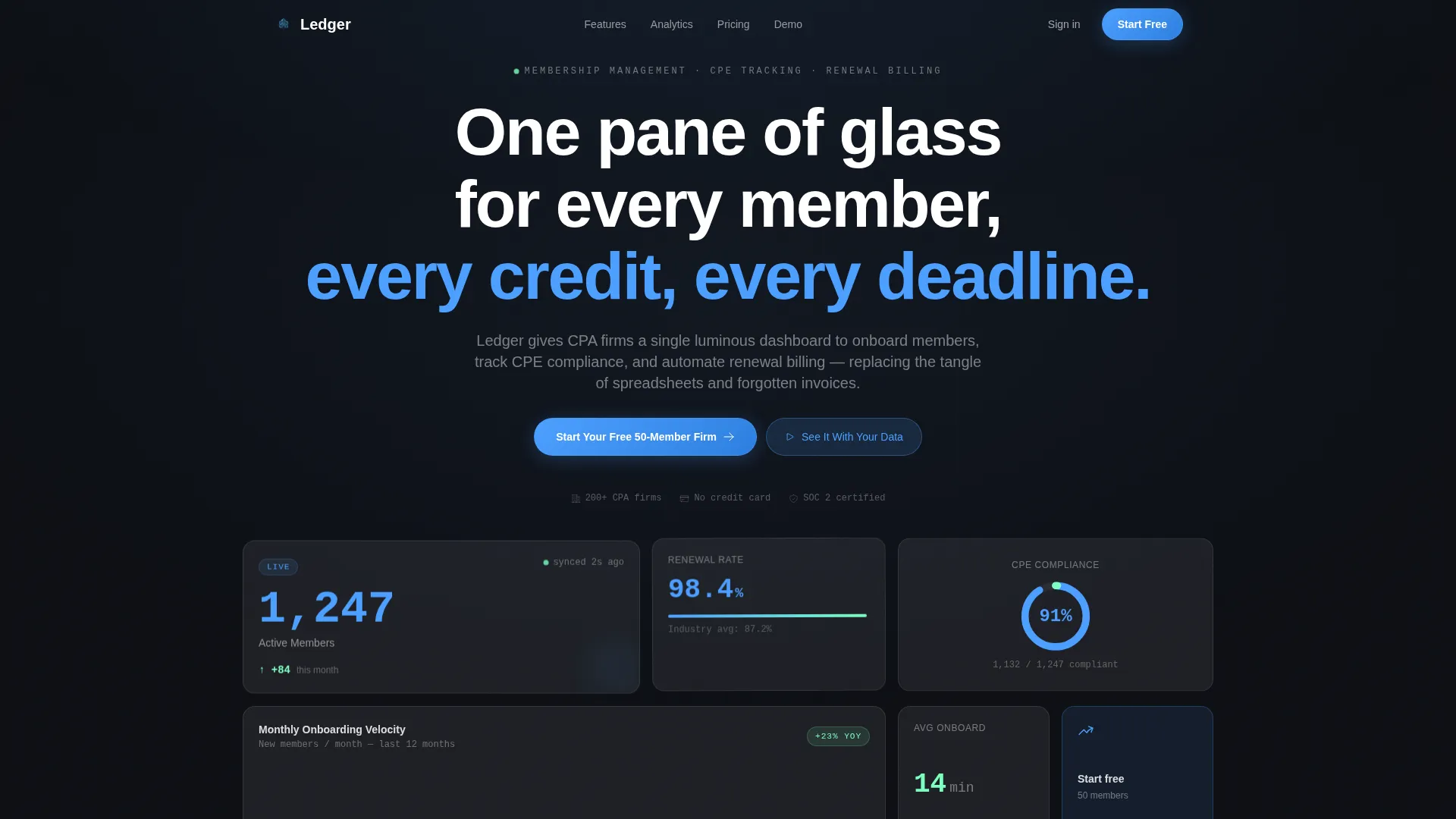
- An interactive header dashboard with animated member counts, renewal rates, and compliance charts
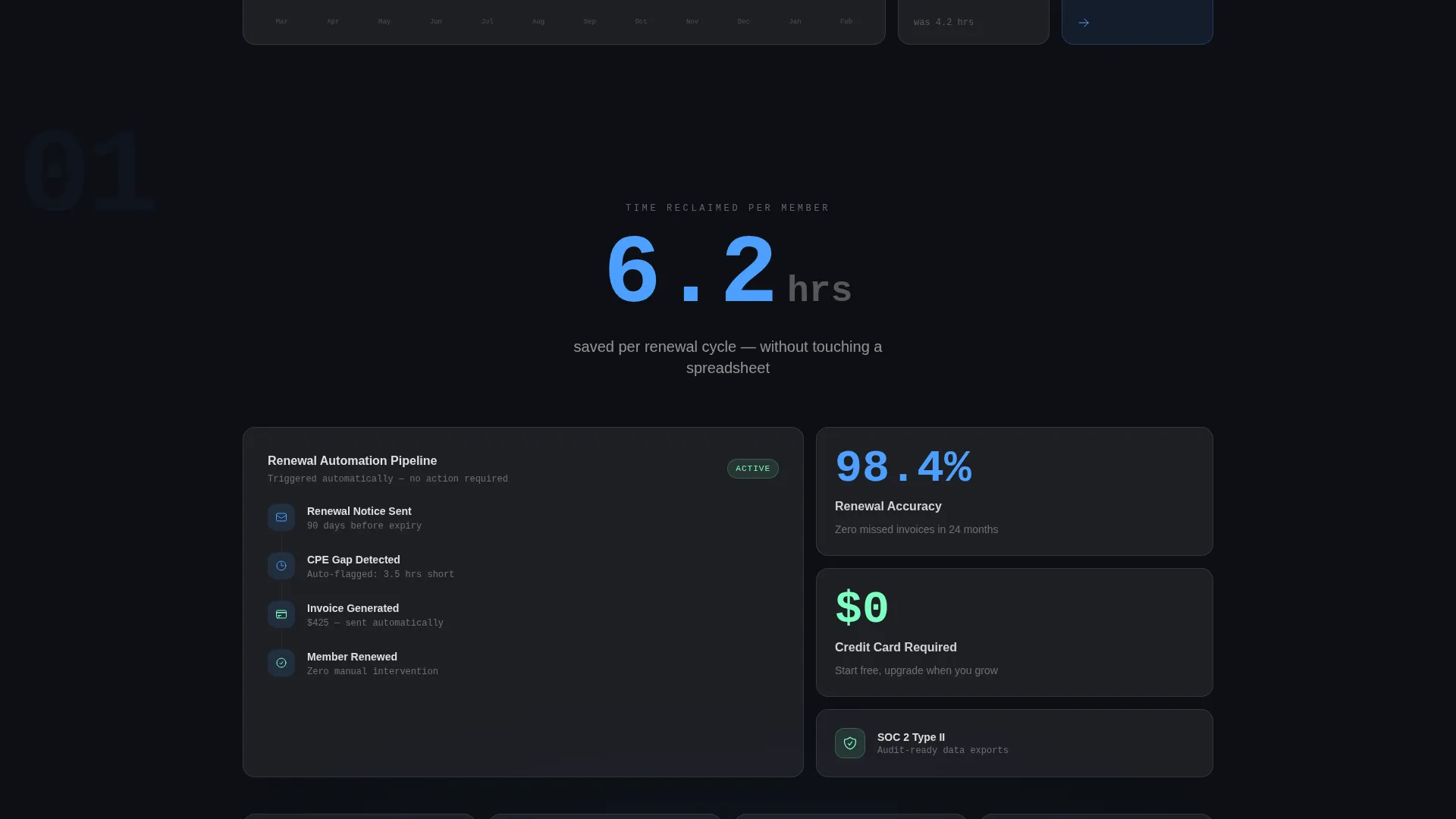
- Stats-first scroll sections that lead with oversized metrics before explaining the feature behind them
- A persistent frosted-glass conversion bar and a three-field freemium sign-up form with no credit card required
Feature list
This template packs focused, prompt-backed components into a coherent page flow. Each feature serves the core goal of earning trust through visible data before asking for a commitment.
Animated Bento Dashboard Header
The header renders a functioning bento grid of glassmorphic panels. Numbers animate on load: 1,247 active members, a 98.4% renewal rate, a monthly onboarding bar chart, and a CPE compliance donut chart filling to 91%. Visitors can hover individual cards to see them frost and expand.
Stats-First Scroll Sections
Each scroll stop opens with a single oversized statistic in electric blue before the supporting bento grid appears beneath it. For example, "6.2 hours saved per renewal cycle" floats into view first, then the automation workflow panel expands below it.
Escalating Data Depth Layout
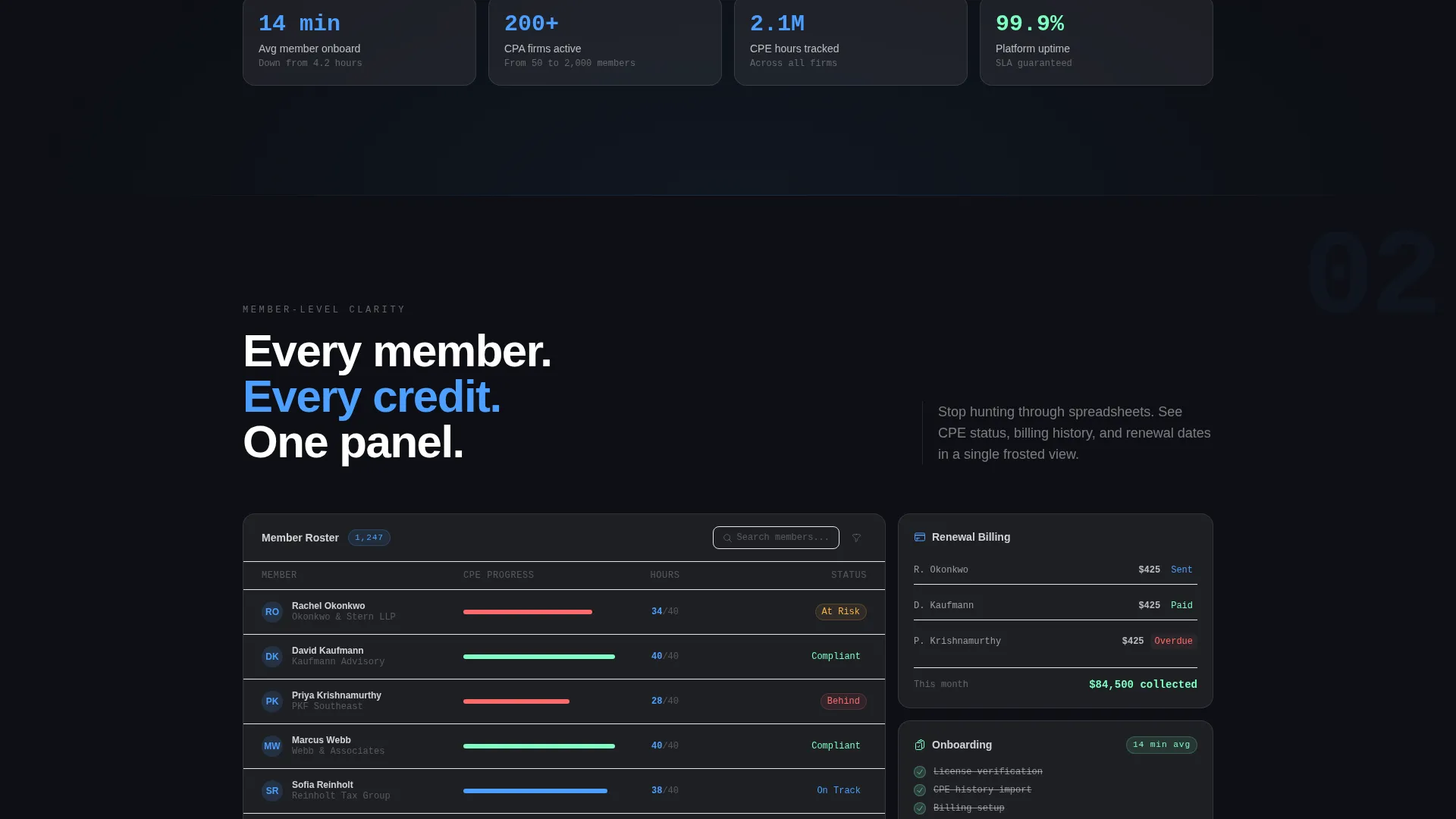
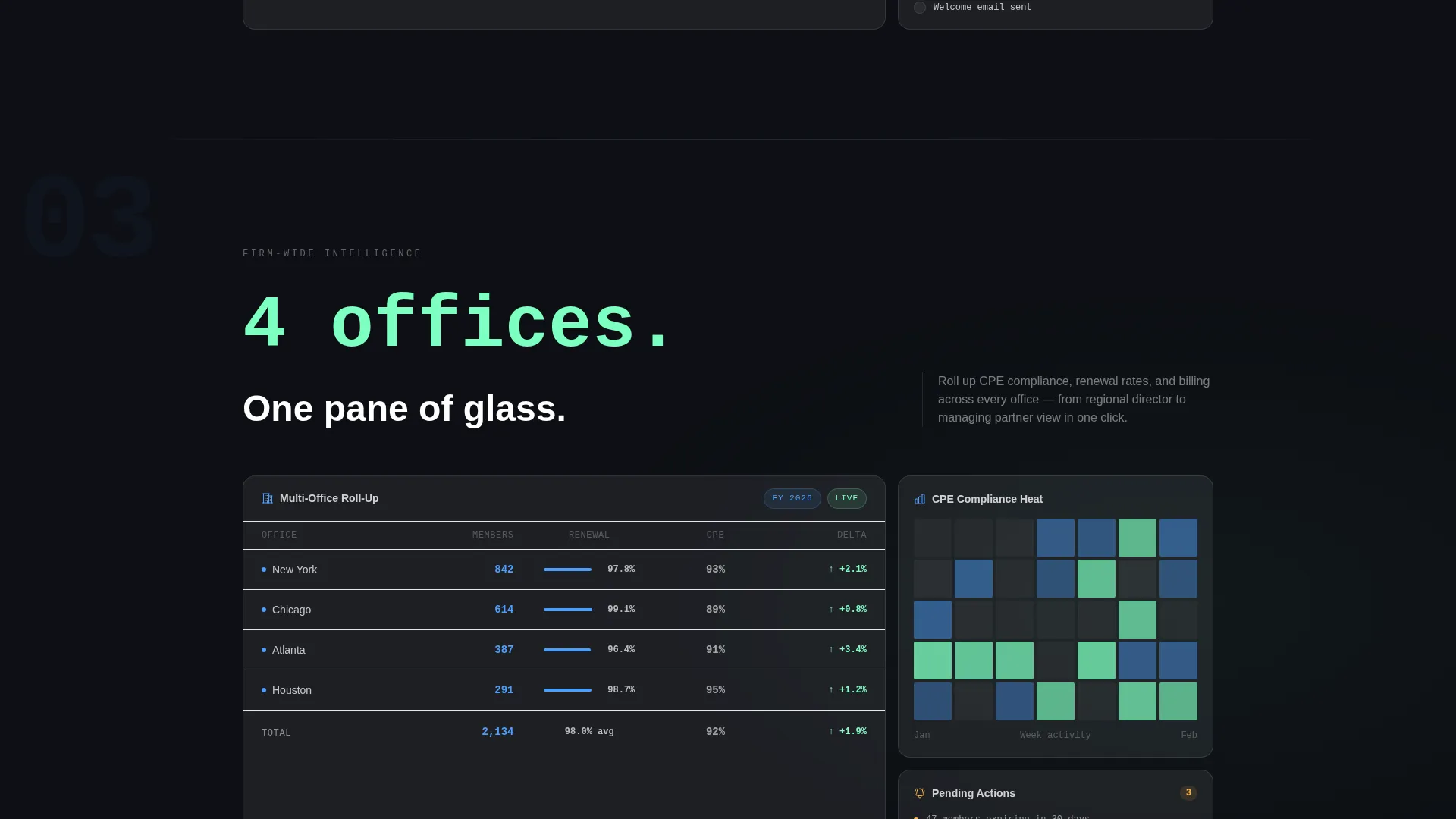
Sections progress from individual member management to firm-wide analytics to multi-office roll-up views. Each tier introduces deeper glass panel layers, building a visual case that the platform scales as the firm grows.
Persistent Frosted-Glass call to action Bar
A frosted-glass conversion bar stays anchored during scroll. It holds the primary call to action and keeps the sign-up path visible without interrupting content consumption.
Three-Field Freemium Sign-Up Form
The sign-up form collects firm name, member count range via dropdown (1 to 50, 51 to 200, 201 to 1,000, and 1,000 plus), and work email. No credit card is required. A secondary path opens a guided demo booking modal labeled "See It With Your Data."
Glassmorphic Panel System
Every panel uses backdrop blur with luminous one-pixel borders. The obsidian base catches electric blue data highlights and soft mint success indicators, creating a layered depth effect across the entire page.
Page sections overview
| Section | Purpose |
|---|---|
| Animated Dashboard Header | Opens with live-data bento panels showing key membership metrics |
| Stats Highlight Row | Leads each scroll stop with a single oversized statistic |
| Member Management View | Shows individual-level onboarding and CPE tracking panels |
| Firm-Wide Analytics | Expands to firm-level renewal and billing automation overview |
| Multi-Office Roll-Up | Demonstrates platform scale across regional office data layers |
| Freemium Sign-Up Form | Converts visitors with a three-field, no-credit-card form |
| Demo Booking Modal | Secondary path for guided demo via "See It With Your Data" |
| Persistent call to action Bar | Anchored frosted-glass bar keeping the primary call to action in view |
Design & branding system
The visual identity follows a Tech Glass theme built on a glassmorphic color system. Every surface, border, and typographic choice reinforces the feeling of organized precision.
- Deep obsidian base (#0D0F14) with frosted glass panels at 12% white opacity, electric ledger blue (#4D9FFF) for active accents and data numbers, and soft mint (#7DFFC0) for success states and positive deltas
- Backdrop-blur panels with luminous one-pixel borders create a floating layered depth across all bento grid components
- Crisp white text on dark surfaces, with blue reserved for metrics that matter and mint for upward trend indicators
Mobile & speed optimization
The bento grid layout is structured to reflow cleanly across screen sizes. Glassmorphic panels are designed to maintain their visual depth and readability on smaller displays.
- Bento grid columns collapse to a single-column stack on mobile, preserving the data hierarchy without sacrificing panel clarity
- Animated dashboard elements are contained within individual cards, keeping motion scoped and controlled at the component level
How this template helps you convert
The page earns the click by letting visitors interact with the product before committing. Conversion is built into the structure, not bolted on at the end.
- The interactive header lets visitors engage with live-looking data immediately, creating a sense of product familiarity before any form appears.
- Stats-first sections anchor each feature claim in a concrete number, making the value proposition specific rather than abstract.
- The three-field sign-up form with no credit card removes the most common barrier to starting a free trial, while the demo modal offers a lower-stakes second path for undecided visitors.
Other information about this template
Ledger is designed as a category-specific template for the accounting firm software market. It avoids generic SaaS page patterns in favor of vocabulary and data formats that resonate with CPA firm operations teams.
- The template style is a bento grid layout, suited to platforms that present multiple data streams simultaneously
- The creative direction is Stats-First Impact, meaning every feature reveal is anchored by a metric before the explanation follows
- The header concept is an Interactive Preview, placing the product itself as the hero rather than photography or illustration
- The conversion path is freemium and trial-focused, with the primary call to action placed both inside the dashboard header and in the persistent scroll bar
Theme
Tech Glass
Creative direction
Stats-First Impact
Color system
Glassmorphic
Style
Bento Grid
Direction
Freemium/Trial
Page Sections
Animated Bento Dashboard Header
Stats-first Scroll Sections
Escalating Data Depth Layout
Persistent Frosted-glass Call to Action Bar
Three-field Freemium Sign-up Form
Related questions
Who is this landing page template designed for?
Does the sign-up form require a credit card?
Can I customize the animated numbers in the dashboard header?
What is the 'See It With Your Data' option on the page?
Does this template work for firms with very large member counts?



