AR CRM Landing Page Template | Glassmorphic Scroll Reveal
Pipeline is a scroll-reveal landing page template built for an augmented reality CRM product. It opens with an animated isometric AR workspace, then walks visitors through a personalized ROI calculator before revealing a structured evidence wall. The design uses a glassmorphic dark-visor palette and guides sales leaders toward a side-by-side comparison call to action.
by Rocket studio
Quick summary
Pipeline is a single-page, scroll-reveal landing page template designed for an AR-enhanced CRM product. It leads with an immersive dashboard preview, moves into a live ROI calculator, and builds an evidence wall that drives visitors toward one focused comparison call to action. Every section progressively deepens the case for switching.
Who this template is for
This template is built for founders and go-to-market teams launching an AR-enhanced CRM to a very specific buyer. The ideal audience already knows their current workflow is broken and is actively comparing options.
- Series A sales leaders managing teams of roughly eight sales representatives
- Operators who have outgrown spreadsheet pipelines but find enterprise CRM tools bloated for their current stage
- Product marketers and growth leads building a high-converting launch page for a spatial or AR sales tool
What problem this template solves
Most CRM landing pages either overwhelm visitors with feature lists or undersell the "aha moment" of a genuinely new interaction model. This template is built to close that gap for a product that has no direct visual equivalent in a visitor's memory.
- Visitors arrive skeptical about yet another CRM and need proof before they read a single feature bullet
- The product's core value, manipulating deals in three-dimensional space, is nearly impossible to convey with static screenshots
- Sales leaders need a revenue-grounded reason to switch, not a checklist of integrations
What you get with this template
You get a fully structured, scroll-reveal landing page with distinct section roles, a pre-built calculator panel, dual call-to-action placements, and a glassmorphic visual system ready to apply to your product's branding.
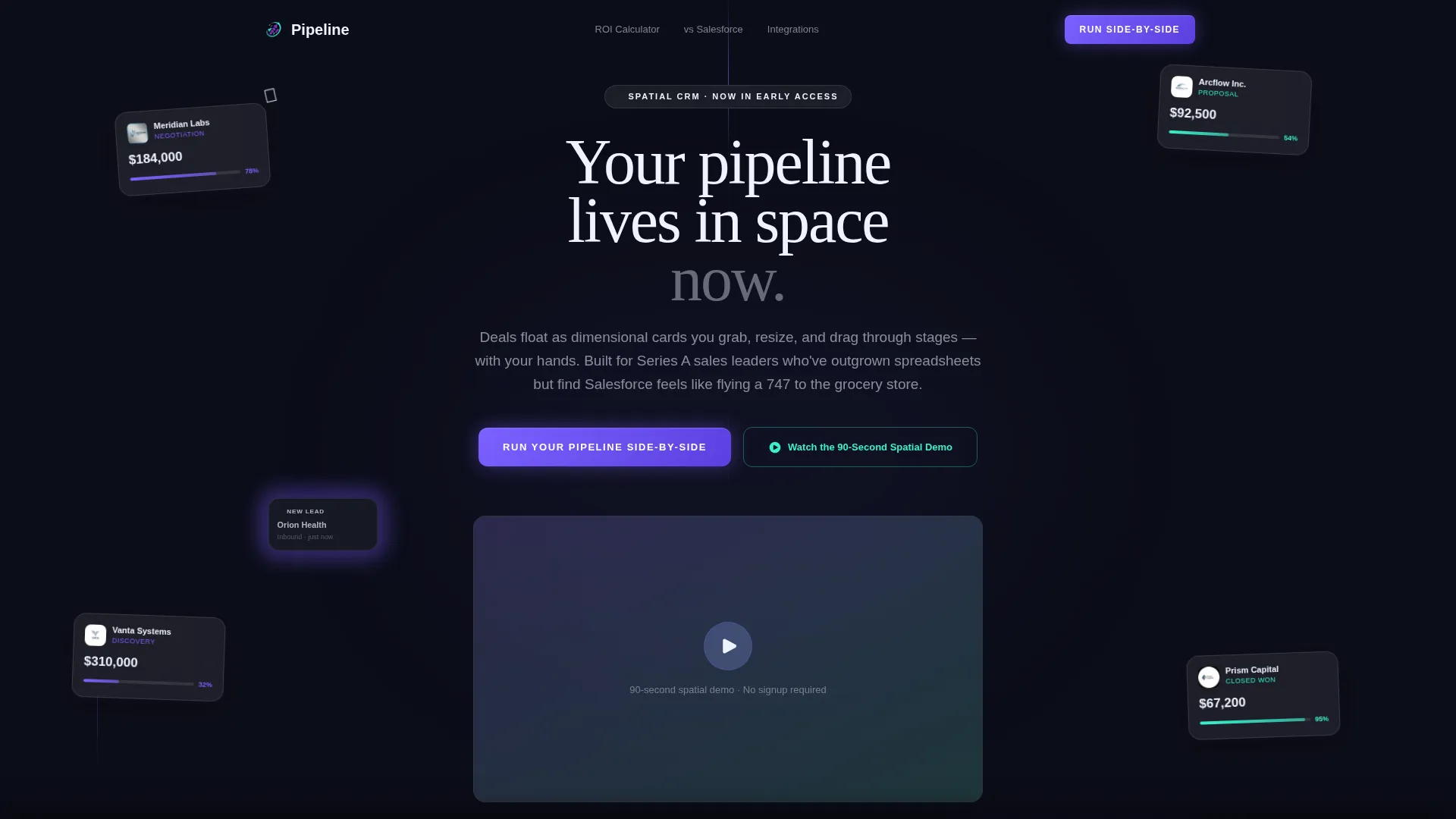
- An animated hero section featuring an isometric AR workspace with floating frosted glass deal cards, particle trails, and a hand-silhouette drag interaction
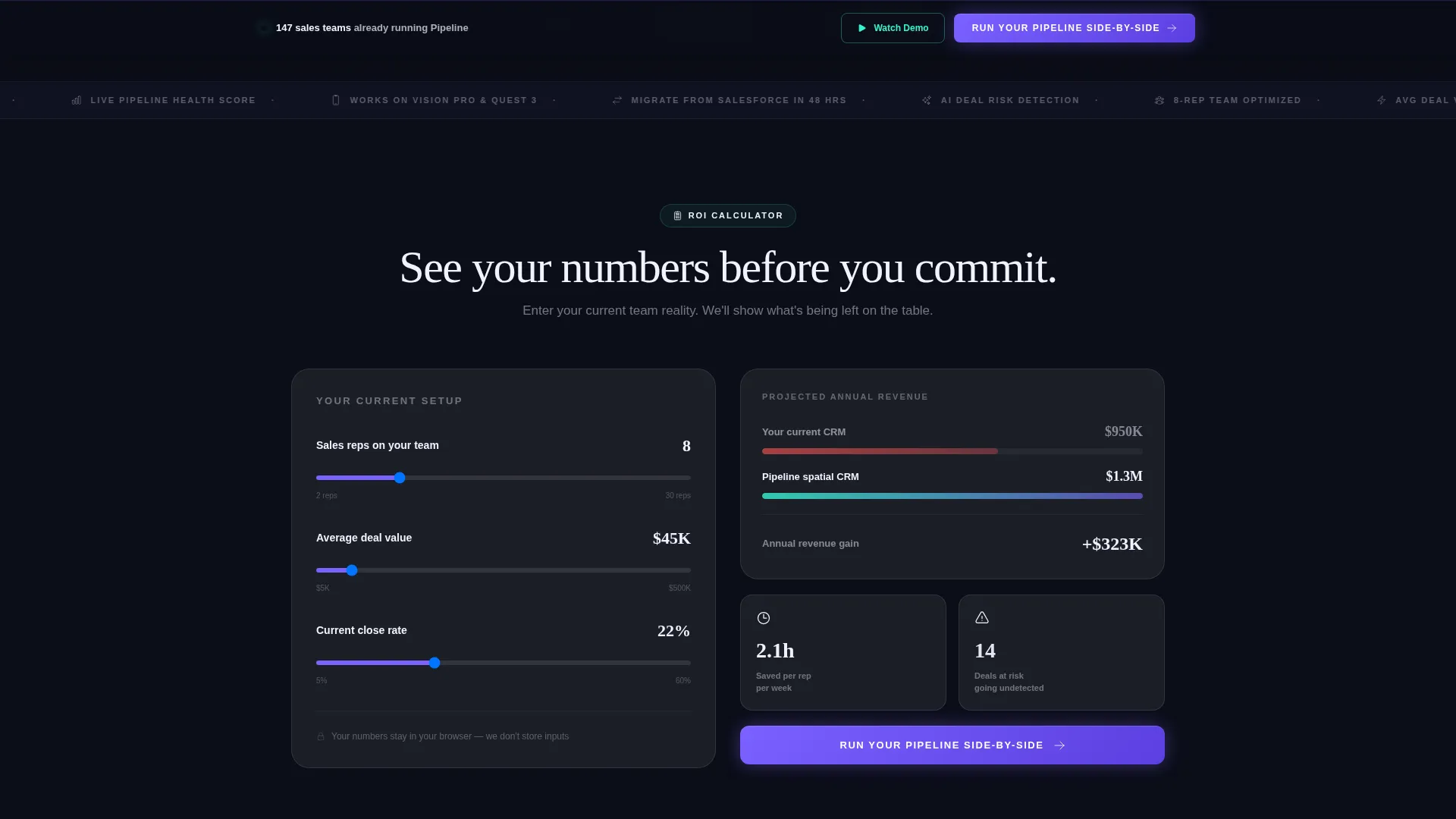
- A personalized ROI calculator panel where visitors input team size, average deal value, and close rate to generate a live revenue comparison
- Two conversion paths: a primary comparison form and a secondary inline video trigger, each placed to capture visitors at different intent levels
Feature list
This template packages several purpose-built components that work together to build trust and drive action across a single scroll journey.
Animated AR Dashboard Hero
The header renders an isometric AR workspace hovering over a minimal desk surface. Deal cards are shown as frosted glass panels displaying company logos, dollar values, and probability percentages. One card is mid-drag between pipeline stages, trailed by particles. Cards gently bob, numbers tick, and a new lead materializes with a soft violet flash, all communicating the product's spatial interaction model before a word is read.
Personalized ROI Calculator Panel
Before any feature pitch appears, visitors enter three inputs: current team size, average deal value, and close rate. The page instantly generates a side-by-side revenue comparison between their existing workflow and the spatial CRM. Time-saved-per-rep and deals-at-risk metrics animate into view as the visitor scrolls, giving every visitor a personalized financial reason to keep reading.
Progressive Evidence Wall
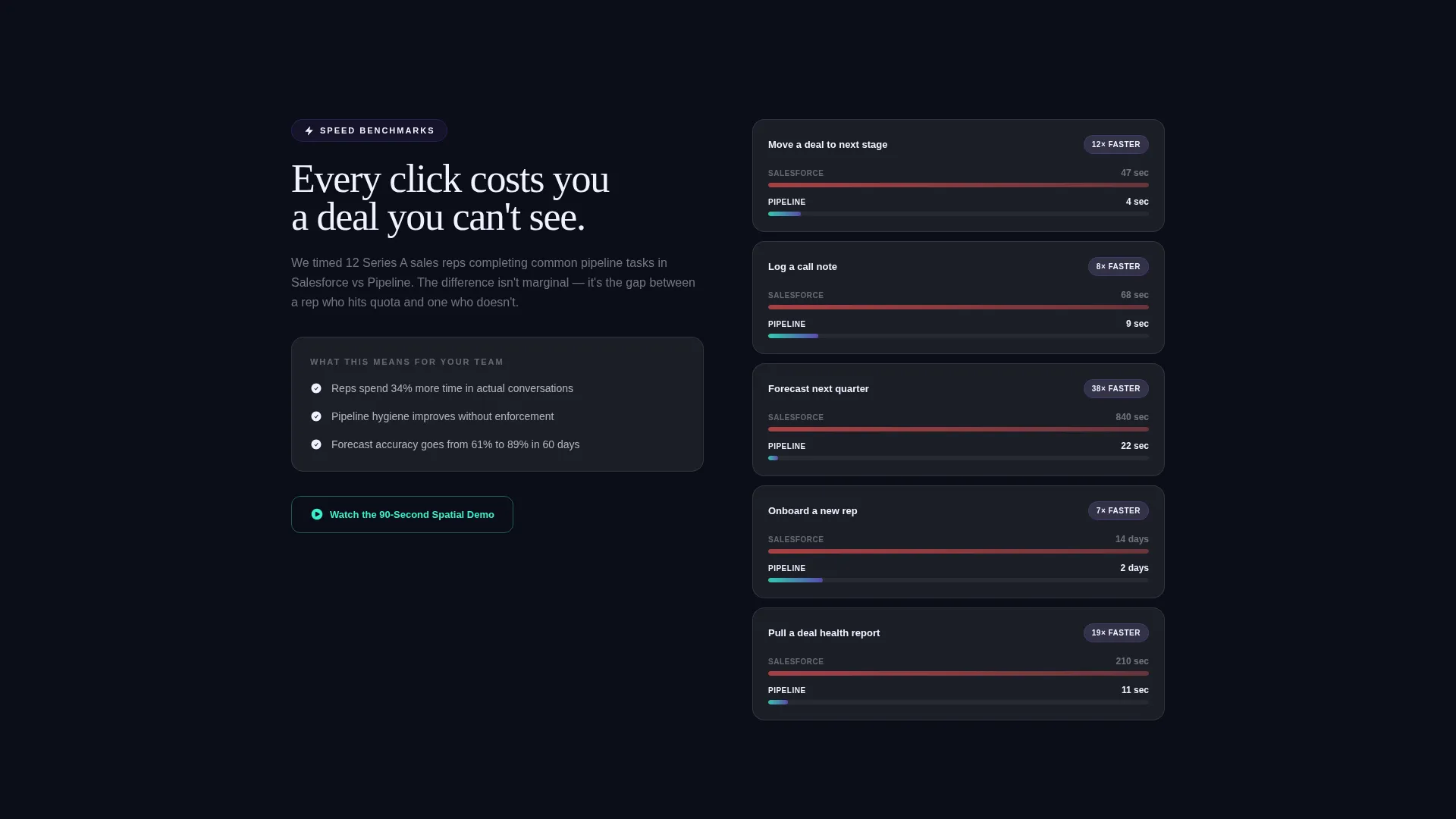
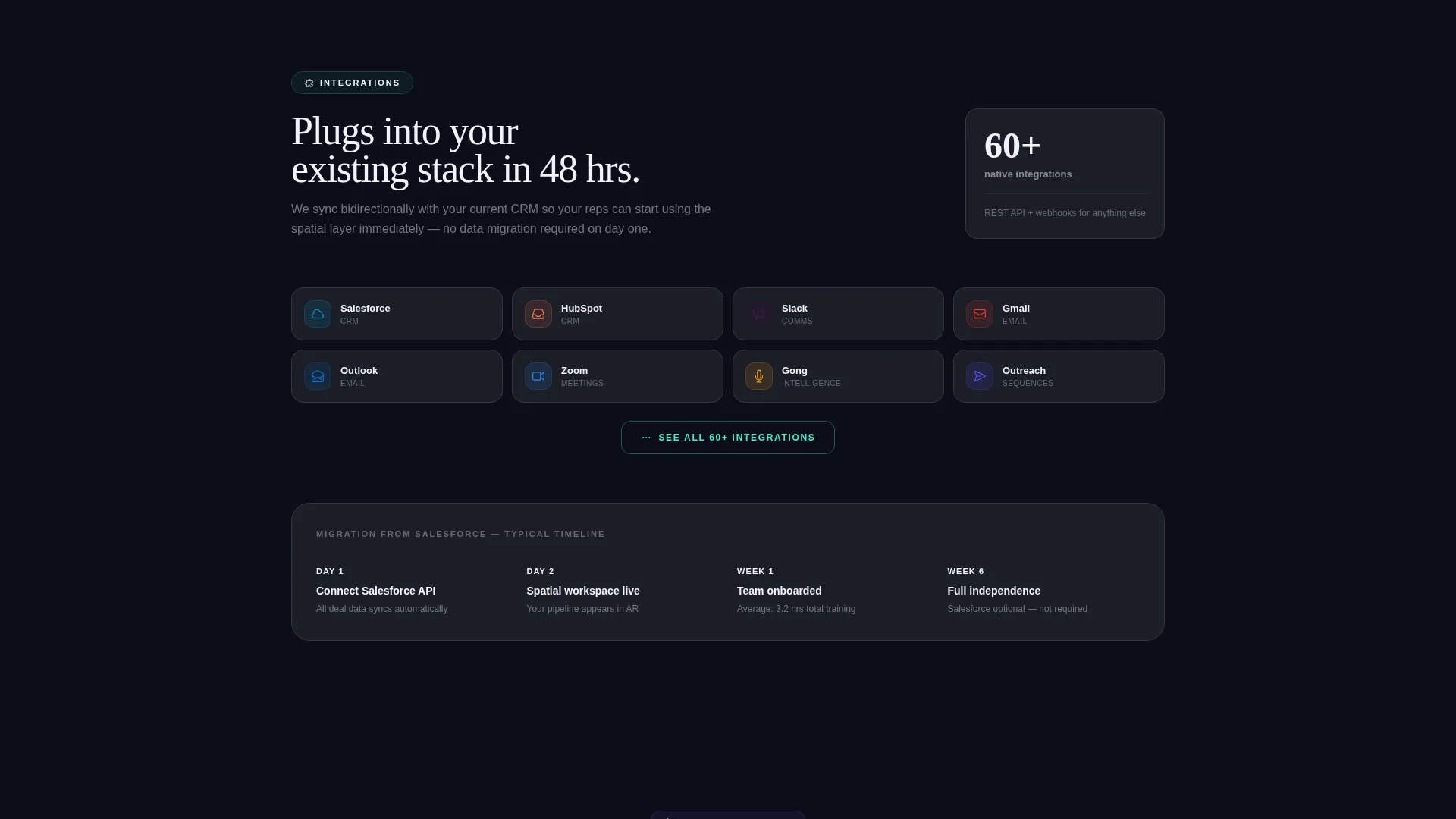
Each section after the calculator slides into view like a card dealt from behind the previous one. The sequence moves from speed benchmarks to integration counts to mobile AR demos. This progressive reveal makes the cost of staying on the old CRM feel tangible and cumulative rather than abstract.
Dual Conversion Path Design
The primary call to action, "Run Your Pipeline Side-by-Side," appears twice: once anchored after the calculator results and once as a floating bottom rail. Clicking opens a two-field form collecting work email and current CRM via a dropdown. A secondary ghost button, "Watch the 90-Second Spatial Demo," triggers an inline video for visitors not ready to submit their email.
Frosted Glass Input Components
The calculator and form panels are styled as frosted glass surfaces consistent with the overall dark-visor aesthetic. Input fields, dropdown selectors, and result readouts all sit inside translucent panels that feel native to the AR product they are promoting. The visual language of the user interface mirrors the product experience itself.
Comparison-Led call to action Flow
The entire page is structured around a Comparison/Versus conversion model. The form asks for a current CRM selection from a dropdown that includes major platforms, and the confirmation state promises a personalized migration analysis delivered to the visitor's inbox. This mechanic makes the call to action feel like a service rather than a sales trap.
Page sections overview
| Section | Purpose |
|---|---|
| AR Dashboard Hero | Communicates the spatial interaction model instantly through animation |
| ROI Calculator Panel | Generates a personalized revenue comparison before any feature pitch |
| Calculator Results Reveal | Animates time-saved and deals-at-risk metrics as the visitor scrolls |
| Speed Benchmarks Block | Compares workflow velocity against conventional CRM tools |
| Integration Count Panel | Shows depth of connectivity as a trust signal in the evidence wall |
| Mobile AR Demo | Demonstrates the spatial interface in a compact, scroll-triggered format |
| Primary call to action Block | Anchors the "Run Your Pipeline Side-by-Side" form after results |
| Floating Bottom Rail | Keeps the primary call to action accessible throughout the full scroll journey |
| Inline Video Trigger | Captures lower-intent visitors via a 90-second spatial demo |
Design & branding system
The visual identity is built around a Startup Velocity theme expressed through a glassmorphic color system. Every layer is designed to feel like a heads-up display rendered on a dark visor, with translucent panels stacking over depth and borders catching light against a near-black background.
- Core palette: void black (#0B0D17) as the base, frosted panel white at 12% opacity (#FFFFFF1F) for glass surfaces, electric violet (#7B61FF) for active states and data pulses, and signal cyan (#36F1CD) on all conversion elements
- Visual depth system: every element floats a few pixels off its shadow, border edges catch light like glass on a dark surface, and particle trails connect moving cards to the stages they just left
- Typography and motion: text elements sit inside translucent panels, active states pulse in violet, and conversion touchpoints are consistently highlighted in signal cyan to guide the eye toward action
Mobile & speed optimization
The scroll-reveal structure is designed to remain legible and functional at smaller viewport sizes, keeping the progressive narrative intact even when the isometric hero scales down.
- The frosted glass panels and calculator inputs are sized and spaced for touch interaction on mobile screens
- Progressive section reveals are timed to feel natural on scroll, avoiding layout shifts that break the immersive narrative on slower connections
- The floating bottom rail call to action remains persistently visible on mobile, ensuring the primary conversion path is never more than a tap away
How this template helps you convert
The page is engineered around a single insight: a sales leader will not switch CRMs based on a feature list alone. They switch when they can see the cost of not switching in their own numbers.
- The ROI calculator front-loads personalization, so the visitor's own revenue projections drive every section that follows, making the comparison feel earned rather than marketed
- The progressive evidence wall builds cumulative pressure across scroll, with each panel adding a new dimension to the argument and making the previous CRM feel heavier by contrast
- The dual call to action structure captures both high-intent visitors ready to share their work email and lower-intent visitors who prefer to watch a demo first, reducing drop-off at the decision point
Other information about this template
This template is part of the broader category of AR-enhanced enterprise software landing pages. It is designed for the Technology sector and specifically targets the AR-enhanced CRM niche. The scroll-reveal progressive style makes it well suited for products where the interaction model itself is the core differentiator.
- The template style is classified as Scroll Reveal (Progressive), meaning each section enters the viewport in sequence, building context before asking for commitment
- The header concept is a Dashboard Preview, making the product's spatial interface the first thing a visitor experiences rather than a headline or value proposition paragraph
- The creative direction is Calculator/Tool First, prioritizing a personalized data output over a generic feature pitch as the primary trust mechanism
- The landing page direction is Comparison/Versus, structuring the entire page around helping the visitor measure their current tool against this one
Theme
Startup Velocity
Creative direction
Calculator/Tool First
Color system
Glassmorphic
Style
Scroll Reveal (Progressive)
Direction
Comparison/Versus
Page Sections
Animated AR Dashboard Hero
Personalized ROI Calculator
Progressive Evidence Wall
Dual Conversion Path Design
Comparison Form with CRM Dropdown
Glassmorphic Component System
Related questions
What kind of product is this template designed for?
Can I edit the ROI calculator inputs and output metrics?
Who fills in the comparison form and what do they receive?
Does the template include the inline video player?
Is the glassmorphic visual style customizable?



