DevOps Bootcamp Landing Page Template
Pipeline is a hub-and-spoke DevOps bootcamp landing page template built for intensive twelve-week programs. It opens with a multi-step role-selector form, flows through anchor-navigated sections covering curriculum, instructors, student stories, tools, and pricing, and closes visitors into a free Week Zero module with no credit card required.
by Rocket studio
Quick summary
Pipeline is a single-page DevOps bootcamp template built around a hub-and-spoke anchor navigation layout. It leads with a three-step form that qualifies visitors by role, then guides them through curriculum, instructor profiles, student stories, tool coverage, and pricing. The freemium entry point unlocks a free starter module to earn trust before asking for commitment.
Who this template is for
This template is built for operators running intensive developer training programs where the offer needs to feel credible and the path to enrollment needs to feel clear. It suits teams who want their landing page to teach while it sells.
- DevOps bootcamp operators and coding school founders launching a structured technical program
- Independent instructors or small training teams offering intensive developer upskilling courses
- Bootcamp builders targeting career switchers, sysadmins, backend developers, and recent graduates
What problem this template solves
Most technical training pages bury the curriculum behind vague promises and generic testimonials. Skeptical developers need specifics: what they will build, who will teach them, and what they will be able to do by week three. This template is structured to answer those questions fast and earn the click before it asks for anything.
- Visitors leave pages that lead with price before demonstrating value
- Developers distrust programs that cannot show real instructor credentials and real student outcomes
- Enrollment rates suffer when there is no low-friction entry point to experience the course before committing
What you get with this template
You get a fully structured single-page layout designed specifically for a technical training program. Every section is positioned to add proof and reduce friction in the right order, from first impression to enrollment action.
- A three-step multi-step form header that qualifies visitors by role and unlocks a free starter module
- Five anchor-navigated spoke sections covering curriculum, instructors, student stories, tools, and pricing
- A persistent anchor navigation bar and a primary call-to-action button that stay visible as users scroll
Feature list
This template includes purpose-built components aligned to the DevOps bootcamp context. Each feature below reflects a specific element described in the source brief.
Multi-Step Role Selector Form
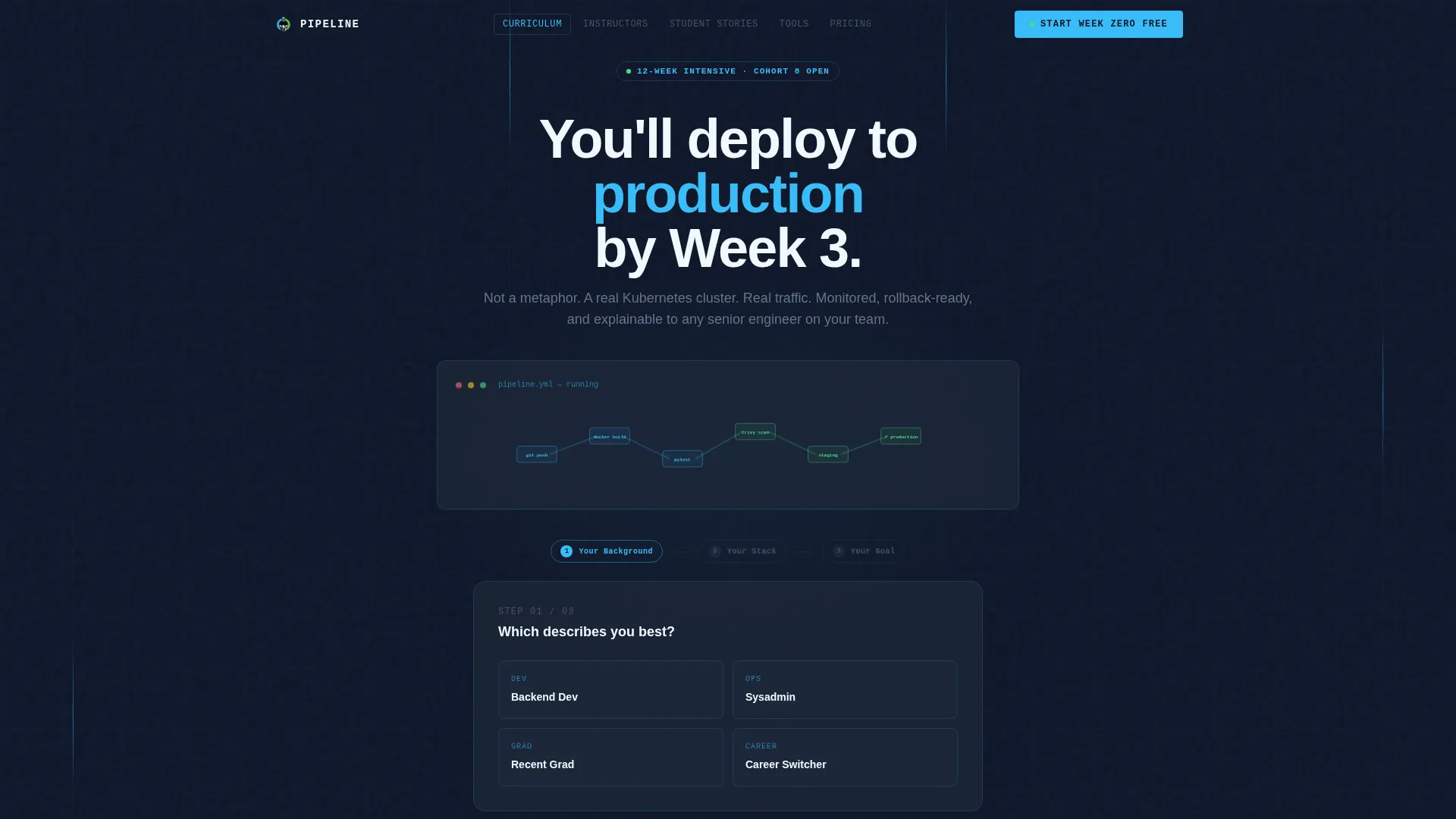
The header form uses three visible steps labeled "Your Background," "Your Stack," and "Your Goal." Step one presents a single role selector with options such as "Backend Dev," "Sysadmin," "Recent Grad," and "Career Switcher." Completing the form unlocks the free Week Zero module without a credit card field.
Looping CI/CD Pipeline Animation
Behind the header form, a subtle looping animation shows a continuous integration and continuous delivery pipeline assembling itself node by node. Commits flow into builds and builds flow into deploys. The animation sets the tone without relying on stock photography.
Anchor Navigation Bar
A pinned navigation bar locks to the top of the viewport after the user scrolls past the header. It carries five labeled spokes: Curriculum, Instructors, Student Stories, Tools, and Pricing. A persistent "Start Week Zero Free" button stays active inside the bar throughout the page.
Instructor Profile Sections
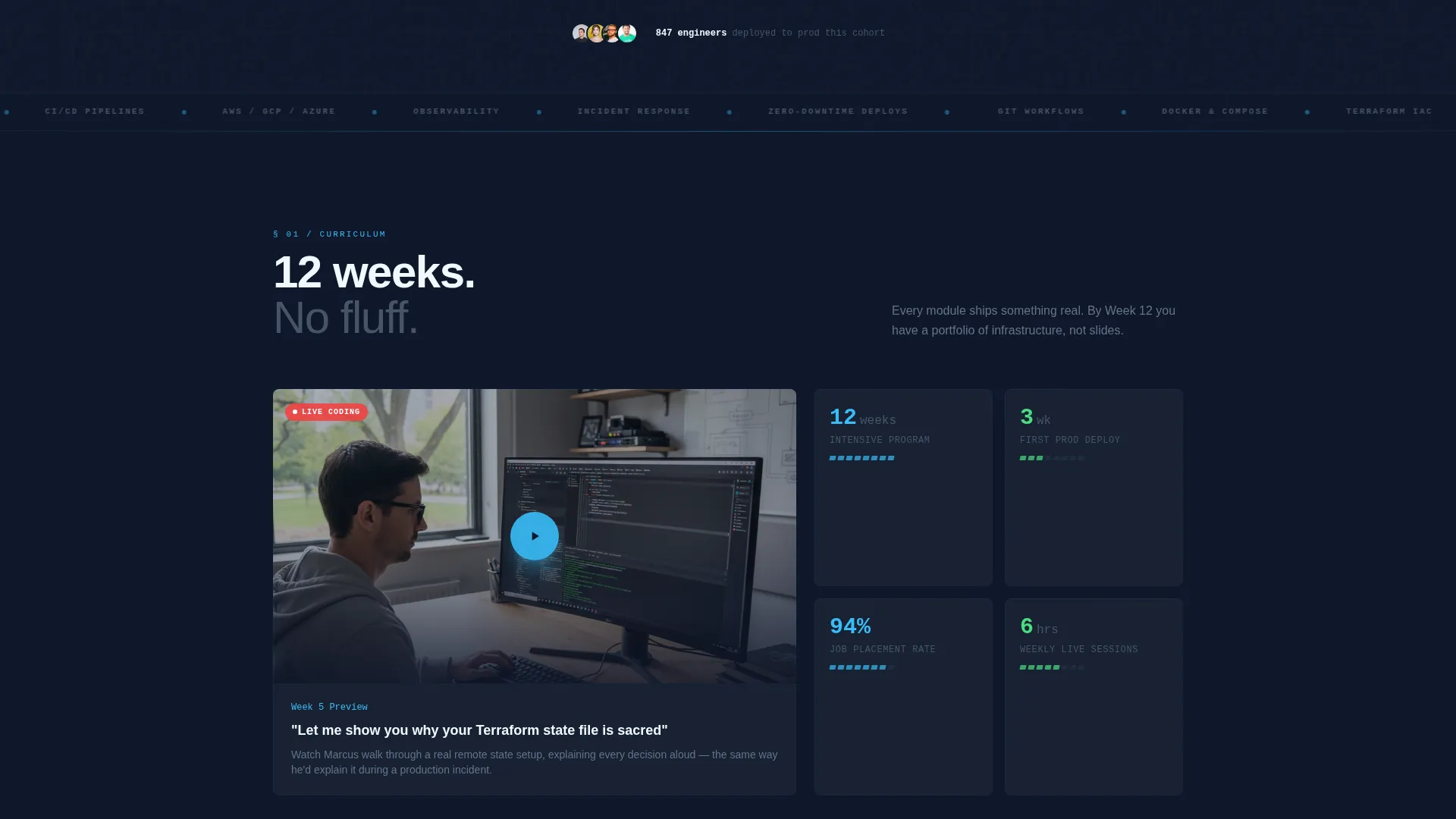
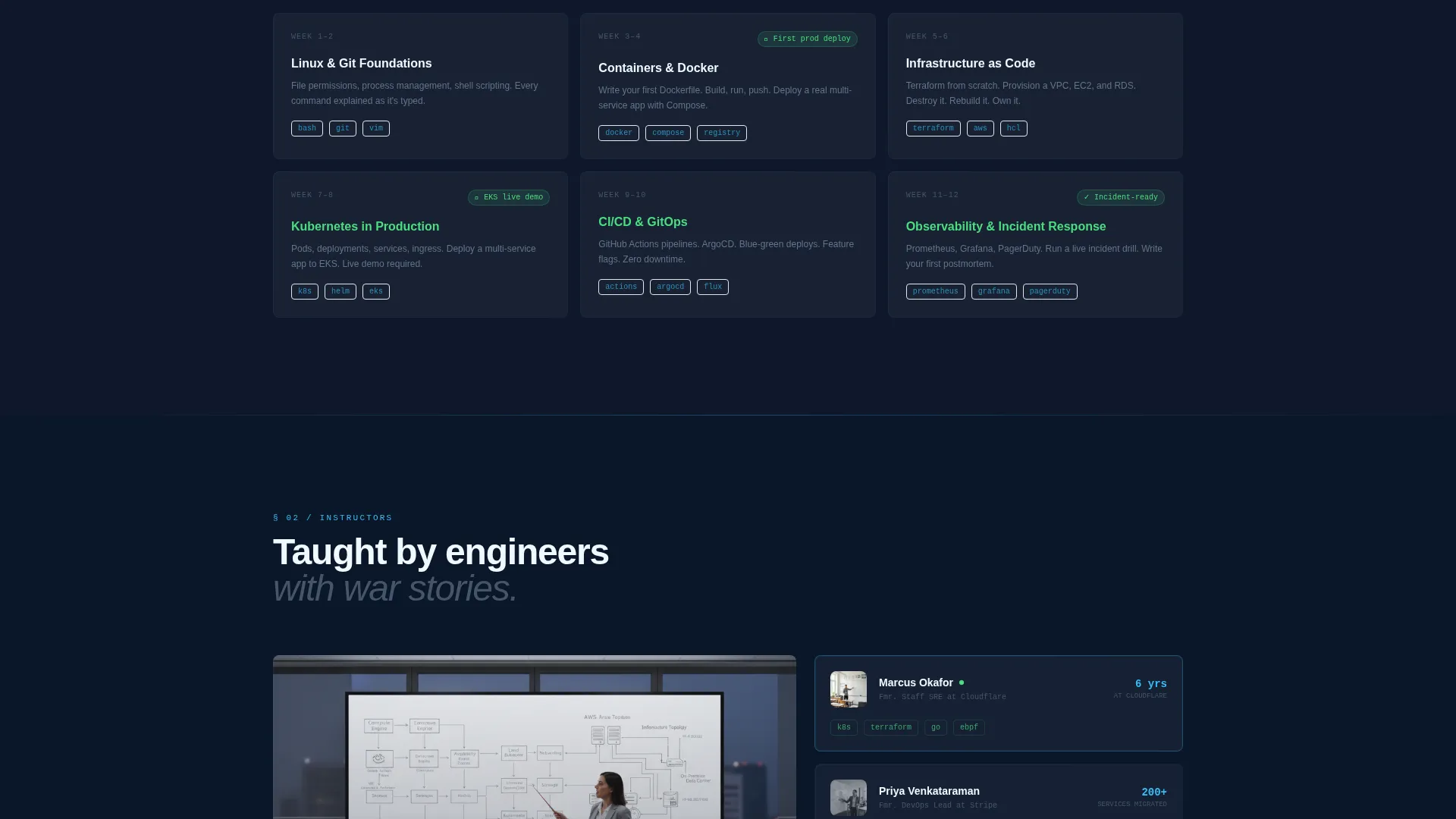
Each instructor section leads with a photograph taken mid-gesture at a whiteboard covered in architecture diagrams. Bios list actual production experience and war stories. The curriculum spoke opens with a video of an instructor live-coding a Terraform module while narrating decisions aloud.
Before-and-After Student Story Blocks
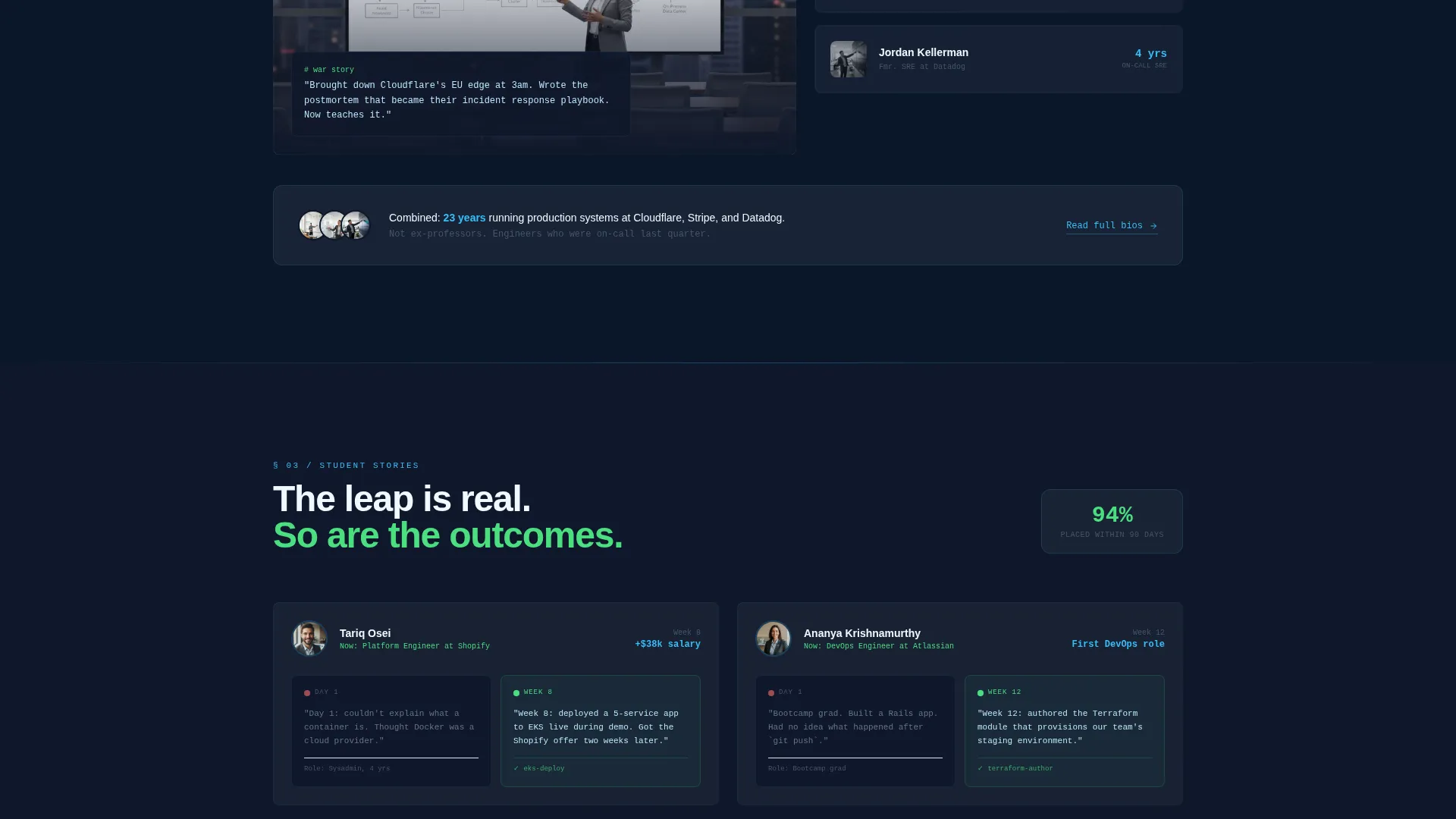
Student story sections use paired snapshots showing where a student started and what they accomplished. An example pairing reads: "Day 1: couldn't explain what a container is. Week 8: deployed a multi-service app to a managed Kubernetes cluster during a live demo." The accumulating faces and voices build social proof as the visitor scrolls.
Dual Conversion Path Layout
The primary call-to-action "Start Week Zero Free" appears at the form's final step and in the persistent anchor navigation. A secondary path, "Download the Full Syllabus," captures an email address for follow-up nurture. Both paths coexist without competing visually.
Page sections overview
| Section | Purpose |
|---|---|
| Multi-Step Header Form | Qualifies visitor by role and unlocks free Week Zero module |
| Anchor Navigation Bar | Pins to viewport top and carries persistent enrollment button |
| Curriculum Spoke | Shows live-coding video and twelve-week program structure |
| Instructors Spoke | Displays instructor photos, bios, and production credentials |
| Student Stories Spoke | Presents before-and-after snapshots to build social proof |
| Tools Spoke | Lists the technology stack covered across the program |
| Pricing Spoke | Presents enrollment options alongside the freemium entry point |
Design & branding system
The visual identity follows an Educational Guide theme built on a Slate and Sky color system. The palette reads like a well-organized monitoring dashboard at dawn: dark enough to sustain hours of reading, with reassuring color accents for active states and success moments.
- Deep terminal slate (#1E293B) and mid-gray infrastructure (#475569) provide the primary dark surfaces and text hierarchy
- Open sky blue (#38BDF8) and cloud-break white (#F0F9FF) handle interactive elements and content surface backgrounds
- Signal green (#4ADE80) marks completed form steps and success states; monospaced fonts style labels while a clean sans-serif carries headlines
Mobile & speed optimization
The template layout is designed with a single-page scrolling structure that keeps the user moving through sections in a deliberate order. The anchor navigation adapts to maintain usability as the page grows in height on any screen size.
- Hub-and-spoke structure keeps all key content on one page, reducing load context switching for mobile visitors
- The pinned anchor bar and persistent call-to-action button remain accessible without requiring the user to scroll back to the top
How this template helps you convert
The page is engineered around a give-first conversion model. Every layout decision is designed to reduce the perceived risk of enrolling and increase confidence in the program before a commitment is made.
- The multi-step form acts as the first lesson by qualifying the visitor through role and goal questions, making the free Week Zero unlock feel earned rather than offered
- Accumulating social proof across Instructors, Student Stories, and Tools sections builds trust progressively, so each scroll reinforces the decision to enroll rather than introducing new resistance
- The dual call-to-action structure lets motivated visitors move straight to enrollment while capturing email addresses from visitors who need more time through the syllabus download path
Other information about this template
This template is part of the Education and Training category under the Coding Bootcamp and Tech School subcategory, with a specific niche focus on DevOps bootcamp programs. It is styled as a Hub and Spoke landing page with anchor navigation and is designed for a Freemium and Trial conversion model.
- The template style is classified as Hub and Spoke with anchor navigation, making it well-suited for programs with multiple distinct content areas that benefit from in-page linking
- The freemium model built into the layout aligns with course platforms that offer trial access or starter modules before full enrollment
- The Team and People creative direction means every major section leads with a real human face, voice, or story to sustain trust throughout the scroll
Theme
Educational Guide
Creative direction
Team & People
Color system
Slate & Sky
Style
Hub & Spoke (Anchor Nav)
Direction
Freemium/Trial
Page Sections
Multi-step Role Selector Form
Looping Ci/cd Pipeline Animation
Pinned Anchor Navigation Bar
Instructor Profile and Video Blocks
Before-and-after Student Story Sections
Dual Call-to-action Conversion Layout
Related questions
What kind of program is this template designed for?
Does the free Week Zero offer require a credit card?
What is the anchor navigation and how does it work?
Can this template support a secondary lead capture path?
What roles does the header form's role selector include?



