Software & SaaS Specialist Professional Website Template
Pipeline is a bento grid landing page template built for ETL data pipeline tools. It targets data engineering teams who need a high-impact, click-through page that proves connector breadth and orchestration depth at a glance. The design uses a dark terminal IDE aesthetic with electric indigo accents, a product screenshot hero, and a feature matrix grid that rewards fast, nonlinear scanning.
by Rocket studio
Quick summary
Pipeline is a single-page, bento grid landing page template designed for ETL data orchestration products. It combines a product screenshot hero, a scrolling connector marquee, a five-cell feature matrix grid, and a persistent call-to-action bar into one cohesive, click-through experience. The template targets data engineering teams and analytics leads who need to see capability proof before they commit to a demo.
Who this template is for
This template is built for software and SaaS teams shipping data infrastructure products. It speaks directly to technical buyers who evaluate tools by scanning feature depth, not by reading marketing copy. If your product helps teams extract, transform, and load data at scale, this template was made for your go-to-market page.
- Data engineers who debug broken pipelines at 2 AM and need to trust a tool before they pitch it to their team
- Analytics leads tired of waiting multiple sprint cycles for a new connector to get built
- Platform teams consolidating fragmented, duct-taped scripts into one reliable orchestration layer
What problem this template solves
Most landing pages for data infrastructure products bury their best proof points under hero copy and generic feature bullets. Technical buyers scan fast and nonlinearly. They are hunting for the one connector, the one transform type, or the one scheduling behavior that solves their specific pain. A generic template cannot serve that behavior. This one is designed specifically around it.
- Fragile pipelines and data quality bottlenecks erode trust fast. The template leads with the product itself, not abstract art.
- Visitors arrive with specific questions. The bento grid rewards nonlinear scanning so every cell can stand alone as proof.
- Standard landing page layouts bury the call to action. This template surfaces it twice: in the header and as a persistent bottom bar.
What you get with this template
You get a fully structured, production-ready landing page layout with every section pre-built and logically sequenced. The template is not a blank canvas. It is an opinionated, purpose-built page that follows the exact flow a technical buyer needs to see before clicking through to a connector library or demo video.
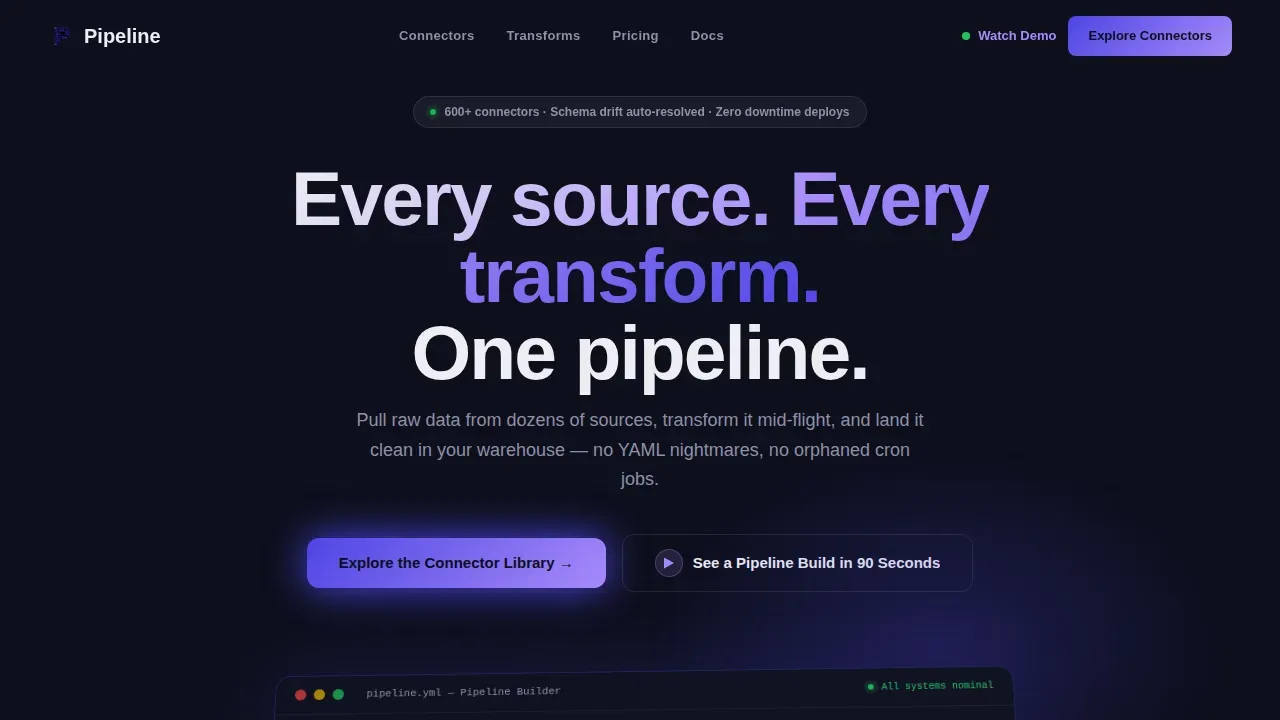
- A product screenshot hero section with an isometric tilt, indigo glow effect, headline slot, and dual call-to-action buttons
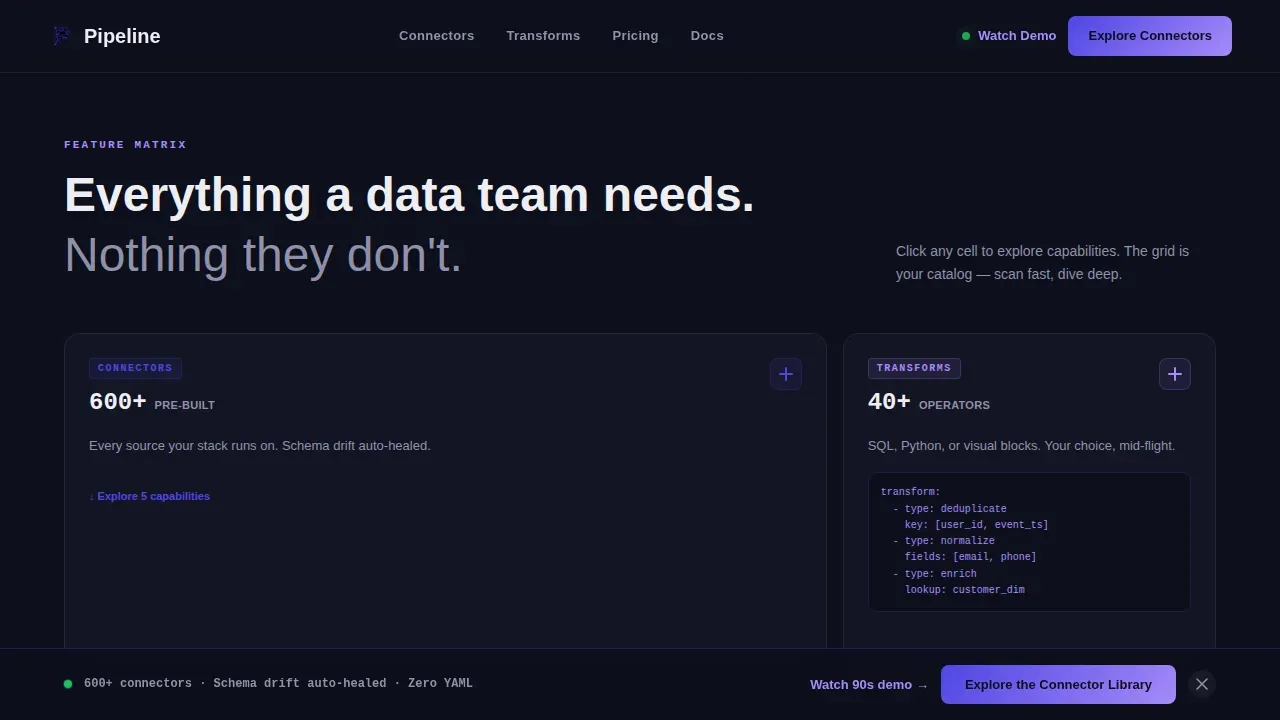
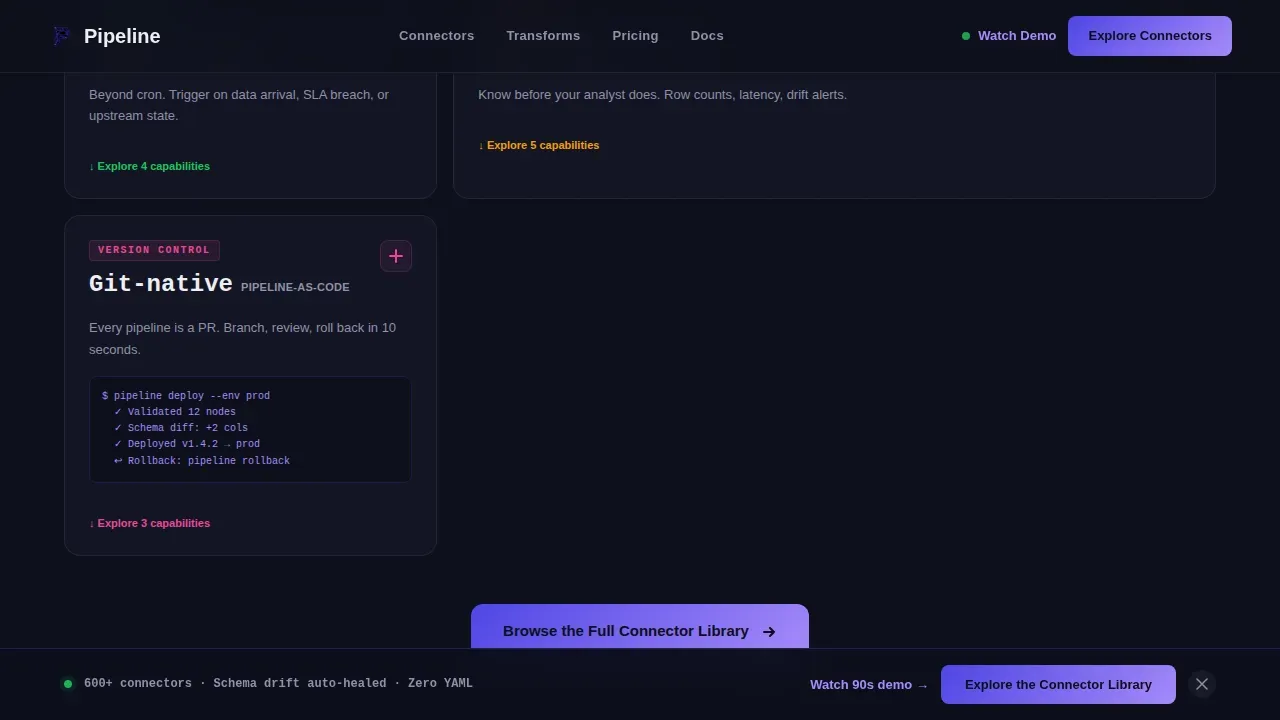
- A bento feature matrix grid with five capability cells covering Connectors, Transforms, Scheduling, Monitoring, and Version Control, each with count badge slots and micro-screenshot card areas
- A stats and social proof section, a scrolling connector marquee, and a persistent bottom call-to-action bar that appears after the first scroll
Feature list
This template includes purpose-built sections and layout components that reflect how data engineering buyers actually evaluate tools. Each component is described below.
Product Screenshot Hero with Isometric Tilt
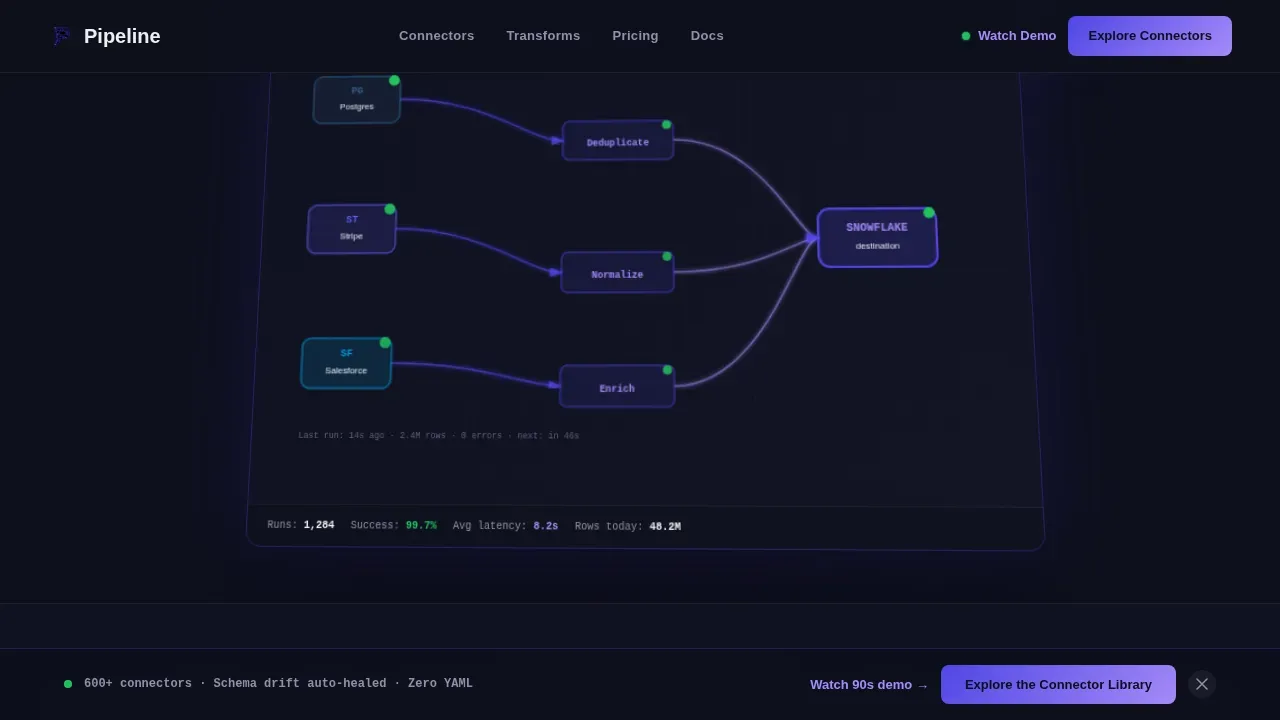
The hero section displays a full-width, pixel-sharp product screenshot on a subtle isometric tilt with a soft indigo glow beneath it. The screenshot slot is designed to show a real multi-source pipeline flow, for example a Postgres node, a Stripe API node, and a Salesforce node feeding through transformation blocks into a Snowflake destination with green status badges on each connection. Above the screenshot, a single benefit-driven headline anchors the section. Two call-to-action buttons sit in the hero: a primary button linking to the connector library and a secondary button linking to the demo video.
Bento Feature Matrix Grid
The five-cell bento grid is the scroll engine of this template. Each cell represents a capability category: Connectors, Transforms, Scheduling, Monitoring, and Version Control. Every cell includes a count badge slot, expandable row areas, and a micro-screenshot card. The grid is designed so each cell stands alone as proof of depth while the full grid communicates completeness. Visitors can scan it the way they scan documentation: fast, nonlinear, and purposeful. This layout is ideal for showing the breadth of data integration coverage without overwhelming the page with long copy.
Scrolling Connector Marquee
Immediately below the hero, a horizontally scrolling marquee displays connector logos as source breadth proof. This section builds trust fast by showing the sheer volume of supported data sources before the visitor reaches any body copy. It sets up the bento grid that follows by priming the visitor to expect depth.
Stats and Social Proof Section
A dedicated section displays concrete metrics alongside engineer testimonials. Metric slots are designed for numbers like pipelines run, connectors available, and data volume moved. Testimonial cards include space for attribution, job title, and a specific pain-point quote. This section is structured to highlight real return on investment, for example reduced ingestion time, fewer manual review cycles, and faster pipeline deployment.
Persistent Bottom Call-to-Action Bar
A sticky bottom bar appears after the visitor scrolls past the first section. It repeats the primary call to action so that users who reach the bottom of the page without clicking the hero button still have a clear, low-friction path forward. The bar stays on screen during scroll and disappears only on the hero viewport.
Linear Single-Row Footer
The footer follows a clean, single-row linear pattern. It includes only essential links, keeping the page free of distractions and consistent with the template's goal of minimizing noise and focusing attention on one conversion action.
Page sections overview
| Section | Purpose |
|---|---|
| Hero with Screenshot | Lead with product truth and dual calls to action |
| Connector Marquee | Prove source breadth instantly via scrolling logos |
| Bento Feature Grid | Show five capability categories in scannable cards |
| Stats and Proof | Display metrics and engineer testimonials |
| Persistent call to action Bar | Resurface primary action after first scroll |
| Linear Footer | Close with minimal, distraction-free navigation |
Design & branding system
The visual identity is built around a Directory and Discovery theme expressed through an Electric Indigo color system. The palette is designed to feel like a well-organized integrated development environment at midnight: dark enough to live in, bright enough to parse at a glance. Typography choices reinforce the developer-tool aesthetic without sacrificing readability.
- Color tokens: deep terminal black (#0D0F1C) for the background, charged indigo (#4F46E5) for active states and connection lines, phosphor lilac (#A78BFA) for secondary highlights and hover glows, and clean schema white (#EEEEF2) for card surfaces and body text
- Typography: JetBrains Mono for all code-adjacent elements and count badges, Manrope for interface labels and body copy
- Animation system: GSAP scroll reveals, node pulse animations, connection line draw effects, and staggered bento cell reveals create the feel of watching a live dependency graph resolve left to right
Mobile & speed optimization
The template is designed desktop-first, which matches how data engineers actually work. Pipeline canvas layouts and multi-node dependency graphs need horizontal space. The bento grid is built to give each cell maximum breathing room on large screens. Responsive behavior is included but the primary experience is tuned for the wide viewport.
- Desktop-first layout prioritizes the full bento grid experience, where each capability cell has enough space to show micro-screenshots and count badges clearly
- Server Components handle all static content sections, while Client Components manage animations, bento cell expansion, and the persistent call-to-action bar
- The page targets a fast load experience by isolating heavy GSAP animations to Client Components, keeping the initial render lean
How this template helps you convert
This template is built around one conversion goal: earning the click to the connector library or demo video. It does not ask for a form fill or a free trial sign-up. It earns trust first, then routes the visitor to a deeper experience. Every design and layout decision is made to reduce friction and build confidence before the call to action appears.
- The hero leads with the product, not with promises. A pixel-sharp screenshot showing a real multi-source pipeline flow answers the first buyer question, "Does this tool actually work at my scale?", before any copy is read.
- The bento feature matrix proves breadth systematically. Each capability cell with its count badge and micro-screenshot tells a complete mini-story. By the time the visitor reaches the bottom, curiosity has done the selling and the persistent call-to-action bar simply closes the loop.
Other information about this template
This template is designed to support the full range of concepts and workflows common in modern data engineering contexts. The sections below provide additional context on how it aligns with industry patterns and tooling expectations that data engineering buyers bring to the page.
- The template's feature matrix structure reflects the evaluation patterns used when assessing tools like Apache Airflow for orchestration, where airflow import dag patterns, task dependency management, and cron-based scheduling are key decision criteria. Teams using python import pythonoperator patterns or managing context import gluecontext configurations will recognize the capability categories immediately.
- Cloud-based pipeline workflows often involve aws cli interactions, aws resources management, and glue job configurations for ETL pipeline development and data ingestion. The template's connector and scheduling cells are pre-structured to surface this kind of depth clearly, whether the target system is a cloud data warehouse, a data lake, or a hybrid of both.
- Modern data stacks typically involve reading and writing parquet files or parquet format outputs for storage efficiency. The transformation logic cells in the bento grid are sized to show this kind of detail at a micro-screenshot level, helping buyers confirm that the product handles their specific data structure and database schema requirements.
- Teams evaluating a complete etl pipeline tool also assess how it handles version control for pipeline logic, source code management, and development workflow integration with tools like Git and CI/CD pipelines. Pipelines created from reusable components and compatible with automated testing workflows reduce the overhead of manual review cycles. The template surfaces version control as a named capability cell for exactly this reason.
- The extract, transform, and load (ETL) process model transforms raw data before it reaches the target system, while the extract, load, and transform (ELT) approach loads data first and transforms it afterward in the target system. ELT is often favored in cloud environments for its efficiency with large datasets. The template is agnostic to either model and can represent both approaches clearly in the bento grid cells.
- Data governance, data quality checks, and change data capture are all topics that senior buyers raise early in the evaluation process. The monitoring and version control cells in the bento grid are designed to accommodate this kind of depth. For example, data lineage visualization, error handling with automated retries, and real-time alerting details can all be surfaced inside the expandable bento rows.
- Import pandas and databricks notebooks are common tools in a data engineering team's day-to-day workflow. When buyers see capability categories that map to their existing data toolchain, trust builds faster. The template's feature matrix is structured to make those connections explicit.
- The template structure aligns with best practices for high-converting infrastructure landing pages, including: a benefit-driven headline, a 3-step process visualization slot (Connect Sources, Transform, Load Destination), social proof with specific return-on-investment metrics, and a repeated call to action at the bottom of the page.
- For teams referencing pipeline templates in platforms like Azure Data Factory, this template serves a parallel purpose: it is a quick-start layout that reduces development time, promotes standardization, and can be customized to reflect a specific product's unique data architecture and workflows. Just as pipeline templates in Azure Data Factory simplify the creation of data integration pipelines and ensure best practices are followed, this landing page template ensures the go-to-market page follows proven conversion patterns without starting from scratch.
Theme
Directory & Discovery
Creative direction
Feature Matrix
Color system
Electric Indigo
Direction
Click-Through
Page Sections
Bento Feature Matrix Grid
Product Screenshot Hero Section
Scrolling Connector Marquee
Stats and Social Proof Section
Persistent Bottom Call-to-action Bar
GSAP Animation and Interactivity System
Related questions
What type of product is this template designed for?
Does this template include a form or sign-up flow?
Can I customize the bento grid cells for my specific feature set?
How does the persistent bottom bar work?
Is this template suitable for both ETL and ELT pipeline products?



