Complete Software & SaaS Comparison Website Template
Pipeline is a recruiting applicant tracking system (ATS) landing page template built for teams who need clarity across every open role. It combines a Feature Tab Switcher header, two comparison tables, and a platform-detection download flow into one focused, dark-themed page. From kanban pipeline views to offer letter builders, every section earns its place.
by Rocket studio
Quick summary
Pipeline is a single-page ATS landing page template designed for recruiting professionals who need to present a powerful, organized hiring tool. The Dashboard Pro theme uses a deep navy and electric indigo palette. The page walks visitors through a Problem→Solution Arc and closes with a frictionless app download flow that requires no credit card or demo booking.
Who this template is for
This template is built for people who manage hiring at scale or solo. Whether you run a full talent acquisition function or wear every hat at a small company, this layout speaks your language.
- In-house talent acquisition leads managing forty or more open roles across multiple departments
- Agency recruiters tracking candidate submittals across a dozen or more client accounts
- Startup founders who are still their own HR department and need to stop losing top candidates in their inbox
What problem this template solves
Recruiting without a proper system means candidates fall through the cracks and time gets wasted on process instead of people. This template makes the cost of that chaos visible, then shows the better path.
- Spreadsheets with dozens of tabs, endless email chains, and manual scheduling across multiple calendars create unnecessary delays
- Scattered résumés and ghosted candidates make it hard to know where any applicant actually stands
- Recruiters need a single live board where every applicant moves through clear stages without confusion
What you get with this template
You get a complete, ready-to-customize single-page landing page that builds trust and drives app downloads. Every section is purposeful and every component earns its place in the layout.
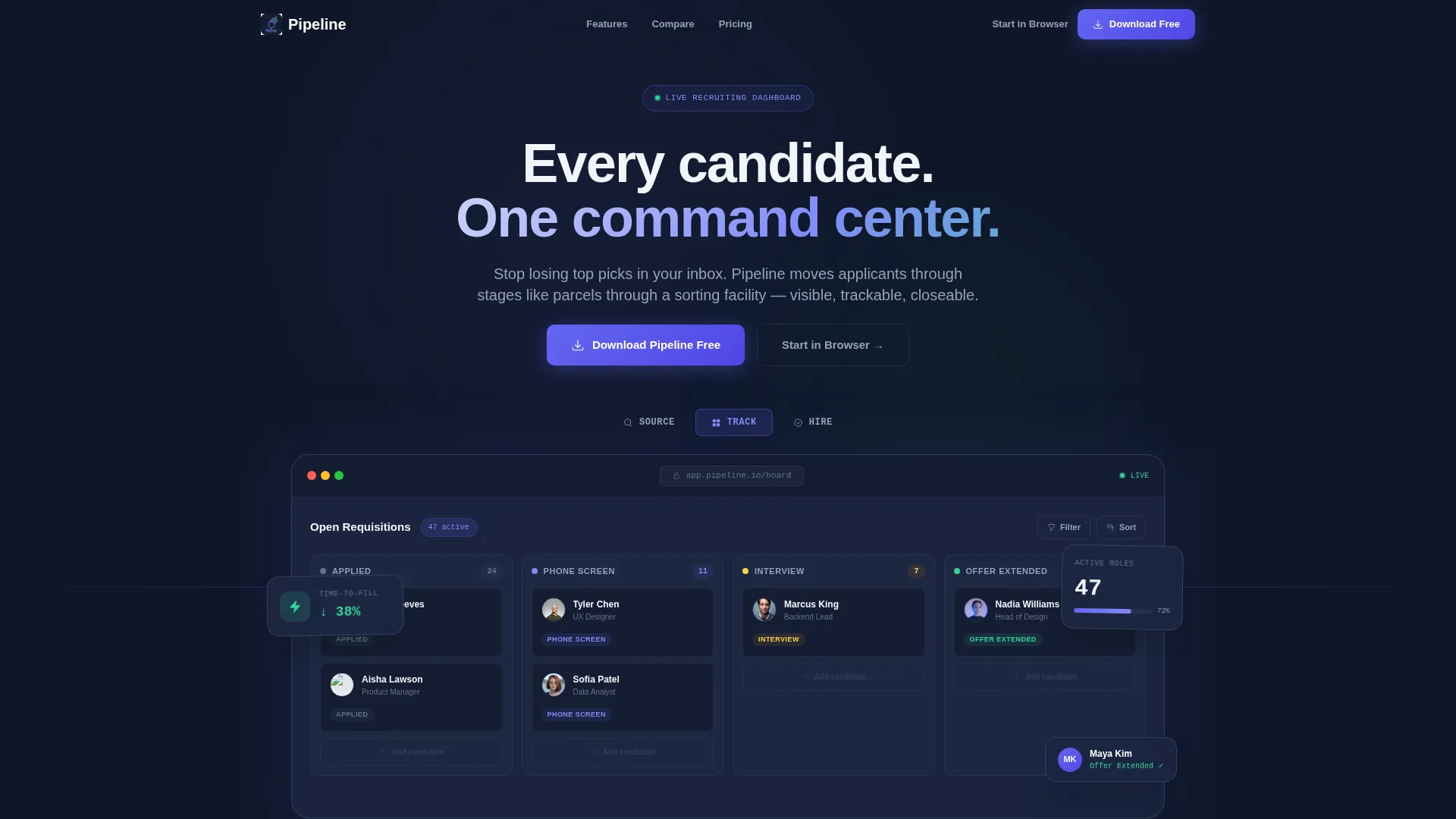
- A Feature Tab Switcher header with three tabs ("Source," "Track," "Hire") each revealing a different live dashboard mockup view
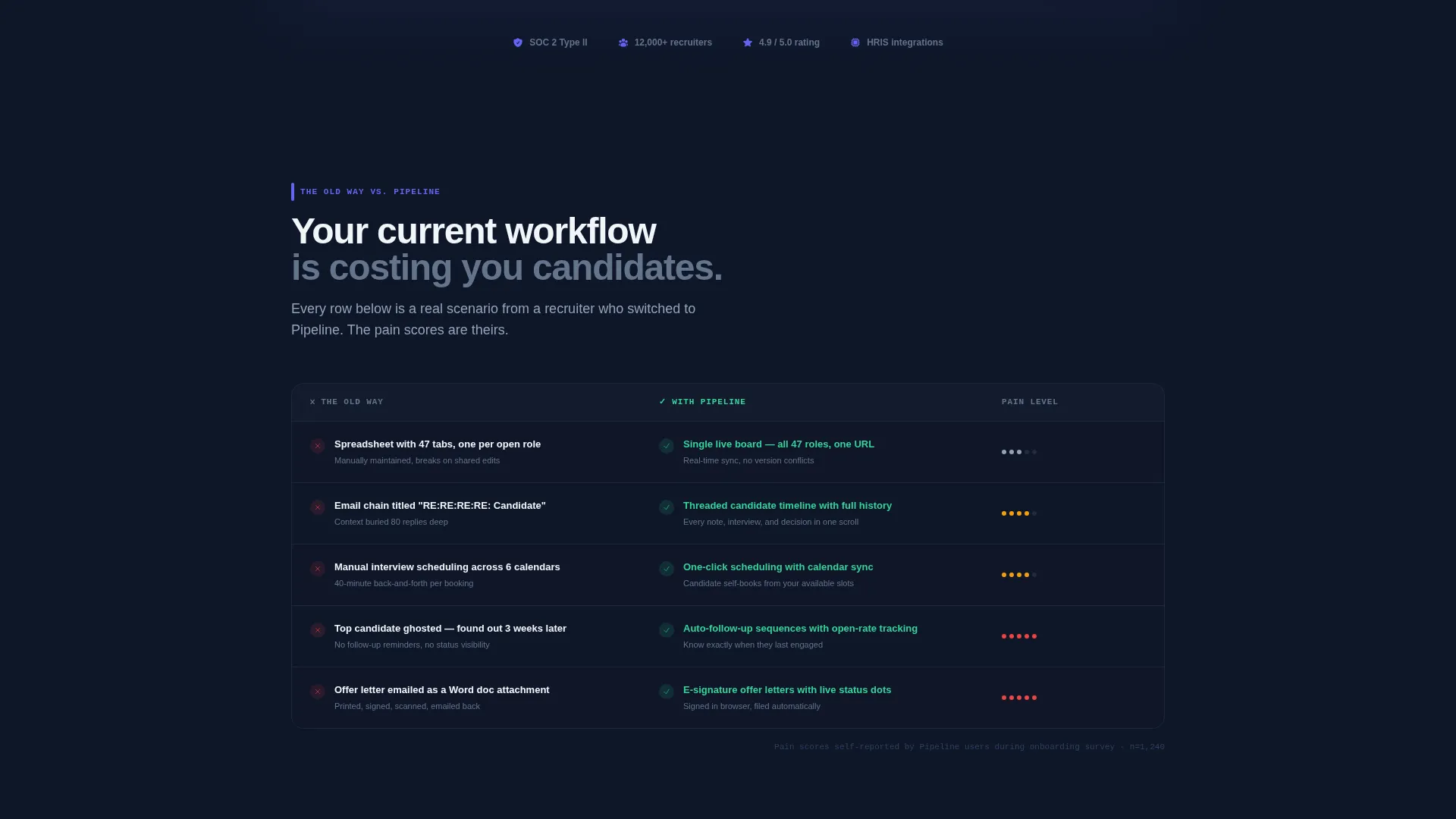
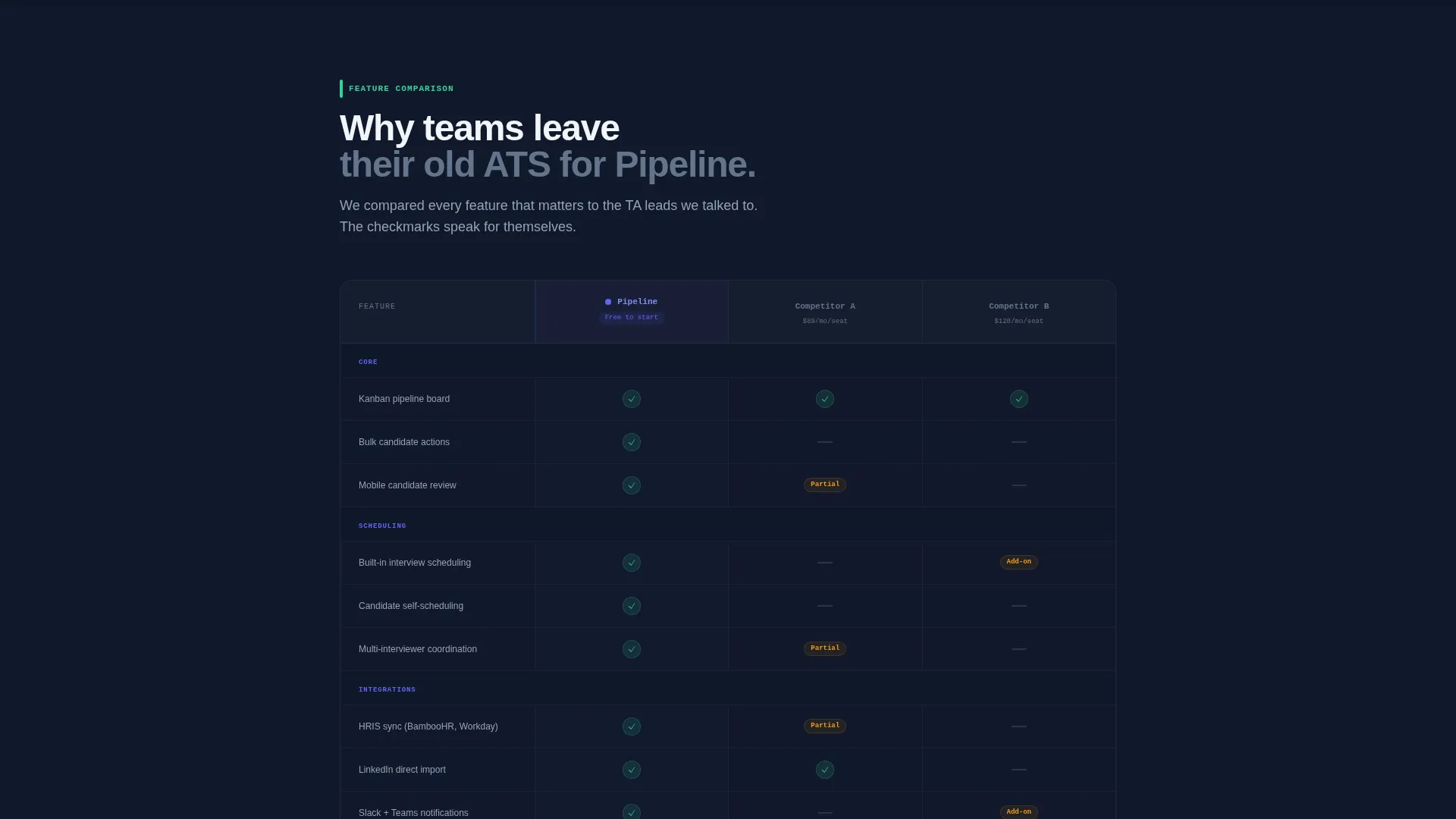
- Two structured comparison tables: one showing the old-way versus. Pipeline, and one benchmarking Pipeline against two anonymized competitors
- A device-detection download section with iOS, Android, and Desktop options plus a "Start in Browser" secondary path
Feature list
This template includes a focused set of built-in components that reflect how modern recruiting tools are actually evaluated and adopted.
Feature Tab Switcher Header
Three clickable tabs sit above a live-rendered dashboard mockup. Default state shows the kanban pipeline view with candidate cards, role titles, and colored stage chips. "Source" swaps in a LinkedIn import panel with parsed profile cards. "Hire" reveals an offer letter builder with e-signature status dots. Transitions are instant, with no page reload.
Problem versus. Solution Comparison Table
The first table contrasts the old recruiting workflow row by row against the Pipeline equivalent. Each row lands with an inline micro-screenshot alongside it. Examples include "Spreadsheet with 47 tabs" versus the Pipeline board, and "Email chain titled RE:RE:RE:RE: Candidate" versus the Pipeline inbox view.
Competitor Feature Comparison Table
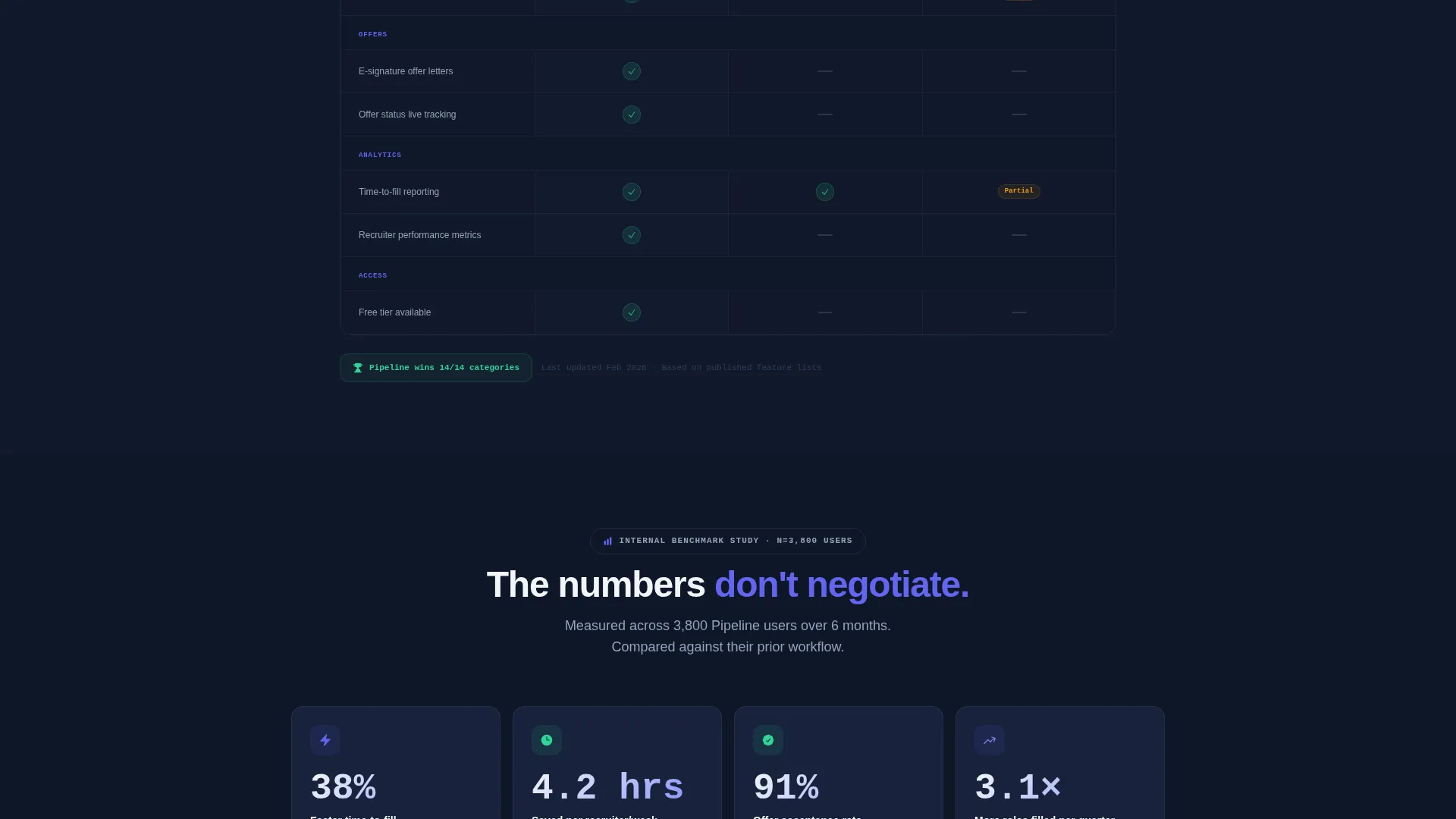
A second table compares Pipeline against two anonymized competitors. It covers features like bulk candidate actions, built-in scheduling, HRIS integrations, and mobile review. Green checkmarks in mint indicate Pipeline capabilities, and gray dashes mark features the competitors lack.
Metrics Band
A dedicated band displays benchmark metrics: 38% faster time-to-fill and 4.2 hours saved per recruiter per week, both sourced from an internal benchmark study. This section resolves the Problem→Solution Arc and anchors the download call to action with real numbers.
Platform-Detection Download Flow
A device selector automatically highlights the correct download option for the visitor's platform: iOS, Android, or Desktop. A secondary "Start in Browser" path serves recruiters who cannot install software on corporate machines. No credit card is required and no demo is needed.
Sticky and Fixed Call-to-Action Placements
The primary call to action, "Download Pipeline Free," appears first inside the header tab switcher. It then reappears as a sticky bottom bar on mobile and a fixed sidebar button on desktop. This multi-placement approach keeps the download action visible throughout the scroll.
Page sections overview
| Section | Purpose |
|---|---|
| Feature Tab Switcher | Introduces the product with three interactive dashboard views |
| Problem Comparison Table | Shows old workflow pain points against Pipeline equivalents |
| Competitor Feature Table | Benchmarks Pipeline against two anonymized rival tools |
| Metrics Benchmark Band | Anchors the solution with sourced time-to-fill and hours-saved data |
| Platform Download Selector | Auto-detects device and highlights the right download option |
| Sticky Download Bar | Keeps the primary call to action visible on mobile throughout scroll |
| Fixed Sidebar Button | Maintains desktop download access without interrupting reading flow |
Design & branding system
The visual identity follows a Dashboard Pro theme built around an Electric Indigo color system. The palette feels like a cockpit at cruising altitude: dark, focused, and purposeful.
- Deep workspace navy (#0F1729) as the primary background, electric indigo (#6366F1) on active states and progress bars, and cool slate (#94A3B8) for secondary text and divider lines
- Sharp mint (#34D399) reserved exclusively for success indicators, hired badges, and the competitor table's green checkmarks
- Colored stage chips (Phone Screen in indigo, Offer Extended in mint) carry the palette logic through the kanban mockup inside the header
Mobile & speed optimization
The template is built with a mobile-first conversion path in mind. Recruiters reviewing candidates on the go are a core audience, and the layout adapts accordingly.
- A sticky bottom bar on mobile keeps the "Download Pipeline Free" call to action accessible without requiring the visitor to scroll back up
- The device selector in the download section auto-detects the visitor's platform so the correct option is already highlighted when they arrive at that section
How this template helps you convert
The entire page is structured as a Problem→Solution Arc that makes the download feel like the natural conclusion, not a hard sell.
- The Feature Tab Switcher shows the product working before asking for anything, letting the visitor experience Source, Track, and Hire flows firsthand and building confidence before they hit the first call to action
- The two comparison tables create progressive conviction: the first table makes the old way look painful, and the second table makes the competition look incomplete, so by the time the visitor reaches the metrics band, the decision feels made
Other information about this template
This template is categorized under Technology, Software and Software as a Service (SaaS), and specifically targets the Recruiting ATS niche. It is a strong fit for teams evaluating applicant tracking systems and comparing options before committing to a download or sign-up.
- The page is purpose-built as a single landing page, not a multi-page website, keeping the visitor focused on one action
- The "Start in Browser" secondary call to action broadens reach to recruiters at companies with software installation restrictions
- The template style is a Comparison Table layout, making it well suited to any ATS or HR software tool that wants to win side-by-side evaluations
Theme
Dashboard Pro
Creative direction
Problem→Solution Arc
Color system
Electric Indigo
Style
Comparison Table
Direction
App Download
Page Sections
Feature Tab Switcher with Live Mockups
Two-table Comparison Layout
Metrics Benchmark Band
Platform-detection Download Flow
Multi-placement Call to Action
Related questions
Can I customize the tab labels and dashboard mockup screenshots?
Does this template work for a solo recruiter or just large teams?
Can I update the competitor names in the feature comparison table?
Is a credit card required to use the download call to action?
What if a visitor's device is not correctly auto-detected in the download section?



