Dynamic Donation Landing Page Template
Pledge is a dynamic donation landing page template built for nonprofits, faith communities, and grassroots organizers. It puts a live micro-dashboard front and center, animating every donation in real time. A side-by-side comparison table, glassmorphic plan cards, and a lead-capture form work together to turn first-time visitors into campaign launchers fast.
by Rocket studio
Quick summary
Pledge is a single-page template designed for charity and donation platforms that need to show momentum, not just describe it. The header runs a live micro-dashboard in the browser. A comparison table reframes the old way of fundraising against the new. Glassmorphic cards, emerald animations, and a focused lead form push visitors from curiosity to commitment.
Who this template is for
This template is built for people who run fundraising efforts and need donors to feel the energy of a campaign the moment they arrive on the page.
- Nonprofit directors managing campaign reconciliation and donor reporting
- Church administrators running annual stewardship drives or pledge campaigns
- Grassroots organizers running time-limited crowdfunding pushes who need to show live traction
What problem this template solves
Traditional fundraising pages feel static. A donor lands, reads a number, and leaves without any sense that their contribution matters right now. Pledge fixes that by making every interaction feel live and consequential.
- Manual tracking and paper pledge cards create delays and erode donor confidence
- Static thermometer graphics and PDF receipts feel disconnected from the real energy of a campaign
- Organizers lose momentum when potential donors cannot see real-time proof that others are giving
What you get with this template
You get a fully structured, single-page layout that combines interactive proof, persuasive comparison, and direct lead capture in one scrollable experience.
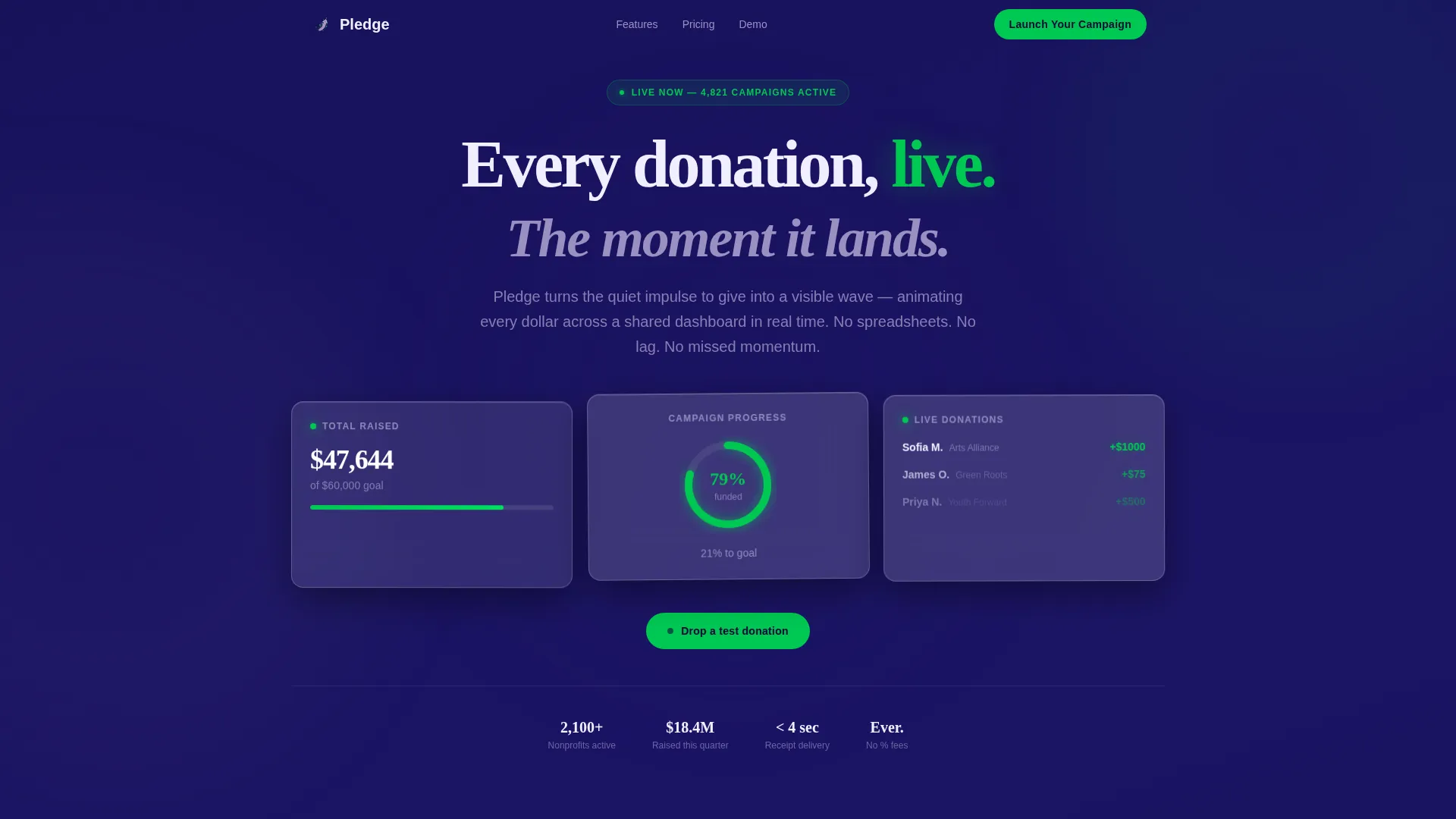
- An interactive header micro-dashboard with a donation counter, a campaign progress ring, and a live donor feed
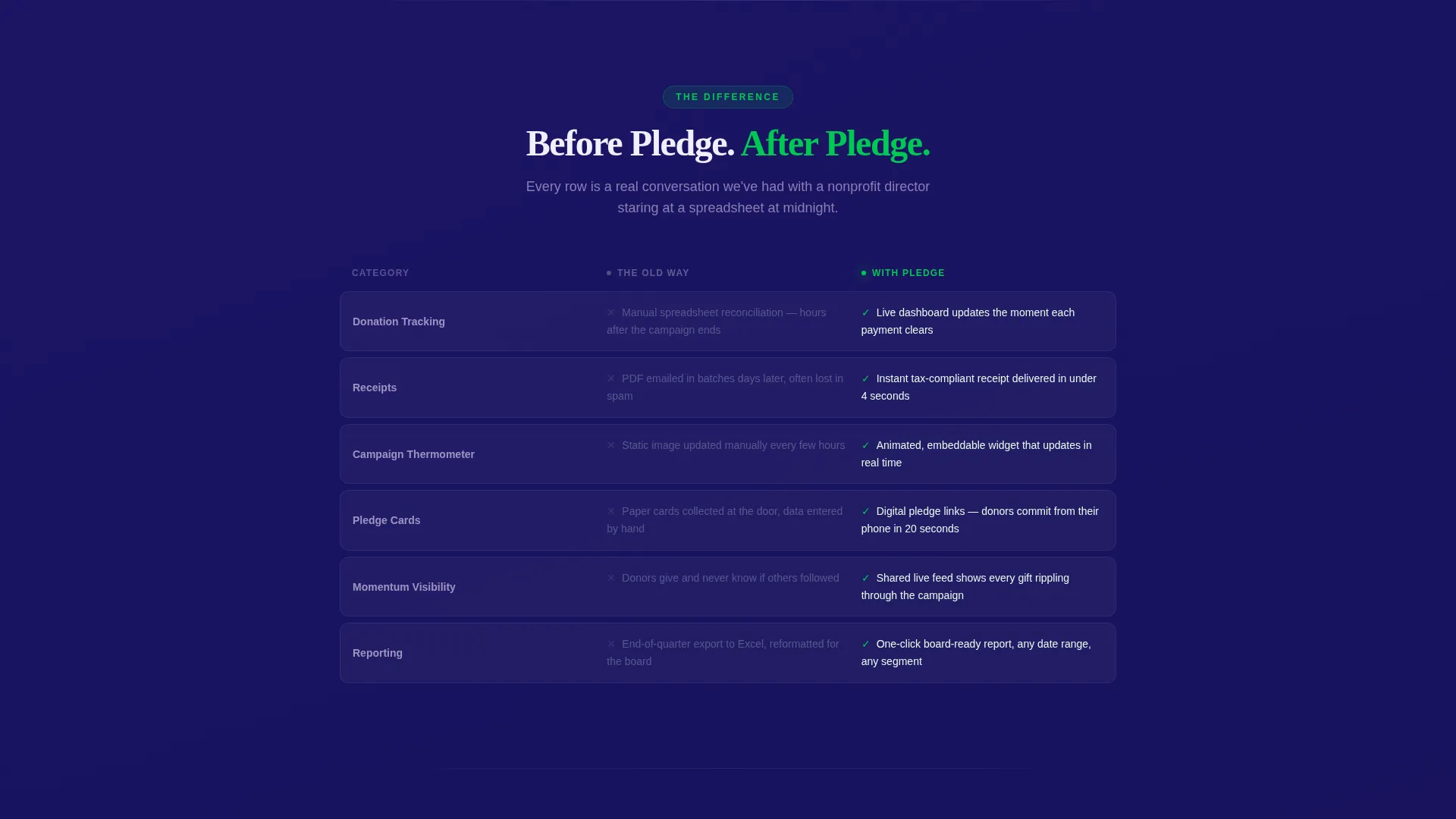
- A side-by-side comparison table contrasting old fundraising methods with the platform's real-time approach
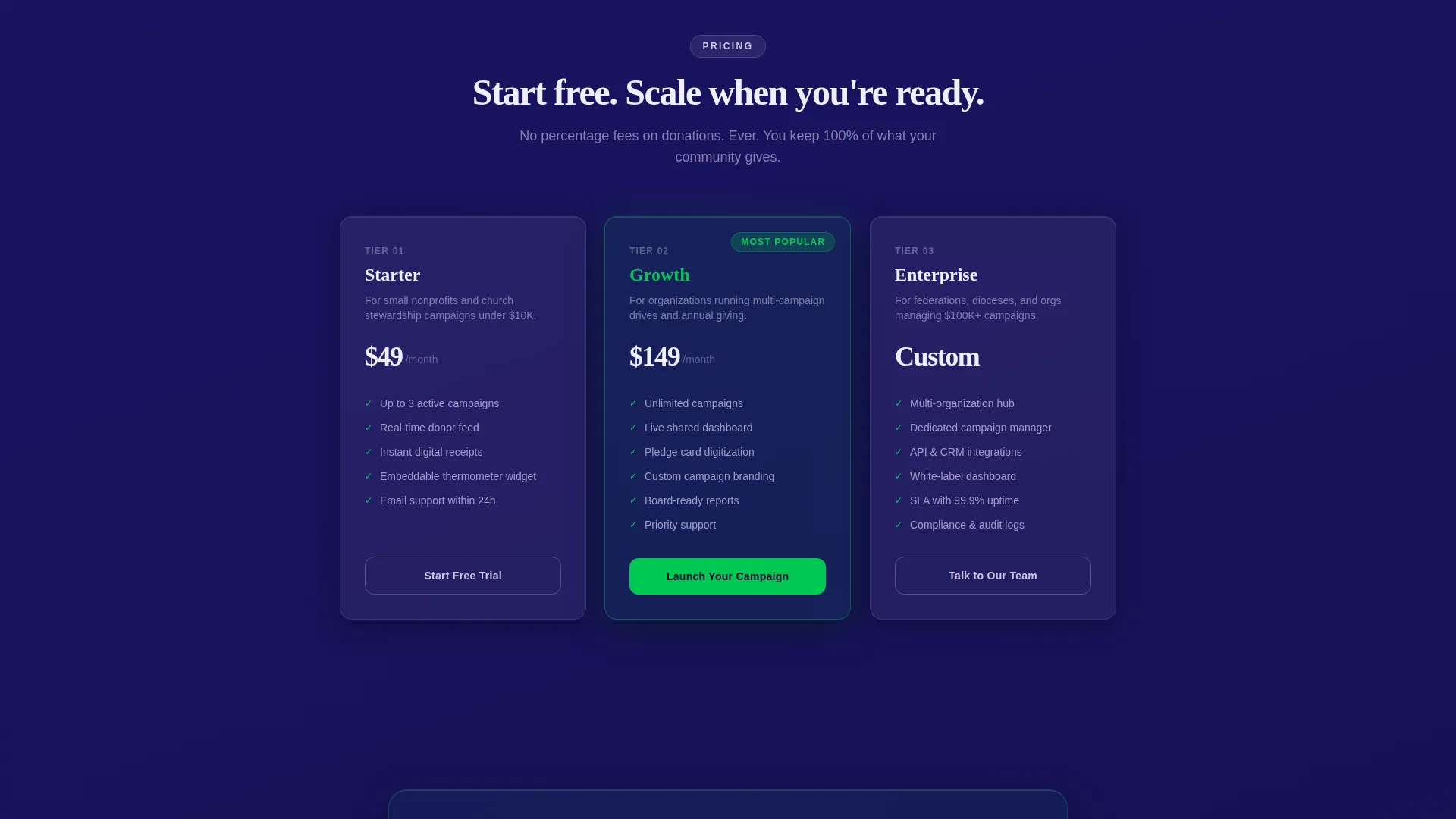
- A three-tier pricing section, a live platform-wide donation counter, and a dual-path lead generation form
Feature list
This template delivers six distinct functional and visual systems, each grounded in the source brief.
Live Browser Micro-Dashboard
Three glassmorphic cards render directly in the browser as the page loads. One card shows a donation counter ticking upward with easing animations. A second displays a campaign progress ring filling in emerald. A third streams anonymized donor names and amounts like a stock ticker. Visitors can click "Drop a test donation" and watch a $25 placeholder ripple across all three cards simultaneously.
Animated Comparison Table
A two-column table contrasts the old fundraising workflow with the platform's approach row by row. Each row springs into view on scroll, with the left column fading in muted gray and the right column snapping into emerald. The table covers manual tracking versus real-time dashboards, PDF receipts versus instant tax documents, and static thermometers versus animated campaign pages.
Glassmorphic Pricing Cards
Three plan tiers are presented as glassmorphic cards that tilt on hover and reflect light like physical objects. Each card floats over the deep indigo background, using frosted translucent surfaces to separate tiers visually without breaking the motion-forward aesthetic.
Real-Time Platform Counter
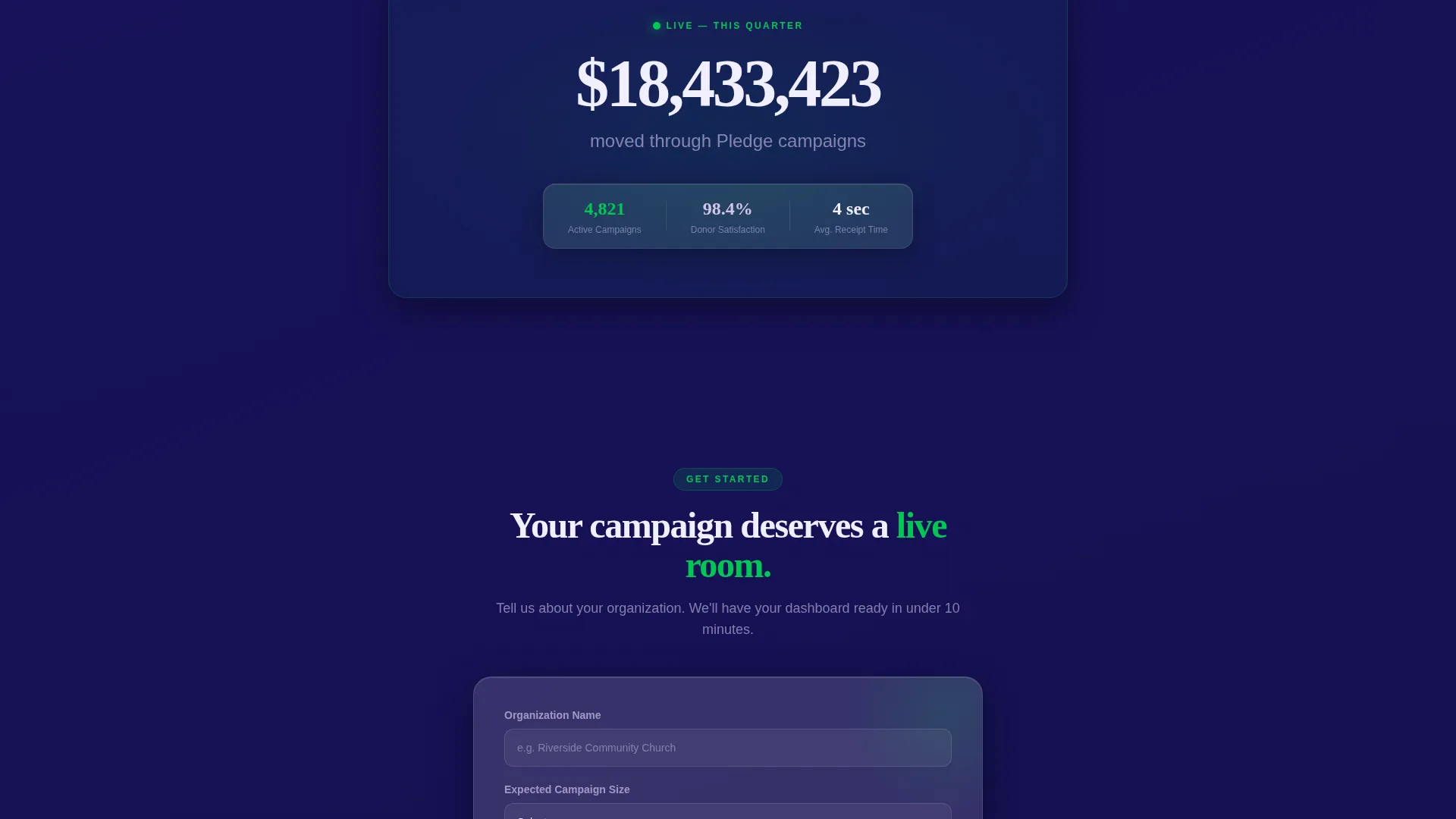
A section dedicated to a live counter shows total dollars moved through the platform during the current quarter. The number increments in real time, signaling to prospective campaign managers that this is an active, working system with real usage behind it.
Dual-Path Lead Generation Form
The primary call to action, "Launch Your Campaign," anchors to a three-field form collecting organization name, expected campaign size via dropdown, and work email. A secondary ghost-button path, "Watch the 90-Second Demo," offers a lower-commitment option and captures email before the video plays.
Dynamic Motion Visual System
Every interactive element uses the emerald accent color as a universal signal for action. Backgrounds shift subtly from indigo to near-black. Glassmorphic card surfaces blur the layers behind them for depth. Toggles, hover states, and call-to-action buttons all glow on interaction, keeping the page feeling alive throughout the scroll.
Page sections overview
| Section | Purpose |
|---|---|
| Interactive Header Dashboard | Demonstrates live donation animation before any copy is read |
| Old versus. New Table | Contrasts legacy fundraising with real-time platform capabilities |
| Pricing Tier Cards | Presents three plan options with tilt-on-hover glassmorphic cards |
| Live Platform Counter | Reinforces platform credibility with a real-time donations total |
| Lead Capture Form | Converts visitors through a focused three-field sign-up form |
| Demo Video Path | Offers a lower-friction secondary conversion for undecided visitors |
Design & branding system
The visual identity uses a Dynamic Motion theme expressed through a Glassmorphic color system. Every surface layer communicates depth, movement, and trust simultaneously.
- Core palette: deep philanthropic indigo (#1B1464) as the base, living emerald (#00C853) for all active states and progress indicators, frosted white (#FFFFFFB3) for card surfaces, and soft lilac (#D1C4E9) as a secondary tint
- Glassmorphic cards blur the layers behind them using backdrop-filter effects, creating the sensation of looking through rain-streaked glass at city lights
- Emerald is the universal action color: every button glow, progress fill, hover state, and success indicator uses it consistently
Mobile & speed optimization
The template is structured to remain visually coherent and functionally clear on smaller screens, with the motion-forward design adapting to touch interactions.
- Glassmorphic card layouts reflow gracefully so the micro-dashboard remains readable without horizontal scrolling
- Spring animations and scroll-triggered effects are designed to feel responsive rather than heavy, keeping the scroll experience smooth on mobile viewports
- The lead form collapses into a clear single-column stack on narrow screens, keeping all three fields and the call-to-action button within easy thumb reach
How this template helps you convert
The page is structured so that persuasion happens before the form ever appears. By the time a visitor reaches the call to action, the decision has already been made emotionally.
- The interactive header micro-dashboard lets visitors feel the product immediately, before reading any copy, which removes skepticism early and builds trust through direct experience.
- The animated comparison table does the persuasion work section by section, turning each row into a before-and-after moment that makes the old way feel visibly inadequate.
- The dual-path form design means no visitor leaves empty-handed: committed visitors fill out the three-field form, while hesitant visitors choose the demo path and still enter the conversion funnel.
Other information about this template
This template is a strong fit for any organization that needs to communicate fundraising urgency and platform credibility on a single page without relying on static imagery or long explanatory text.
- The template is categorized under Technology, specifically Consumer App and Platform, making it suitable for software products serving the charity and donation platform niche
- The "Launch Energy" creative direction means the page structure is deliberately front-loaded with proof before explanation, which suits high-stakes 48-hour crowdfunding pushes as much as longer annual campaigns
- The Comparison Table template style is particularly effective for donation platforms competing against established manual workflows, since it lets the product speak through contrast rather than claim
Theme
Dynamic Motion
Creative direction
Launch Energy
Color system
Glassmorphic
Style
Comparison Table
Direction
Lead Generation
Page Sections
Live Browser Micro-dashboard
Animated Comparison Table
Glassmorphic Pricing Cards
Real-time Platform Counter
Dual-path Lead Generation Form
Dynamic Motion Visual System
Related questions
Who is this template designed for?
What makes the header different from a standard hero section?
Can I use this template for a short-term crowdfunding push?
What conversion paths does the template include?
Is this template suitable for organizations of different sizes?



