Open-Source Enterprise Software Pricing Website Template
PLM is a split-screen landing page template built for an open-source product lifecycle management platform. It opens with a live cost estimator, flows through a spec-sheet-style scroll, and drives toward a frictionless app download. The Data Command visual theme, void black backgrounds, and a violet-to-cyan gradient palette give every section the precise, technical feel that engineers trust immediately.
by Rocket studio
Quick summary
This is a single-page landing page template for an open-source product lifecycle management (PLM) platform. It combines a live calculator header, a relentless spec-sheet scroll, and a no-email-gate download flow. The design language is cold, precise, and built to earn the trust of engineers before asking them for anything.
Who this template is for
This template speaks directly to technically minded users who evaluate tools by reading specs, not marketing copy. It is designed for teams that manage physical products and need traceability without expensive vendor lock-in.
- Mechanical engineers managing revision histories and bill of materials (BOM) changes across product versions
- Hardware startup CTOs who have outgrown unstructured file storage and need structured part number management
- Manufacturing operations leads who need auditable change-order records that hold up during quality reviews
What problem this template solves
Most PLM vendor pages hide their real capabilities behind sales calls and non-disclosure agreements. Engineers want to verify a tool before they commit to it. This template solves the credibility gap by front-loading proof.
- Visitors cannot trust what they cannot verify, so the page shows live savings estimates and deep spec data immediately
- Change-order traceability and revision depth are technical concerns that generic landing pages fail to address clearly
- The frictionless download flow removes the email gate that typically delays evaluation by days
What you get with this template
You get a structured, single-page layout that earns technical trust at every scroll depth. The template is built around three major zones: an interactive estimator, a spec-sheet comparison scroll, and a conversion close.
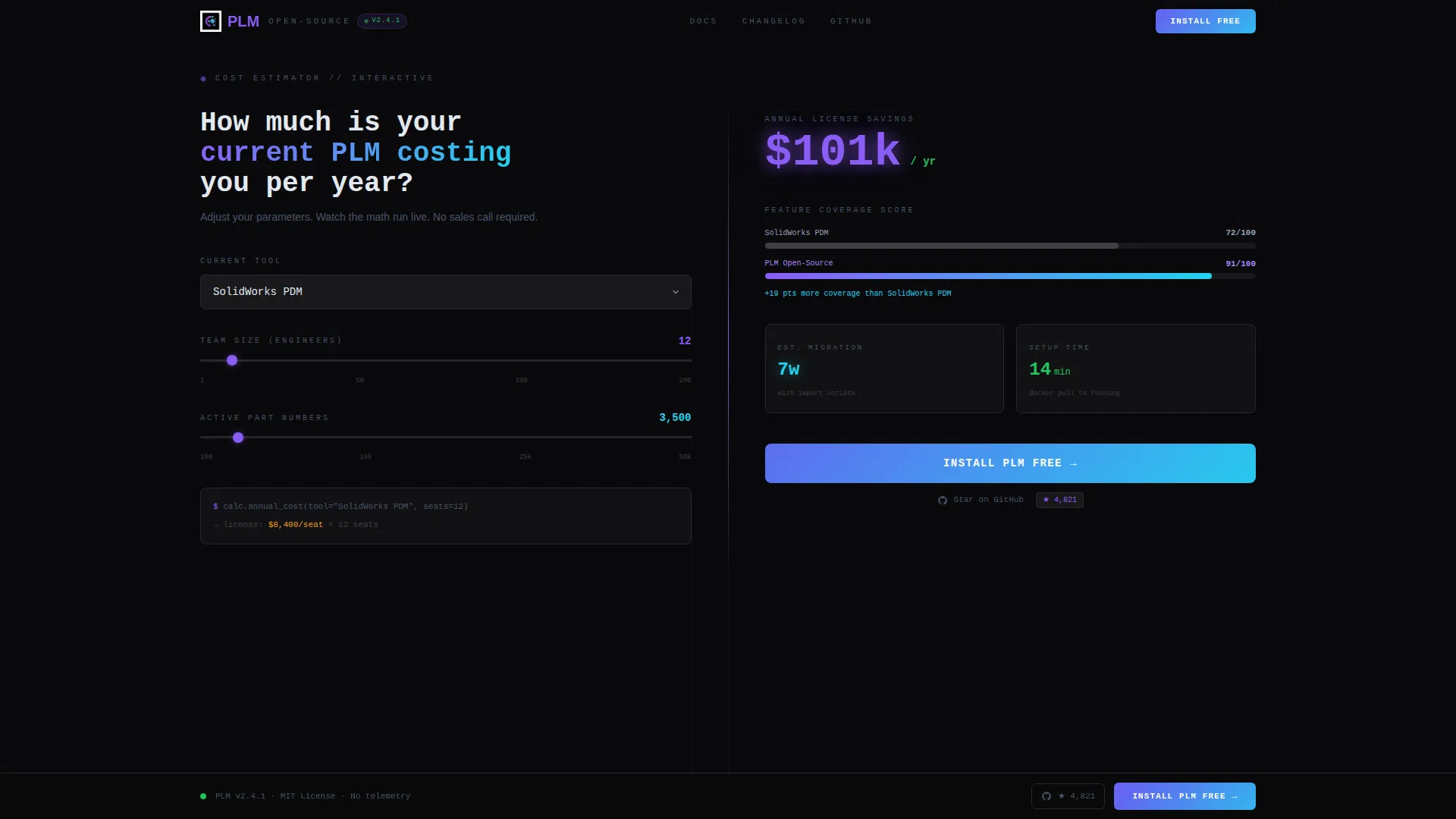
- A split-screen (50/50) live calculator header with animated outputs and a primary call-to-action inside the results panel
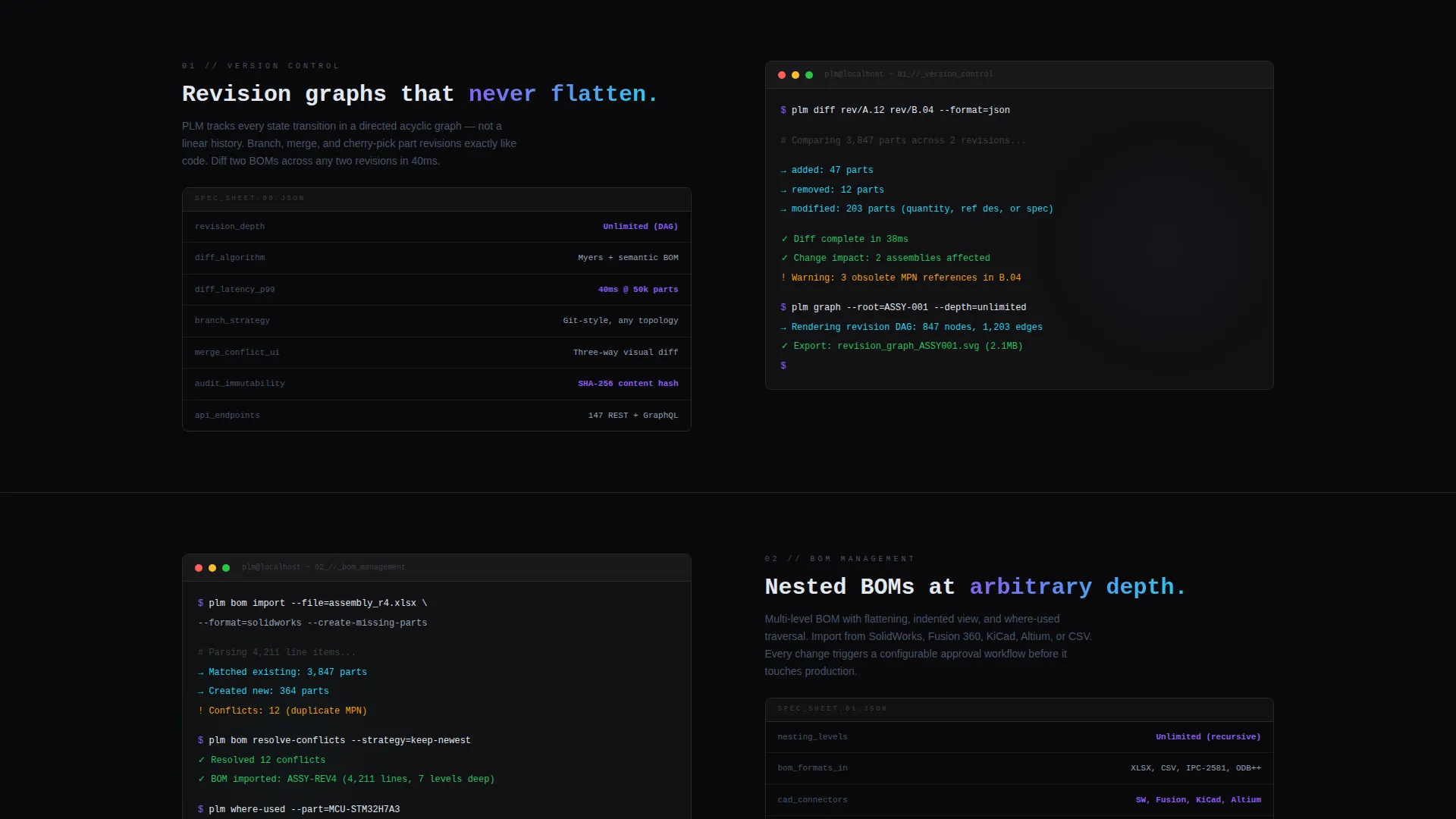
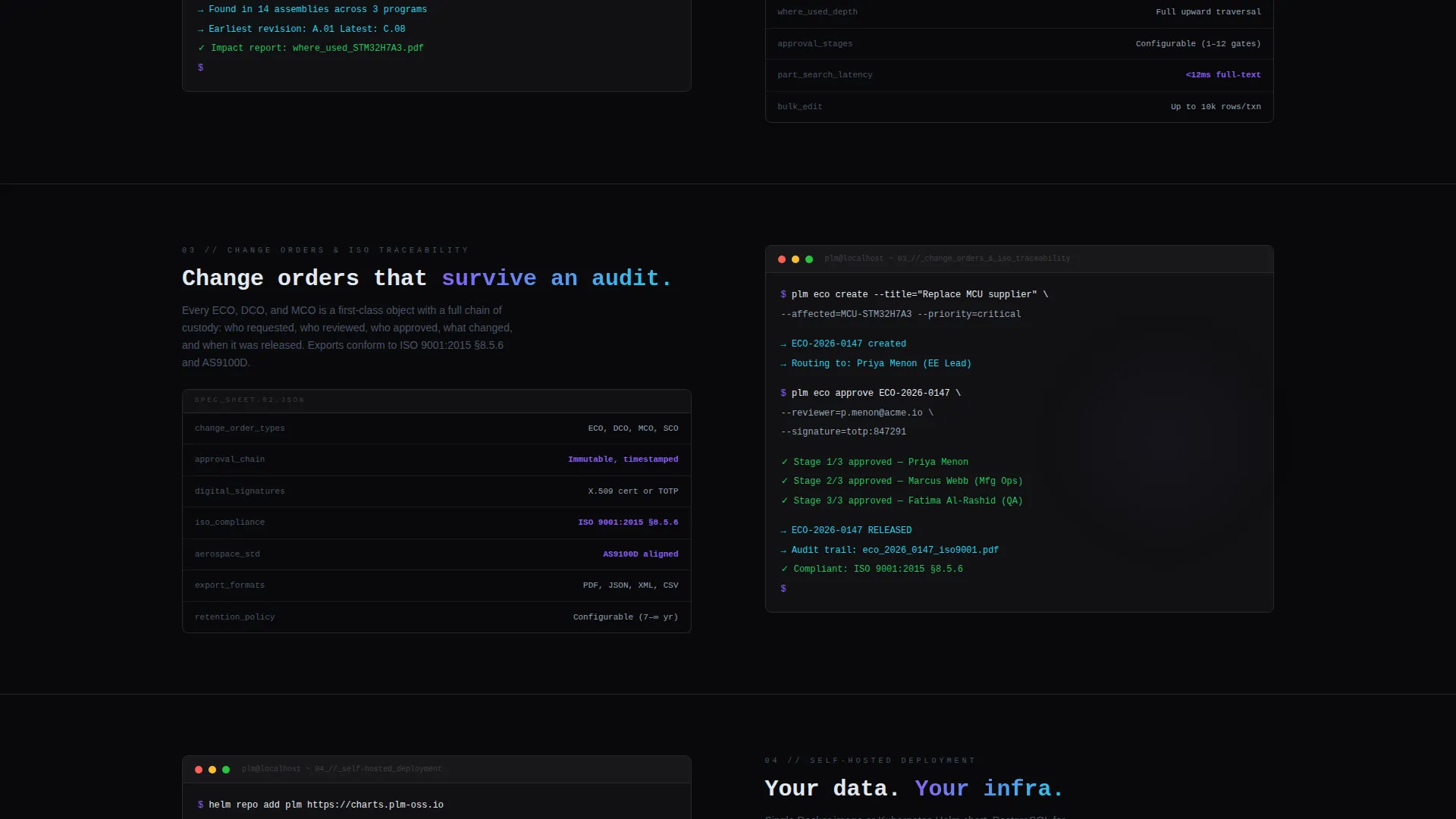
- A scrolling spec-sheet section with left-column capability labels and right-column proof content for each claim
- A sticky download bar, a multi-option install modal, and a secondary GitHub star conversion path
Feature list
This template is purpose-built for a product lifecycle management platform landing page. Every feature below is grounded in the source brief.
Live Cost Estimator Header
The header splits the screen evenly. The left side takes inputs: team size, number of active parts, and current tool via dropdowns and sliders. The right side renders results instantly. Annual license savings display in large holographic-violet type, a mini bar chart compares feature coverage, and a single line shows estimated migration time in weeks. Numbers animate as inputs change.
Spec-Sheet Comparison Scroll
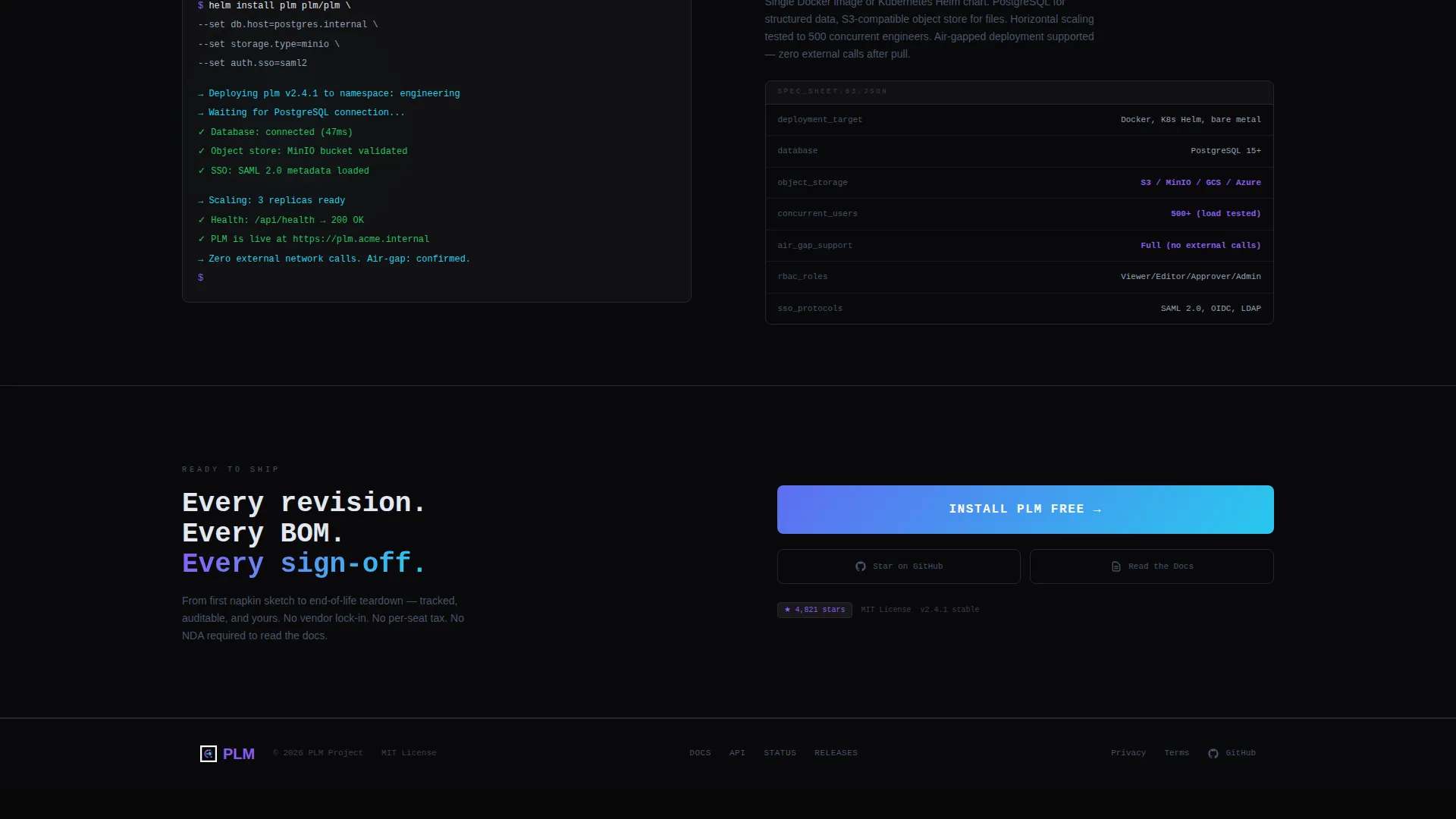
Each section below the header follows a two-column structure. The left column carries a capability label and dense spec text covering items such as revision graph depth, BOM nesting levels, supported CAD formats, and API endpoint count. The right column shows the corresponding screenshot or animated terminal output. Sections escalate from individual-engineer features up to enterprise-scale concerns such as role-based access and self-hosted deployment.
Sticky Download Bar
After the visitor has passed the third spec section, a sticky bottom bar appears with the primary call-to-action. This placement is intentional: the visitor has already seen savings data and read technical specs before the bar prompts action.
Frictionless Install Modal
Clicking the primary call-to-action opens a minimal modal with three choices. The visitor can copy a Docker pull command to clipboard, select a desktop installer for Linux, macOS, or Windows, or open a cloud sandbox link for an immediate browser trial. No email address is required.
GitHub Star Secondary Path
A secondary conversion link appears alongside the primary download call-to-action. It displays a live star count badge and targets visitors who are not yet ready to install but want to signal community commitment.
Data Command Visual Theme
The template uses void black as the dominant background, holographic violet for primary actions and data highlights, shimmer cyan for secondary indicators and hover states, and pale iridescent white for body text and table borders. The violet-to-cyan gradient appears only on interactive surfaces so every color shift signals something active.
Page sections overview
| Section | Purpose |
|---|---|
| Calculator / Estimator Header | Live savings and feature comparison tool that acts as the hero element |
| Individual Engineer Specs | Covers version diffing, part search, and per-engineer workflow features |
| Enterprise Scale Specs | Covers role-based access, webhook integrations, and self-hosted deployment |
| Sticky call to action Bar | Persistent download prompt that appears after the third spec section |
| Install Modal | Three-option download flow with no email gate required |
| GitHub Star Link | Secondary conversion path with live community star count badge |
Design & branding system
The visual identity follows a Data Command theme built on an AI Iridescent color system. The palette is designed so that every color shift carries a functional meaning rather than a decorative one.
- Void black (#09090B) dominates all backgrounds; holographic violet (#8B5CF6) marks primary actions and data highlights; shimmer cyan (#22D3EE) handles hover states and secondary indicators
- Pale iridescent white (#E2E8F0) is used for body text and table borders, keeping legibility clean against near-black surfaces
- The violet-to-cyan gradient appears only on interactive surfaces such as buttons, toggle states, and progress bars, so passive content never competes with active elements
Mobile & speed optimization
The split-screen (50/50) layout is structured to adapt cleanly across viewport sizes. The template is designed with the expectation that engineers will review it on various devices, including during late-night evaluation sessions.
- The 50/50 split reflows into a stacked single-column layout on smaller screens so the calculator and results remain usable
- Interactive elements such as sliders, dropdowns, and the copy-to-clipboard command are sized and spaced for touch input
- The sticky bottom bar is built to remain visible and functional on mobile without obscuring critical spec content
How this template helps you convert
This template is built around the principle that engineers convert after verification, not after persuasion. Every structural decision supports that sequence.
- The calculator header creates a personalized savings number early, giving the visitor a reason to keep scrolling before a single marketing claim appears
- The spec-sheet scroll delivers escalating technical detail that matches the engineer's instinct to verify, building trust through the depth of information shared
- The no-email-gate modal removes friction at the moment of highest intent, letting the visitor install, sandbox, or star without a commitment barrier
Other information about this template
This template is categorized under Technology and specifically targets the open-source enterprise software space. It is a strong fit for any open-source PLM product that competes on transparency and total cost of ownership against traditional commercial platforms.
- The template style is Split Screen (50/50), and the header concept is Calculator/Estimator, making it a distinctive choice in a category where most pages rely on static hero illustrations
- The creative direction is Spec Sheet, which means the scroll rhythm rewards engineers who read deeply and naturally filters for high-intent visitors
- The landing page direction is App Download, so the entire page structure is oriented toward installation rather than lead capture
- Teams evaluating this template alongside tools such as Arena PLM, SolidWorks PDM, or spreadsheet-based workflows will find the comparison framing built directly into the calculator header
- The intersection match score for this template is 13 out of the available range, reflecting a precise alignment between the Data Command theme, the AI Iridescent color system, the open-source PLM niche, and the technology category
Theme
Data Command
Creative direction
Spec Sheet
Color system
AI Iridescent
Style
Split Screen (50/50)
Direction
App Download
Page Sections
Live Cost Estimator with Animated Outputs
Spec-sheet Comparison Scroll
No-email-gate Install Modal
Sticky Download Bar
Github Star Secondary Conversion Path
Data Command Visual Identity
Related questions
Does the download flow require an email address?
What is the primary call-to-action on this landing page?
Who is the intended visitor for this landing page?
Can the calculator section be customized for different team sizes or tools?
What is the secondary conversion path on this page?



