3D Modeling Course Landing Page Template
Polygonpath is a hub and spoke landing page built for a Blender-based 3D modeling online course. A quiz-style header sorts visitors by discipline, Character, Hard Surface, Environment, or Motion, then drops them into a personalized spoke. Instructor-led curriculum nodes, a free preview lesson, and a downloadable topology cheat sheet do the selling before any signup is required.
by Rocket studio
Quick summary
Polygonpath is a single-page course landing page designed around discipline-based spokes. Visitors choose what they want to build, navigate to their section, watch an instructor model live, explore a node-tree curriculum layout, and claim a free lesson or resource, all before entering an email address or making any commitment.
Who this template is for
This template is built for educators and course creators who teach practical 3D modeling skills. It suits anyone launching a structured Blender course to an audience that ranges from curious beginners to career-focused artists.
- Self-taught 3D artists who need structured topology guidance
- Game development hobbyists building clean low-poly assets on a deadline
- Career-switchers assembling demo reels for junior studio roles
What problem this template solves
Generic course pages treat every visitor the same. A flat hero, a long feature list, and a single call to action rarely speak to someone who already knows they want to model hard-surface weapons, not characters, not environments. This template removes that friction by routing visitors immediately to what matters to them.
- Visitors feel lost when a course page does not match their specific discipline or goal
- Long, undifferentiated sales pages push motivated learners away before they see the curriculum
- Course creators struggle to prove teaching quality before asking for a signup
What you get with this template
You get a fully structured, single-page layout that uses anchor navigation to connect a central quiz header to four discipline-specific content spokes. Every section is designed with instructor presence in mind and leads visitors toward a low-commitment conversion action.
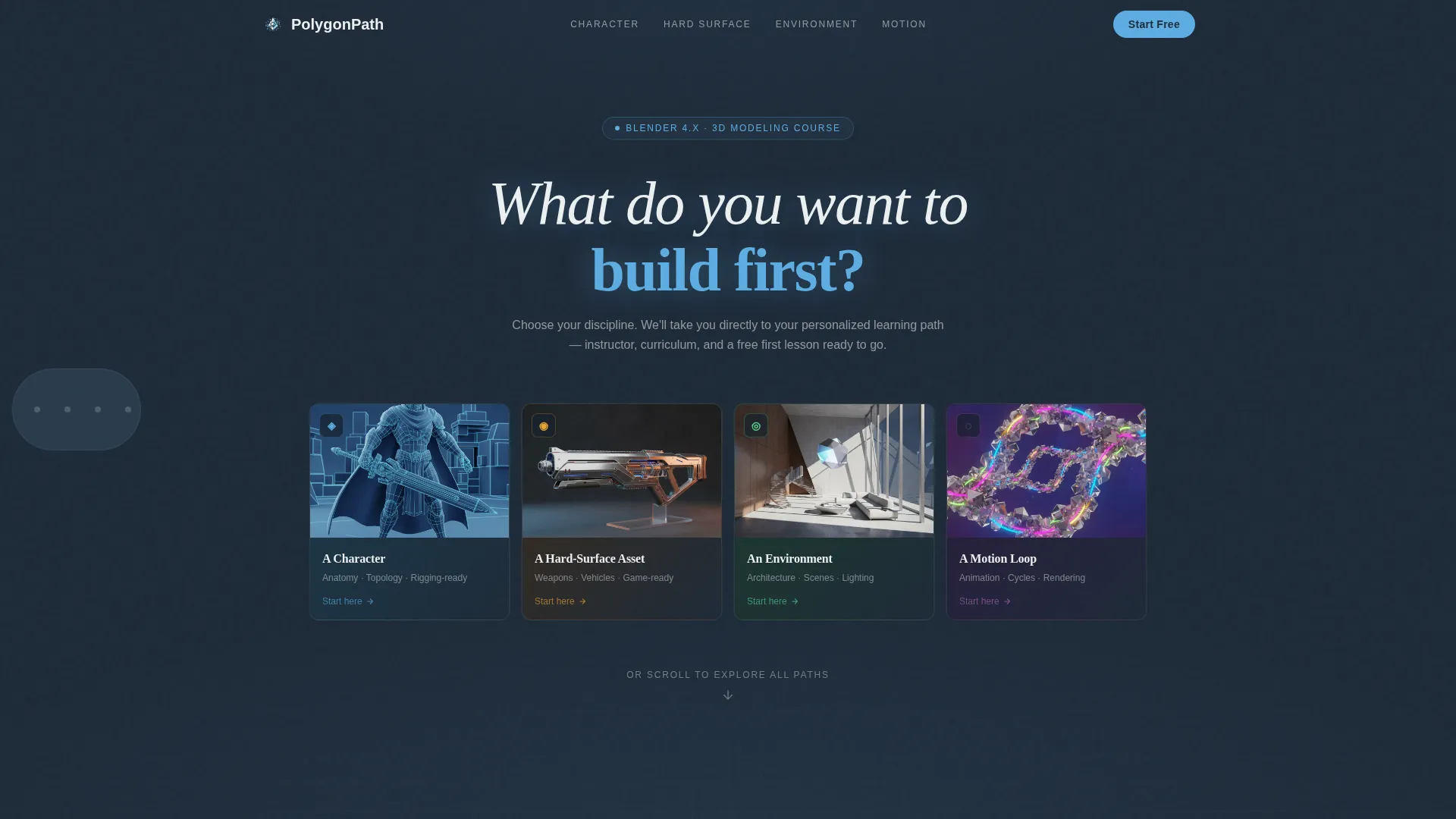
- A quiz-starter header with four 3D-rendered, hover-rotating discipline thumbnails
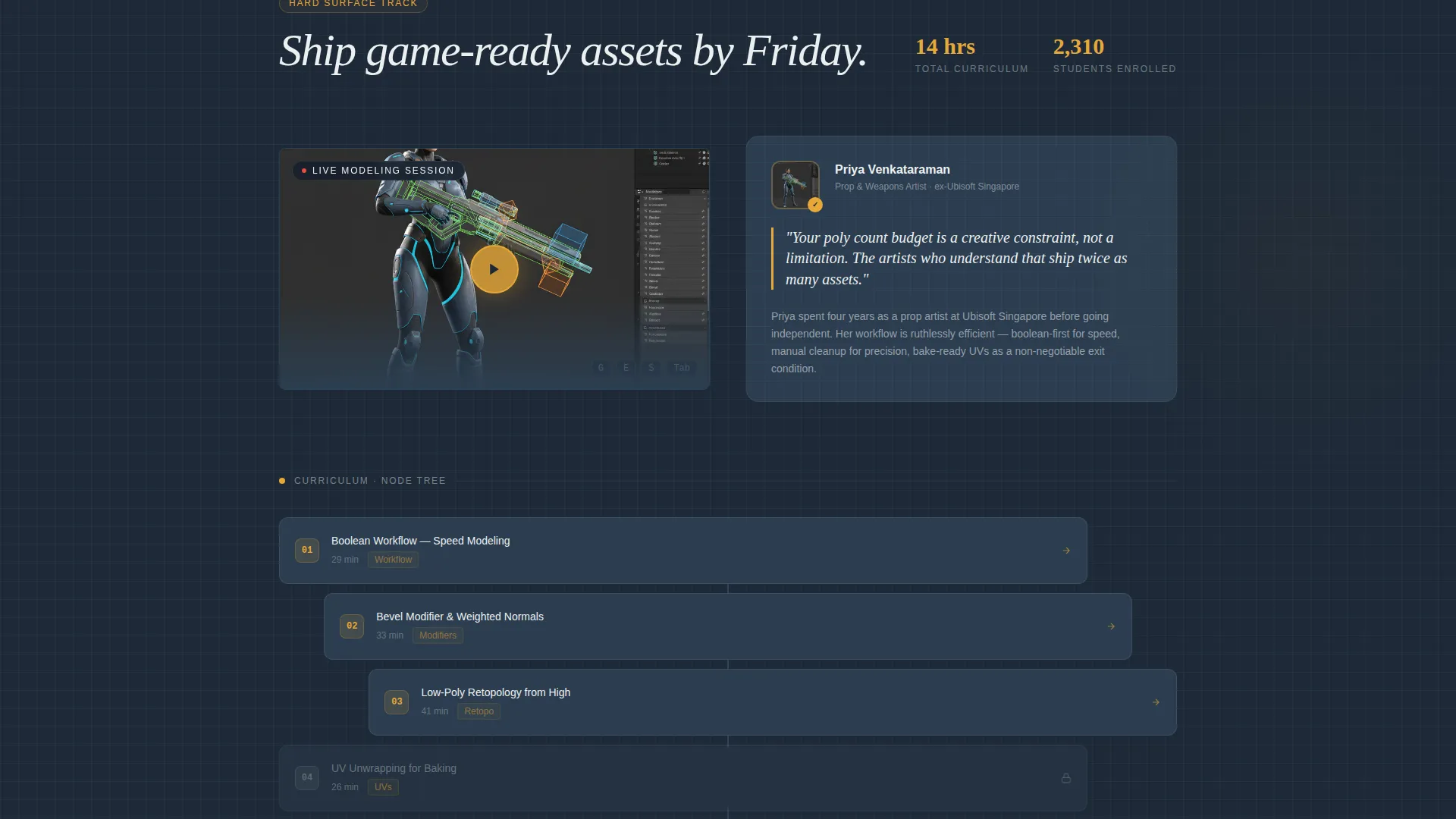
- Four spoke sections, each containing a looping instructor video, a node-tree curriculum layout, and a free preview lesson
- A resource magnet block with an email-gated topology cheat sheet and a skill-level dropdown
Feature list
This template is built around a small set of purposeful features. Each one supports the goal of earning trust before asking for a commitment.
Quiz-Starter Header
Visitors land on one question: "What do you want to build first?" Four clickable thumbnails, character, hard-surface weapon, architectural interior, motion-graphics loop, each rotate subtly on hover. Selecting one scrolls the visitor directly to their matching spoke section.
Fixed Left-Rail Anchor Navigation
A persistent left-side navigation hub lists each spoke by discipline name: Character, Hard Surface, Environment, and Motion. Visitors can jump between sections at any point without losing their place in the page.
Instructor-Led Spoke Sections
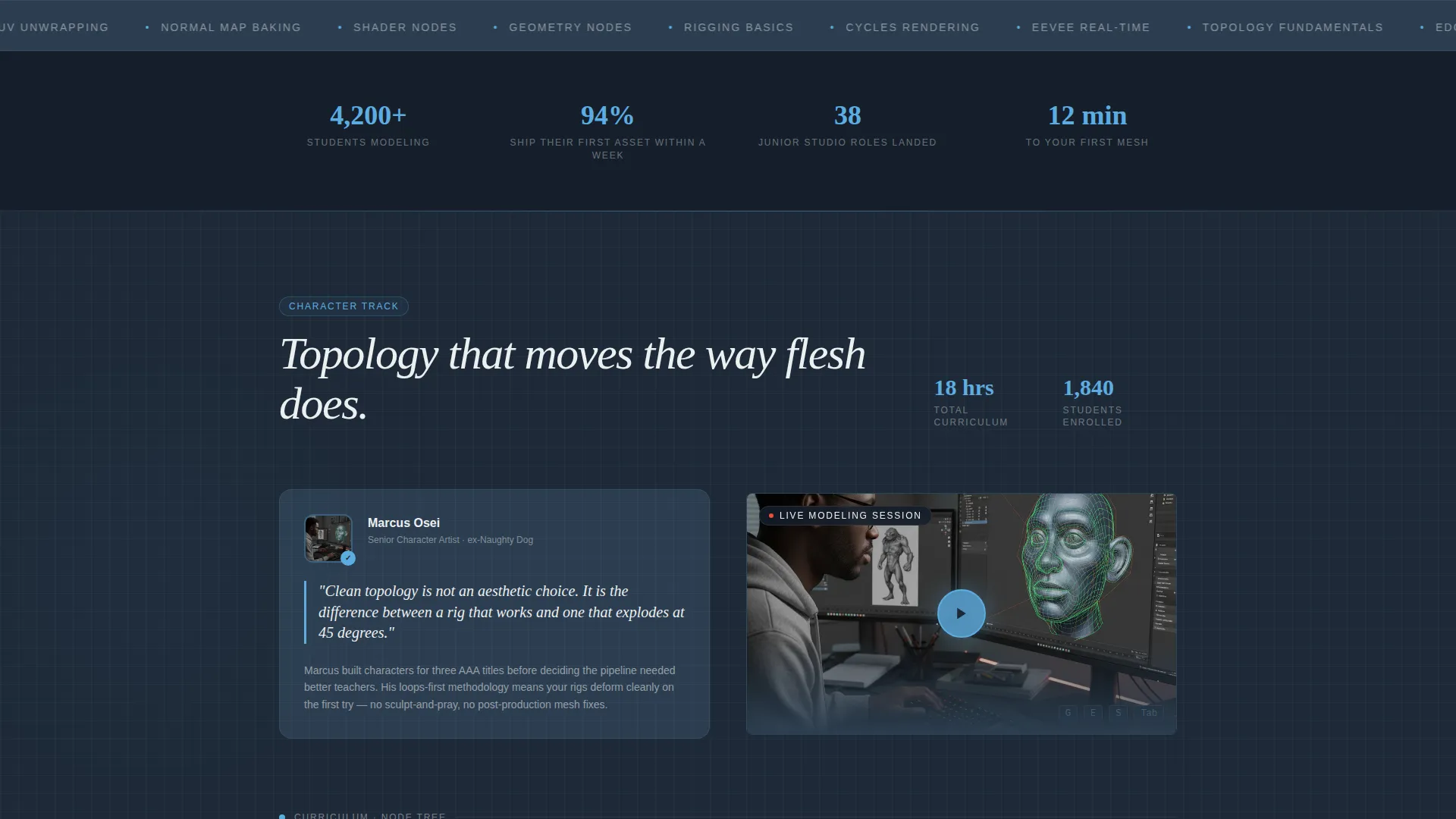
Each discipline spoke opens with a short looping video of the instructor modeling live. Hotkeys, viewport rotation, and mesh formation are visible in real time, making the teaching voice immediately credible.
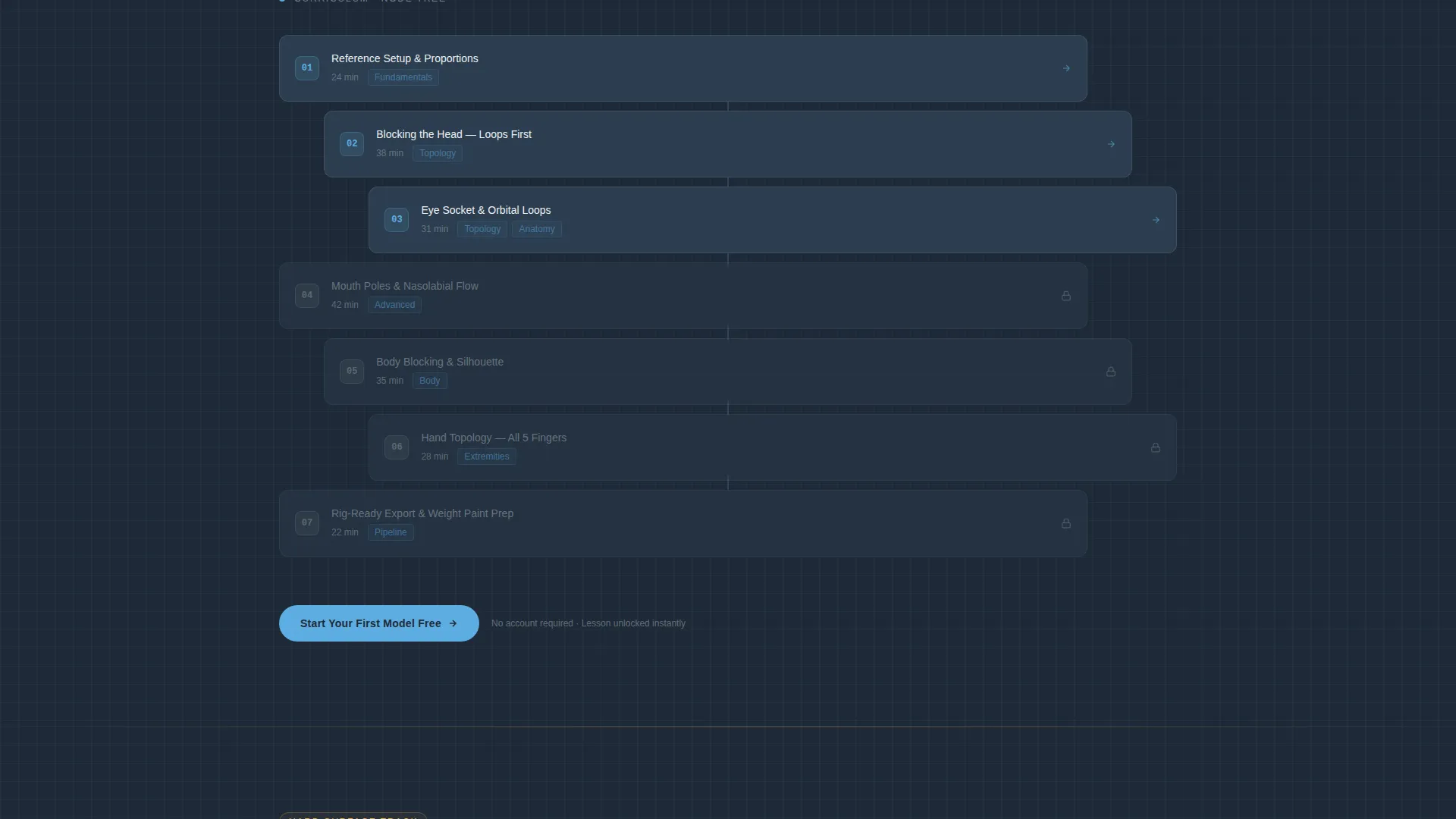
Node-Tree Curriculum Layout
Lesson structure is presented as a branching node tree that mirrors the visual logic of a shader editor. Each node carries a headshot and an instructor quote, keeping the curriculum layout warm and human rather than a plain list.
Free Preview and Resource Magnet
Every spoke ends with an unlocked preview lesson requiring no signup. A secondary block offers a downloadable topology cheat sheet gated only by an email address and a single skill-level dropdown, with no credit card required.
Slate and Sky Visual System
The color palette uses deep viewport slate as the primary background, toolbar charcoal for card surfaces, open-sky blue on all interactive elements, and wireframe white for body text. The result feels like Blender's own interface adapted for a course page.
Page sections overview
| Section | Purpose |
|---|---|
| Quiz Starter Header | Routes visitors to their discipline spoke |
| Fixed Anchor Nav | Keeps spoke navigation always accessible |
| Character Spoke | Covers character modeling curriculum |
| Hard Surface Spoke | Covers hard-surface and weapon modeling |
| Environment Spoke | Covers architectural interior modeling |
| Motion Spoke | Covers motion-graphics loop content |
| Resource Magnet Block | Captures emails via cheat sheet offer |
| Free Preview call to action | Delivers a lesson without requiring signup |
Design & branding system
The visual identity follows an Educational Guide theme built around a Slate and Sky color system. Every color choice references the Blender workspace that students already know, so the page feels like a natural extension of the tool rather than a separate marketing environment.
- Deep viewport slate (#1E2A38) as the primary background across all spokes
- Toolbar charcoal (#2C3E50) for card surfaces, section dividers, and spoke containers
- Open-sky blue (#5DADE2) on every interactive element, progress indicator, and hover state
- Wireframe white (#ECF0F1) for body text and outlined illustration style
Mobile & speed optimization
The layout is structured to remain usable and readable on smaller screens. The fixed left-rail navigation adapts to the page's responsive constraints so visitors on any device can move between spokes without confusion.
- Spoke sections are stacked vertically on mobile, keeping the curriculum nodes readable
- The quiz-starter header and thumbnail grid scale down without losing the hover interaction context
How this template helps you convert
The page is built around a Content and Resource conversion model. Visitors receive real value before any commitment is requested, which builds trust in the teaching voice first and drives signup second.
- The quiz header creates immediate personalization, making visitors feel the page was designed for their specific goal before they scroll a single pixel.
- The free preview lesson at the bottom of each spoke lets visitors experience the actual instruction style, removing the main objection to signing up.
- The topology cheat sheet resource magnet collects email addresses through a low-friction exchange, using only a skill-level dropdown and no payment details.
Other information about this template
This template is part of the Polygonpath design series, built specifically for online skill course creators in the 3D modeling and digital art space. It is a single-page layout with anchor-based navigation, not a multi-page site.
- The page includes no course pricing, no credit card prompts, and no upsell blocks, keeping the focus on earning trust
- The node-tree curriculum display is a visual layout component, not a functional learning management system
- The template suits creators launching a Blender course whether they are independent educators or small studios building a training brand
- All four spokes share the same structural pattern, making it straightforward to adapt any spoke for a different discipline or skill level
Theme
Educational Guide
Creative direction
Team & People
Color system
Slate & Sky
Style
Hub & Spoke (Anchor Nav)
Direction
Content/Resource
Page Sections
Quiz-starter Header with Rotating Thumbnails
Fixed Left-rail Anchor Navigation
Instructor-presence Spoke Sections
Node-tree Curriculum Layout
Free Preview and Email-gated Resource
Slate and Sky Color System
Related questions
Does this template require any coding knowledge to set up?
Can I add or remove discipline spokes from the page?
Is the topology cheat sheet file included with the template?
Do I need video content ready before publishing this page?
What student skill levels does this page work for?



