Portal - Frictionless Insurance Landing Page Template
Portal is a hub-and-spoke insurance customer portal landing page template built for mid-market property and casualty carriers and managing general agents. It pairs a product screenshot header with a scrollable feature matrix covering claims, payments, documents, communications, and analytics. The result is a confident, conversion-focused page that shows the product before asking for the meeting.
by Rocket studio
Quick summary
Portal is a single-page, anchor-nav landing page template designed for insurance customer portal products. It leads with a crisp dashboard screenshot and walks prospects through five core capability spokes. Inline proof stats and a pinned demo-booking form keep buyers moving toward conversion. The Slate and Sky color system gives every section a clean, software-native feel.
Who this template is for
This template is built for software vendors and product teams selling self-service portal technology to insurance carriers and managing general agents (MGAs). It speaks directly to the buyers who own customer experience and call center budgets.
- Mid-market property and casualty (P&C) carriers looking to reduce inbound call volume
- MGAs competing against insurtech challengers for profitable customer segments
- Insurance software vendors who need a lead-generation page that shows real product capability before asking for a call
What problem this template solves
Insurance carriers lose ground every quarter to digital-first competitors, yet most vendor landing pages still rely on vague promises and stock photography. Prospects need to see the actual product and understand what it does before they will book a demo.
- Call center volume stays high because policyholders cannot self-serve basic tasks like filing claims or pulling digital ID cards
- Vendor pages bury the product behind headline copy, leaving technical buyers unconvinced before the form ever appears
- No clear path exists for technical evaluators who need API documentation before committing to a sales conversation
What you get with this template
You get a fully structured, section-led landing page that walks each visitor from first impression to conversion without friction. Every layout decision supports the goal of showing the product first and earning the click second.
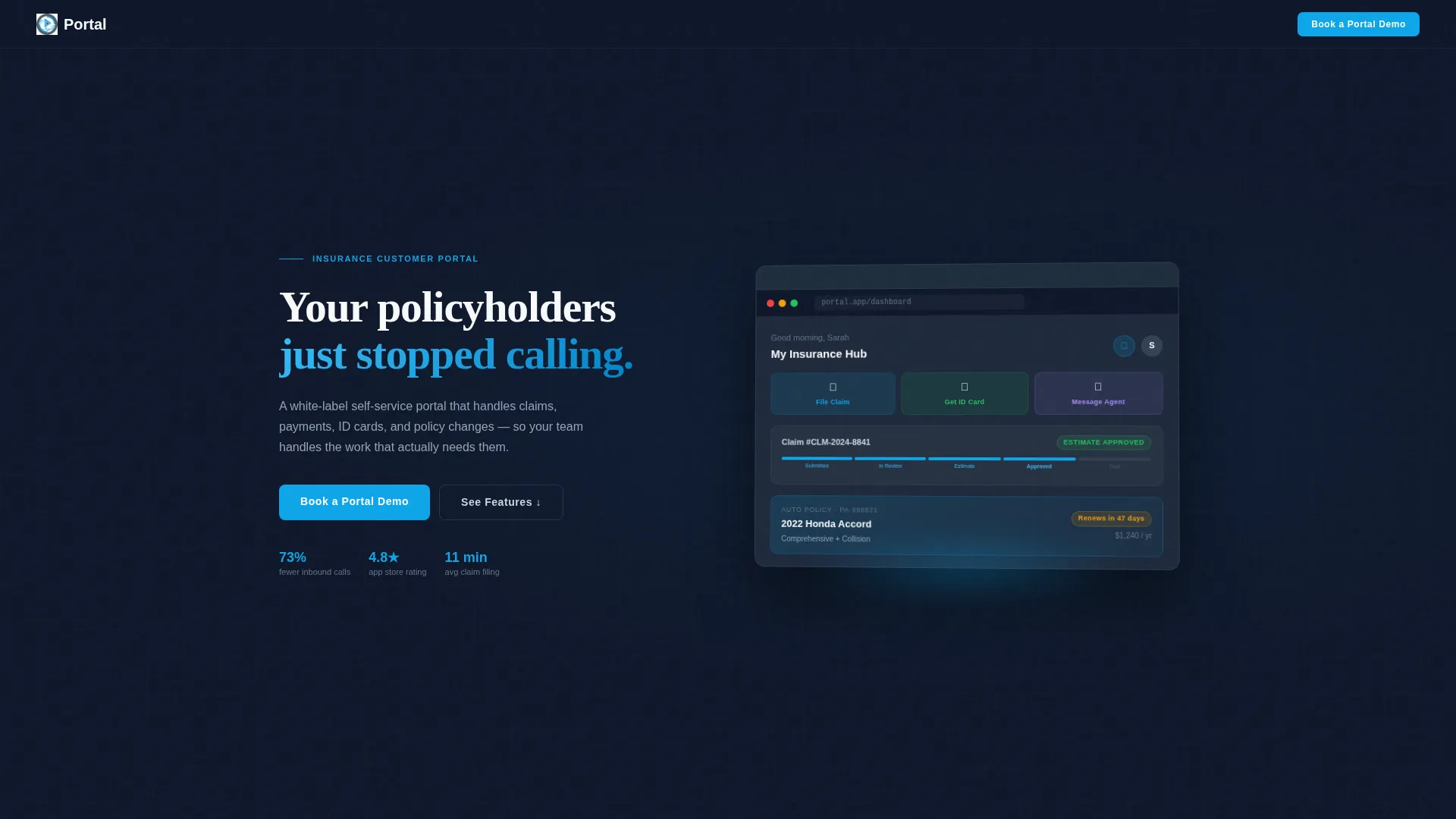
- A product screenshot header with a tilted dashboard render, visible claim status, and a quick-action row baked into the hero
- A five-spoke anchor navigation system covering Claims, Payments, Documents, Communications, and Analytics, each with a two-column feature grid and contextual screenshot
- Dual conversion paths: a three-field inline demo-booking form pinned in the nav, and a secondary link to integration documentation for technical buyers
Feature list
This template delivers a structured set of purpose-built layout components. Each one maps directly to a real sales or conversion objective on an insurance portal page.
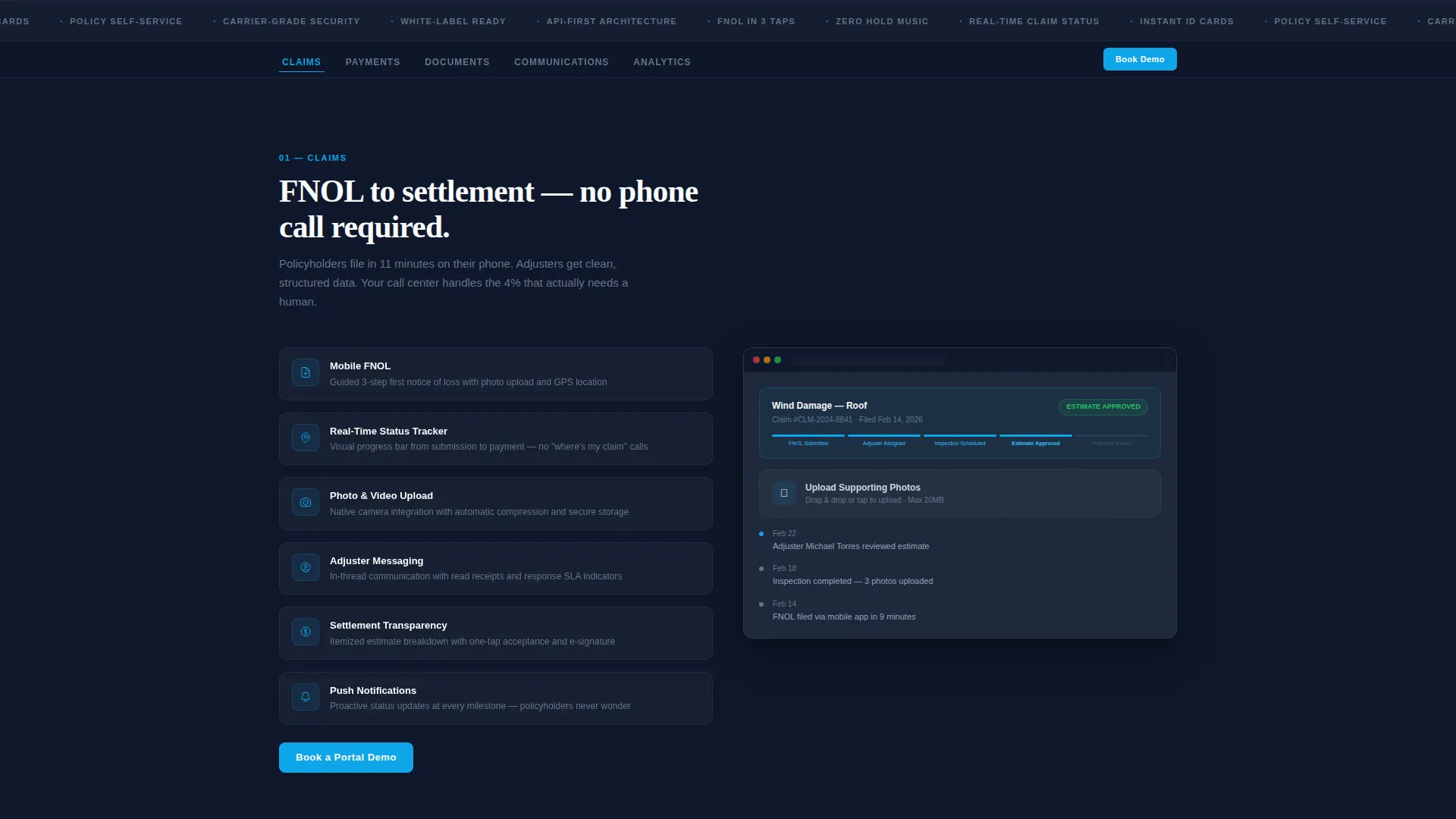
Pinned Anchor Navigation
A sticky top navigation bar links directly to each of the five feature spokes. The primary "Book a Portal Demo" call to action travels with the user on every scroll, so the conversion path is never more than one tap away.
Five-Spoke Feature Matrix
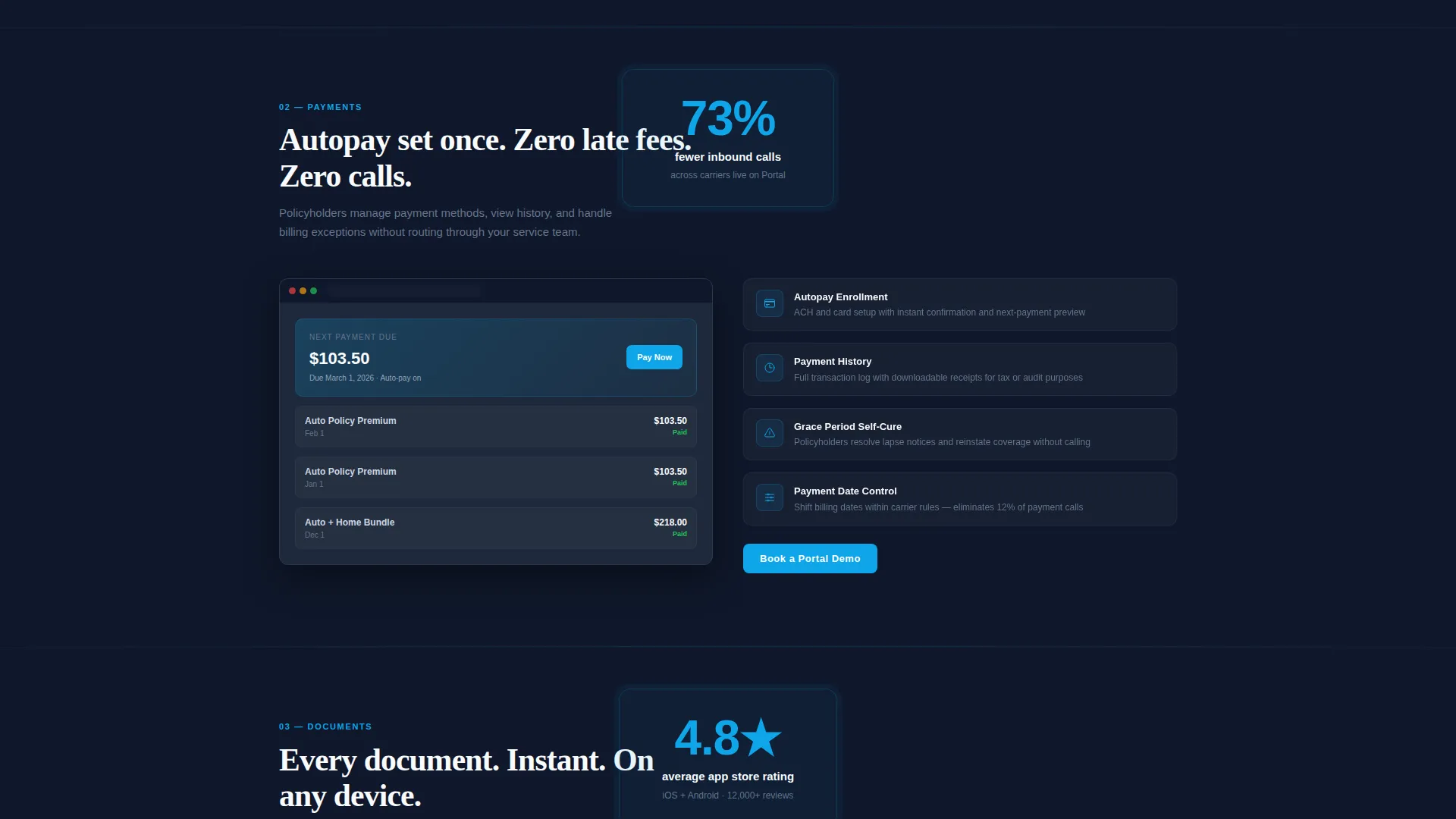
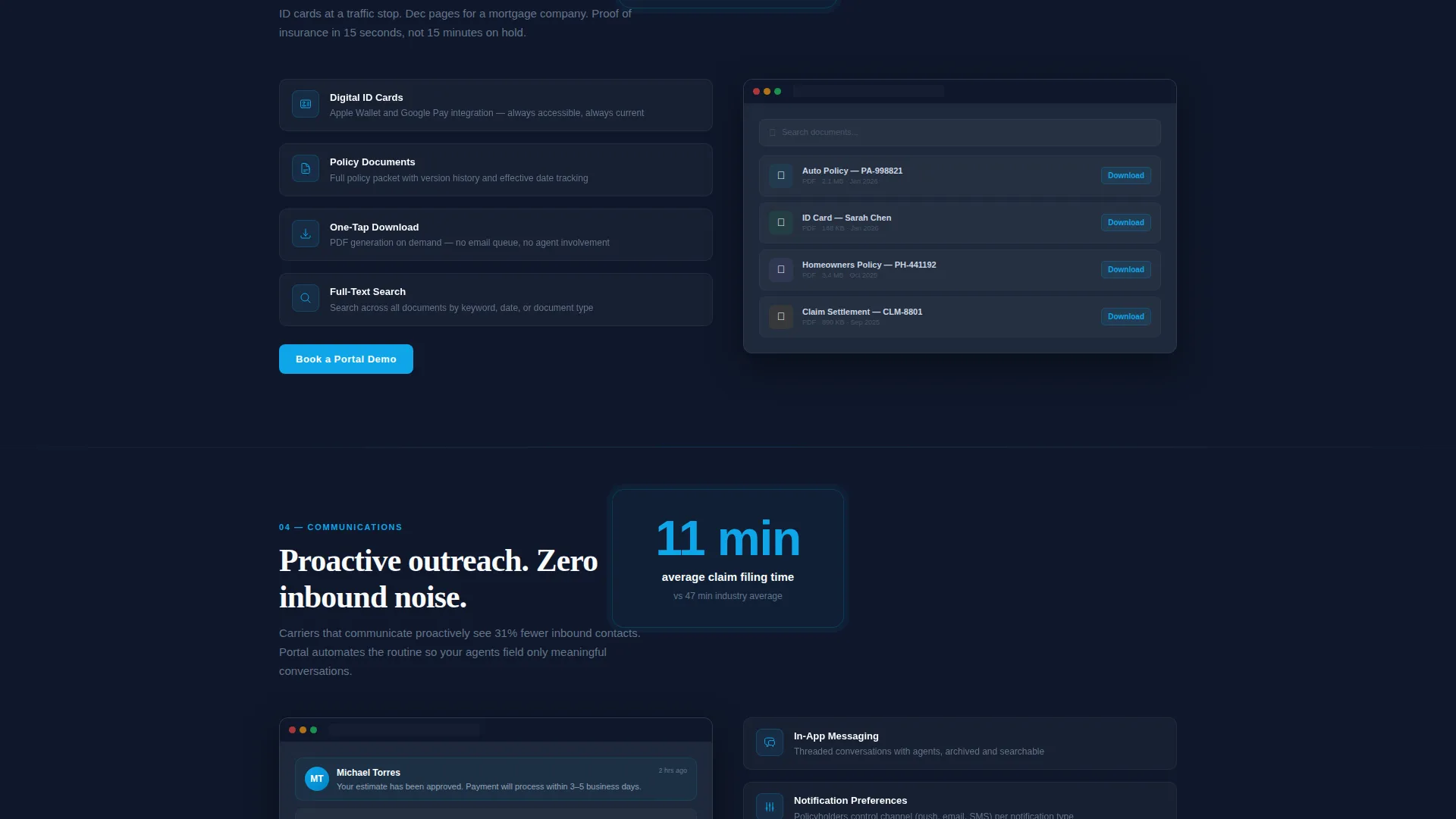
Each spoke (Claims, Payments, Documents, Communications, Analytics) lands on a two-column layout. The left side holds a tight feature grid with icon, name, and a one-line description. The right side shows a contextual screenshot of that module in action.
Proof Stat Callouts
Single-stat callout blocks appear between each spoke. Numbers like "73% fewer inbound calls," "4.8 star app store rating," and "11-minute average claim filing" pulse in sky blue, creating credibility beats that reward the scroll without interrupting the layout flow.
Inline Lead Capture Form
The primary conversion component is a three-field inline form: company name, book of business size (dropdown with three tiers), and work email. It is embedded on the page rather than hidden behind a modal, reducing friction at the moment of intent.
Secondary Technical Buyer Path
Below the final spoke, a separate call to action points technical evaluators toward integration documentation. This gives developers and IT stakeholders a clear next step without pulling them into a sales conversation they are not ready for.
Claims-Priority Layout Rhythm
The Claims spoke receives the most layout real estate because it represents the highest-pain use case for carrier buyers. Each subsequent spoke tightens in density, building a sense of accumulated capability as the visitor scrolls deeper.
Page sections overview
| Section | Purpose |
|---|---|
| Header hero | Anchors the product screenshot and primary headline |
| Anchor navigation bar | Pins conversion call to action and section jump links |
| Claims spoke | Covers claim filing and status tracking features |
| Payments spoke | Highlights billing and payment self-service options |
| Documents spoke | Shows policy document and ID card access features |
| Communications spoke | Presents agent messaging and notification features |
| Analytics spoke | Displays carrier-side reporting and usage data |
| Proof stat callouts | Delivers social proof between each feature spoke |
| Demo booking form | Captures lead data via inline three-field form |
| Technical buyer path | Directs API-focused evaluators to integration docs |
Design & branding system
The Slate and Sky color system gives the page a software-native visual identity. It feels like a well-built fintech or weather app: clean data floating in open space, with nothing heavy or decorative competing for attention.
- Deep charcoal slate (#1E293B) for primary backgrounds, cool mid-gray (#64748B) for secondary text and dividers, open sky blue (#0EA5E9) for every button and interactive highlight, and cloud white (#F8FAFC) for card surfaces
- The header dashboard render floats at a subtle 3-degree tilt with a soft sky-blue glow underneath, giving the screenshot a sense of depth without any heavy visual effects
- The overall theme follows a Startup Velocity direction: high information density, tight spacing, and a confident pace that signals modern software rather than legacy insurance technology
Mobile & speed optimization
The template layout is designed to translate naturally from desktop to smaller screens. The hub-and-spoke structure keeps navigation clear even on mobile viewports, where anchor links become critical for orientation.
- The pinned anchor nav collapses cleanly for mobile use, keeping the demo call to action accessible without crowding the viewport
- Two-column spoke layouts stack vertically on smaller screens, preserving the feature grid and screenshot pairing in a readable single-column flow
How this template helps you convert
Every structural decision in this template serves the conversion goal. The page earns trust before it asks for anything, and it gives multiple types of buyers a clear path forward.
- The product screenshot hero puts real dashboard user interface in front of the prospect immediately. By the time they reach the first form, they have already seen the product working, which lowers the psychological barrier to booking a demo.
- The pinned call to action in the anchor nav ensures the "Book a Portal Demo" button is visible at every point in the scroll, without requiring the visitor to hunt for it or scroll back to the top.
- The secondary "See the Integration Docs" path captures technical evaluators who would otherwise leave without converting, turning a potential dead end into a qualified lead touchpoint.
Other information about this template
This template is part of the Insurance Software and SaaS category within the broader Technology template collection. It is specifically designed for the insurance customer portal niche, where the gap between legacy carrier portals and modern insurtech experience is most commercially relevant.
- The template style is Hub and Spoke with Anchor Navigation, a structure well suited to products with multiple distinct feature modules that each need dedicated real estate
- The creative direction is a Feature Matrix, meaning the primary scroll experience is organized around demonstrable capabilities rather than marketing copy
- The header concept is a Product Screenshot, which is intentionally chosen over illustrated mockups to signal that the product is real and ready to evaluate
- The Startup Velocity theme is reflected in tight visual rhythm, proof-stat pacing, and a color system that reads as modern software rather than enterprise insurance
Theme
Startup Velocity
Creative direction
Feature Matrix
Color system
Slate & Sky
Style
Hub & Spoke (Anchor Nav)
Direction
Lead Generation
Page Sections
Pinned Anchor Navigation with Call to Action
Five-spoke Feature Matrix Layout
Between-spoke Proof Stat Callouts
Three-field Inline Lead Form
Secondary Integration Docs Path
Claims-priority Layout Rhythm
Related questions
Who is this landing page template designed for?
Can I adapt the five feature spokes to match my own product modules?
What does the inline demo booking form collect?
Is there a path for technical buyers who are not ready to book a demo?
Why does the Claims section get more space than the other spokes?



