Coworking Digital Presence Cost Estimator Website Template
Portal is a modular card-grid landing page template built for coworking client portals. It combines a live Dashboard Preview header, an interactive savings calculator, and a feature-showcase grid into one focused flow. The design uses an Electric Indigo color system on a Dashboard Pro theme, guiding freelancers, founders, and operations managers toward downloading or trying the portal app.
by Rocket studio
Quick summary
Portal is a single-page, card-grid landing page template designed for coworking client portals. It opens with an animated dashboard header, leads immediately into an interactive savings calculator, and builds trust through modular feature cards. The Electric Indigo color system keeps the interface sharp and energized, while every section pushes toward one clear action: get the app.
Who this template is for
This template is built for coworking businesses and portal product teams that need to convert visitors into app users. It speaks directly to the people who will actually use the portal every day.
- Freelance designers managing hot-desk credits across flexible schedules
- Startup founders scaling team seat allocations quickly and without friction
- Operations managers tracking check-ins and desk usage across multiple city locations
What problem this template solves
Coworking portals are powerful tools, but landing pages for them often undersell what the product actually does. Visitors leave before they understand the value. This template solves the persuasion problem before it starts.
- Visitors rarely trust a portal app without seeing it work first
- Generic coworking pages fail to speak to the specific roles using the product
- No clear path from "curious visitor" to "app download" leaves conversions on the table
What you get with this template
You get a fully structured, single-page layout built around the Calculator/Tool First creative direction. Every section is purposeful and sequenced to move the visitor forward.
- An animated Dashboard Preview header that shows the portal in action before a word is read
- A live interactive savings calculator that compares current desk spend against three portal-managed plans
- A dense modular card grid that showcases each portal feature with micro-animations
Feature list
This template delivers a tightly sequenced set of interactive and visual components. Each one is designed to demonstrate portal value rather than describe it.
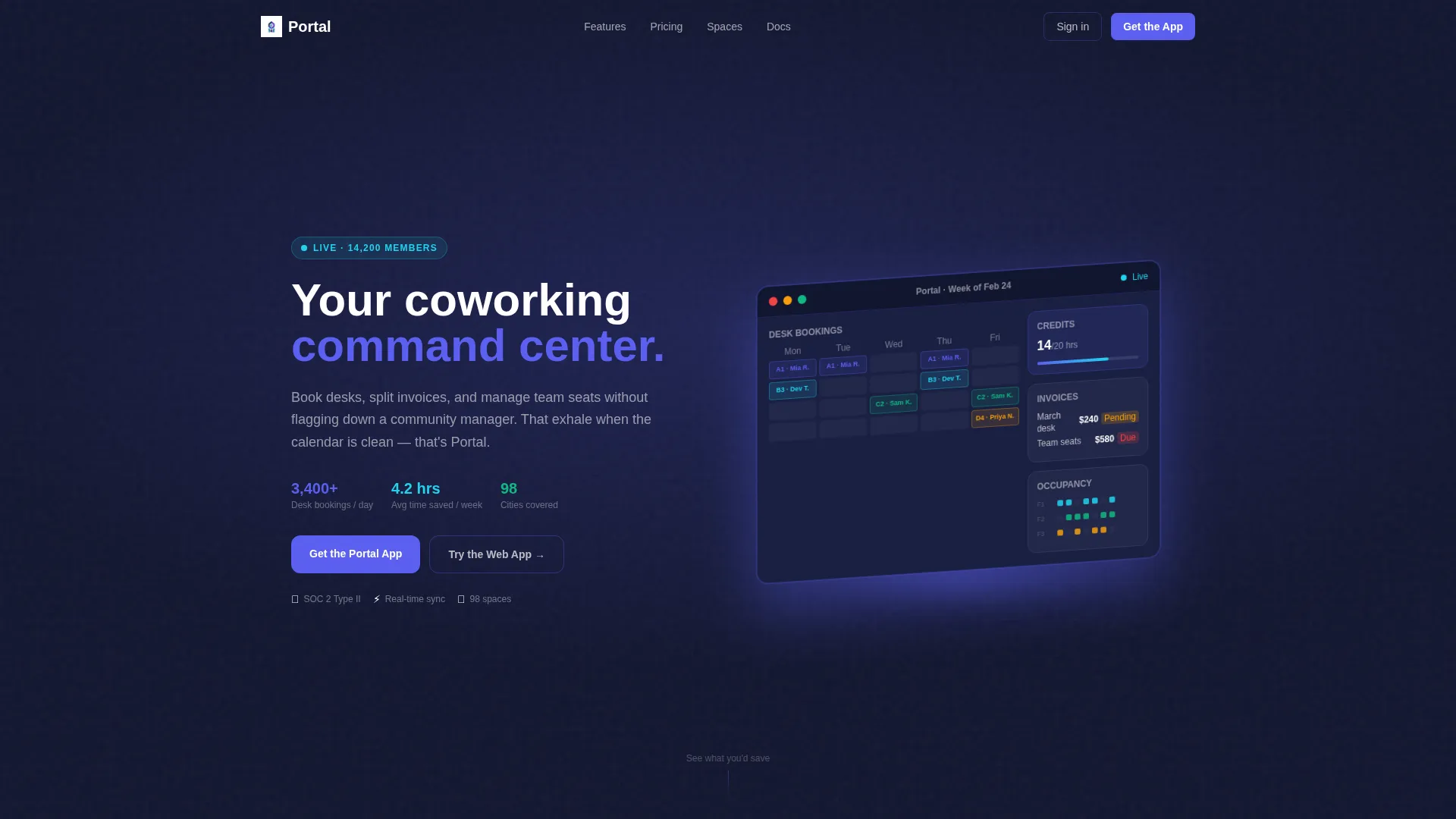
Animated Dashboard Preview Header
The header renders a pixel-perfect isometric view of the portal's main screen. It shows a week-view calendar with color-coded desk bookings, a credit balance display, two pending invoice cards, and a three-floor occupancy heat map. A cursor animates across the preview, dragging a booking from Tuesday to Thursday in real time.
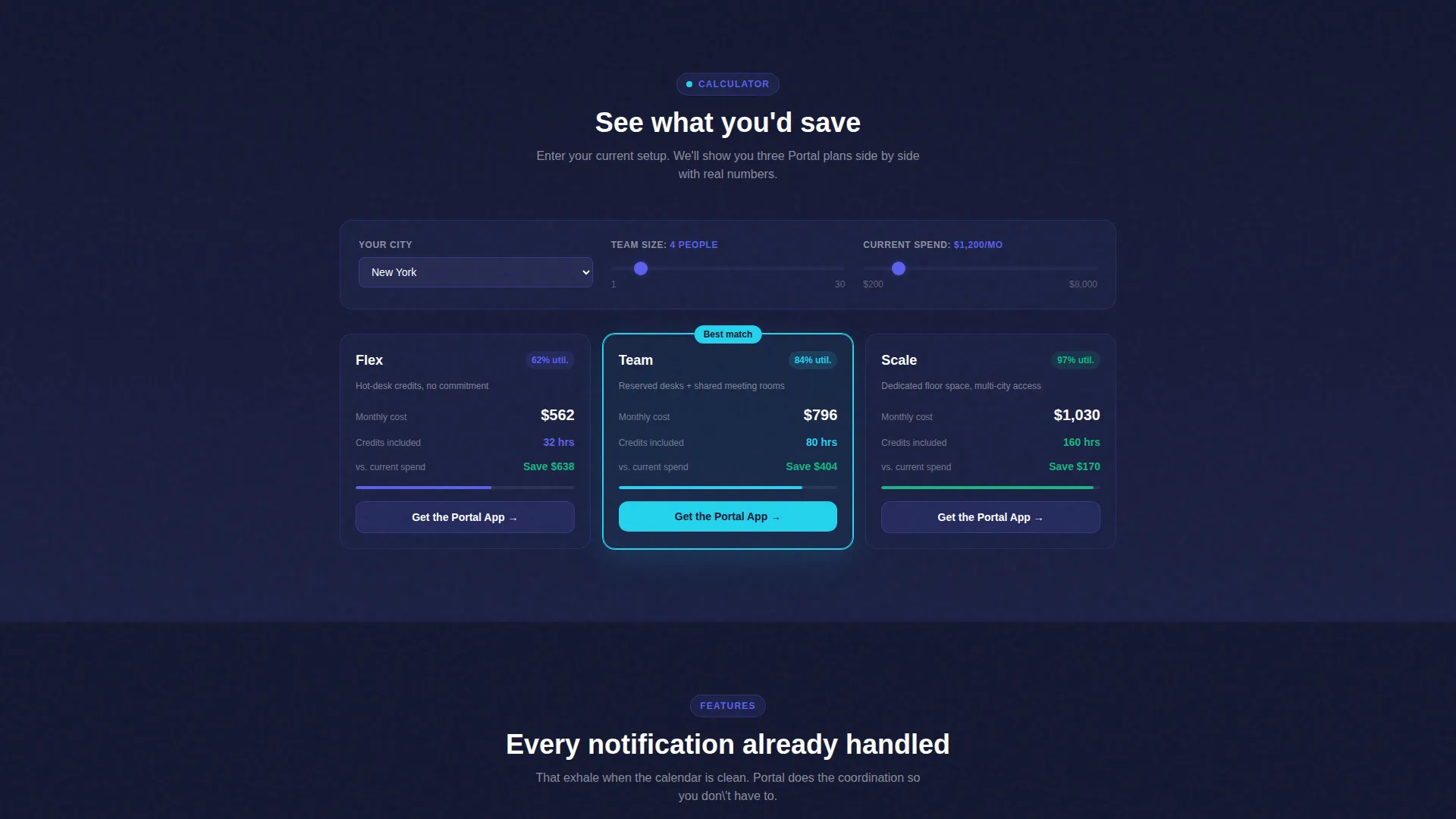
Interactive Savings Calculator
Positioned immediately below the header, this live module lets visitors input their city, team size, and current monthly desk spend. The tool instantly renders a card grid comparing the visitor's status quo against three portal-managed plans. Each result card shows projected savings, included credits, and a utilization score.
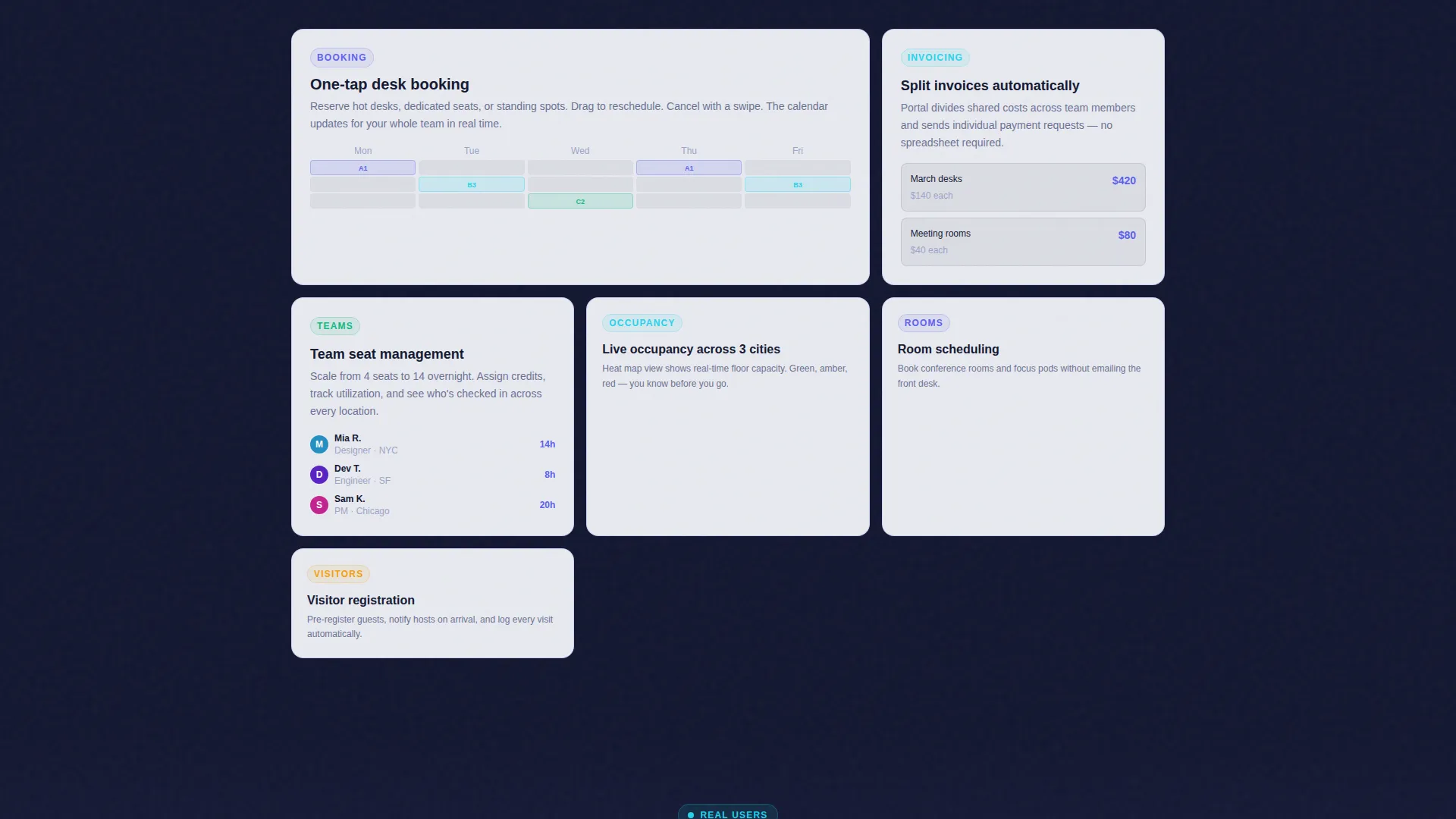
Modular Feature Card Grid
As visitors scroll past the calculator, the page shifts into a card-grid evidence section. Each card focuses on one portal feature: desk booking, invoice splitting, team seat management, visitor registration, or room scheduling. Every card contains a micro-animation of that feature in action.
Contextual and Sticky Call-to-Action
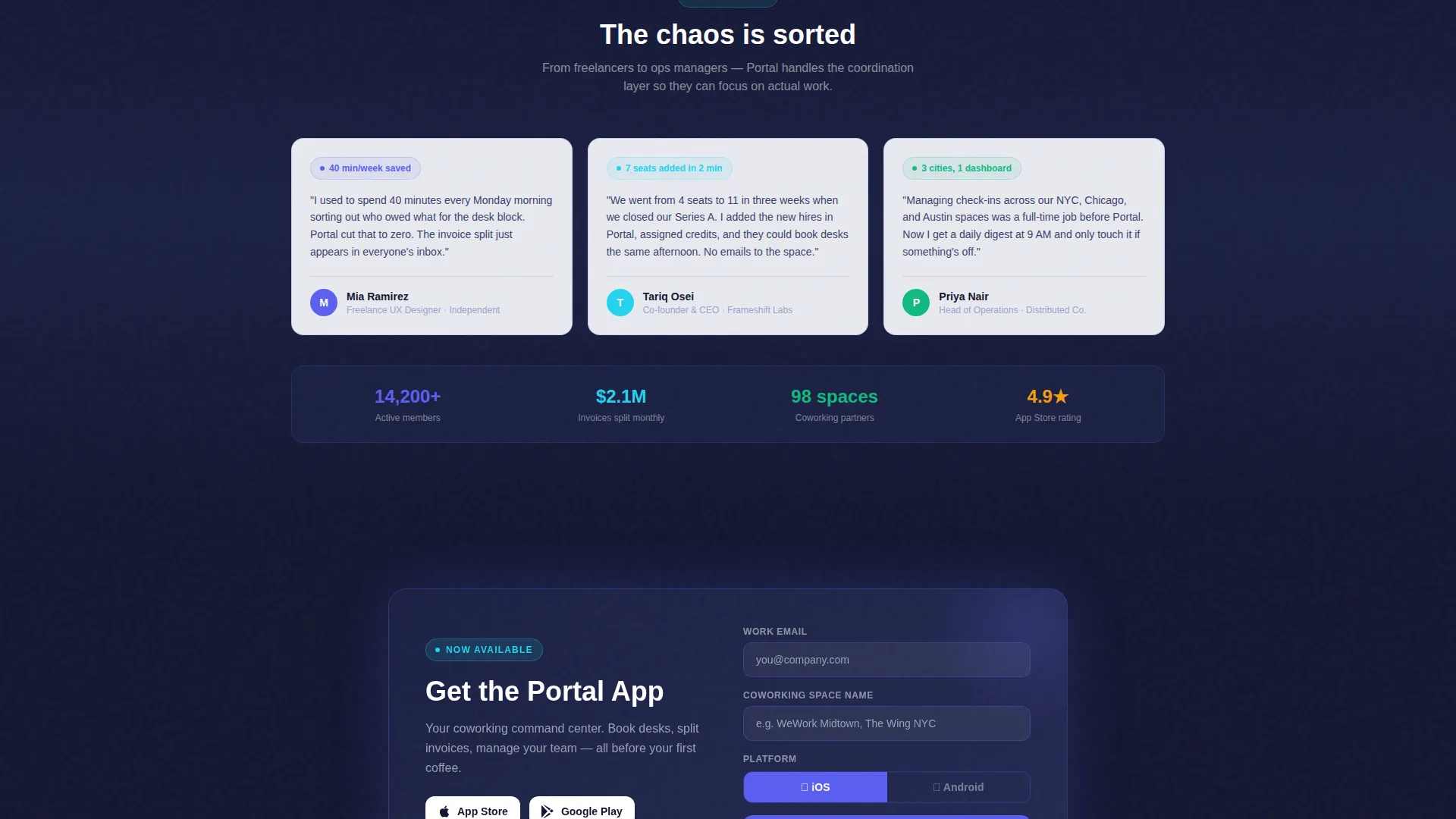
The primary call-to-action, "Get the Portal App," appears first inside the calculator results after the visitor has engaged with the tool. It reappears as a sticky bottom bar on mobile. Tapping opens a slim form collecting work email, coworking space name, and platform preference between iOS and Android.
Secondary Web App Entry Path
Desktop visitors who prefer not to install an app see a "Try the Web App" option. This secondary path gives instant access without requiring a download, reducing friction for users who want to evaluate the portal before committing.
Live-Status Color Indicators
Electric cyan dots pulse on real-time occupancy indicators throughout the interface preview. These visual cues reinforce the idea that the portal is always live and always current, not a static snapshot. The indigo-to-cyan color shift communicates active versus confirmed states clearly.
Page sections overview
| Section | Purpose |
|---|---|
| Dashboard Preview Header | Shows the portal in animated action before copy loads |
| Savings Calculator Module | Converts visitor intent into a personalized plan comparison |
| Calculator Results Grid | Renders three plan cards with savings, credits, and utilization scores |
| Feature Card Grid | Demonstrates each portal feature with focused micro-animations |
| Desk Booking Card | Highlights the calendar-based desk reservation workflow |
| Invoice Splitting Card | Shows how team billing is divided without manual coordination |
| Team Seat Management Card | Covers seat scaling and assignment for distributed teams |
| Visitor Registration Card | Explains how guest check-ins are handled inside the portal |
| Room Scheduling Card | Presents room reservation as part of the broader portal workflow |
| App Download call to action | Presents the primary app download form with platform toggle |
| Web App Secondary call to action | Offers a browser-based trial path for desktop visitors |
| Mobile Sticky Bar | Keeps the app download action visible as users scroll on phones |
Design & branding system
The template uses the Electric Indigo color system built on a Dashboard Pro theme. The palette is deliberately precise: it feels like a phone screen glowing in a dim room at 6 AM, already active and organized before the day begins.
- Deep app-shell navy (#121630) anchors the header and navigation background
- Vivid indigo (#5B5FEF) drives primary buttons and active state highlights; cool mist gray (#E8EAF0) forms the card surface field
- Electric cyan (#22D3EE) is reserved for live-status dots and success confirmation states, keeping real-time signals visually distinct
Mobile & speed optimization
The sticky mobile call-to-action bar ensures the app download prompt stays accessible as visitors scroll through the full page on smaller screens. The card-grid layout adapts naturally to narrower viewports without losing the modular rhythm.
- The slim app download form (three fields, one platform toggle) keeps the conversion step lightweight on mobile
- The card grid scales from a dense multi-column desktop layout to a readable single-column mobile flow
- The sticky bottom bar surfaces the primary call-to-action without interrupting the scrolling experience
How this template helps you convert
The entire page is sequenced as a trust-building journey. By the time a visitor reaches the app download form, they have already seen the product work and calculated their own savings.
- The animated dashboard header demonstrates the product in the first seconds, removing the "what is this?" question before it forms
- The interactive savings calculator creates a personalized reason to act, making the download feel like collecting a receipt rather than taking a risk
- The modular feature card grid builds confidence through depth, showing that every workflow a member needs is already handled inside the portal
Other information about this template
This template is categorized under Technology, specifically within the Coworking Digital Presence subcategory and the Coworking Client Portal niche. It is designed as a card-grid modular landing page, not a multi-page website.
- The template style is Card Grid (Modular), meaning sections can be reordered or removed to match the scope of a specific portal product
- The landing page direction is App Download, so all conversion logic points toward the app install form as the primary outcome
- The Dashboard Pro theme and Electric Indigo color system are self-contained within the template and do not require external design tools to apply
Theme
Dashboard Pro
Creative direction
Calculator/Tool First
Color system
Electric Indigo
Style
Card Grid (Modular)
Direction
App Download
Page Sections
Animated Dashboard Preview Header
Interactive Savings Calculator
Modular Feature Card Grid
Contextual App Download Call to Action
Secondary Web App Path
Live-status Cyan Indicators
Related questions
Who is this landing page template built for?
Can I use this template without offering a mobile app?
What does the savings calculator show visitors?
How customizable is the card grid layout?
Does this template include the portal app itself?



