Daycare Client Portal Landing Page Template
Portal is a dashboard-style daycare client portal landing page template built for daycare directors and childcare professionals. It uses a dark Midnight Blue color system, interactive scrollable modules, and a real-time data aesthetic to show parents and directors exactly what the product does before they ever sign up. The lead generation flow is low friction and built into the design.
by Rocket studio
Quick summary
Portal is a single-page, dashboard-style landing page template designed for daycare client portals. It shows a live-data aesthetic with a Midnight Blue color system, interactive scroll modules, and a low-friction lead generation flow. Directors see how the product works, and parents see what their child's day looks like, all before creating an account.
Who this template is for
This template is built for people who need to communicate the value of a real-time childcare portal quickly and convincingly. It works equally well for daycare directors building their own presence and for product teams selling portal software to childcare centers.
- Daycare directors who want to replace paper sign-in sheets and end-of-day group texts with one clean dashboard
- Working parents who need moment-to-moment visibility into their child's day without calling the center
- Software teams selling daycare client portal solutions who need a lead generation page that proves the product by showing it
What problem this template solves
Running a daycare involves a constant flow of information. Attendance, nap logs, meals, photos, allergy alerts, incident reports, and parent messages pile up across clipboards, group chats, and phone calls. At the same time, parents are refreshing their phones between meetings, hoping for a photo or a quick update. Neither side has a clean system.
- Directors spend time on administrative friction that could go toward the children in their care
- Parents lack real-time visibility and often feel disconnected from their child's day
- A poorly designed landing page fails to communicate the portal's value before asking parents or directors to commit
What you get with this template
You get a fully structured single-page landing page built around a dashboard and data grid visual language. Every section behaves like a product module. Visitors scroll through the page as if they are actually using the portal.
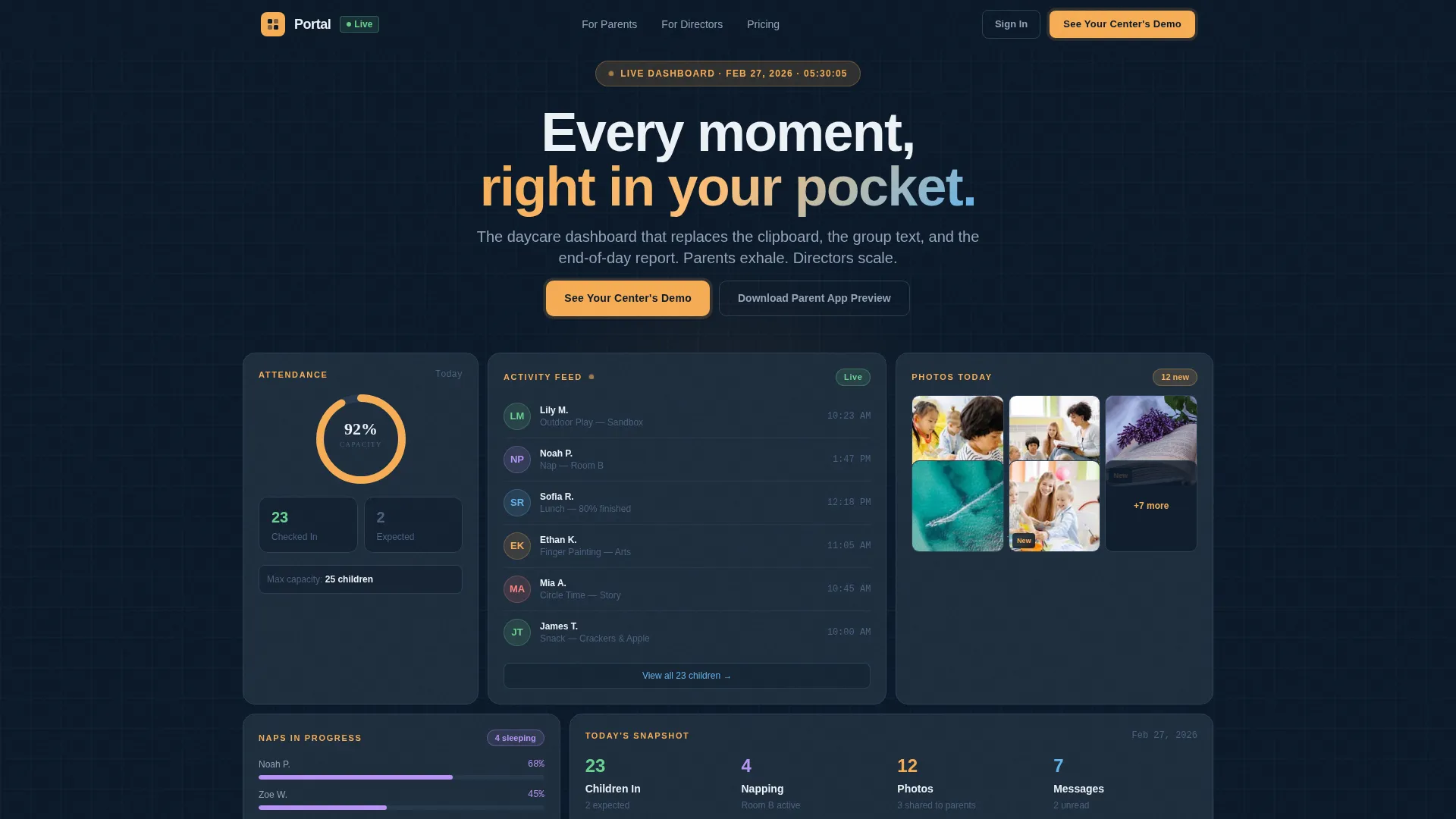
- A hero section styled as a live stats dashboard, complete with specific mid-day data points, an attendance ring chart, and a recent activity feed
- Interactive scroll modules covering attendance grids, milestone trackers, messaging panels, and photo feeds that visitors can click and explore
- Two distinct lead generation paths: a director-facing demo request form and a parent-facing gated PDF download for the parent app preview
Feature list
This template is built around a focused set of components that make a daycare client portal feel real, trustworthy, and worth signing up for.
Live Stats Hero Dashboard
The header is a pixel-perfect mockup of a daycare portal frozen mid-day. It shows 23 children checked in, 4 naps in progress, 12 activity photos uploaded, and a real-time attendance ring chart at 92% capacity. Specific data points like "Lily M. -- Outdoor Play -- 10:23 AM" make it feel authentic rather than illustrative.
Interactive Scroll Modules
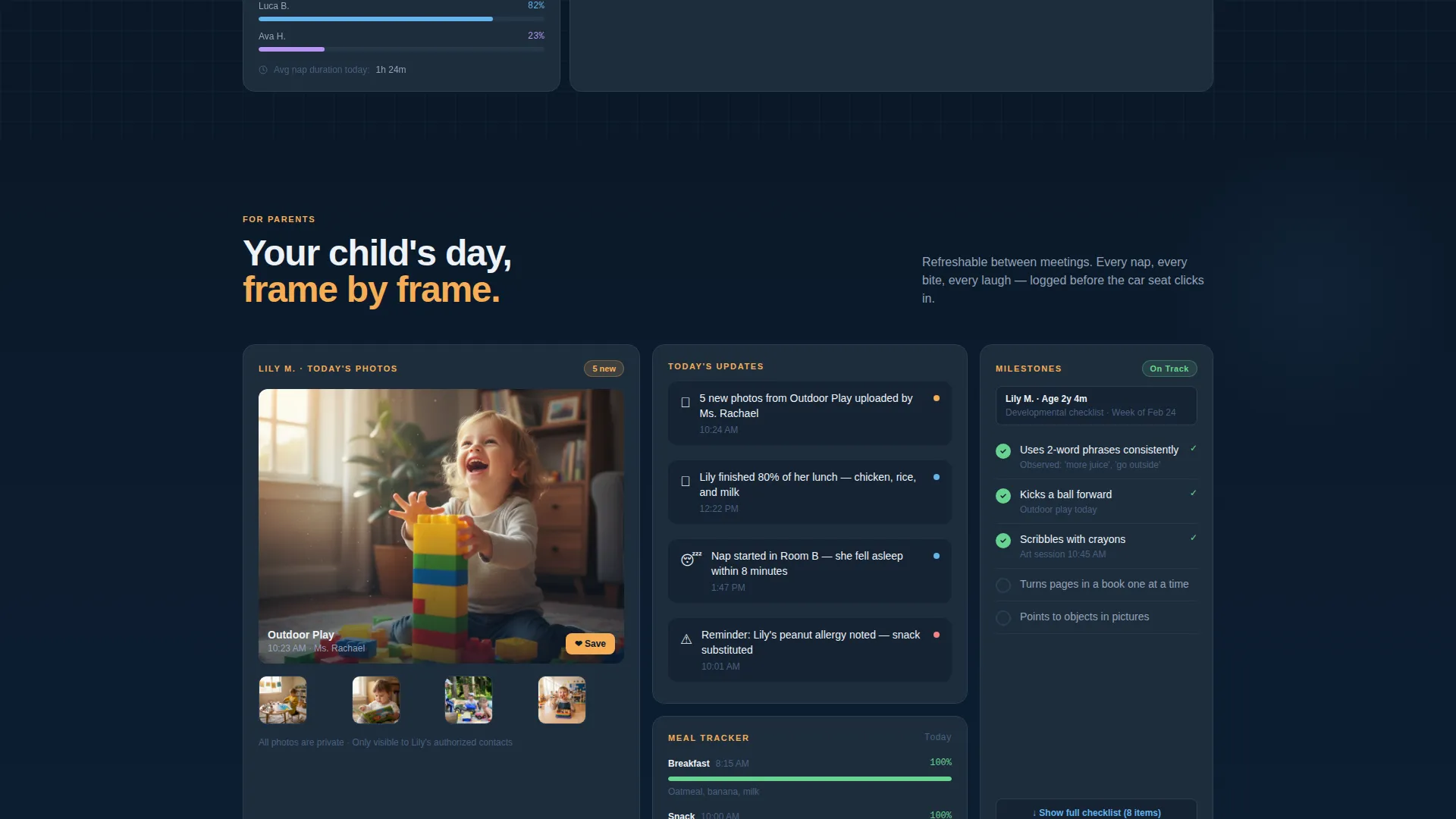
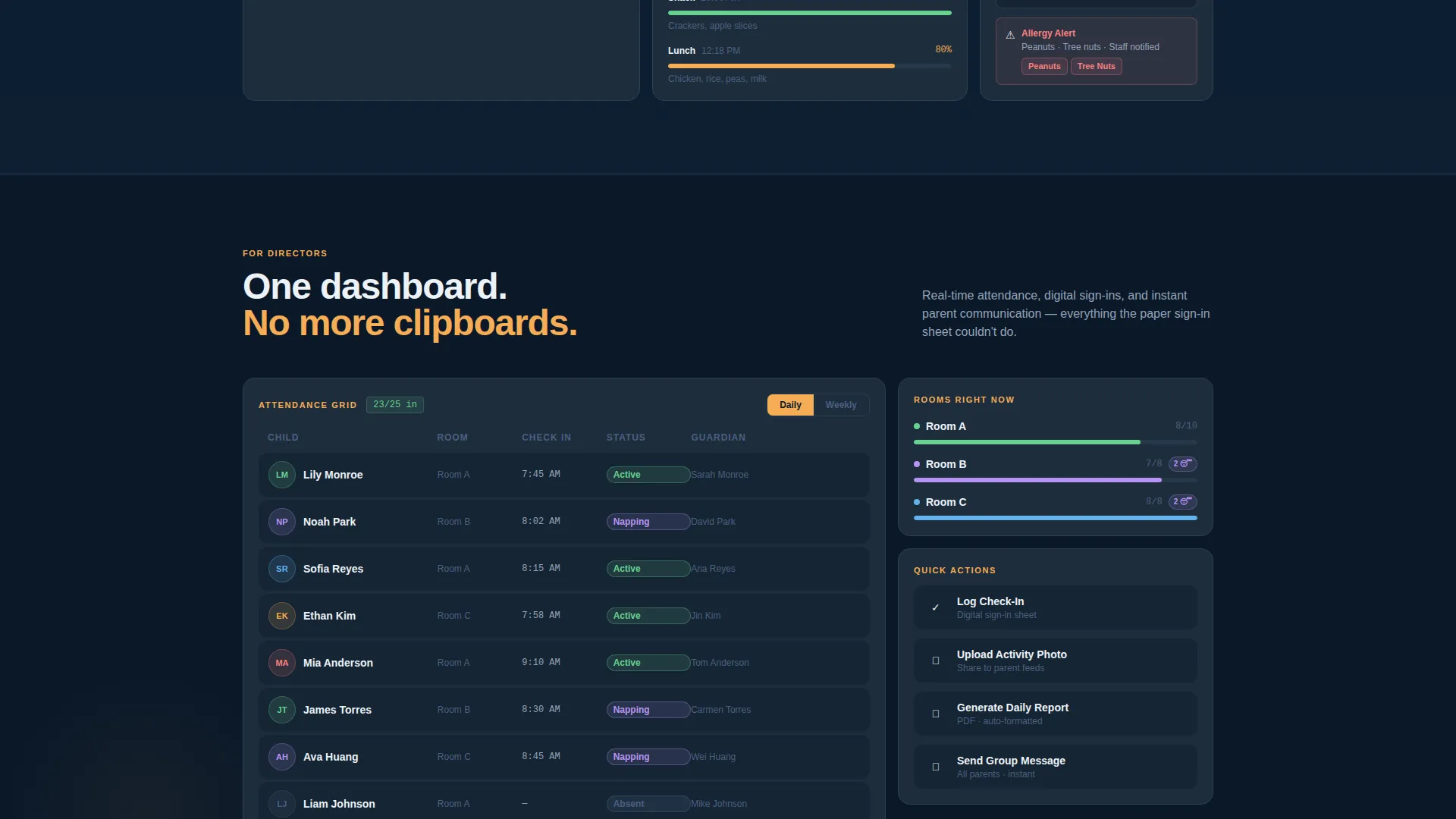
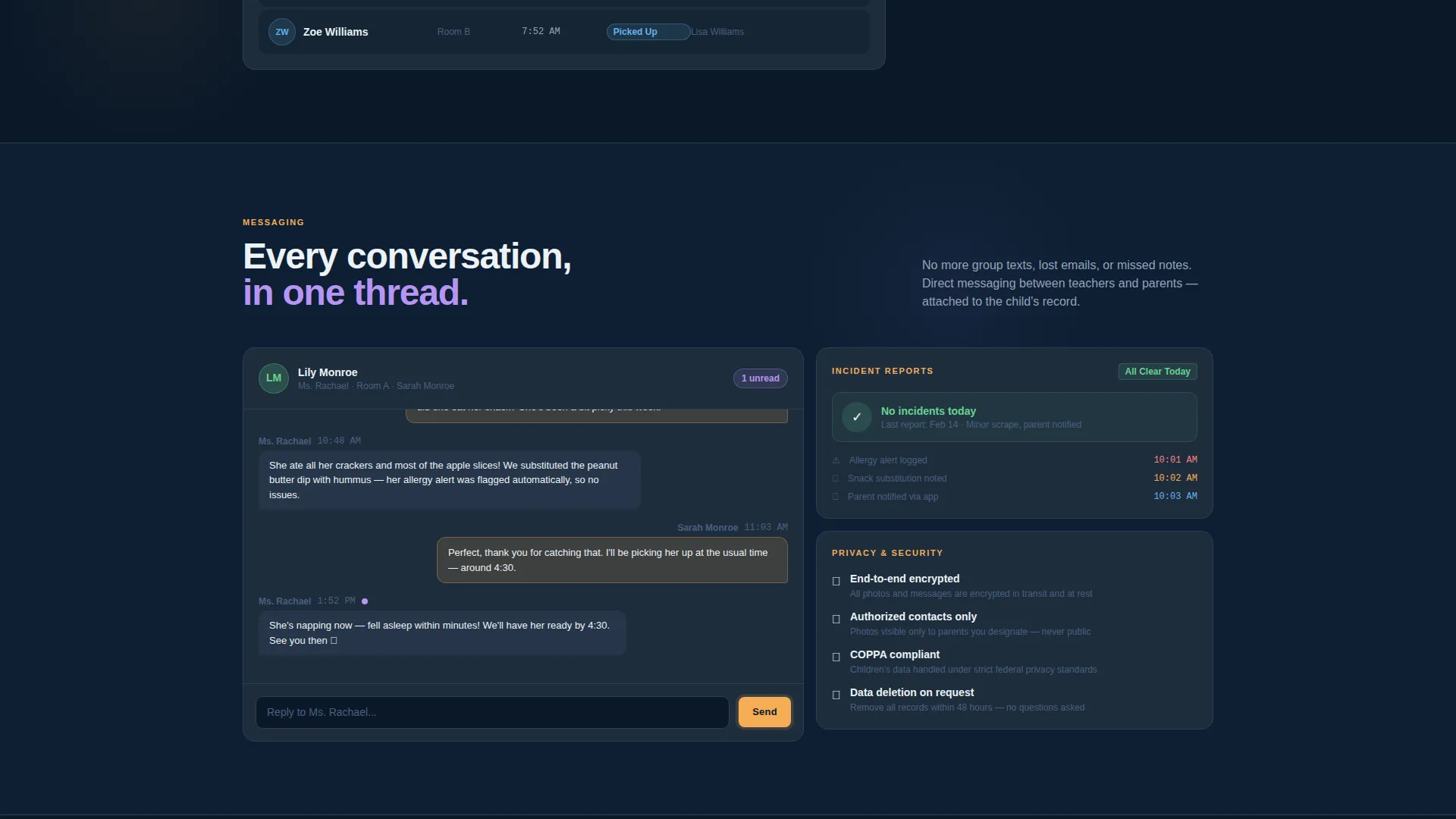
Each scroll section is a clickable dashboard panel. The attendance grid toggles between daily and weekly views. The milestone tracker expands to show a sample developmental checklist. The messaging panel displays a threaded parent-teacher conversation. Visitors interact with the product before they ever fill in a form.
Dual Lead Generation Flow
The template includes two conversion paths designed for two different visitor types. Directors are directed toward a "See Your Center's Demo" form that asks for center name, number of enrolled children, and director's email. Parents who arrive organically are offered a "Download the Parent App Preview" gated PDF, keeping both audiences engaged without friction.
Persistent and Embedded Call-to-Action
The primary call-to-action appears both as a persistent top navigation button and as the final module inside the dashboard grid. It is styled identically to the other panels, so it feels like the next natural step rather than a sales interruption.
Midnight Blue Dashboard Aesthetic
The visual system uses a deep navy background, slate panel cards, crisp white typography, and warm amber highlights on interactive elements. The result is a premium, command-center feel that makes dense childcare data look calm and organized rather than clinical or overwhelming.
Page sections overview
| Section | Purpose |
|---|---|
| Live Stats Header | Show mid-day portal data to prove the product works |
| Attendance Grid Module | Let visitors toggle daily and weekly attendance views |
| Activity Photo Feed | Display child activity thumbnails with timestamps |
| Milestone Tracker Panel | Expand a sample developmental checklist interactively |
| Parent-Teacher Messaging | Show a threaded conversation panel in action |
| Incident and Allergy Alerts | Raise stakes by showing trust-critical data features |
| Director Demo Form | Capture center name, enrollment size, and director email |
| Parent App Preview | Offer a gated PDF download for organically arriving parents |
| Final call to action Module | Close the page with a panel-styled demo request prompt |
Design & branding system
The design follows a Dashboard Pro theme built on a Midnight Blue color system. It is engineered to make a high volume of childcare data feel readable and reassuring rather than busy or clinical.
- Core palette: deep command-center navy (#0B1929) as the primary background, soft slate panel gray (#1E2D3D) for card surfaces, crisp interface white (#EDF2F7) for all typography and data labels, and warm notification amber (#F6AD55) for interactive highlights and alerts
- No stock photography or decorative illustration; the visual proof comes entirely from the interface itself, rendered in glowing detail against the dark background
- Typography and data are styled to prioritize scannability, so parents and directors can read key information at a glance without feeling overwhelmed
Mobile & speed optimization
This template is structured so the dashboard grid and interactive modules translate cleanly to smaller screens. The dark background and high-contrast white text are naturally readable on mobile without extra adjustment.
- Panel-based layout means each module stacks vertically on mobile, preserving the scroll-as-product-tour experience on phones and tablets
- The persistent top navigation call-to-action remains accessible as visitors scroll, ensuring the demo form entry point is never out of reach on any screen size
How this template helps you convert
This template earns the lead before asking for it. Visitors spend roughly sixty seconds interacting with real interface components. By the time they reach the form, they have already experienced the portal working.
- The interactive scroll structure lets visitors click through attendance grids, milestone checklists, and messaging panels before encountering any form, lowering resistance and building genuine confidence in the product
- The two-path lead generation design captures both directors and parents in the same flow, qualifying directors by center name and enrollment size while offering parents a lower-commitment PDF download as a first step
Other information about this template
Portal fits into a broader category of technology-focused landing page templates built for the daycare digital presence space. It is especially relevant for teams and centers operating in the daycare client portal niche who need a page that does more than describe the product.
- Template style: Dashboard and Data Grid, built on the Dashboard Pro theme
- Creative direction: Interactive Explorer, meaning the scroll journey is the product demonstration
- Header concept: Stats and Metrics, using specific real-looking data to establish credibility immediately
- The template is well suited for any childcare software company, independent daycare operator, or digital product team targeting the intersection of technology and early childhood education
Theme
Dashboard Pro
Creative direction
Interactive Explorer
Color system
Midnight Blue
Style
Dashboard/Data Grid
Direction
Lead Generation
Page Sections
Live Stats Hero Dashboard
Interactive Scroll-based Product Tour
Dual Lead Generation Paths
Persistent Call-to-action Design
Midnight Blue Dashboard Aesthetic
Related questions
Can I customize the dashboard data shown in the hero section?
Do I need design or coding experience to use this template?
Is this template suitable for a small daycare with fewer than 30 children?
What makes this different from a standard childcare website template?
Can the two lead generation paths be adjusted for a single audience?



