Franchise Digital Presence Privacy Policy & Terms Website Template
Portal is a hub-and-spoke franchise client portal landing page built for multi-unit operators and franchise development teams. It features a staged dashboard screenshot header, a sticky anchor navigation bar, and a five-spoke feature matrix covering Operations, Compliance, Marketing, Reporting, and Onboarding. The primary call to action drives demo login requests through a focused lead capture form.
by Rocket studio
Quick summary
Portal is a single-page franchise client portal landing page template. It opens with a depth-staged dashboard screenshot and guides visitors through a clickable anchor navigation system. Five spoke sections lay out capabilities in a two-column feature matrix. The lead generation flow ends at a concise demo request form designed to qualify franchise operators before they ever book a call.
Who this template is for
This template was designed for franchise businesses that need to present a client portal product with authority and clarity. It speaks directly to the people who live inside operations data every day.
- Multi-unit franchise operators managing ten or more locations from a single device
- Franchise development directors onboarding large cohorts of new partners each quarter
- Brand compliance managers responsible for keeping assets consistent across multiple states
What problem this template solves
Franchise portal products are often described in long paragraphs that bury the actual capability. Potential clients leave before they understand what the tool does. This template solves that by showing the product working before asking for anything.
- Visitors cannot quickly identify which features address their specific operational pain point
- Generic landing pages force linear reading instead of letting users jump to the section that matters most
- Lead forms appear before trust is established, reducing conversion intent
What you get with this template
You get a fully structured, single-page hub-and-spoke landing page ready to represent a franchise client portal product. Every section has a defined role, and the layout guides the visitor from awareness to action without wasted motion.
- A header block with a staged 3D-axis dashboard screenshot and a high-conviction headline
- Five anchor-nav spoke sections covering Operations, Compliance, Marketing, Reporting, and Onboarding
- A two-part lead generation flow: a primary demo request form and a gated interactive tour in the Reporting spoke
Feature list
This template packages several purpose-built components. Each one serves the franchise portal use case directly.
Staged Dashboard Screenshot Header
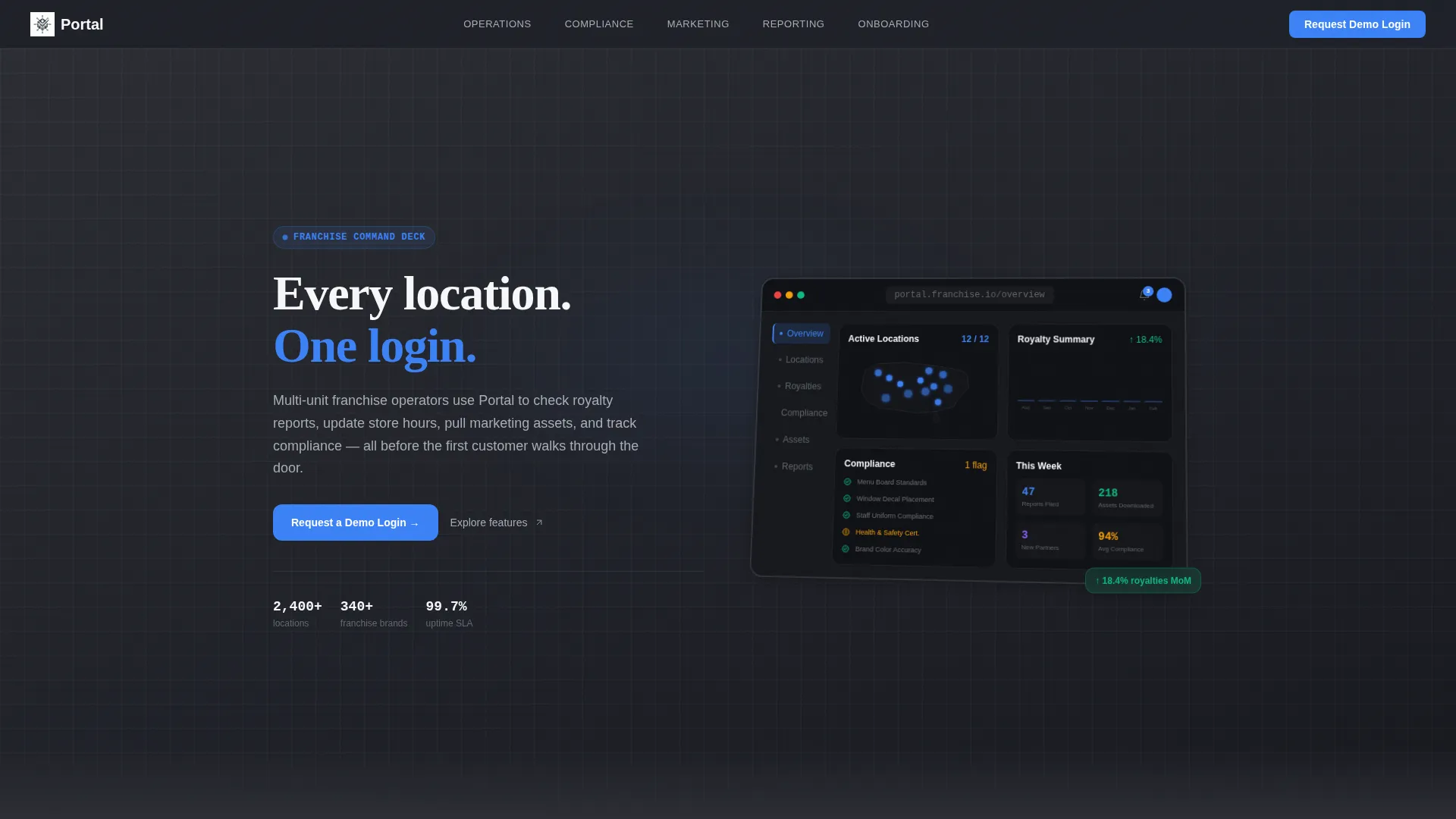
The header opens with a meticulously composed dashboard view floating on a charcoal background. The screen shows a U.S. location map, a royalty summary bar chart, a compliance checklist with an amber flag mid-click, and a notification bell. A subtle 3D axis tilt gives the image real visual depth without decoration.
Clickable Anchor Navigation Bar
A fixed anchor navigation bar sits at the top of the page once the visitor begins scrolling. It links directly to five spoke sections: Operations, Compliance, Marketing, Reporting, and Onboarding. This lets visitors skip to the section that answers their specific concern instead of reading the page in sequence.
Five-Spoke Feature Matrix
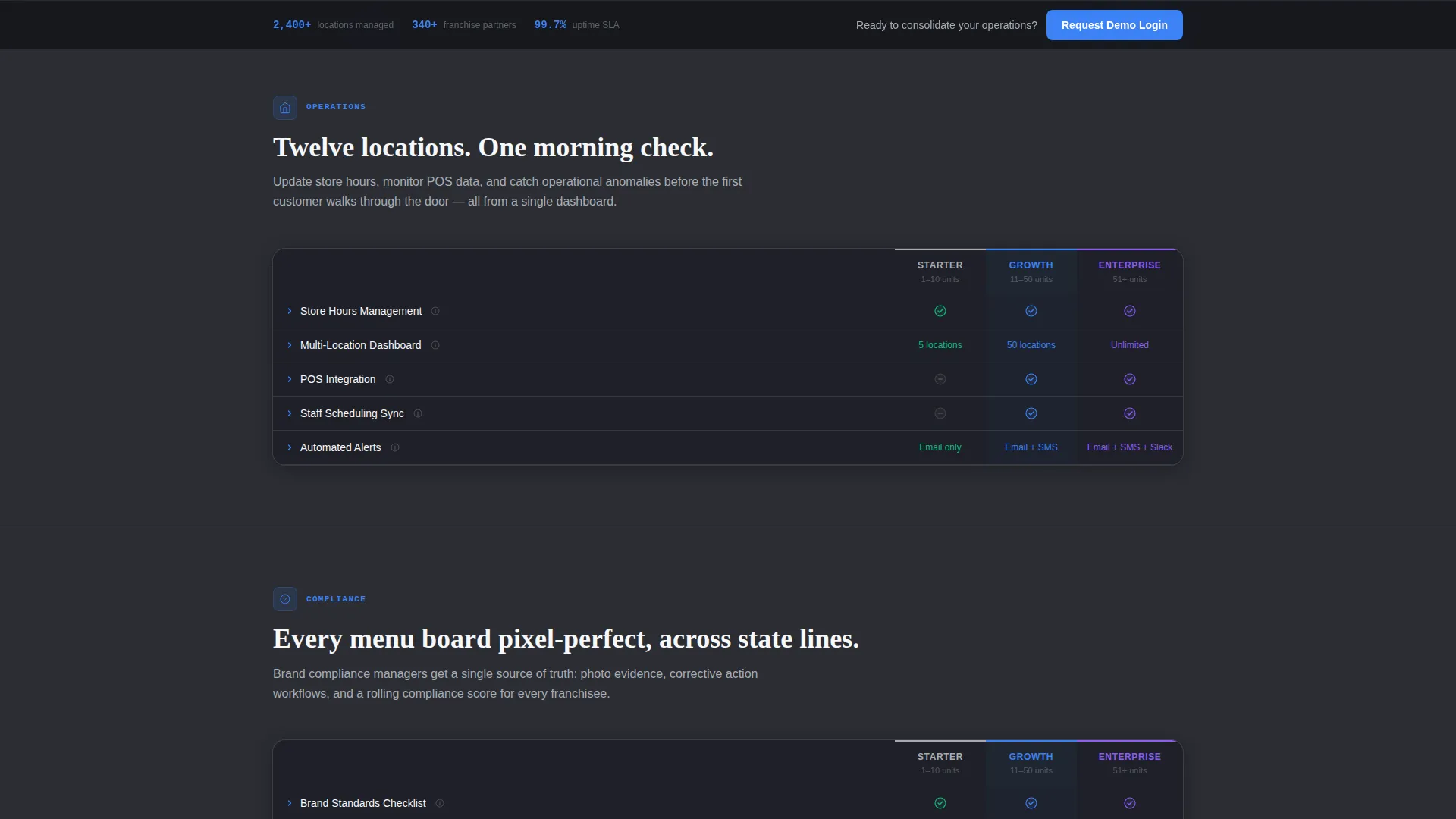
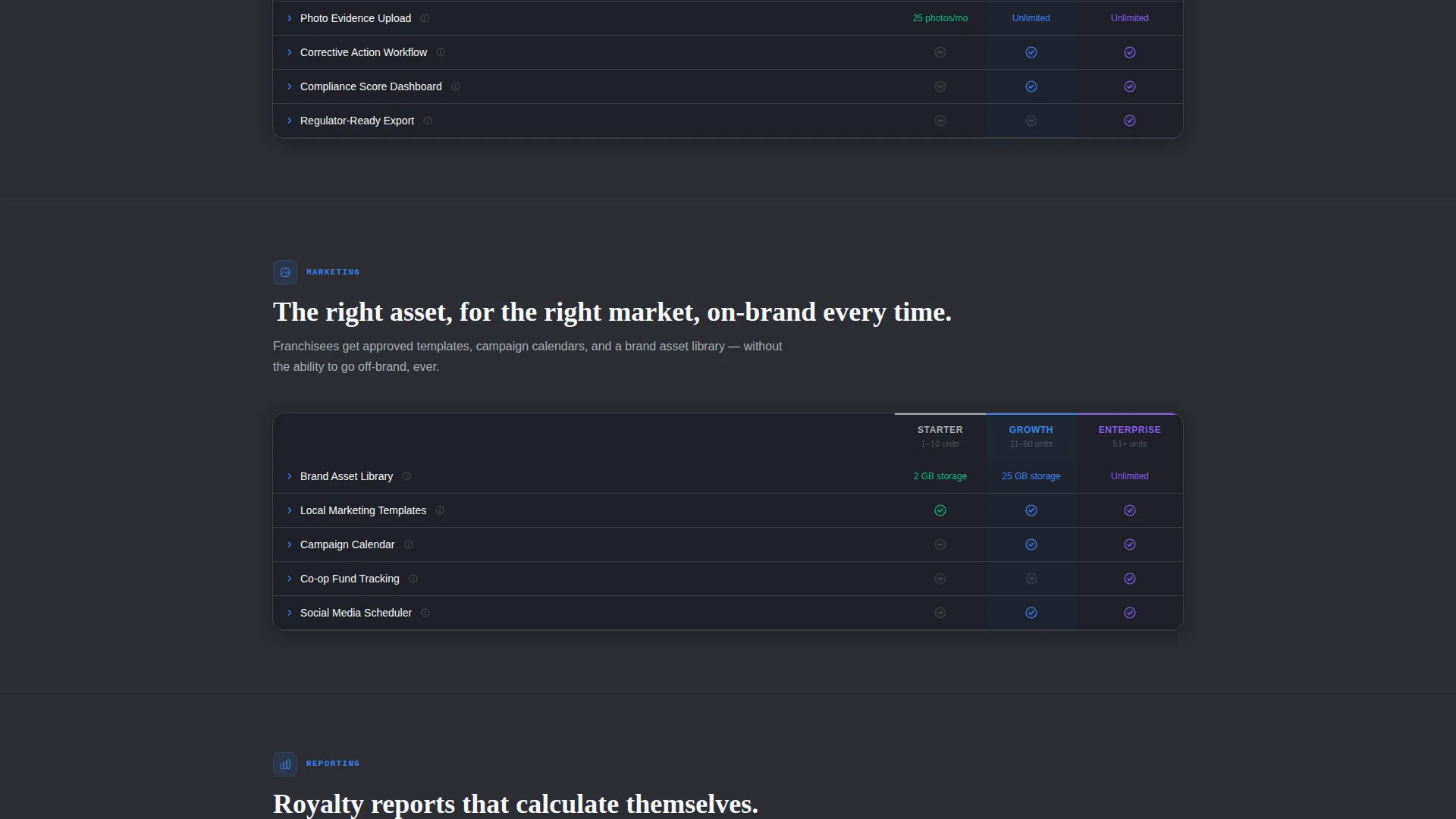
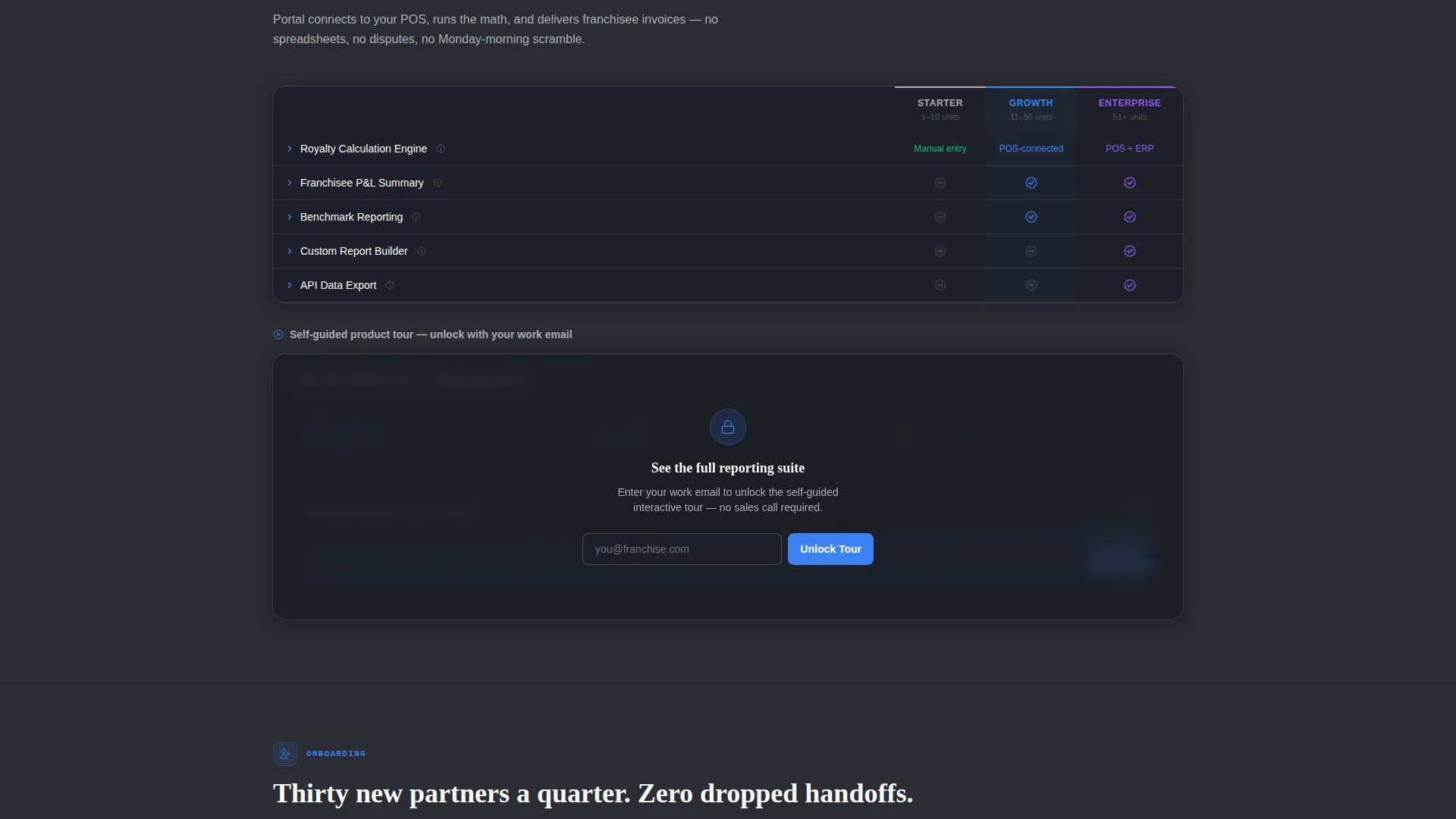
Each spoke section reveals a two-column grid that compares capabilities across plan tiers. Features include checkmarks, tooltips, and expandable detail rows. The matrix format rewards visitors who explore while staying scannable for those who move quickly.
Sticky Lead Generation Bar
After the visitor scrolls past the first spoke, a sticky bar activates at the top of the viewport. It carries the primary call to action and keeps the demo request visible throughout the rest of the scroll experience without interrupting content.
Qualified Demo Request Form
The lead form collects four fields in sequence: company name, number of franchise locations via a range slider with four bands (1 to 10, 11 to 50, 51 to 200, and 200 or more), work email, and one optional open field for the visitor's biggest operational challenge. The sequence qualifies the lead before submission.
Gated Interactive Tour Embed
The Reporting spoke includes an interactive product tour thumbnail. Access is gated behind an email capture, creating a secondary conversion path. Visitors who are not ready to request a demo can still engage with the product at a lower commitment level.
Page sections overview
| Section | Purpose |
|---|---|
| Header with Screenshot | Establishes product credibility with a staged dashboard and the headline "Every location. One login." |
| Anchor Navigation Bar | Lets visitors jump directly to the spoke that matches their operational concern |
| Operations Spoke | Presents operational feature tier comparison in a two-column matrix |
| Compliance Spoke | Shows compliance management capabilities with checkmarks and expandable rows |
| Marketing Spoke | Covers marketing asset access and distribution features by plan tier |
| Reporting Spoke | Displays reporting capabilities and hosts the gated interactive tour embed |
| Onboarding Spoke | Details partner onboarding features for franchise development teams |
| Demo Request Form | Captures qualified leads via a four-field form with a location range slider |
| Sticky call to action Bar | Keeps the primary call to action visible after the first spoke section |
Design & branding system
The visual identity follows a Directory and Discovery theme built on a Monochrome Steel color system. The palette deliberately avoids warmth or decorative detail. Every color choice reinforces the feeling of reliable, always-on infrastructure.
- Structural charcoal (#2B2D33) for primary backgrounds, brushed aluminum (#A8ADB5) for secondary surfaces and divider lines, and bright white (#F7F8FA) for card faces and data fields
- Signal blue (#3B82F6) used exclusively for interactive elements, active anchor navigation states, and call-to-action buttons
- No gradients, no illustrative accents; the result reads like a polished server environment built for daily professional use
Mobile & speed optimization
The hub-and-spoke structure and feature matrix layout are built with responsive behavior in mind. Visitors on smaller screens can still navigate between spokes using the anchor bar and read the matrix without horizontal scrolling.
- The two-column feature matrix collapses gracefully on narrow viewports so each tier stacks vertically
- The sticky lead generation bar and demo form remain accessible at all screen sizes
- The staged dashboard screenshot scales within its container while preserving the 3D axis tilt effect
How this template helps you convert
The page is structured so that trust is built through demonstration before any ask is made. By the time a visitor reaches the form, they have already seen the product in action.
- The staged dashboard screenshot in the header shows the portal working immediately, creating mental ownership before a single word of copy is read.
- The anchor navigation lets visitors self-select their pain point, making the feature matrix feel personally relevant rather than generic.
- The qualified demo request form collects meaningful context with minimal friction, and the gated interactive tour gives hesitant visitors a lower-commitment entry point.
Other information about this template
Portal is built for the franchise digital presence category within the broader technology template space. It is designed to serve as the primary web presence for a franchise client portal product rather than a supplementary marketing page.
- The template style is Hub and Spoke with Anchor Navigation, meaning every section is reachable from the fixed top bar without full-page scrolling
- The Feature Matrix creative direction is used throughout, making the page especially effective when a product has multiple capability tiers to compare
- The header concept is Product Screenshot, a format that shows the actual interface rather than relying on abstract visuals or illustration
- The lead generation direction is applied at two points: the primary demo request form and the secondary gated tour, giving the page two distinct conversion entry points
Theme
Directory & Discovery
Creative direction
Feature Matrix
Color system
Monochrome Steel
Style
Hub & Spoke (Anchor Nav)
Direction
Lead Generation
Page Sections
Staged 3D Dashboard Screenshot
Fixed Anchor Navigation Bar
Two-column Feature Matrix
Qualified Lead Capture Form
Sticky Post-scroll Call to Action Bar
Gated Reporting Tour Embed
Related questions
Can I customize the five spoke sections for a different set of features?
Is the location range slider included in the template as delivered?
How does the sticky call-to-action bar behave during scrolling?
Who is this template best suited for?
Can the gated tour embed in the Reporting spoke be replaced with a video?



