Daycare Social Media Landing Page Template
Postable is a modular daycare social media landing page template built for childcare providers who need scroll-stopping content fast. It features pre-built category modules, a product screenshot header, and a lead capture form. The design uses a bold Midnight Blue palette to feel organized and authoritative. Providers can showcase their full template library and collect signups in one clean page.
by Rocket studio
Quick summary
Postable is a card grid landing page template built for daycare social media toolkits. It opens with a browser-frame product screenshot, flows through organized category modules, and closes with a focused lead capture form. The Midnight Blue and marigold design system feels like a command center built for childcare professionals.
Who this template is for
This template is made for anyone selling or distributing a daycare social media template product to childcare professionals. It speaks directly to the people who need ready-made content the most.
- Overwhelmed daycare directors juggling licensing paperwork alongside daily operations
- Solo home-daycare providers posting content from their phones between care responsibilities
- Childcare franchise managers keeping multiple locations visually consistent across social feeds
What problem this template solves
Childcare providers spend far too much time creating social media content from scratch. A single post can take 45 minutes to design, write, and format. That time does not exist in a busy daycare environment.
- No organized way to browse or present a large library of social media templates
- Visitors leave without converting because they cannot see the product's full value quickly
- Cold leads hesitate to sign up before previewing what they will actually receive
What you get with this template
You get a fully structured single-page layout that presents your daycare social media toolkit with confidence and clarity. Every section is purpose-built to show volume, earn trust, and move visitors toward a signup.
- A product screenshot header with a browser-frame mockup and bold headline
- Five category card modules each showing template count badges and preview thumbnails
- A three-field lead capture form plus a no-signup preview lightbox for cold visitors
Feature list
This template includes a focused set of purpose-built sections and layout elements. Each piece is designed to reduce friction and communicate value quickly.
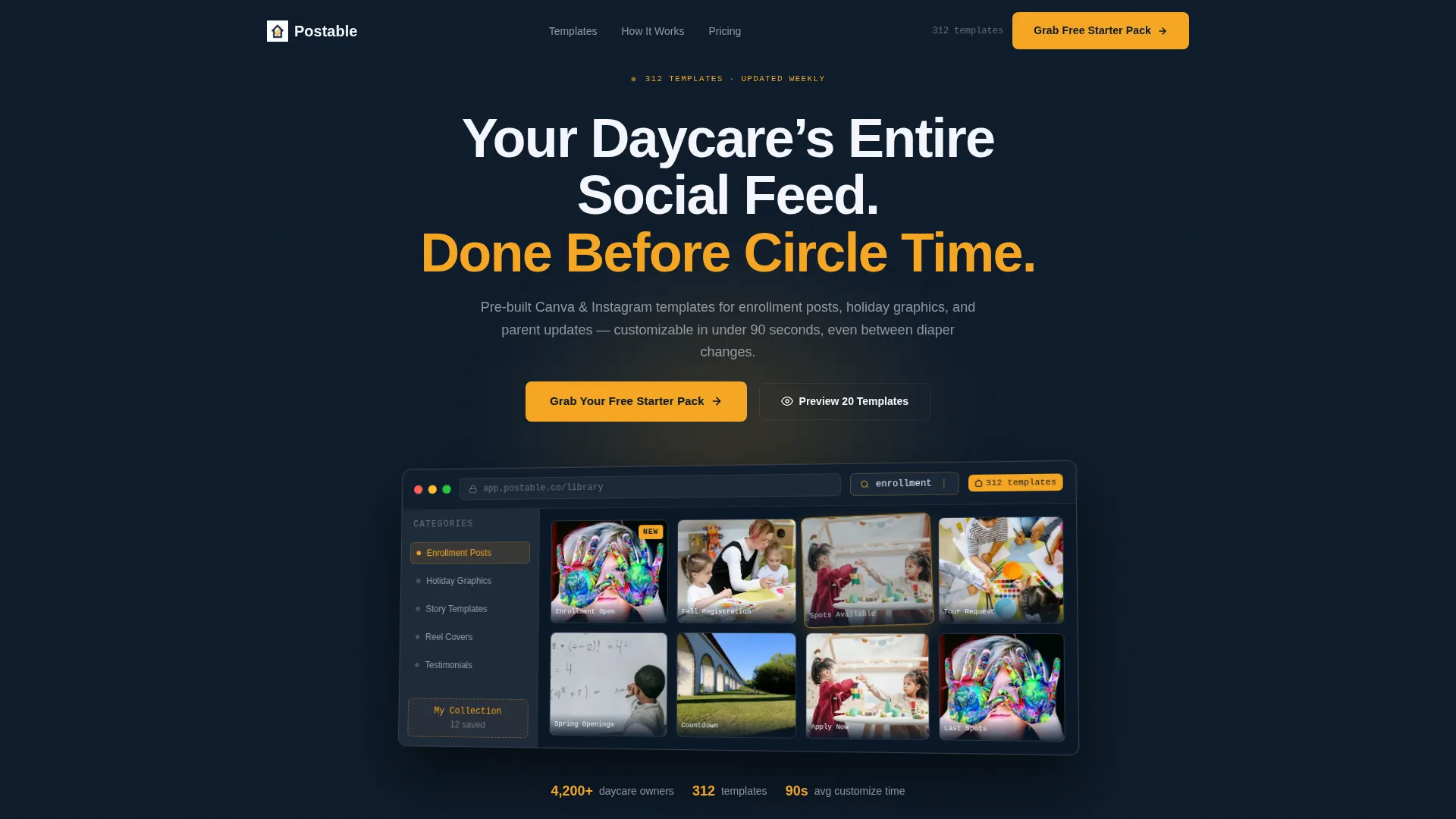
Browser-Frame Product Screenshot Header
The header shows a browser-frame mockup floating against a deep navy background. The mockup displays a live template library grid, a drag-in-progress interaction, a search bar reading "enrollment," and a badge showing 312 templates. A five-degree angle and a soft marigold glow give it visual depth.
Modular Card Grid Category Sections
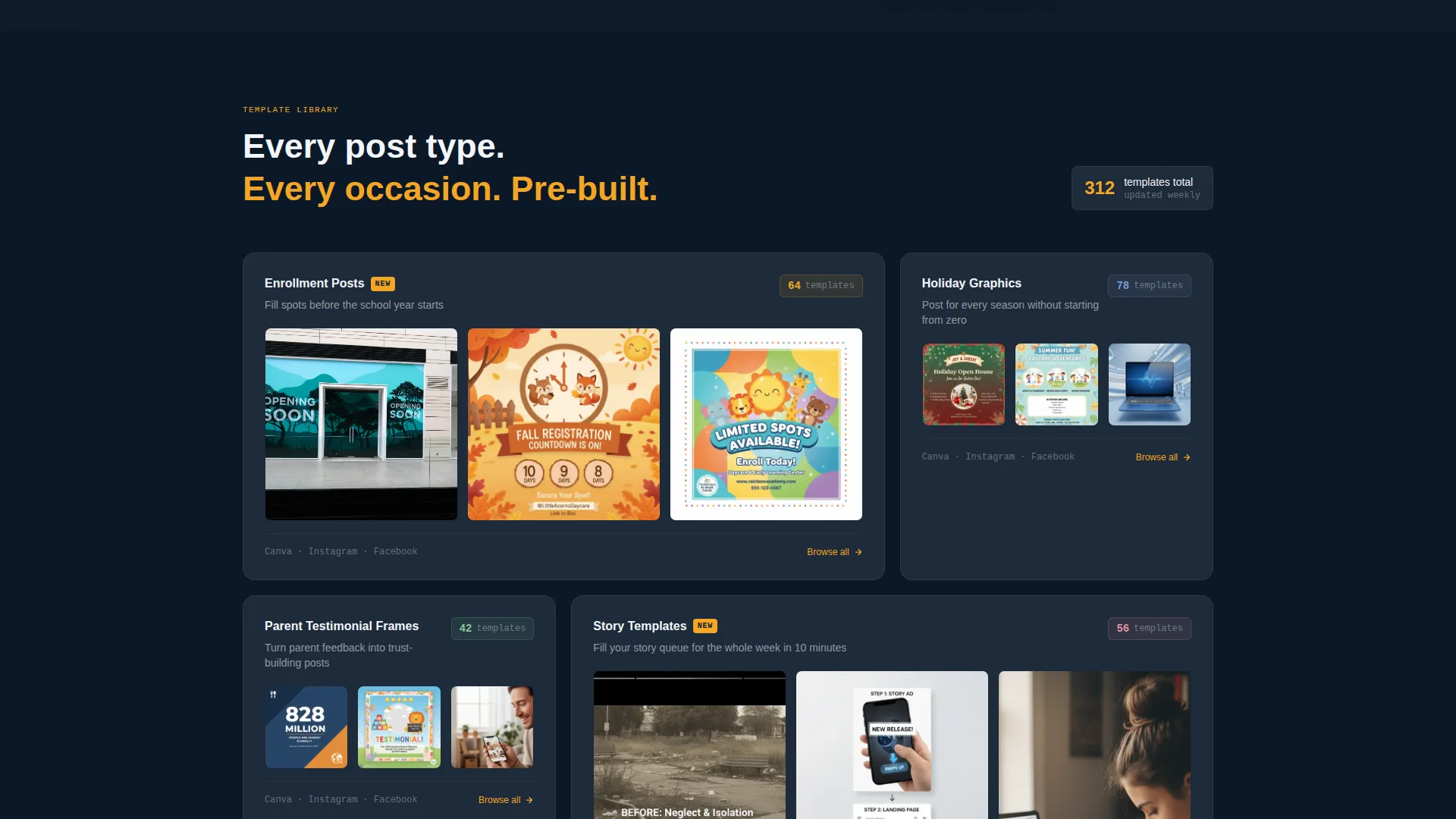
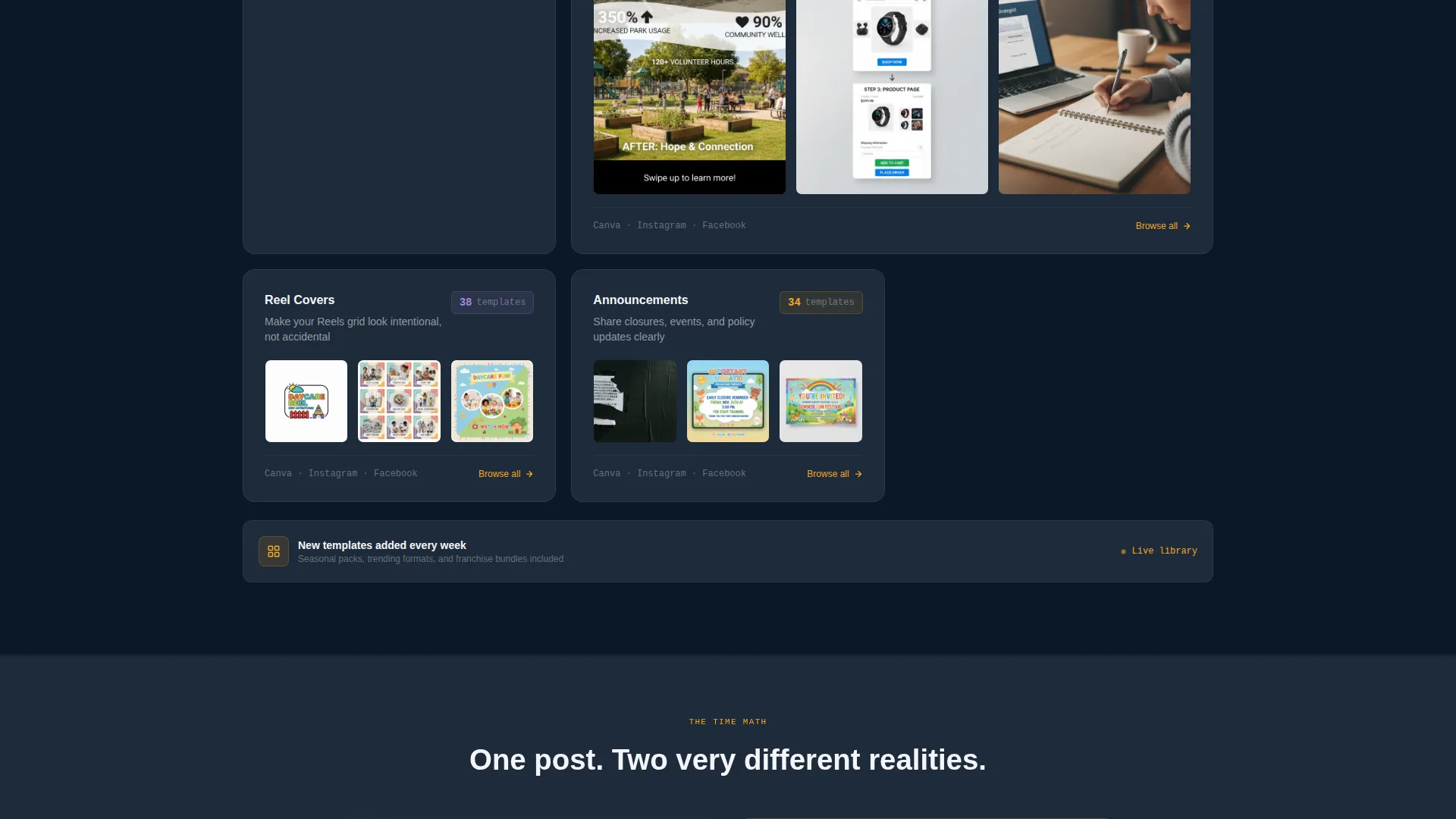
The main body is organized into card grid modules for five content categories: Enrollment Posts, Holiday Graphics, Parent Testimonial Frames, Story Templates, and Reel Covers. Each module displays a template count badge, three preview thumbnails, and a one-line use case description.
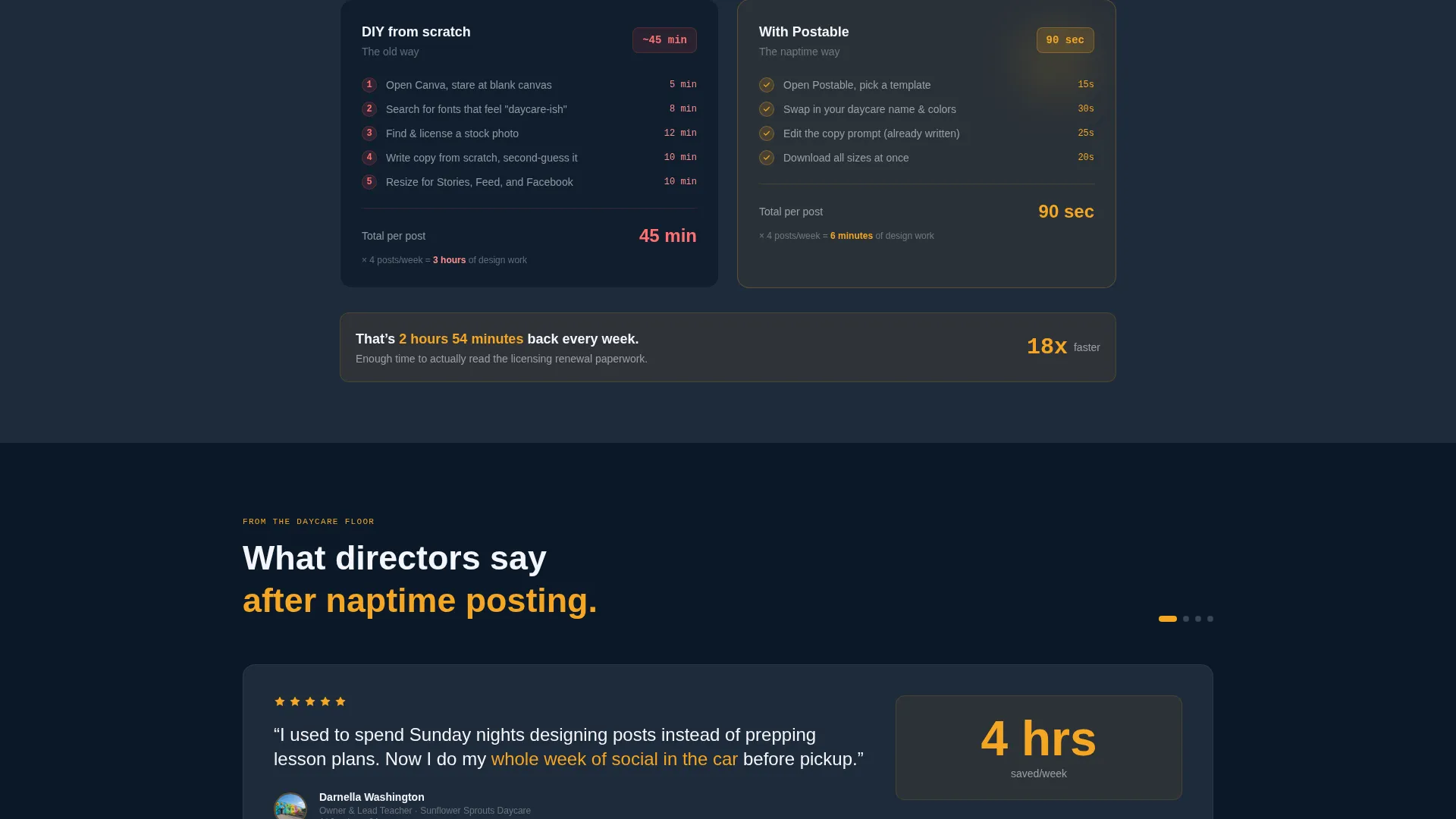
Dark Comparison Callout Card
A single dark card breaks the scrolling grid midway through the page. It presents a direct time comparison: 45 minutes per post when designing from scratch versus 90 seconds with the template toolkit. It builds confidence through a concrete, specific contrast.
Three-Field Lead Capture Form
The primary conversion form collects first name, daycare name, and email in a single step. The call to action is "Grab Your Free Starter Pack." The form appears in the header section, as a sticky bar on mobile screens, and again at the final page section.
No-Signup Preview Lightbox
A secondary conversion path labeled "Preview 20 Templates" opens a lightbox gallery. Visitors can browse real template previews without entering any information. This warms cold traffic before they decide to sign up.
Page sections overview
| Section | Purpose |
|---|---|
| Header with mockup | Establishes product credibility with a browser-frame screenshot and headline |
| Enrollment Posts module | Showcases enrollment-focused templates with count badge and previews |
| Holiday Graphics module | Displays seasonal content templates with thumbnail previews |
| Testimonial Frames module | Presents parent testimonial layout templates with use case line |
| Story Templates module | Covers vertical story-format templates for daily posting |
| Reel Covers module | Features short-form video cover templates with badge and thumbnails |
| Comparison callout card | Delivers time-savings contrast to build conversion confidence |
| Final call to action section | Anchors the lead capture form with a repeated signup call to action |
Design & branding system
The visual identity follows a Data Command theme using a Midnight Blue color system. The palette feels authoritative and organized without being cold or clinical.
- Deep command-center navy (#0B1929) and slate panel gray (#1E2A3A) dominate backgrounds and card surfaces, while cloud white (#F4F6FB) carries all body text and template preview mats
- Warm marigold (#F5A623) marks every interactive element including buttons, hover states, badge counts, and "NEW" flags on recently added templates
Mobile & speed optimization
The sticky bottom bar on mobile ensures the primary call to action is always visible without requiring the visitor to scroll back up. The layout is built to stay clean and readable on smaller screens.
- Sticky mobile bottom bar repeats the "Grab Your Free Starter Pack" call to action throughout scrolling
- Card grid modules stack cleanly for single-column viewing on phone screens
How this template helps you convert
The page earns the signup by showing value before asking for anything. Every layout decision is aimed at reducing hesitation and building trust through visible product depth.
- The browser-frame mockup with 312 visible templates communicates product scale immediately, so visitors understand the library's size before reading a single line of copy.
- The no-signup lightbox lets cold visitors preview 20 real templates first, which reduces the perceived risk of sharing their email address.
- The three-field form placed in three strategic locations keeps the conversion path short and within reach at every point in the scroll.
Other information about this template
This template is designed specifically for the daycare digital presence niche within the broader childcare technology space. It is a strong fit for creators, educators, and toolkit sellers operating in this category.
- The template style is Card Grid (Modular), making it easy to expand or remove category sections as the product library grows
- The creative direction follows a Spec Sheet approach, where sheer catalog volume builds confidence in the product offering
- The header concept is a Product Screenshot, which is well-suited to software-style toolkit products sold in the childcare and education technology space
- The lead generation direction focuses on a free starter pack offer, a proven low-friction entry point for digital product audiences
Theme
Data Command
Creative direction
Spec Sheet
Color system
Midnight Blue
Style
Card Grid (Modular)
Direction
Lead Generation
Page Sections
Browser-frame Product Screenshot Header
Modular Card Grid Category Sections
Dark Comparison Callout Card
Three-field Lead Capture Form
No-signup Preview Lightbox
Related questions
Can I customize the template categories for my own product?
Do visitors need to sign up to preview templates?
How many fields does the signup form include?
Who is this landing page template built for?



