Prism — Home Ops Landing Page Template
Portal is a bold brutalist home services landing page template built for customer portals. It uses a modular card grid layout and a glassmorphic color system to present repair tracking, invoice management, and appointment scheduling in one organized dashboard view. Designed for property managers, landlords, and busy homeowners, it turns home maintenance chaos into a structured, clickable workflow.
by Rocket studio
Quick summary
Portal is a single-page landing page template for home services customer portals. It uses a card grid layout, a glassmorphic visual system, and an industry-report content flow to show potential users exactly what disorganized home maintenance costs them, before introducing the product as the fix.
Who this template is for
This template is built for teams and individuals who manage home maintenance at scale or under pressure. The design and copy structure speaks directly to users with real organizational pain.
- Property managers overseeing maintenance across multiple rental units
- Dual-income households who need to schedule and track services without losing details
- Landlords who require clear repair and invoice records for tax documentation
What problem this template solves
Most homeowners and property managers track repairs through scattered texts, paper receipts, and missed calendar reminders. That fragmentation has a measurable financial cost. This template frames the disorganization problem first, so the portal product feels like an obvious answer by the time a call-to-action appears.
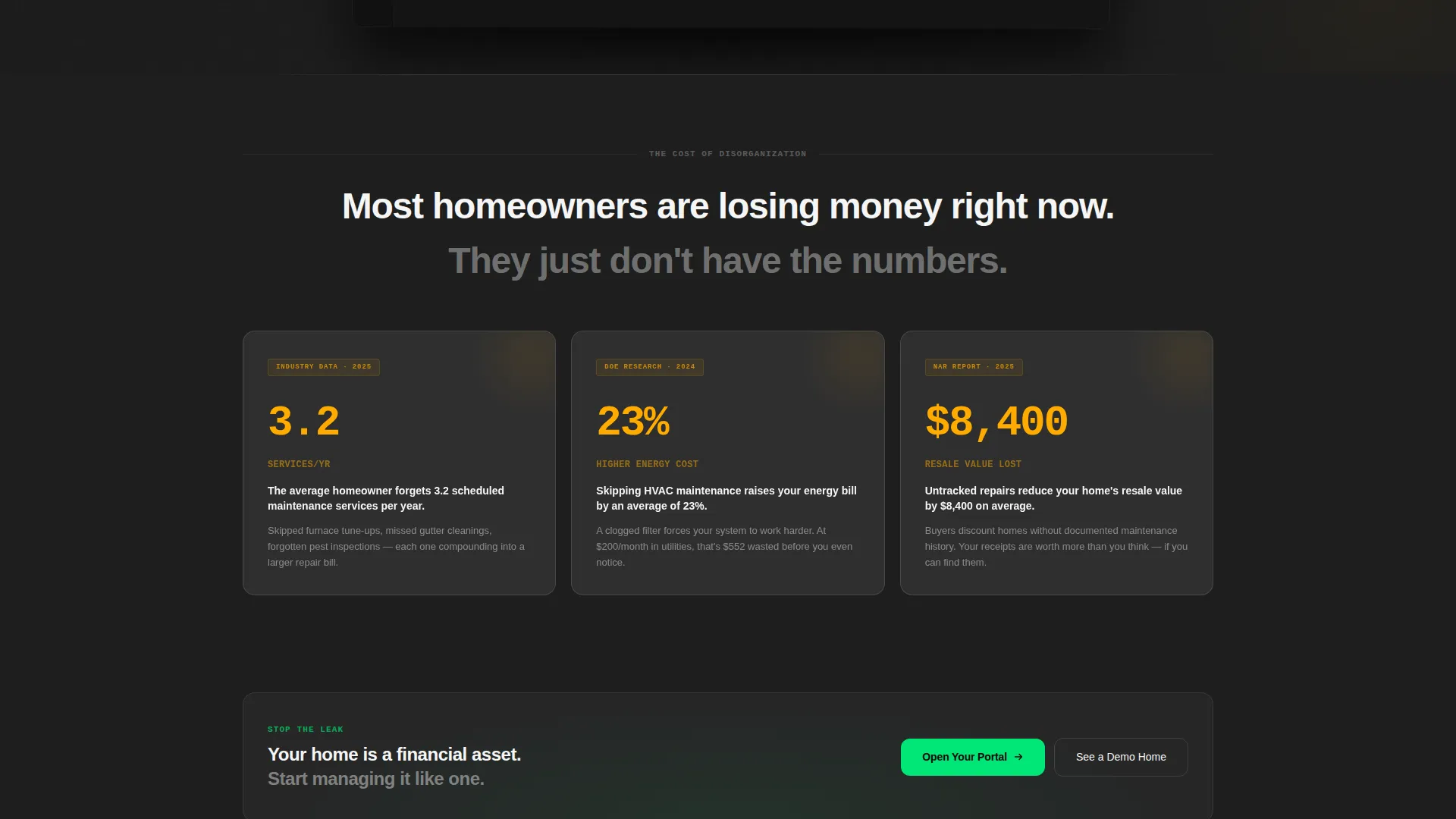
- Missed scheduled services, averaging 3.2 per year for a typical homeowner
- Neglected HVAC maintenance that raises energy bills by roughly 23 percent
- Untracked repairs that can reduce a property's resale value by approximately $8,400
What you get with this template
You get a fully structured, single-page landing page template organized around a card grid flow. Every section is built to move a visitor from problem awareness to confident action, without a single form on the page.
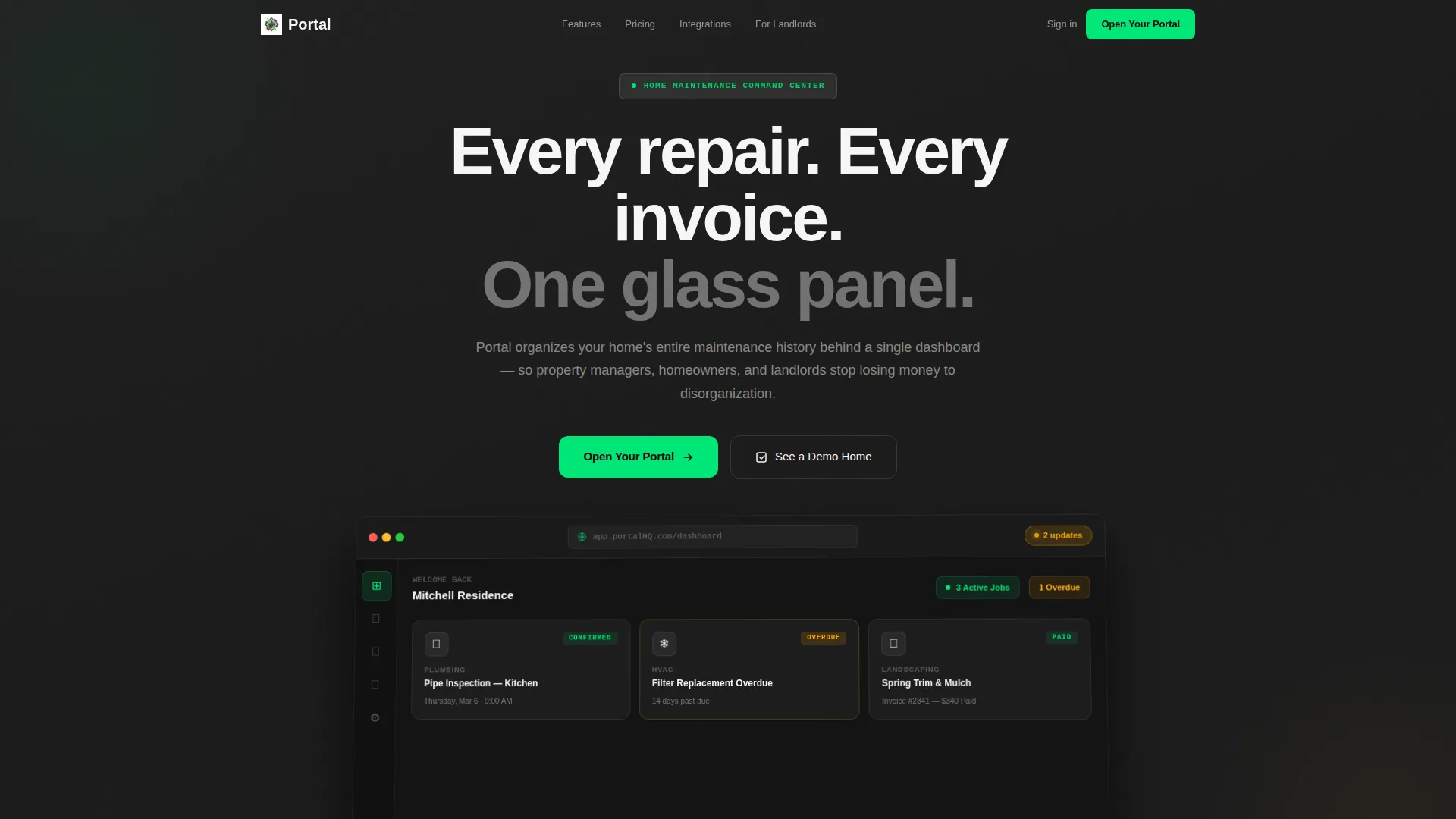
- A full-width dashboard preview header showing the portal interface mid-use
- Three rows of modular stat, feature, and integration cards following an industry-report content cadence
- Strategically placed call-to-action buttons and a secondary demo path throughout the scroll
Feature list
This template includes purpose-built components designed around the home services portal use case. Each element serves a specific role in guiding the visitor toward clicking through to the signup flow.
Full-Width Dashboard Preview Header
The header renders a slightly tilted browser frame at 90 percent scale, showing three live service cards, a brutalist navigation rail, and a notification badge reading "2 updates." The portal interface is the hero, no stock photography.
Stat Card Row
The first card row presents three data-driven insight cards, each citing a real cost of disorganized home maintenance. The figures reframe the problem as financial and logistical before any product feature is introduced.
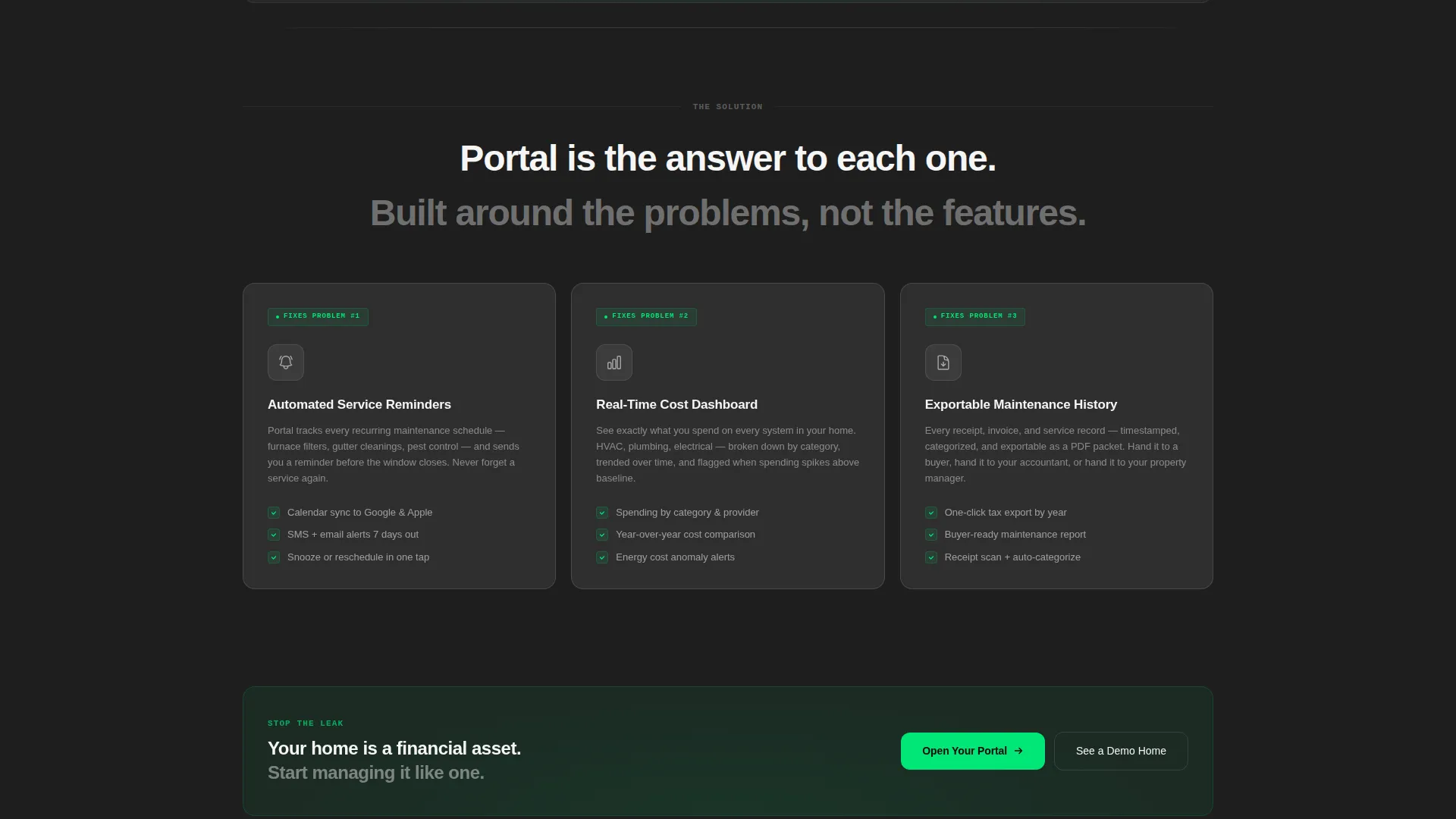
Feature Response Card Row
The second row answers each stat card directly with a feature card. Automated reminders respond to missed services, cost-tracking dashboards address energy and repair costs, and exportable maintenance history answers the record-keeping gap.
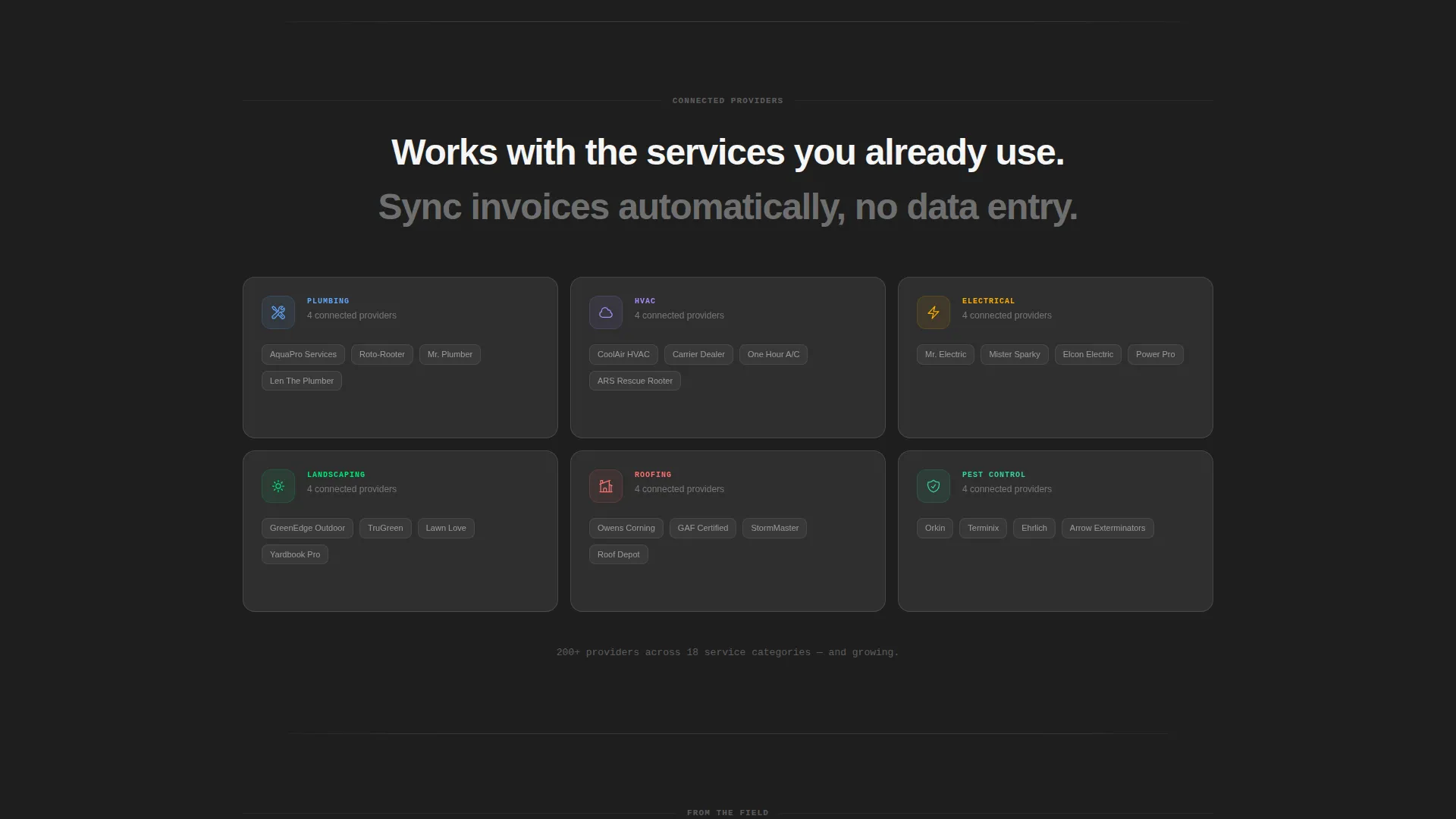
Integration Provider Card Row
The third card row displays connected service provider cards, showing the portal's breadth across plumbing, electrical, HVAC, and landscaping categories.
Repeating Click-Through call to action System
The primary call-to-action button, "Open Your Portal," appears first inside the dashboard header as a frosted glass button, then repeats after each card row. A secondary "See a Demo Home" path gives hesitant visitors a lower-commitment option.
Glassmorphic Card Components
Every card uses backdrop blur, a thin 1px white border, and a green hover glow. Cards float visually above the deep concrete-dark background, creating depth without additional imagery.
Page sections overview
| Section | Purpose |
|---|---|
| Dashboard Preview Header | Introduces the portal interface as the visual hero |
| Stat Insight Cards | Quantifies the cost of disorganized home maintenance |
| Primary call to action Block | Prompts first click after the header section |
| Feature Response Cards | Pairs each stat problem with a direct product answer |
| Mid-Page call to action Block | Reinforces the primary action after feature cards |
| Integration Provider Cards | Shows connected service categories and breadth |
| Final call to action Block | Closes the page with the primary and secondary actions |
Design & branding system
The visual identity blends bold brutalist structure with a glassmorphic surface treatment. The result feels like a smart-home control panel mounted inside a raw concrete lobby: heavy foundation, weightless interface layer on top.
- Core palette: poured-concrete charcoal (#1E1E1E) backgrounds, frosted-panel white at 60 percent opacity (#FFFFFFCC) for cards, status-green (#00E676) for active jobs, and alert amber (#FFAB00) pulsing on overdue invoices
- Card treatment: backdrop-blur effect, 1px white border, and green glow on hover to confirm interaction
- No stock photography anywhere; the user interface screenshot and card data are the sole visual content
Mobile & speed optimization
The card grid layout is modular by design, which means each row adapts naturally to narrower viewports. The deep flat backgrounds and blur-based card surfaces keep the visual system intact across screen sizes without relying on large image assets.
- Modular card grid reflows cleanly for tablet and mobile breakpoints
- Flat color backgrounds reduce visual payload compared to full-bleed photography layouts
- Frosted glass card effects rely on CSS backdrop-filter rather than image overlays
How this template helps you convert
This template earns the click by building a financial case before it ever shows a feature. The scroll flow is structured like an industry report, making the product feel like the logical conclusion of data the visitor just read.
- The stat card row opens with three quantified costs of disorganized maintenance, creating urgency before any product claim is made.
- The feature card row resolves each stat directly, so the product's value feels earned rather than asserted.
- The repeating call to action system places "Open Your Portal" at each natural decision point, reducing the distance between conviction and action.
Other information about this template
This template is categorized under Technology and the Home Services Software and SaaS subcategory, making it well-suited for portal product launches, software marketing pages, and property management tool promotions. The intersection of bold brutalist aesthetics with glassmorphic surfaces is intentional and distinctive within the home services space, where most templates default to soft lifestyle photography.
- Template style: Card Grid (Modular), ideal for dashboard-oriented SaaS products
- Creative direction: Industry Report cadence, where data builds trust before features are introduced
- Header concept: Dashboard Preview, using the actual product user interface as the hero visual
- Landing page direction: Click-Through, with no on-page form and a clean handoff to a signup flow
- Color system: Glassmorphic, built on flat dark backgrounds with blur-layer card surfaces
- Theme: Bold Brutalist, combining raw concrete tones with etched-glass interactive elements
Theme
Bold Brutalist
Creative direction
Industry Report
Color system
Glassmorphic
Style
Card Grid (Modular)
Direction
Click-Through
Page Sections
Dashboard Preview Hero Header
Three-row Modular Card Grid
Industry Report Content Flow
Repeating Click-through Call to Action System
Glassmorphic Card Components
Status and Alert Visual System
Related questions
Is this template suitable for a SaaS product launch page?
Does this template include a contact form or lead capture form?
Can I customize the stat card figures and feature card copy?
How many call-to-action buttons appear on the page?
What service categories does the template cover by default?



