Government Digital Presence Privacy Policy Website Template
Procure is a scroll-reveal government procurement landing page built for agencies navigating compliance-heavy purchasing workflows. It presents pre-negotiated contract catalogs, automated audit trail comparisons, and fiscal-year-ready data visualizations inside a dark, authoritative Slate and Sky design system. The primary call to action drives visitors to run a cost comparison through a two-step qualifier form.
by Rocket studio
Quick summary
Procure is a single-page government procurement storefront template. It uses a progressive scroll-reveal structure to guide procurement officers from familiar pain points to clear proof of a better process. Three stat cards, three versus sections, and a persistent cost-comparison call to action make the case before asking for any contact details.
Who this template is for
This template is built for GovTech teams and digital agencies serving the public sector. It speaks directly to the people who live inside procurement cycles and compliance reviews.
- Procurement officers managing General Services Administration schedules and fiscal-year deadlines
- County information technology directors replacing aging infrastructure on a fixed budget
- State agency administrators who need reliable audit trails at every purchasing step
What problem this template solves
Government procurement teams waste time on legacy workflows that were never designed for speed or transparency. The template reflects that reality back to visitors before offering any solution.
- Slow vendor vetting timelines that delay critical infrastructure purchases
- Manual compliance documentation that creates audit risk and staff overhead
- Disconnected purchasing processes that lack the pre-approved catalog access modern agencies need
What you get with this template
You get a fully structured, single-page government online store layout that earns visitor trust through data before asking for a conversion. Every section is ready to populate with agency-specific figures and contract details.
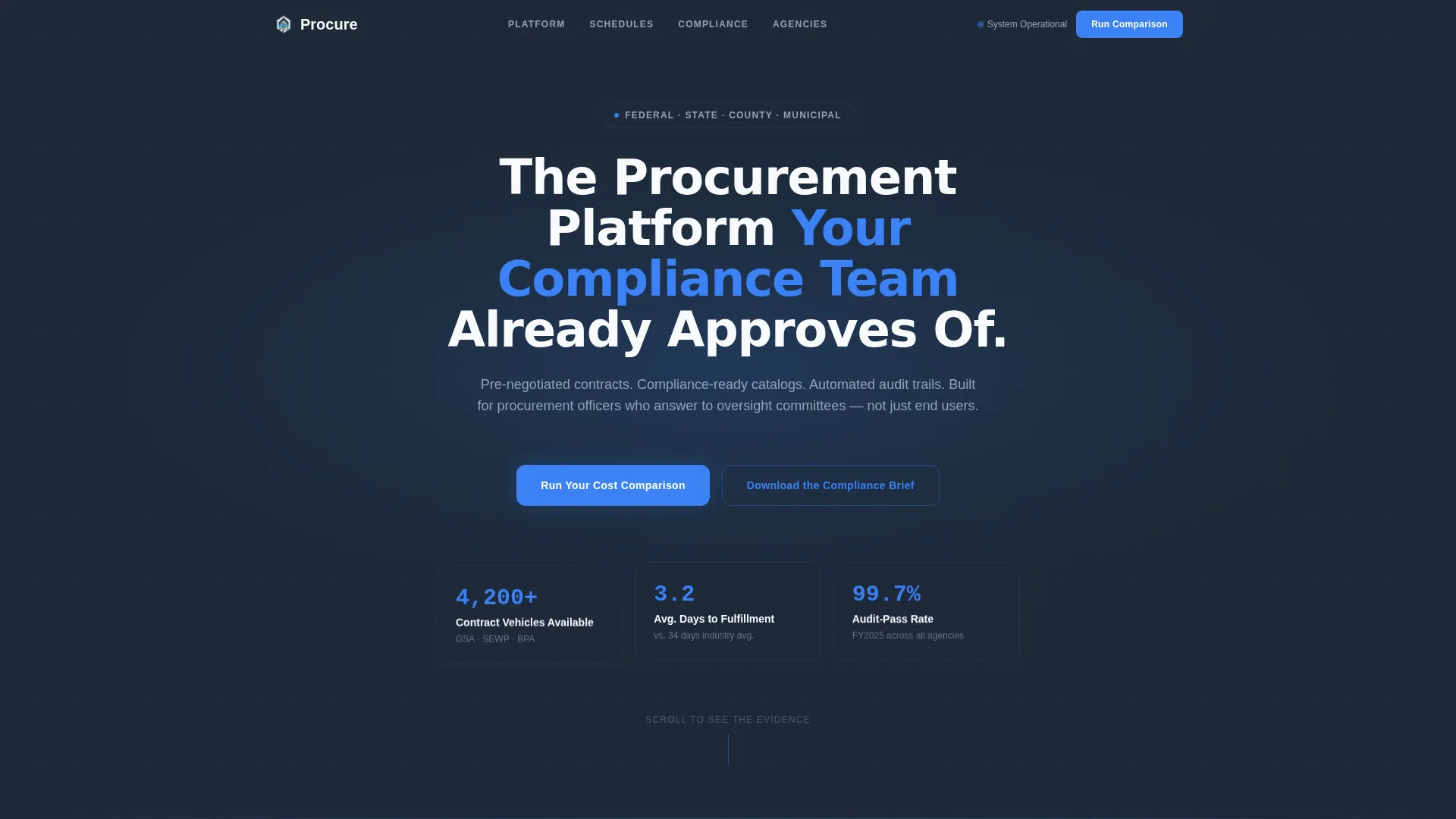
- A dark full-bleed hero with a sky-blue radial glow, a centered compliance headline, and three animated stat cards
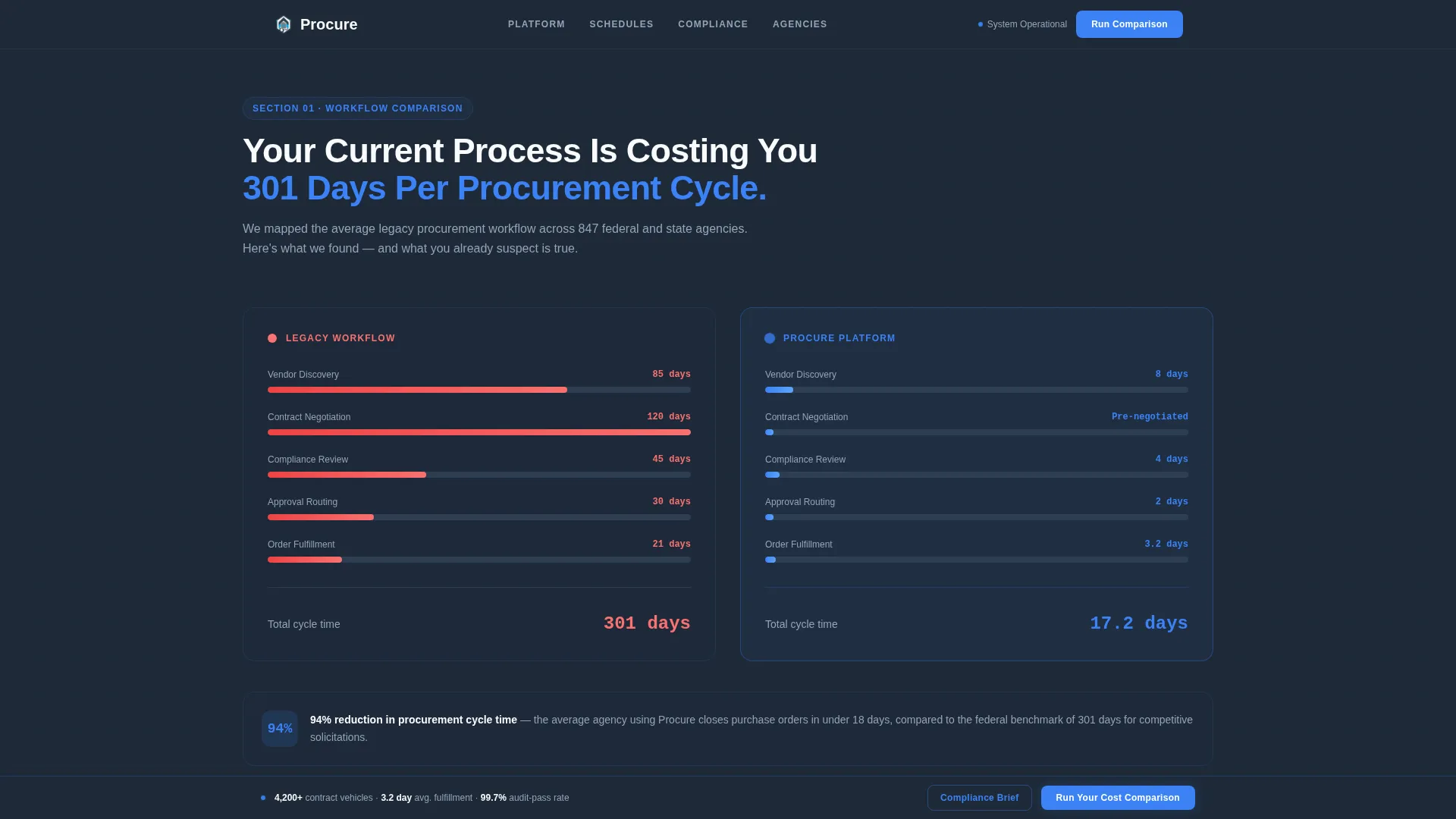
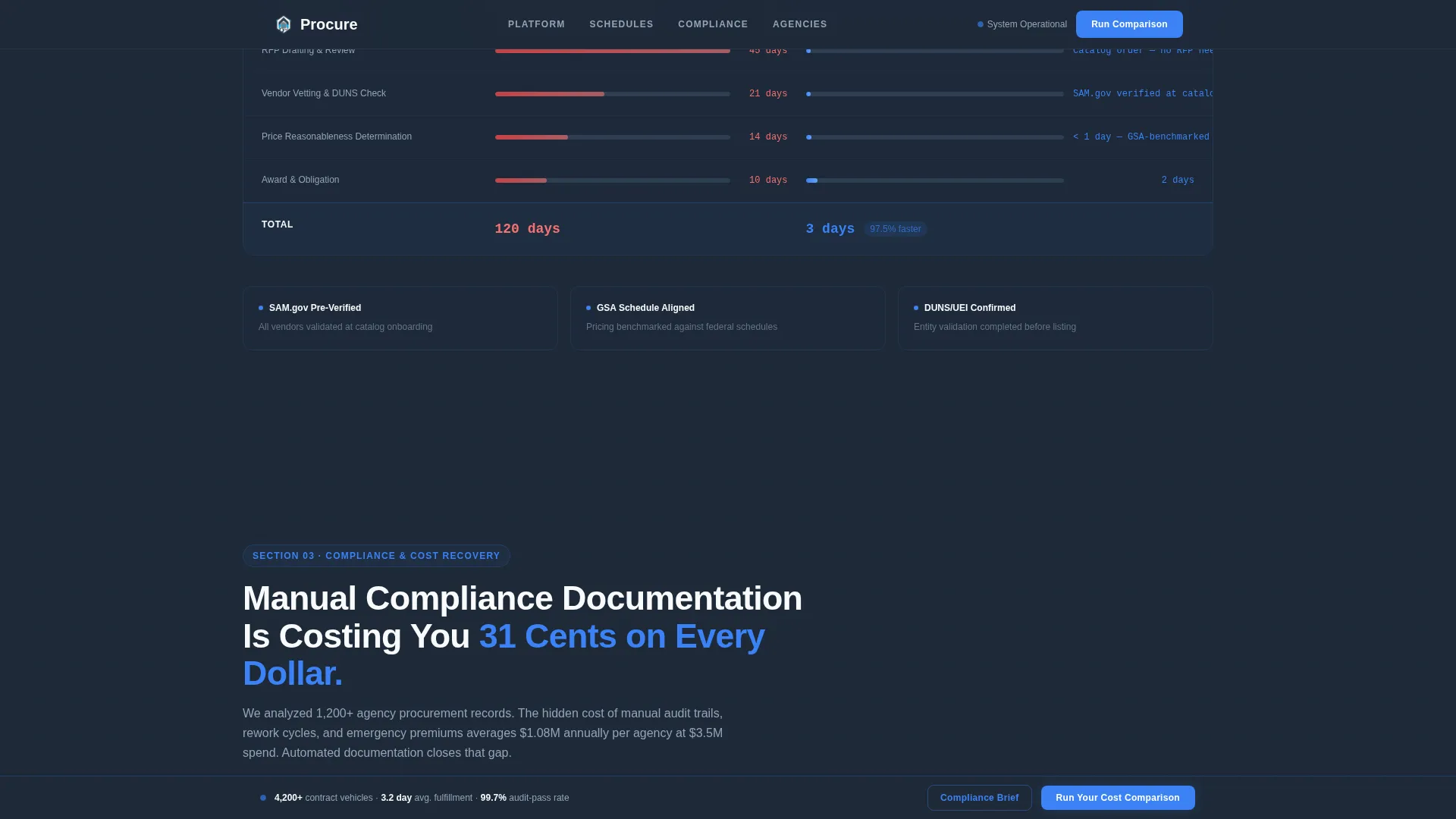
- Three sequential versus sections with slide-in bar charts, timeline compressions, and cost-savings waterfall diagrams
- A two-step qualifier modal, a persistent bottom call-to-action bar, and a gated compliance brief download path
Feature list
This template includes the following built-in capabilities drawn directly from its design and interaction brief.
Progressive Scroll-Reveal Layout
Each section animates into view as the visitor scrolls, using GSAP ScrollTrigger staggered reveals. The page feels like paging through a federal procurement white paper that keeps surfacing new evidence.
Dark Full-Bleed Hero with Stat Cards
The hero opens in near-black slate with a subtle pulsing sky-blue radial glow behind the headline. Three floating stat cards fade in sequentially, each displaying a key performance metric in sky blue against dark glass panels.
Three Versus Comparison Sections
Legacy workflows are placed side by side with the platform's streamlined process across three dedicated sections. Visualizations include a bar chart, a timeline compression graphic, and a cost-savings waterfall diagram, each sliding in from the page edges.
Two-Step Qualifier Modal
The primary call to action opens a two-panel form. Step one captures agency type and annual procurement volume via dropdown selectors. Step two collects a category checklist covering information technology hardware, facilities, fleet, and office supplies, plus a work email address.
Persistent Bottom Call-to-Action Bar
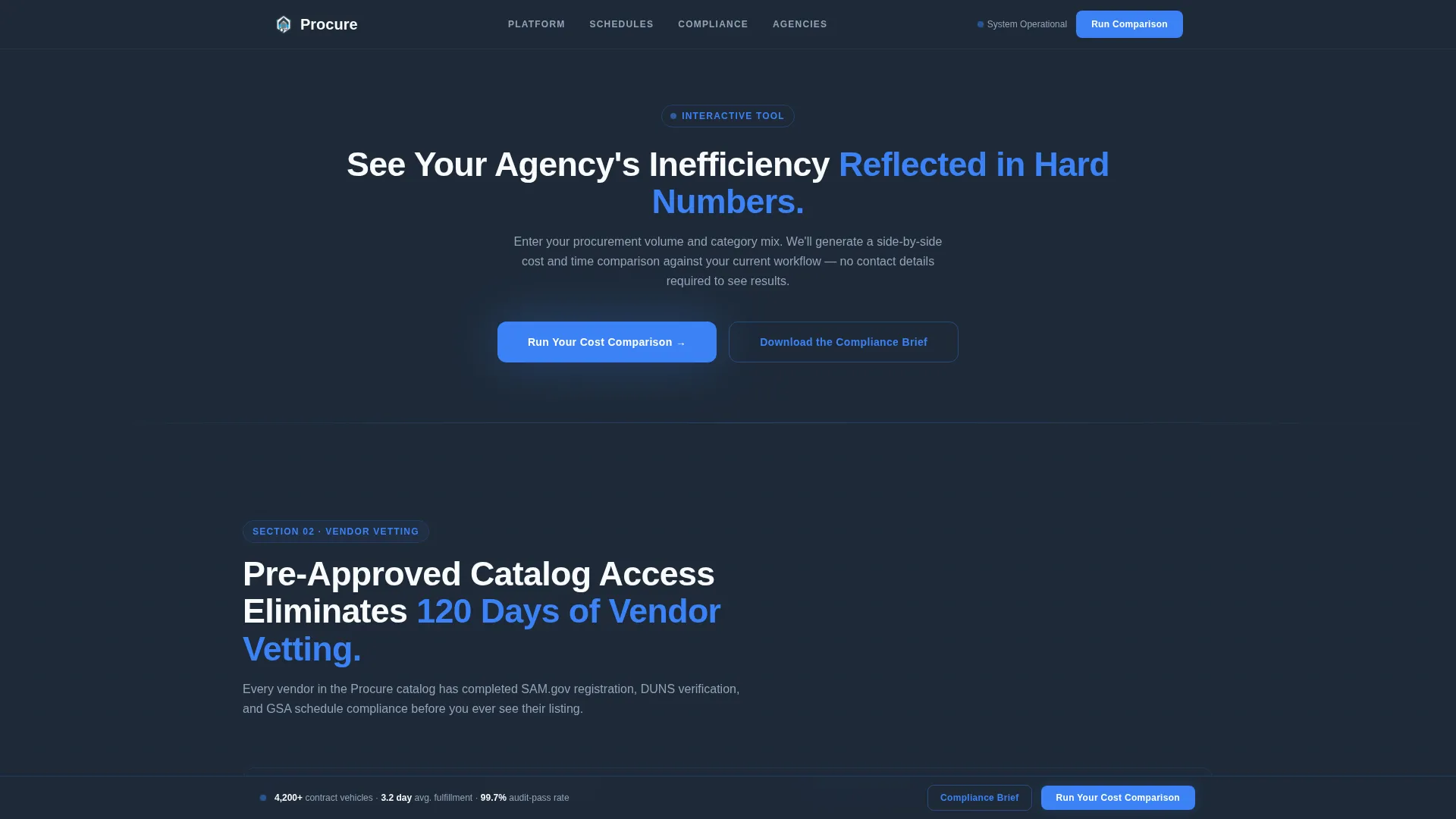
After its first appearance following the second reveal section, the "Run Your Cost Comparison" call to action anchors in a slim bar at the bottom of the viewport. It stays visible throughout the remainder of the scroll journey.
Gated Compliance Brief Download
A secondary conversion path offers a downloadable compliance brief as a portable document format file. This path serves procurement officers who are still building internal buy-in before committing to a demo or comparison.
Page sections overview
| Section | Purpose |
|---|---|
| Hero stat cards | Establish authority with pulsing headline and three animated performance metrics |
| Versus Section One | Compare legacy purchasing workflows against the platform's streamlined process using a bar chart |
| Cost Comparison Bar | First appearance of the primary call to action with modal qualifier trigger |
| Versus Section Two | Compare vendor vetting timelines against pre-approved catalog access using a timeline compression graphic |
| Versus Section Three | Compare manual compliance documentation against automated audit trails using a waterfall diagram |
| Minimal footer | Close the page with a horizontal flow footer pattern and secondary compliance brief download link |
Design & branding system
The visual identity follows a Directory and Discovery theme built around a Slate and Sky color palette. The overall feel is a secure operations center at dawn: dark perimeter walls, cool fluorescent surfaces, and one bright blue indicator light confirming everything is running.
- Core colors: deep charcoal slate (#1E2A38), governmental gray (#4A5568), clearance-sky blue (#3B82F6) for interactive highlights and data points, and document white (#F8FAFC) for content surfaces
- Typography: DM Sans for headings and body copy, JetBrains Mono for all numerical data points and statistics
- Animation style: high-motion GSAP ScrollTrigger with staggered section reveals, slide-in data visualizations, and a single imperceptible pulse on the hero glow at page load
Mobile & speed optimization
The template is designed desktop-first to match the working environment of procurement officers. It also responds cleanly to tablet viewports for officers reviewing the page away from a fixed workstation.
- Desktop-first layout proportions with tablet-responsive breakpoints for secondary viewing contexts
- Server Components handle all static content sections, while Client Components manage the animated and interactive elements
- Chart and diagram reveals are scoped to their trigger zones, so off-screen elements do not load animations until the visitor reaches them
How this template helps you convert
The page is structured around a Comparison and Versus conversion philosophy. It shows visitors their own inefficiency in hard numbers before ever presenting a call to action.
- Three data-backed versus sections build an evidentiary case that escalates from "here is what is already broken" to "here is the proof it does not have to be," warming visitors before the primary call to action appears.
- The two-step qualifier modal collects agency type, procurement volume, category needs, and a work email in a low-friction sequence, making the "Run Your Cost Comparison" action feel like a tool rather than a sales form.
Other information about this template
This template is categorized under Government Digital Presence within the broader Technology category. It is suited for GovTech SaaS teams and business-to-government agencies building a credible first digital touchpoint.
- Localization is set to English (United States), with USD currency formatting, MM/DD/YYYY date conventions, and US government procurement context throughout
- The Industry Report creative direction means the scroll cadence reads like a federal white paper, not a commercial product page
- The template style is Scroll Reveal (Progressive), with the header concept built around a Dark Full-Bleed layout with a centered radial glow effect
Theme
Directory & Discovery
Creative direction
Industry Report
Color system
Slate & Sky
Style
Scroll Reveal (Progressive)
Direction
Comparison/Versus
Page Sections
Progressive Scroll-reveal Layout
Dark Full-bleed Hero with Stat Cards
Three Versus Comparison Sections
Two-step Qualifier Modal
Persistent Bottom Call-to-action Bar
Gated Compliance Brief Download
Related questions
Who is this template designed for?
What conversion actions does this template support?
Can I customize the stat card numbers and versus section data?
What animation library does this template use?
Is this template suitable for a multi-page procurement portal?



