Propose - Powerful Homeservices Landing Page Template
Propose is a comparison table landing page template built for home services contractors who need to replace messy, outdated estimates with polished, trackable proposals. With a Feature Tab Switcher header, a Problem-to-Solution comparison table, a revenue calculator, and a freemium signup flow, this template shows the product working before asking for a commitment.
by Rocket studio
Quick summary
Propose is a single-page landing page template designed for a home services proposal and quote platform. It follows a Problem-to-Solution arc, opening with a side-by-side comparison table and building toward a freemium trial signup. The layout is built around a Feature Tab Switcher header, a live dashboard mockup, and a sticky call-to-action bar.
Who this template is for
This template is built for founders and marketers launching or promoting a home services proposal platform. It speaks directly to the contractors who will sign up and use the software every day.
- HVAC technicians drafting quotes between service calls who need faster, cleaner proposal tools
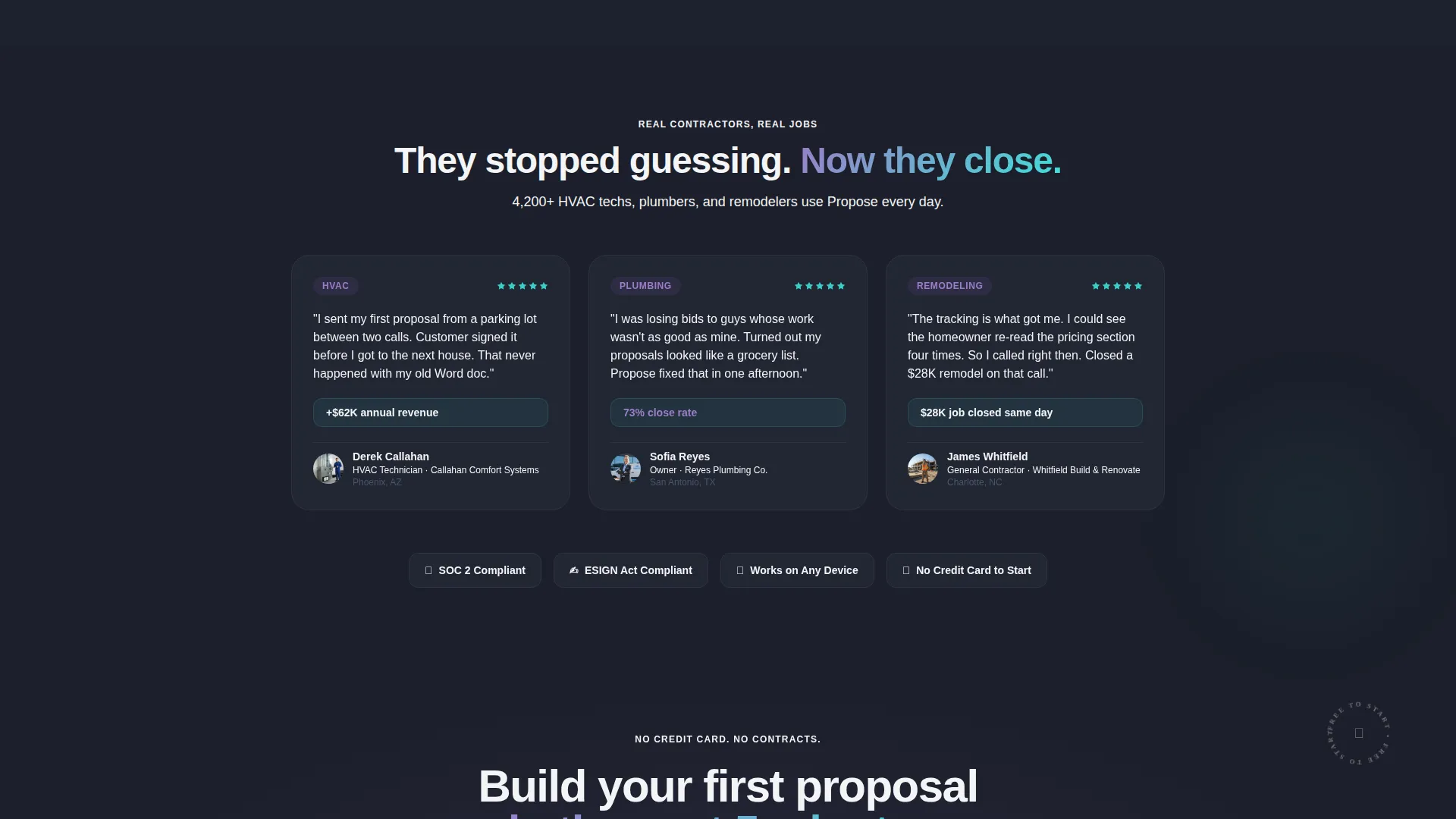
- Plumbing company owners losing high-value jobs to competitors with more professional-looking documents
- Remodeling contractors and general contractors whose work quality outpaces their current proposal presentation
What problem this template solves
Contractors with strong technical skills often lose jobs because their estimates look unpolished. The platform this template promotes solves that gap, and the landing page communicates that gap clearly from the first scroll.
- Handwritten or plaintext estimates that fail to build client confidence
- No visibility into whether a prospect has opened, read, or considered a proposal
- Slow signature collection that lets competitors close the job first
What you get with this template
You get a complete, single-page landing page template that takes a visitor from frustrated recognition to confident signup. Every section is purposeful and ordered to reduce friction.
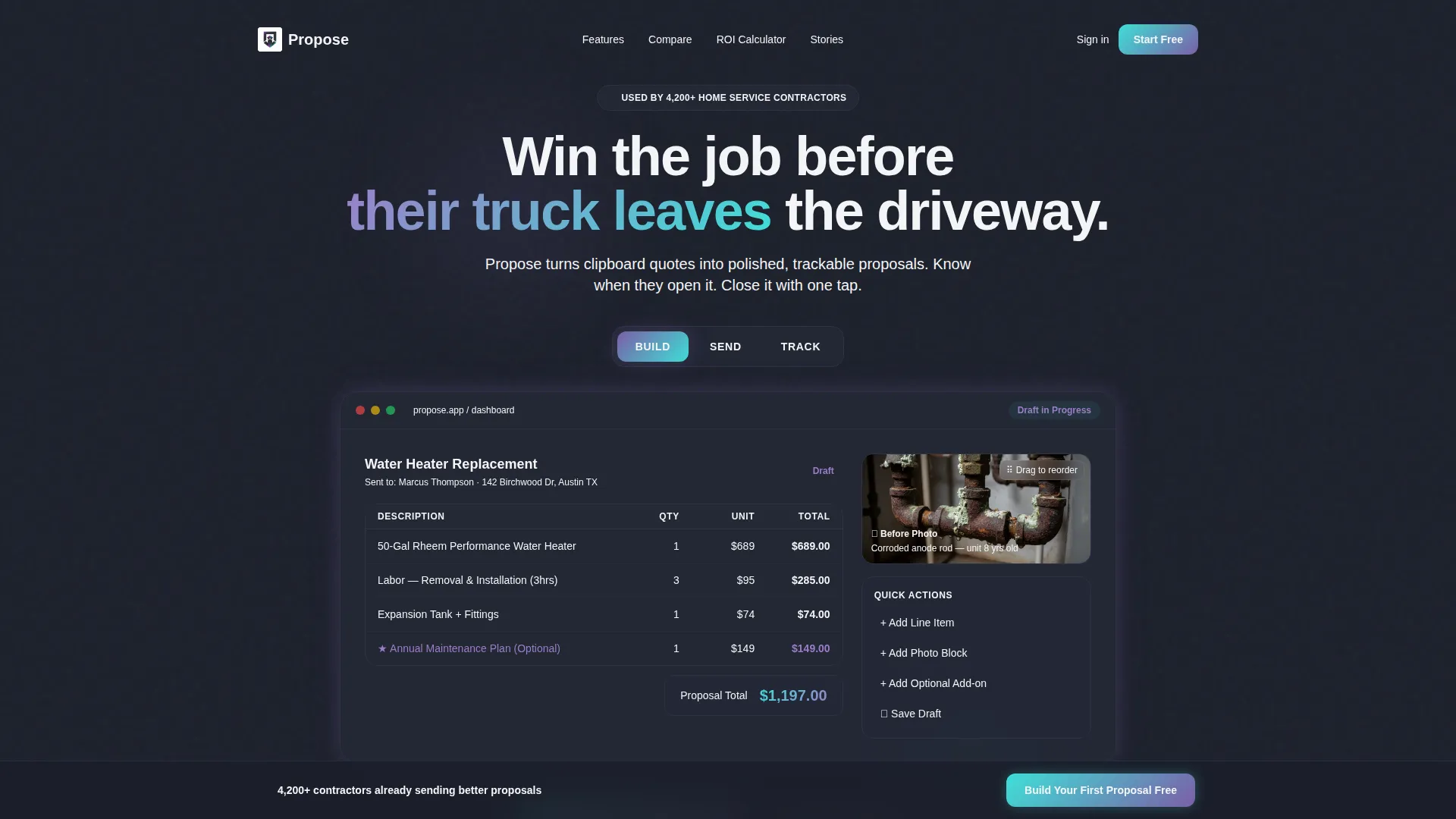
- A Feature Tab Switcher header with three states: Build, Send, and Track, each revealing a different dashboard view
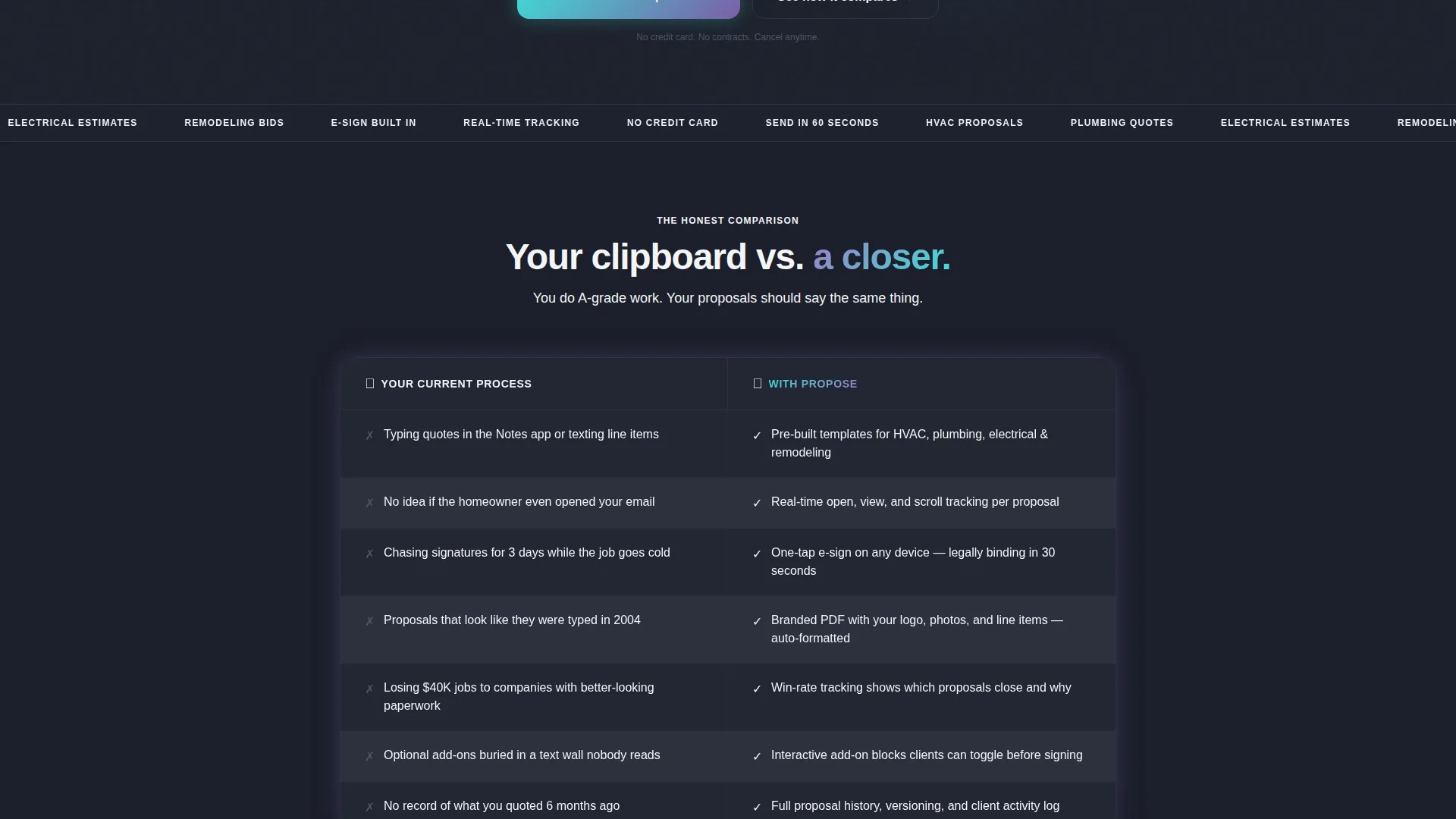
- A side-by-side comparison table contrasting the old workflow with the platform's approach, row by row
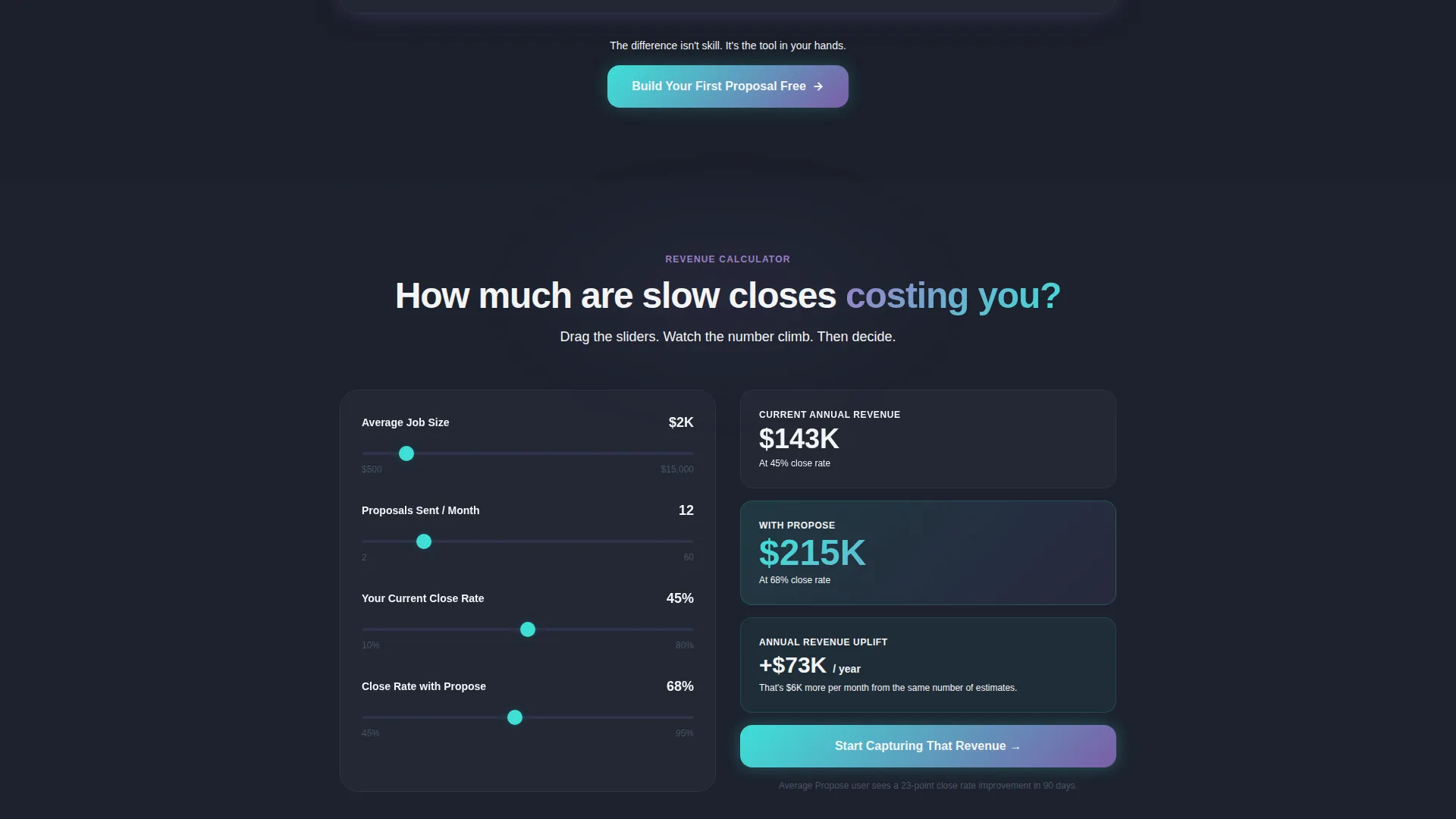
- A revenue calculator where contractors enter job size and close rate to see projected annual revenue
Feature list
This template delivers focused, conversion-oriented sections. Each component serves the Problem-to-Solution arc without distraction.
Feature Tab Switcher Header
Three clickable tabs labeled Build, Send, and Track sit above a live dashboard mockup. Each tab reveals a distinct product view: a proposal mid-edit, a branded client preview, and a real-time activity feed. Tabs animate with an iridescent violet shift, making the product feel alive on first impression.
Side-by-Side Comparison Table
The comparison table anchors the page's persuasive core. The left column, titled "Your Current Process," is styled in muted gray. The right column, titled "With Propose," is highlighted in luminous teal. Row-by-row contrasts make the value case instantly readable.
Revenue Calculator Section
Contractors input their average job size and close rate into an interactive calculator. The projected annual revenue figure updates as the win-rate slider moves upward. This section turns an abstract software benefit into a personal financial outcome.
Freemium Signup Form
The primary call to action, "Build Your First Proposal Free," appears inside the header tabs and repeats as a sticky bottom bar. The form collects only email address and trade type. No credit card, no phone number, and no company size field reduces signup friction to a minimum.
Interactive Demo Proposal
A secondary conversion path offers visitors a live sample proposal they can click through before signing up. This lets contractors experience the product directly. It builds desire through demonstration rather than description.
Live Dashboard Mockup
The header mockup displays a realistic proposal in progress: line items for a water heater installation, an optional maintenance plan add-on, and a draggable photo block showing corroded pipe before work begins. The detail makes the product tangible for trade professionals.
Page sections overview
| Section | Purpose |
|---|---|
| Feature Tab Switcher | Introduce the platform through three interactive product views |
| Comparison Table | Contrast old workflow pain points with platform solutions row by row |
| Revenue Calculator | Let contractors model personal income gains from higher close rates |
| Primary call to action Bar | Capture freemium signups with a minimal two-field form |
| Sticky Bottom Bar | Repeat the main call to action after the comparison table scroll |
| Sample Proposal Path | Offer an interactive demo as a low-commitment secondary entry point |
Design & branding system
The visual identity follows a Dashboard Pro theme with an AI Iridescent color palette. The overall feeling is synthetic and intelligent, like a notification lighting up a dark screen late at night.
- Deep graphite (#1B1F2A) forms the primary background, keeping the interface focused and serious
- Aurora violet (#7B5EA7) activates on hover states and tab selections, giving interactive elements a distinctive glow
- Luminous teal (#3EDFD7) marks success states, progress bars, and the "With Propose" column, signaling positive outcomes
- Crisp white (#F4F5F7) covers card surfaces and body text, ensuring clear contrast against the dark base
Mobile & speed optimization
The layout is structured for contractors who will encounter this page on a phone between jobs. Every interactive element is built to work at thumb-scale and on smaller screens.
- The Feature Tab Switcher and comparison table reflow cleanly for narrow viewports
- The sticky bottom call-to-action bar remains visible and tappable throughout the mobile scroll
- The signup form stays minimal at every screen size, asking only for email and trade type
How this template helps you convert
The page earns the click by showing the product in action before making any request. The conversion architecture is deliberate and sequential.
- The comparison table creates immediate recognition, reflecting the contractor's real frustrations back at them in plain language before introducing the solution
- The revenue calculator makes the value personal and quantified, shifting the visitor's mindset from "interesting product" to "this affects my income"
- The interactive demo proposal lets visitors experience the platform's output directly, so the freemium signup feels like a natural next step rather than a leap of faith
Other information about this template
This template is well-suited for teams building or marketing home services software in the proposal and quoting space. It is also relevant for agencies creating landing pages for trade-focused software-as-a-service products.
- The template style is a comparison table layout, making it effective for any platform where a before-and-after value story is central to the pitch
- The freemium and trial conversion direction means the page is optimized for low-barrier signups rather than demo requests or sales-assisted pipelines
- Trade type options in the signup form cover HVAC, plumbing, electrical, remodeling, and general contracting, reflecting the platform's core audience segments
- The Problem-to-Solution arc is a proven creative direction for software landing pages targeting skilled tradespeople who identify strongly with the pain points shown
Theme
Dashboard Pro
Creative direction
Problem→Solution Arc
Color system
AI Iridescent
Style
Comparison Table
Direction
Freemium/Trial
Page Sections
Feature Tab Switcher Header
Side-by-side Comparison Table
Revenue Calculator
Freemium Signup Form
Interactive Demo Proposal
Live Dashboard Mockup
Related questions
What type of contractor is this template designed for?
Does the signup form require a credit card?
Can visitors try the product before signing up?
How does the comparison table work on this landing page?
What does the revenue calculator show visitors?



