Real Estate ERP Dashboard Landing Page Template
Propstack is a dark-themed, dashboard-style real estate ERP landing page built for portfolio operators. It combines a live-looking data interface, interactive simulated views, and a research-report narrative to showcase lease management, maintenance workflows, tenant communications, and revenue forecasting, all driving toward an app download with a qualifier form.
by Rocket studio
Quick summary
Propstack is a single-page, data-forward landing page template for a real estate ERP platform. It uses deep void-black backgrounds, glass-morphism data cards, and iridescent violet-to-teal gradients to present portfolio operations as a live command center. The page narrates from market pain to platform depth, then earns the app download by letting visitors interact with simulated dashboard views first.
Who this template is for
This template is designed for real estate software products that need to communicate complexity without overwhelming the visitor. It speaks directly to operators who run at scale and need proof before they commit.
- Asset managers overseeing large, multi-city property portfolios
- Property managers dealing with high-volume maintenance requests daily
- Real estate finance professionals who still reconcile rent rolls manually each quarter
What problem this template solves
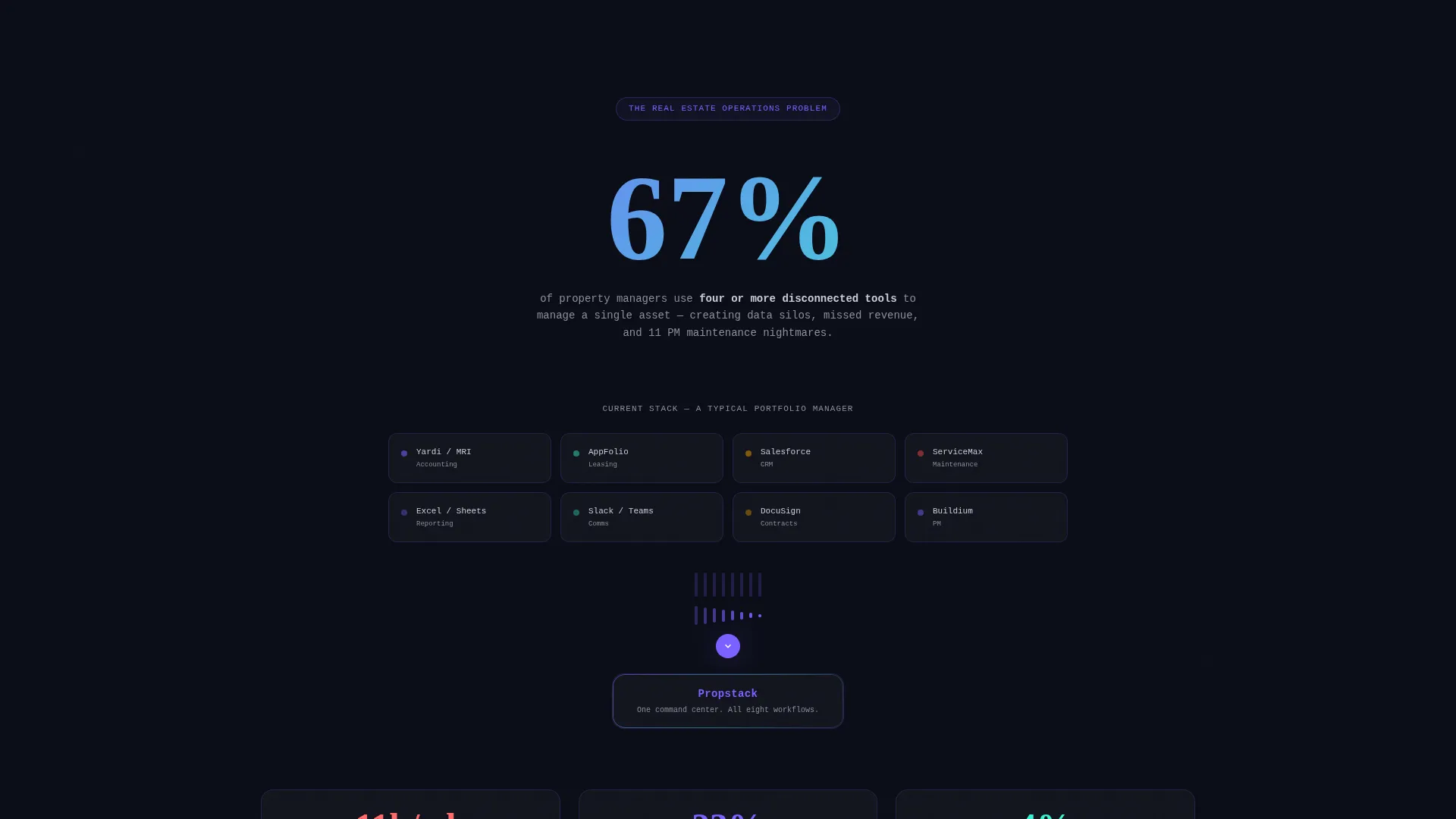
Most real estate operators juggle four or more disconnected tools to manage a single asset. The problem is not a lack of data, it is that the data lives in silos. This template gives a platform the visual and narrative language to demonstrate consolidation convincingly.
- Fragmented toolsets that slow down leasing, maintenance, and financial decisions
- Visitors who need to feel the product before they trust it enough to download
- A conversion gap between a capable platform and a static, uninspiring product page
What you get with this template
You get a fully structured, single-page template that moves visitors from problem awareness through product depth to a clear download action. Every section is purposefully sequenced and visually differentiated.
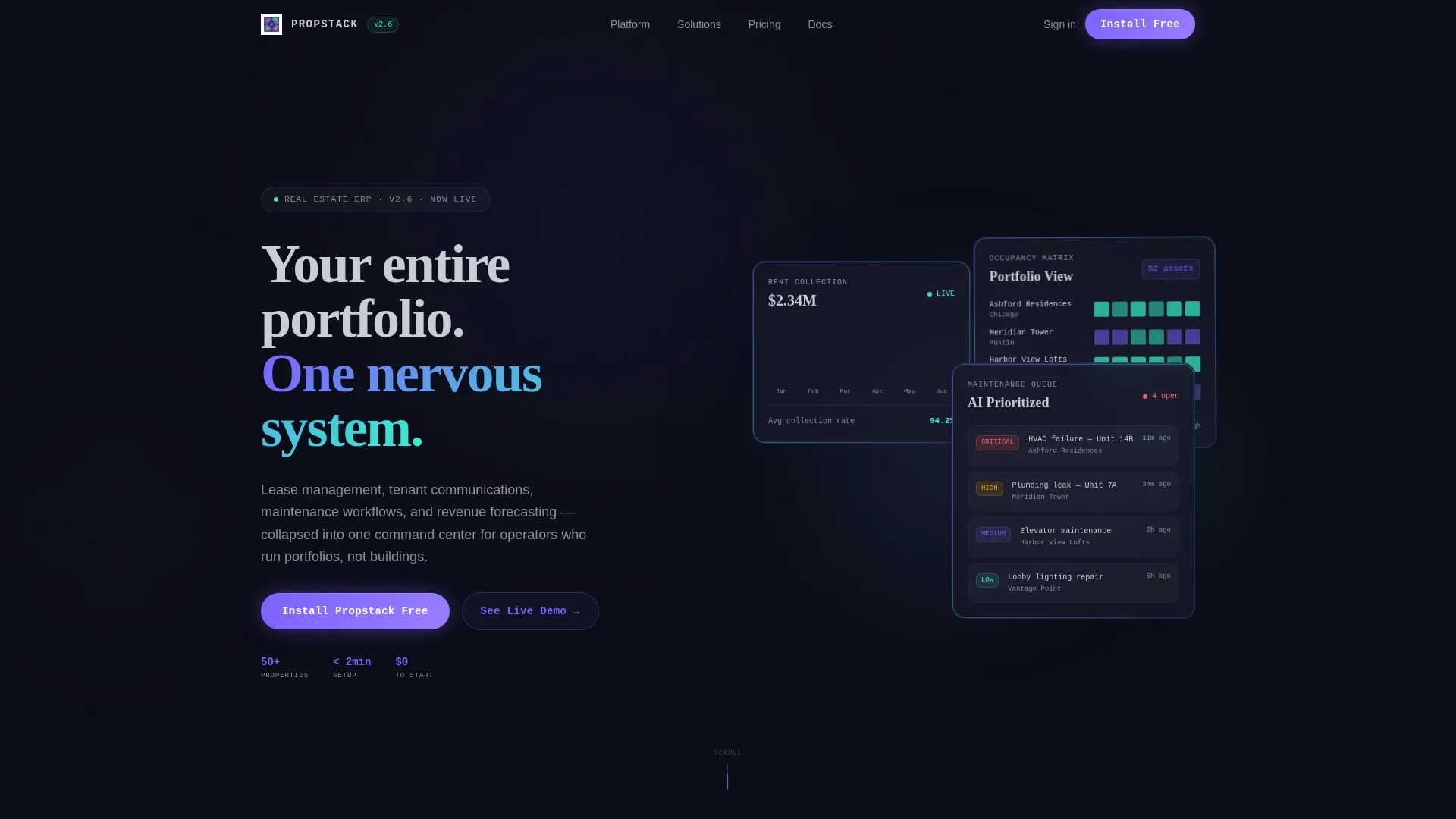
- A header composed of three staggered, frosted-glass data panels with live-looking metrics
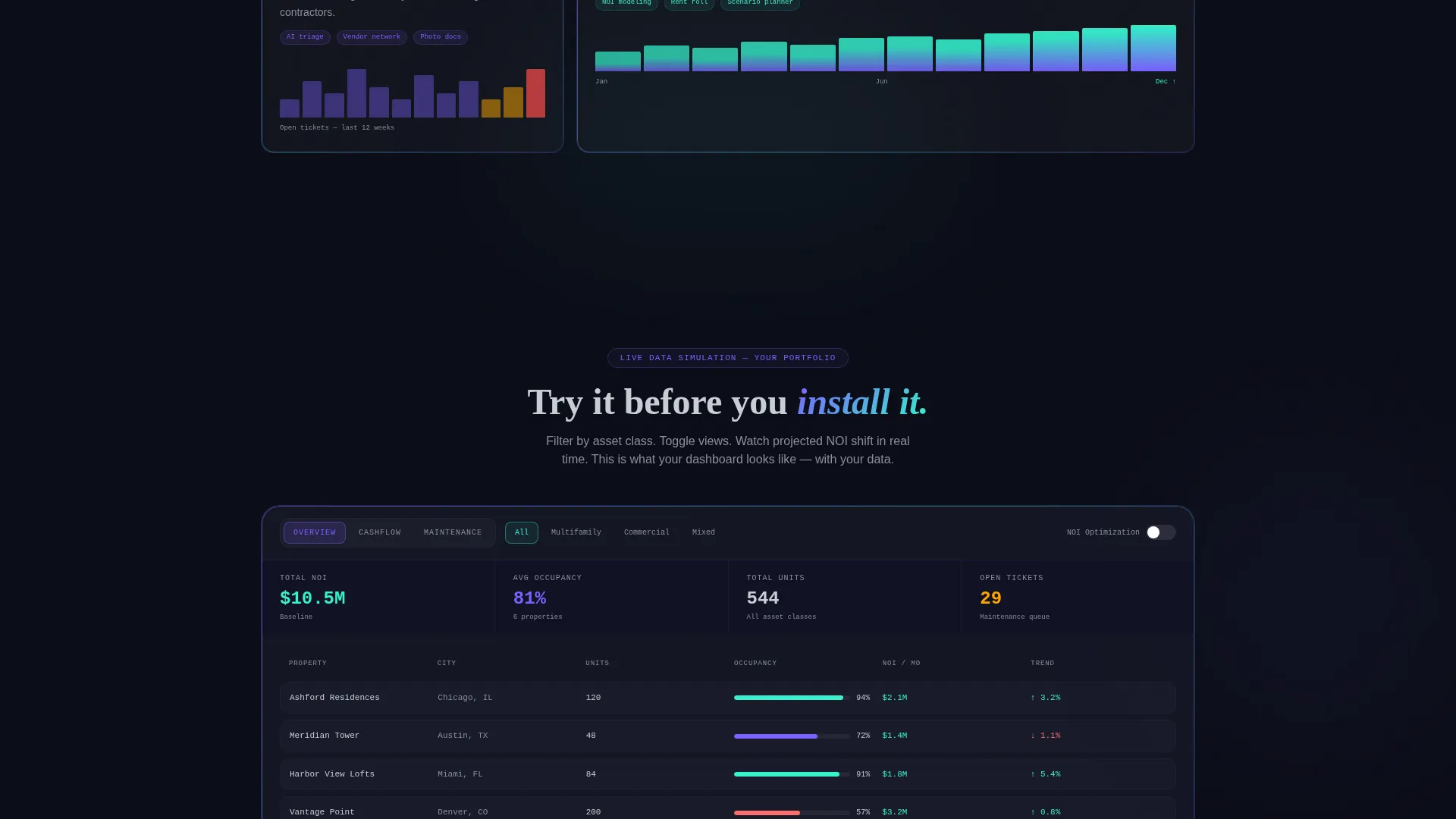
- An interactive simulated dashboard where visitors toggle portfolio views and watch projected net operating income shift
- A dual-path conversion section with app store badges and a short portfolio qualifier form
Feature list
This template ships as a cohesive set of purpose-built components. Each one serves the larger goal of turning a skeptical operator into a confident downloader.
Staggered Dark Glass Header Panels
Three translucent, frosted-glass user interface cards are arranged at varying depths against the void-black canvas. Each panel displays a distinct live-looking data module: a rent collection waterfall chart, an occupancy heat map, and an AI-generated maintenance priority queue with severity badges. A subtle parallax drift on mouse movement adds a three-dimensional, operational feel.
Terminal-Style Animated Headline
The primary headline types in like a terminal command, delivering the message "Your entire portfolio. One nervous system." This animation sets the product tone immediately and signals intelligence and precision to a technically minded audience.
Industry Report Scroll Narrative
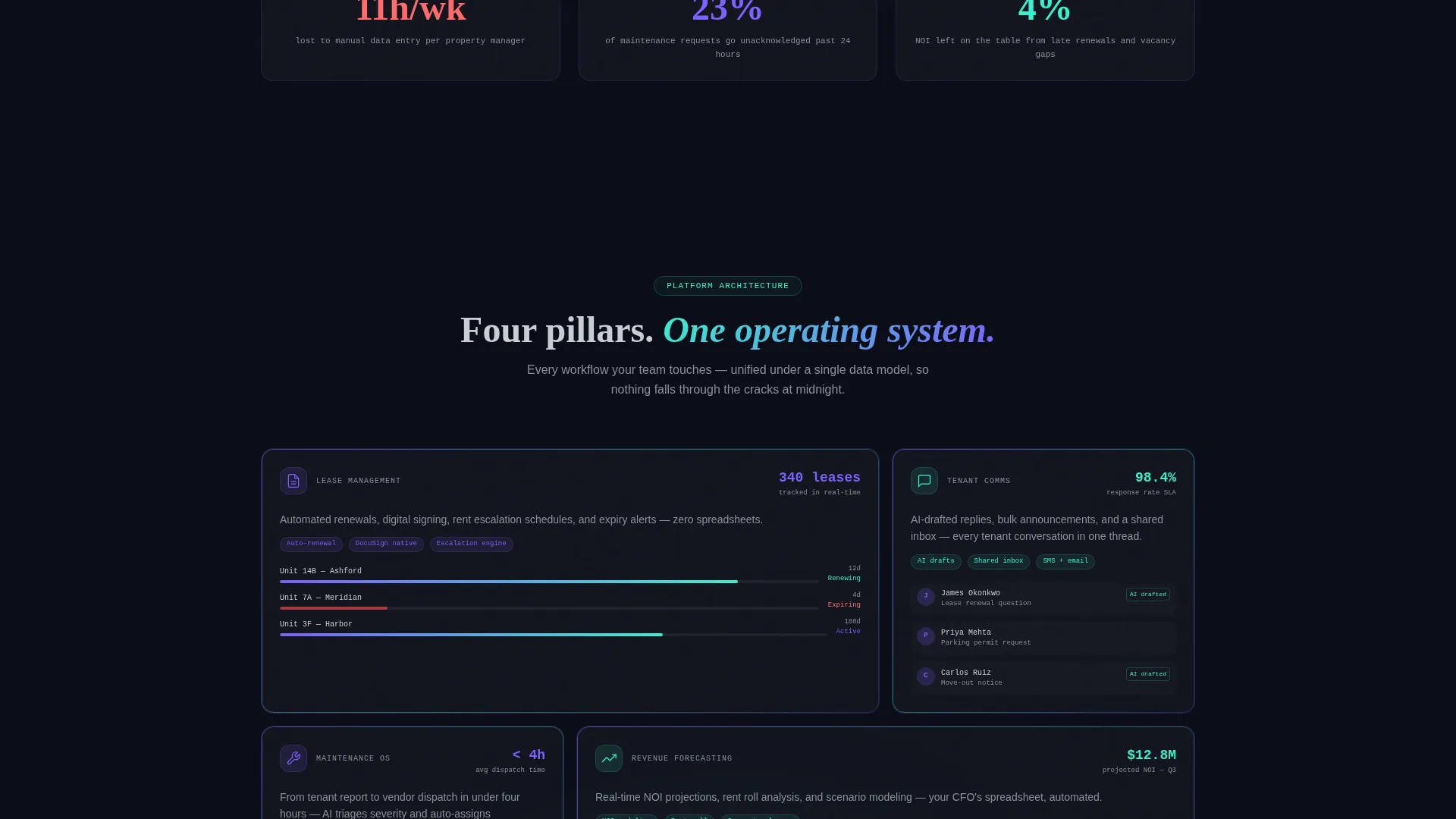
Each scroll section pairs a hard statistic about real estate operations inefficiency with a data-grid visualization showing platform consolidation. The narrative escalates from market pain to solution architecture, making the case progressively more personal as the visitor scrolls deeper.
Interactive Simulated Dashboard
Visitors can toggle between portfolio views, filter by asset class, and watch projected net operating income (NOI) shift in real time inside the simulated interface. This interaction lets visitors experience the product before committing to a download.
Dual-Path Conversion Section
The primary call to action reads "Install Propstack Free" alongside App Store and Google Play badges. A secondary path, "See It With Your Data," opens a short form requesting portfolio size, primary asset type, and work email, qualifying leads while reducing friction.
Iridescent Data Visualization System
Charts and data cards use violet-to-teal gradients that make numbers feel alive on screen. Glass-morphism layers with 1px iridescent borders float above the void-black background, giving the interface visual depth without clutter.
Page sections overview
| Section | Purpose |
|---|---|
| Hero Header Panels | Establish product credibility with live-looking data modules |
| Terminal Headline Block | Communicate the core platform promise immediately |
| Market Pain Statistics | Frame the industry problem with hard operational data |
| Platform Architecture View | Show how the product consolidates disconnected workflows |
| Interactive Dashboard Simulation | Let visitors experience portfolio toggling and NOI filtering |
| Dual call to action Download Block | Drive app installs and capture qualified leads via form |
Design & branding system
The visual identity is built on the AI Iridescent color system layered over a Startup Velocity theme. The result is a dark, frictionless interface that feels like staring into a prism laid on obsidian.
- Core palette: void black (#0B0D17) background, holographic violet (#7B61FF) for primary actions and data highlights, liquid teal (#36F1CD) for positive metrics and success states, cool frost (#C8CDD5) for secondary text and grid lines
- Glass-morphism data cards with 1px iridescent borders that catch light as the user scrolls, floating above the recessive dark background
- Violet-to-teal gradient charts that pulse with data energy, making financial and occupancy metrics feel live rather than static
Mobile & speed optimization
The template is structured with a mobile-first layout in mind. The dark glass panel compositions and data-grid sections reflow cleanly for smaller viewports, preserving the operational feel at every screen size.
- Staggered panel depths and parallax effects are designed to scale gracefully across device widths
- Data cards and chart components stack vertically on mobile without losing the glass-morphism visual layering
- The interactive dashboard simulation and dual-path call to action remain fully accessible and functional at compact screen sizes
How this template helps you convert
The page is engineered to earn conversion rather than demand it. Every section removes a reason to hesitate before the visitor reaches the download button.
- The interactive simulated dashboard lets visitors use the product before they download it, collapsing the trust gap that kills most software landing pages.
- The industry-report narrative escalates naturally from shared pain to personal relevance, so the call to action feels like the logical next step rather than a sales push.
- The dual-path conversion section serves two visitor types at once: those ready to install immediately and those who need to qualify the product against their specific portfolio first.
Other information about this template
This template is category-matched to the Real Estate Software and Software as a Service (SaaS) space, with a niche focus on real estate enterprise resource planning (ERP) platforms. It was built against an intersection of Dashboard and Data Grid template style, Industry Report creative direction, Dark Glass Panels header concept, App Download landing-page direction, and Startup Velocity theme.
- The template is designed as a single-page landing experience, not a multi-page site
- No stock photography or people imagery is used; the visual language is entirely product and data focused
- The qualifier form captures three fields: number of units, primary asset type (multifamily, commercial, or mixed-use), and work email, making it useful for both marketing and early sales qualification
Theme
Startup Velocity
Creative direction
Industry Report
Color system
AI Iridescent
Style
Dashboard/Data Grid
Direction
App Download
Page Sections
Staggered Dark Glass Header Panels
Terminal-style Animated Headline
Industry Report Scroll Narrative
Interactive Simulated Dashboard
Dual-path Conversion Section
Iridescent Data Visualization System
Related questions
What kind of product is this template designed for?
Does the interactive dashboard section require real data?
Can I customize the data panels and chart visuals?
Is this template suitable for an app download campaign?
Who are the target visitors this template speaks to?



