Dental AI Analytics Dashboard Landing Page Template
Pulp is a dental AI analytics landing page template built for platforms that read panoramic X-rays, periapical films, and CBCT scans. It combines a living dashboard mockup, a Problem-to-Solution scroll arc, and a freemium trial flow into one sharp, clinically styled single-page layout designed to convert radiograph-burdened dental professionals into active users.
by Rocket studio
Quick summary
Pulp is a single-page landing page template for dental AI diagnostic platforms. It pairs an animated dashboard mockup with a Problem-to-Solution narrative arc, pulling visitors from a cluttered unread radiograph queue to a fully annotated AI analysis in a few controlled scroll steps. The design is surgical, monochrome, and built to drive free trial signups.
Who this template is for
This template is built for companies and teams offering AI-powered radiograph analysis tools to dental professionals. It speaks directly to the buyers who feel diagnostic pressure every day.
- Associate dentists managing a backlog of unread panoramic and periapical radiographs
- Dental service organization (DSO) operations managers tracking diagnostic consistency across thirty or more locations
- Solo practitioners who need a reliable second-opinion tool that is always available
What problem this template solves
Radiograph review is slow, inconsistent, and hard to scale. A traditional diagnostic workflow runs roughly fourteen minutes per panoramic film. That delay compounds across a multi-location practice and creates real clinical risk. This template frames that problem visibly, then resolves it with the platform's own data.
- No clear way to show diagnostic speed and accuracy in a single buyer interaction
- Generic SaaS landing pages that fail to resonate with clinical dental audiences
- Multi-location buyers need fleet-wide analytics proof before they will book a demo
What you get with this template
You get a full-featured, single-page layout built around dashboard-style data presentation and a structured freemium conversion funnel. Every section is purposefully sequenced to move a clinical buyer from skepticism to signup.
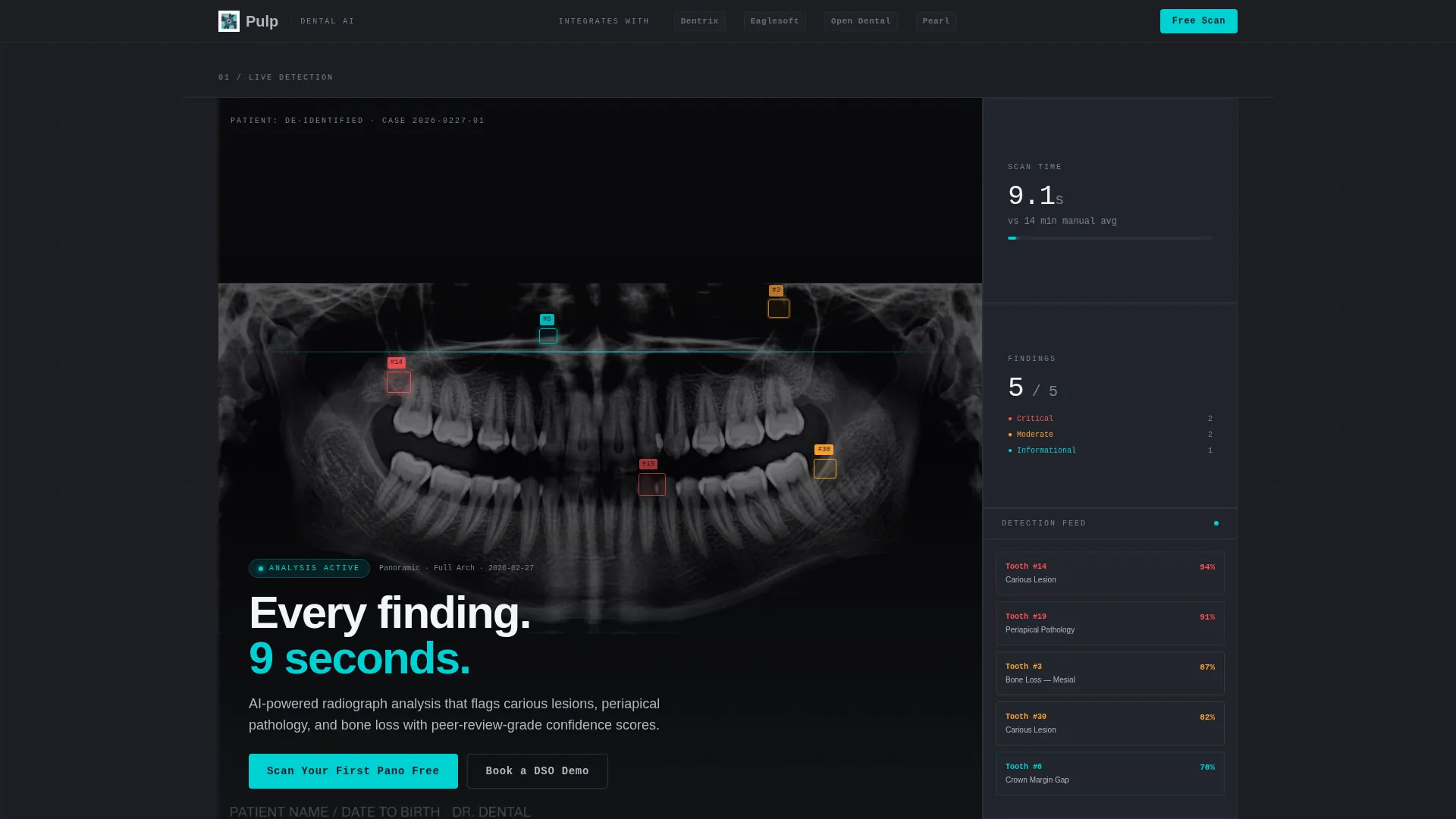
- A living dashboard mockup with animated detection overlays on a panoramic radiograph
- A four-section Problem-to-Solution scroll arc with data-driven proof points
- A floating primary call-to-action button and a two-step free-scan modal
- A secondary conversion path targeting DSO buyers with a dedicated demo booking option
- A compliance and trust section with a sensitivity and specificity chart that animates on scroll
Feature list
This template ships with purpose-built components that reflect how dental AI platforms actually sell their value. Each one is grounded in the source brief.
Animated Dashboard Mockup
The hero viewport drops immediately into a live dashboard simulation. Detection overlays pulse softly on a panoramic radiograph, confidence percentages tick upward, and a sidebar of flagged teeth populates tooth-by-tooth. The motion is clinical and precise, not decorative.
Problem-to-Solution Scroll Arc
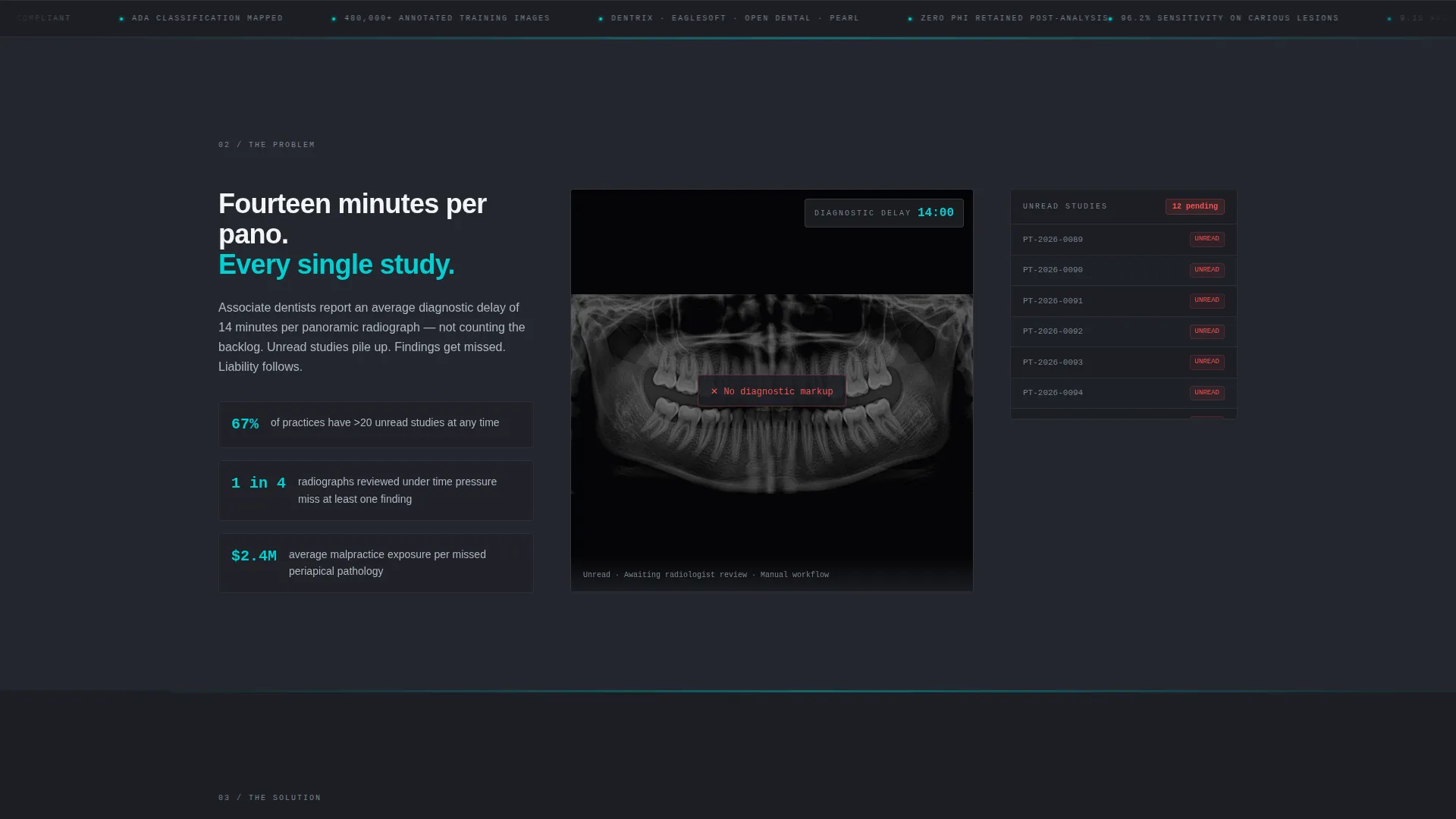
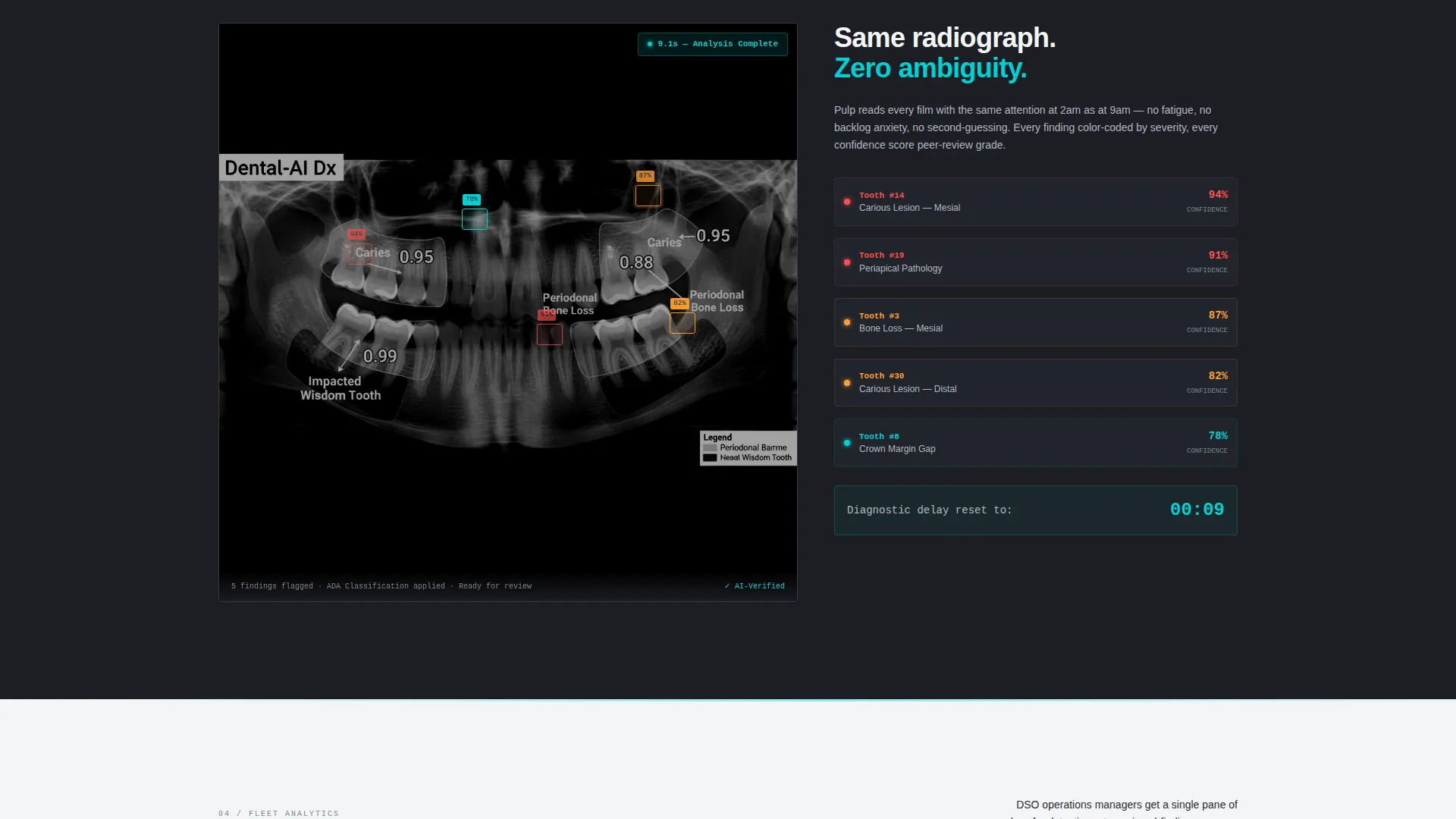
A four-section narrative guides the visitor through the diagnostic problem and its resolution. Section one shows the problem with a static, cluttered radiograph and a bold cyan fourteen-minute delay clock. Section two activates the AI solution, resetting the same clock to nine seconds with annotated overlays.
Fleet-Wide Analytics Data Grid
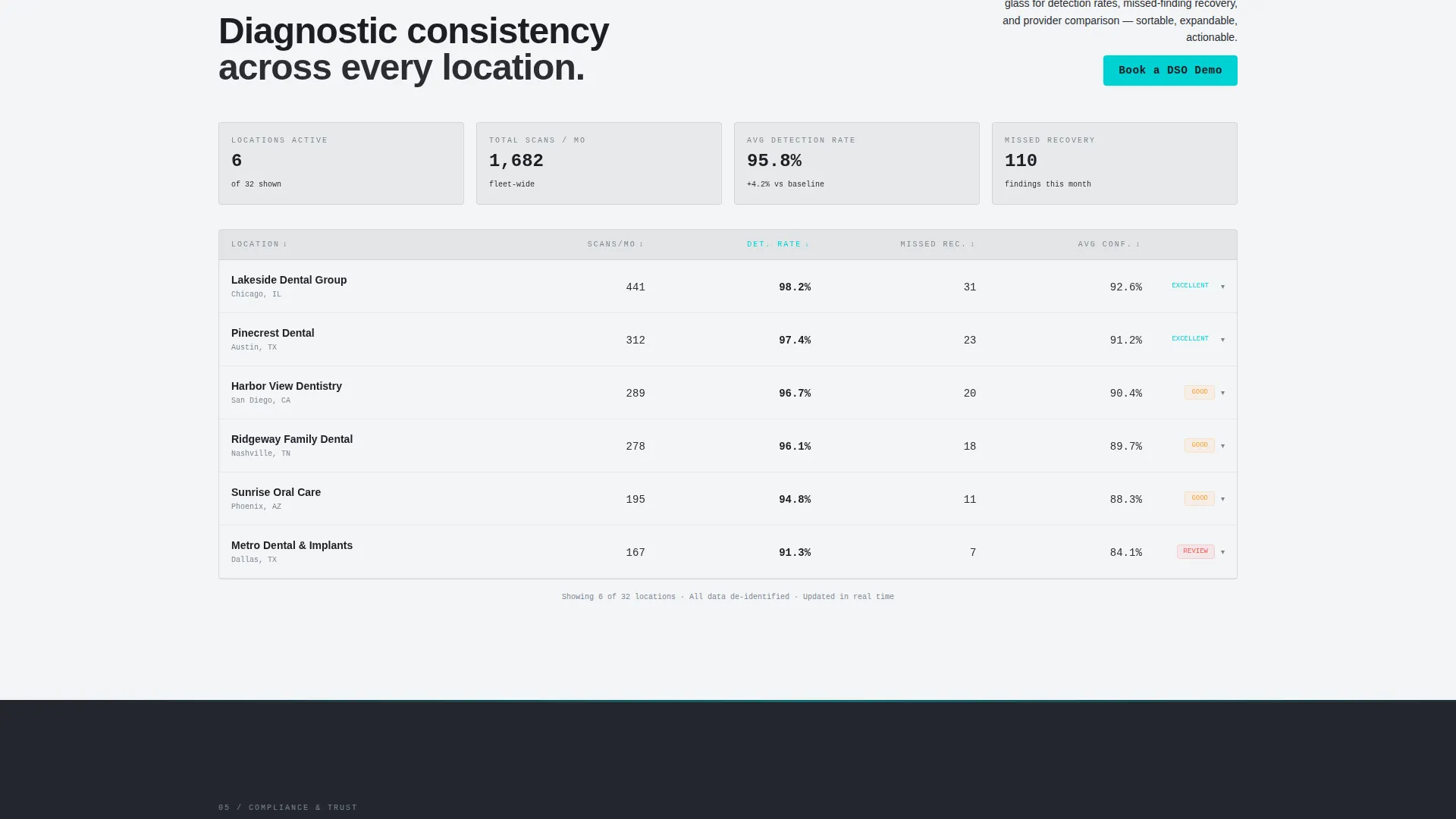
Section three presents a sortable data grid showing detection rates, missed-finding recovery, and provider comparison across locations. Columns sort on hover and rows expand on click to reveal individual case thumbnails, giving DSO buyers the proof they need.
Compliance and Trust Section
Section four maps findings to American Dental Association (ADA) classification standards, displays Food and Drug Administration (FDA) clearance status, and animates a sensitivity and specificity chart as it enters the viewport. This section directly addresses the peer-review-grade confidence buyers require.
Floating Free-Scan Call to Action
After the first scroll, a floating "Scan Your First Pano Free" button pins to the viewport in diagnostic-alert cyan on autoclave charcoal. Clicking it opens a two-step modal: practice name and practice management system selection first, then work email and a DICOM or JPEG upload.
DSO Demo Booking Path
A secondary conversion module sits below the data grid section. It targets multi-location buyers with a "Book a DSO Demo" option, giving enterprise-level prospects a white-glove entry point separate from the self-serve free scan funnel.
Page sections overview
| Section | Purpose |
|---|---|
| Logo Bar Header | Anchors wordmark and muted integration partner logos |
| Live Dashboard Hero | Immerses visitor in animated AI detection immediately |
| Problem Exposure | Visualizes diagnostic delay with a fourteen-minute clock |
| Solution Activation | Resets clock to nine seconds with AI-annotated radiograph |
| Fleet Analytics Grid | Proves multi-location consistency with a sortable data grid |
| Compliance and Trust | Validates clinical credibility with ADA mapping and FDA status |
| Free Scan Modal | Captures lead and DICOM upload in two focused steps |
| DSO Demo Booking | Converts enterprise buyers with a dedicated demo request path |
Design & branding system
The visual identity follows a Dynamic Motion theme expressed through a Monochrome Steel color system. Every color choice mirrors the sterile precision of a clinical environment.
- Surgical-instrument silver (#B0B8C1) for wordmark and body text, autoclave charcoal (#2B2D33) for backgrounds, and operatory white (#F4F5F7) for surface areas
- A single diagnostic-alert cyan (#00D1D4) reserved strictly for interactive states, hover glows, data highlights, and the primary call-to-action button
- Scroll transitions use a horizontal wipe that mimics a panoramic carriage sliding left to right, tying every animation directly to clinical workflow
Mobile & speed optimization
The template is structured for responsive presentation across screen sizes. The dashboard mockup and data grid components are designed to adapt without losing the clinical precision of the layout.
- Floating call-to-action button remains accessible on mobile viewports throughout the scroll experience
- The two-step modal flow is compact enough to complete on a phone without disorienting the user
- Animated elements use ease-in timing rather than heavy motion, keeping the interface feeling controlled on all devices
How this template helps you convert
The conversion architecture is deliberate. Every layout decision reduces friction and builds enough clinical credibility to justify a free scan submission before a credit card appears.
- The floating "Scan Your First Pano Free" button pins after the first scroll, keeping the primary action visible without interrupting the Problem-to-Solution narrative that builds purchase intent.
- The two-step modal lowers commitment by separating practice context from contact and upload details, making each step feel manageable rather than intrusive.
- Free scan results are delivered to the user's inbox within sixty seconds, making the platform's value self-evident before any sales conversation begins.
Other information about this template
This template is built specifically for the dental AI analytics dashboard niche and supports the full buyer spectrum from solo practitioners to large DSO operators. A few additional details worth noting:
- The header logo bar includes muted monochrome placeholders representing integration partners such as Dentrix, Eaglesoft, Open Dental, and Pearl, which can be updated to match your actual integration partnerships
- The template style is Dashboard and Data Grid, using the Dynamic Motion theme and a Monochrome Steel color system as specified in the matched intersection context
- The creative direction follows a Problem-to-Solution Arc with a Freemium and Trial conversion strategy, a Logo Bar header concept, and horizontal wipe scroll transitions throughout
Theme
Dynamic Motion
Creative direction
Problem→Solution Arc
Color system
Monochrome Steel
Style
Dashboard/Data Grid
Direction
Freemium/Trial
Page Sections
Animated Diagnostic Dashboard Hero
Problem-to-solution Scroll Arc
Sortable Fleet Analytics Grid
Compliance and Trust Section
Floating Free-scan Conversion Button
DSO Demo Booking Module
Related questions
Who is the primary target audience for this template?
Does the template include a free trial or demo conversion flow?
What does the animated dashboard hero section show?
Can the data grid section support multi-location analytics presentation?
What makes the compliance section credible to clinical buyers?



