Pulse - Autonomous Energy Landing Page Template
Pulse is a scroll-reveal landing page template built for energy marketing automation platforms. It opens with a live, interactive campaign-builder preview in the header, then walks visitors through a Problem-to-Solution arc that earns each scroll. The Acid Digital color system and progressive animations make the product demonstrate itself before a single form field appears.
by Rocket studio
Quick summary
Pulse is a single-page, scroll-reveal landing page template designed for energy marketing automation platforms. It opens on an interactive campaign-builder preview, guides visitors through a cinematic Problem-to-Solution arc, and closes with a frictionless app-download call to action. The Acid Digital palette and circuit-board visual identity match the real-time, data-driven nature of the product it promotes.
Who this template is for
This template is built for teams that sell or operate automated marketing tools in the competitive retail energy space. If your platform converts leads faster than a billing cycle closes, this page is your front door.
- Growth marketers at competitive retail energy providers who need to convert rate-comparison leads quickly
- Demand-response program managers at utilities running enrollment campaigns tied to consumption data
- Community solar operators looking to automate lead nurturing from first touch to signed contract
What problem this template solves
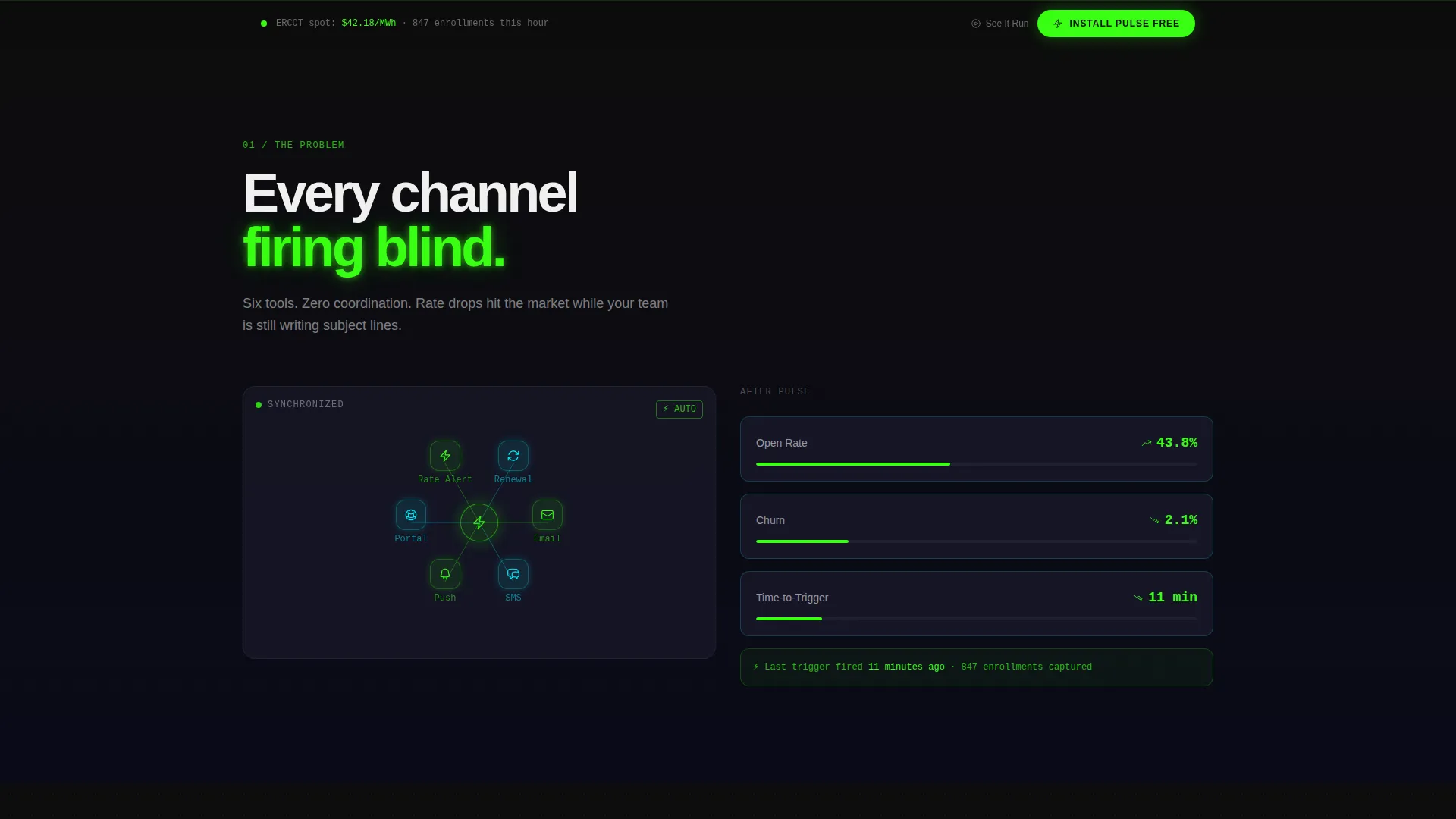
Energy marketing teams lose leads because their channels are disconnected. Email drips, rate alerts, usage nudges, and renewal campaigns each live in a different tool, and by the time a human stitches them together a billing cycle has already closed.
- Visitors arrive with no proof the platform works, and a static screenshot does not close that gap
- Disconnected channel visuals fail to communicate the "everything wired together" value proposition
- Long sign-up forms create friction before a prospect has seen the product in action
What you get with this template
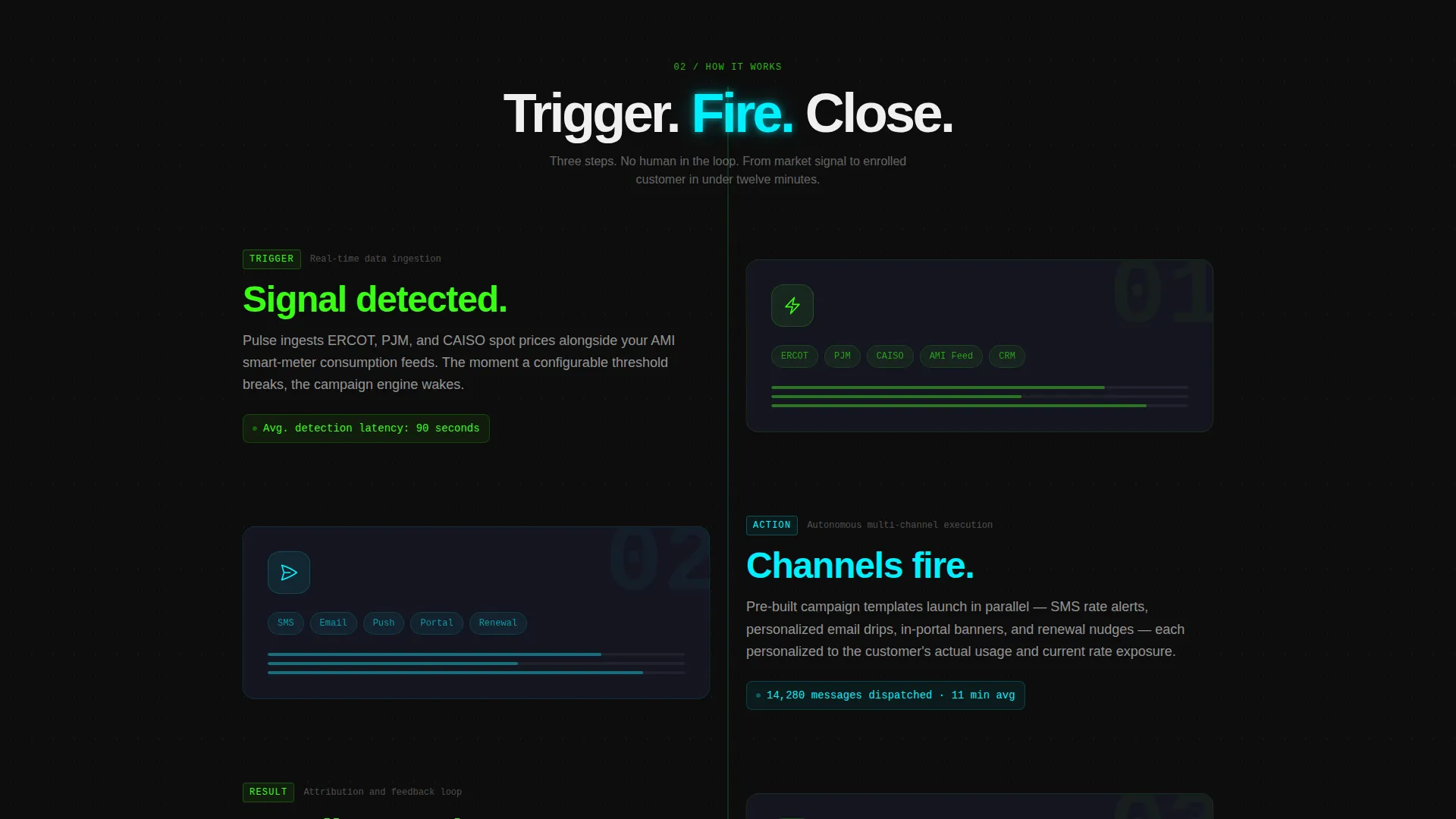
You get a fully structured, scroll-reveal landing page that lets the product demonstrate itself. Every section reveals progressively, mirroring the trigger-action-result logic of the automation platform it promotes.
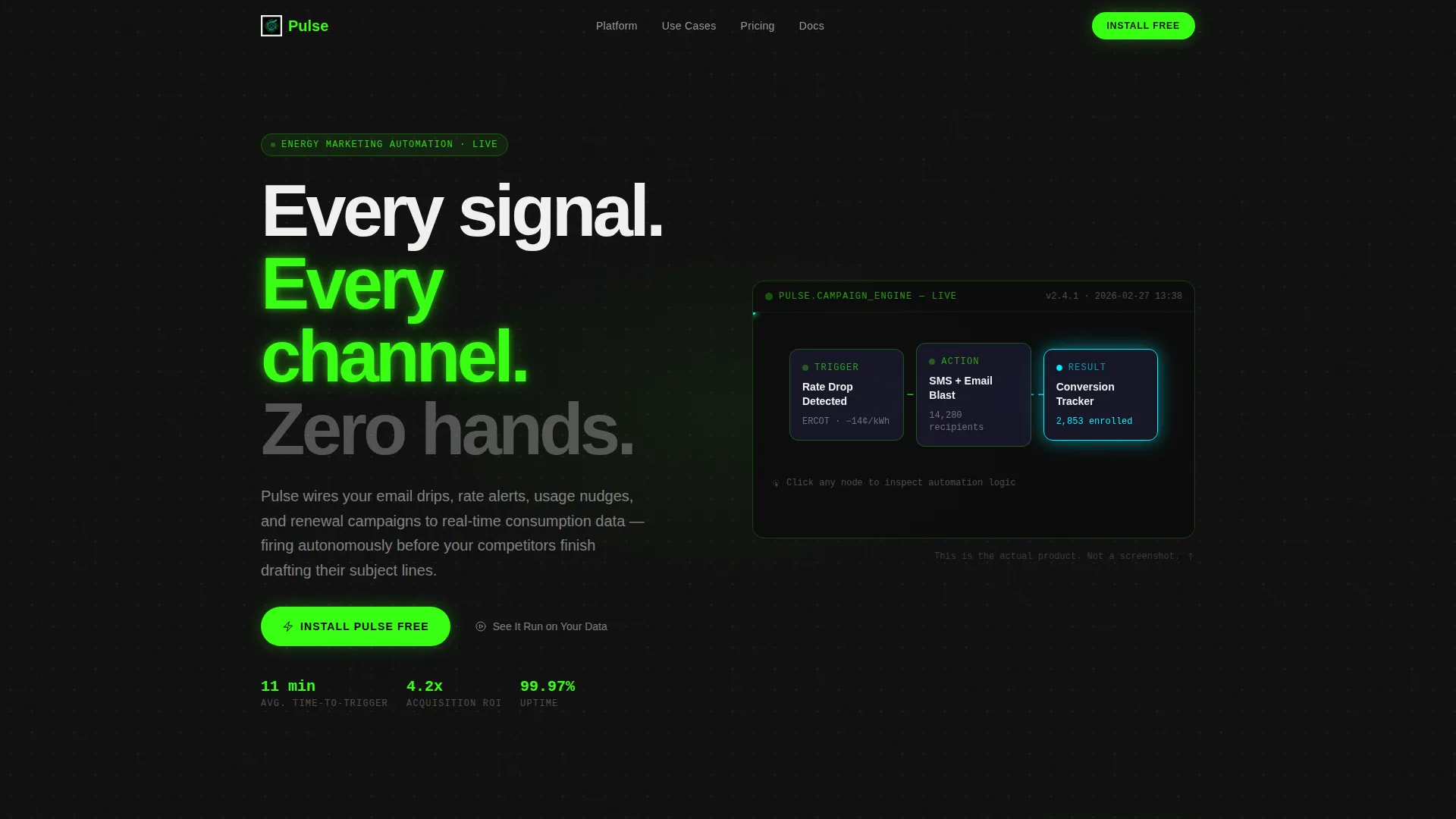
- An interactive header with a drag-and-drop campaign-builder canvas showing live animated energy-flow lines between three pre-built nodes
- A three-act Problem-to-Solution arc with animated channel visualizations, reversing metrics, and case-study proof cards
- A sticky app-download call to action that pins to the viewport bottom after the second reveal, with OS-detection copy
Feature list
This section covers every major built-in capability the Pulse template delivers as specified in the source brief.
Interactive Campaign-Builder Header
The header renders a functioning miniature of the platform's campaign-builder directly in the viewport. Three pre-built nodes, "Rate Drop Detected," "SMS + Email Blast," and "Conversion Tracker", sit connected by animated energy-flow lines. Hovering any node triggers a reactor-green glow; clicking expands a tooltip showing the automation logic beneath. No screenshot, no mockup.
Scroll-Reveal Progressive Disclosure
Each content section stays hidden until the visitor reaches it. Sections assemble on-screen like a circuit being soldered in real time, reinforcing the product's own trigger-action-result logic with every scroll step.
Three-Act Problem-to-Solution Arc
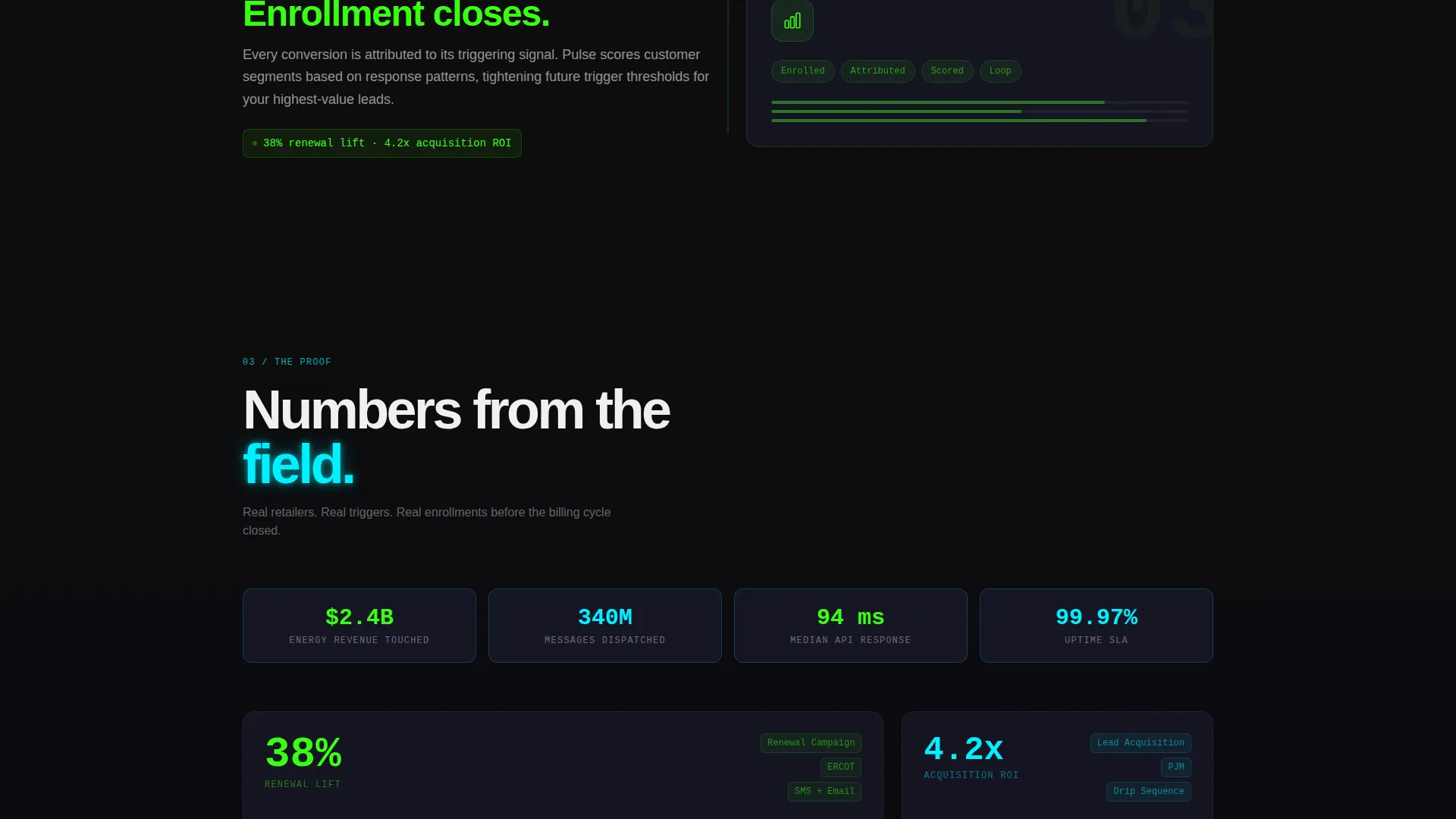
The first reveal shows disconnected channels with declining open rates and climbing churn. The second snaps those channels into an automated sequence with animated connectors and metrics reversing direction. The third delivers case-study cards with specific proof numbers: 38% renewal lift, 4.2x return on acquisition drips, and an 11-minute average time-to-trigger.
Sticky OS-Detecting Download Button
The primary call to action reads "Install Pulse Free" and adapts its copy based on the visitor's operating system, showing "Get for iOS," "Get for Android," or "Open Web App." It pins to the viewport bottom after the second scroll reveal, keeping the conversion path always visible.
60-Second Demo Modal
A secondary text link labeled "See It Run on Your Data" opens a 60-second demo video in a modal overlay. This gives hesitant visitors a low-commitment proof path without navigating away from the page.
Acid Digital Visual System
The template ships with a complete dark-mode visual identity: void black (#0D0D0D) backgrounds with a faint pulsing dot grid, reactor green (#39FF14) for calls to action and active states, arc-flash cyan (#00F0FF) for data visualizations and metric callouts, and warning-label white (#F0F0F0) for primary text.
Page sections overview
| Section | Purpose |
|---|---|
| Interactive Header Preview | Demonstrates the campaign builder live before the visitor scrolls |
| Chaos Reveal (First) | Visualizes disconnected channels with declining metrics |
| Wiring Reveal (Second) | Shows channels snapping into automated sequence with reversing metrics |
| Proof Reveal (Third) | Displays case-study cards with specific performance numbers |
| Sticky Download Bar | Pins the primary call to action to the viewport after the second reveal |
| Demo Video Modal | Opens a 60-second walkthrough for visitors who need more proof |
Design & branding system
The visual identity follows an Acid Digital color system on a Directory and Discovery theme. Every color choice is functional, not decorative, each hue communicates a specific type of information at a glance.
- Void black (#0D0D0D) fills backgrounds; a faint dot grid pulses beneath sections to suggest a live circuit board
- Reactor green (#39FF14) drives calls to action, hover states, and active-node animations; arc-flash cyan (#00F0FF) marks data visualizations and metric callouts
- Warning-label white (#F0F0F0) handles primary text; grid-line gray (#1A1A2E) provides structural dividers between sections
Mobile & speed optimization
The template is built with a scroll-reveal flow that adapts naturally to smaller screens. Progressive disclosure keeps the page focused and prevents content overload on mobile viewports.
- Each section reveals only when it enters view, reducing the amount of content rendered at once on any screen size
- The sticky download bar is sized and positioned for thumb-friendly tapping on mobile devices
- The interactive header nodes and tooltips are designed to respond to both hover and tap interactions
How this template helps you convert
Every design and structural decision in this template is aimed at moving a skeptical visitor toward the download tap with as little friction as possible.
- The interactive header puts the product in the visitor's hands before any copy asks for commitment, so trust is earned through direct experience rather than claims
- The Problem-to-Solution arc makes the value proposition visceral: visitors watch their pain (disconnected channels, rising churn) transform into the solution (automated sequences, concrete results) in real time
- The no-form-before-download approach removes the biggest friction point at the moment of highest intent, the app handles onboarding, and the page handles conviction
Other information about this template
This template sits at the intersection of Energy Software as a Service and energy marketing automation, making it specific enough to resonate with niche buyers while remaining flexible for adjacent use cases.
- The template style is Scroll Reveal (Progressive), which suits platforms that need to build a case before asking for action
- The header concept is classified as an Interactive Preview, a pattern well-suited to SaaS and automation tools where seeing the interface beats reading about it
- The creative direction follows a Problem-to-Solution Arc, a proven structure for converting informed, comparison-stage buyers in competitive software categories
Theme
Directory & Discovery
Creative direction
Problem→Solution Arc
Color system
Acid Digital
Style
Scroll Reveal (Progressive)
Direction
App Download
Page Sections
Interactive Campaign-builder Header
Scroll-reveal Progressive Disclosure
Three-act Problem-to-solution Arc
Os-detecting Sticky Download Button
Demo Video Modal
Acid Digital Color System
Related questions
Does this template require a real working backend to display the interactive header?
Can I replace the case-study numbers in the proof section with my own results?
What does the sticky download button show on a desktop browser?
Is the 60-second demo video included in the template?
Who is this landing page template best suited for?



