Coaching Digital Presence Advanced Professional Website Template
Pulse is a scroll-reveal landing page template built for coaches who deliver digital meal plans and nutrition protocols. It replaces static PDFs with a live, trackable menu experience. The page surfaces industry data points progressively, pairs each one with a product answer, and drives leads through a focused three-field form flow.
by Rocket studio
Quick summary
Pulse is a single-page, scroll-driven landing page template for coaching digital menu platforms. It combines an Acid Digital visual identity with a data-led creative direction that reframes the problem with every scroll. The result is a high-urgency lead generation page built for fitness coaches, nutrition consultants, and wellness startups.
Who this template is for
This template is built for coaches and wellness professionals who send meal plans and nutrition protocols to clients. If you have been sharing PDFs or printed menus, this page is designed to position your upgrade compellingly.
- Fitness coaches managing multiple client meal plans at once
- Nutrition consultants tracking macros across a large active client base
- Wellness startups delivering personalized eating protocols at scale
What problem this template solves
Most coaches lose client engagement the moment they hand over a static document. A PDF gets downloaded and forgotten. A laminated menu gets ignored. The problem is not the plan itself, it is the delivery format. This template addresses that gap directly, using real data points to show visitors why the old way is broken before introducing the new one.
- Clients never open PDF meal plans a second time, which wastes the coach's preparation time
- Coaches spend hours each week rebuilding plans instead of coaching
- There is no visible engagement data to tell coaches whether a plan is actually working
What you get with this template
You get a fully structured, single-page layout designed around progressive scroll reveals. Each section is built to surface a problem, back it with a data point, and then resolve it with a product feature. The page moves visitors from skepticism to clarity without a hard sell.
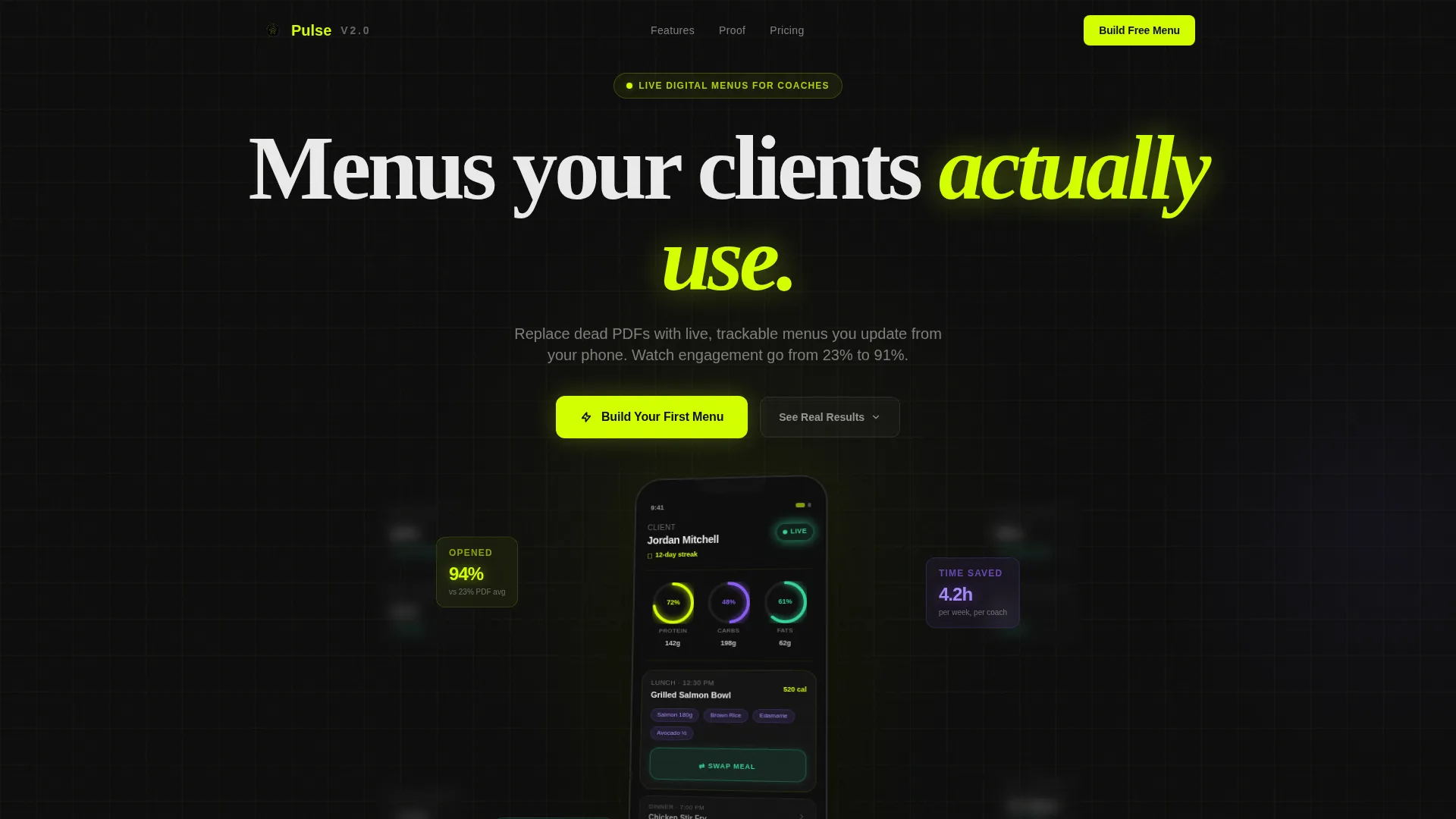
- A phone mockup header with live menu visuals, macro rings, and blurred analytics in the background
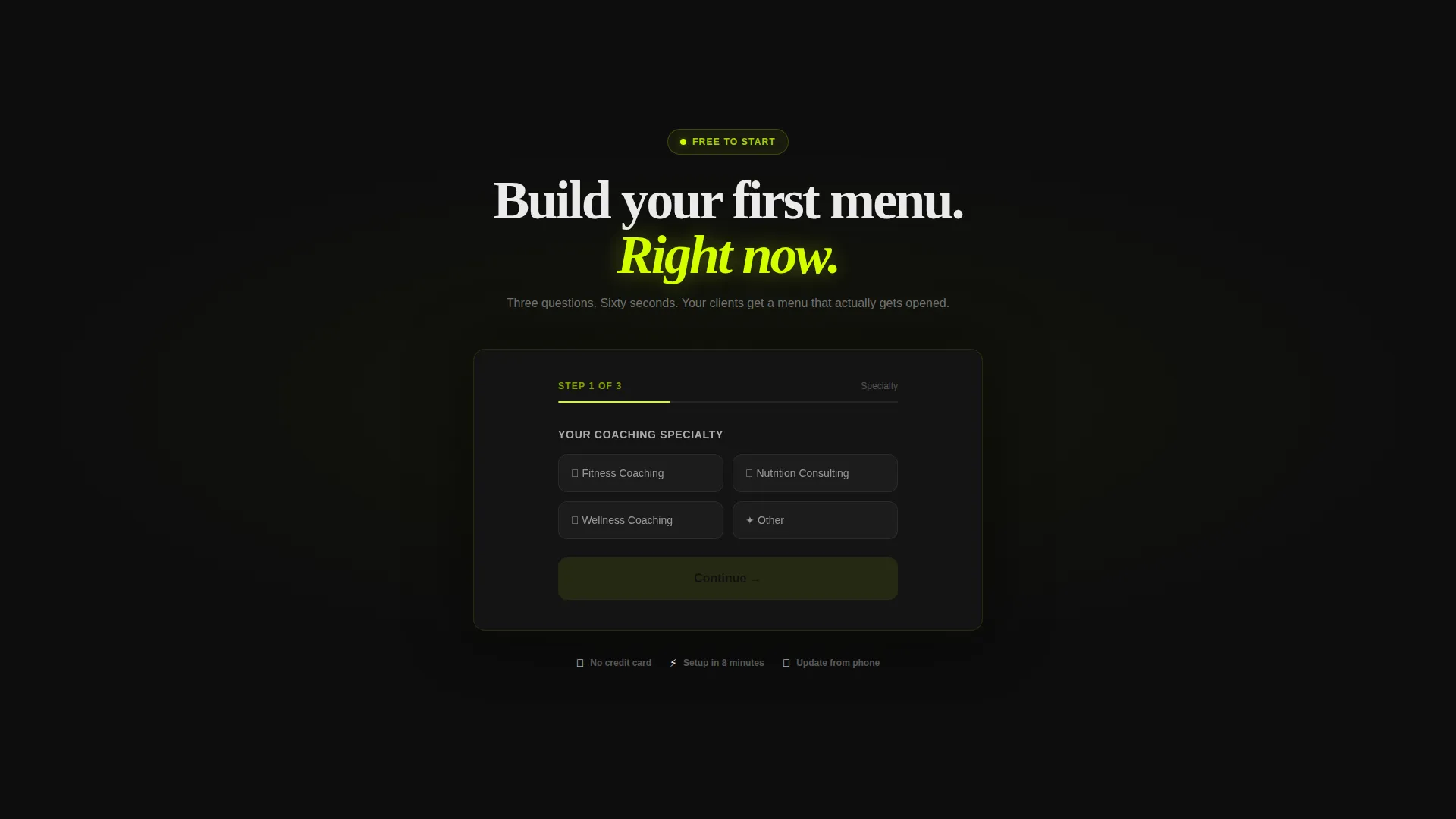
- A sequential three-field lead generation form capturing coaching specialty, client count, and email
- A sticky bottom bar repeating the primary call to action throughout the scroll
Feature list
This section covers the core template capabilities drawn directly from the page brief.
Progressive Scroll Reveal Layout
Each section appears as the visitor scrolls down the page. The reveal sequence is intentional: a data stat lands first, then the product answer slides in to resolve it. The pacing makes the argument feel inevitable rather than forced.
Industry Report Creative Direction
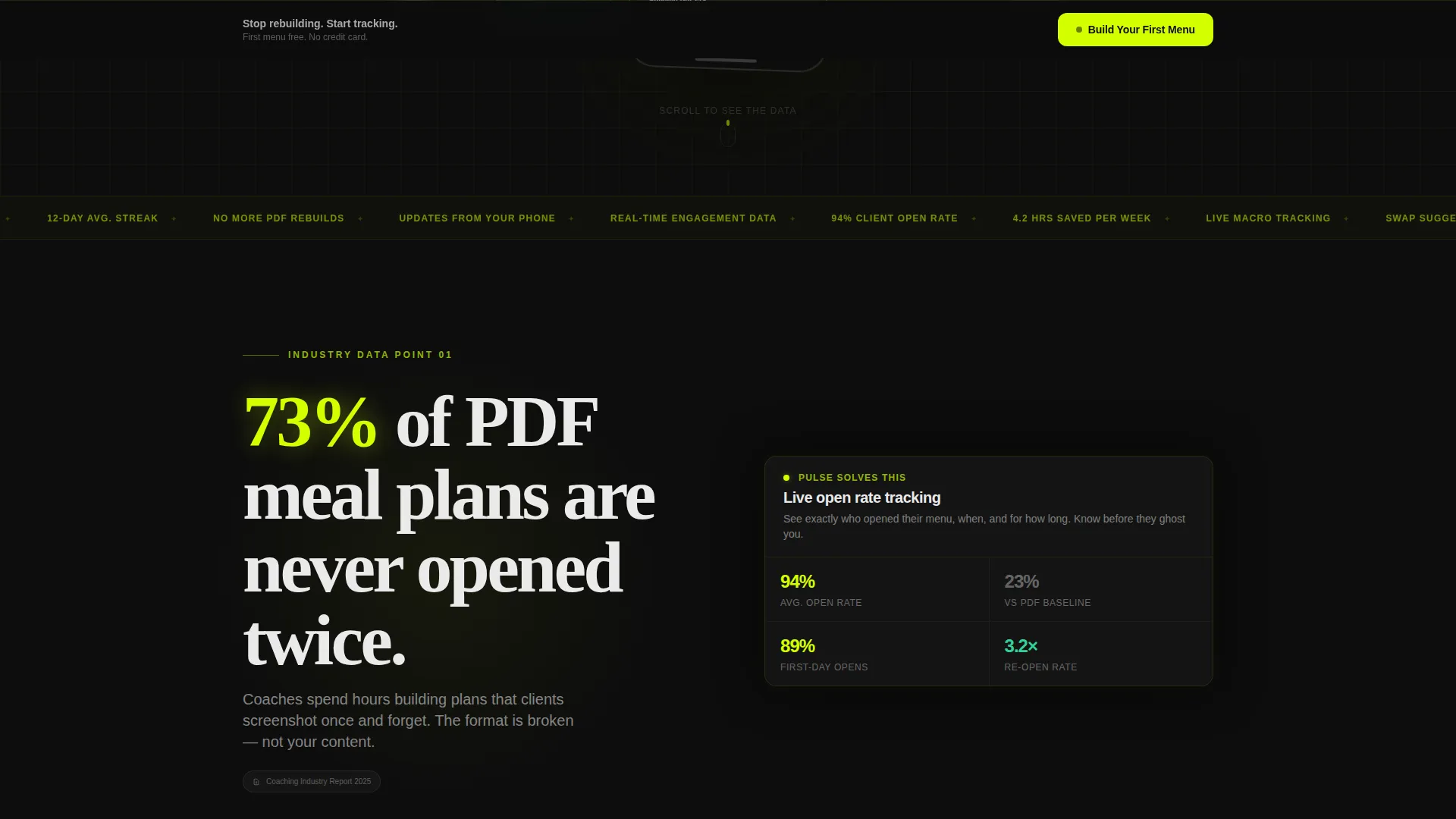
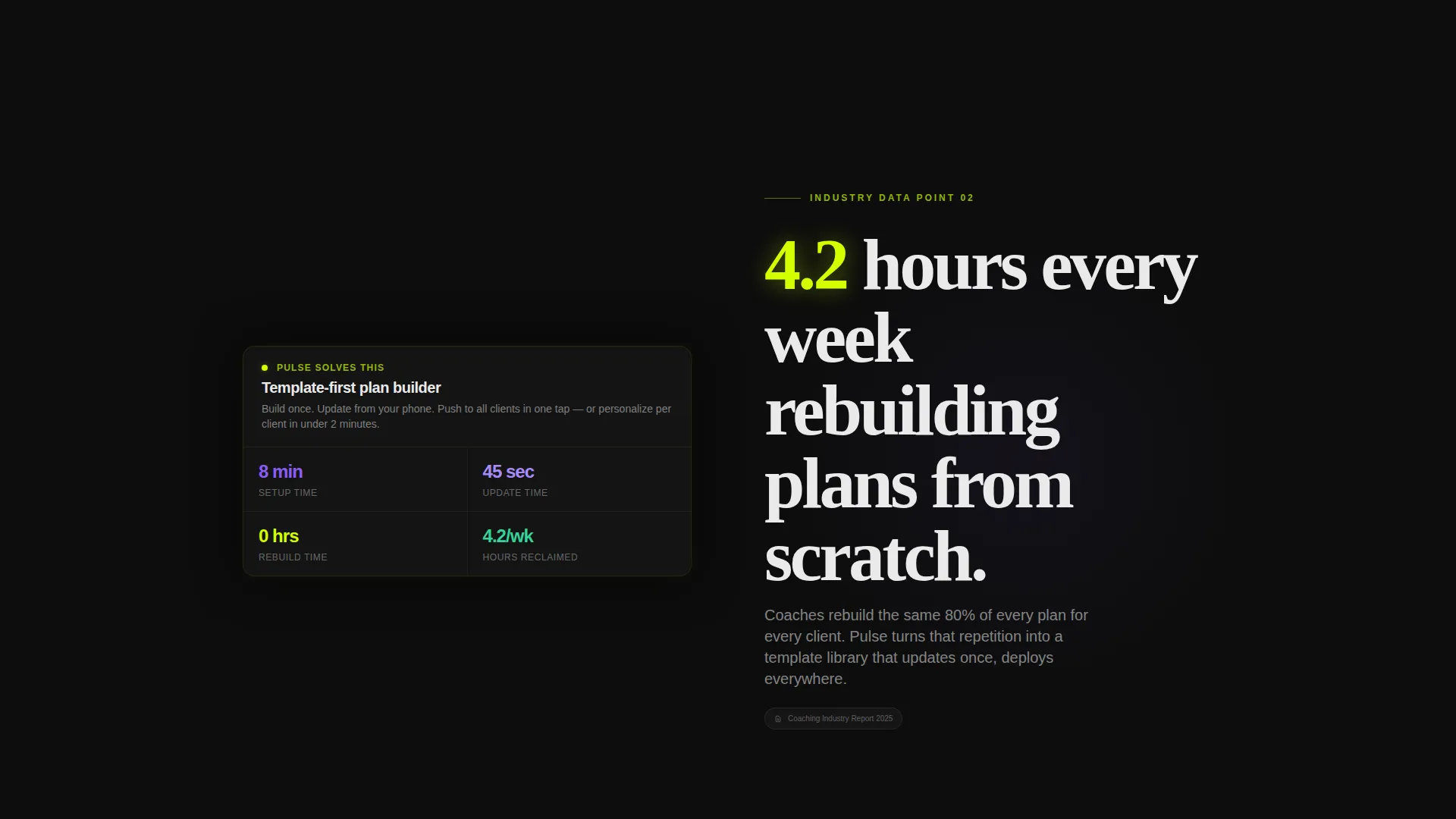
The page is structured like a pitch deck that gets more convincing with each scroll. Three data reveals are built in: PDF open rates, weekly time lost to plan rebuilding, and automation gaps. Each stat is paired with the relevant product feature so the connection is immediate.
Product Screenshot Header
The header centers a phone mockup at a slight angle showing a live digital menu in use. A client name, half-filled macro rings in chartreuse and purple, and a glowing swap button are visible on screen. Behind the phone, a blurred analytics grid suggests depth without competing for attention.
Three-Field Sequential Lead Form
The lead form collects three inputs in sequence: coaching specialty via dropdown, active client count via a range slider, and an email address. The form is placed after the third data reveal, once visitor intent is highest. A secondary path offers a gated industry report download using the same email capture.
Sticky Call-to-Action Bar
A persistent bottom bar repeats the primary call to action throughout the entire scroll experience. Visitors never have to scroll back up to convert. The bar keeps the conversion path visible without interrupting the reading flow.
Dual Conversion Paths
The page supports two lead flows. The primary path drives visitors to build their first menu. The secondary path offers access to the full industry report. Both paths use the same email capture, giving data-motivated visitors a reason to convert before they are fully sold on the product.
Page sections overview
| Section | Purpose |
|---|---|
| Hero Header | Anchors the product visually with a phone mockup and headline |
| First Data Reveal | Surfaces the PDF open-rate stat and pairs it with the product |
| Second Data Reveal | Shows weekly time lost to plan rebuilding, then the automation feature |
| Third Data Reveal | Closes the data argument and triggers the primary lead form |
| Lead Capture Form | Collects coaching specialty, client count, and email in sequence |
| Secondary Report call to action | Offers the industry report as a gated alternative conversion path |
| Sticky Bottom Bar | Keeps the primary call to action visible throughout the scroll |
Design & branding system
The visual identity follows a Startup Velocity theme built on the Acid Digital color system. The palette is designed to feel like a live terminal: high-contrast, data-forward, and impossible to skim past without engaging.
- Void black (#0D0D0D) as the base background, electric chartreuse (#D4FF00) for primary highlights and active user interface elements
- Scanner purple (#8B5CF6) for secondary accents including macro ring fills and data indicators
- Interface white (#EAEAEA) for body text, keeping readability high against the dark background
Mobile & speed optimization
The layout is built as a single-page scroll experience, which keeps the structure lean and navigable on smaller screens. The progressive reveal pattern works well on touch devices where scrolling is the primary interaction.
- Phone mockup header naturally signals mobile-first use, reinforcing the product's on-the-go update capability
- Three-field sequential form reduces friction on mobile by presenting one input at a time
How this template helps you convert
The page is structured to build purchase intent progressively rather than asking for a conversion too early. Every design decision pushes toward one of two lead outcomes.
- The industry report data sequence reframes the problem three times before the form appears, so visitors arrive at the call to action already convinced the old way is costing them.
- The dual conversion path means data-motivated visitors who are not yet product-ready still convert via the report gate, giving you a second lead entry point from the same page.
Other information about this template
This template is part of a broader set of coaching digital presence layouts designed for the technology and digital tools category. It is a strong fit for coaches exploring modern client delivery formats.
- The template style is Scroll Reveal (Progressive), meaning sections animate in as the visitor reaches them during natural page scrolling
- The header concept is Product Screenshot, which grounds the page in the actual product experience rather than abstract marketing imagery
- The creative direction is Industry Report, a format that uses real-feeling statistics to build the case before the product is introduced
- The lead generation direction means every layout decision prioritizes email capture over general awareness or content browsing
Theme
Startup Velocity
Creative direction
Industry Report
Color system
Acid Digital
Style
Scroll Reveal (Progressive)
Direction
Lead Generation
Page Sections
Progressive Scroll Reveal Sequencing
Industry Report Data Reveals
Phone Mockup Hero Header
Sequential Three-field Lead Form
Dual Conversion Path Structure
Persistent Sticky Bottom Bar
Related questions
Can I customize the data stats shown in the scroll reveals?
Is the lead form connected to any specific email platform?
Can both conversion paths collect leads at the same time?
Who is the secondary conversion path best suited for?
Does the sticky bottom bar stay visible throughout the entire page?



