Pulse Fitness Email Automation Landing Page Template
Pulse is a fitness email landing page template built for gym owners who lose members before the 90-day mark. It combines a retention revenue calculator, a side-by-side comparison table, and a pre-built sequence template directory into one high-converting single-page layout. The Carbon Fiber design system and industrial typography create an instantly credible first impression for fitness business operators.
by Rocket studio
Quick summary
Pulse is a single-page landing page template designed to help gym owners stop losing new members in the first 90 days. It leads with an interactive retention calculator, moves into a structured comparison table, and closes with a browsable directory of pre-built welcome sequences. The Carbon Fiber visual system keeps the experience sharp, focused, and built to convert.
Who this template is for
This template is built for fitness business operators who run member-based facilities and need a smarter way to onboard new subscribers. If you manage an email list of gym members and want to turn sign up momentum into long-term retention, this page was made for you.
- Independent gym operators managing rosters of 200 to 800 members who expect onboarding to work without extra staff
- Boutique studio founders juggling ClassPass and direct bookings who need a welcome sequence that can scale
- Franchise managers who want onboarding messages that introduce the brand consistently across locations
What problem this template solves
Gym owners lose roughly 40% of new signups before those members ever build a real habit. A generic "thanks for joining" email does not engage, does not build trust, and does not give new customers a reason to come back. The pain points are real: no time to write, no system to send emails automatically, and no clear way to show what a welcome email sequence is worth in dollars.
- New subscribers sign up excited, then go quiet because no meaningful follow-up arrives in time
- Manual onboarding is inconsistent and impossible to scale without hiring more front-desk staff
- Gym owners miss revenue that a structured email welcome sequence could recover automatically
What you get with this template
You get a fully designed, single-page layout that walks a gym owner from problem awareness to sign up in a logical, persuasive flow. Every section is built to introduce the value of automated welcome sequences visually and functionally.
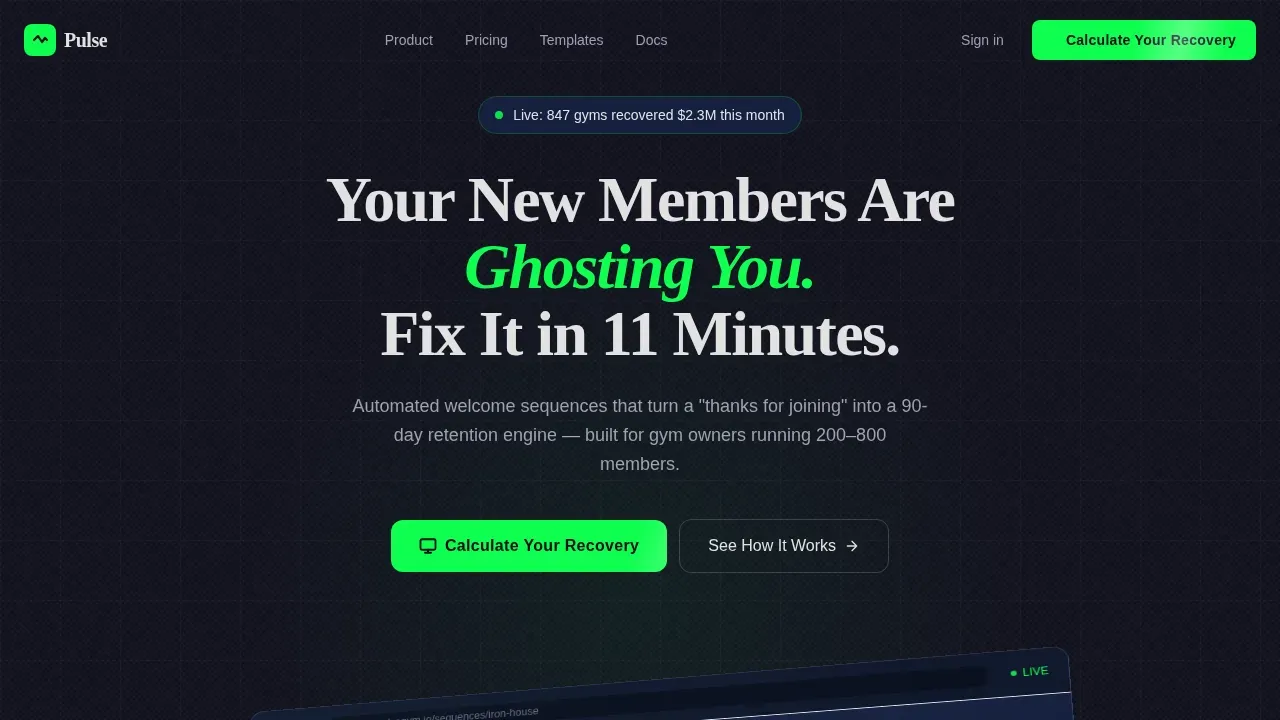
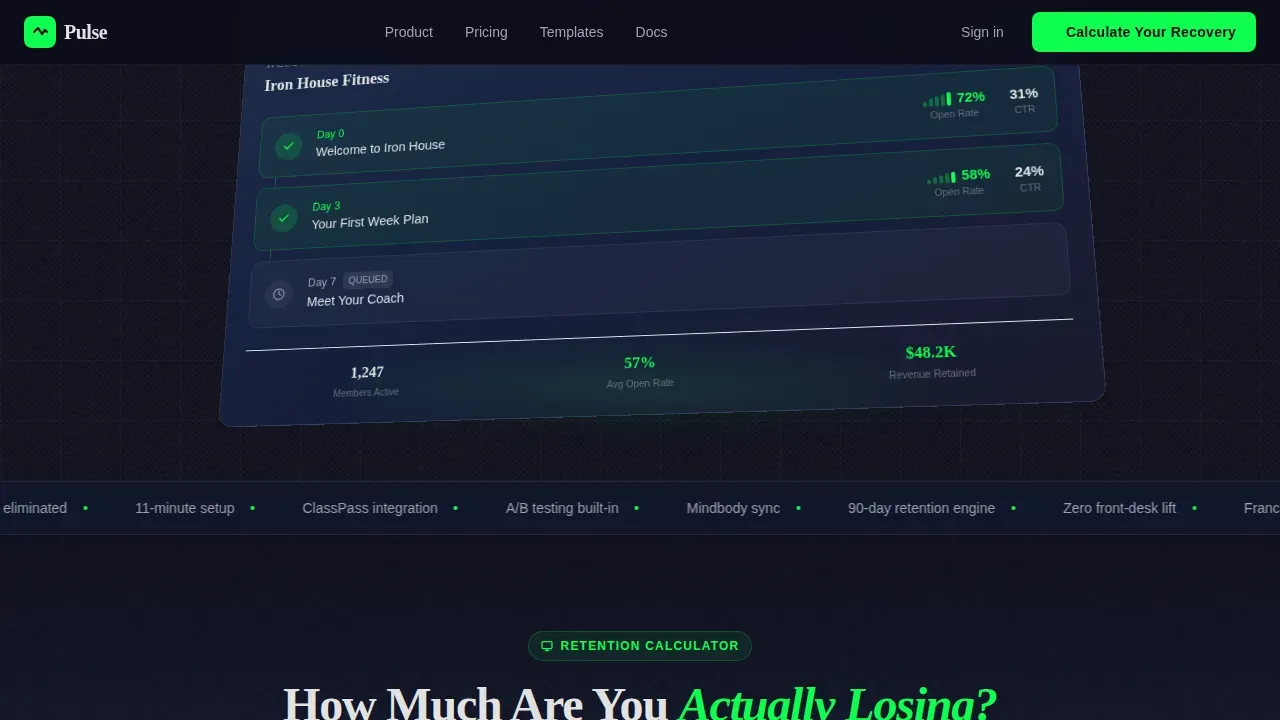
- An isometric hero section showing a live email builder dashboard with three queued welcome emails and visible open-rate metrics
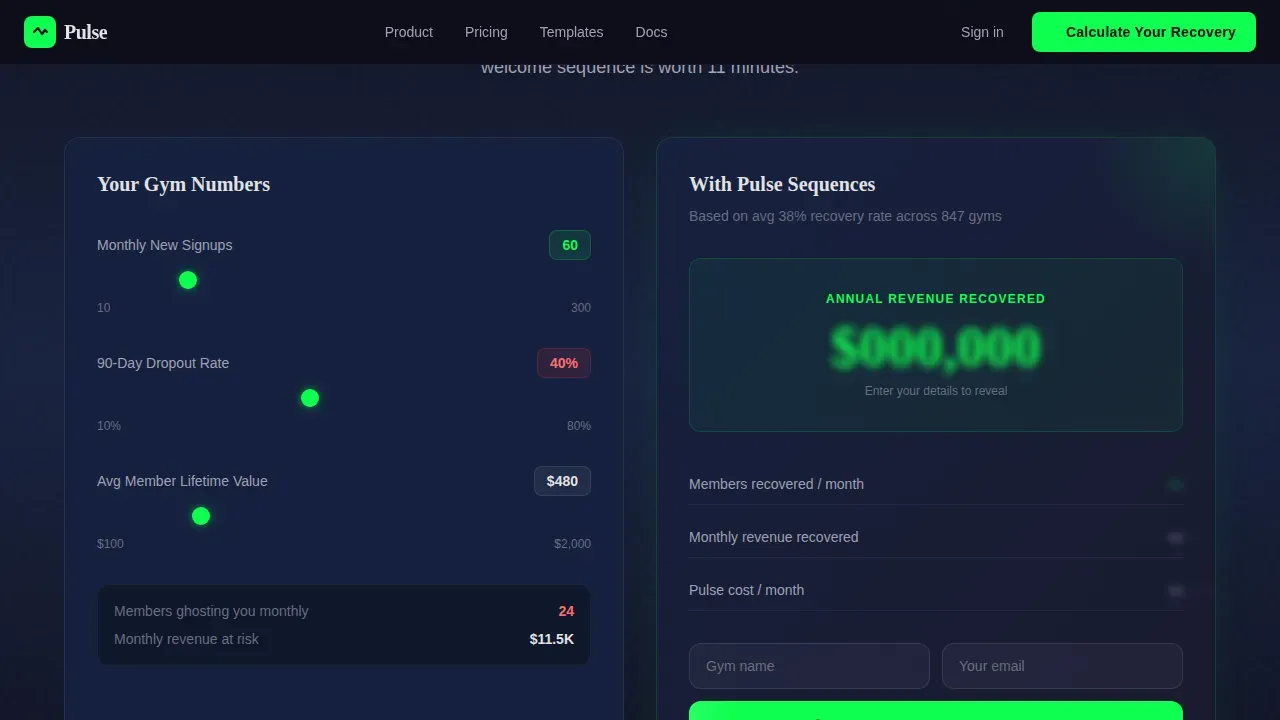
- An interactive retention calculator that takes monthly signups, dropout rate, and member lifetime value as inputs, then outputs a projected recovery figure
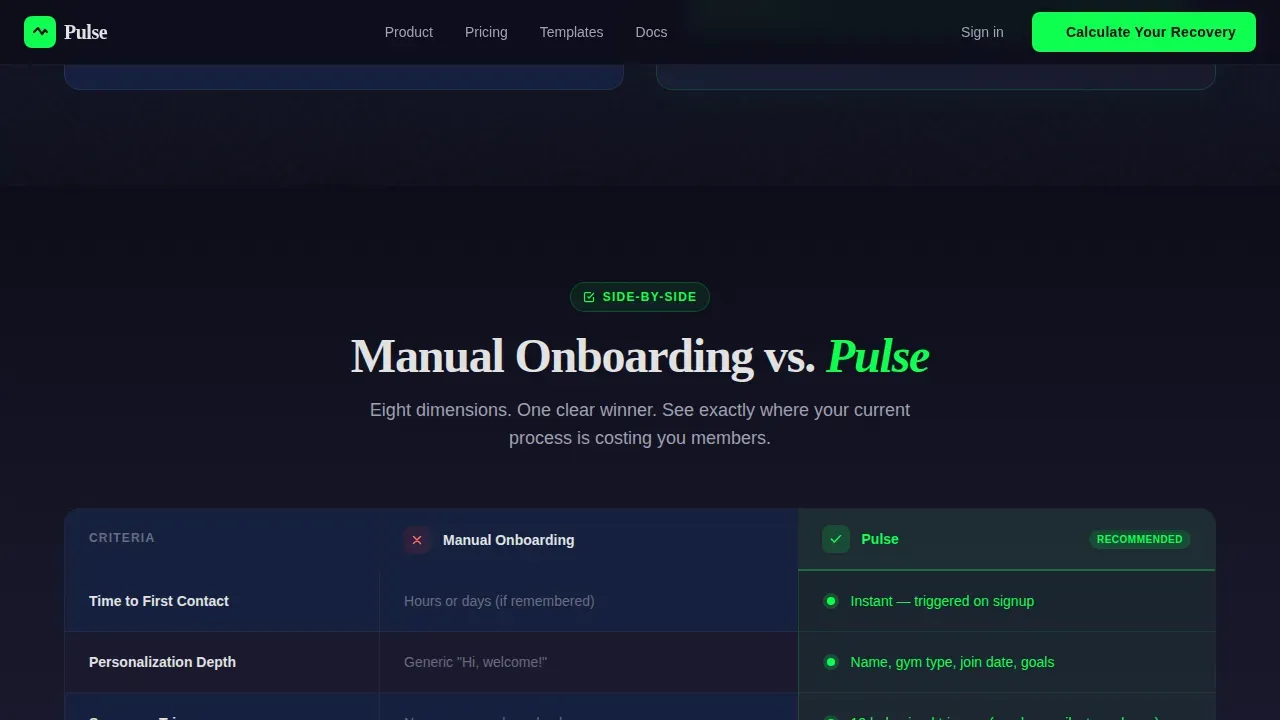
- A structured comparison table with eight rows benchmarking manual onboarding against automated sequences, plus a browsable directory of sequence templates organized by gym type
Feature list
This template includes several built-in components that work together to help you demonstrate value and capture qualified leads.
Interactive Retention Revenue Calculator
The calculator sits immediately below the hero and functions as the primary lead magnet on the page. Visitors input their monthly signups, current 90-day dropout rate, and average member lifetime value. The tool returns a projected revenue figure showing what they stand to recover with a structured email welcome sequence versus without one. The primary sign up form captures gym name and email inline before the result is revealed.
Eight-Row Comparison Table
The comparison table is the structural backbone of the page. It pits manual onboarding against automated welcome sequences across eight rows: time to first contact, personalization depth, sequence triggers, A/B testing, booking software integration, cost per member, retention lift, and setup time. Each winning cell highlights in electric green, making the benefit of automation immediately clear to anyone who scans the page.
Sequence Template Discovery Directory
Below the comparison table, a bento-style discovery grid organizes pre-built email sequence templates by gym type: CrossFit box, yoga studio, big-box franchise, and personal training studio. Each card is expandable so visitors can preview the actual email flow before they commit. This lets potential customers explore relevant options and self-qualify before they reach the secondary sign up form.
Inline Lead Capture Forms
Two sign up form placements are built into the page. The first is anchored to the calculator with the call to action "Calculate Your Recovery." The second sits at the base of the comparison table under the label "Import My Member List" and includes three fields: name, email, and a member count range dropdown covering under 200, 200 to 500, and 500 or more members.
Animated Dashboard Hero Section
The header opens with a pixel-perfect product screenshot of an email builder dashboard shown on a slight isometric tilt against a pure carbon black background. Three emails are queued in the visible interface: "Welcome to Iron House," "Your First Week Plan," and "Meet Your Coach." Open rate and click-through figures are shown beside each node, providing social proof at the very first moment a visitor lands on the page.
Scroll-Reveal and Counter Animations
The template includes high-level animation behavior: scroll-reveal effects for section entries, counter animations for live data points, green pulse effects on call-to-action elements, and a marquee strip for supporting context. These animations are built with CSS-first performance principles and use Intersection Observer triggers for scroll-based reveals.
Page sections overview
| Section | Purpose |
|---|---|
| Hero dashboard header | Presents product screenshot with headline and primary call to action |
| Retention calculator tool | Captures lead inline while showing projected revenue recovery |
| Manual versus. automated table | Compares onboarding approaches across eight decision-making rows |
| Sequence template directory | Lets visitors browse and preview pre-built welcome sequences by gym type |
| Footer call to action | Delivers secondary sign up form and final conversion prompt |
| Minimal footer | Closes the page with minimal navigation and brand signoff |
Design & branding system
The visual identity uses a Carbon Fiber color system that feels industrial, tactile, and high-contrast. The palette was chosen to communicate the precision and reliability that gym owners expect from a tool they will trust to send emails on their behalf.
- Deep carbon black (#1A1A2E) dominates the background; graphite weave (#16213E) structures cards and table rows; titanium silver (#E2E2E2) carries body text and dividers
- Electric green (#0FFF50) appears only on calls to action, live data points inside the calculator, and progress indicators so it retains maximum visual impact
- Typography pairs Fraunces for display headlines with DM Sans for body copy, balancing editorial weight with clean readability across all sections
Mobile & speed optimization
The template is desktop-first in its layout priority, reflecting the reality that gym owners typically check dashboards and review email campaigns from a desktop browser. However, the layout is fully responsive to accommodate the high mobile traffic common in the fitness category.
- All section layouts reflow cleanly for smaller screens, keeping the calculator and comparison table usable on mobile devices
- CSS animations are preferred over JavaScript-heavy alternatives, and Intersection Observer handles scroll-reveal triggers to keep rendering efficient
- The sign up form fields remain accessible and easy to interact with on touch screens without layout breakage
How this template helps you convert
This template is structured so every section earns the next click. The sequence moves a visitor from curiosity to commitment without feeling like a hard sell.
- The hero creates strong first impressions immediately by showing realistic open-rate metrics on a live-looking dashboard, then the calculator turns a vague worry about dropout into a specific dollar figure the owner is currently losing, making the "Calculate Your Recovery" call to action the obvious first step.
- The comparison table reinforces the purchase decision by showing exactly where manual onboarding falls short across eight concrete rows, and the electric green highlights on the winning cells guide the eye toward the conclusion before the visitor consciously reaches it.
- The sequence template directory lets visitors explore and find a welcome series that matches their gym type, reducing uncertainty and making the "Import My Member List" sign up form feel like a natural forward move rather than a cold commitment.
Other information about this template
This template is a strong fit for anyone building or refining a fitness email marketing campaign. It covers the full funnel from awareness to form submission in one focused page.
- The Pulse automated welcome sequence fitness email landing page template is organized around the principle that the moment someone subscribes is when they are most engaged, so the first email in a welcome sequence should be triggered instantly
- Welcome emails deliver four times higher open rates and five times higher click-through rates than standard email campaigns, and this page is designed to communicate that advantage clearly to gym operators who may not yet be running a structured email welcome sequence
- Each email in an effective welcome series serves a specific purpose: the first email makes first impressions count and delivers any promised resource or lead magnet, the second email shares the brand story and the problem it solves, the third provides a quick win or actionable tip, and the final email in the sequence creates urgency before an offer expires
- The template is built to introduce potential customers to the idea that a well-crafted welcome sequence can build trust, move subscribers toward a purchase decision, and drive conversions without requiring daily manual effort
- Visitors who engage with the calculator see a personalized dollar figure that makes the sign up feel personal, not generic
- The page supports social proof through visible open-rate and click-through metrics in the hero and through the comparison table's retention lift row
- You can customize the sequence template cards, adjust the dropdown options in the sign up form, and update the calculator inputs to reflect your own email marketing benchmarks
- The download link for any lead magnet resource, free resources, or free training materials you want to offer can be linked directly from the calculator result state or from an email triggered post sign up
- The page does not require a separate blog post or external content to work; it is self-contained, but you can add a link to a relevant blog post or free training page from the footer if you want to extend engagement after sign up
- Emails in the welcome sequence should be personalized and written in a conversational tone; use the sequence template cards to write copy that will feel personal to members across every gym type
- An automated emails approach removes the need to manually send individual messages, freeing your team to focus on in-person community building rather than inbox management
- The action subject line for each email in the sequence template is a critical lever: a strong action subject line increases open rates and signals to new subscribers that each message carries real value
- Keep the email list segmented by gym type where possible so every email welcome feels relevant to the subscriber who receives it; segmentation is one of the fastest ways to reduce unsubscribe rates after the initial welcome email
Theme
Directory & Discovery
Creative direction
Calculator/Tool First
Color system
Carbon Fiber
Style
Comparison Table
Direction
Lead Generation
Page Sections
Interactive Retention Revenue Calculator
Eight-row Comparison Table
Pre-built Sequence Template Directory
Dual Inline Lead Capture Forms
Isometric Dashboard Hero Section
Scroll-reveal and Counter Animations
Related questions
How many emails should a welcome sequence include?
Can I customize the comparison table rows for my own offer?
Does the calculator require a backend or server setup?
What gym types are included in the sequence template directory?
Can this landing page support a lead magnet or free training offer?



