Behavioral Analytics Tool Landing Page Template
Pulse is a scroll reveal landing page template built for behavioral analytics tools. It opens with a syntax-highlighted SDK install snippet, then progressively reveals heatmaps, funnel charts, and session replay previews as visitors scroll. Designed for solo founders, growth product managers, and indie developers, the page drives installs with a frictionless, no-form conversion flow.
by Rocket studio
Quick summary
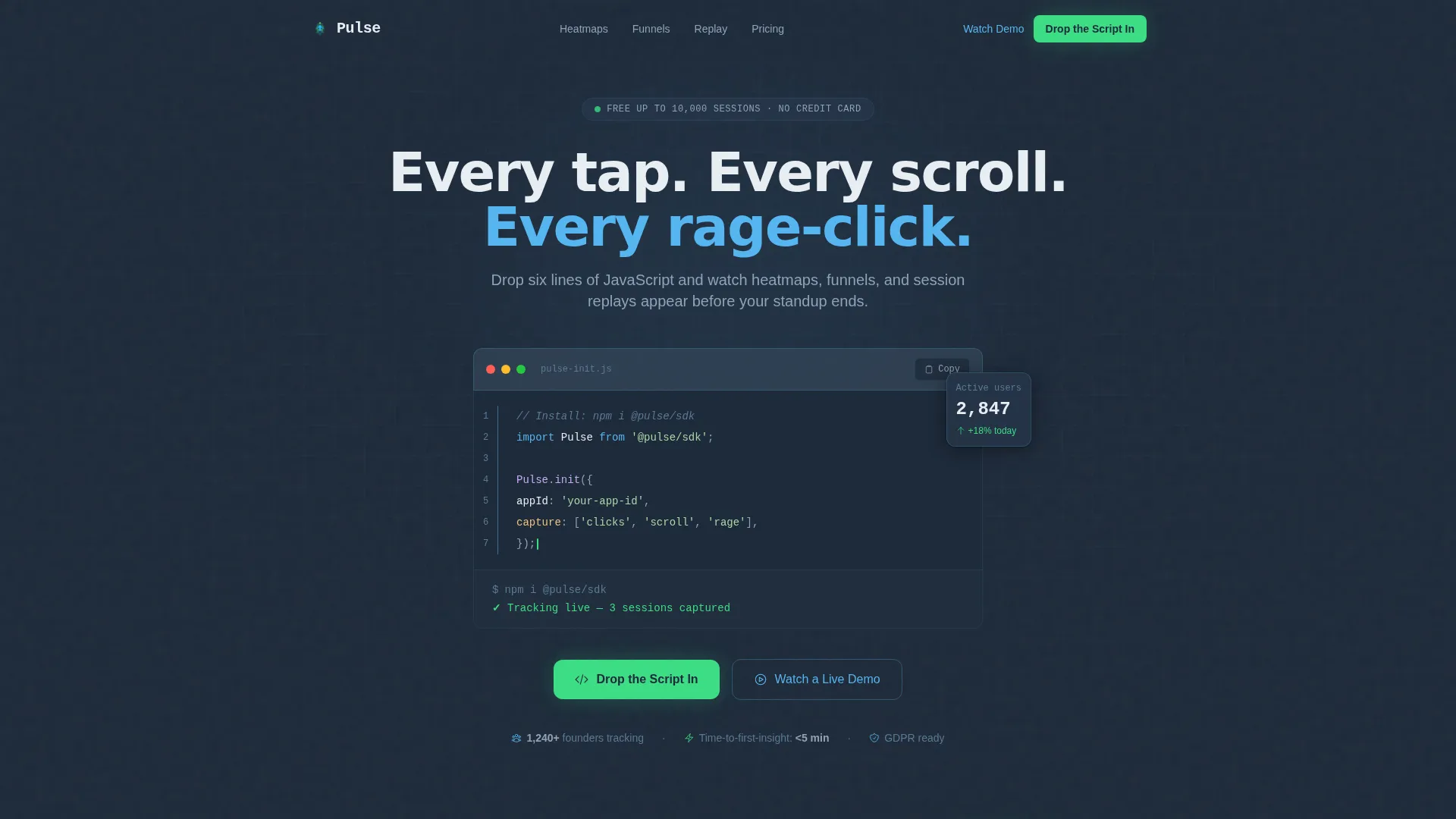
Pulse is a single-page, scroll-driven landing page template for a behavioral analytics tool. It leads with a live code snippet header, then escalates through heatmap, funnel, and session replay sections. The Slate and Sky color system gives it a code-editor aesthetic. The primary call to action targets direct SDK installs with zero friction.
Who this template is for
This template is built for teams and individuals who ship fast and need to understand user behavior immediately after launch. It speaks to people who track metrics, not marketing fluff.
- Solo founders shipping a first version and needing instant behavioral insight
- Growth product managers at early-stage startups who report retention numbers weekly
- Indie developers who need to diagnose a sudden traffic spike after a public launch
What problem this template solves
Most analytics landing pages bury the product behind feature lists and testimonial carousels. Visitors leave before they understand the value. This template solves that by demonstrating the product's speed and clarity the moment someone lands on the page.
- Potential users do not believe setup is fast until they see the actual install code
- Founders and developers need to feel product confidence before committing to an integration
- Generic analytics pages fail to show what the data looks like after install
What you get with this template
You get a fully structured, scroll reveal landing page that mirrors the experience of integrating a real analytics product. Every section is built to escalate engagement from the first line of code to actual user footage.
- A syntax-highlighted JavaScript SDK snippet header with a blinking cursor and live terminal output confirmation
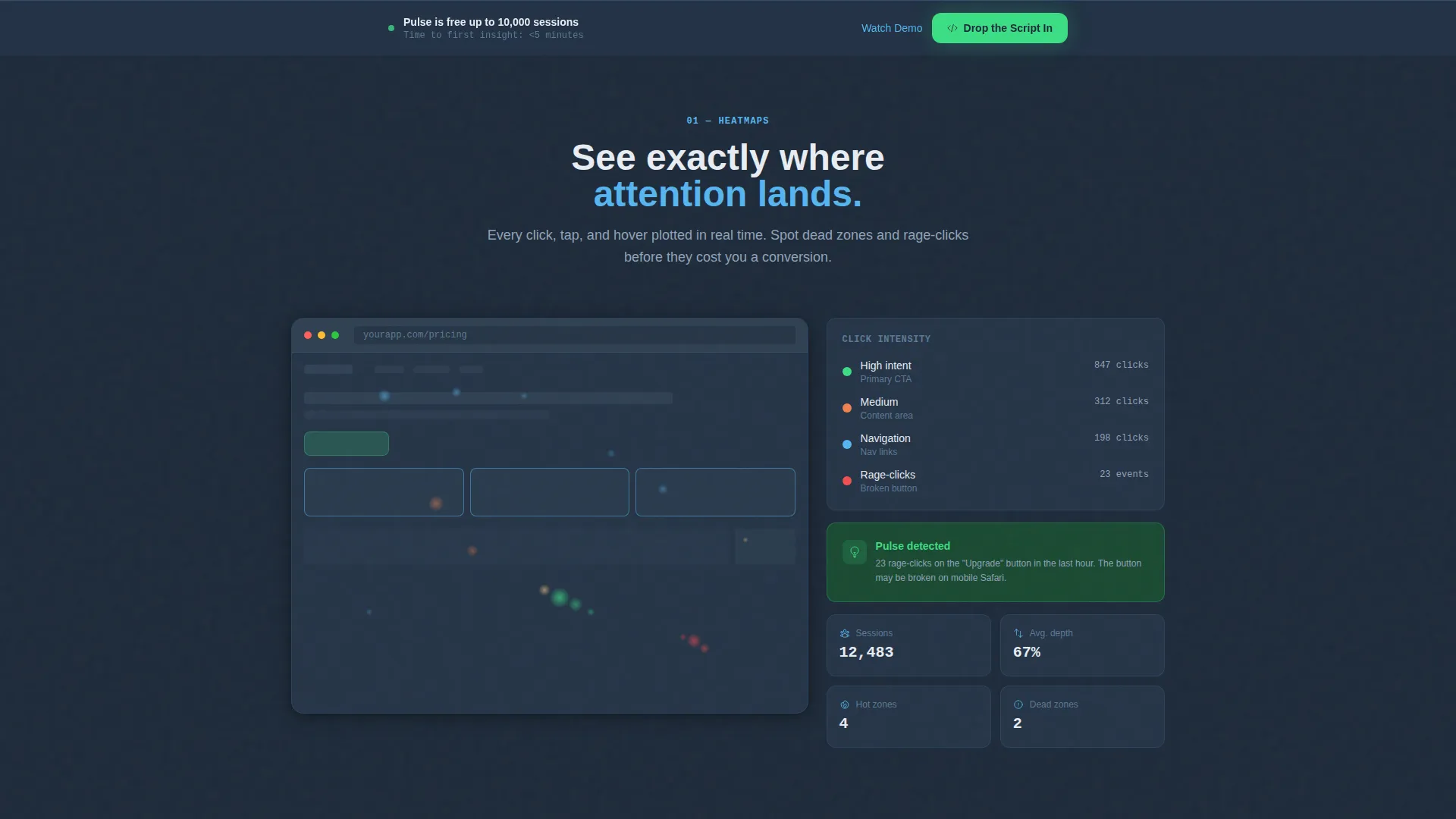
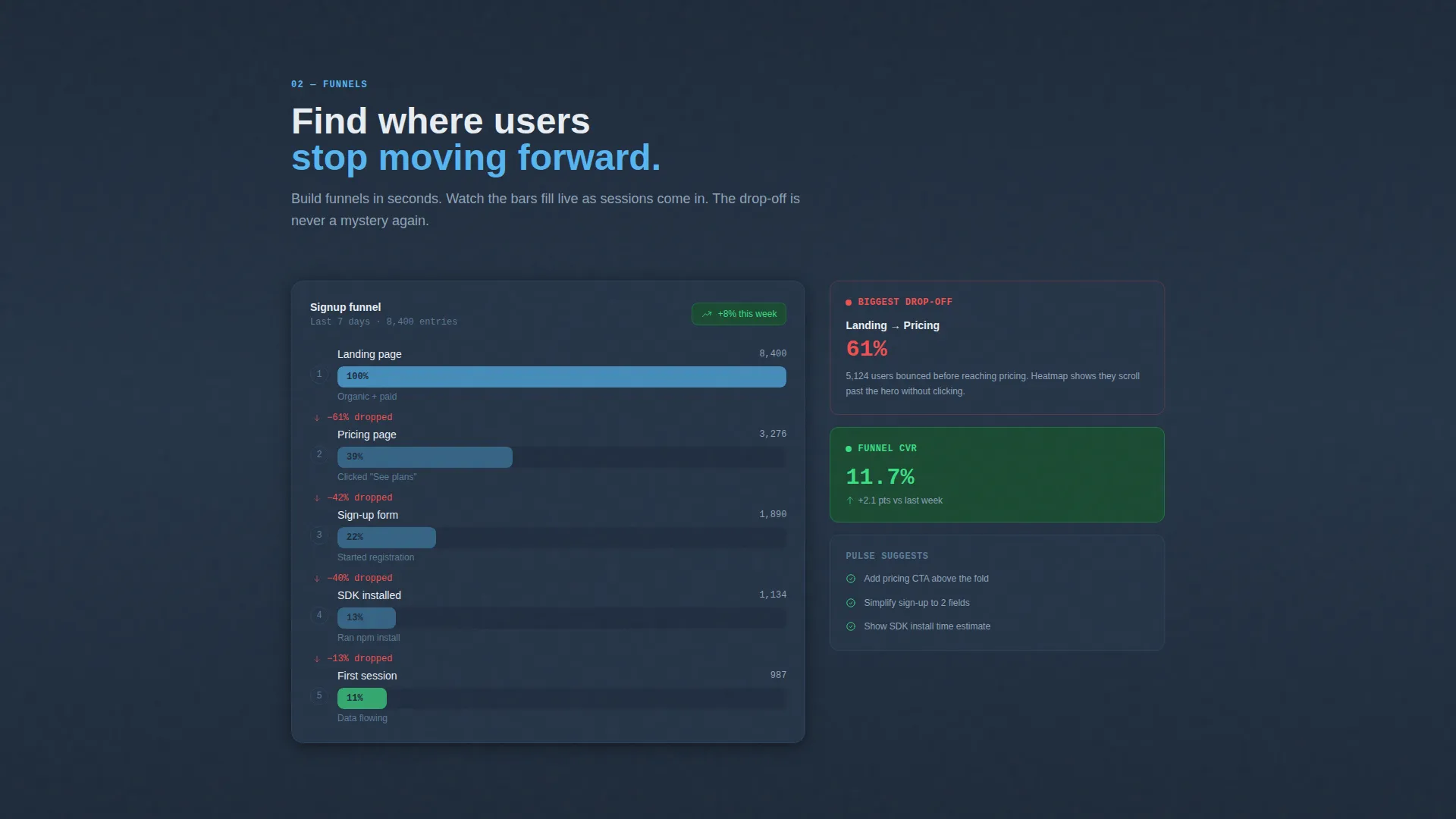
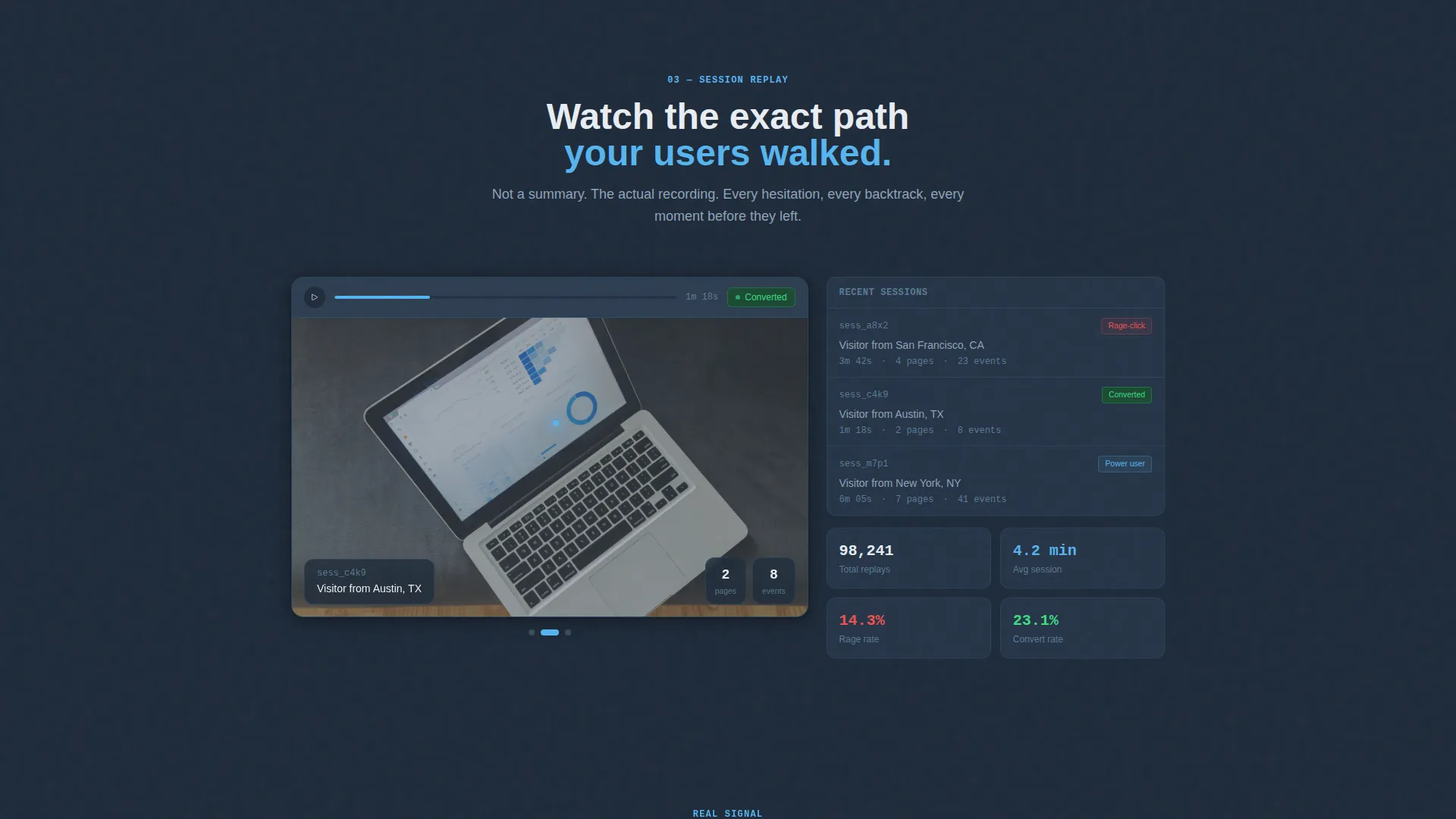
- Progressive scroll animations revealing a heatmap, a funnel chart, and a session replay thumbnail in sequence
- A sticky bottom bar call to action that appears after the second section and persists through the rest of the page
Feature list
This template ships with six purpose-built components that work together to move a skeptical visitor toward a confident install decision.
Live Code Snippet Header
The header displays a realistic six-line JavaScript SDK install block. Syntax highlighting uses sky blue for string values and commit green for the success output line. A blinking cursor and a terminal message reading "Tracking live" reinforce that setup is immediate.
Progressive Scroll Reveal Animations
Each section fades and slides upward as the visitor scrolls. The sequence moves from static code to an animated heatmap, then to a filling funnel chart, then to a session replay clip. This pacing makes the product feel like it is accelerating with every scroll tick.
Animated Heatmap Section
A heatmap visualization animates dot by dot as it enters the viewport. This section communicates the density of behavioral data without requiring the visitor to imagine it.
Live Funnel Chart Display
A funnel chart section fills its bars in real time as the visitor scrolls into view. This gives an immediate, visceral sense of how the product surfaces conversion drop-off data.
Session Replay Thumbnail
A session replay preview auto-plays a three-second clip of a simulated user path. It bridges the gap between abstract data and real user behavior in a single visual moment.
Dual-Path Conversion Flow
The primary call to action, "Drop the Script In," appears as a copy-to-clipboard button inside the header snippet. It recurs in a sticky bottom bar after the second section. A secondary path links to a sixty-second demo video. No email gate and no form fields stand between the visitor and the install.
Page sections overview
| Section | Purpose |
|---|---|
| Code Snippet Header | Prove instant setup with a six-line SDK install block and live terminal confirmation |
| Heatmap Reveal | Show behavioral density data animating dot by dot as the visitor scrolls |
| Funnel Chart Section | Display conversion funnel bars filling progressively to demonstrate drop-off insight |
| Session Replay Preview | Auto-play a three-second user path clip to bridge data and real behavior |
| Sticky call to action Bar | Persist the primary install call to action after the second section throughout the page |
Design & branding system
The visual identity is built around a Slate and Sky color system that feels like a code editor open at 2 a.m. Dark tones dominate functional areas; bright tones appear only where action is required.
- Deep editor slate (#1E2A3A) and muted terminal gray (#394B5E) form all background and container surfaces
- Open sky blue (#56B5F0) highlights interactive data points, navigation elements, and string values in code
- Electric commit green (#3DDC84) is reserved exclusively for call-to-action buttons and positive metric indicators so it always signals forward movement
Mobile & speed optimization
The template is structured with a scroll reveal pattern that keeps each section focused and lightweight. Progressive disclosure means only the visible section demands attention at any moment.
- Each animated section triggers only when it enters the viewport, keeping the experience controlled on smaller screens
- The monospaced code header and dark slate palette translate cleanly to mobile without requiring image assets or heavy media loads
How this template helps you convert
This template removes every traditional barrier between a visitor and an install decision. The conversion architecture is designed around demonstrating time-to-value before asking for any commitment.
- The six-line SDK snippet in the header makes setup feel immediate. Visitors see the install before they read a single feature claim, which builds confidence faster than any bullet list.
- The sticky bottom bar ensures the primary call to action is always one tap away. Visitors do not need to scroll back up or hunt for a sign-up button at any point in their journey.
Other information about this template
This template is categorized under Technology and Advanced Tech and Artificial Intelligence Platforms, with a niche focus on behavioral analytics tooling. It is designed to support the Startup Velocity theme with a Launch Energy creative direction.
- The template style is Scroll Reveal, also described as a progressive disclosure pattern, meaning sections animate into view in a defined sequence
- The landing page direction is App Download, meaning the conversion goal is a direct SDK install rather than a lead capture or demo request form
- The header concept is a Code Snippet, a deliberately technical choice that validates the product's developer-first positioning before any marketing copy appears
- The free tier referenced in the brief supports up to ten thousand sessions, which the page communicates plainly to remove cost hesitation before the install decision
- The page does not use stock photography or illustration; all visual evidence comes from the product data itself
Theme
Startup Velocity
Creative direction
Launch Energy
Color system
Slate & Sky
Style
Scroll Reveal (Progressive)
Direction
App Download
Page Sections
Syntax-highlighted Code Snippet Header
Progressive Scroll Reveal Sections
Animated Heatmap Visualization
Filling Funnel Chart Display
Session Replay Auto-play Preview
Dual-path No-form Conversion Flow
Related questions
Who is this template designed for?
Does this template include any form fields or email gates?
How does the scroll reveal animation work in this template?
What does the sticky bottom bar do?
Can I adapt the color system to my own brand?



