AIOps Technology Specialist Professional Website Template
Pulse is a split-screen AIOps landing page template built for open-source infrastructure observability projects. It pairs a simulated live terminal with a real-time anomaly detection dashboard, guides visitors through an interactive incident demo, and drives freemium conversions with a frictionless two-step deployment flow. The Tech Glass visual identity makes the page feel as calm and trustworthy as a green production console at 2 a.m.
by Rocket studio
Quick summary
Pulse is a single-page AIOps landing page template designed for open-source observability platforms. It uses a 50/50 split-screen layout to contrast raw infrastructure chaos with intelligent, correlated insight. Every section builds momentum toward one action: deploying the platform for free.
Who this template is for
This template is built for technical teams and open-source contributors who need a landing page that speaks fluently to engineers. It earns trust before it asks for anything.
- Site reliability engineers (SREs) dealing with alert fatigue at fast-growing startups
- Platform engineers managing fragmented monitoring stacks at enterprise scale
- Open-source maintainers who want a credible, high-energy project page without a large budget
What problem this template solves
Most AIOps project pages fail because they describe features instead of demonstrating value. Engineers are skeptical, fast to leave, and slow to share credentials. This template addresses that reality head-on.
- Visitors see a live interactive demo before reading a single feature bullet
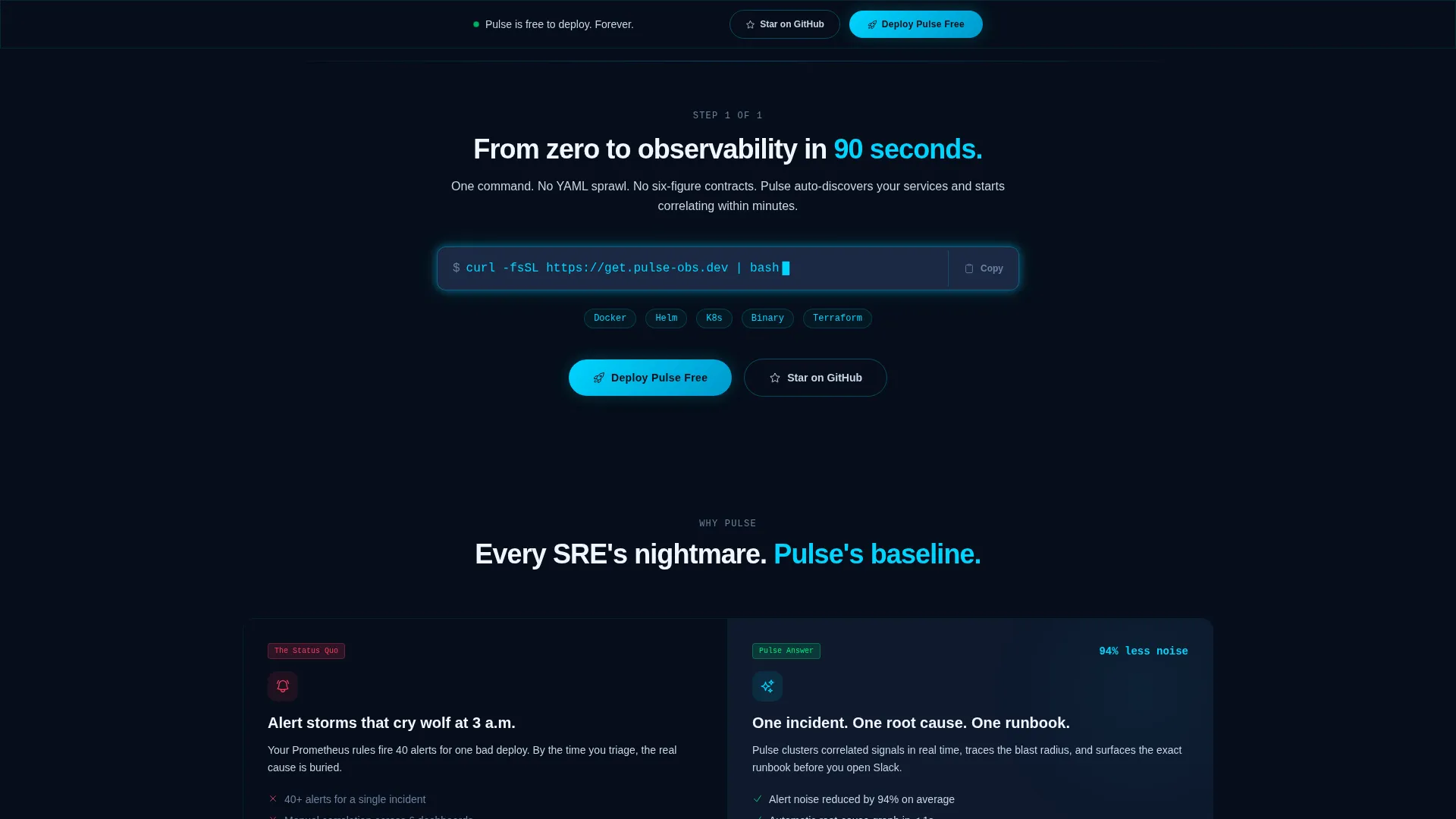
- The page proves simplicity with a copyable one-line install command
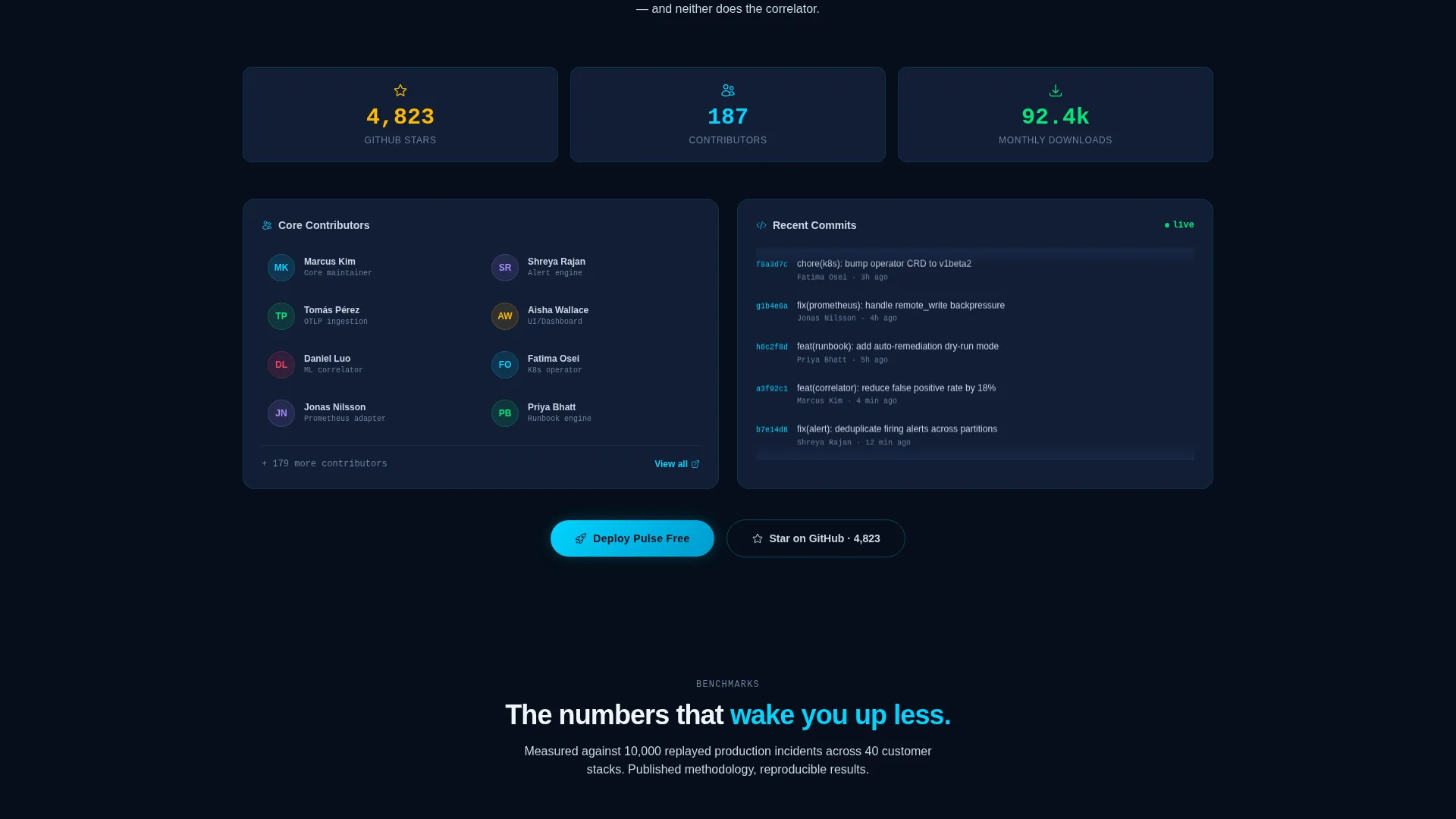
- Community proof elements make the project feel active and trustworthy, not abandoned
What you get with this template
You get a fully structured, single-page landing page template with a defined visual system, interactive preview section, and a two-step conversion flow. Every component is tied to a specific moment in the visitor journey.
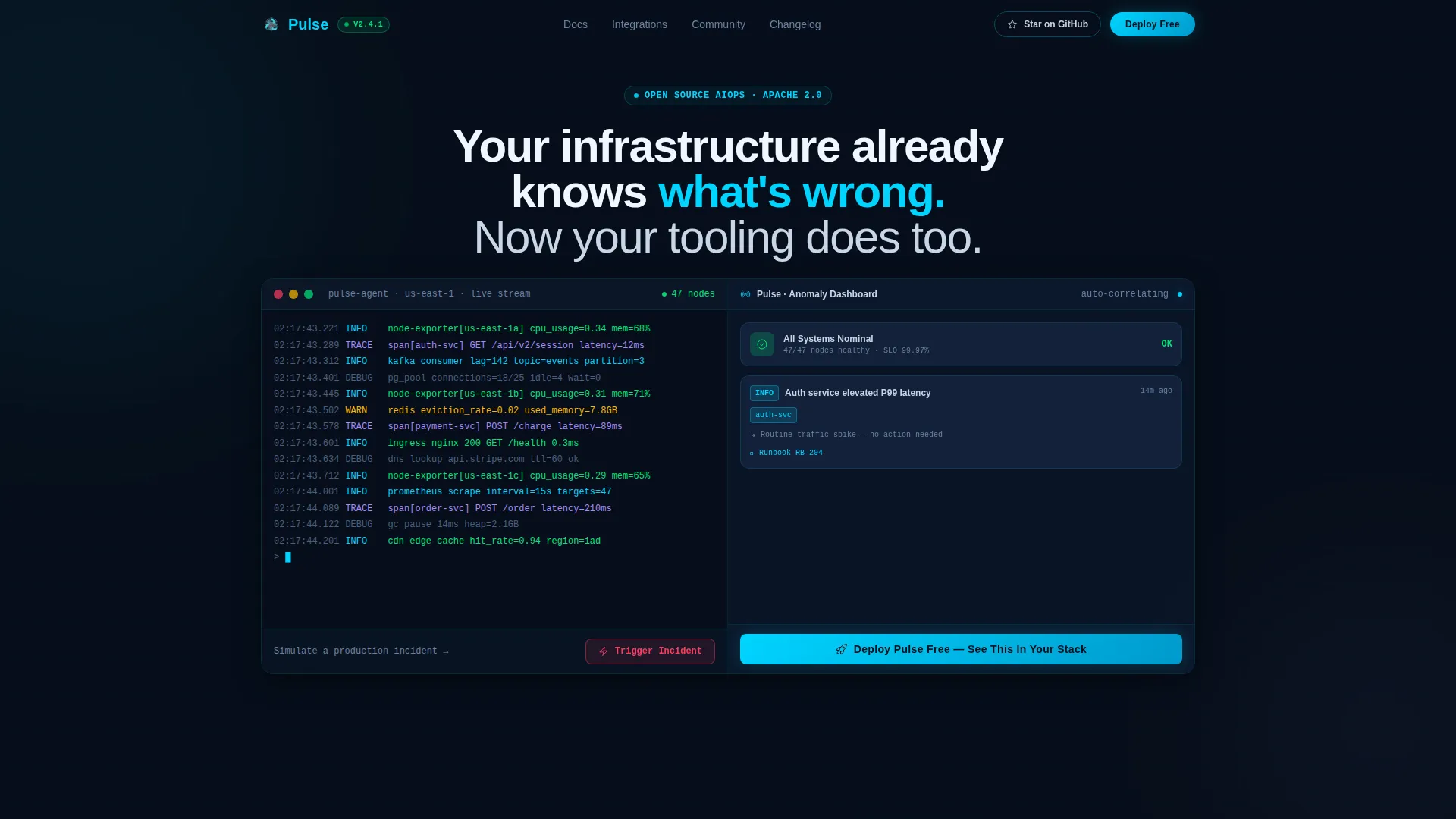
- A 50/50 split-screen header with a simulated terminal on the left and an anomaly detection dashboard on the right
- A "Trigger Incident" interactive demo button that animates an incident propagation and shows clustering, severity assignment, and runbook suggestion
- A sticky bottom call-to-action bar, a two-step deployment flow, and a secondary GitHub star path for lower-commitment visitors
Feature list
This template is built around a tightly sequenced set of components, each serving a distinct conversion purpose.
Interactive Split-Screen Header
The header divides into two equal panels. The left streams raw log lines, metric ticks, and trace spans in monospace type. The right transforms the same data into a clean anomaly detection dashboard with correlated incidents, severity badges, and a root-cause graph. The headline fades in over the divide.
Trigger Incident Demo Button
Visitors click "Trigger Incident" inside the preview and watch an anomaly propagate in real time. The right panel instantly clusters the anomaly, assigns a severity level, and surfaces a runbook suggestion. This single interaction communicates the platform's core value more clearly than any paragraph could.
Copyable Install Command Block
Immediately after the header, a single-line install command sits inside a styled code block with a blinking cursor. The "Deploy Pulse Free" call-to-action appears right beside it. This combination converts curiosity into action at the highest-intent moment on the page.
Problem-Solution Section Pairs
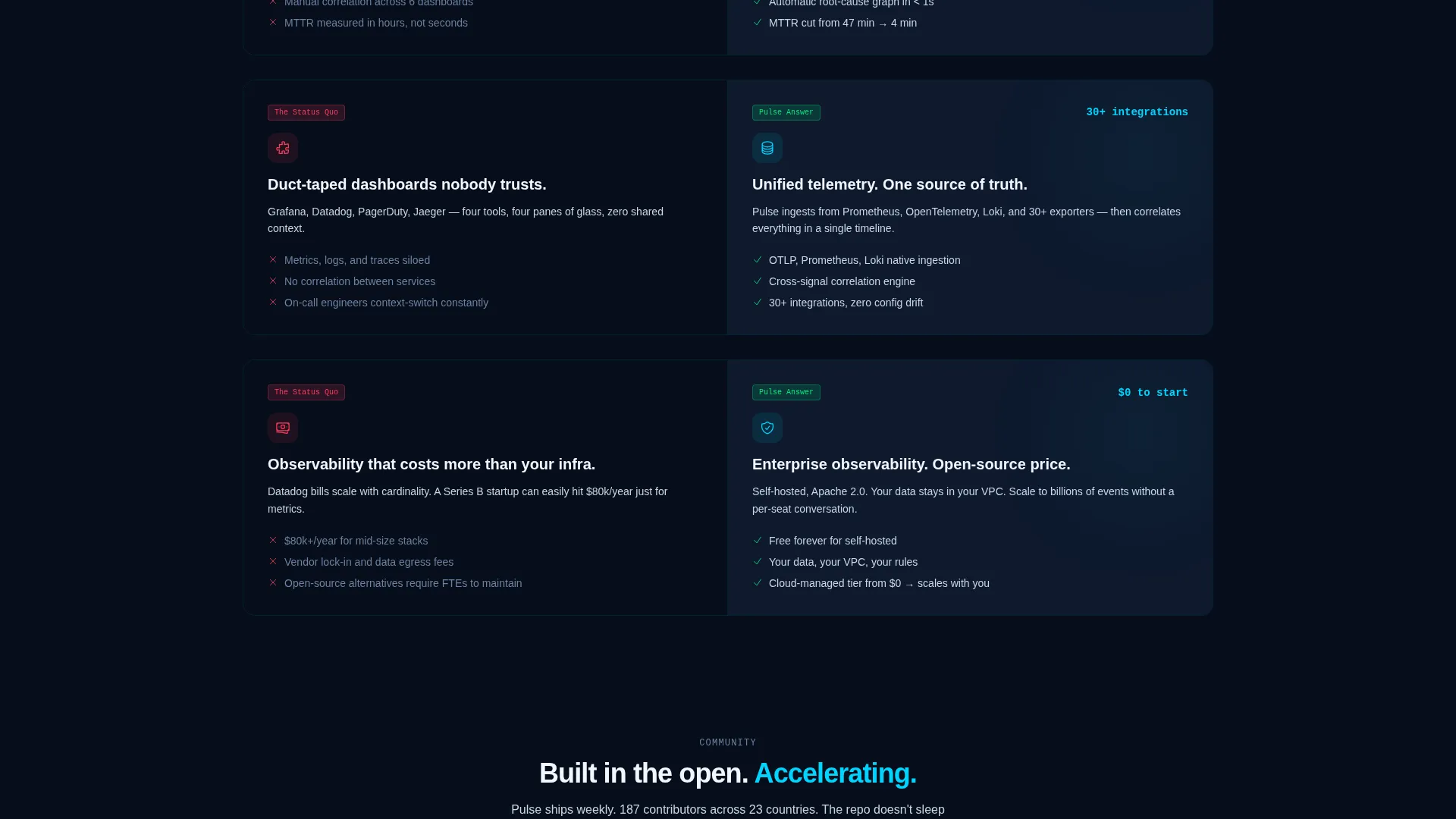
Continuing the split-screen format, the left side shows the problem state: noisy dashboards, missed correlations, and manual triage. The right side reveals the platform's answer. Each pair slides in with kinetic transitions as the visitor scrolls, maintaining the launch-energy pacing.
Live Community Proof Block
A live GitHub star counter, contributor avatars pulled from the repository, and a scrolling feed of recent commits make the project feel alive. This section builds social trust without requiring testimonials or case studies.
Benchmark Comparison Section
Latency numbers and detection accuracy are rendered as animated gauges that fill in as they scroll into view. This section provides concrete, quantified evidence of performance before the final conversion call-to-action.
Page sections overview
| Section | Purpose |
|---|---|
| Split-screen header | Demonstrate live terminal versus. dashboard contrast |
| Incident demo button | Let visitors trigger and observe anomaly detection |
| Install command block | Ground abstract value in a concrete one-line action |
| Problem-solution pairs | Contrast the old way with the platform's approach |
| Community proof block | Show repo activity, stars, and contributor presence |
| Benchmark comparison | Quantify detection accuracy with animated gauges |
| Primary conversion section | Drive "Deploy Pulse Free" with two-step flow |
| Sticky bottom bar | Repeat the primary call-to-action after the fold |
Design & branding system
The visual identity follows a Tech Glass theme built on the Midnight Blue color system. The palette feels like staring into a glass-walled server room at midnight, with dark polished surfaces and the quiet hum of active infrastructure.
- Deep terminal navy (#0A1628) as the primary background, translucent panel blue (#1B2A4A) for card surfaces and split-screen dividers, electric cyan (#00D4FF) for live-state accents and interactive highlights, and cool silver (#C8D6E5) for body text
- Frosted-glass blur effects layered across backgrounds; cyan pulses on hover states and active elements like a heartbeat monitor
- Monospace typography in the terminal panel reinforces the engineering context; the dashboard panel uses clean, structured type for contrast
Mobile & speed optimization
The layout is designed to maintain the split-screen impact across screen sizes without sacrificing the core interactive experience. Engineering audiences often preview projects on mobile before committing to a desktop session.
- The 50/50 split-screen adapts gracefully for narrower viewports, stacking panels vertically while preserving the terminal-to-dashboard narrative
- The sticky bottom call-to-action bar remains accessible at all scroll depths on mobile, keeping the primary conversion path within reach
- Kinetic transitions and animated gauges are scoped to the sections where they appear, keeping the page feeling responsive and focused
How this template helps you convert
The page is structured to earn the click before it asks for it. Each section removes a layer of skepticism before presenting the next commitment step.
- The interactive demo in the header delivers immediate, tangible proof of the platform's value before any copy is read, lowering the barrier for skeptical engineers to keep scrolling.
- The install command paired with the "Deploy Pulse Free" call-to-action converts high-intent visitors at their peak moment of interest, while the secondary "Star on GitHub" path captures visitors who are curious but not yet ready to deploy.
- The two-step inline deployment flow minimizes friction: visitors choose a deployment method (Docker, Helm, or binary), then enter an email to receive a quickstart guide and join the community Slack, completing the funnel without leaving the page.
Other information about this template
This template is purpose-built for the AIOps open-source project niche, where credibility and community momentum are the primary conversion levers. A few additional details are worth noting.
- The template style is a 50/50 split screen, a layout well suited to before-and-after narratives common in infrastructure tooling pages
- The creative direction follows a Launch Energy sequence, meaning each scroll step builds pressure toward deployment rather than simply listing features
- The header concept is an Interactive Preview, which is especially effective for developer tools where showing beats telling
- The freemium and trial conversion direction means the page never asks for payment information, lowering commitment anxiety for open-source audiences
- The Tech Glass theme and Midnight Blue color system are designed to resonate with engineers who spend time in terminal environments and dark-mode interfaces
Theme
Tech Glass
Creative direction
Launch Energy
Color system
Midnight Blue
Style
Split Screen (50/50)
Direction
Freemium/Trial
Page Sections
Interactive Split-screen Header
Trigger Incident Demo Button
Copyable Install Command Block
Live Community Proof Block
Animated Benchmark Comparison
Two-step Inline Deployment Flow
Related questions
Who is the ideal audience for this landing page template?
Can I customize the terminal and dashboard panels with my own project's data?
What is the two-step conversion flow and how does it work?
Does this template include the GitHub star counter and community proof components?
Is the sticky bottom call-to-action bar included in this template?



