API-First Enterprise Software Pricing Website Template
Quotient is a hub-and-spoke landing page template built for API-first configure-price-quote platforms. It opens with a live, editable code snippet, guides visitors through five interactive spoke modules, and closes every section with a sandbox sign-up prompt. The result is a single-page experience where engineers and revenue-ops leads discover the product by using it before they ever fill out a form.
by Rocket studio
Quick summary
Quotient is a dark-mode, single-page template designed for API-first configure-price-quote software. Visitors arrive at a live code editor hero, explore five interactive modules covering every stage of the quoting workflow, and are nudged toward a three-field sandbox form after each section. The template is opinionated, fast to scan, and built to turn technical curiosity into qualified leads.
Who this template is for
This template speaks directly to teams selling developer-centric enterprise software, where the buyer evaluates the product before talking to sales. It is especially well-suited for early-stage and growth-stage companies that compete on integration speed and pricing transparency.
- Platform engineers at mid-market SaaS companies who need to embed a configure-price-quote engine into an existing stack without a months-long implementation
- Revenue operations leads whose deals stall because pricing logic is locked inside hard-to-read spreadsheet formulas
- Chief technology officers who have been burned by monolithic vendors and want proof of simplicity before committing to an evaluation
What problem this template solves
Most software landing pages describe what a product does. Technical buyers need to feel what it does. This template closes that gap by replacing static feature lists with interactive, runnable demos that mirror real workflows.
- Buyers arrive skeptical and leave having already configured a rule, simulated a margin, and reviewed an auto-generated quote preview
- Sales teams lose deals because pricing logic is opaque; this template makes every stage of the configure-price-quote workflow visible and legible in one scroll
- Generic templates cannot carry the weight of a deeply technical value proposition; Quotient is designed from the ground up for API-first software
What you get with this template
Quotient delivers a complete, production-ready single-page layout with no placeholder sections. Every component in the template is directly connected to a configure-price-quote use case, from the header code snippet to the SDK integration spoke.
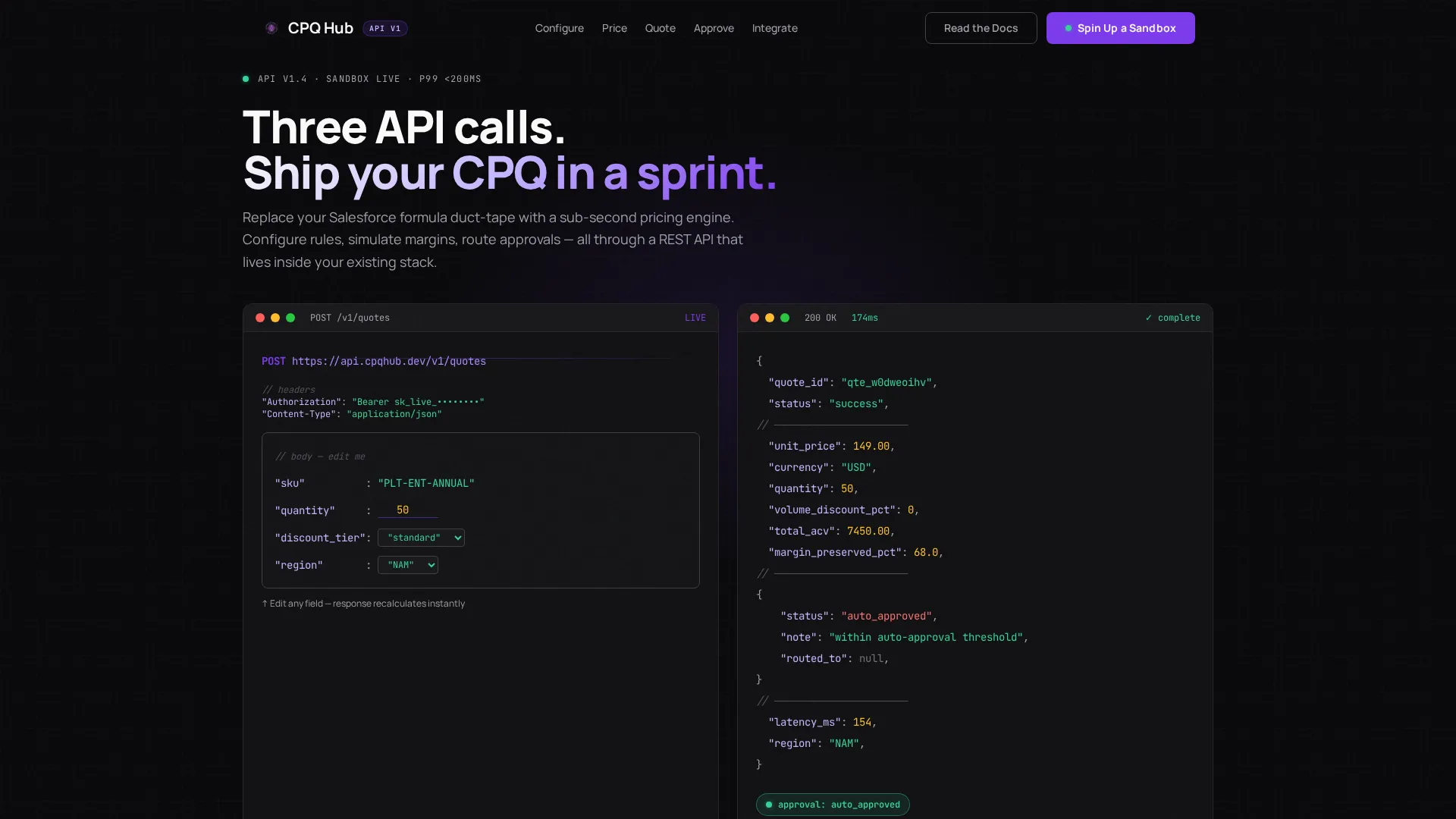
- A syntax-highlighted, editable API hero section with a live request-response pair that recalculates in real time as parameters change
- Five self-contained interactive spoke modules covering the Configure, Price, Quote, Approve, and Integrate stages of the quoting workflow
- A sticky anchor navigation rail, a lead-generation form with three targeted fields, and a secondary call to action linking to documentation
Feature list
This template bundles a focused set of interactive components, each designed to serve a specific moment in the buyer's evaluation journey.
Editable API Hero Section
The header presents a live POST /v1/quotes code snippet. Visitors can change the quantity value and watch the JSON response recalculate in real time. Discount tiers cascade, approval routing updates, and margin data refreshes without a page reload. No stock imagery competes with the output.
Sticky Anchor Navigation Rail
A fixed left-rail navigation keeps all five spoke labels visible throughout the scroll. Clicking any label triggers a smooth scroll to the corresponding module. The primary call-to-action button appears inside the nav so it is always one click away.
Five Interactive Spoke Modules
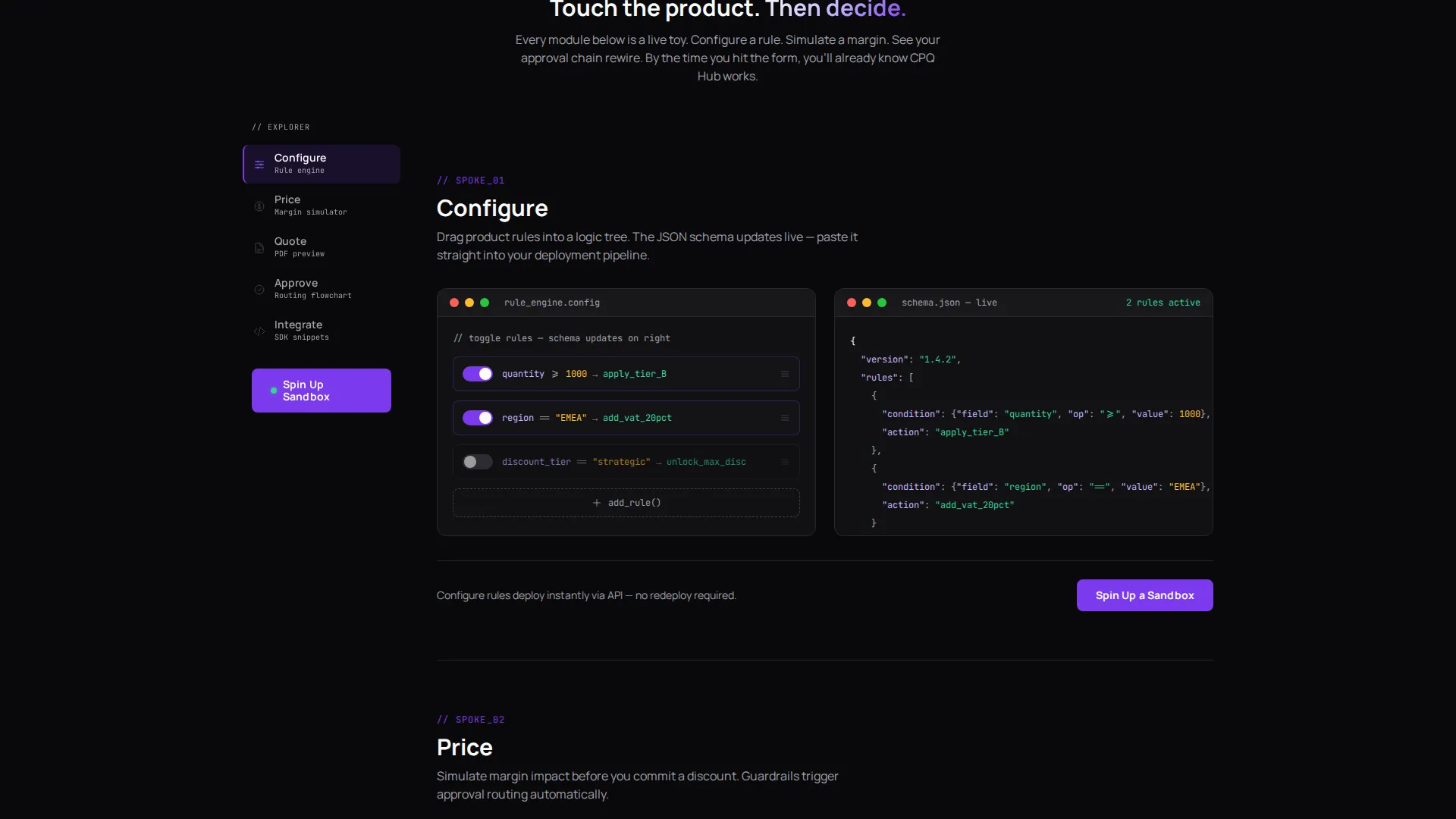
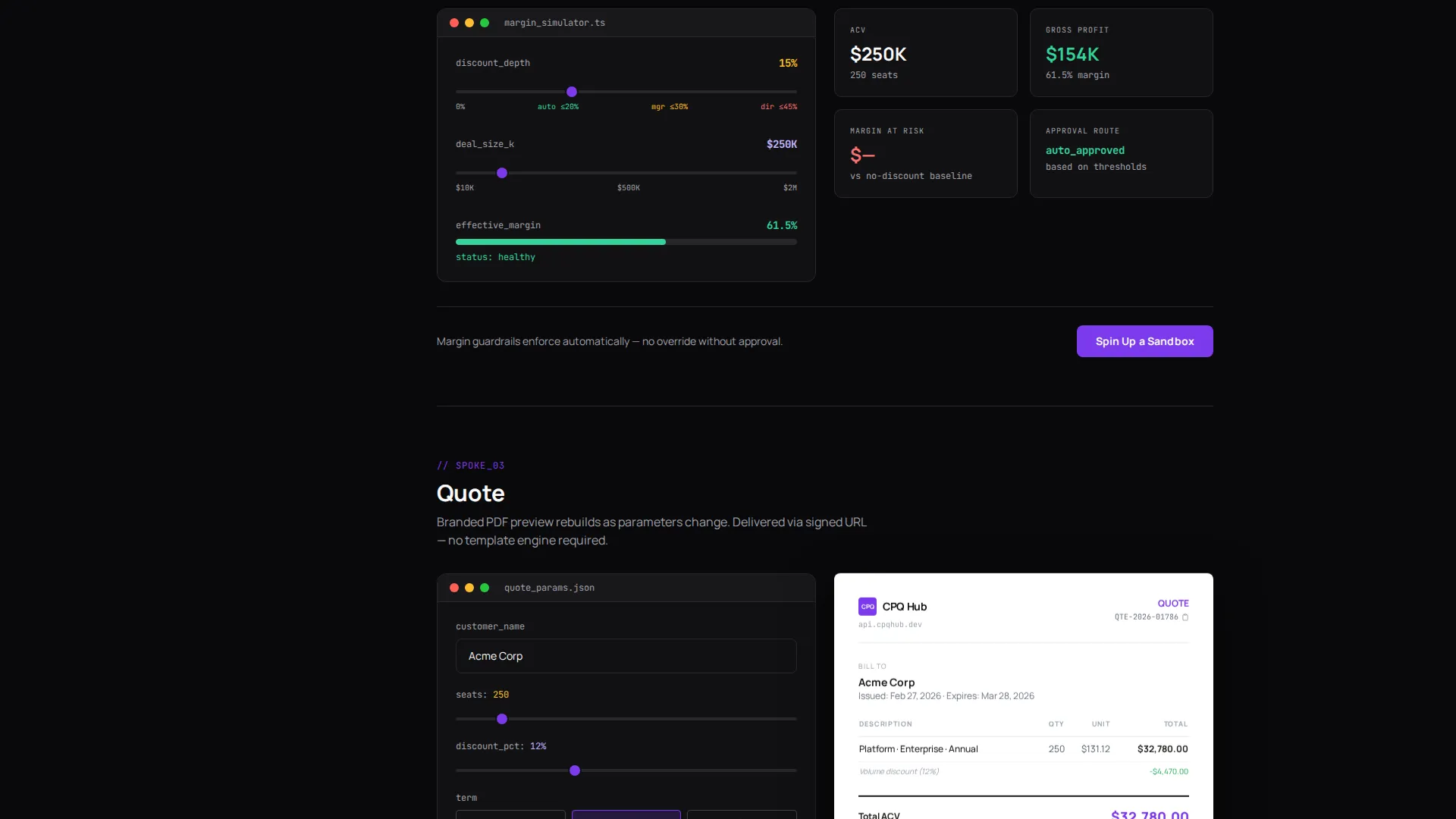
Each spoke is a self-contained, hands-on tool. Configure lets visitors build a product rule logic tree and see the schema update live. Price exposes a margin simulator with sliders. Quote renders a branded PDF preview. Approve shows a routing flowchart that rewires as thresholds shift. Integrate delivers copy-paste SDK snippets in Python, Node, Go, and curl, each runnable against a sandbox.
Inline Lead Generation Form
After every spoke module, a three-field form appears: work email, estimated monthly quote volume (dropdown with three tiers), and current configure-price-quote tool (optional free text). The form is embedded in context, so the visitor has already experienced value before they are asked to convert.
Dual Call-to-Action Architecture
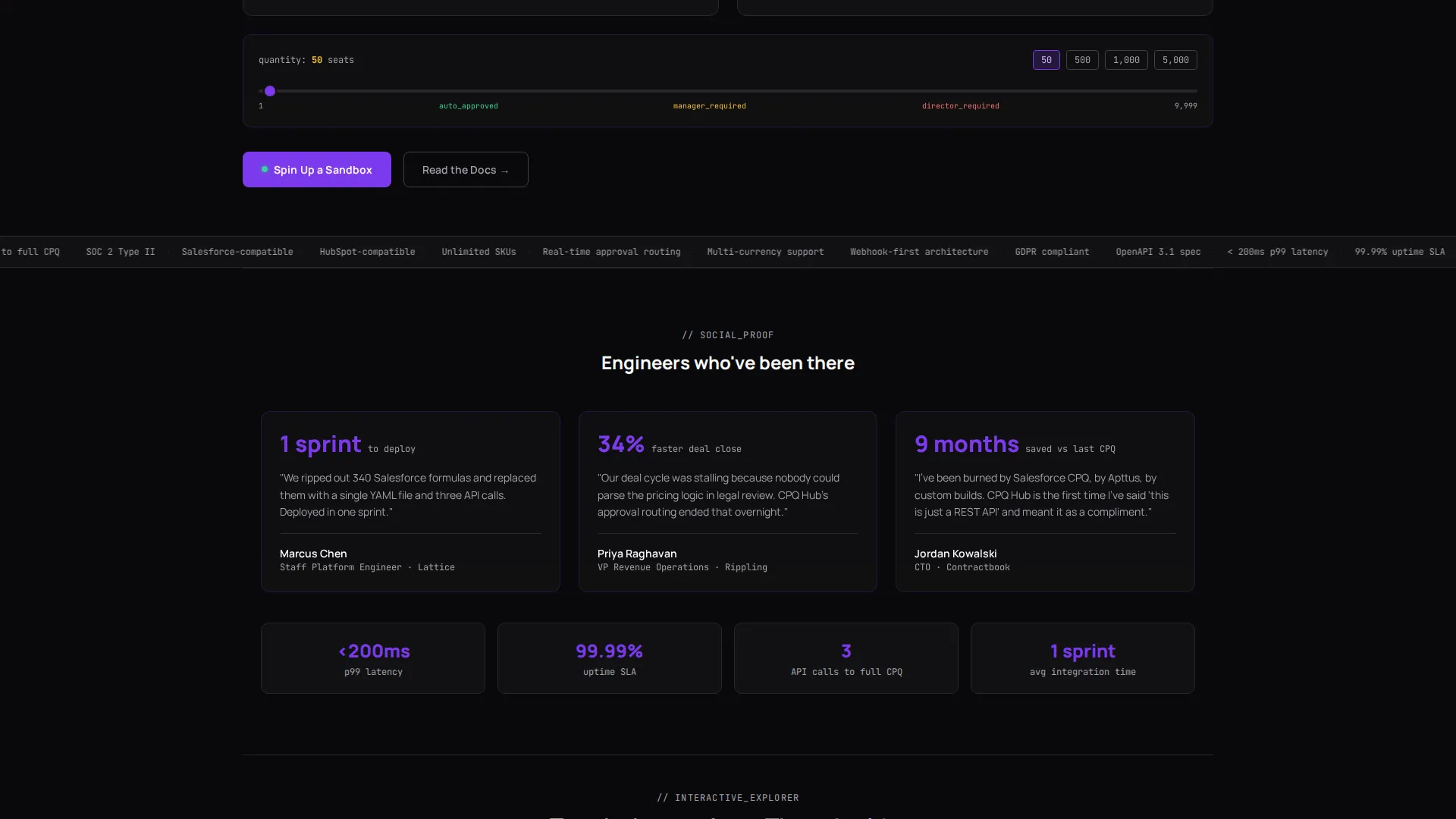
The primary path is "Spin Up a Sandbox," which leads to the sign-up form. The secondary path is "Read the Docs," aimed at engineers who need to complete a technical evaluation before engaging sales. Both paths appear consistently across the page.
Void and Violet Design System
The layout uses a code-editor-inspired color palette: absolute void black for the background, deep violet for interactive elements and hover states, phosphor lilac for secondary text and code comments, and terminal white for headlines and live output. The result is a visual identity that feels native to the developer tools ecosystem.
Page sections overview
| Section | Purpose |
|---|---|
| API Hero Header | Anchors visitors with a live, editable code snippet showing a real configure-price-quote request and response |
| Sticky Anchor Nav | Keeps spoke labels and the primary call to action visible at all times as the visitor scrolls |
| Configure Spoke | Lets visitors drag product rules into a logic tree and see the underlying schema update in real time |
| Price Spoke | Exposes a margin simulator with sliders for discount depth and deal size |
| Quote Spoke | Renders a branded PDF quote preview that rebuilds as input parameters change |
| Approve Spoke | Visualizes an approval routing flowchart that rewires dynamically when thresholds move |
| Integrate Spoke | Provides copy-paste SDK snippets in four languages, each runnable against a live sandbox |
| Inline Lead Form | Collects work email, monthly quote volume, and current tool after each spoke module |
| Docs call to action | Offers a secondary path for engineers who need technical depth before engaging sales |
Design & branding system
The Void and Violet palette is built around a code-editor aesthetic that feels intentional, not just dark. Every color choice reinforces the product's identity as a developer-native tool. The system uses four values consistently across every component.
- Absolute void black (
#09090B) as the page background, deep interstellar violet (#7C3AED) for primary actions and hover states, phosphor lilac (#C4B5FD) for secondary text and code comments, and terminal white (#FAFAFA) for headlines and live output - Typography and layout follow a Startup Velocity theme: high contrast, minimal decoration, and content that earns visual weight through function rather than ornamentation
- The interactive modules drive visual rhythm; each spoke section has its own contained layout so visitors know exactly where one idea ends and the next begins
Mobile & speed optimization
The template is structured so that interactive components remain accessible and legible on smaller viewports. The sticky nav collapses gracefully, and each spoke module is self-contained, making it straightforward to reflow for narrower screens.
- The anchor navigation and inline call-to-action buttons are sized and spaced for touch interaction, keeping the primary conversion path reachable on mobile
- Spoke modules are designed as discrete, isolated sections so that heavier interactive elements can be loaded independently without blocking the initial page render
How this template helps you convert
Quotient earns conversions by giving visitors hands-on product contact before asking for anything in return. Every structural decision reinforces the same loop: explore, understand, act.
- Visitors interact with the editable API hero first, which builds immediate credibility and reduces the skepticism that technical buyers bring to any software marketing page
- Each spoke module ends with the same "Spin Up a Sandbox" prompt, so conversion opportunities multiply across the page without feeling repetitive or pushy
- The optional free-text field for current configure-price-quote tool collects qualification data passively, giving the sales team context without adding friction to the sign-up flow
Other information about this template
Quotient is a Framer-based template that works well for teams launching a new API product, repositioning an existing configure-price-quote offering, or A/B testing a developer-led growth motion against a traditional demo-request flow.
- The template is designed around a hub-and-spoke structure, making it straightforward to add or remove spoke modules as the product roadmap evolves
- The three-field lead form is intentionally lightweight; the optional current-tool field can be removed or replaced with a different qualifier without restructuring the layout
- The Void and Violet color system is fully customizable; teams can swap accent values to match an existing brand without breaking the overall contrast ratios
- The "Read the Docs" secondary call to action is a standalone link component, making it easy to point to any external documentation URL or internal docs portal
Theme
Startup Velocity
Creative direction
Interactive Explorer
Color system
Void & Violet
Style
Hub & Spoke (Anchor Nav)
Direction
Lead Generation
Page Sections
Editable API Hero with Live Response
Five Interactive Spoke Modules
Sticky Left-rail Anchor Navigation
Inline Lead Generation Form
Dual Call-to-action Architecture
Void and Violet Design System
Related questions
Who is the Quotient template designed for?
Can I customize the spoke modules to match my product's workflow?
What does the lead generation form collect?
Does the template include the secondary documentation path?
How does the Void and Violet color system work across interactive components?



