Radiant — Premium Diamond Landing Page Template
Facet is a diamond management landing page template built for dealers, cutters, and graders who need total inventory control on one screen. It features a live rough-to-polished yield estimator in the hero, a sortable inventory grid, a margin heat map, and a Rapaport price-feed panel, all rendered in a dark Carbon Fiber visual system with laser-blue live data highlights.
by Rocket studio
Quick summary
Facet is a single-page dashboard template designed for diamond industry professionals. It puts a functional yield estimator front and center, then walks visitors through live inventory data, margin analytics, and price-feed panels as they scroll. The dark Data Command aesthetic and electric-blue accents make every number feel immediate and credible.
Who this template is for
This template is built for professionals who move diamonds from rough to polished and need to communicate serious data capability at a glance. It speaks directly to the operational realities of the trade.
- Diamond dealers and wholesalers pricing memo goods or reconciling physical stock against certificates
- Cutting-house managers in high-volume facilities tracking thousands of stones across multiple sawyers
- Graders and inventory specialists who need margin visibility across parcels before a buyer call
What problem this template solves
Most diamond businesses track inventory across spreadsheets, WhatsApp threads, and memory. That fragmentation costs margin and time. This template presents a software product that consolidates the entire stone lifecycle on one screen.
- Rough parcel tracking and polished inventory management live in separate tools, creating blind spots on margin
- Dealers lose negotiating leverage when Rapaport spread data is not instantly visible during a call
- Qualification forms on generic SaaS pages waste time on both sides, this template asks the one question that matters: how many stones do you manage?
What you get with this template
You get a fully structured, single-page layout designed around data-first storytelling. Every section is purpose-built to move a diamond professional from curiosity to trial signup.
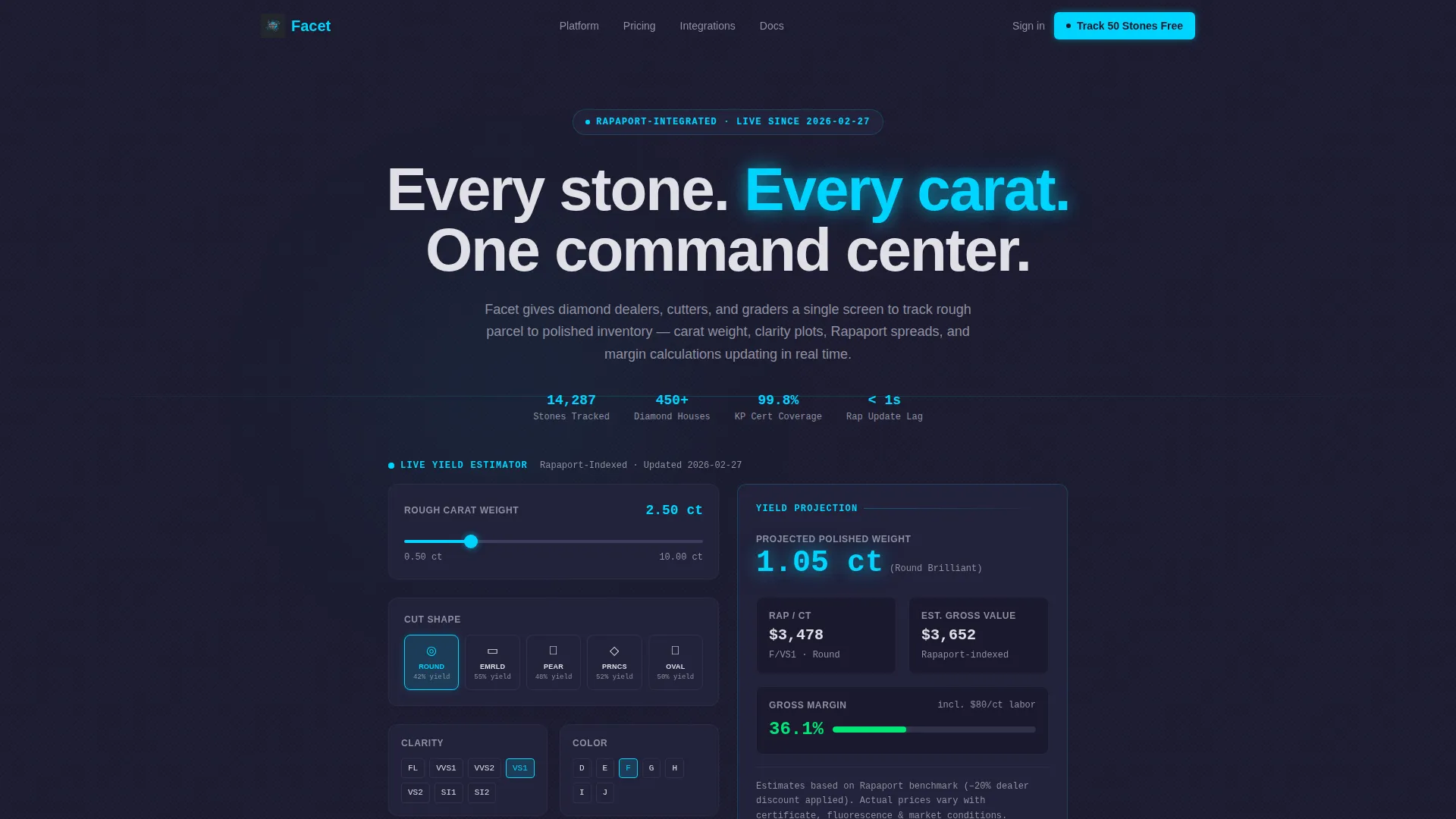
- A hero section with a functional rough-to-polished yield estimator using a carat-weight slider, shape selector, and clarity toggle
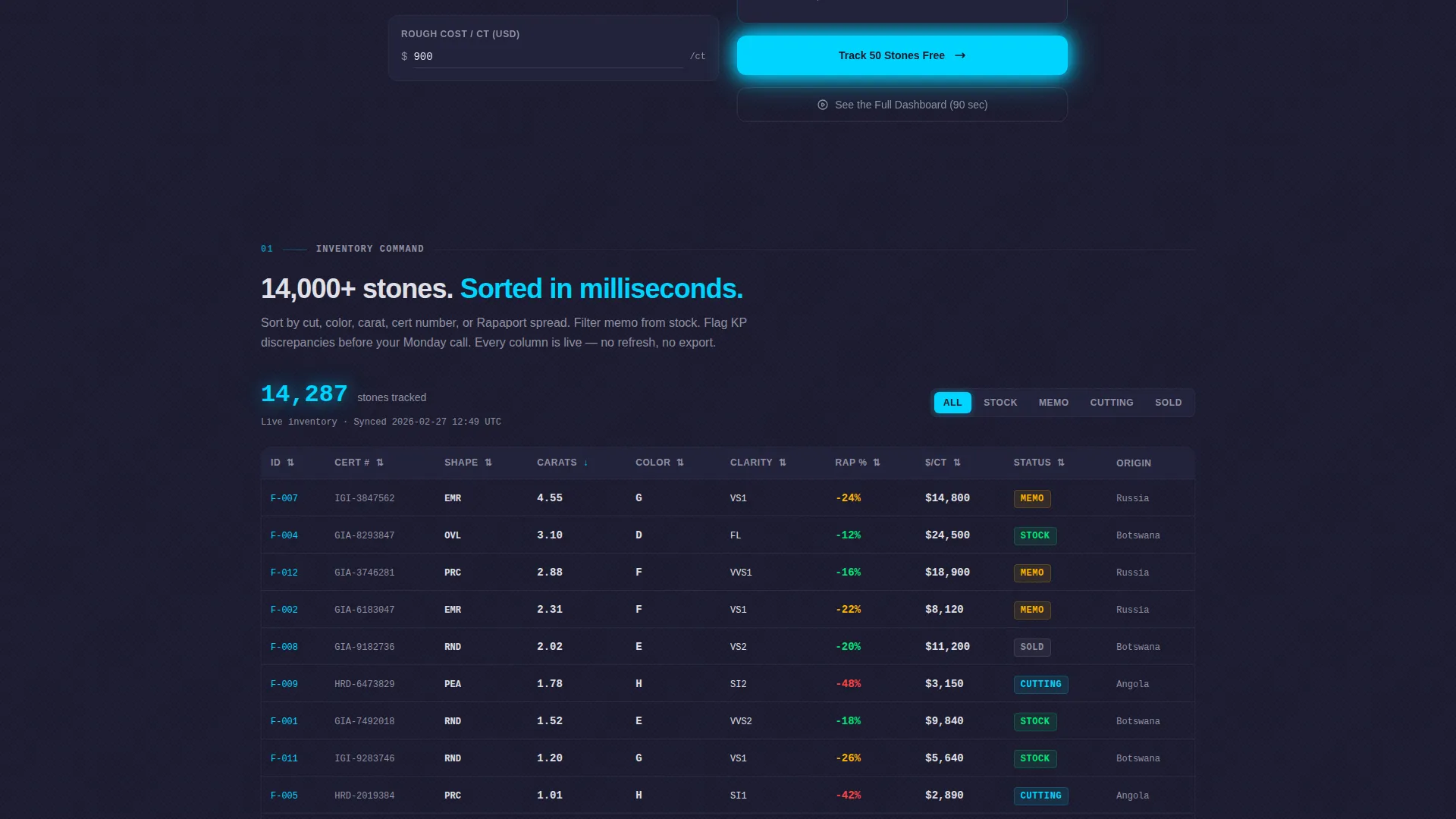
- A live inventory grid module displaying 14,000+ stones, sortable by cut, color, carat, and certificate number
- A sticky freemium call-to-action bar, a qualified lead capture form, and a modal video walkthrough path
Feature list
This template includes a set of tightly scoped, brief-backed components. Each one serves a specific role in the conversion flow.
Live Yield Estimator Hero
The header is not a headline, it is a working calculator. Visitors select rough carat weight via a slider, choose a shape (round brilliant, emerald, or pear), and toggle a clarity grade. The tool returns projected polished weight, estimated Rapaport value, and gross margin percentage in animating laser-blue digits.
Sortable Inventory Data Grid
A full-width grid module renders 14,000+ stones with live sort controls for cut, color, carat, and certificate number. Count-up animations fire on scroll entry so the numbers feel populated and real rather than static.
Margin Heat Map Panel
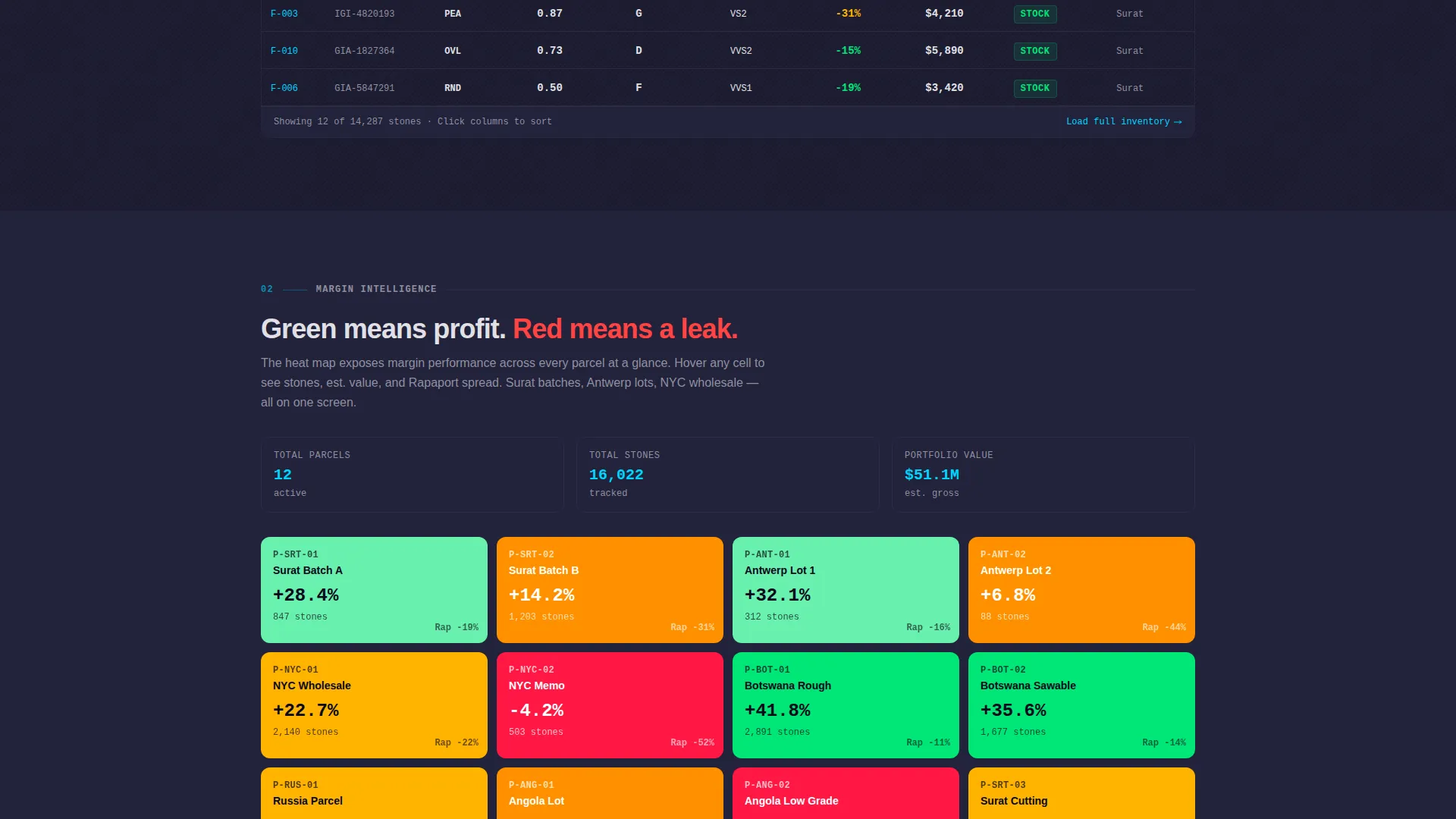
A color-coded heat map renders parcel-level profit data using a green-to-red cell scale. It exposes margin leaks visually without requiring the visitor to interpret a table of raw figures.
Rapaport Price-Feed Panel
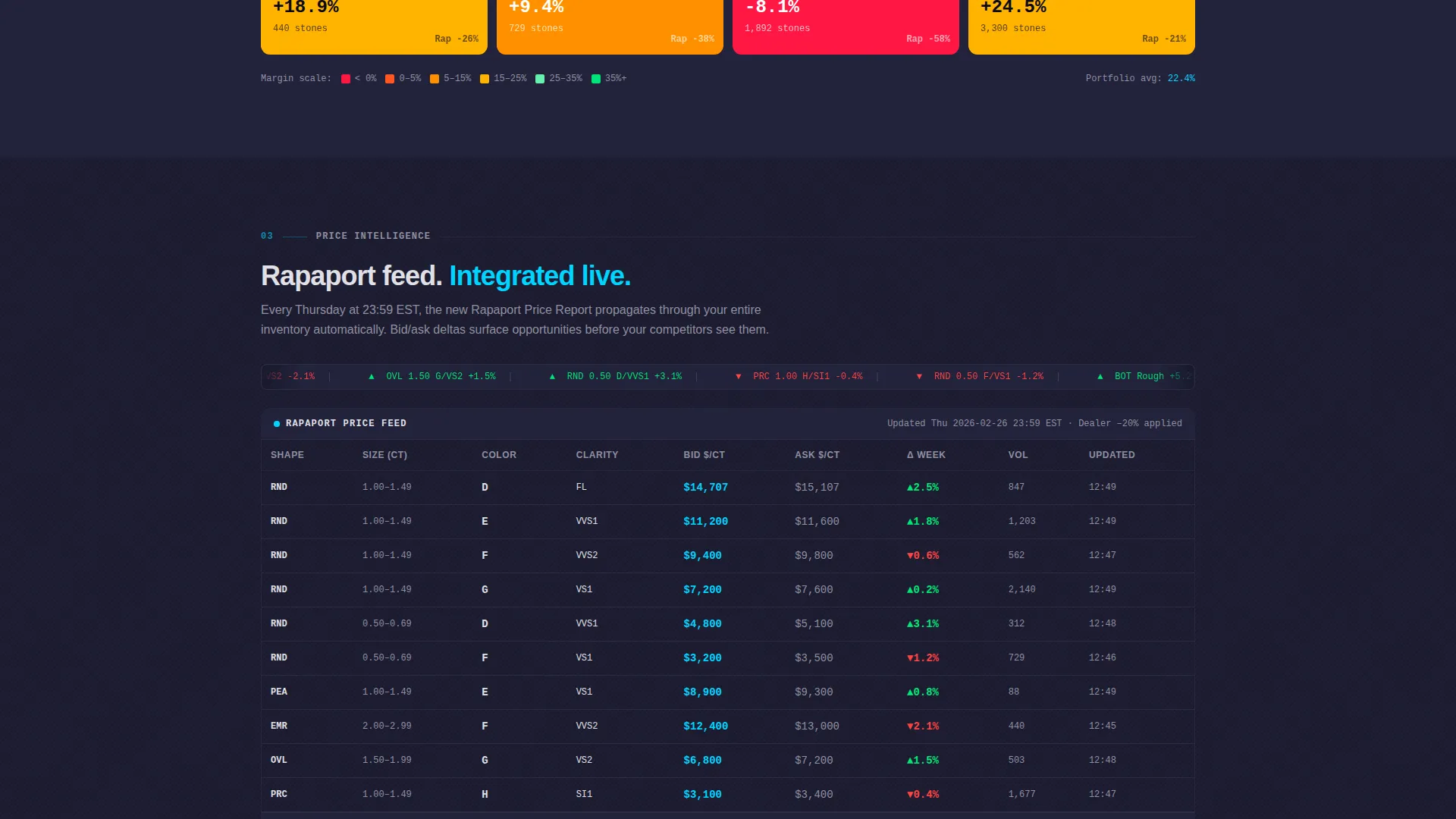
A dedicated section displays bid and ask delta data from a Rapaport price-feed integration panel. This gives dealers and wholesalers an immediate sense of how the platform keeps pricing current during active negotiations.
Qualified Lead Capture Form
The signup form collects email, company name, and a single dropdown asking how many stones the prospect manages. The four-tier options (under 100, 100 to 1,000, 1,000 to 10,000, and 10,000 and above) qualify the lead and personalize the onboarding path simultaneously.
Modal Video Walkthrough
A secondary conversion path labeled "See the Full Dashboard" triggers a 90-second screen-recorded walkthrough in a modal overlay. The video ends with the same trial call-to-action, ensuring every exit point funnels back toward activation.
Page sections overview
| Section | Purpose |
|---|---|
| Yield Estimator Hero | Engage visitors immediately with a live rough-to-polished calculator |
| Inventory Grid Module | Demonstrate scale and sort capability with 14,000+ stone data grid |
| Margin Heat Map | Visualize parcel-level profit and loss with color-coded cells |
| Rapaport Feed Panel | Show live bid and ask delta data for real-time pricing context |
| Freemium call to action Bar | Sticky prompt driving "Track 50 Stones Free" trial signup |
| Lead Capture Form | Qualify and convert visitors with a three-field signup form |
| Modal Walkthrough | 90-second video tour ending with the trial call-to-action |
Design & branding system
The visual identity follows a Data Command theme built on a Carbon Fiber color system. Every design choice prioritizes data legibility over decoration.
- Deep graphite black (#1A1A2E) and woven carbon mid-tone (#30304A) form the background layer, with polished titanium (#E0E0E6) used for all body text
- A single laser-blue accent (#00D4FF) marks every live data point, hover state, active toggle, and interactive element so the eye always knows where to act
- No stock photography or lifestyle imagery appears anywhere, the interface itself is the visual, keeping all attention on the numbers
Mobile & speed optimization
The layout is structured to carry its data-heavy modules cleanly across screen sizes. Interaction patterns are designed to work on touch as well as cursor.
- Slider, dropdown, and toggle inputs in the estimator hero are built for both mouse and touch interaction
- Data grid sort controls and heat map cells adapt to narrower viewports without losing their functional hierarchy
- Count-up animations and sticky call to action bar behavior are scoped to avoid layout interference on mobile scroll
How this template helps you convert
The page is engineered around a single principle: let the product demonstrate itself before the visitor reads a single marketing claim.
- The yield estimator creates personal investment in the first few seconds, the visitor's own numbers are already on screen before they scroll, making the trial offer feel like a natural next step rather than a cold ask.
- Each scroll-triggered data module adds another layer of capability, building accumulated evidence of product depth so the "Track 50 Stones Free" call-to-action lands with full context behind it.
Other information about this template
This template is categorized under Technology as a Diamond Vertical SaaS product and is optimized for the diamond management software niche. It is suited to freemium and trial-led go-to-market strategies where lead qualification and onboarding personalization matter from the first interaction.
- The template style is a Dashboard and Data Grid layout, designed to mirror the interface it promotes
- The header concept is a Calculator and Estimator, placing the core product value in the most visible position on the page
- The creative direction is Stats-First Impact, meaning every scroll increment reveals a new data module rather than a new marketing message
- The Data Command theme and Carbon Fiber palette make this template well suited to B2B SaaS products in technical or precision-driven industries beyond diamonds
Theme
Data Command
Creative direction
Stats-First Impact
Color system
Carbon Fiber
Style
Dashboard/Data Grid
Direction
Freemium/Trial
Page Sections
Live Rough-to-polished Yield Estimator
Sortable 14,000+ Stone Inventory Grid
Parcel Margin Heat Map
Rapaport Price-feed Integration Panel
Qualifying Lead Capture Form
Modal Dashboard Video Walkthrough
Related questions
Can I adapt the yield estimator inputs for different stone shapes or grading scales?
Does the inventory grid show real data or sample data out of the box?
How does the lead qualification dropdown connect to onboarding?
When does the sticky trial call to action bar appear on the page?
Who is the modal video walkthrough designed for?



