Micro-SaaS & Developer Tools Professional Website Template
Rankengine is a dashboard-style landing page template built for AI SEO writer tools. It uses a dark carbon fiber visual system, a live dashboard hero, and a Problem-to-Solution scroll arc to move SEO managers, agency founders, and affiliate marketers toward a free trial click. No forms, no friction, just proof followed by action.
by Rocket studio
Quick summary
Rankengine is a single-page, click-through landing page template designed for AI-powered SEO writing tools. It opens with a live dashboard hero showing content being generated in real time, then walks visitors through a data-driven Problem-to-Solution arc that ends at a free trial call to action. The template targets technical buyers who respond to proof over promises.
Who this template is for
This template is built for founders and marketers who sell or use AI content generation tools at scale. It speaks to people who understand content velocity, organic search, and the cost of slow output.
- SEO managers running large content calendars who need to show clients or stakeholders concrete productivity gains
- Agency founders offering white-label content services who want a polished, conversion-ready page without custom development
- Solo affiliate marketers who depend on ranking speed and need a tool page that signals credibility fast
What problem this template solves
Manual content production is slow, expensive, and hard to scale. Writers spend hours on a single article, revision cycles pile up, and the time between publishing and ranking stretches weeks. A landing page that simply lists features does not communicate urgency or value to a data-driven buyer.
- Visitors who evaluate AI writing tools need to see performance data, not just bullet-point claims
- Founders and agency operators need a page that converts cold traffic without a sales call or a long form
- The template removes the need to build a custom dashboard-style layout from scratch, saving significant design and development time
What you get with this template
You get a fully structured, single-page landing page template built around a dashboard and data grid visual system. Every section has a defined purpose inside the Problem-to-Solution scroll arc.
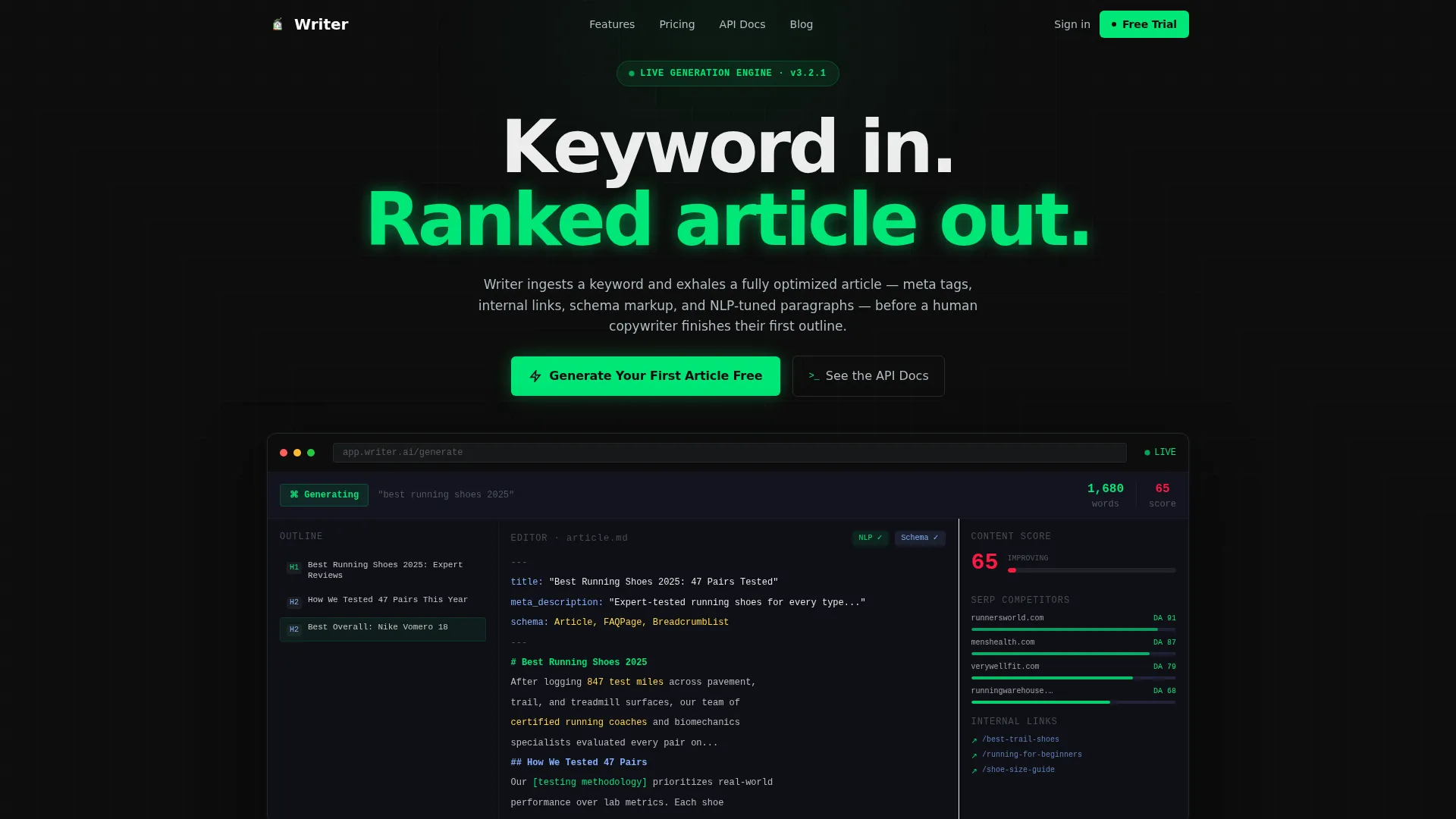
- A live-style dashboard header showing a keyword mid-generation, complete with a content score counter, SERP competitor sidebar, outline builder, and word count ticker
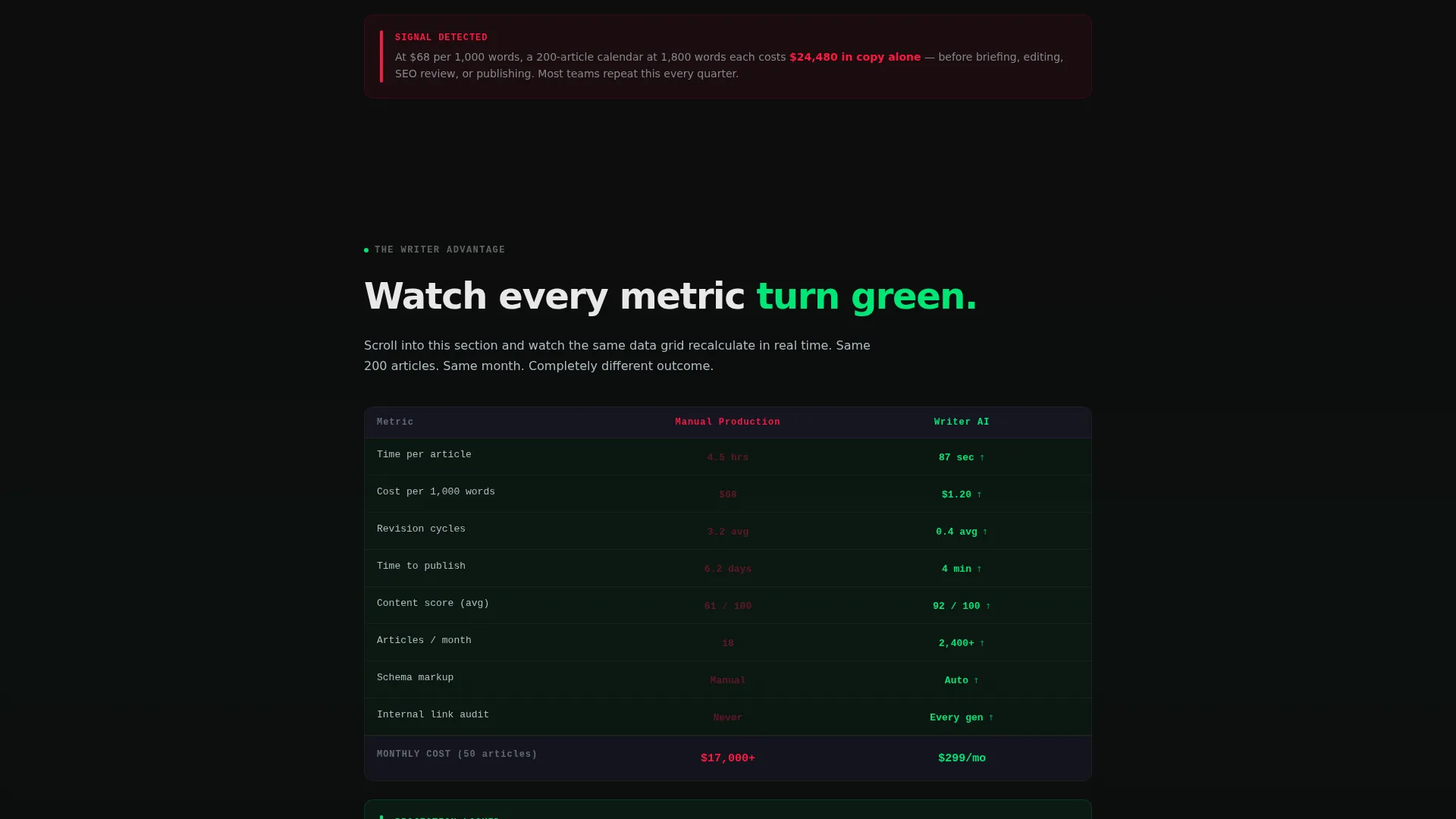
- A two-state comparison data grid that transitions from red negative indicators to green positive indicators as the visitor scrolls
- A sticky bottom call-to-action bar, a code-editor-style output sample panel, an integration logo ticker, and a secondary API docs text link
Feature list
This template includes purpose-built sections and interaction patterns grounded in the source brief. Each component serves a specific role in the click-through flow.
Live Dashboard Hero Section
The header fills the entire viewport with a pixel-accurate render of the AI writer interface. It shows a keyword mid-generation with a real-time content score climbing from 62 to 94, a SERP competitor sidebar with domain authority numbers, an auto-populating outline with H2 and H3 headings, and a word count ticker rolling past 1,800. The cursor blinks inside the editor. No photography or illustration is used.
Problem-to-Solution Data Grid
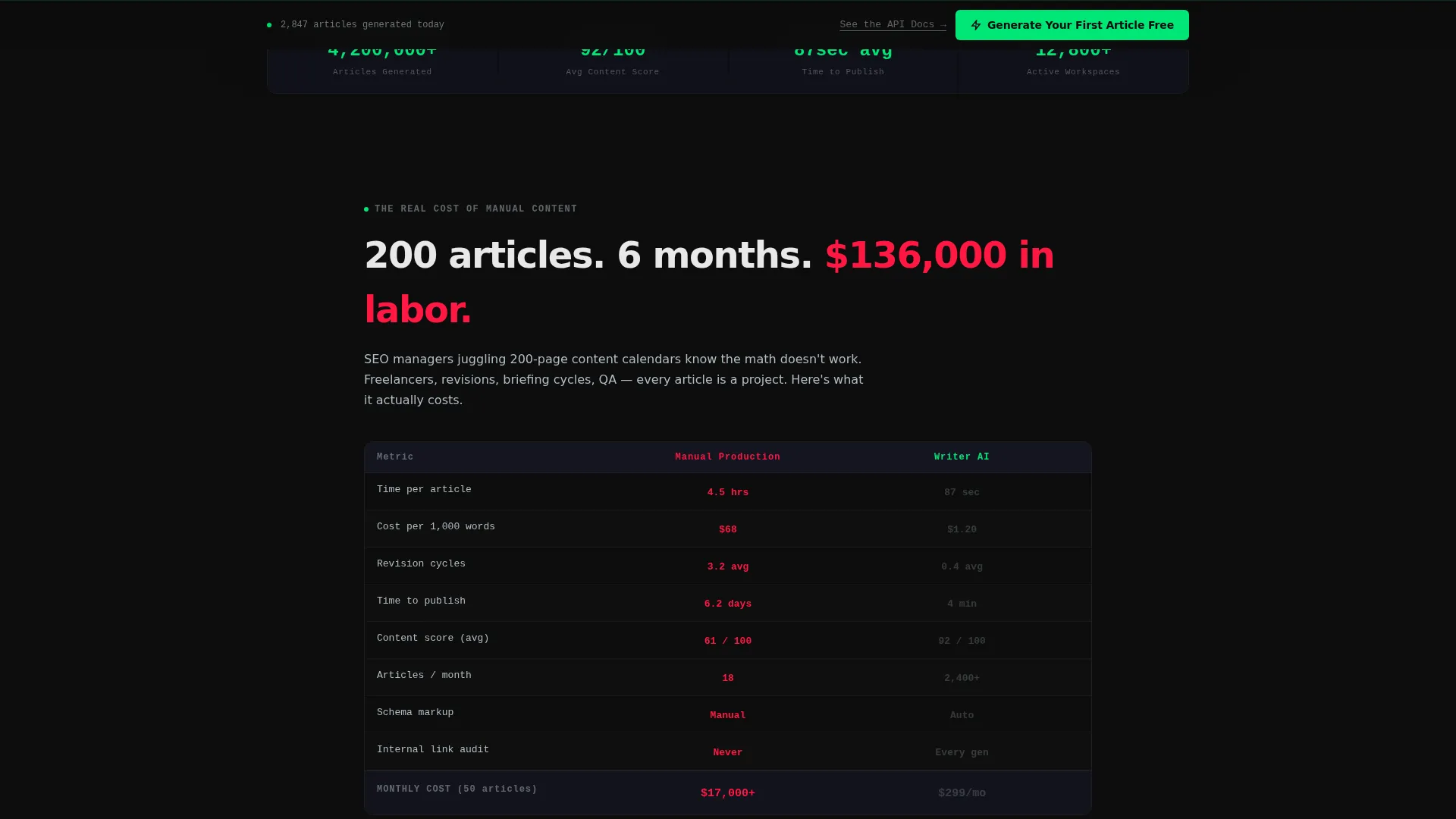
The second and third sections use a paired data grid layout. The first state shows manual content production costs rendered as a dark table with red negative indicators across metrics like hours per article, cost per word, revision cycles, and time to rank. The same grid then recalculates with AI output, with every metric animating from red to green as the visitor watches.
Code-Editor Output Panel
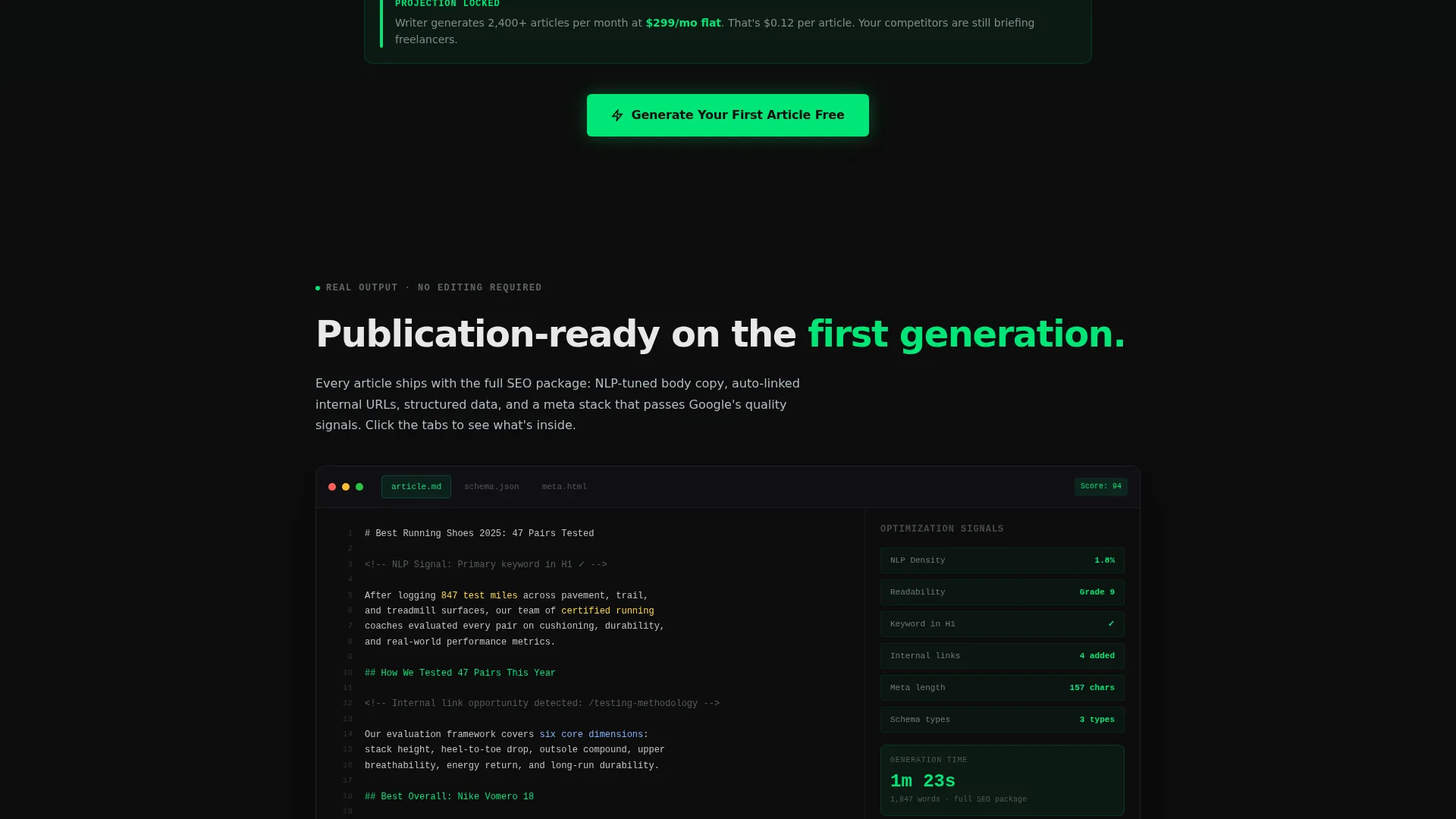
The fourth section presents real article samples inside a code-editor-style panel. Optimization signals are highlighted inline, giving technical buyers a direct look at output quality without leaving the page.
Integration Ticker and API Signal
The fifth section runs a horizontal ticker displaying integration logos and API response times. This section targets the technical buyer who wants to evaluate how the tool connects with existing workflows before committing to a trial.
Click-Through Call to Action System
The primary call to action, "Generate Your First Article Free," appears first as a native-looking button inside the dashboard header. It reappears as a sticky bottom bar after the cost-comparison grid. A secondary text link, "See the API Docs," provides a lower-commitment path for developers and technical evaluators.
Carbon Fiber Color System
Every interactive element including buttons, toggles, and progress bars uses readout green (#00E676) against carbon black (#0D0D0D). Backgrounds stay in the #0D0D0D to #1A1A2E range. Secondary text and gridlines use cool chrome (#B0BEC5). The result is a mission control aesthetic where small green signals confirm that everything is running.
Page sections overview
| Section | Purpose |
|---|---|
| Dashboard Hero Header | Show AI writer in live generation state to hook the visitor immediately |
| Problem Cost Grid | Display manual content production costs using red negative indicators |
| Solution Cost Grid | Reanimate the same grid with green metrics to show the AI advantage |
| Article Output Panel | Present real content samples in a code-editor view with highlighted signals |
| Integration Logo Ticker | Show compatibility logos and API response times for technical buyers |
| Sticky call to action Bar | Keep the free trial action visible after the cost-comparison section |
Design & branding system
The template uses a Carbon Fiber color system modeled on a mission control console interior. Dark matte surfaces are punctuated by small glowing confirmations rendered in electric green.
- Core palette: deep cockpit black (#0D0D0D) and woven graphite (#1A1A2E) for all backgrounds, readout green (#00E676) for live-state indicators and every interactive element, cool chrome (#B0BEC5) for secondary text and gridlines
- All buttons, toggles, and progress bars pulse in readout green to reinforce an active, real-time system feel
- No photography or illustration is used anywhere in the template; the product interface is the only visual content
Mobile & speed optimization
The dashboard-style layout is designed to read clearly on smaller screens without losing the data-dense aesthetic that makes it convincing on desktop.
- The live dashboard hero scales to fill the viewport on mobile while keeping the key metrics readable
- The data grid sections reflow into vertically stacked rows on narrow screens so red-to-green transitions remain visible and impactful
- The sticky call-to-action bar is always visible at the bottom of the screen regardless of device size
How this template helps you convert
The page earns each click by proving capability before asking for commitment. The scroll arc is structured to build trust progressively, not to close visitors immediately with a form.
- The dashboard hero creates an immediate visceral impression of speed and output quality, reducing skepticism before the visitor reads a single line of body copy
- The Problem-to-Solution data grid gives data-driven buyers a concrete, visual case for switching, using their own familiar metrics like cost per word and time to rank
- The sticky call-to-action bar and the secondary API docs link work together to capture both the general user and the technical evaluator with a single, no-form click
Other information about this template
This template is built under the Dashboard Pro theme and is categorized within the Technology vertical, specifically the Micro-SaaS and Developer Tools subcategory targeting the AI SEO writer niche.
- The template style is a Dashboard and Data Grid layout, suited to tools that need to demonstrate live data and real-time performance rather than static feature lists
- The creative direction follows a Problem-to-Solution Arc, a scroll pattern that surfaces pain first and resolves it visually before presenting the call to action
- The header concept is a Dashboard Preview, meaning the product interface itself acts as the hero rather than a separate promotional graphic
- The landing page direction is Click-Through, routing visitors to an external onboarding or trial flow rather than capturing leads on-page
- The color system is Carbon Fiber, a dark-surface palette with high-contrast green indicators designed to feel technical, live, and credible
Theme
Dashboard Pro
Creative direction
Problem→Solution Arc
Color system
Carbon Fiber
Style
Dashboard/Data Grid
Direction
Click-Through
Page Sections
Live Dashboard Hero Section
Problem-to-solution Data Grid
Code-editor Output Panel
Integration Logo Ticker
Click-through Call to Action System
Carbon Fiber Color System
Related questions
Does this template include a lead capture form?
Can I change the keyword shown in the dashboard hero?
Is the red-to-green grid animation included in the template?
Who is the secondary API docs link intended for?



