Smart Home Services Reminder Landing Page Template
Dispatch is a split-screen landing page template built for home services companies that need to reduce no shows through automated SMS and email appointment reminders. It pairs a live dispatch board visual with hard-hitting before-and-after stats, an inline no-show cost calculator, and a clean Data Command aesthetic designed to convert ops managers and franchise owners into demo bookings.
by Rocket studio
Quick summary
Dispatch is a single-page, split-screen landing page template designed for mid-size home services companies. It fires SMS and email appointment reminders fifteen minutes before a technician arrives, helping ops managers reduce no shows, protect revenue, and eliminate the confirmation phone call grind. The template uses a dark glassmorphic Data Command visual style and converts visitors through stats-first storytelling and an inline revenue calculator.
Who this template is for
This template was built for decision-makers in the home services industry who are tired of chasing homeowners before every service call. It speaks directly to the people who feel the cost of no shows every single week.
- Ops managers and dispatchers running fleets of ten to fifty trucks across multiple zip codes
- Franchise owners tracking revenue leakage from missed appointments and last minute cancellations
- Service business leaders who want to automate appointment reminders without adding headcount
What problem this template solves
Every missed appointment in a home services business represents a block of time that could have generated revenue. Wasted staff salaries and ongoing overhead costs keep adding up even when a scheduled appointment goes unanswered. The no show rate across the industry sits near 71%, and most service based businesses are still relying on manual phone call confirmations to close that gap.
- Dispatchers waste hours each day making confirmation calls instead of coordinating active jobs
- No shows disrupt operational flow, hurt staff morale, and quietly drain profit from every week
- Without structured appointment reminder templates, businesses send inconsistent messages and miss the window to confirm appointments before it is too late
What you get with this template
You get a fully built, conversion-focused landing page that makes the visitor's own numbers do the selling. Every scroll stacks another data point until the cost of not switching becomes impossible to ignore. The page is designed for speed, clarity, and action from the first pixel to the footer call to action.
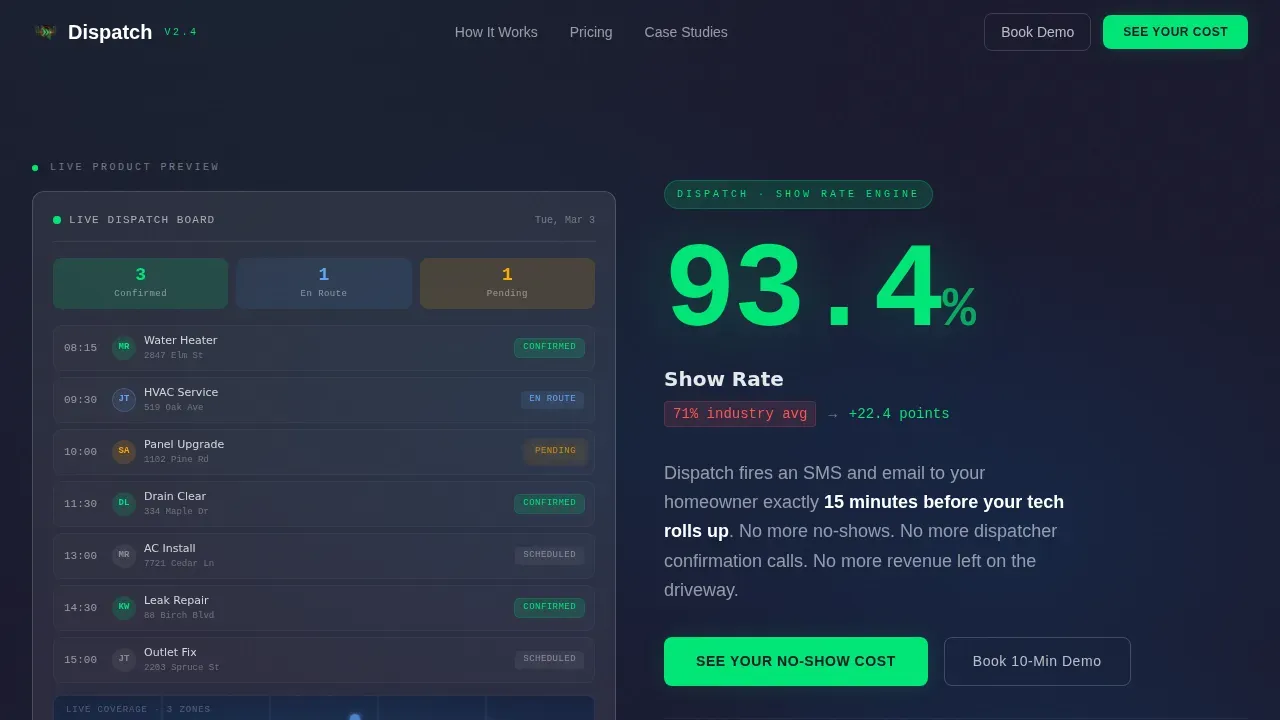
- A split-screen hero with a live dispatch board visual on the left and an oversized show-rate stat on the right
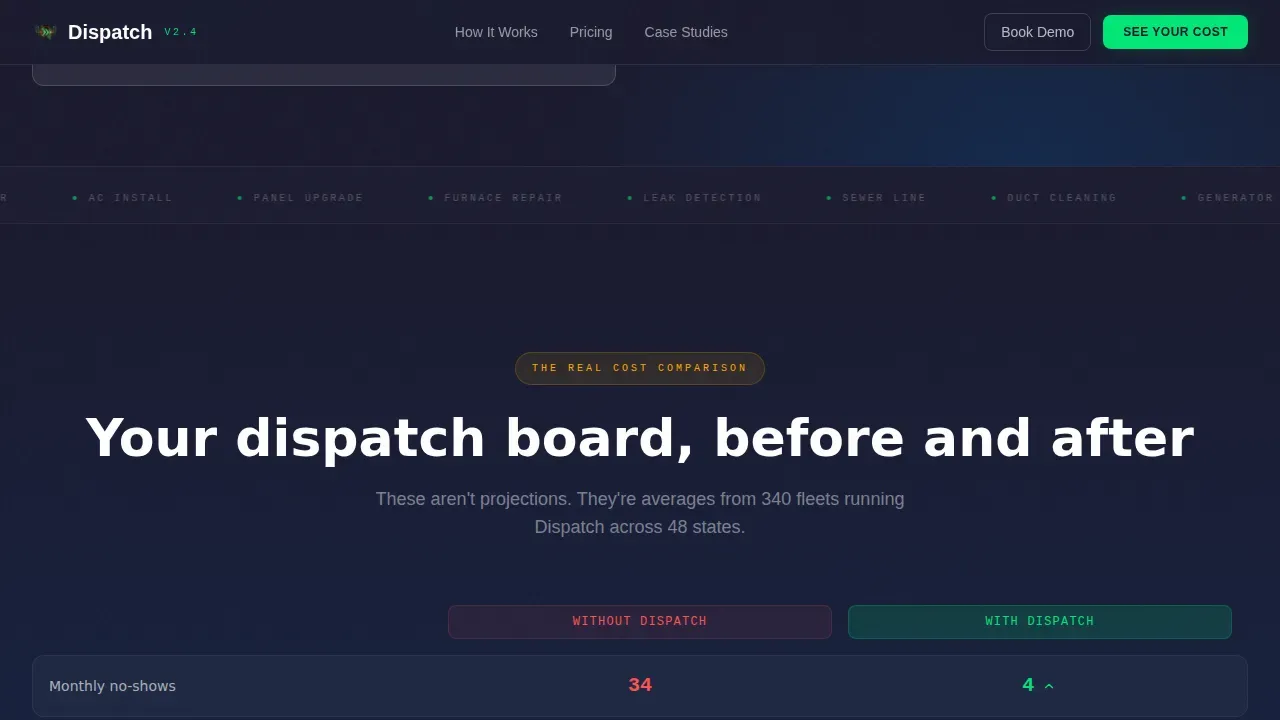
- A Before and After comparison section, a live-feel reminder ticker, and an inline no-show cost calculator
- Social proof blocks with specific ops manager quotes, a primary call to action, and a footer demo booking prompt
Feature list
This section covers the core built-in capabilities delivered inside the Dispatch template.
Split-Screen Hero with Live Dispatch Board Visual
The left panel renders a frosted-glass dispatch board showing eight appointments with green confirmation badges, an amber pulse animation on a pending job, technician initials, timestamps, and a map pin cluster. The right panel displays "93.4% show rate" in oversized monospace type alongside a counter animation and the subline "versus. 71% industry average." The product is the visual, no stock photography needed.
Before and After Comparison Cards
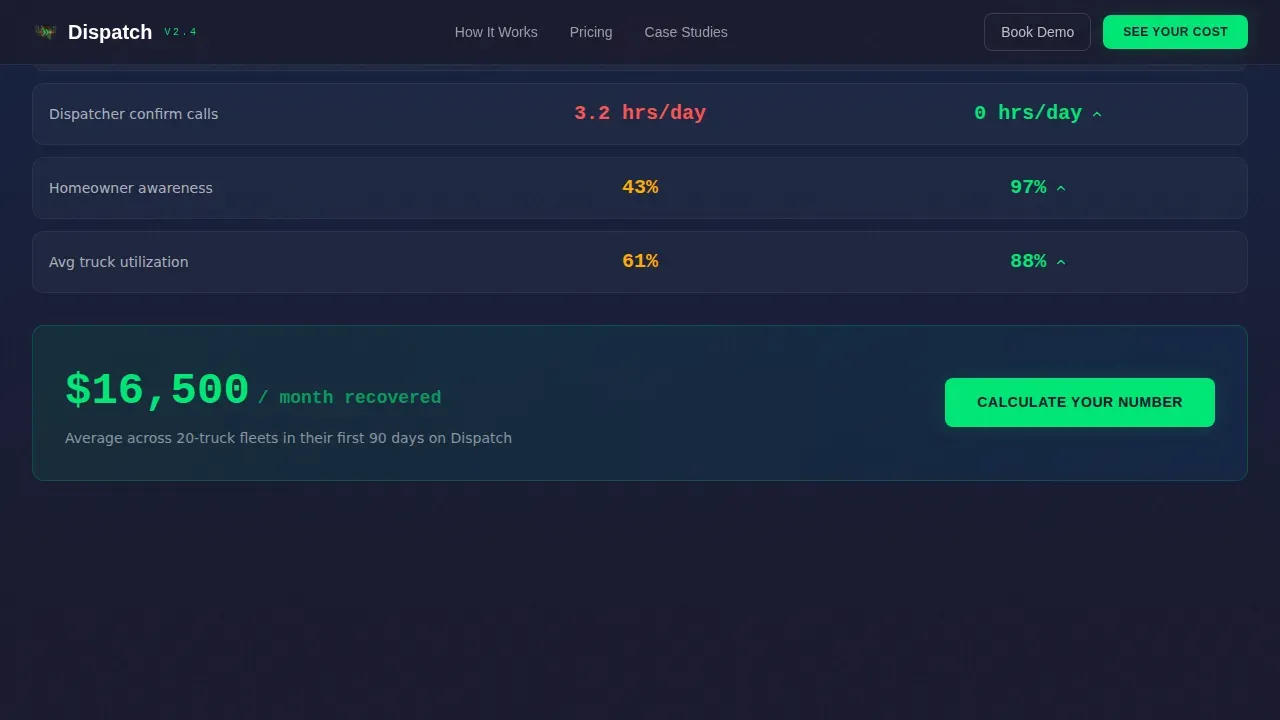
Section two presents a frosted "Without Dispatch" card against a "With Dispatch" card. Each card shows the same set of metrics: missed appointments per month, revenue lost, and dispatcher hours wasted. The transformation is immediate and visceral. Seeing both cards side by side makes the financial impact of no shows physically uncomfortable to ignore.
Live Reminder Ticker
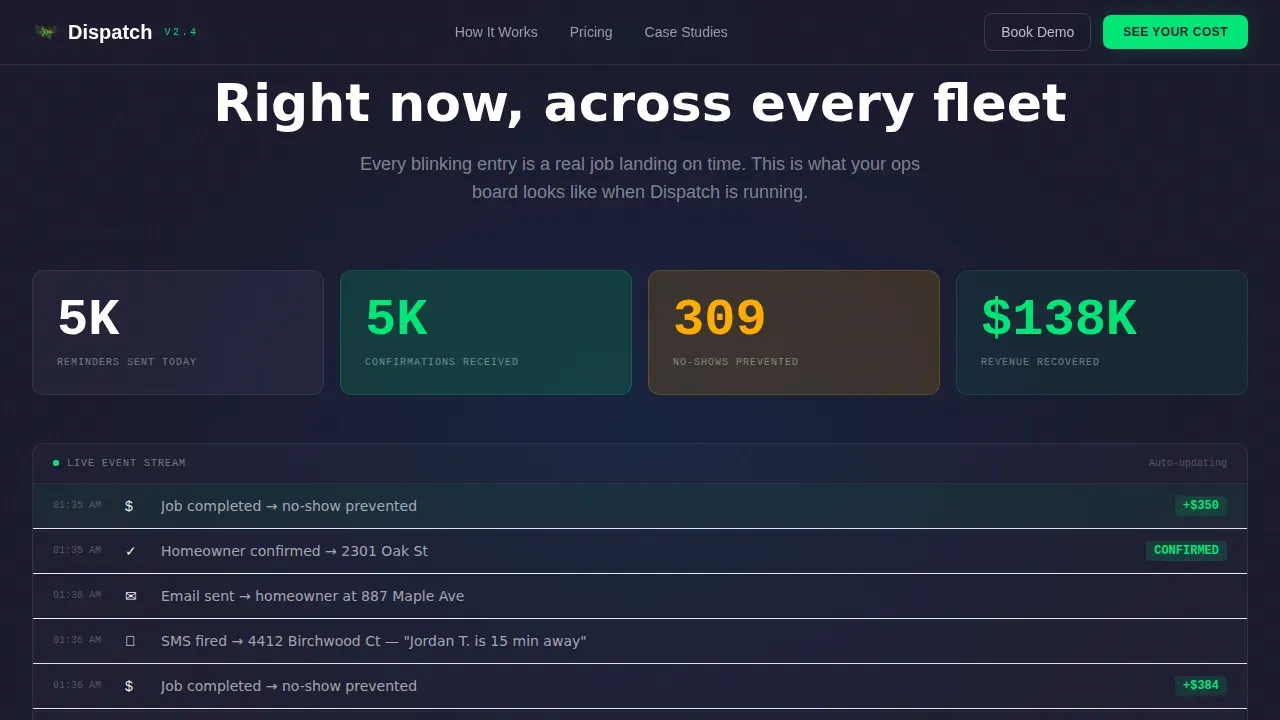
Section three animates a marquee-style ticker showing reminders sent, appointment confirmation counts, and dollars recovered in real time. The ticker reinforces the accumulation narrative, every number builds on the previous one and pushes the visitor closer to the calculator below.
Inline No-Show Cost Calculator
The primary call to action, "See Your No-Show Cost," opens an inline calculator where visitors enter their average jobs per week and average ticket value. The calculator instantly outputs projected recovered revenue. This section converts because the visitor's own numbers close the argument before a single form field appears.
Social Proof with Specific Outcomes
The social proof section features testimonials from ops managers that include fleet size and recovered revenue figures. Specific outcomes tied to real job types, plumbing, electrical, and HVAC service appointment confirmations, give the claims weight and make the page trustworthy to a skeptical buyer.
Stats-First Scroll Narrative
Every scroll reveals a new data comparison before any paragraph of copy appears. The narrative engine runs on accumulation: each stat stacks on the last. This structure keeps field service businesses engaged long enough to reach the calculator and the demo booking call to action at the footer.
Page sections overview
| Section | Purpose |
|---|---|
| Split-Screen Hero | Show dispatch board visual and oversized show-rate stat side by side |
| Before After Cards | Compare missed-appointment metrics without and with reminder automation |
| Live Reminder Ticker | Animate running totals of reminders sent, confirmations, and revenue recovered |
| No-Show Calculator | Let visitors enter their own job volume and ticket value to see projected recovery |
| Social Proof Block | Display ops manager testimonials with fleet size and specific revenue outcomes |
| Footer call to action | Present the "Book a 10-Minute Demo" secondary call to action |
Design & branding system
The visual identity follows a Data Command theme. The palette feels like a rain-streaked windshield at night with dashboard lights glowing through, dark, layered, and alive with signal. Typography pairs DM Sans for body copy with JetBrains Mono for all stats and data displays.
- Deep command-center charcoal (#1A1A2E) as the base background, frosted translucent card surfaces using rgba(255,255,255,0.08) with backdrop blur and thin 1px luminous borders
- Electric confirmation green (#00E676) reserved for success states and confirmed appointment badges; alert pulse amber (#FFAB00) for warning and pending states with a keyframe pulse animation
- JetBrains Mono renders every stat, date at time display, and counter in a terminal-style weight that reinforces the data command aesthetic
Mobile & speed optimization
The template is built desktop-first, matching how ops managers and dispatchers actually work, on wide-screen dashboards in busy back offices. The layout stays fully responsive so franchise owners reviewing the page on mobile get a clean, readable experience.
- Static sections use server components to keep the initial load lean; the calculator and animations are isolated as client components
- Scroll-reveal stagger animations, the amber pulse keyframe, counter tick-up, and marquee ticker are all scoped to client-side rendering so they do not block the critical path
- The split-screen layout collapses gracefully on smaller screens without losing the contrast between the "Without Dispatch" and "With Dispatch" columns
How this template helps you convert
The conversion architecture of this landing page is built around one principle: let the visitor's own data make the case before asking for anything in return.
- The stats-first scroll narrative stacks financial impact data, no show rate, revenue lost per month, dispatcher hours wasted, so that by the time the visitor reaches the calculator, the cost of inaction is already established and emotionally real.
- The inline no-show cost calculator turns passive reading into active participation. Visitors enter jobs per week and ticket value, then instantly see their projected recovered revenue. That number becomes the reason to click "Book a 10-Minute Demo" at the footer.
Other information about this template
This template is a strong fit for any service business that wants to present appointment reminder automation in a compelling, data-driven way. Below are additional details about built-in messaging patterns, design flexibility, and how the template supports a complete reminder workflow.
- The reminder template structure supports both an appointment reminder email template and appointment reminder text templates. Each reminder message can include the client name, service description, appointment date, appointment time, and a reply prompt such as "reply yes to confirm" so the homeowner can confirm with a single text.
- Appointment reminder texts and text reminders are the fastest channel for a same day reminder or a final reminder before a technician departs. Text messages have high open rates, which makes appointment reminder text messages more reliable than a phone call alone for last-minute confirmation.
- The appointment reminder email layout supports a friendly and professional tone. An appointment reminder email can include all the relevant details: the business name, the service address, the cancellation policy, clear instructions for property access, and a secure link to view or sign digital documents before the visit.
- For homeowners, each reminder message acts as a just a friendly reminder that their upcoming appointment is confirmed. A quick reminder sent 24 to 72 hours before the job, followed by a same day reminder, follows a few best practices for reducing no shows without sending too many messages.
- Appointment confirmation messages can include a "reply yes to confirm" prompt or a confirm appointments button. A simple confirmation message reassures the homeowner, updates the dispatch board in real time, and eliminates the need for an additional phone call from the office.
- The template is designed to help field service businesses send appointment reminders that remind customers of their scheduled appointment without overwhelming them. Each reminder text avoids unnecessary details while still covering the appointment date, the appointment time, the business name, and how to reach the office, contact us at phone number is a standard closing line in each reminder template.
- The page can support virtual appointments as well. For remote consultations or virtual link-based service calls, the reminder message simply swaps the appointment location detail for a virtual link, keeping the format consistent across job types.
- Appointment reminder text templates included in this design follow a format that covers: client name, upcoming appointment details, date and time, and a prompt to contact us at phone number if the homeowner needs to reschedule. This keeps the reminder text concise and actionable.
- The dispatch data command home services appointment reminder landing page template is purpose-built for the home services niche and can be adapted for plumbing, electrical, HVAC, and other service appointment types. Appointment reminder messages for a dental appointment or other adjacent service businesses follow the same structural pattern and can be customized by swapping the service description and business name.
- A review request can be appended to the post-service confirmation message or included as a review link in the follow-up reminder. This keeps the customer experience loop closed after the job is complete.
- The no show cost calculator directly addresses the financial impact of no shows, wasted staff salaries, overhead that keeps running, and the next appointment that could have filled the slot. Automated appointment reminders reduce no show rates by an average of 30 to 40%, making it one of the highest-return moves a service based business can make.
- Client communication stays consistent because every outbound reminder uses the same reminder template structure. Whether it is a scheduled appointment confirmation, a just a quick reminder text, or a final reminder before arrival, the message format is predictable and professional.
Theme
Data Command
Creative direction
Stats-First Impact
Color system
Glassmorphic
Style
Split Screen (50/50)
Direction
Comparison/Versus
Page Sections
Split-screen Dispatch Board Hero
Before and After Comparison Cards
Inline No-show Cost Calculator
Live Reminder Ticker Animation
Social Proof with Specific Outcomes
Stats-first Scroll Architecture
Related questions
What types of reminder messages does this template support?
How does the no-show cost calculator work?
Can the reminder template be customized for different service types?
What is the primary call to action on this landing page?
Does this template include space for cancellation policy and rescheduling instructions?



