AI for Agriculture Cost Calculator Website Template
Yield is a precision agriculture landing page template built for AI-powered crop recommendation platforms. It opens with an interactive yield calculator, flows into a three-tier animated comparison table, and drives freemium sign-ups with a persistent harvest-amber call-to-action bar. The design uses a glassmorphic heads-up-display aesthetic over a deep field-black background, built for mid-scale row-crop operators and agronomists who need data they can act on fast.
by Rocket studio
Quick summary
Yield is a single-page landing page template for an agriculture AI recommendation engine. It leads with a live acreage calculator, escalates through an animated feature comparison table, and converts visitors with a low-friction freemium sign-up. The visual identity feels like a combine cab cockpit at dawn: frosted glass panels, glowing data, and a dark field palette that makes every number feel actionable.
Who this template is for
This template is built for teams launching or marketing an AI-powered precision agriculture platform. It speaks directly to operators who run fields by the acre and answer to a bottom line.
- Mid-scale row-crop operators managing 2,000 to 10,000 acres of corn and soy who need per-field recommendations, not generic advice.
- Agronomists consulting for co-ops across multiple counties who need a tool that communicates real prescriptive value quickly.
- Precision agriculture managers at corporate farm groups who must justify every input cost on a per-bushel basis to financial stakeholders.
What problem this template solves
Selling an AI decision engine to farmers is hard. Skeptical buyers want proof before they hand over an email address. Generic SaaS landing pages do not speak the language of soil moisture, satellite imagery, or commodity futures.
- Most agriculture software pages bury the value proposition in feature lists instead of showing a real dollar figure upfront.
- Comparison tables typically feel static and unconvincing, failing to show the escalating difference between tiers in a way that pulls buyers toward upgrading.
- Low-friction sign-up paths are often undermined by asking for too much too soon, losing the exact operator who would convert on a strong first result.
What you get with this template
You get a fully structured, section-led landing page designed around the specific conversion flow of a freemium agriculture AI product. Every section is purpose-built to move a skeptical farmer from curiosity to sign-up.
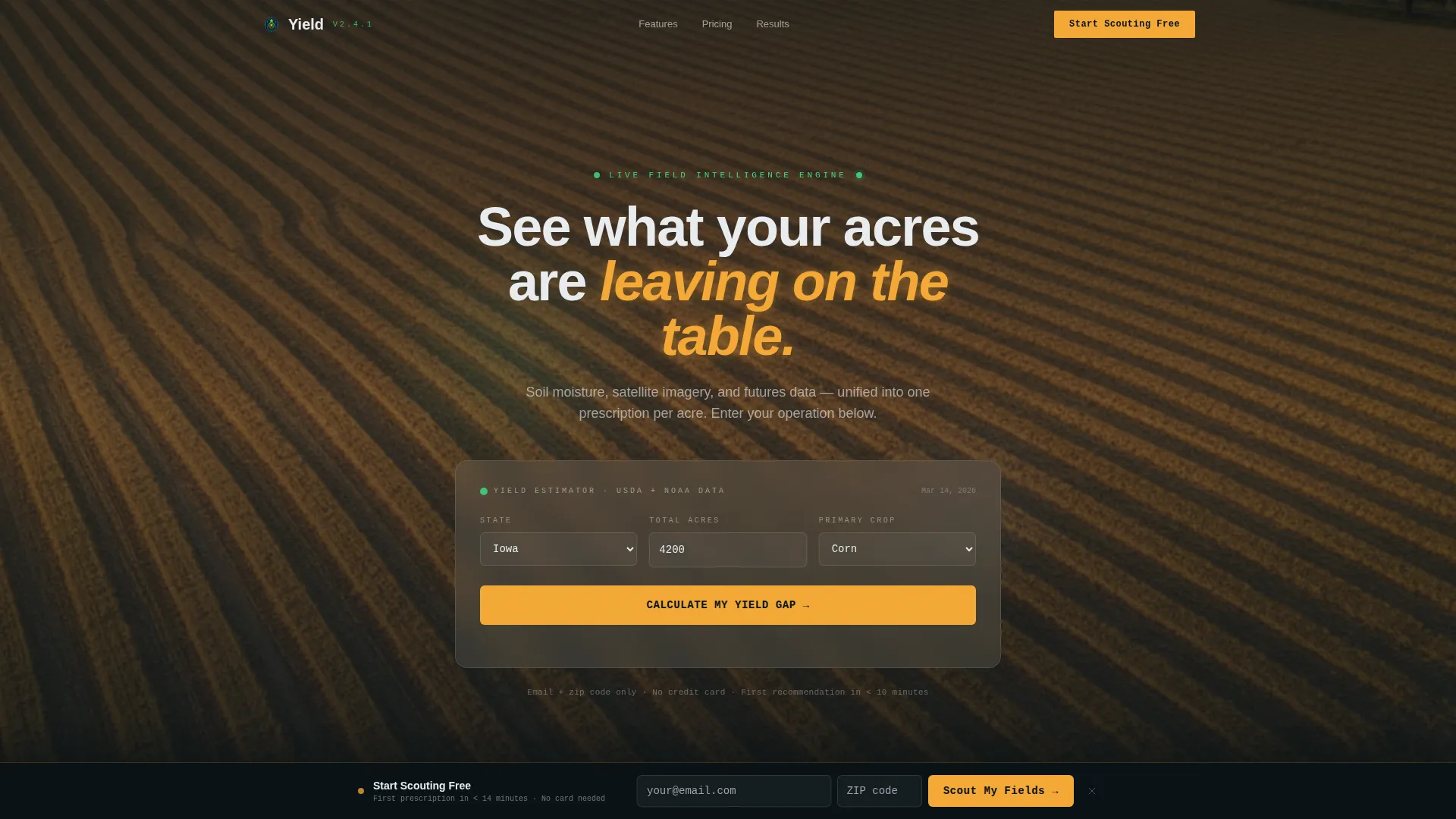
- A header calculator section where visitors select their state, enter total acreage, and choose a primary crop to receive an instant projected yield improvement and estimated annual dollar gain.
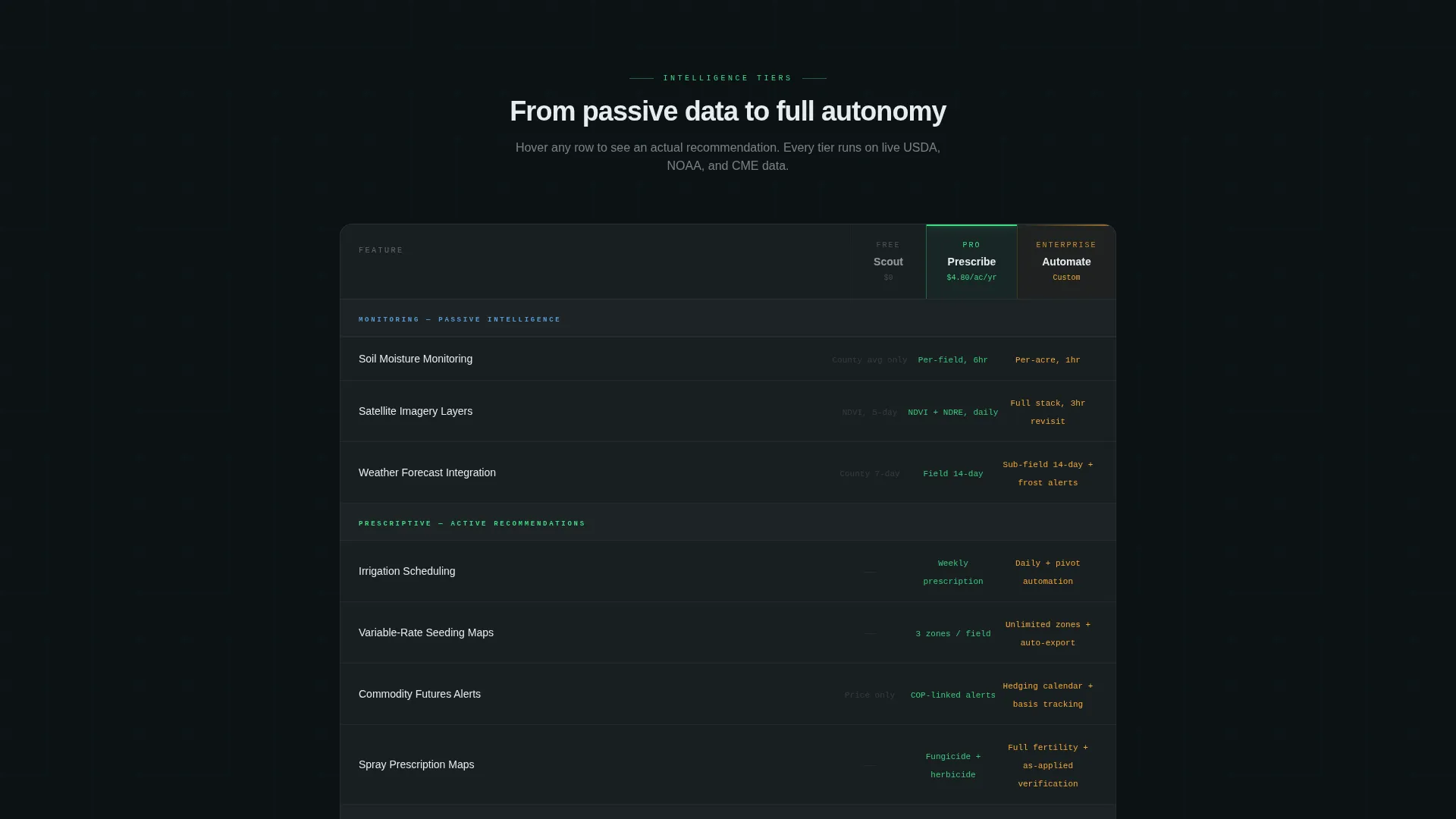
- A three-tier animated comparison table (Free, Pro, Enterprise) with hover-triggered glassmorphic cards that expand to show real recommendation samples and field map previews.
- A persistent floating bottom bar with a primary "Start Scouting Free" call-to-action that appears after the calculator interaction and stays visible through the comparison table scroll.
Feature list
This template includes a focused set of interactive and visual components designed specifically for a precision agriculture AI platform.
Live Yield Calculator Header
The header section includes an interactive estimator where visitors input their state, total acreage, and primary crop. The engine instantly returns a projected yield-per-acre improvement percentage and an estimated annual dollar gain, with numbers that tick upward using a smooth counter animation. The background plays a slow aerial pan over fields at golden hour, blurred softly behind the frosted glass input card.
Animated Three-Tier Comparison Table
The feature matrix presents Free, Pro, and Enterprise tiers in a live comparison table. Each tier column shifts in brightness dynamically: Free appears dim, Pro glows, and Enterprise pulses, guiding the eye toward the upgrade path. Hovering any feature row triggers a micro-animation that expands a glassmorphic card showing a real recommendation sample and a small field map with pulsing moisture zones.
Persistent Floating Conversion Bar
A floating bottom bar locks to the viewport after the visitor completes the calculator interaction. It carries the primary "Start Scouting Free" call-to-action in harvest amber and remains visible as the user scrolls through the entire comparison table. This keeps the conversion path present without interrupting the content reading flow.
Freemium Sign-Up Path
The free tier entry point requires only an email address and a zip code. No credit card is needed. The template communicates that the platform can pull public soil and weather data from the zip code alone to deliver a first recommendation within minutes, reducing signup friction to its absolute minimum.
Enterprise Agronomist Path
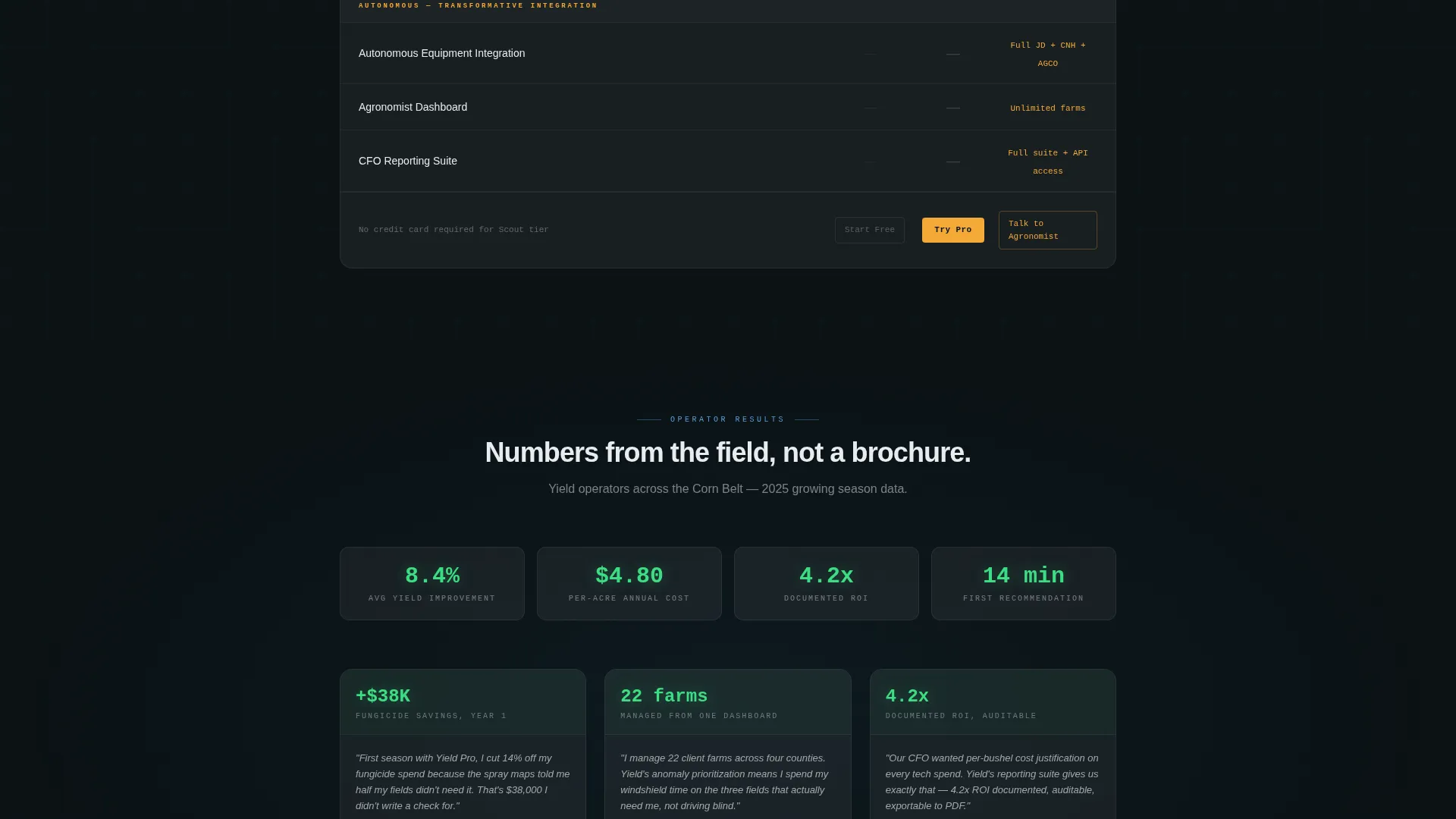
Inside the Enterprise column, a secondary call-to-action labeled "Talk to an Agronomist" provides a white-glove onboarding path for large operators. This secondary path appears exclusively in the Enterprise tier, keeping the primary conversion flow uncluttered for the freemium audience.
Dynamic Motion Background System
The page uses continuous but calm motion throughout: parallax soil layers, drifting satellite tiles, and data numbers that refresh as if live. Motion escalates subtly as the user scrolls deeper into the comparison table, reinforcing the transition from passive monitoring to active prescriptive recommendations to autonomous equipment integration.
Page sections overview
| Section | Purpose |
|---|---|
| Calculator Header | Deliver instant projected dollar value before asking for anything |
| Aerial Field Background | Set a cockpit-at-dawn mood behind the calculator input card |
| Feature Comparison Table | Compare Free, Pro, and Enterprise tiers with live hover interactions |
| Tier Brightness Gradient | Guide the eye toward higher tiers using dynamic visual weight |
| Hover Recommendation Cards | Show real prescription samples inline when a feature row is hovered |
| Floating call to action Bar | Keep the freemium sign-up path visible throughout the page scroll |
| Enterprise Agronomist call to action | Provide a direct consultation path for large corporate operators |
Design & branding system
The visual identity is built on a glassmorphic color system layered over a deep field-black base. Every color in the palette carries a functional meaning, so nothing decorative competes with actionable data.
- Core palette: field-black (#0B1215) as the base, chlorophyll green (#3DDC84) for active data states, satellite-blue (#5B9BD5) for secondary information layers, and harvest amber (#F4A836) reserved for calls-to-action and alert indicators.
- Glass panels use 12 to 16 percent white opacity with a 24px soft blur, giving frosted translucent surfaces that feel like moisture on a windshield catching light.
- Typography pairs monospaced fonts for data and numeric outputs with a clean sans-serif for prose, both rendered in near-white (#E8ECF0) so text reads clearly against dark backgrounds without competing with the green.
Mobile & speed optimization
The template's motion system and glassmorphic layers are designed to remain intentional and controlled rather than excessive, keeping the layout functional across screen sizes.
- The floating call to action bar and calculator card are structured to resize and reflow cleanly for smaller viewports, keeping the primary conversion path accessible without horizontal scrolling.
- Parallax and motion elements are layered as background effects, so the core content hierarchy, calculator inputs, comparison table, and calls-to-action remain usable even when motion is reduced or the viewport is narrow.
How this template helps you convert
The conversion strategy is baked into the page structure itself. The calculator result acts as the primary trust mechanism, delivering a dollar figure before asking for any commitment.
- The header calculator shows a projected annual gain before the visitor encounters any sign-up request, letting the math build trust and justify the next step on its own terms.
- The comparison table escalates stakes row by row, moving from passive monitoring features to active prescriptive recommendations to transformative autonomous equipment integration, so buyers naturally feel the pull toward a higher tier.
- The persistent floating bar with the "Start Scouting Free" call-to-action and the two-field sign-up form (email plus zip code, no credit card) remove every remaining barrier at the moment conversion intent is highest.
Other information about this template
This template is categorized under Technology with a subcategory focus on AI for agriculture, making it well suited for teams positioning a data-driven crop management or precision farming product. A few practical notes for teams evaluating this template:
- The template style is a Comparison Table, and the header concept is a Calculator or Estimator, both of which are purpose-matched to the freemium or trial conversion model built into the page flow.
- The Dynamic Motion theme is implemented with restraint: motion is constant but never frantic, using parallax soil layers, drifting satellite tiles, and live-refreshing data numbers to reinforce the cockpit-instrument feel without overwhelming the content.
- The page is designed to support the full freemium to enterprise conversion spectrum, from a solo operator entering a zip code to a corporate precision agriculture manager requesting a white-glove agronomist consultation.

Theme
Dynamic Motion
Creative direction
Feature Matrix
Color system
Glassmorphic
Style
Comparison Table
Direction
Freemium/Trial
Page Sections
Live Yield Calculator with Counter Animation
Three-tier Animated Comparison Table
Persistent Floating Call to Action Bar
Two-field Freemium Sign-up
Enterprise Agronomist Call to Action
Dynamic Motion Background System
Related questions
Who is this landing page template designed for?
Does the free tier sign-up require a credit card?
How does the comparison table encourage tier upgrades?
Can this template support both solo farmers and large corporate operators?
What makes the calculator section effective for driving sign-ups?



