Auto Dealer Abandoned Cart Email Landing Page Template
Recapture is a high-converting landing page template built for auto dealerships that lose leads when shoppers close the vehicle detail page without acting. It pairs a real-time recovery dashboard header with a sharp three-way comparison table, animated stats, and a two-step personalized revenue-estimate form to turn abandoned sessions into booked demos.
by Rocket studio
Quick summary
Recapture is a single-page comparison landing page template designed for an auto dealer abandoned cart email platform. It opens with a live-feed product screenshot, walks visitors through a data-driven three-way comparison table, and closes with a two-step interactive form that generates a personalized revenue-recovery projection on the spot.
Who this template is for
This template is built for automotive retail professionals who need to prove ROI fast and move decision-makers from skepticism to action. It speaks directly to the people who feel the cost of inaction in their daily numbers.
- Internet sales managers overwhelmed by CRM alerts and chasing cold leads manually
- Dealer group marketing directors who need hard data to justify paid media spend
- General managers watching the majority of website sessions end without a single form fill
What problem this template solves
Most dealerships have no systematic way to re-engage shoppers who browse a vehicle detail page and leave. The gap between a shopper's interest and a follow-up is wide enough to lose the deal entirely. This template makes that problem impossible to ignore.
- Visualizes the financial cost of inaction with hard, on-screen stat panels during every scroll
- Replaces vague sales pitches with a structured side-by-side comparison across three follow-up methods
- Delivers a personalized revenue-recovery estimate before asking for any sales call commitment
What you get with this template
The template ships as a complete, single-page layout with every section pre-built and ready to customize. Every creative decision serves one outcome: getting a qualified dealership contact to run their recovery estimate and book a demo.
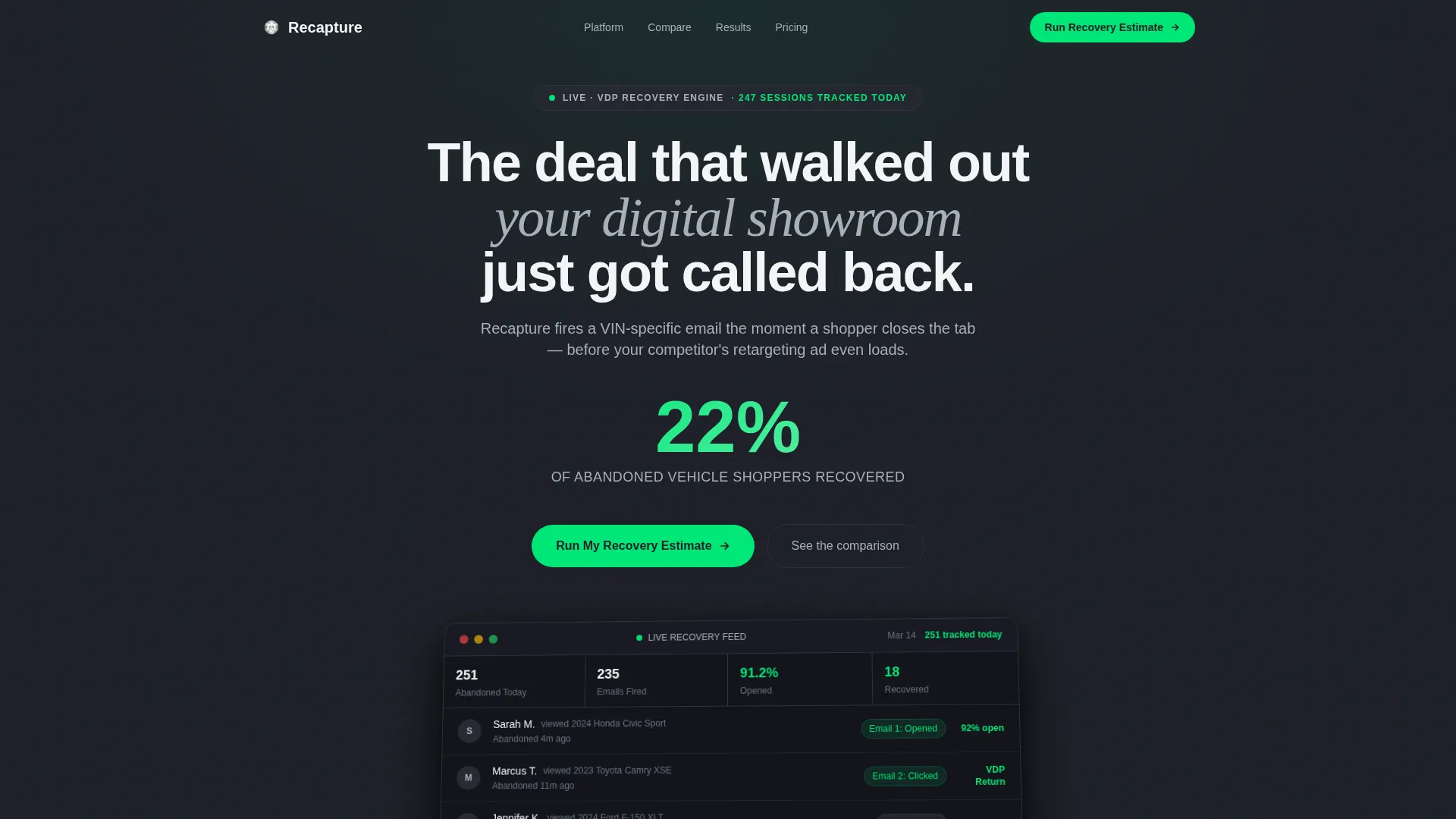
- A pixel-perfect product screenshot hero section with parallax tilt and a live-feed activity display
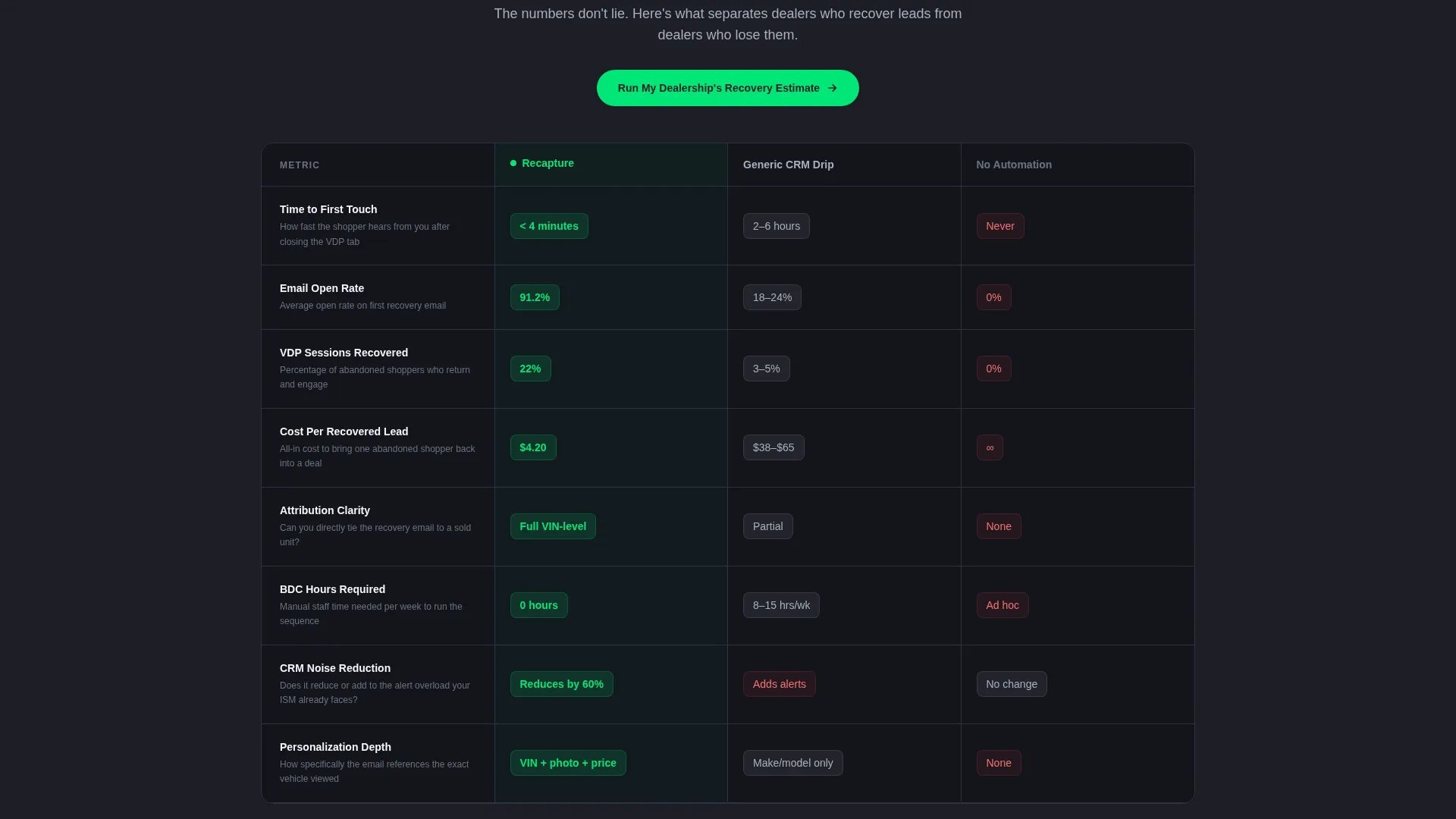
- A three-column comparison table covering Recapture versus generic CRM follow-up versus no automation
- A two-step interactive estimate form with instant on-screen output and a conditional secondary call to action
Feature list
This template is engineered around one idea: let the data do the selling before a human ever picks up the phone.
Real-Time Recovery Dashboard Header
The hero section features a product screenshot of the platform's live recovery feed. A sample entry reads "Sarah M. viewed 2024 Civic Sport, abandoned 4 minutes ago, Email 1: Sent, Opened." The screenshot floats on a gunmetal background with a subtle parallax tilt and numbers that tick upward as the page loads.
Animated Stat Entry on Scroll
Every major data point in the comparison table animates into view as the visitor scrolls. Numbers count up on viewport entry, making each metric feel live and credible rather than static. This reinforces the Stats-First creative direction without requiring the visitor to read dense paragraphs.
Three-Way Comparison Table
The template's centerpiece is a structured side-by-side table. Each row quantifies a specific performance gap across open rates, time to first touch, cost per recovered lead, and attribution clarity. The visual hierarchy makes Recapture's advantage readable at a glance.
Single-Stat Breaker Panels
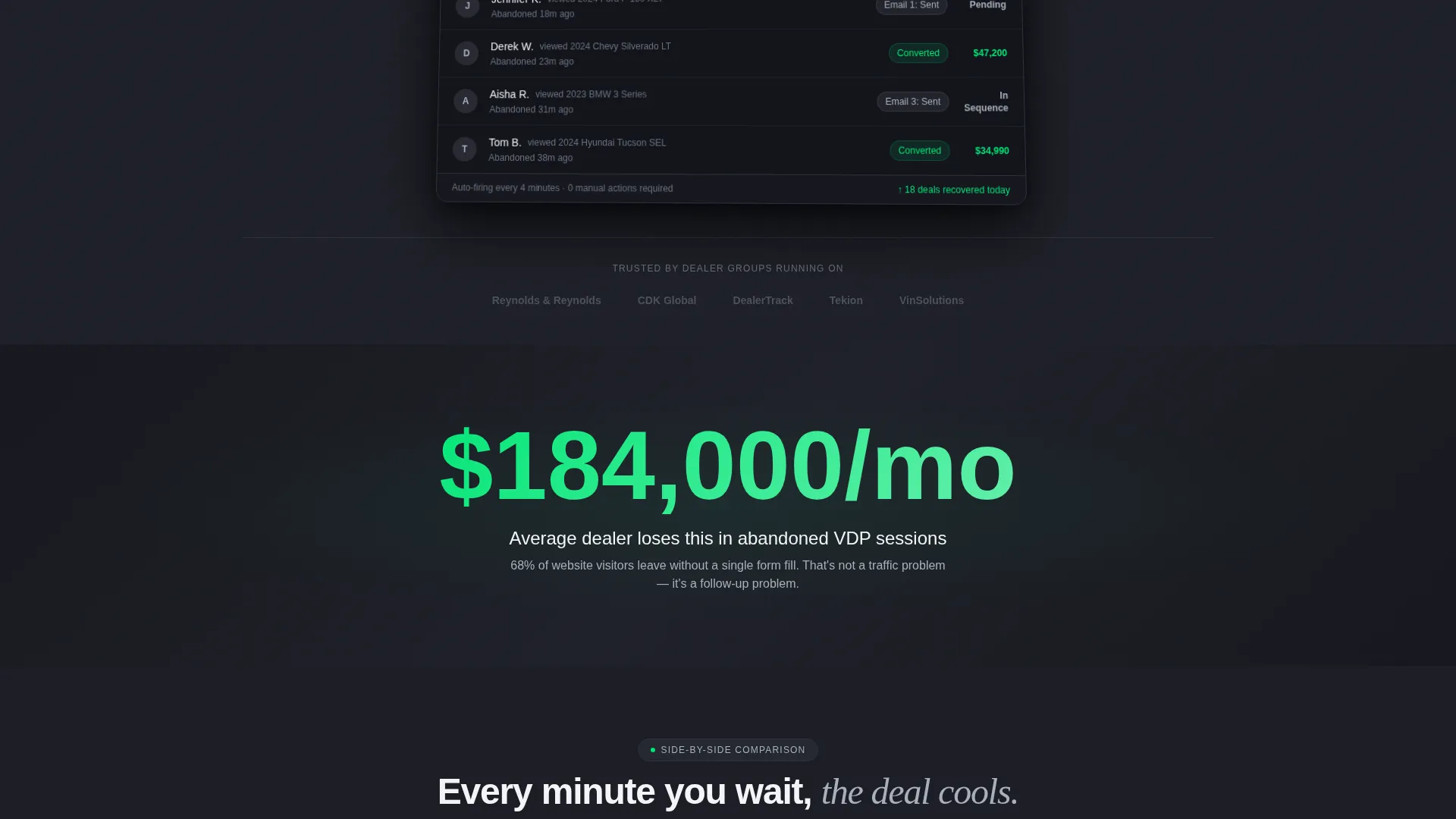
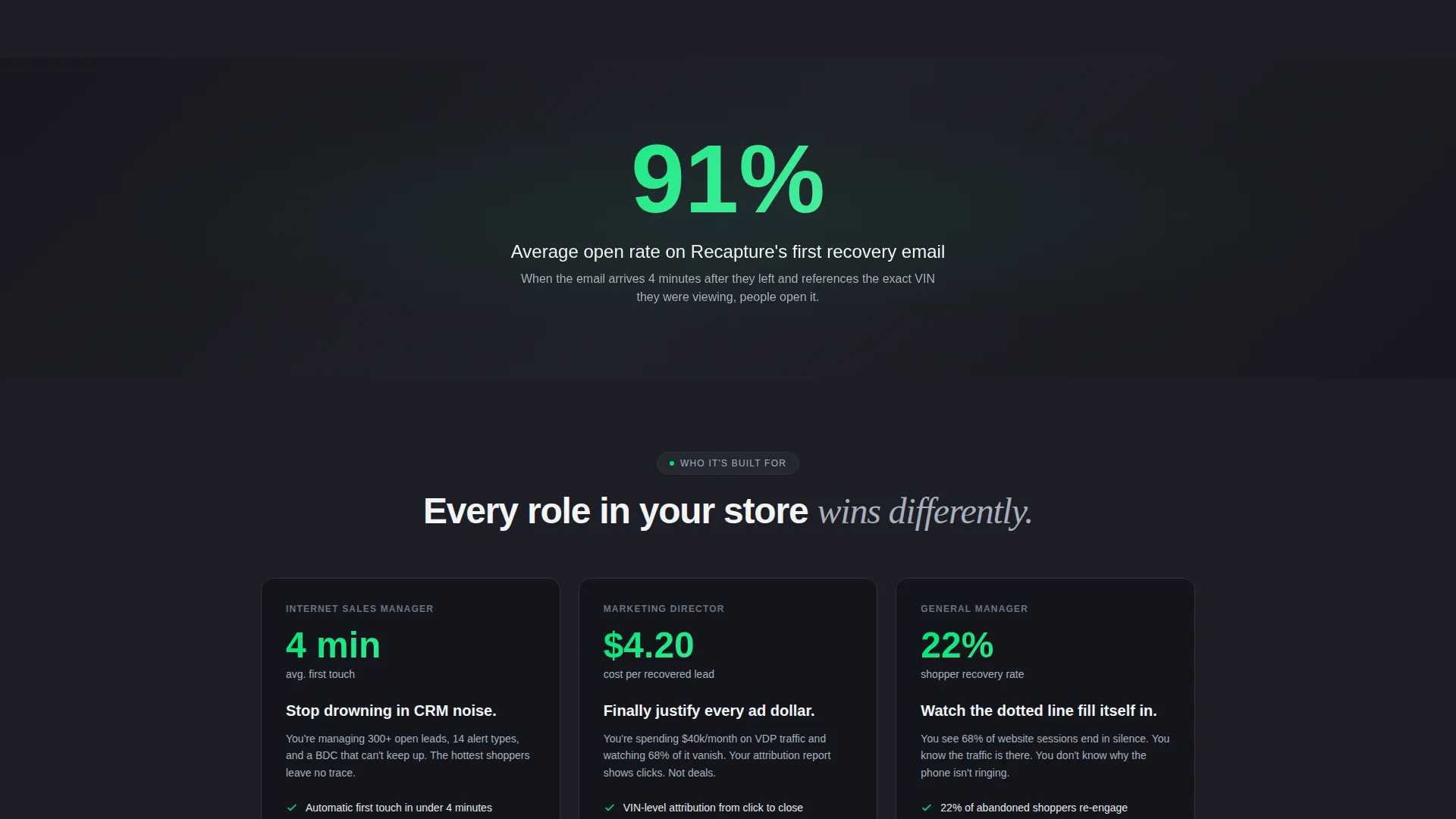
Between table sections, full-width panels display one bold statistic at a time. An example panel reads: "Average dealer loses $184,000 per month in abandoned sessions." These interrupt the scroll rhythm with urgency, alternating between evidence and gut-punch impact.
Two-Step Revenue Estimate Form
The primary call to action opens a two-step form. Step one collects monthly unique vehicle detail page views and current follow-up method via a dropdown. Step two asks for rooftop count and dealer management system provider. The output is a personalized revenue-recovery projection delivered instantly on-screen.
Sticky Call-to-Action Bar
After the first scroll, a sticky bar keeps the primary call to action visible at all times. The secondary call to action, "Book a 15-Min Demo," appears only after the revenue estimate renders. This conditional reveal prevents premature friction and keeps intent high.
Page sections overview
| Section | Purpose |
|---|---|
| Hero Screenshot Header | Establishes platform credibility with a live-feed user interface capture and the headline stat "Recover 22% of abandoned vehicle shoppers" |
| Headline Stat Panel | Opens the page with a single 72-pixel metric to anchor the value proposition immediately |
| Comparison Table Top | Hosts the primary call to action "Run My Dealership's Recovery Estimate" above the first table row |
| Three-Way Data Table | Side-by-side rows comparing Recapture, generic CRM follow-up, and no automation across key metrics |
| Breaker Stat Panels | Full-width urgency panels placed between table sections to reinforce cost of inaction |
| Two-Step Estimate Form | Interactive form collecting VDP volume and dealership data to generate a live revenue projection |
| Demo call to action Section | Conditional "Book a 15-Min Demo" call to action rendered only after the estimate output appears |
| Sticky call to action Bar | Persistent bar repeating the primary estimate call to action after the first scroll |
Design & branding system
The visual identity follows a Startup Velocity theme built on a Monochrome Steel color system. The palette is deliberately restrained, creating a late-night dealership atmosphere where data glows against dark surfaces.
- Core palette: gunmetal dark (#1C1E26) for backgrounds, brushed chrome (#A8B0BC) for supporting text and table borders, and panel white (#F4F5F7) for readable content areas
- Electric green (#00E676) is used exclusively for positive metric callouts and call-to-action elements, making recovery wins and next steps unmistakable at a glance
- Typography pairs a large-impact scale (72-pixel hero stat) with clean body type to keep the scroll rhythm between data and narrative feeling deliberate and controlled
Mobile & speed optimization
The template is structured for a smooth reading and interaction experience across screen sizes. Every layout decision supports clarity on smaller viewports without breaking the comparison table's visual logic.
- The comparison table is designed to remain scannable on mobile, with column priorities set so the most critical data stays visible without horizontal scrolling
- Animated stat entry uses viewport-based triggers, so animations only fire when the relevant section is actually on screen rather than on page load
- The sticky call-to-action bar reflows cleanly on smaller screens, keeping the estimate prompt accessible throughout the scroll
How this template helps you convert
The conversion architecture is built so that value lands before the visitor is ever asked to commit. Every scroll delivers evidence, and the estimate form creates a personalized reason to act.
- The hero stat and live-feed screenshot establish credibility within the first viewport, reducing the time a visitor spends deciding whether to keep reading.
- The animated comparison table rows quantify the cost of the alternatives, making inaction feel more expensive than trying the platform.
- The two-step estimate form delivers a concrete, personalized revenue projection on-screen, giving the visitor a business case before a sales conversation begins.
Other information about this template
This template is a strong fit for any software-as-a-service platform targeting franchise and independent auto dealerships that currently rely on manual business development center follow-up or basic CRM drip sequences. It is specifically designed for the auto dealer abandoned cart email category, where the window between a shopper leaving a vehicle detail page and going cold is measured in minutes, not hours.
- The template's comparison table structure can be adapted for other automotive retail technology products that need to contrast automation against manual processes
- The conditional secondary call-to-action logic, where "Book a 15-Min Demo" only appears after the estimate renders, is a deliberate friction-reduction pattern suited to high-consideration B2B software sales
- The Startup Velocity theme and Monochrome Steel color system make this template visually distinctive in a category that often defaults to generic blue-and-white SaaS layouts
Theme
Startup Velocity
Creative direction
Stats-First Impact
Color system
Monochrome Steel
Style
Comparison Table
Direction
Comparison/Versus
Page Sections
Live-feed Recovery Dashboard Hero
Animated Scroll-triggered Stats
Three-way Comparison Table
Single-stat Breaker Panels
Two-step Revenue Estimate Form
Conditional Sticky Call to Action Bar
Related questions
Who is this landing page template designed for?
What makes the three-way comparison table effective?
Does the revenue estimate form require a backend integration?
Can the color palette and stat figures be customized?
Is this template a good fit for multi-rooftop dealer groups?



