Physical Education Education Education Website Template
Recess is a sidebar companion landing page template built for a physical education homework help service. It uses a persona-selector header, real-time topic filtering, and a warm Slate & Sky color system to guide middle-schoolers, high-schoolers, and parents from a blank worksheet to a clear, step-by-step answer guide, all within a single focused page.
by Rocket studio
Quick summary
Recess is a single-page homework help template designed for a physical education theory service. It opens with a three-card persona selector, narrows by topic through illustrated tiles, and delivers free sample answers before asking for an email address. The sidebar companion updates in real time throughout the scroll, so every visitor feels like the page was built for their exact problem.
Who this template is for
This template is made for educators, tutors, and independent service creators who want to help students work through physical education theory assignments online. It suits anyone running a homework support resource for school-age learners and the parents who help them.
- Middle-schoolers facing muscle diagrams or fitness-plan worksheets for the first time
- High-schoolers preparing GCSE Physical Education mark schemes and movement analysis essays
- Parents searching for clear explanations so they can support their child at home
What problem this template solves
PE theory homework is surprisingly difficult. Students face topics like agonist muscles, training principles, and sport rule essays without a clear starting point. Parents feel just as stuck. Most online resources either go too deep into sports science or stay too shallow to be useful.
- No clear entry point for different year groups or ability levels
- Generic answers that do not match the student's actual worksheet question
- Value-gating that asks for an email before proving the service can help
What you get with this template
This template delivers a fully structured sidebar companion landing page ready to represent a physical education homework help service. Every section is designed with a specific role, from persona selection at the top to ungated topic browsing at the bottom.
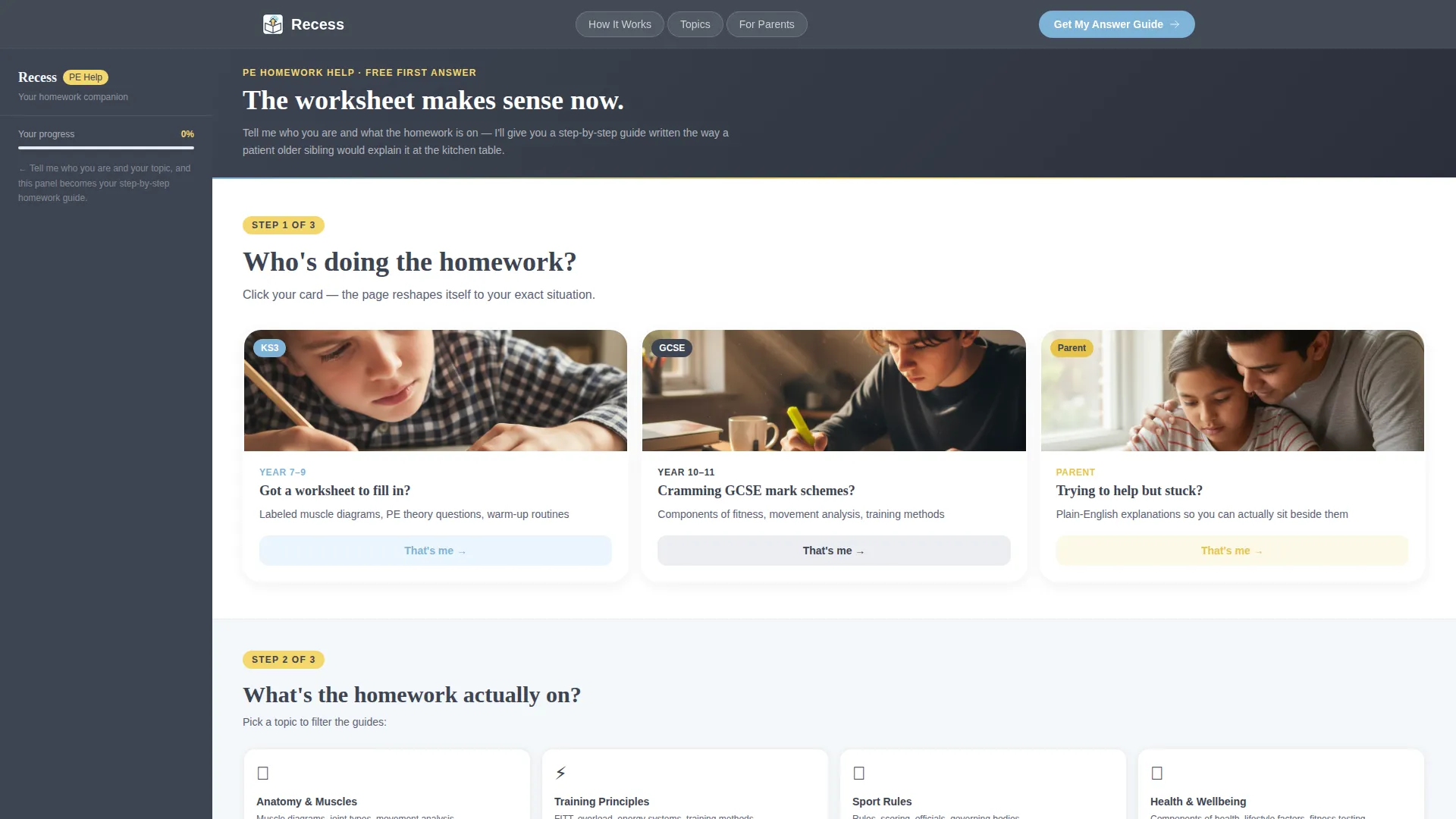
- A persona selector header with three illustrated scenario cards
- An interactive topic-filter section with anatomy, training principles, sport rules, and health and wellbeing tiles
- A sidebar companion rail that updates its checklist, examples, and resource links based on the visitor's chosen persona and topic
Feature list
This template packages several distinct interactive and visual components into one cohesive page. Each feature connects to a specific moment in the visitor's journey from confusion to clarity.
Three-Card Persona Selector Header
Three illustrated cards sit side by side at the top of the page. Each card shows a recognizable homework scene and asks one simple question. A single click collapses the other two cards and slides the chosen persona into the persistent sidebar, reshaping the language and examples throughout the rest of the page.
Real-Time Topic Filter Tiles
After the persona locks in, illustrated topic tiles appear asking what subject the homework covers. Choosing a tile filters the main content column in real time. The sidebar companion updates with a topic-specific step-by-step checklist while the main area reveals a sample answered question, a downloadable worksheet guide, and a short explainer video thumbnail.
Persistent Sidebar Companion Rail
The sidebar companion stays visible throughout the entire scroll. It holds the active persona indicator, the topic checklist, and a permanent "Browse All Topics" link for visitors who prefer to explore freely. The sidebar is styled in warm charcoal slate so it anchors the layout without competing with the main content.
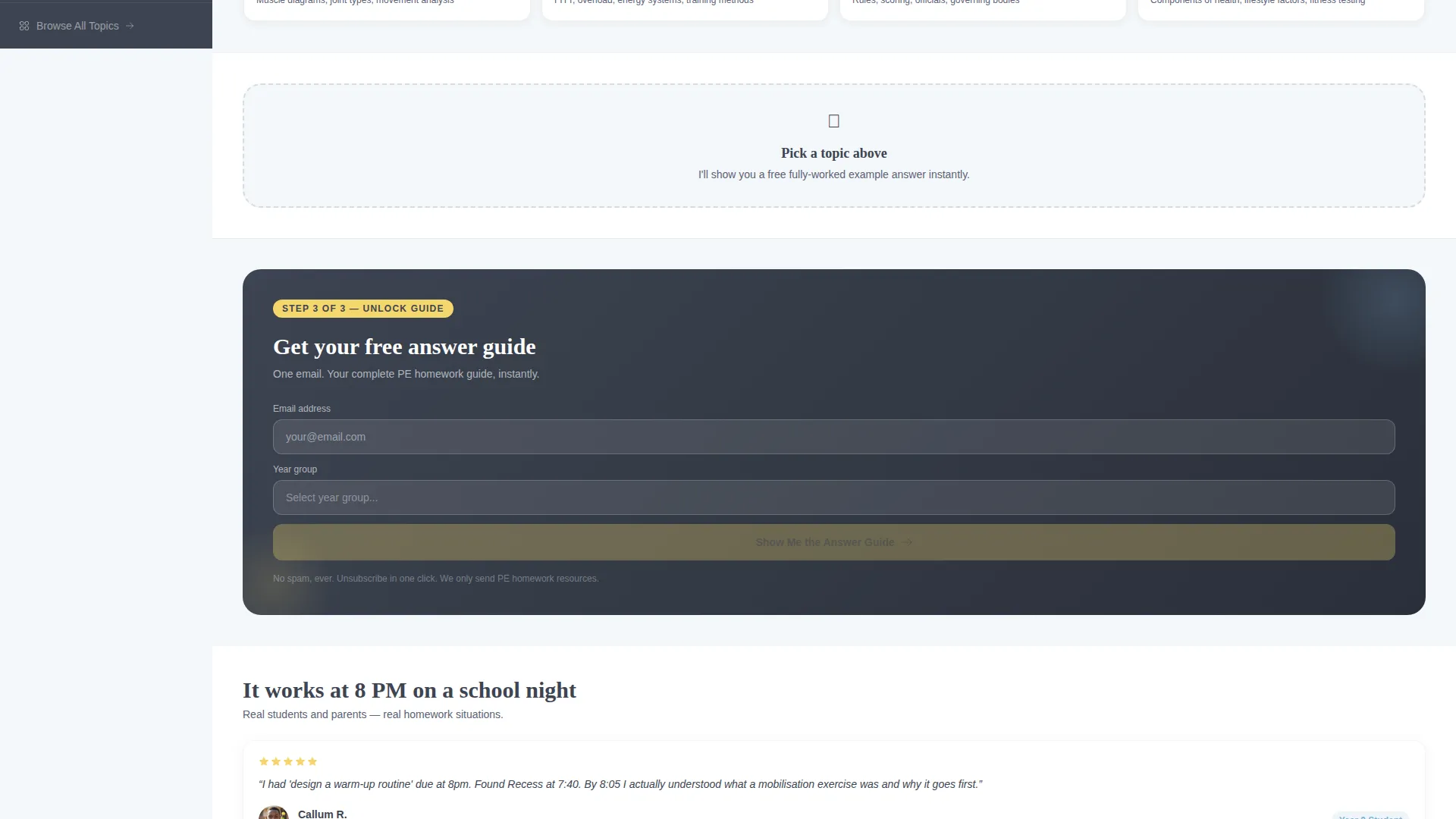
Inline Email Gate After Free Sample
The primary call to action appears only after the visitor has already seen one free sample answer. A lightweight inline form asks for an email address and year group, then unlocks the full answer guide. This placement means the service has already proven its value before asking for anything.
Chalk-Yellow Quiz and Progress Indicators
Interactive quiz elements and progress markers use a chalk-yellow highlight color throughout the page. This makes micro-decision moments visually distinct from static content and gives the page a light, encouraging feel without looking like a classroom test.
Family First Visual Theme
The entire template uses a warm, kitchen-table aesthetic. Cloud white content backgrounds, soft sky blue action buttons, and slate body text combine to feel approachable and clean. The design avoids clinical or institutional styling so students and parents feel comfortable engaging from the first scroll.
Page sections overview
| Section | Purpose |
|---|---|
| Persona Selector Header | Identifies the visitor type and personalizes the experience |
| Topic Filter Tiles | Narrows content to the student's specific homework subject |
| Free Sample Answer | Demonstrates value before any email is requested |
| Inline Email Gate | Captures email and year group after trust is established |
| Sidebar Companion Rail | Provides persistent checklists, examples, and topic links |
| Browse All Topics | Offers ungated topic exploration for open-ended visitors |
Design & branding system
The Slate & Sky color system gives Recess its distinctive kitchen-table warmth. The palette is chosen to feel encouraging without looking like a branded education platform.
- Warm charcoal slate (#3D4451) for body text and the persistent sidebar rail, soft sky blue (#7FB3D8) for primary action buttons and links, and cloud white (#F4F7FA) across all content background areas
- Chalk-yellow (#F5D76E) reserved for interactive quiz elements and progress indicators to signal participation without feeling like a formal assessment
- The overall visual style evokes a school exercise book open on a bright kitchen counter, approachable and clean rather than clinical
Mobile & speed optimization
The sidebar companion layout is structured to adapt across screen sizes. Smaller screens can stack the sidebar below the main content column without losing the companion context or checklist flow.
- The persona selector cards are designed for tap interaction, making the one-click collapse behavior natural on touch devices
- Topic filter tiles use an illustrated grid that reorganizes cleanly at narrower widths
- The inline email gate form is minimal by design, keeping the mobile interaction short and frictionless
How this template helps you convert
The conversion architecture in this template is built around earning trust first and asking second. Every structural choice reflects that sequence.
- The persona selector immediately signals that the page understands different users, so the visitor feels seen before they have read a single line of content.
- The free sample answer section removes doubt by showing real, useful output before the email gate ever appears, making the "Show Me the Answer Guide" call to action feel like a natural next step rather than a barrier.
Other information about this template
This template sits in the Education and Training category under the Physical Education Education subcategory. It is built specifically around the physical education homework help service niche, where the audience ranges from younger students to exam-focused teenagers and their parents.
- Template style: Sidebar Companion landing page with a Quiz and Personalize creative direction
- Theme: Family First, designed to feel supportive and human rather than institutional
- The "Browse All Topics" secondary path in the sidebar ensures that visitors who do not convert on the primary call to action still have a clear, ungated route to explore the service
- The page is suited for service creators who want to lead with content generosity and convert through demonstrated helpfulness

Theme
Family First
Creative direction
Quiz & Personalize
Color system
Slate & Sky
Style
Sidebar Companion
Direction
Content/Resource
Page Sections
Three-card Persona Selector Header
Real-time Topic Filter Tiles
Persistent Sidebar Companion Rail
Inline Email Gate After Free Sample
Chalk-yellow Interactive Indicators
Family First Visual Theme
Related questions
Who is this template designed for?
What makes the sidebar companion different from a standard layout?
Does the page show content before asking for an email address?
How does the persona selector work visually?
Can the topic tiles be changed to reflect different subjects?



