Expert Compliance Landing Page Template
Comply is a single-page compliance landing page template built for real estate brokerage platforms. It opens with animated metric counters, leads visitors into an interactive risk calculator, and flows into a detailed feature comparison table. The Monochrome Steel design system projects the authority and precision that compliance-focused buyers expect before they trust any software.
by Rocket studio
Quick summary
Comply is a high-converting landing page template designed for real estate compliance management platforms. It opens with an animated stats wall, moves into an interactive risk calculator, and anchors around a feature-by-feature comparison table. The Monochrome Steel palette and Directory and Discovery theme reinforce trust at every scroll point.
Who this template is for
This template is built for teams selling compliance automation to real estate professionals. It speaks directly to the people managing the most regulatory pressure in the industry.
- Managing brokers overseeing large agent rosters across multiple states
- Compliance officers at national franchises who respond to audit notices regularly
- Operations directors at independent brokerages still running compliance tracking on manual spreadsheets
What problem this template solves
Real estate compliance software is a hard sell because buyers are skeptical and already overwhelmed. A generic product page does not move them. They need to feel the cost of inaction before they engage with a demo offer.
- Visitors cannot quickly see how the platform compares to their current manual process or competing tools
- The stakes of missed filings are invisible until someone quantifies them in dollars and risk scores
- Busy compliance officers will not fill out a long demo form unless they have already felt the urgency
What you get with this template
This template delivers a complete, structured landing page ready to adapt for a real estate compliance platform. Every section has a defined job and a clear place in the conversion journey.
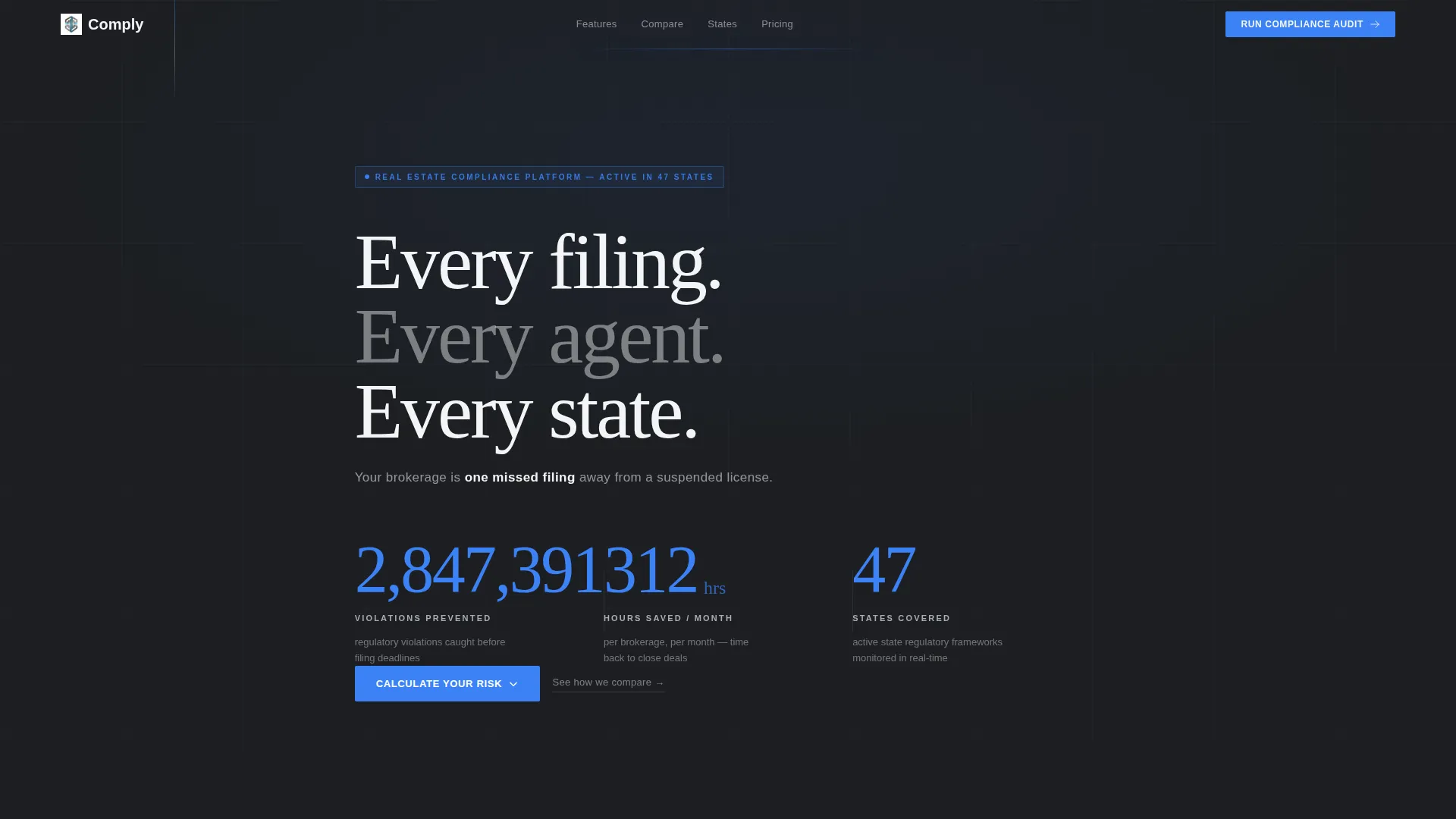
- An animated metrics header with three large odometer-style counters built on a charcoal background
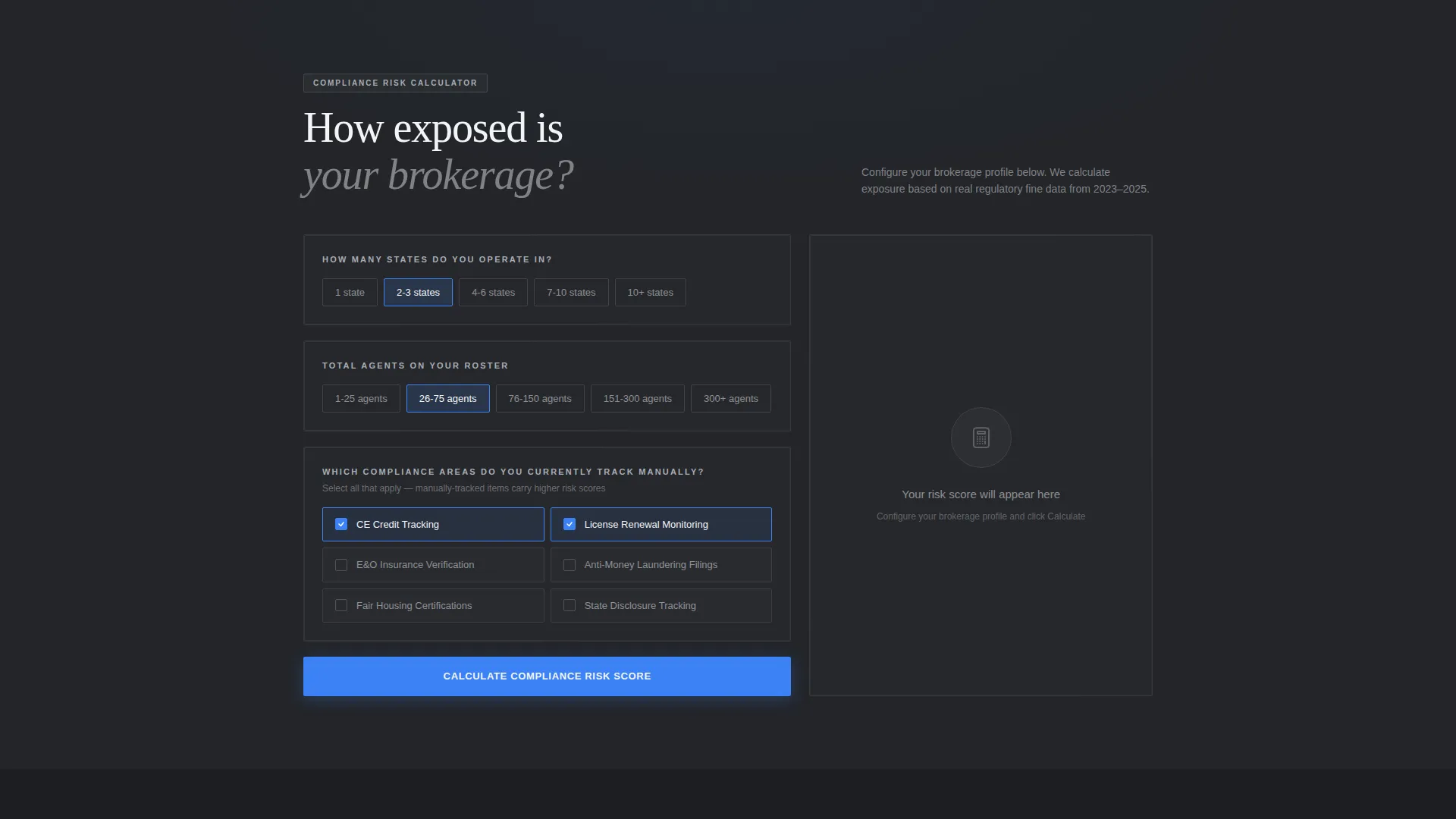
- An interactive compliance risk calculator that outputs a risk score and estimated fine exposure based on visitor inputs
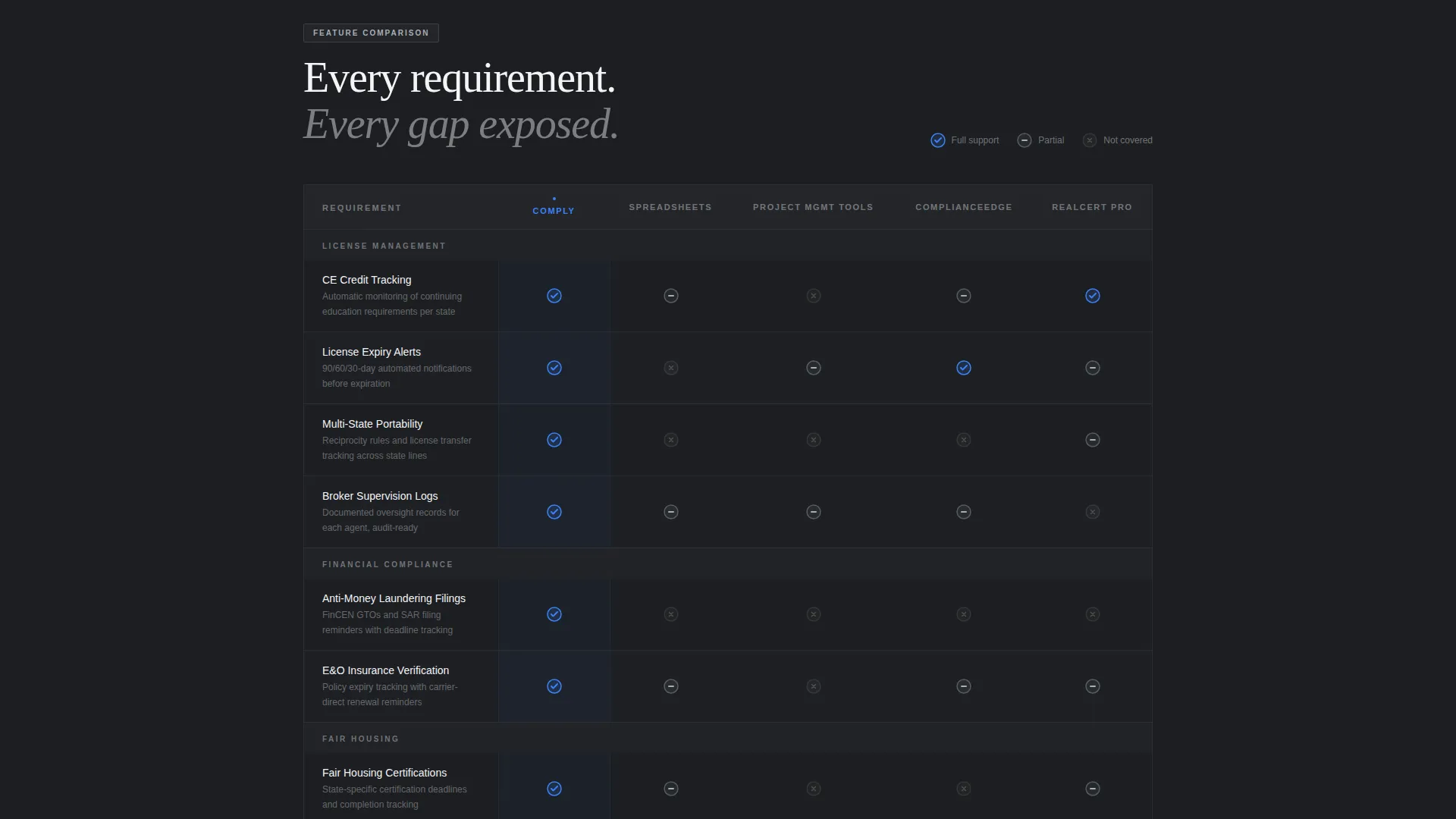
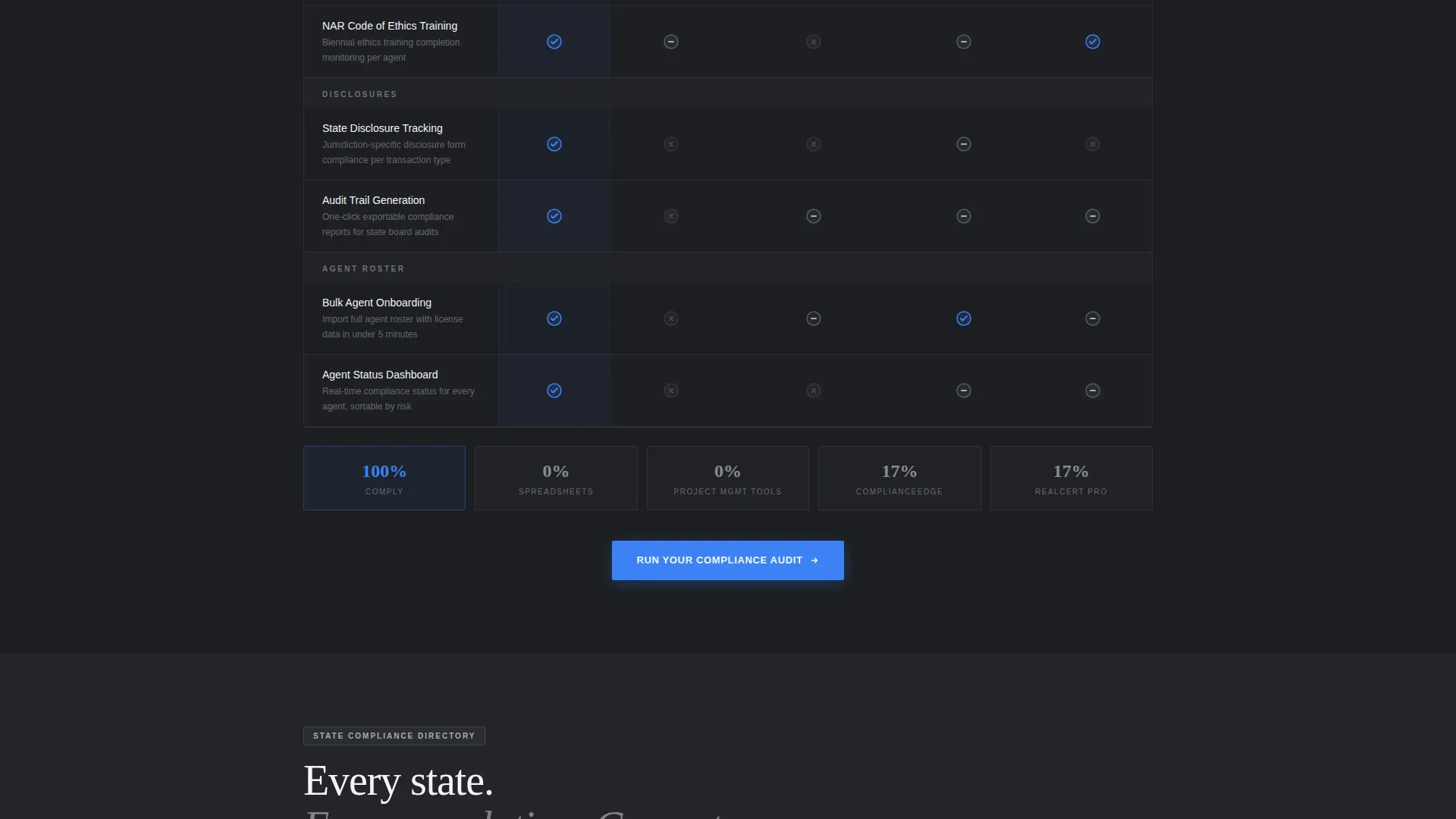
- A detailed comparison table covering specific regulatory requirements row by row against manual tracking and competing tools
- A state-specific compliance directory section where visitors can explore the regulations monitored per state
- Two conversion paths: a primary audit request form and a secondary gated PDF checklist download
Feature list
This template includes purpose-built components that match the decision-making process of a compliance buyer. Each one carries a specific function.
Animated Stats Wall Header
Three large counters animate on page load using a mechanical odometer roll effect. The signal blue digits snap into place against the structural charcoal background, presenting violations prevented, hours saved per brokerage per month, and states with active regulatory coverage.
Interactive Compliance Risk Calculator
Visitors select their state count, enter agent headcount, and toggle which compliance categories they currently track manually. The tool instantly renders a personalized risk score and a dollar figure representing potential fine exposure, creating urgency before any sales copy appears.
Feature-by-Feature Comparison Table
A detailed table pits the platform against manual tracking, generic project management tools, and named competitors. Each row represents a specific regulatory requirement such as continuing education tracking, errors and omissions verification, license portability, and audit trail generation. Checkmarks, partial-support indicators, and empty cells make the gaps immediately visible.
State-Specific Compliance Directory
Below the comparison table, visitors can click any state to view the exact regulations the platform monitors along with last-amended dates. This reinforces the Directory and Discovery theme and gives compliance officers the specific detail they need to evaluate coverage.
Dual Conversion Path Structure
The primary call to action is "Run Your Compliance Audit," appearing first at the calculator output and repeating as a sticky bar after the comparison table. A secondary path offers a downloadable state-by-state compliance checklist PDF gated behind email and role title, capturing visitors who are researching but not yet ready to demo.
Urgency-Driven Audit Request Form
The primary form captures brokerage name, state footprint via multi-select, agent count range, and a qualifying question about the last compliance review. Answer options include "Never" and "I'm not sure," which do the urgency-building work without requiring additional copy.
Page sections overview
| Section | Purpose |
|---|---|
| Stats metrics wall | Opens with animated counters showing violations prevented, hours saved, and states covered |
| Risk calculator tool | Lets visitors calculate their personal compliance risk score and estimated fine exposure |
| Comparison table | Compares the platform row by row against manual processes and competing tools |
| State directory grid | Allows visitors to explore state-specific regulations and last-amended dates |
| Audit request form | Primary conversion form capturing brokerage details and last compliance review date |
| Gated checklist offer | Secondary lead capture for a downloadable state-by-state compliance checklist PDF |
Design & branding system
The template uses a Monochrome Steel color system that communicates precision and institutional authority. Every color decision has a functional role, not a decorative one.
- Structural charcoal (#2B2D31) for primary backgrounds, signal blue (#3B82F6) reserved exclusively for interactive elements, active states, and compliance-status indicators
- Brushed aluminum (#A8ADB5) for secondary surfaces and table borders, cold white (#F4F5F7) for cell fills and open breathing room
- No warm tones, no decorative gradients; the palette reads like the inside of a bank vault, quiet and unambiguous
Mobile & speed optimization
The layout is designed to remain fully readable and navigable at smaller screen sizes. The comparison table and calculator components are structured to adapt without losing clarity.
- The sticky call-to-action bar stays accessible as visitors scroll through the comparison table on any device
- Section spacing and typographic hierarchy are calibrated so skimming remains effective on narrower screens
How this template helps you convert
The Comparison and Versus conversion strategy runs through every section. Each part of the page moves the visitor one step closer to requesting the audit.
- The risk calculator front-loads personal stakes, so by the time the visitor reaches the comparison table they already have a dollar figure attached to their current process
- The comparison table makes competitor and manual-tracking gaps visible row by row, reducing the need for the visitor to research elsewhere
- The dual conversion path captures both high-intent visitors ready for a demo and research-stage visitors who will respond to the gated checklist, widening the top of the funnel without diluting the primary offer
Other information about this template
This template is categorized under Technology and Real Estate Software, designed specifically for the real estate compliance management niche. It suits platforms serving brokerages of any size, from independent offices to national franchise networks.
- The Directory and Discovery theme makes it well-suited for platforms that need to demonstrate regulatory breadth across many states
- The Calculator and Tool First creative direction means the interactive component loads before any sales narrative, which aligns with how compliance professionals evaluate software
- The template style is a Comparison Table layout, making it a strong fit for positioning against established tools in the real estate compliance software space
- The header concept follows a Stats and Metrics wall approach, which anchors credibility immediately for buyers who need to justify a software purchase to stakeholders
Theme
Directory & Discovery
Creative direction
Calculator/Tool First
Color system
Monochrome Steel
Style
Comparison Table
Direction
Comparison/Versus
Page Sections
Animated Odometer Stats Wall
Interactive Compliance Risk Calculator
Row-by-row Comparison Table
State-specific Compliance Directory
Dual Conversion Path Design
Urgency-driven Audit Request Form
Related questions
Can I adapt this template for a compliance platform serving a single state?
Is the comparison table editable so I can name specific competitors?
What is the purpose of the last compliance review question in the form?
Who is the gated PDF checklist designed to capture?
Can this template be used for a platform focused on one compliance category like fair housing?



