Specialist Government Software Privacy Policy & Terms Website Template
The Mandate Federal Compliance Command Center landing page template is built for government learning management teams that need to prove compliance on demand. It combines a Feature Tab Switcher hero, three brutal comparison tables, stat callout blocks, and a sticky lead-gen form into one dense, decision-driving page, styled for federal operations centers, not corporate boardrooms.
by Rocket studio
Quick Summary
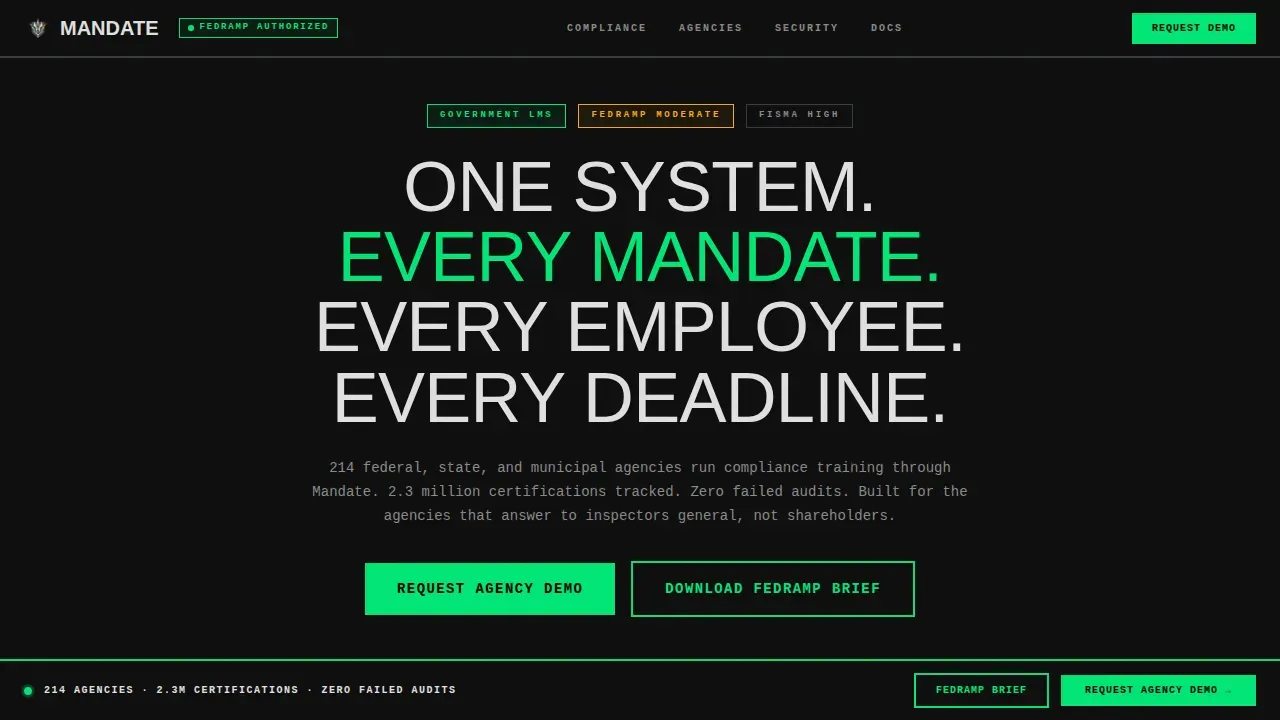
Mandate is a single-page government learning management system (LMS) template built around authority, data, and speed. It routes compliance training, security clearances, and policy certifications through one command center website. Every section is structured to move federal and government agency buyers toward a demo request or a downloadable FedRAMP brief, without friction and without softening the ask.
Who This Template Is For
This template was developed for the people whose jobs depend on compliance records holding up under federal audit. They manage large employee populations across multiple locations, and they answer to oversight bodies, not product teams. The site is built around their daily reality.
- Federal training directors managing tens of thousands of employees across departments and time zones
- State agency Chief Information Officers migrating off legacy SCORM-era content management system platforms
- Municipal HR leads required to document and verify employee training completion by firm deadlines
What Problem This Template Solves
Most government agencies still track compliance obligations using legacy tools that were never designed for the scale or scrutiny that federal law demands. When an auditor asks for records, scattered data across outdated systems creates real risks. This template gives procurement officers, training directors, and compliance leads a structured page to evaluate a modern solution before they commit budget.
- No single view exists across all compliance, security clearances, and policy certifications for the full agency
- Legacy platforms cannot support the review process that federal regulations and executive order mandates now require
- Manual spreadsheet tracking lacks the data integrity and auditability that government operations depend on
What You Get With This Template
This template delivers a fully structured, single-page website with every section pre-built and ready for your content. It was developed with federal agency audiences in mind, where every user on the page is evaluating a mission-critical procurement. The layout prioritizes density and authority over decoration.
- A Feature Tab Switcher hero section with three interactive panel views: COMPLIANCE ENGINE, LEARNER TRACKING, and AUDIT REPORTING
- Three head-to-head comparison tables benchmarking the platform against legacy LMS tools, commercial SaaS, and manual tracking
- A sticky lead-gen bar with a demo request form and a secondary gated downloadable files path for the FedRAMP compliance brief
Feature List
This section covers the core interactive and structural capabilities built into the template. Each component serves a specific role in guiding the user toward a confident procurement decision.
Three-Panel Feature Tab Switcher
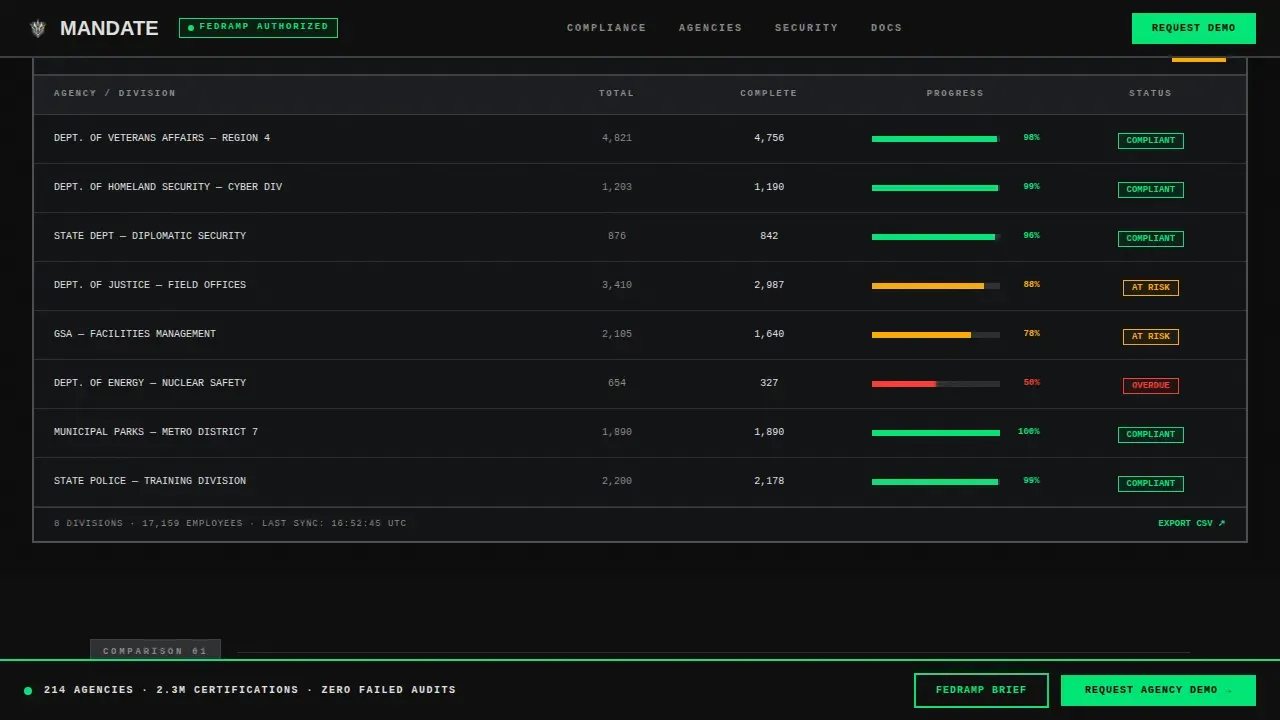
The hero section includes three brutalist tabs, COMPLIANCE ENGINE, LEARNER TRACKING, and AUDIT REPORTING. Each tab loads a dense interface screenshot on click with no animation easing. The transitions are hard and instant, communicating that this is a working system, not a product brochure. The headline above the tabs reads "One system. Every mandate. Every employee. Every deadline."
Head-to-Head Comparison Tables
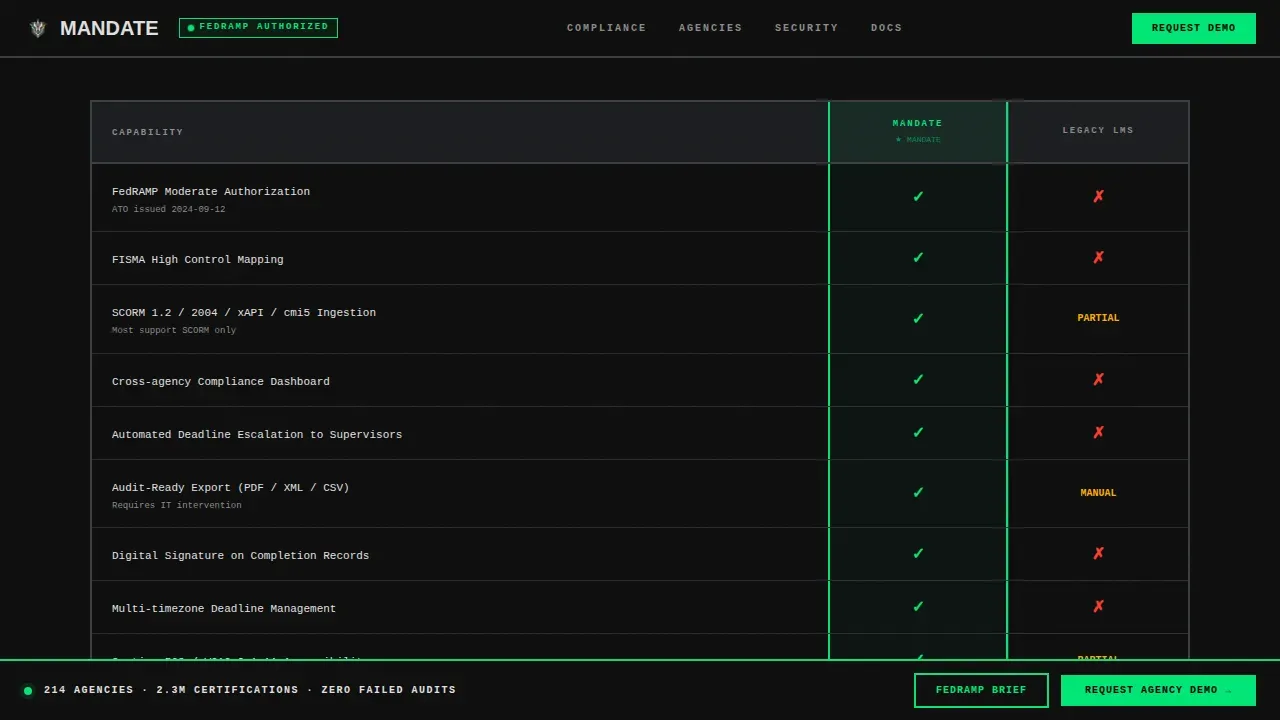
Three separate comparison tables let users review platform capabilities against real alternatives. The tables cover Mandate versus legacy LMS platforms, Mandate versus commercial SaaS tools without federal security authorization, and Mandate versus spreadsheet-based tracking. Each row uses clear green checkmarks and red X marks, no partial categories, no hedging.
Stat Callout Blocks
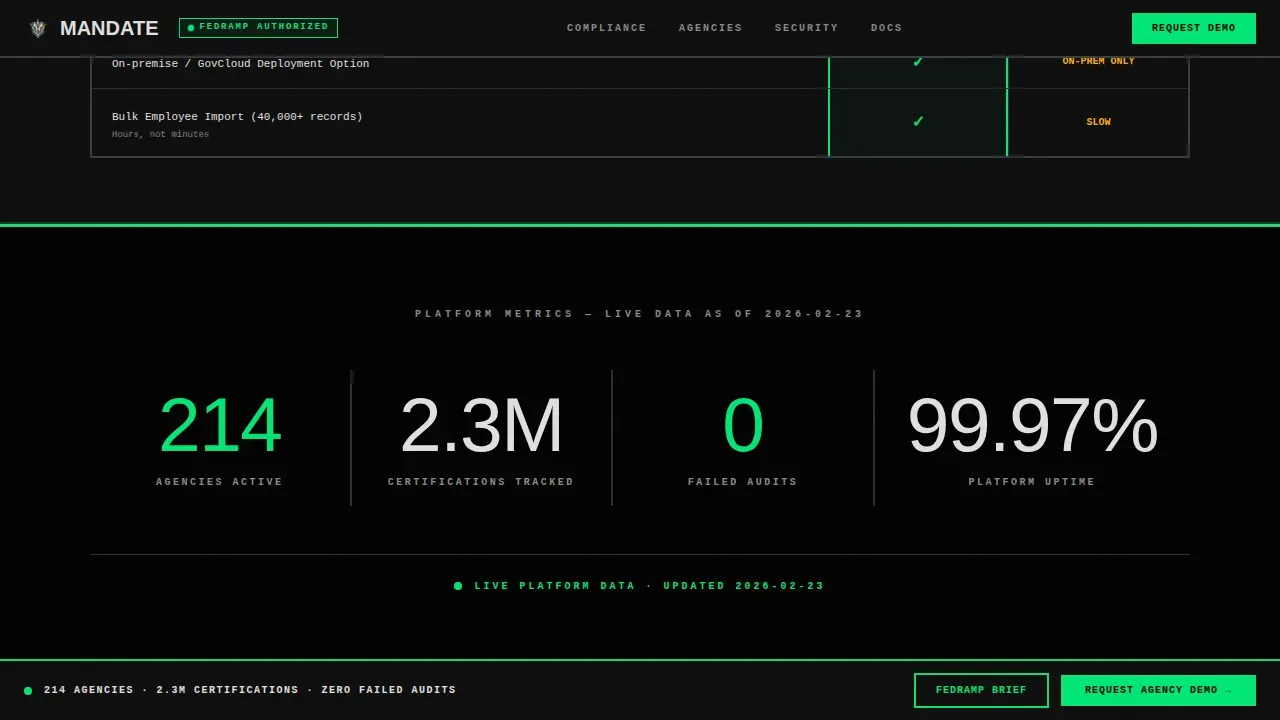
Between the comparison tables, full-width callout blocks interrupt the grid with oversized monospaced data: "214 agencies. 2.3M certifications tracked. Zero failed audits." These blocks establish trust by grounding the page in concrete mission outcomes rather than marketing language. They help users identify proof before reaching the form.
Sticky Lead Generation Bar
After the first comparison table, a sticky bottom bar anchors to the viewport. It surfaces the primary call to action, "Request Agency Demo", along with a structured form that collects agency name, employee count, current LMS platform, and a required authority-to-evaluate checkbox. This keeps conversion accessible throughout the entire scroll.
Gated FedRAMP Brief Download
A secondary conversion path captures email only and gates a downloadable PDF that documents the platform's authorization status. This supports procurement officers and compliance leads who need to establish vendor credibility before the first sales conversation. The modal triggers separately from the demo form.
Monospaced Data and Slab Typography System
Table data and stat callouts render in IBM Plex Mono for precision and legibility at scale. Section headers use oversized slab serif. Body text uses DM Sans. Together, these tools establish a clear visual hierarchy where every element earns its presence by communicating status, not style.
Page Sections Overview
| Section | Purpose |
|---|---|
| Hero Tab Switcher | Introduces three core platform views with instant-switching panels and a mission-level headline |
| Comparison Table One | Benchmarks against legacy SCORM-era LMS platforms row by row |
| Stat Callout Block | Delivers raw agency and certification metrics in oversized monospaced type |
| Comparison Table Two | Benchmarks against commercial SaaS tools lacking federal security authorization |
| Comparison Table Three | Benchmarks against manual spreadsheet tracking and surfaces the lead gen form |
| Sticky Demo Bar | Anchors the primary demo request form and FedRAMP brief download path to the bottom of the viewport |
| Footer Section | Minimal developer-style footer with essential links and organization details |
Design & Branding System
The visual identity follows a Bold Brutalist theme that respects no decoration and wastes no space. The Carbon Fiber color system is matte, utilitarian, and status-driven. Every color communicates a specific operational meaning, this is not an aesthetic choice, it is a system of guidance built for high-stakes decision makers. The site feels like a federal operations center, not a marketing website.
- Structural black (#0D0D0D) backgrounds, gunmetal panel gray (#2B2D30) for surface areas, and #E0E0E0 for all readable text and table content
- Status-green (#00E676) marks active states, compliance indicators, and the primary call to action; warning amber (#FFAB00) flags deadlines and action items
- Thick visible borders, zero ornamentation, and oversized typography establish authority and eliminate distraction across every page section
Mobile & Speed Optimization
This template is built desktop-first, reflecting the federal workstation environment where most users will access the site. The layout is also responsive for tablet use, ensuring compliance leads and procurement officers can review the page during briefings or off-site reviews. Interactive components are scoped to client rendering only where necessary.
- GSAP handles tab switching with hard cuts and scroll reveals; static sections use server-rendered components for fast initial load
- Grain texture and interactivity layers, including the tab switcher, sticky bar, and email gate modal, are client-scoped to keep non-interactive sections lightweight
- The comparison table layout remains structured and readable on tablet viewports without collapsing critical data columns
How This Template Helps You Convert
This page is engineered for procurement decisions, not passive browsing. The entire scroll sequence is designed to build confidence, remove objections, and direct the user toward a specific action. Every section serves the conversion process in a deliberate manner.
- The comparison tables do the analytical heavy lifting early in the page, helping users identify gaps in their current tools and establish the case for switching before they reach the form
- The stat callout blocks and zero-failed-audits claim establish trust through concrete data at the exact moment a user might hesitate, keeping progress toward the call to action steady
- The sticky demo bar and secondary FedRAMP brief download create two conversion paths so procurement officers and training directors can both find an entry point that matches their current stage in the evaluation process
Other Information About This Template
This template was developed specifically for the government learning management niche, where the stakes of non-compliance extend beyond business risk into legal and regulatory territory. The following context may help teams determine whether this template fits their implementation goals.
- The page is built to support the information security and information technology requirements common to federal government procurement contexts, where security requirements and data integrity are evaluated before vendor engagement
- Government websites and federal websites operate under specific laws and regulations, including guidance aligned with executive order mandates and national institute standards for protected data and secure digital services
- Procurement teams can use the gated FedRAMP brief download to establish vendor authorization status before any sales interaction, reducing risks early in the process
- The template is accessible to non-technical teams; content editors can update table rows, stat callouts, and form fields without deep web development knowledge
- Organizations managing responsibilities across multiple departments or agency divisions will find the comparison table structure useful for internal stakeholder review sessions
- The mandate federal compliance command center landing page template is listed in the Government Software subcategory and is designed to help gov-facing vendors establish credibility with federal agencies and government agencies quickly
- Analytics tracking and search visibility configurations are outside the scope of this template and should be implemented separately based on your organization's infrastructure and procedures
Theme
Bold Brutalist
Creative direction
Feature Matrix
Color system
Carbon Fiber
Direction
Lead Generation
Page Sections
Three-panel Feature Tab Switcher Hero
Head-to-head Comparison Tables
Stat Callout Blocks
Sticky Lead Generation Bar
Gated Fedramp Brief Download
Monospaced and Slab Typography System
Related questions
Who is the primary audience for this template?
Can non-technical staff update the comparison tables and form fields?
Does the template include the FedRAMP compliance brief PDF?
Is this template designed for a government agency's own public website?
Can the comparison table rows be customized for specific compliance frameworks?



