Relay — Telecom Landing Page Template
Signal is a hub-and-spoke landing page template built for telecommunications online stores. It serves IT managers, network engineers, and small internet service providers shopping for routers, mesh systems, SIM kits, and enterprise switches. A Data Command visual theme, sticky anchor navigation, product comparison grids, and a freemium sign-up flow work together to turn serious buyers into confident customers.
by Rocket studio
Quick summary
Signal is a single-page telecommunications storefront template built around a hub-and-spoke anchor navigation layout. It combines a terminal-styled header, a feature matrix product grid, and a freemium conversion flow. The design speaks directly to technical buyers who want precise hardware specifications, not marketing fluff.
Who this template is for
This template is purpose-built for store owners selling networking hardware and connectivity products online. The audience already thinks in specs, SKUs, and stack diagrams.
- IT managers refreshing branch-office infrastructure and comparing hardware late at night
- Freelance network engineers quoting routers, mesh nodes, and enterprise switches for client builds
- Small internet service provider founders sourcing affordable gear to expand rural coverage
What problem this template solves
Most e-commerce templates are designed for lifestyle products. They rely on photography, soft gradients, and emotional storytelling. That approach fails technical buyers who need port counts, throughput figures, and protocol support before they will add anything to a cart.
- Generic store templates lack the spec-dense comparison layout that networking professionals expect
- Scattered product pages slow down buyers who need to cross-reference multiple SKUs quickly
- Vague calls to action push price-sensitive buyers away before they see the value on offer
What you get with this template
The template delivers a complete single-page storefront structured around a sticky anchor navigation bar. Each major product category is a spoke reachable directly from the nav, so buyers jump to exactly what they need.
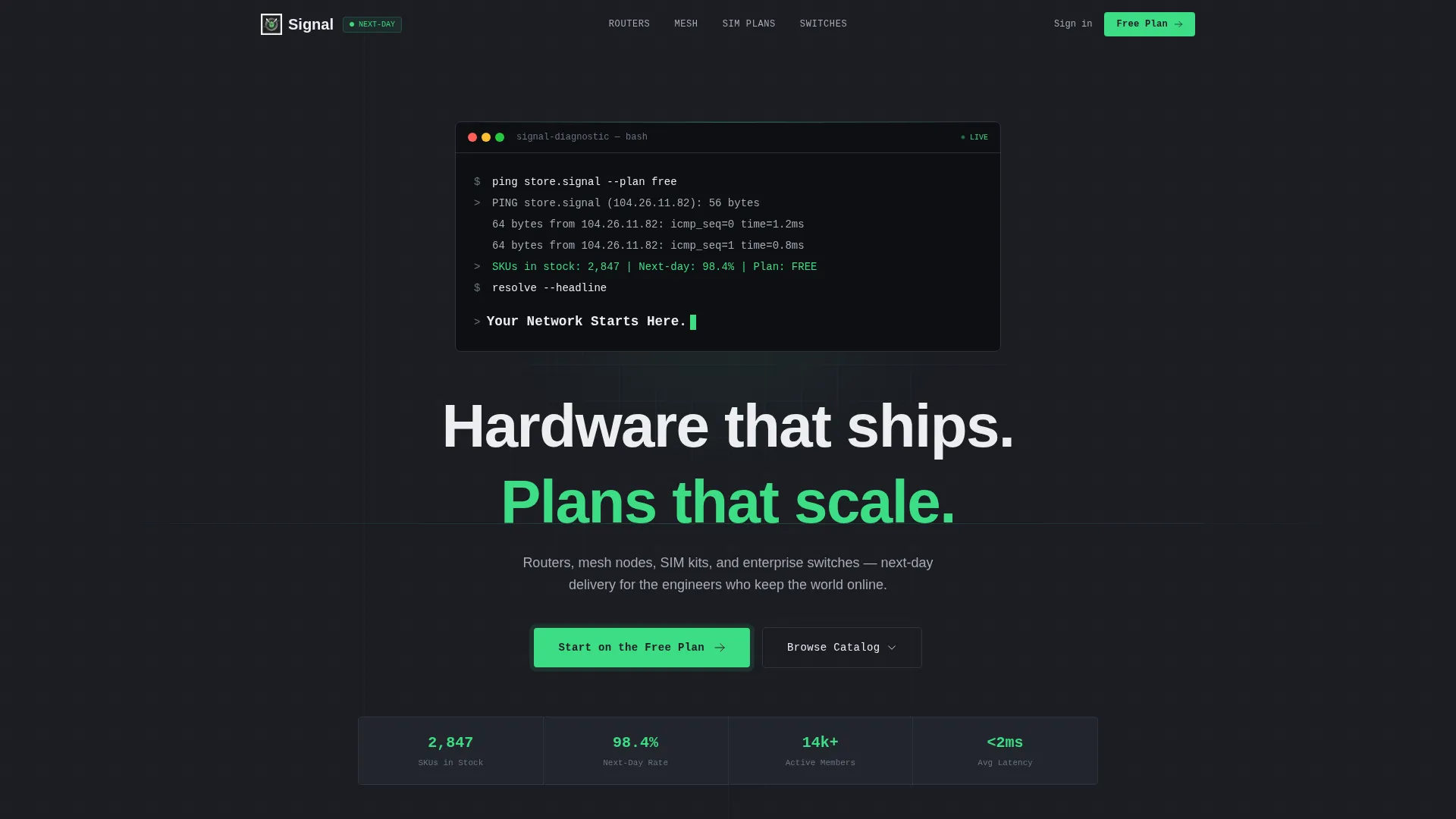
- A terminal-animated header with a live-styled code snippet and a primary call to action
- Hub-and-spoke anchor navigation with four product spokes covering Routers, Mesh Systems, SIM Plans, and Enterprise Switches
- A freemium sign-up flow that collects email, company size, and primary use case before revealing member pricing and stock alerts
Feature list
This section describes the core built-in capabilities that make Signal work as a telecommunications storefront.
Terminal-Animated Header Block
The header renders as a dark terminal window on a carbon background. Monospaced type animates line by line, simulating a live network diagnostic. The sequence resolves into the headline "Your Network Starts Here" with a blinking cursor, setting the tone for the technical audience immediately.
Sticky Anchor Navigation Bar
A persistent navigation bar stays fixed at the top of the viewport as the visitor scrolls. Each spoke link highlights in terminal green when its section is active. The floating "Start on the Free Plan" button docks alongside the nav on scroll, keeping the primary call to action visible at all times.
Product Comparison Grid
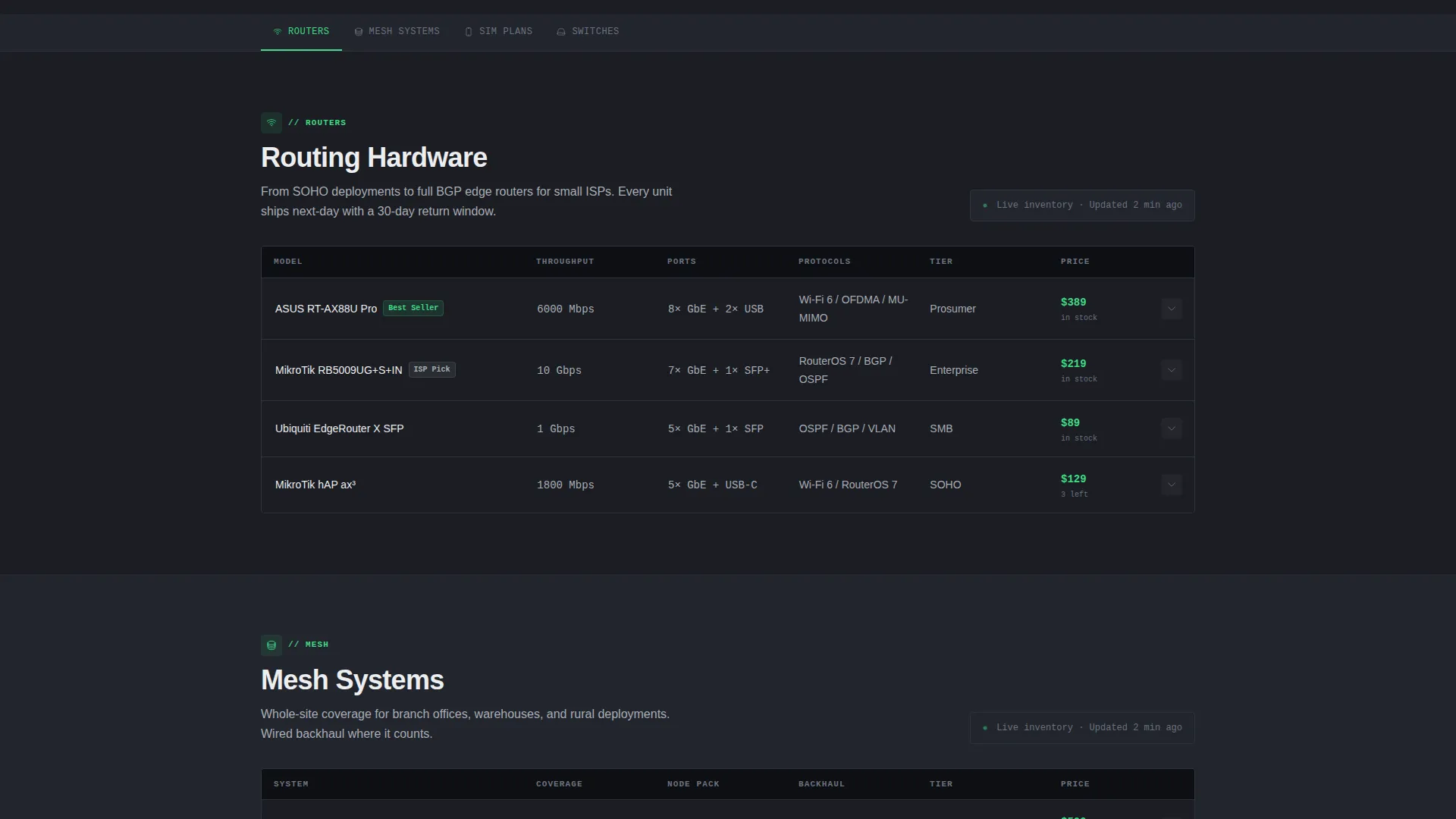
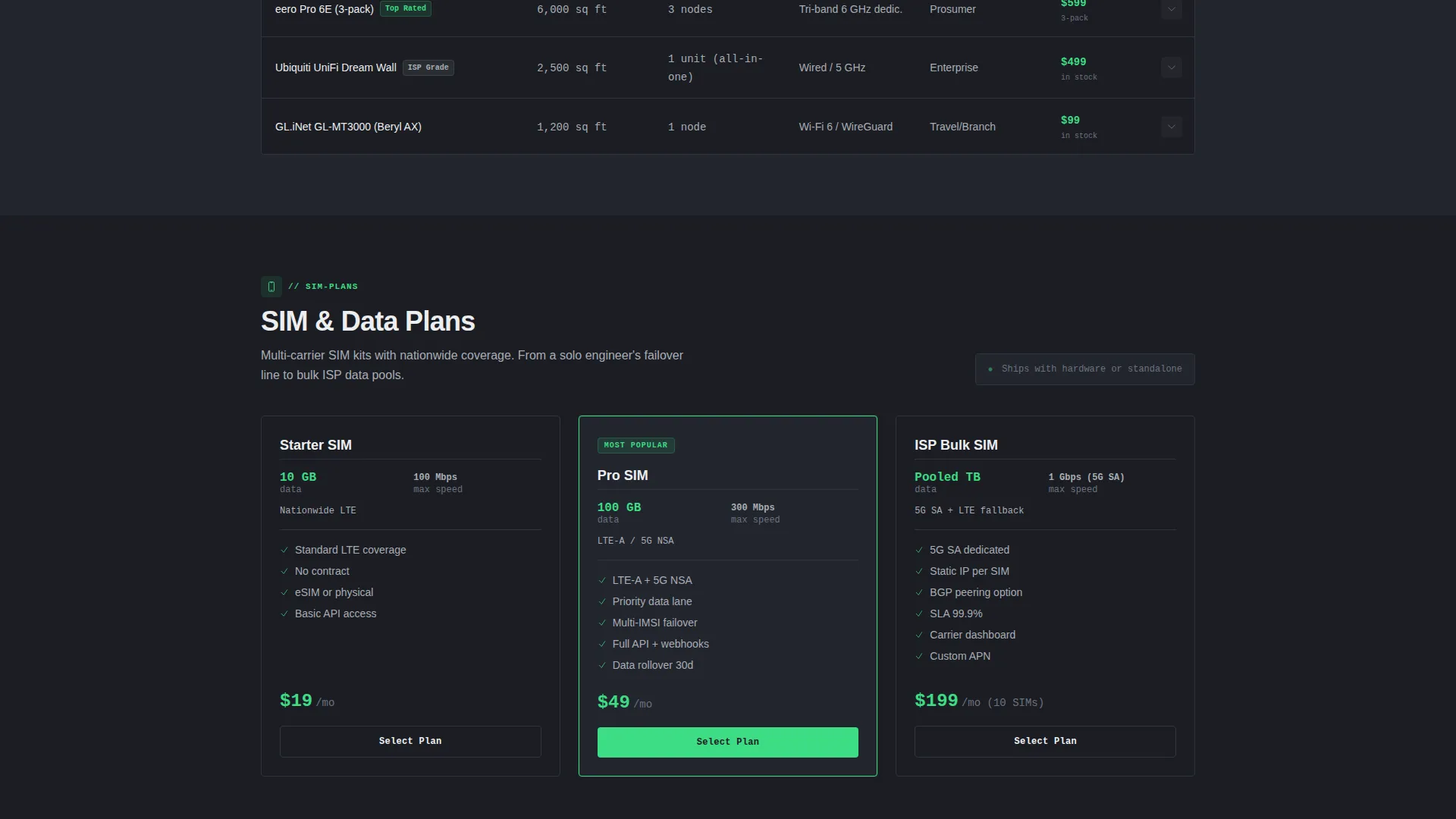
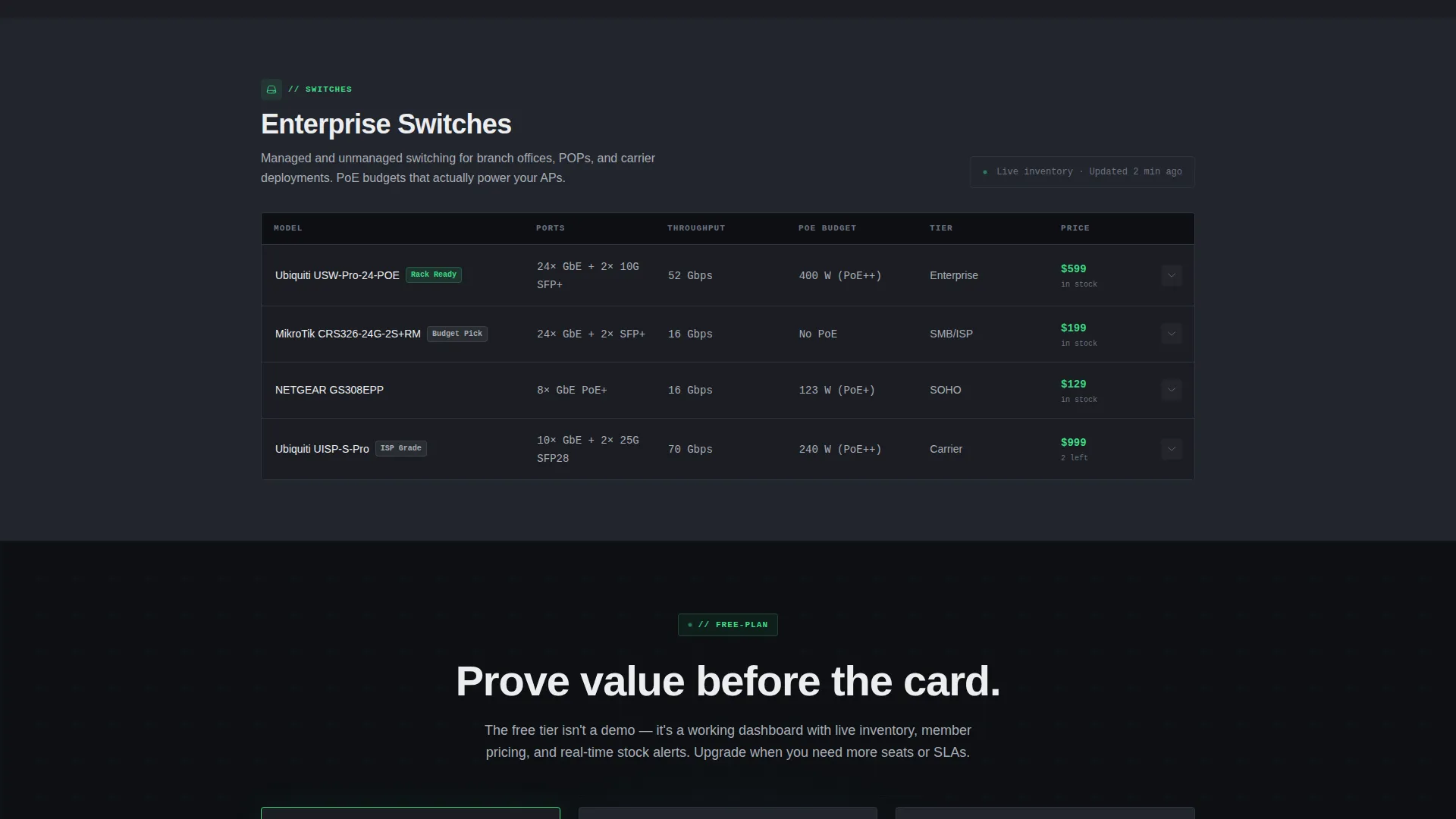
Inside every product spoke, items are displayed in a structured comparison grid. Columns cover model name, throughput, port count, protocol support, and price tier. This layout lets buyers evaluate multiple products side by side without leaving the page.
Expandable Micro-Detail Drawer
Hovering over a product row expands a detail drawer beneath it. The drawer surfaces compatibility notes and stack diagrams, giving buyers the secondary information they need to confirm a purchase decision without navigating away.
Freemium Sign-Up Flow
Clicking the primary call to action opens a lightweight sign-up form. The form collects email address, company size (solo, team, or internet service provider), and a primary use case dropdown. On completion, the free tier unlocks a curated hardware bundle dashboard, real-time stock alerts, and exclusive member pricing.
Data Command Visual Theme
The entire page follows a Monochrome Steel color system. Matte carbon dominates backgrounds, brushed aluminum carries body text and divider rules, terminal green fires on hover states and price callouts, and signal white reserves itself for headlines and primary calls to action.
Page sections overview
| Section | Purpose |
|---|---|
| Terminal Header Block | Animate the brand intro and present the primary call to action |
| Sticky Anchor Nav | Let buyers jump directly to any product category spoke |
| Routers Spoke | Compare router models by throughput, ports, and protocol |
| Mesh Systems Spoke | Display mesh node options with expandable detail drawers |
| SIM Plans Spoke | Show SIM kit tiers with pricing and compatibility notes |
| Enterprise Switches Spoke | List switch models by port count and protocol support |
| Freemium Sign-Up Panel | Collect sign-up details and activate the free dashboard tier |
Design & branding system
The visual identity follows a Data Command theme grounded in a Monochrome Steel color system. Every color decision serves a functional role, not a decorative one.
- Matte carbon (#1B1D23) fills page backgrounds; brushed aluminum (#A8ADB5) carries body text and section dividers
- Terminal green (#3DDC84) activates on hover states, active anchor links, and price callouts to direct buyer attention
- Signal white (#EDEEF0) is reserved for headlines and primary call-to-action buttons so they cut through the dark layout instantly
Mobile & speed optimization
The hub-and-spoke layout is structured so that the sticky anchor navigation remains functional across viewport sizes. Technical buyers frequently research hardware from mobile devices while on-site at client locations.
- The comparison grid columns are designed to reflow cleanly when horizontal space is reduced
- The freemium sign-up form is minimal by design, keeping the field count low for fast completion on any device
- No stock photography or lifestyle imagery is used anywhere in the template, keeping the visual payload lean
How this template helps you convert
Signal earns trust before it asks for a commitment. The freemium model lets buyers experience genuine value through the free dashboard before any payment is involved.
- The terminal header animation immediately signals credibility to technical buyers, reducing bounce before the product grid is reached
- The comparison grid removes friction from the research phase, so buyers arrive at a decision faster and with more confidence
- The freemium sign-up flow proves value first by unlocking a curated hardware dashboard, real-time stock alerts, and member pricing before asking for a credit card
Other information about this template
Signal is categorized under Technology, specifically within the Telecommunications Digital Presence subcategory. It is designed as a hub-and-spoke anchor navigation landing page for a telecommunications online store niche.
- The template ships with four pre-built product spokes: Routers, Mesh Systems, SIM Plans, and Enterprise Switches
- Next-day shipping is referenced in the storefront concept, making delivery speed a visible trust signal for urgent buyers
- The free tier dashboard includes recommended hardware bundles, real-time stock alerts, and exclusive member pricing as described in the brief
- This template is well-suited for store owners who want a technical, database-style browsing experience rather than a conventional product catalog layout
Theme
Data Command
Creative direction
Feature Matrix
Color system
Monochrome Steel
Style
Hub & Spoke (Anchor Nav)
Direction
Freemium/Trial
Page Sections
Terminal-animated Header Block
Sticky Anchor Navigation with Active States
Product Comparison Grid
Expandable Micro-detail Drawer
Freemium Sign-up Flow
Related questions
Who is the Signal template designed for?
What product categories are included in the template?
How does the freemium conversion flow work?
Can I customize the color system and branding?
Does the template support single-page navigation only?



