Release — Live Tracker Updates Landing Page Template
This changelog live integration release notes tracker landing page template is built for teams who need to monitor every update the moment it ships. It pairs a dark glass dashboard aesthetic with a data-first layout: live stat panels, a side-by-side comparison table, and a filterable changelog feed. Operations managers, no-code builders, and integration architects will find exactly what they need without digging.
by Rocket studio
Quick summary
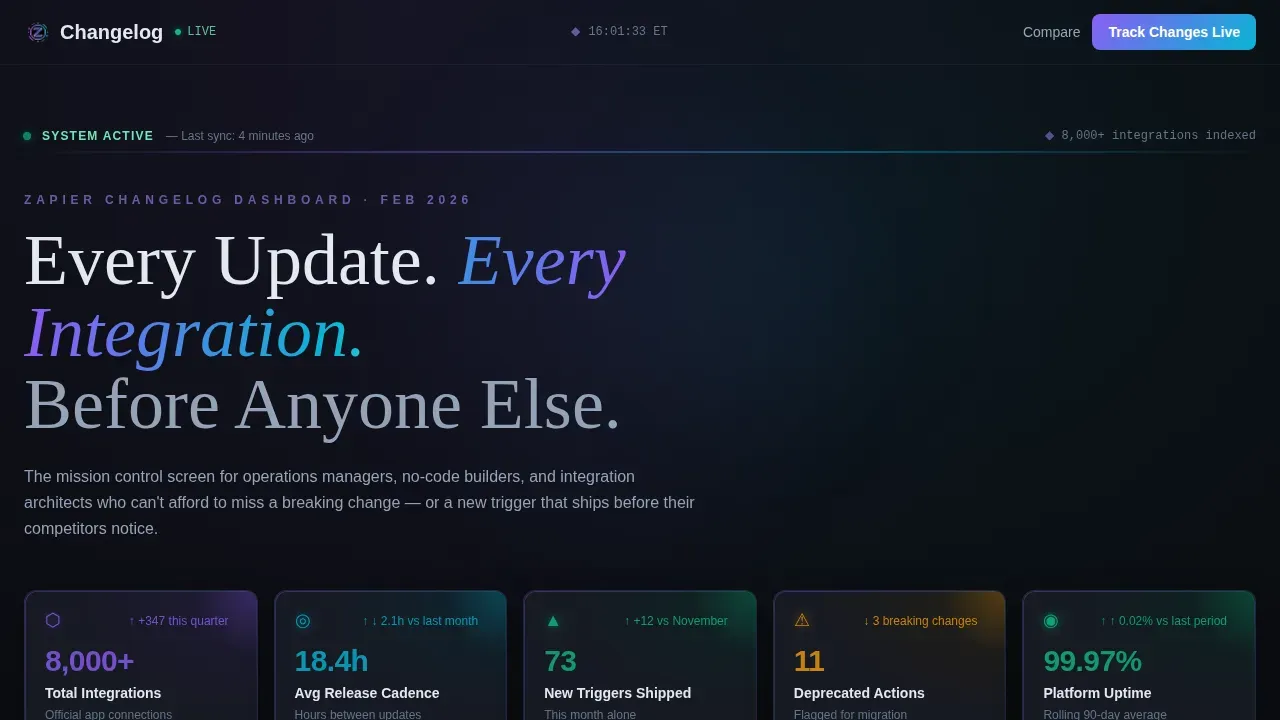
This template delivers a mission-control-style dashboard for tracking integration updates, new triggers, deprecated actions, and breaking changes in real time. It opens with frosted stat panels, drops immediately into a comparative data table, and flows into a chronological changelog feed. Every layout decision is built around proof first and promises never.
Who this template is for
This template is designed for people who live inside automation workflows and cannot afford to miss a change. It serves readers who need precision, speed, and clarity above all else.
- Operations managers who maintain complex Zap stacks and need to catch breaking changes or deprecated actions before they cause failures.
- No-code builders who want to know the exact release date a new trigger or action lands so they can move faster than competitors.
- Integration architects who are evaluating connector depth, webhook reliability, and pricing across competing platforms before committing to a stack.
What problem this template solves
Keeping users informed about software updates is genuinely hard. New features ship constantly. Bug fixes close quietly. API changes break workflows without warning. Most product release notes live scattered across blog posts, community forums, and in-app notifications that are easy to miss.
The result is that operations teams spend hours hunting for key updates instead of acting on them. No-code builders discover new functionality days after it ships. Integration architects make platform decisions with stale data.
- This template consolidates release notes, version history, and comparison data into one always-on dashboard, so nothing slips past the people who depend on it.
- It replaces fragmented product release notes scattered across support resources and blog announcements with a single, filterable, searchable feed.
- It surfaces the information that technical users, casual users, and non-technical users each need, without forcing anyone to parse dense walls of text.
What you get with this template
This template is a fully structured, single-page dashboard layout. You get a complete set of designed sections ready to fill with your release data, comparison figures, and changelog entries.
- Six to eight dark glass stat panels across the header, each displaying a live metric such as total integrations added, average release cadence, new triggers shipped, deprecated actions flagged, uptime percentage, and a head-to-head connector count.
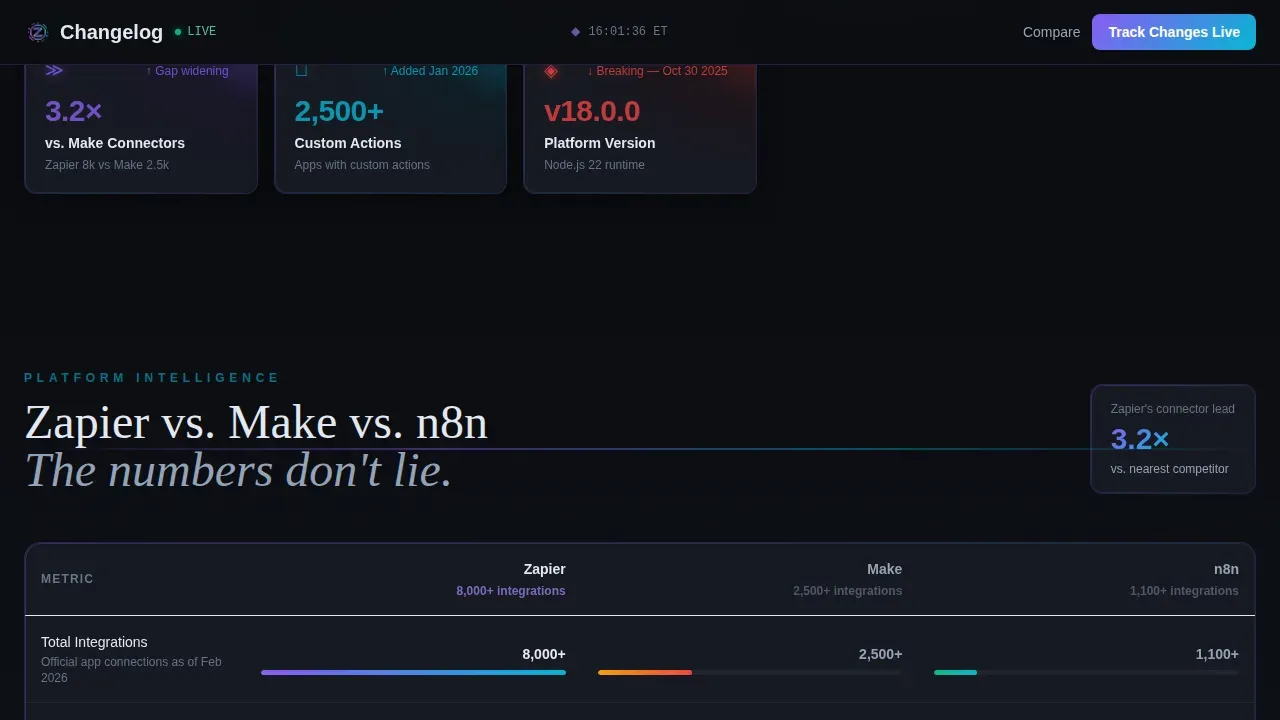
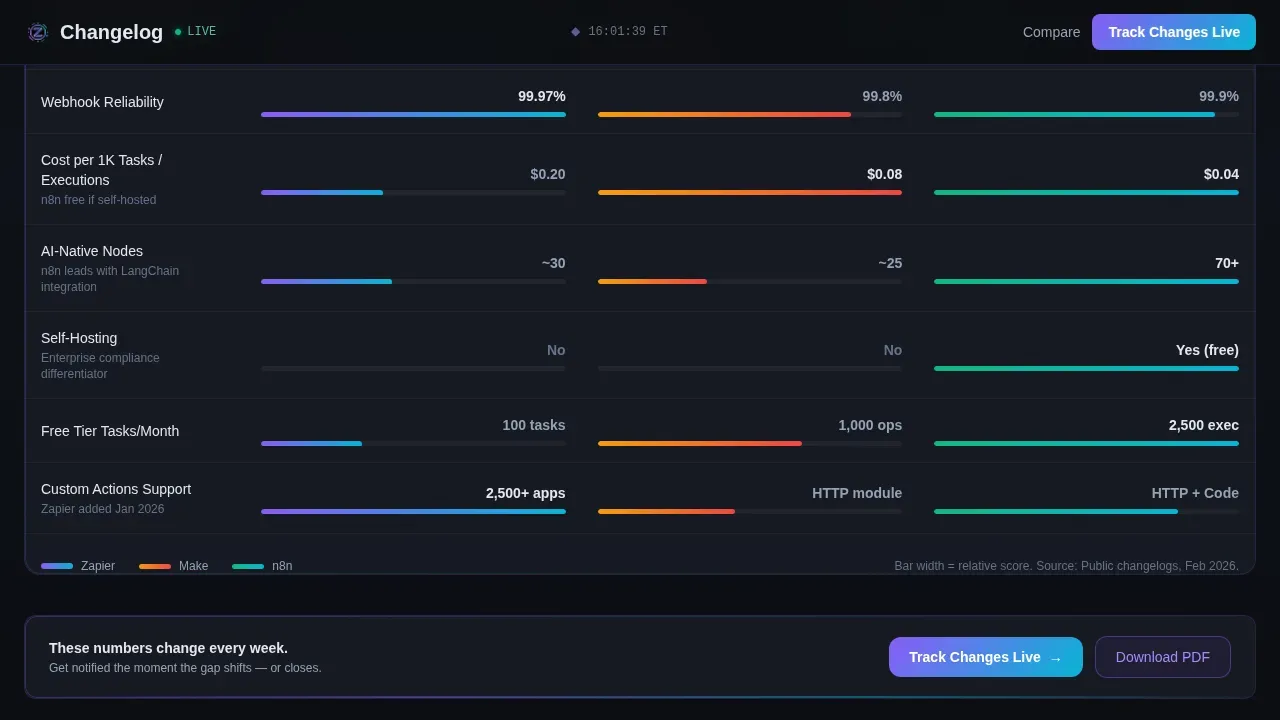
- A side-by-side comparison table covering integration counts, average time-to-new-connector, webhook reliability scores, and pricing per task across three volume tiers, with iridescent highlight bars sized proportionally to the data.
- A chronological changelog feed filterable by app category, update type, and date range, where each entry is a glass card carrying a version number tag, severity badge, and a plain-English summary of the change.
Feature list
This template is built around a small number of high-impact components that work together to make complex release information immediately scannable.
Dark Glass Stat Panel Grid
Six to eight frosted, translucent cards float on a void-black canvas at the top of the page. Each panel displays a single live metric. The panels catch a faint iridescent edge-light that makes data feel active rather than static. There is no hero image and no illustration. The data itself is the visual, and it grabs attention the moment the page loads.
Comparative Data Table with Iridescent Bars
The comparison section presents release details side by side across multiple platforms, covering integration counts, connector speed, webhook reliability, and per-task pricing at three volume tiers. Each row includes a proportional iridescent highlight bar so visitors can see the gap visually before reading a single number. This is one of the key elements that makes the page persuasive without requiring a single sales claim.
Filterable Changelog Feed
The changelog feed sits below the comparison table and displays product release notes in reverse chronological order. Users can filter by app category, update type, and date range. Each entry carries a version number, a severity badge, and a brief summary written in plain language. The layout groups changes by type, such as Added, Fixed, Improved, Deprecated, and Security, following changelog best practices for scannability.
Pinned call to action and Email Capture Form
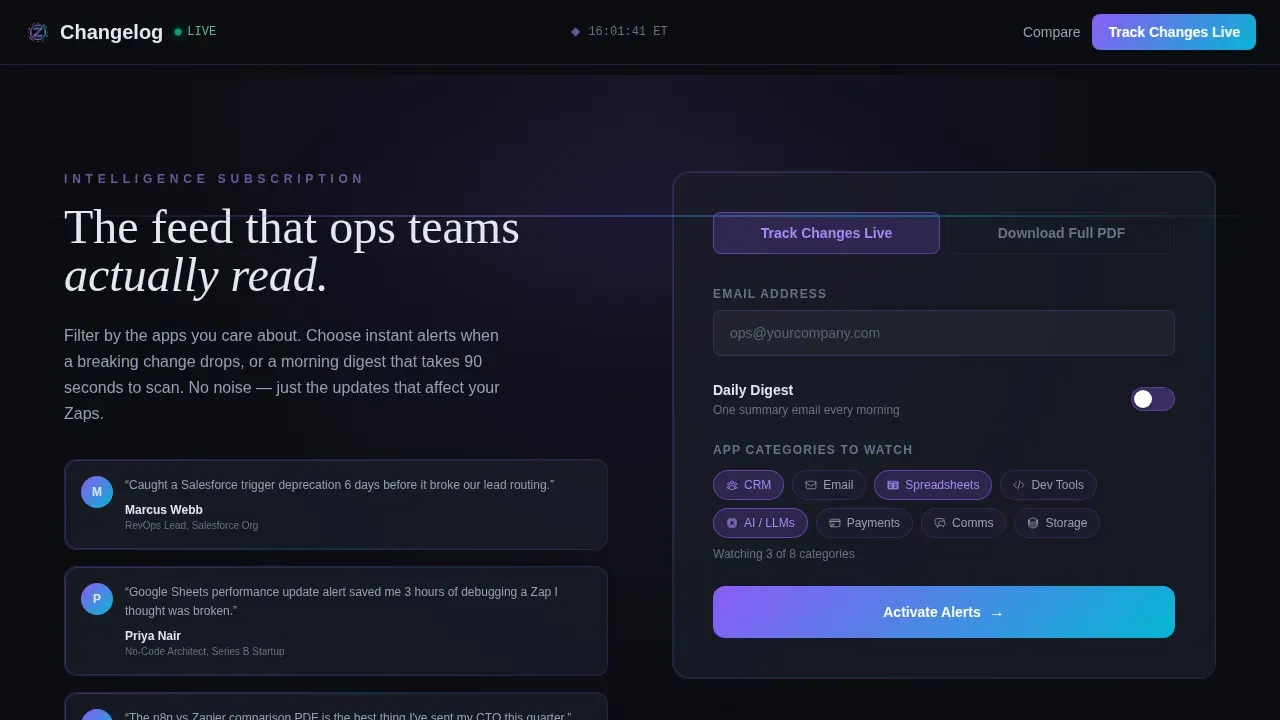
The primary call to action, "Track Changes Live," is pinned in the top navigation and repeated after the comparison table. It opens an email capture form with an address field, a toggle between daily digest and instant alerts, and a multi-select for app categories such as CRM, email, spreadsheets, and developer tools. A secondary path offers a downloadable comparison document gated behind the same field.
Iridescent Gradient Border System
Borders, progress bars, and hover states all use a violet-to-cyan iridescent gradient. The gradient intensity indicates recency: the newest release notes glow hottest while older entries cool toward the background. This gives users an immediate visual scan of what is recent without reading a single release date.
Version Tag and Severity Badge System
Every changelog card carries a version number tag and a color-coded severity badge. Breaking changes, new features, bug fixes, and performance enhancements each get a distinct visual treatment. This makes it fast to triage the feed at a glance, especially for technical readers who need to assess impact before diving into technical details.
Page sections overview
| Section | Purpose |
|---|---|
| Stat Panel Header | Display six to eight live metrics across frosted glass cards |
| Headline Block | Anchor the page with a single bold signal-white headline |
| Comparison Data Table | Show platform differences with proportional iridescent bars |
| call to action Repeat Block | Reinforce the primary conversion action after the table |
| Email Capture Form | Collect address, alert preference, and category selections |
| Changelog Feed | Filterable reverse-chronological release notes list |
| Secondary call to action Block | Offer the downloadable comparison document as an alternative path |
| Navigation Bar | Pin the primary call to action and provide persistent access |
Design & branding system
The visual identity is built on a Tech Glass theme using an AI Iridescent color system. Every design decision reinforces the feeling of a live system that never sleeps.
- Color palette: Void black (#0B0D11) as the primary background, frosted panel gray (#1A1D27) for card surfaces, iridescent violet (#8B5CF6) shifting into electric cyan (#06B6D4) on gradients and hover states, and signal white (#E2E8F0) for body text.
- Gradient system: Iridescent gradients appear on borders, progress bars, and severity indicators. The violet-to-cyan shift communicates recency, with the newest entries glowing hottest and older entries fading toward the void background.
- Typography and spacing: Signal white body text sits on frosted panel surfaces with generous white space to support visual hierarchy. Clear headers and ample spacing make the dense data grid scannable rather than overwhelming.
Mobile & speed optimization
The dashboard layout is designed to remain readable and functional across screen sizes. Data-heavy pages like this one require careful structure to avoid overwhelming users on smaller viewports.
- The stat panel grid adapts from a multi-column desktop row to a stacked card layout on mobile, keeping each metric clearly readable without horizontal scrolling.
- The comparison table uses horizontal scroll behavior on narrow screens so no data column is clipped, and each row retains its iridescent bar visualization.
- The changelog feed switches to a single-column card stack on mobile, preserving the version number, severity badge, and brief summary for every entry regardless of screen width.
How this template helps you convert
The conversion strategy is built into the layout sequence. The page earns trust through data before it ever asks for anything.
- Proof before the ask: The stat panel header and comparison table do the persuasive work up front. By the time visitors reach the primary call to action, the numbers have already made the argument. This means the "Track Changes Live" button lands in a context of demonstrated value, not an empty promise.
- Dual conversion paths: The pinned call to action targets users who are ready to subscribe to alerts, while the secondary "Download Full Comparison" path captures data-focused architects who want detailed documentation before committing. Both paths feed the same email capture form, giving every visitor type a reason to convert.
- Category-level personalization: The multi-select for app categories inside the capture form lets users self-segment at the moment of conversion. Relevant updates reach the right inboxes, which improves the long-term value of every address collected and keeps users engaged past the first email.
Other information about this template
This template is part of the Documentation and Support category, sitting inside the Zapier Documentation subcategory and the Zapier Changelog and Release Notes niche. It is designed for teams building a release notes workflow that can scale with a fast-moving product.
- A changelog is a curated, chronological record of a software product's notable changes such as new features, bug fixes, and updates. This template gives that record a visual home that feels as current as the data inside it.
- A release notes template provides a structured space to log updates, communicate fixes, and ensure everyone is aware of what has shipped. Using release note templates allows teams to document every release with consistent formatting, following best practices for product release notes across both technical and non-technical audiences.
- Writing release notes is a collaborative effort that typically involves product managers, developers, and technical writers. Product managers usually lead the process, focusing on user benefits and aligning messaging with product strategy. Developers provide the technical details. Technical writers often help translate complex technical changes into user-friendly language.
- Effective release notes keep internal teams, support teams, and customer support teams on the same page. When release notes are clear and structured, support teams spend less time fielding questions about what changed.
- The best release notes include a brief summary at the top, followed by grouped changes using categories like Added, Fixed, Improved, Deprecated, and Security. They use user-friendly language, incorporate direct links to relevant documentation and support resources, and guide users toward new functionality with clear calls to action.
- Consistent release notes, published with consistent formatting on every release date, help avoid confuse-users moments where readers cannot tell which version number introduced a change.
- This template supports the product development process by making it easy to publish release notes each release cycle, from minor feature improvements and bug fixes to major releases with significant changes.
- Effective release notes can reduce support tickets, strengthen user engagement, and serve as a record of product evolution over time. They also work as a subtle marketing tool: they show that the development team is active, that the software company behind the product takes its users seriously, and that future releases are already in motion.
- Release note templates can be delivered in multiple formats. Release notes can come in the form of a presentation, a web page, a word document, or even a video. This template focuses on the web page format, designed specifically for a data-heavy, always-updating changelog context.
- Teams using Zapier documentation workflows, merge requests, and automated pipeline triggers can use this template to create release notes that are both structured and visually compelling. The template also supports blog announcements and in-app notifications by providing a canonical source of release details to link back to.
- Templates can be tailored further with customizable fields, dynamic sections, and conditional formatting that reveals or hides information depending on the release type or target audience. This makes it suitable for both casual users who want a brief explanation of what changed and for technical readers who want full technical details and version history.
- Providing direct links to community forums, help articles, and detailed documentation within each changelog card follows best practices for keeping users informed. It also reduces the risk of overwhelming users by giving them a clear path to explore only what is relevant to them.
- Key takeaways from using this template: every release note entry carries a version number, a release date, a severity badge, and a plain-English summary. The layout helps product managers, development teams, and end users stay aligned across every software release.
Theme
Tech Glass
Creative direction
Stats-First Impact
Color system
AI Iridescent
Style
Dashboard/Data Grid
Direction
Comparison/Versus
Page Sections
Dark Glass Stat Panel Header
Side-by-side Comparison Table
Filterable Changelog Feed
Pinned Call to Action with Email Capture Form
Iridescent Gradient Border and Badge System
Related questions
What types of updates does this changelog template cover?
Can non-technical users read and understand the changelog feed?
How does the side-by-side comparison table work?
Does this template support multiple conversion paths?
Can I customize the stat panels and changelog categories?



