Remind - Precision Wedding Landing Page Template
Remind is a hub-and-spoke wedding appointment reminder landing page built for wedding planners, brides, and venue coordinators. It opens with a live interactive timeline tool, walks visitors through vendor, guest, bridal party, and day-of reminder logic, and drives leads through a pre-filled form and a secondary checklist download. The design is clean, monochrome steel with a pale rose gold accent.
by Rocket studio
Quick summary
Remind is a single-page wedding appointment reminder template designed around a live calculator tool and a crisp product screenshot hero. It speaks directly to coordinators and couples juggling dozens of vendor deadlines. The layout moves visitors from instant value to qualified lead through two conversion paths and four anchored spoke sections.
Who this template is for
This template is built for professionals and couples who manage complex wedding timelines with multiple moving parts. If missed reminders cost you sleep, this page was designed for you.
- Wedding planners coordinating thirty or more vendors across overlapping schedules
- Brides managing bridesmaids and family across multiple time zones
- Venue coordinators who need every walkthrough confirmed without manual follow-up calls
What problem this template solves
Wedding planning involves dozens of time-sensitive appointments. A dress fitting, a florist tasting, a final headcount deadline, each one carries real consequences if it slips through the cracks. This template gives a reminder service the right landing page to show couples and coordinators exactly how that problem disappears.
- Couples lose track of appointment details scattered across messages and calendars
- Planners spend hours chasing confirmations that should happen automatically
- Coordinators need visible proof that every vendor touchpoint is covered and confirmed
What you get with this template
You get a fully structured hub-and-spoke landing page with a persistent anchor navigation bar and four spoke sections. Each piece of the page earns its place by demonstrating real product value before asking for anything in return.
- A live interactive timeline calculator pre-wired for wedding date and vendor count input
- Two lead generation paths: a pre-filled primary form and a gated checklist download
- Four anchored spoke sections covering Vendors, Guests, Bridal Party, and Day-Of reminders
Feature list
This template ships with purpose-built components tied directly to the wedding appointment reminder use case.
Interactive Timeline Calculator
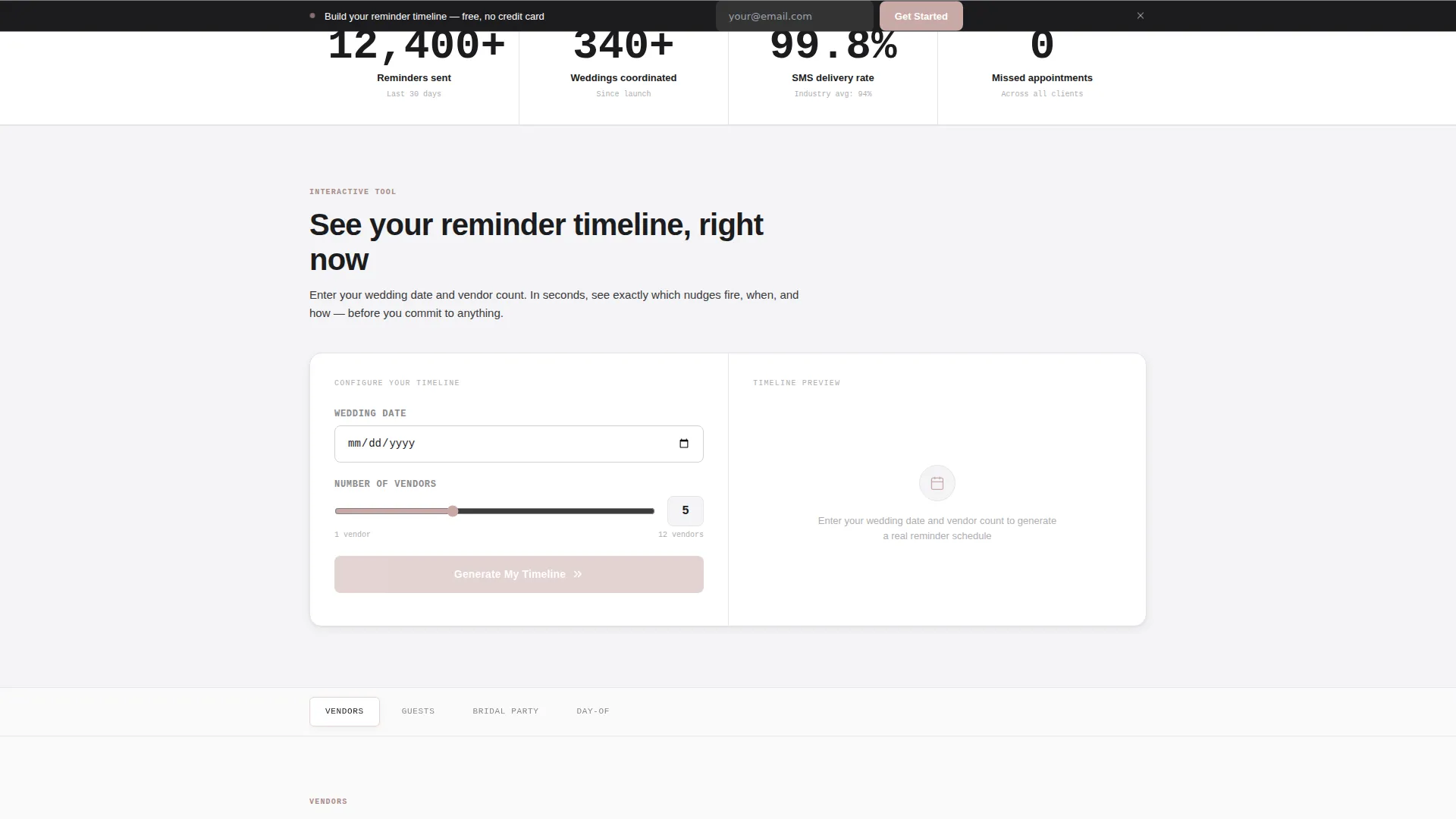
Visitors enter their wedding date and vendor count, and the tool instantly generates a sample reminder timeline. The output is a visual calendar strip with appointment dots and SMS and email icons, making the service value clear in under fifteen seconds.
Pre-Filled Lead Capture Form
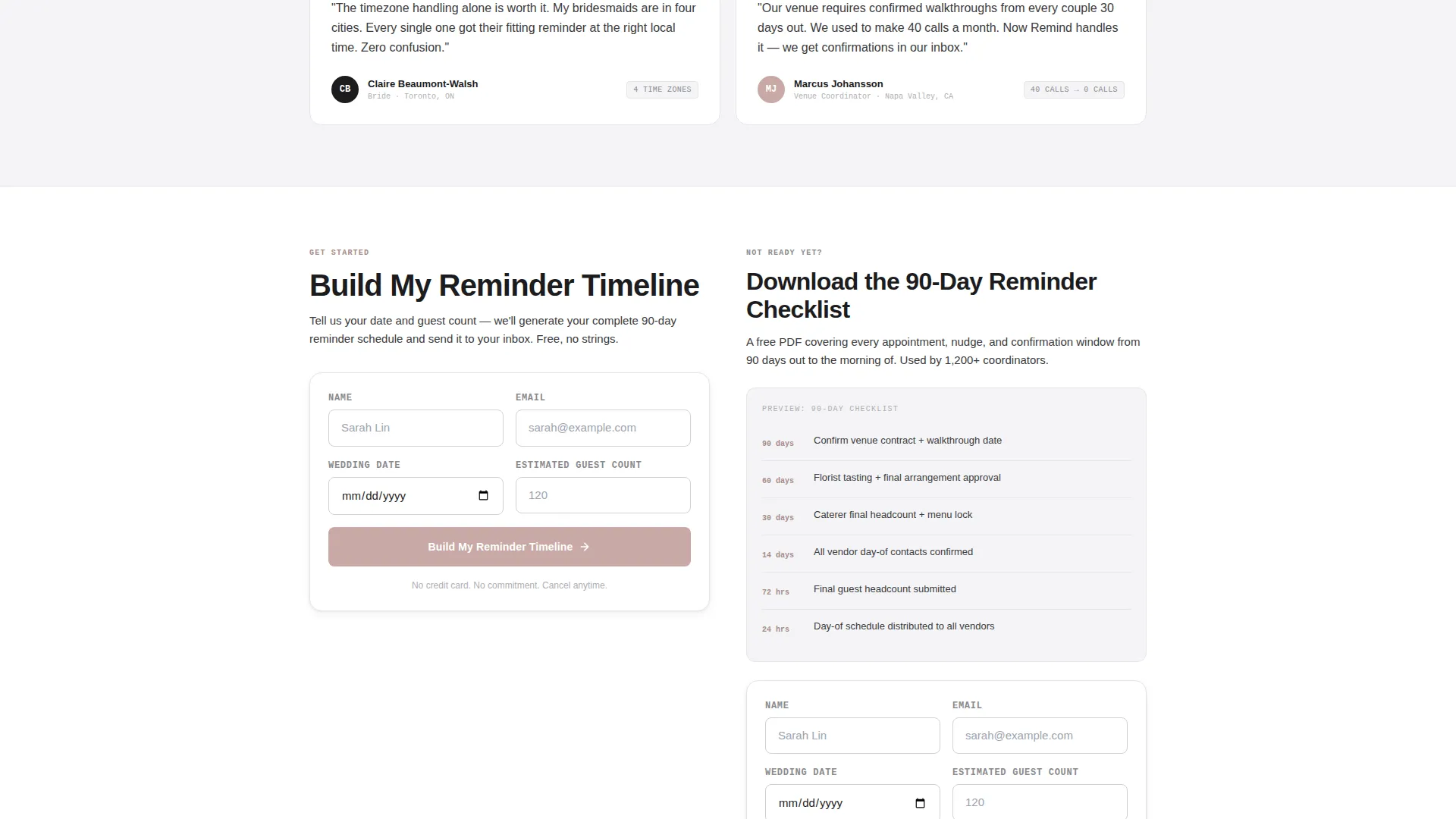
The primary form appears below the calculator with the date and vendor count already populated from the tool. It collects name, email, wedding date, and estimated guest count in that order. A sticky bar version of the form follows the visitor on scroll.
Product Screenshot Hero
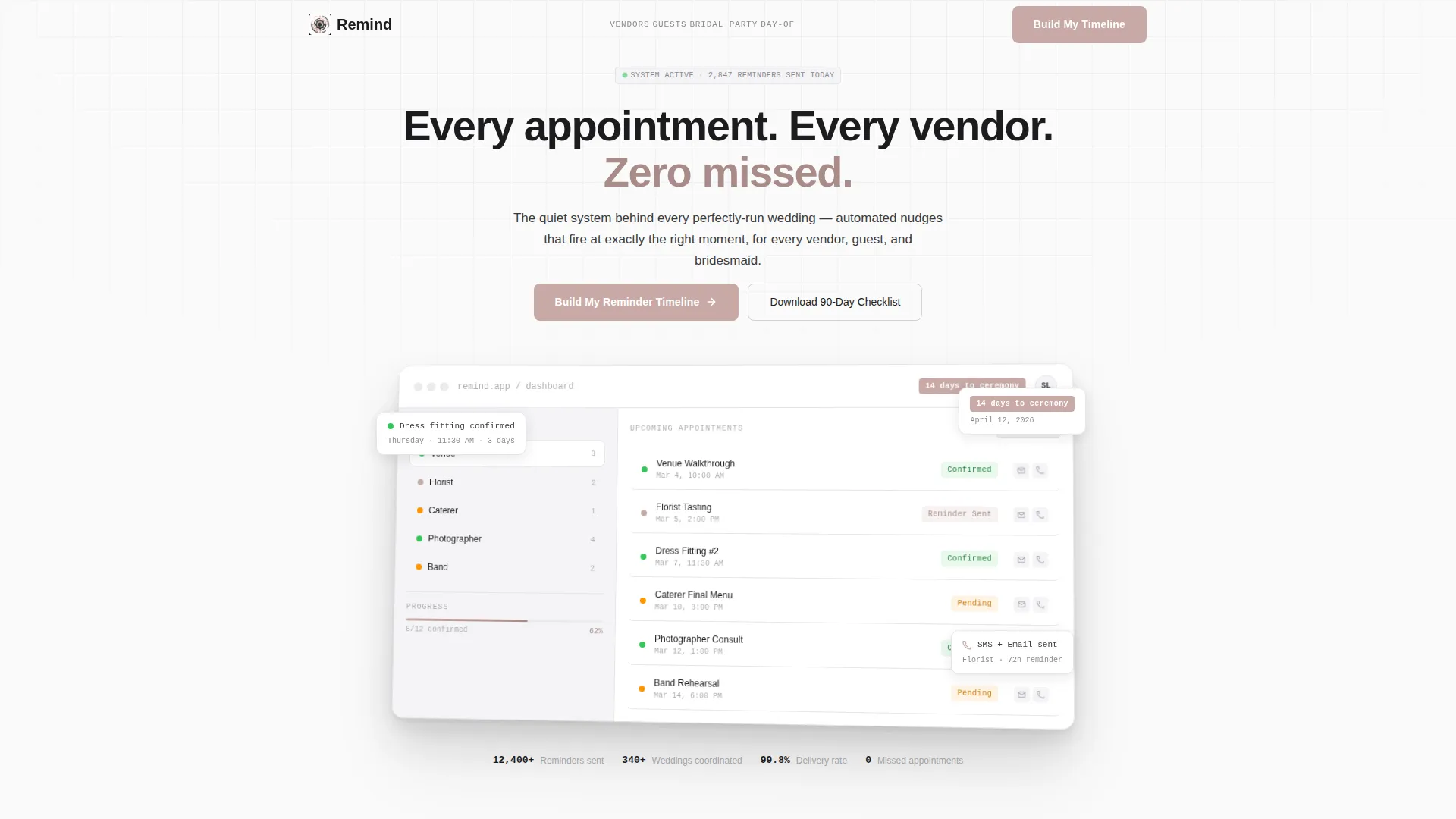
The header uses a crisp dashboard screenshot showing twelve appointments across five vendors, color-coded confirmation statuses, and a countdown badge reading "14 days to ceremony." The screenshot floats with a subtle drop shadow and a slight z-axis rotation to suggest depth.
Hub and Spoke Anchor Navigation
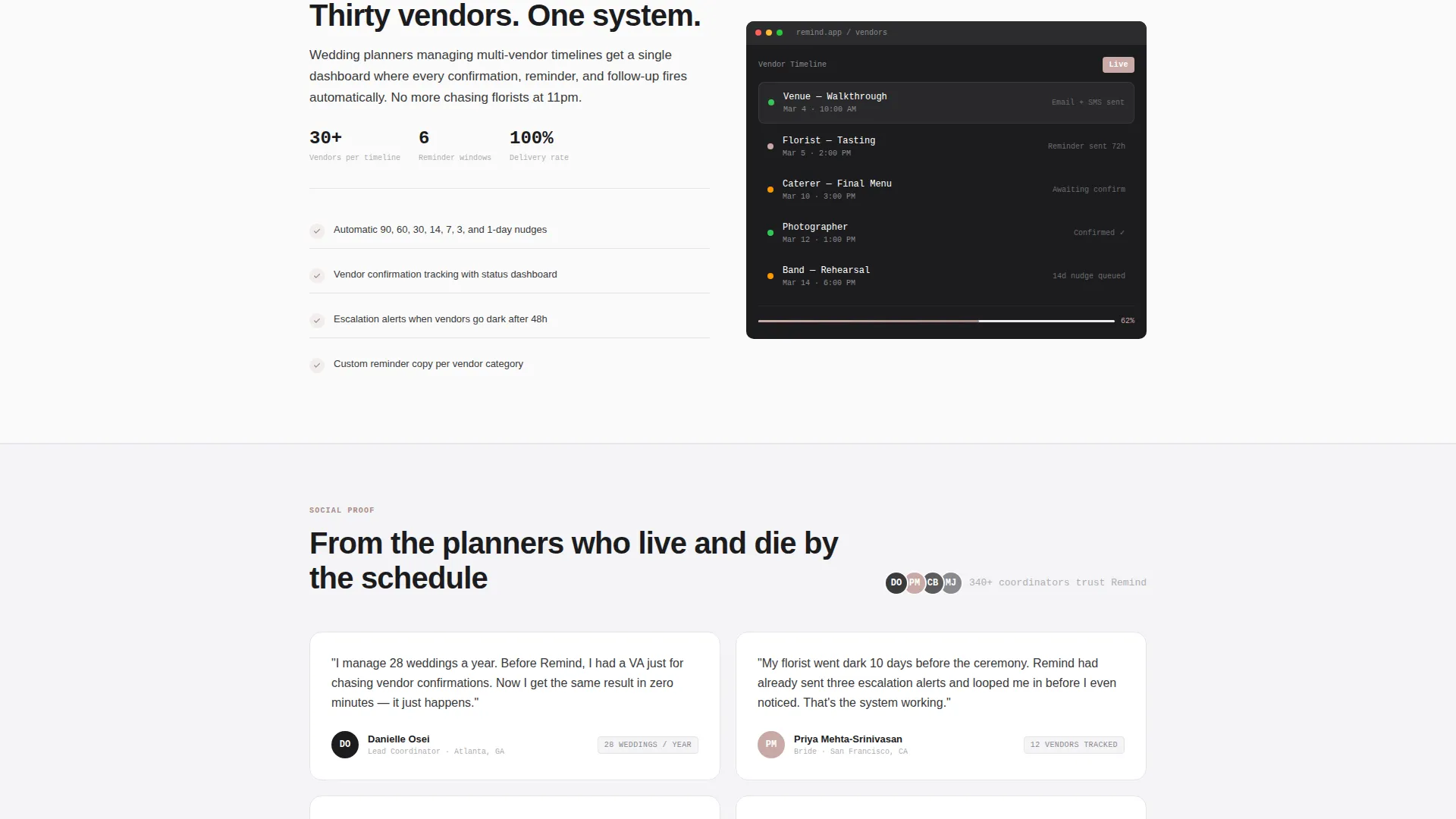
A persistent top navigation bar anchors four spoke sections: Vendors, Guests, Bridal Party, and Day-Of. Each section adapts the reminder logic narrative to a specific audience and includes progressively detailed mini product screenshots.
Secondary Checklist Download Path
Visitors who are not ready to submit the primary form can download a gated ninety-day reminder checklist PDF. This secondary conversion path captures leads at an earlier stage of decision-making.
Dual Call-to-Action Architecture
The primary call to action reads "Build My Reminder Timeline" and appears both below the calculator and in the sticky scroll bar. The secondary call to action offers the checklist download. Both paths feed into the same lead generation goal from different intent levels.
Page sections overview
| Section | Purpose |
|---|---|
| Hero Dashboard Screenshot | Opens the page with a product-first visual and a single clear headline |
| Interactive Timeline Calculator | Lets visitors generate their own reminder schedule before reading sales copy |
| Primary Lead Form | Captures qualified leads with pre-filled data from the calculator tool |
| Vendors Spoke | Shows how reminder logic applies to multi-vendor coordination timelines |
| Guests Spoke | Explains reminder behavior for guest communication and headcount tracking |
| Bridal Party Spoke | Covers appointment nudges for bridesmaids and bridal party scheduling |
| Day-Of Spoke | Demonstrates how reminders adapt to ceremony-day timing and logistics |
| Sticky call to action Bar | Keeps the primary form accessible at every scroll depth |
| Checklist Download | Offers a gated PDF as a lower-commitment second conversion path |
Design & branding system
The visual identity follows a Directory and Discovery theme executed through a Monochrome Steel color system. The palette feels like a precision instrument, cool, deliberate, and functional, with warmth introduced only where the eye needs to act.
- Forge black (#1C1C1E) and brushed graphite (#3A3A3C) form the core type and structure layers
- Polished aluminum (#D1D1D6) and cold white (#FAFAFA) handle backgrounds, cards, and surface hierarchy
- Pale rose gold (#C9A9A6) appears exclusively on interactive states, active navigation indicators, and call-to-action buttons
Mobile & speed optimization
The layout is built to perform on smaller screens without losing the visual precision that makes the product credible. Every section scales cleanly and the interactive tool remains usable at mobile widths.
- The sticky call-to-action bar adapts to mobile viewport height so it never obscures key content
- The hub and spoke anchor navigation collapses gracefully for touch-based scrolling
How this template helps you convert
Every design and copy decision in this template serves the lead generation goal. The calculator is the engine, it creates personal investment before any ask is made.
- The interactive tool generates a custom timeline for each visitor, so the primary form feels like a natural next step rather than a cold ask.
- The sticky scroll bar keeps the "Build My Reminder Timeline" call to action visible at all times, reducing the friction of having to scroll back to convert.
- The checklist download gives undecided visitors a low-commitment reason to share their email, extending the funnel without requiring a separate page.
Other information about this template
This template is categorized under Technology and Wedding Email Templates, making it relevant for reminder services that communicate through both SMS and email channels. The ninety-day reminder checklist referenced in the secondary conversion path aligns with standard wedding planning horizons. The hub-and-spoke structure makes it straightforward to adapt spoke section copy for different coordinator roles or service tiers without restructuring the page. The page type is a single-page landing page with anchor-based navigation, not a multi-page website.
- The template is designed for the wedding appointment reminder niche within the broader wedding planning technology category
- No florals, script fonts, or decorative elements are used anywhere in the layout, the product interface is the only visual hero
- The color system and typography are intentionally neutral to appeal to both modern couples and professional wedding coordinators
Theme
Directory & Discovery
Creative direction
Calculator/Tool First
Color system
Monochrome Steel
Style
Hub & Spoke (Anchor Nav)
Direction
Lead Generation
Page Sections
Interactive Wedding Timeline Calculator
Pre-filled Lead Capture Form
Product Screenshot Hero Section
Hub and Spoke Anchor Navigation
Dual Conversion Path Architecture
Related questions
Who is this landing page template designed for?
What does the interactive calculator tool do on this page?
How does the lead generation flow work?
Can the spoke sections be adapted for different service offerings?
What makes this template different from a generic service landing page?



