Fitness & Gym Software Specialist Professional Website Template
Rep is a dashboard-style landing page template built for fitness and gym fleet management platforms. It showcases real-time equipment tracking across multiple gym locations through a data-rich user interface, animated metrics, and a Feature Matrix layout. The dark Slate and Sky color system gives it a premium ops-room feel that speaks directly to multi-site gym operators and franchise managers.
by Rocket studio
Quick summary
Rep is a single-page landing page template designed for gym fleet management platforms. It opens with a live-style metrics dashboard header, moves through a Feature Matrix that contrasts old and new workflows, and converts visitors through a freemium trial model. The Slate and Sky color system keeps the interface feeling like a premium control room at any hour.
Who this template is for
This template is built for software companies serving the operational side of the fitness industry. It speaks clearly to buyers who manage equipment at scale, not at a single club.
- Multi-site gym owners running fifteen or more locations who need one screen for everything
- Franchise operations managers who field equipment failure calls at any hour of the day
- Regional fitness directors who review per-club maintenance budgets before quarterly reporting
What problem this template solves
Managing gym equipment across many locations without a central system is slow and costly. Spreadsheets miss warranty deadlines, maintenance logs live in different inboxes, and by the time a problem is visible it has already become expensive. This template gives a platform the right visual language to show buyers how much that friction costs them.
- No unified view of equipment status, work orders, or uptime across locations
- Manual tracking that misses preventive maintenance windows and warranty expirations
- No per-club cost visibility until a quarterly review reveals the damage
What you get with this template
You get a fully structured, single-page layout built for a fitness and gym fleet management platform. Every section is purpose-designed to earn trust before asking for a signup.
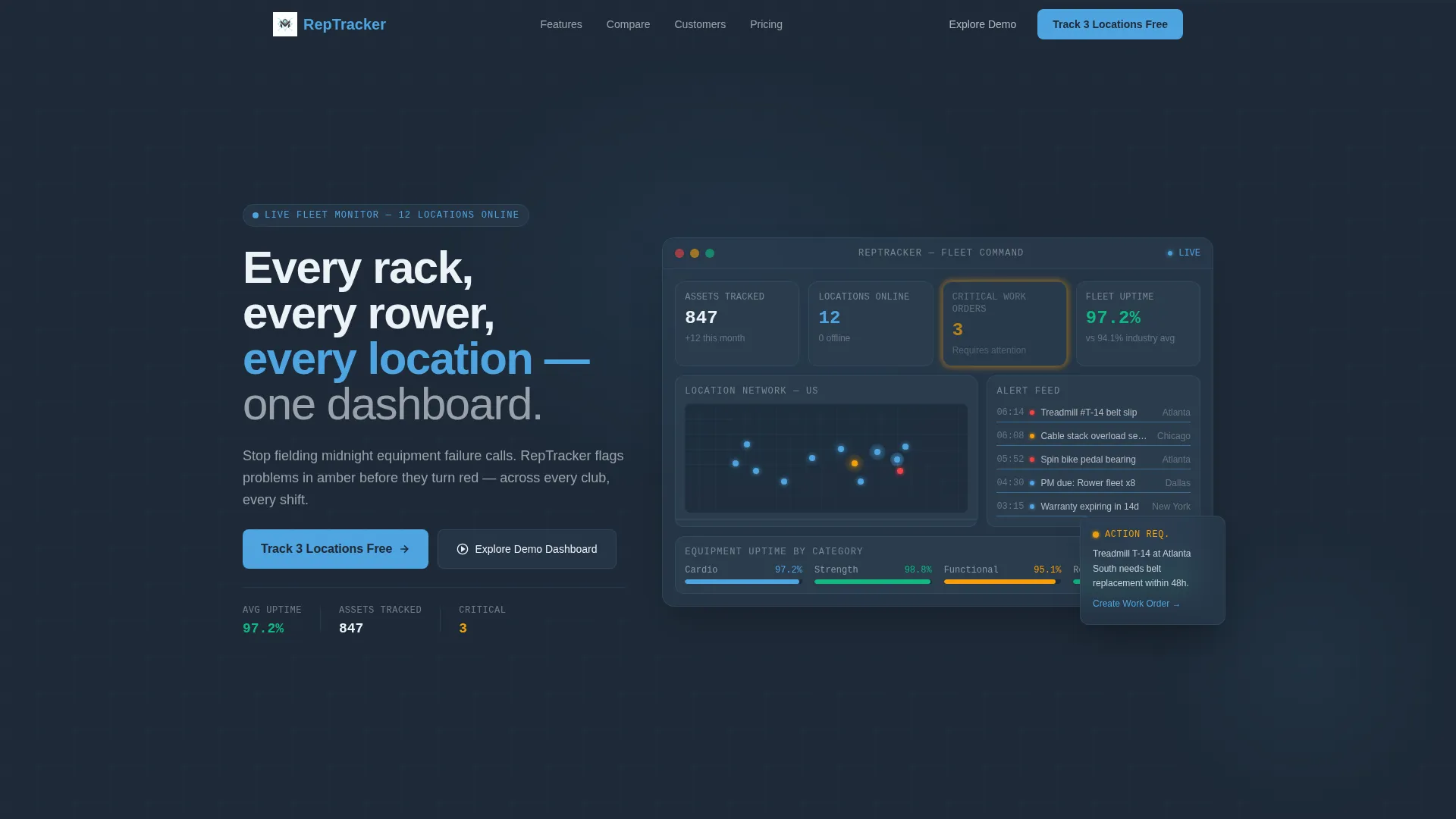
- An animated stats header showing live-style fleet metrics: 847 assets tracked, 12 locations online, 3 critical work orders flagged, and average equipment uptime at 97.2%
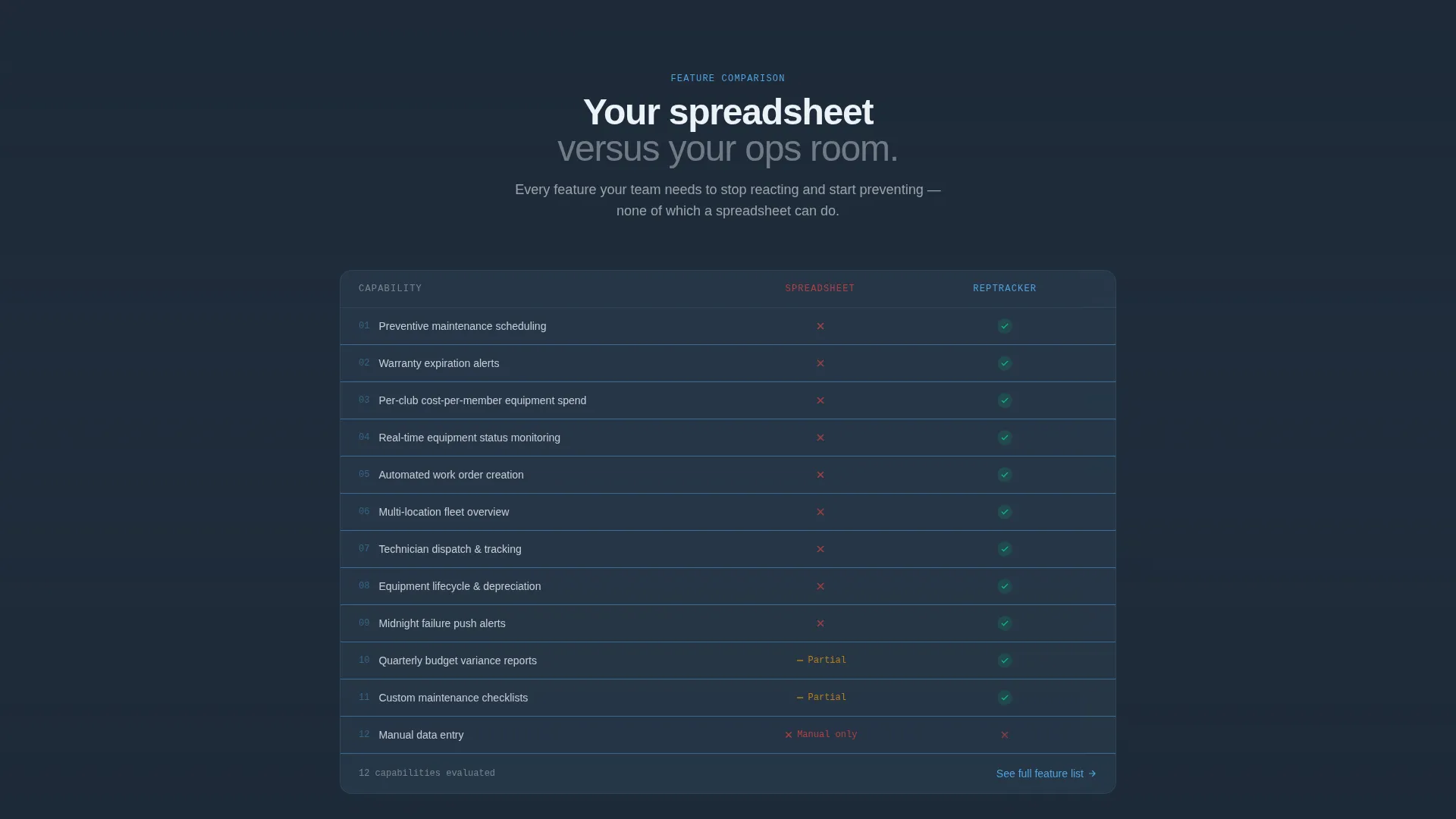
- A Feature Matrix section with a side-by-side comparison grid using red and green indicators across gym-specific tracking capabilities
- A freemium trial conversion flow with a minimal three-field signup form and a no-signup demo sandbox path
Feature list
This template includes several purpose-built components that reflect how gym operations managers actually work.
Animated Metrics Dashboard Header
The header opens as a live-style stats panel, not a hero image. A subtle animation ticks the uptime figure from 96.8% to 97.2% on page load. A miniature location map dots each gym site in sky blue against the deep slate background, and the headline fades in below the data display.
Feature Matrix Comparison Grid
A tight comparison grid contrasts manual spreadsheet tracking against the platform. Red marks and green checks are applied to gym-specific capabilities such as preventive maintenance scheduling, warranty expiration alerts, and per-club cost-per-member equipment spend. This section does the sales work without a single sentence of hype.
Expandable Feature Detail Panels
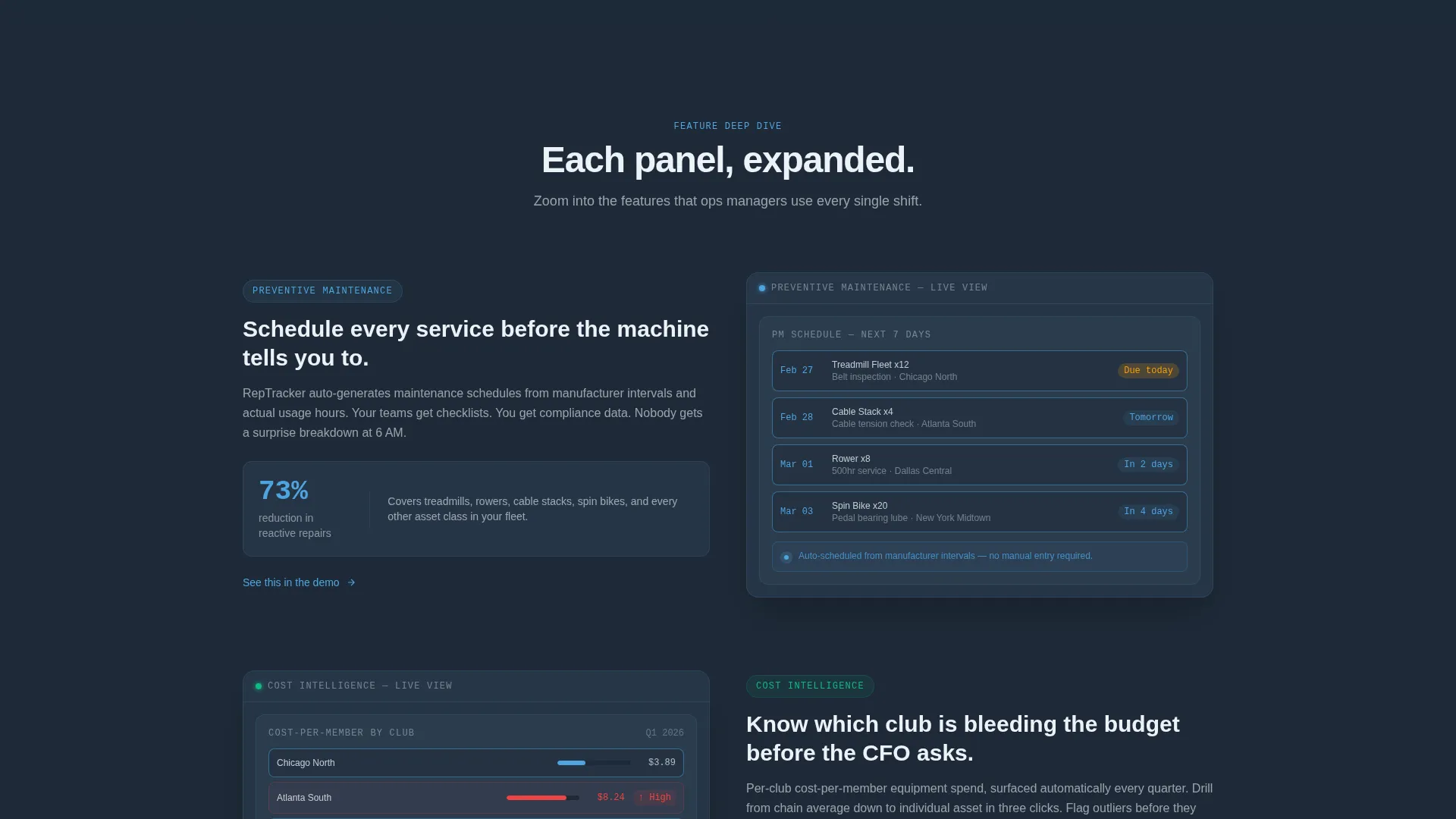
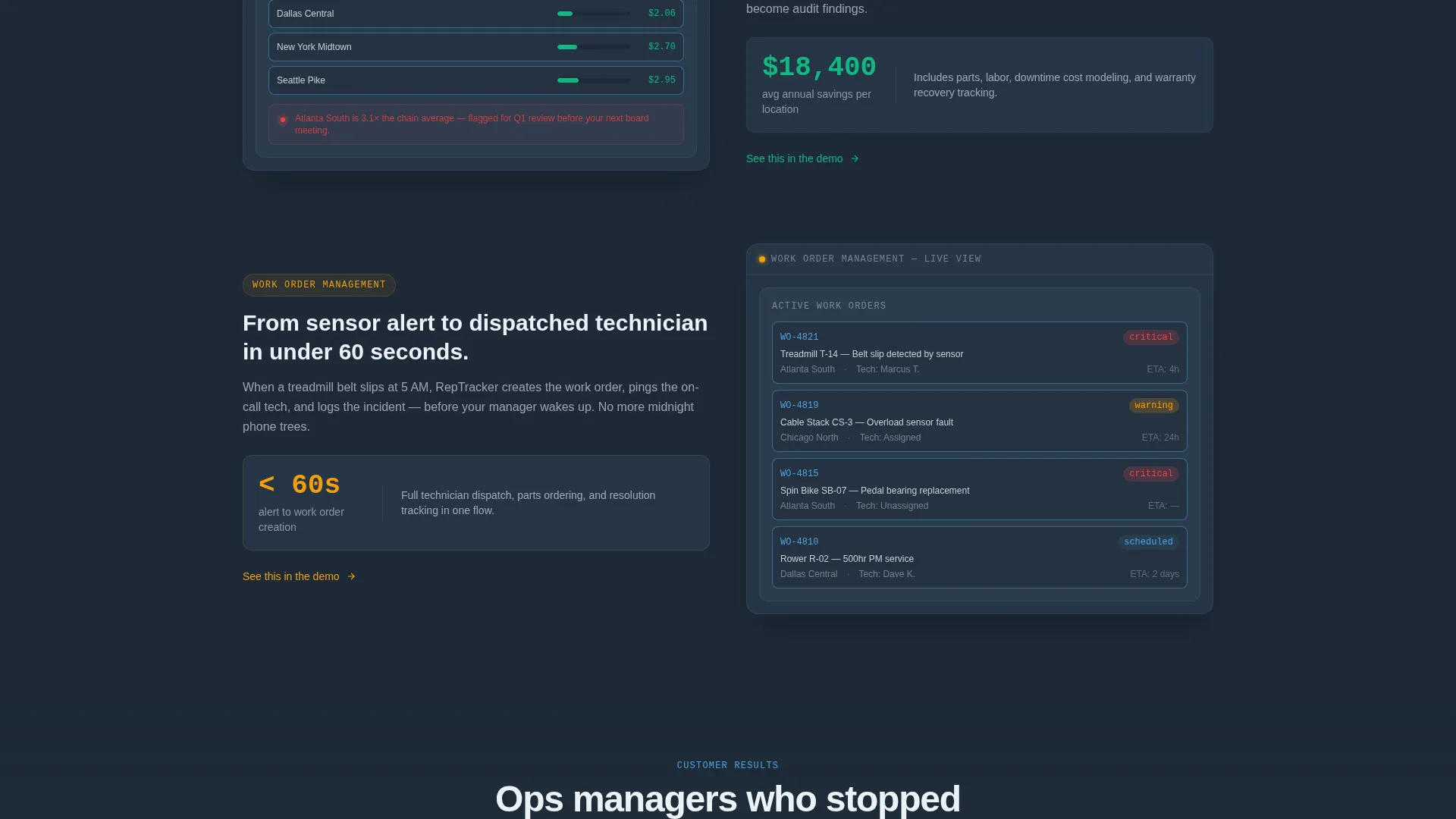
Each subsequent section zooms into one tile from the comparison grid and expands it into a mini-dashboard screenshot with annotated callouts. The rhythm alternates between compressed grid views and expanded detail panels, mimicking how an ops manager scans the fleet and then drills into one problem location.
Sticky Freemium Trial call to action
The primary call to action, "Track 3 Locations Free," locks to the top navigation bar after the first scroll. It stays visible throughout the entire page without interrupting the reading flow, so the conversion opportunity is always one click away.
No-Signup Demo Sandbox Path
A secondary conversion path lets visitors open an interactive sandbox preloaded with sample gym data. No email required. This path lets skeptical buyers see the dashboard working before they commit to anything.
Minimal Three-Field Signup Form
The trial signup form collects only email address, company name, and number of locations. The locations field uses a dropdown with four ranges: 1 to 5, 6 to 20, 21 to 50, and 50 or more. Keeping the form short removes friction at the most critical moment.
Page sections overview
| Section | Purpose |
|---|---|
| Animated Stats Header | Opens with live-style fleet metrics and a miniature location map |
| Headline Fade-In | Delivers the core value statement below the data display |
| Feature Matrix Grid | Compares manual tracking against the platform using gym-specific indicators |
| Expanded Feature Panels | Zooms into individual features with annotated mini-dashboard screenshots |
| Sticky Trial call to action | Keeps the freemium signup offer visible after first scroll |
| Demo Sandbox Entry | Lets visitors explore sample gym data without signing up |
| Signup Form | Collects email, company name, and number of locations |
Design & branding system
The template uses a Dashboard Pro theme built on the Slate and Sky color system. The palette is designed for long viewing sessions in an operational environment.
- Deep operations slate (#1E2A38) and cool panel gray (#2C3E50) form the base layers, keeping the interface dark and focused
- Sky-blue data accent (#4FA4E0) and alert white (#EDF2F7) highlight metrics, card surfaces, and body text so numbers are always easy to read
- Interactive elements pulse in a brighter signal blue (#5BC0F5) on hover, giving the interface a cockpit instrument feel without relying on decorative imagery
Mobile & speed optimization
The layout is built as a data-heavy dashboard interface, so mobile readability is handled through the template's structural choices rather than relying on dense tables that would break on small screens.
- Grid and panel sections are designed to reflow cleanly so comparison views remain legible on narrower viewports
- The sticky call to action bar is sized to stay functional on touch screens without blocking page content
- Animation elements are lightweight by design, keeping the page feeling responsive even on the initial load sequence
How this template helps you convert
This template earns the conversion before it asks for one. Every section reduces doubt and builds confidence in the product being promoted.
- The animated metrics header shows the platform working immediately, so visitors arrive with proof before they read a single feature claim
- The Feature Matrix makes the cost of the current alternative visible using specific, gym-relevant data points that match a buyer's real daily pain
- The dual conversion path lets high-intent visitors sign up for the trial and cautious visitors explore the demo sandbox, so neither buyer type is lost
Other information about this template
This template suits any software product in the fitness operations space that needs a credible, data-forward landing page to attract buyers at scale.
- The Dashboard and Data Grid template style makes it a strong fit for platforms in the gym management software and fitness technology categories
- The freemium and trial conversion model is baked into the layout structure, so no redesign is needed to support a free-tier or pilot offer
- The template is part of the Rep template family and follows the Dashboard Pro theme conventions used across that design system
Theme
Dashboard Pro
Creative direction
Feature Matrix
Color system
Slate & Sky
Style
Dashboard/Data Grid
Direction
Freemium/Trial
Page Sections
Animated Live-style Metrics Header
Feature Matrix Comparison Grid
Expanding Feature Detail Panels
Sticky Freemium Trial Call to Action Bar
No-signup Demo Sandbox Entry
Minimal Three-field Signup Form
Related questions
Can I change the sample metrics shown in the header?
Does the demo sandbox path require any backend setup?
Is this template only useful for gym fleet management platforms?
How does the sticky call to action work after the first scroll?
Can the signup form fields be adjusted?



