Swift Financial Assistance Landing Page Template
The Ticket landing page template is a bento grid command center built for financial institutions that need their support queues under control. It combines a live interactive dashboard, an SLA calculator, animated auto-routing visuals, and a compliance-ready audit trail into one polished Tech Glass layout. Operations managers, compliance officers, and IT directors can finally replace scattered email threads with a structured, conversion-focused ticketing platform.
by Rocket studio
Quick summary
This is a single-page, bento grid landing page template designed for financial services help desk and ticketing platforms. It opens with a live interactive dashboard, flows into a hands-on SLA calculator, and closes with a freemium trial conversion path. Every section demonstrates real capability before asking the visitor to commit. The result is a landing page that earns trust through proof, not promises.
Who this template is for
This template is built for teams inside financial institutions who have outgrown improvised customer support workflows. If your current ticketing process lives in a shared inbox or on sticky notes, this page shows a better way.
- Operations managers at regional banks handling high volumes of password resets and account access requests
- Compliance officers at credit unions tracking Reg E disputes and needing audit-ready archives
- IT directors at wealth management firms who inherited broken desk software and need a real ticketing system fast
What problem this template solves
Financial customer support teams face a specific kind of chaos. Incoming tickets arrive across various channels, SLA timers run silently in the background, and sensitive customer information gets buried in email threads. Without a structured ticketing system, teams struggle to sort tickets by urgency, identify bottlenecks, and maintain the compliance records auditors will eventually request.
- Support staff lose time searching through unstructured email threads instead of resolving customer issues
- Ticket volume spikes during dispute cycles, and teams have no way to track progress or spot recurring issues
- Compliance requirements like Reg E demand complete audit trails, but scattered support workflows make that nearly impossible
What you get with this template
This ticket template delivers a full-featured landing page that puts the platform's capability on display from the first scroll. The page is structured so visitors understand the product by using it, not just reading about it. Every bento card, every interactive section, and every call-to-action block is included and ready to customize with your company name and brand identity.
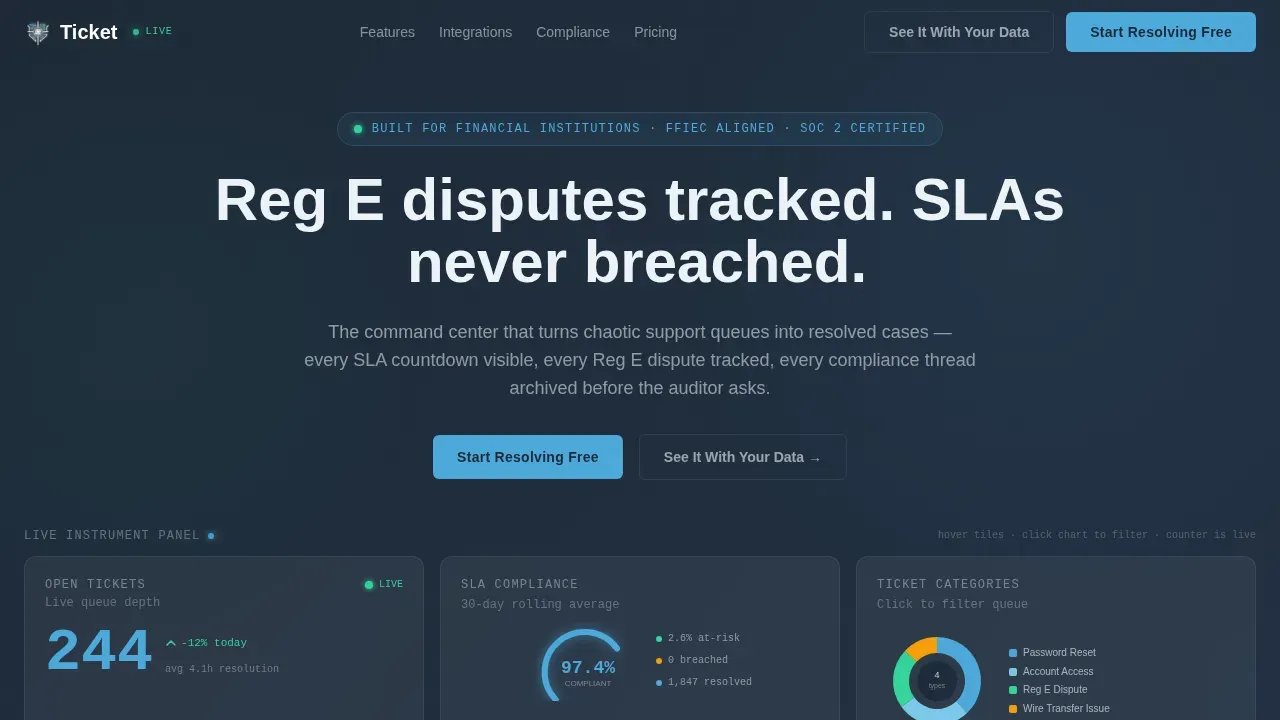
- A live interactive hero dashboard with a real-time open-ticket counter, an SLA compliance gauge, and a filterable category donut chart
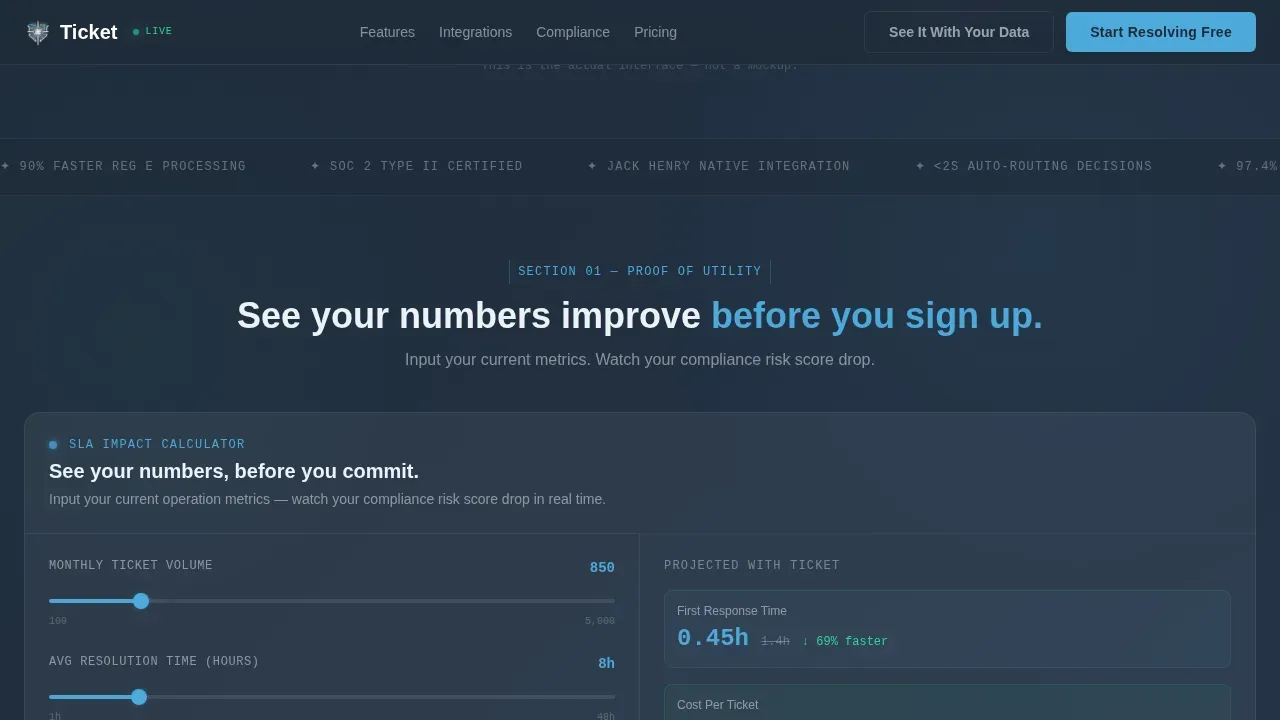
- A built-in SLA calculator that takes ticket volume, resolution time, and team size as inputs and returns projected first-response time, cost-per-ticket reduction, and a compliance-risk score
- A full capabilities bento section, an animated integration map, a social proof row, and a freemium trial conversion flow with a two-step signup form
Feature list
This ticket template is built around interactive proof. Each feature listed here is present in the template as described in the source brief.
Live Interactive Hero Dashboard
The header is a fully functional mini-dashboard rendered directly in the viewport. It displays three bento tiles: an open-ticket counter that animates in real time, an SLA compliance gauge showing a live percentage, and a category breakdown donut chart. Visitors can hover each tile to see tooltips and click donut slices to filter by ticket types such as Password Reset, Wire Transfer Issue, Account Access, and Reg E Dispute. A typewriter headline assembles itself beneath the dashboard, reinforcing the page message the moment the visitor lands.
SLA Calculator Section
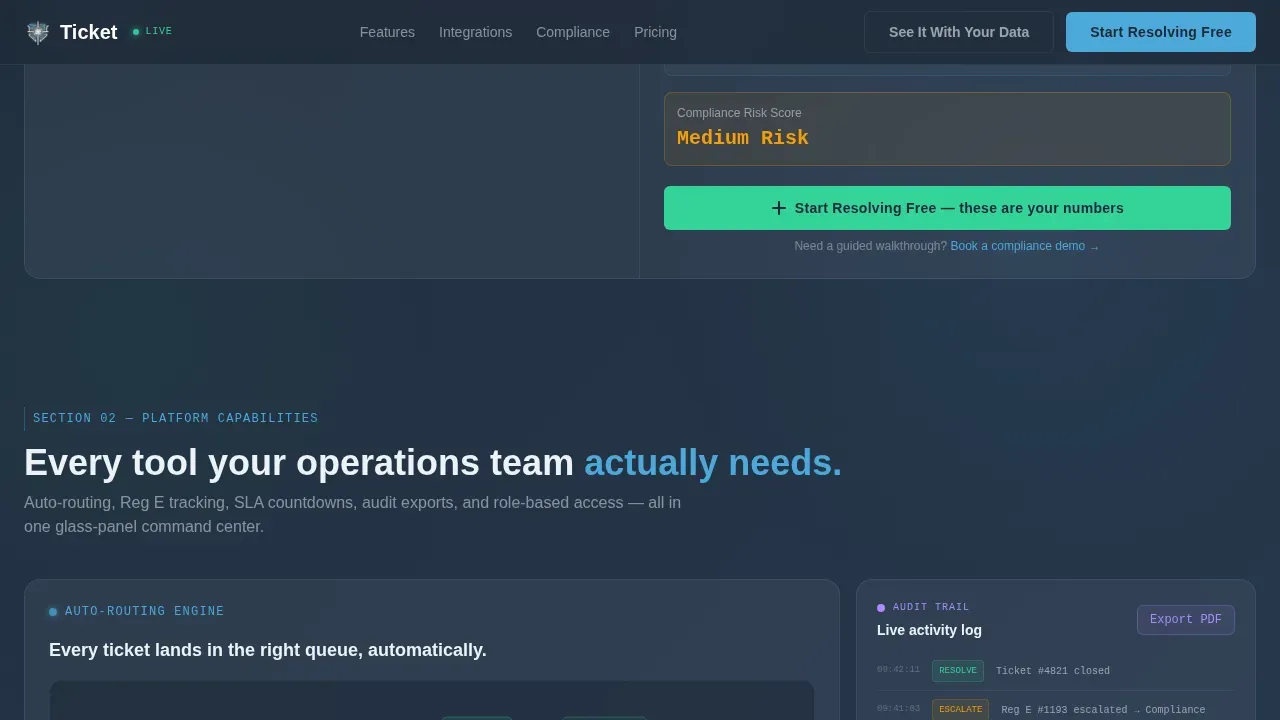
Below the hero, the first full content section is an interactive SLA calculator. Visitors input their average monthly ticket volume, current resolution time, and team size. The tool instantly returns projected first-response time, estimated cost-per-ticket reduction, and a compliance-risk score. The primary call-to-action button is embedded directly inside the results panel, so the moment a visitor sees their numbers improve, the path to signup is already visible.
Auto-Routing and Capabilities Bento
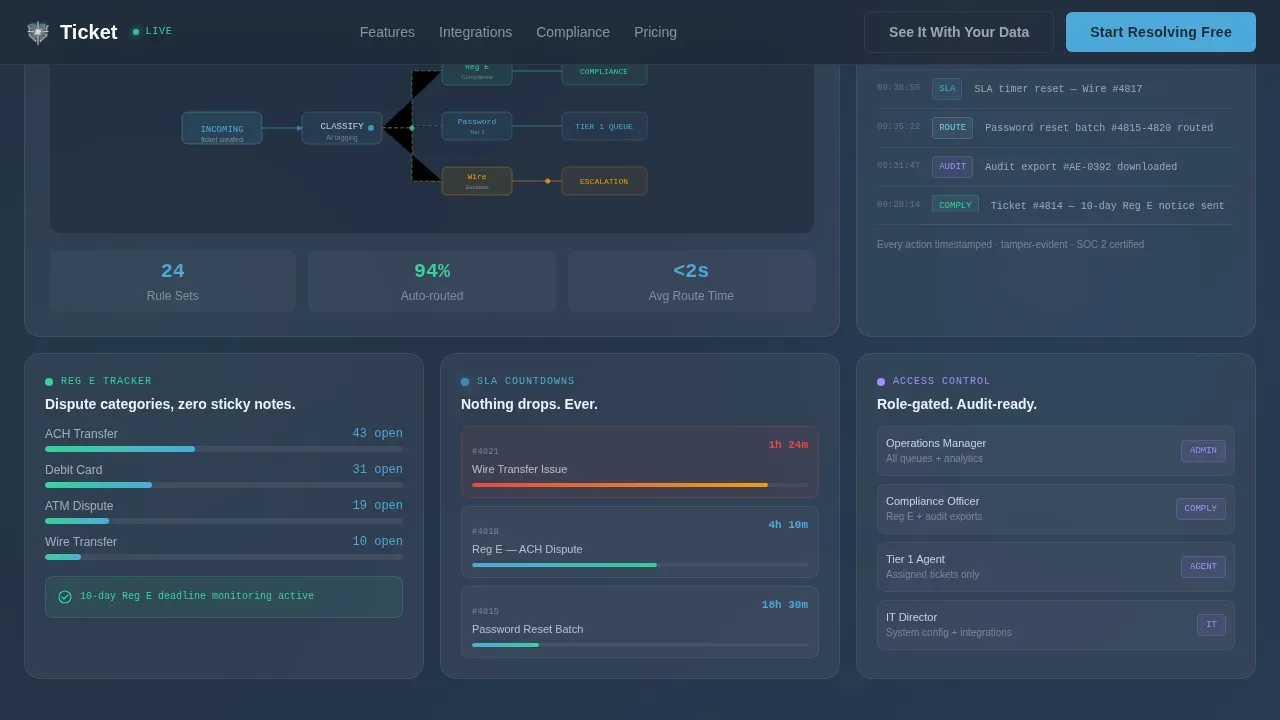
A dedicated bento row visualizes auto-routing rules as animated flowcharts. The section shows how the platform helps route tickets to the right team based on ticket category, priority field, and institution type. Additional tiles cover audit trail exports shown as one-click previews, Reg E dispute categories, and role-based access controls. Each tile is interactive, giving visitors a hands-on sense of the platform before they sign up.
Audit Trail and Compliance Archive
The template includes a dedicated audit trail section that demonstrates how every change made to a support ticket is tracked and stored. This is shown as an exportable record, reinforcing the platform's suitability for financial institutions subject to regulatory review. The design clearly communicates that sensitive customer information is handled with the structured discipline compliance officers require.
Animated Integration Map
A bento section renders an animated connector grid showing platform integrations. Each integration node is labeled and connected by animated lines, making it immediately clear how the platform fits into an existing financial technology stack. This section visually communicates that adopting the ticketing system does not mean rebuilding every existing workflow from scratch.
Two-Step Freemium Trial Conversion Flow
The conversion path is built as a progressive two-step form. Step one asks only for work email and institution name, reducing friction at the point of highest intent. Step two, shown after account creation, collects team size and primary ticketing pain point. A secondary conversion path labeled "See It With Your Data" offers a guided demo booking for compliance-heavy institutions that need a more detailed walkthrough before committing.
Page sections overview
| Section | Purpose |
|---|---|
| Interactive Hero Dashboard | Live ticket counter, SLA gauge, and filterable donut chart with typewriter headline |
| SLA Calculator Tool | Visitor inputs ticket volume and team data; outputs projected metrics and embedded call to action |
| Capabilities Bento Row | Auto-routing flowcharts, audit trail export, Reg E categories, and role-based access tiles |
| Integration Map | Animated connector grid showing platform integrations with financial technology partners |
| Social Proof Row | Quantified metrics and institution-type testimonial quotes |
| Trial Conversion Block | Primary "Start Resolving Free" call to action and secondary "See It With Your Data" demo booking |
| Footer | Linear single-row footer with essential links |
Design & branding system
The visual identity follows a Tech Glass theme built on a Slate and Sky color system. The palette was chosen deliberately for financial services: blues and greens are psychologically linked to trust and security, and the overall aesthetic feels like a glass-walled operations floor rather than a generic SaaS product page.
- Background layers use charcoal-to-slate gradients (#1E2A38 to #3B4D61), bento cards float on frosted white (#EDF2F7) with backdrop-blur, and sky blue (#4DA8DA) marks every interactive element and live data point
- Resolution green (#34D399) appears only on success states: a ticket closed, a threshold met, or a trial activation confirmed, reinforcing a clear visual language for positive outcomes
- Typography pairs DM Sans for interface and body copy with JetBrains Mono for data, metrics, and code-style readouts, creating a clear visual hierarchy between narrative text and live operational data
Mobile & speed optimization
The template is designed desktop-first, reflecting the reality that operations managers and compliance officers work primarily at workstations with large monitors. However, the bento grid layout adapts to smaller viewports so that the ticket queue and support workflow remain accessible on mobile devices as well.
- Interactive components including the live dashboard, calculator, and animated flowcharts are built as client components to preserve responsiveness without blocking static content
- The frosted card surfaces and backdrop-blur effects are implemented to remain visually clean across screen sizes, maintaining a professional aesthetic on both desktop and mobile
- The minimalist bento layout removes standard navigation distractions and keeps the visitor focused on the tool sections, which is especially important on smaller screens where attention is limited
How this template helps you convert
This landing page is structured around a Calculator/Tool First creative direction, meaning the conversion case is built before the call-to-action is presented. Visitors are already half-engaged with the product by the time they see the signup button.
- The interactive hero dashboard demonstrates platform value the moment the page loads. Visitors watch a live ticket counter, interact with a donut chart, and see an SLA compliance gauge before reading a single line of sales copy. This builds trust through direct customer interaction rather than through claims alone.
- The SLA calculator makes the value proposition personal and measurable. When a visitor inputs their own ticket volume and team size, the projected metrics are specific to their situation. Seeing their own numbers improve in real time is more persuasive than any testimonial. The embedded call to action appears at exactly that moment, removing every barrier between insight and action.
- The two-step trial form and the secondary demo-booking path serve different buyer types. Visitors who are ready to act can start with just a work email. Visitors who need a compliance-focused walkthrough can book a guided session. Both paths are present on the same page, so no buyer type is left without a next step.
Other information about this template
This template is part of a broader category of financial services help desk tools, and the design decisions reflect best practices drawn from various industries that prioritize security, clarity, and structured workflows. Beyond the core financial services niche, teams in e commerce, online retailers, and e commerce businesses managing high volumes of return requests and feature requests will find the bento grid layout and ticket template structure adaptable to their own service delivery context.
- The ticket template supports custom statuses so your team can organize tickets beyond default states. You can add statuses that reflect your institution's specific ticketing process, such as "Pending Reg E Review" or "Escalated to Compliance." Regular template reviews keep the system up to date as processes evolve.
- Each support ticket submission generates a unique ticket ID automatically, along with an auto-filled date and time stamp. After submission, a confirmation screen provides the customer with their ticket ID and clear next steps, replacing the ambiguity of traditional email threads.
- Templates standardize the information captured at ticket creation, ensuring that product managers, support staff, and compliance officers all work from the same structured data set. A built-in knowledge base section allows agents to reference standard procedures without leaving the ticket view, reducing the time spent on recurring issues and complex issues alike.
- The simple form structure at the intake step collects only what the team needs: a brief summary of the issue, a priority field selection, the relevant ticket types, and optional file attachments. Keeping minimalist fields reduces friction for customers and helps route tickets accurately from the first submission, avoiding frustrated customers who have to re-submit incomplete requests.
- The landing page also supports various channels of ticket intake. Whether a customer submits a general inquiry, a technical support request, or uses the customer portal to report issues, every incoming ticket enters the same structured queue. This helps support teams identify patterns across customer inquiries, spot recurring issues, and identify bottlenecks before they affect customer satisfaction scores.
- The desk ticketing structure is designed to work alongside existing desk software your team already uses. Slack messages, internal notes, and customer-facing responses can all be managed from one integrated communication panel. This eliminates the scattered workflows that lead to duplicate responses and missed SLA timers.
- Tracking metrics such as ticket volume, response times, average resolution time, and first contact resolution rates gives your team a reliable measure of workflow efficiency. The dashboard visualizes these key performance indicators so product managers and operations leads can make data-informed decisions without running separate reports.
- The template can be customized to reflect your company name, brand identity, and institution-specific language. You can modify fields, adjust the color accents within the established palette, and tailor the knowledge base content to your team's most common customer issues. Ticket templates standardize your intake process while still leaving room for a personal touch in how your team responds.
Theme
Tech Glass
Creative direction
Calculator/Tool First
Color system
Slate & Sky
Style
Bento Grid
Direction
Freemium/Trial
Page Sections
Live Interactive Hero Dashboard
Built-in SLA Calculator Tool
Auto-routing Flowchart Bento
Compliance Audit Trail Display
Two-step Freemium Conversion Flow
Related questions
What kind of support team is this template designed for?
Can I customize the ticket template fields for my institution?
Does the SLA calculator use my real data?
How does the two-step signup form reduce friction at ticket creation?
Is this template suitable for industries outside financial services?



