AI for Financial Services Privacy Policy & Terms Website Template
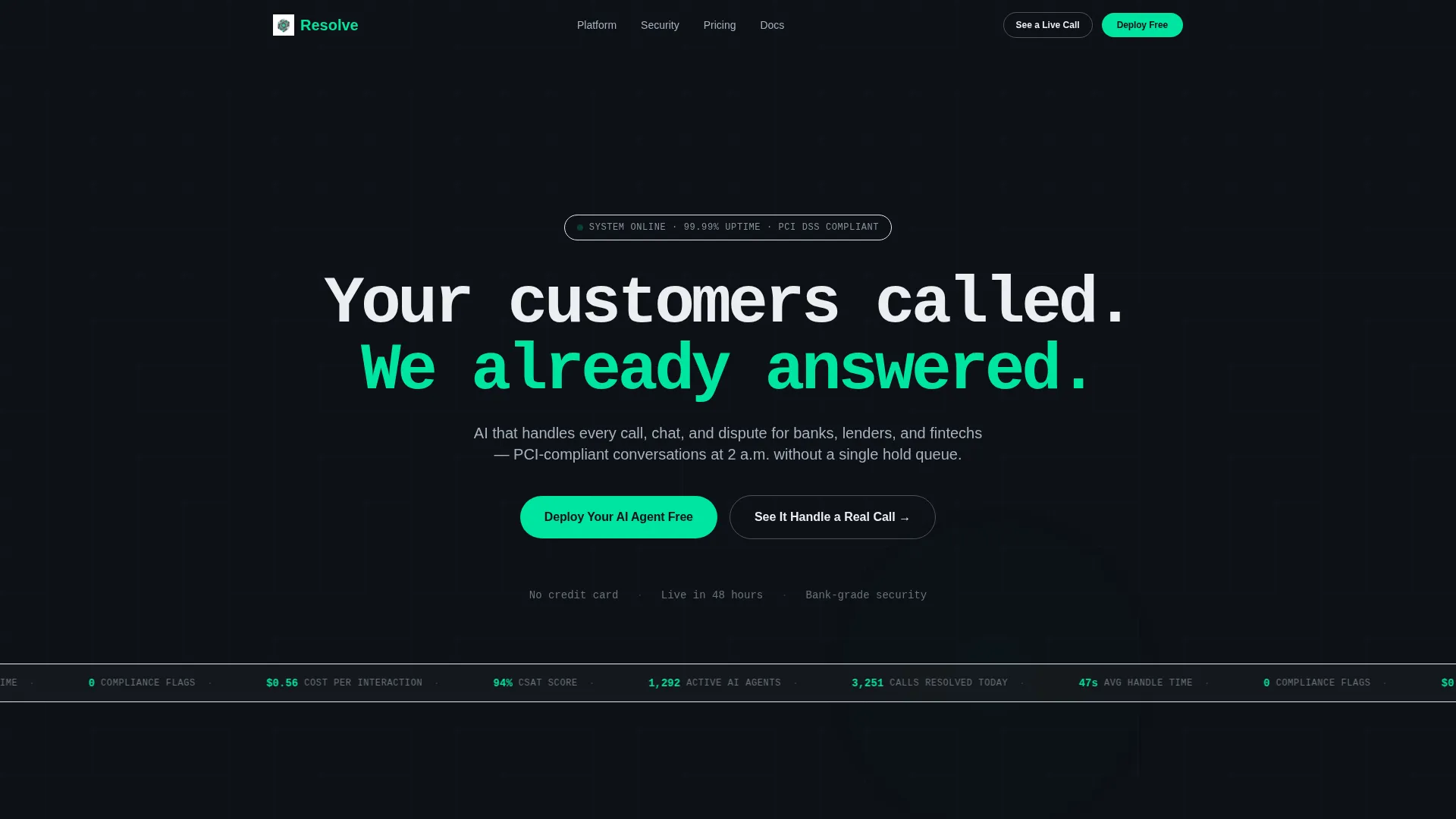
Resolve is a modular card-grid landing page template built for AI-powered customer service platforms in financial services. It targets operations and compliance leaders at credit unions, neobanks, and insurance firms. The design uses a dark Monochrome Steel palette with a neon mint accent, a live-metrics ticker, and a Problem-to-Solution scroll arc that moves visitors straight toward a free trial signup.
by Rocket studio
Quick summary
Resolve is a single-page, card-grid landing page template for fintech and financial services AI customer service platforms. It opens with a dark full-bleed header, scrolls through a Problem-to-Solution arc, and closes on a conversion form. The visual system is Monochrome Steel with one electric mint accent. Every section earns trust before it asks for a signup.
Who this template is for
This template speaks directly to leaders inside financial institutions who are watching their customer service operations strain under volume, compliance risk, and rising costs. It is built for teams that need to communicate a complex AI product quickly and credibly to a skeptical, senior audience.
- VP-level operations leaders at mid-market credit unions managing high call volume
- Compliance officers at neobanks concerned about regulatory errors in agent scripts
- Customer experience directors at insurance firms tracking satisfaction scores during open-enrollment periods
What problem this template solves
Traditional call center pages lean on stock photography and vague benefit statements. That approach fails when your buyers are ops executives who read spreadsheets for a living. Resolve addresses the gap between what an AI customer service platform actually does and how it is presented to the people who approve its purchase.
- No clear way to show the before-and-after impact of replacing human queues with AI handling
- Generic landing pages that do not signal PCI compliance, security trust, or enterprise-grade reliability
- Weak conversion paths that ask for a demo before they have proven the product works
What you get with this template
Resolve delivers a fully structured, single-page layout organized into modular card rows. Each section has a defined job: establish pain, demonstrate the solution, prove trust, and capture the lead. Nothing is decorative without purpose.
- A dark full-bleed header with a pulsing radial glow, oversized monospaced headline, and a live-feed scrolling ticker showing anonymized interaction metrics
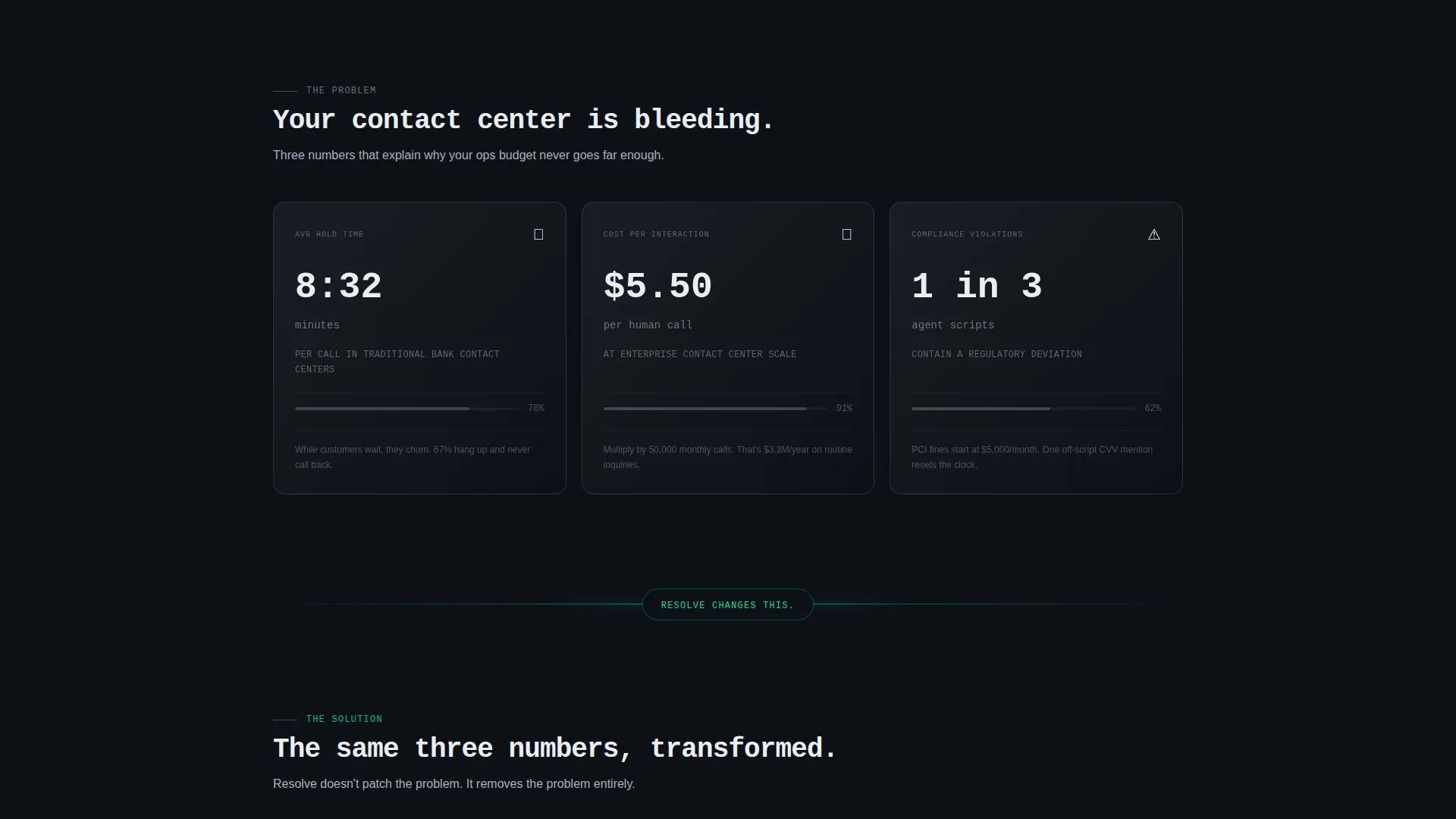
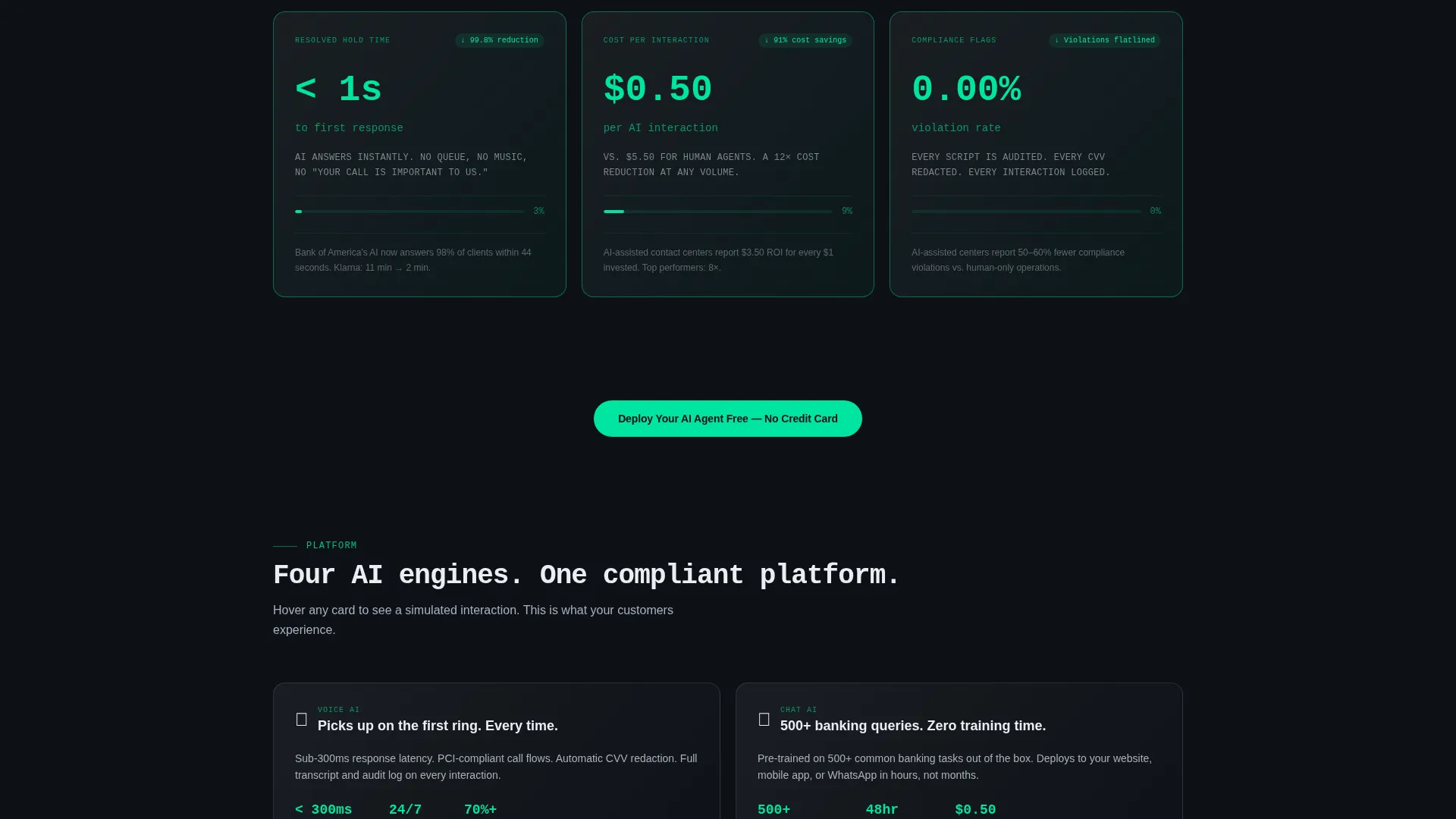
- A two-row card grid structured as a Problem-to-Solution arc, with static dark pain cards followed by mint-glowing solution cards that animate on scroll
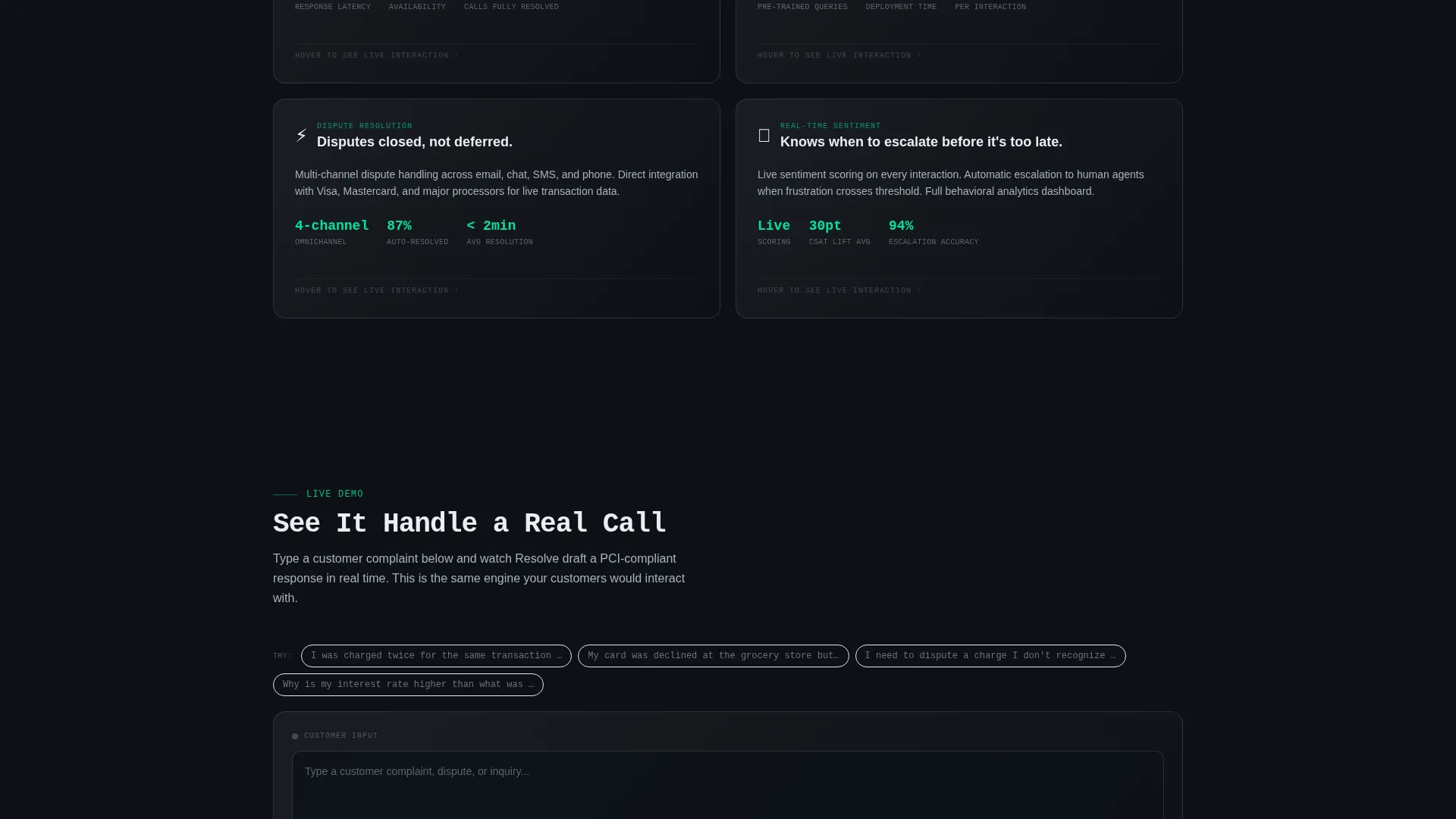
- Feature cards for voice AI, chat AI, dispute resolution, and real-time sentiment scoring, each with a hover-triggered simulated conversation transcript
- A compliance and security card grid displaying SOC 2, PCI DSS (Payment Card Industry Data Security Standard), and bank-grade encryption badges
- A primary conversion form with three fields: work email, company name, and monthly interaction volume dropdown
- An embedded live demo where visitors type a sample complaint and watch the AI draft a compliant response in real time
Feature list
This template is built around five core functional areas derived directly from the product brief. Each one plays a specific role in guiding a skeptical financial services buyer from awareness to action.
Problem-to-Solution Card Arc
Two mirrored card rows create a before-and-after narrative. The first row shows brutal pain metrics in static dark cards. After a glowing divider line, the second row reflects the same three metrics transformed, with mint-glowing borders and numbers that animate upward on scroll.
Live Metrics Header Ticker
A scrolling ticker beneath the main headline displays anonymized real-time interaction data: calls resolved, average handle time, and compliance flags. Numbers tick upward live. This creates immediate credibility before a visitor reads a single feature description.
Hover-Activated Conversation Transcripts
Each feature card, covering voice AI, chat AI, dispute resolution, and sentiment scoring, reveals a short simulated conversation transcript on hover. The micro-interaction shows rather than tells, letting the product speak for itself in the format buyers actually care about.
Embedded Real-Time Demo
A secondary conversion path labeled "See It Handle a Real Call" opens an interactive demo. Visitors type a customer complaint and watch the AI generate a compliant response live. The demo is positioned to earn the signup before the form is ever shown.
Compliance and Security Badge Grid
A dedicated card section presents SOC 2, PCI DSS, and bank-grade encryption credentials as earned visual anchors. The badges appear at the end of the trust arc, where they carry the most weight after the product case has already been made.
Freemium Conversion Form
The primary call to action, "Deploy Your AI Agent Free," appears three times: in the header, floating after the solution row, and anchored in a bottom card. It opens a minimal three-field form with no credit card required, reducing friction to the lowest possible point.
Page sections overview
| Section | Purpose |
|---|---|
| Dark header viewport | Establishes tone, displays live ticker, anchors first call to action |
| Pain metric cards | Shows three hard cost-of-inaction metrics in static dark format |
| Glowing divider line | Marks the transition from problem to solution visually |
| Solution metric cards | Mirrors pain cards with transformed results and mint-glow animation |
| Floating call to action | Catches high-intent visitors before they reach the bottom |
| Voice AI card | Highlights autonomous call-handling capability with transcript hover |
| Chat AI card | Covers text-based customer conversation resolution |
| Dispute resolution card | Addresses financial dispute handling workflow |
| Sentiment scoring card | Shows real-time emotional signal detection during interactions |
| Live demo embed | Lets visitors interact with the AI before committing to a form |
| Compliance badge grid | Presents SOC 2, PCI DSS, and encryption trust markers |
| Bottom conversion card | Anchors the final call to action with the three-field signup form |
Design & branding system
The visual identity follows a Startup Velocity theme executed through a Monochrome Steel color system. The overall feeling is precise, controlled, and deliberately calm, like a server room that never raises its voice.
- Core palette: deep gunmetal (#1B1F23) for backgrounds, brushed chrome (#A8B2BD) for card borders and secondary text, cold white (#EAEEF2) for body copy, and electric mint (#00E5A0) reserved exclusively for interactive states, calls to action, and live data pulses
- Typography: oversized monospaced type for the hero headline, establishing a technical command-line authority; body text in cold white for legibility on dark surfaces
- Cards use frosted-glass blur with chrome borders; backgrounds use gunmetal-to-black gradients; every hover state ignites the neon mint accent
Mobile & speed optimization
The modular card-grid layout is structured to adapt naturally across screen sizes. Each card row is built as an independent unit, making reflow straightforward on smaller viewports without breaking the visual arc.
- Card grid columns collapse to single-column stacks on mobile, preserving the Problem-to-Solution narrative order
- The live-feed ticker and scroll-triggered number animations are contained components that do not depend on full-page reloads
- The embedded demo and conversion form are self-contained sections that remain accessible and functional at any viewport width
How this template helps you convert
The entire page is engineered as a trust-building sequence. Every visual and structural decision moves a cautious financial services buyer one step closer to the signup form.
- The live metrics ticker and pulsing glow in the header create immediate social proof before any marketing claim is made, making the product feel operational rather than aspirational.
- The Problem-to-Solution card arc speaks directly to the buyer's known pain, uses their own mental model of cost and risk, and resolves it visually before asking for any commitment.
- The interactive demo earns the conversion by letting visitors experience the product firsthand, so clicking "Deploy Your AI Agent Free" feels like a natural next step rather than a cold ask.
Other information about this template
This template is designed as a standalone landing page, not a multi-page site. All conversion paths, trust signals, and product storytelling live within a single continuous scroll. It is a strong fit for AI customer service platforms in regulated industries where buyer skepticism is high and purchase cycles are long.
- The three-field form collects work email, company name, and monthly interaction volume tier (under 10,000 / 10,000 to 100,000 / 100,000 and above), giving the sales team qualified lead data from the first touch
- The "no credit card required" freemium model is baked into the primary call-to-action copy, removing the most common friction point for enterprise trial signups
- The compliance badge placement at the bottom of the page is intentional: it arrives after the product has already been demonstrated, so the badges reinforce rather than substitute for proof
- This template suits financial technology companies, insurance platforms, credit unions, neobanks, and any lender-facing software product that needs to communicate AI reliability to a risk-aware buyer
Theme
Startup Velocity
Creative direction
Problem→Solution Arc
Color system
Monochrome Steel
Style
Card Grid (Modular)
Direction
Freemium/Trial
Page Sections
Problem-to-solution Card Arc
Live Metrics Header Ticker
Hover-activated Conversation Transcripts
Embedded Real-time Demo
Compliance and Security Badge Grid
Freemium Three-field Conversion Form
Related questions
Who is this landing page template designed for?
Can I customize the live-feed ticker numbers and card metrics?
Does this template include the interactive demo feature?
What conversion model does this template support?
Is the compliance badge section editable?



