AI & Machine Learning Premium Professional Website Template
Resolve is a bento grid landing page template built for AI customer service platforms. It combines a live dashboard header, stat-heavy bento cards, a 14-row versus table, and an inline ticket simulation into one high-converting single-page layout. The Midnight Blue color system and Dashboard Pro theme give it the focused intensity of a real operations center.
by Rocket studio
Quick summary
Resolve is a single-page bento grid template designed for AI customer service platforms. It leads with a live dashboard preview, drops three massive metric cards on first scroll, then walks visitors through a detailed AI-versus-traditional-helpdesk comparison. Every section is built around numbers, proof, and a frictionless path to calculating the visitor's own projected savings.
Who this template is for
This template is built for teams selling or showcasing AI-powered customer support tools to serious operations buyers. If your audience evaluates software under pressure, this layout speaks their language.
- Heads of support at mid-market SaaS companies managing thousands of tickets per week with lean teams
- E-commerce operations directors watching customer satisfaction scores drop during high-volume seasonal periods
- Fintech compliance leads who need every support response to be traceable and audit-ready
What problem this template solves
Support teams at scale face a brutal math problem: ticket volume keeps climbing while headcount stays flat. A landing page that leads with empathy and vague promises does not convert these buyers. They need to see hard numbers immediately and understand the cost of their current setup before they consider an alternative.
- Generic landing pages bury the product value under stock photography and marketing copy
- Buyers comparing AI tools against their existing helpdesk need a structured, side-by-side proof point, not a feature list
- Friction in the conversion path, such as mandatory demo bookings or email gates, causes high-intent visitors to leave before they calculate their savings
What you get with this template
You get a fully structured bento grid landing page that puts the product experience front and center. Every section is designed to move a skeptical, data-literate buyer from awareness to action.
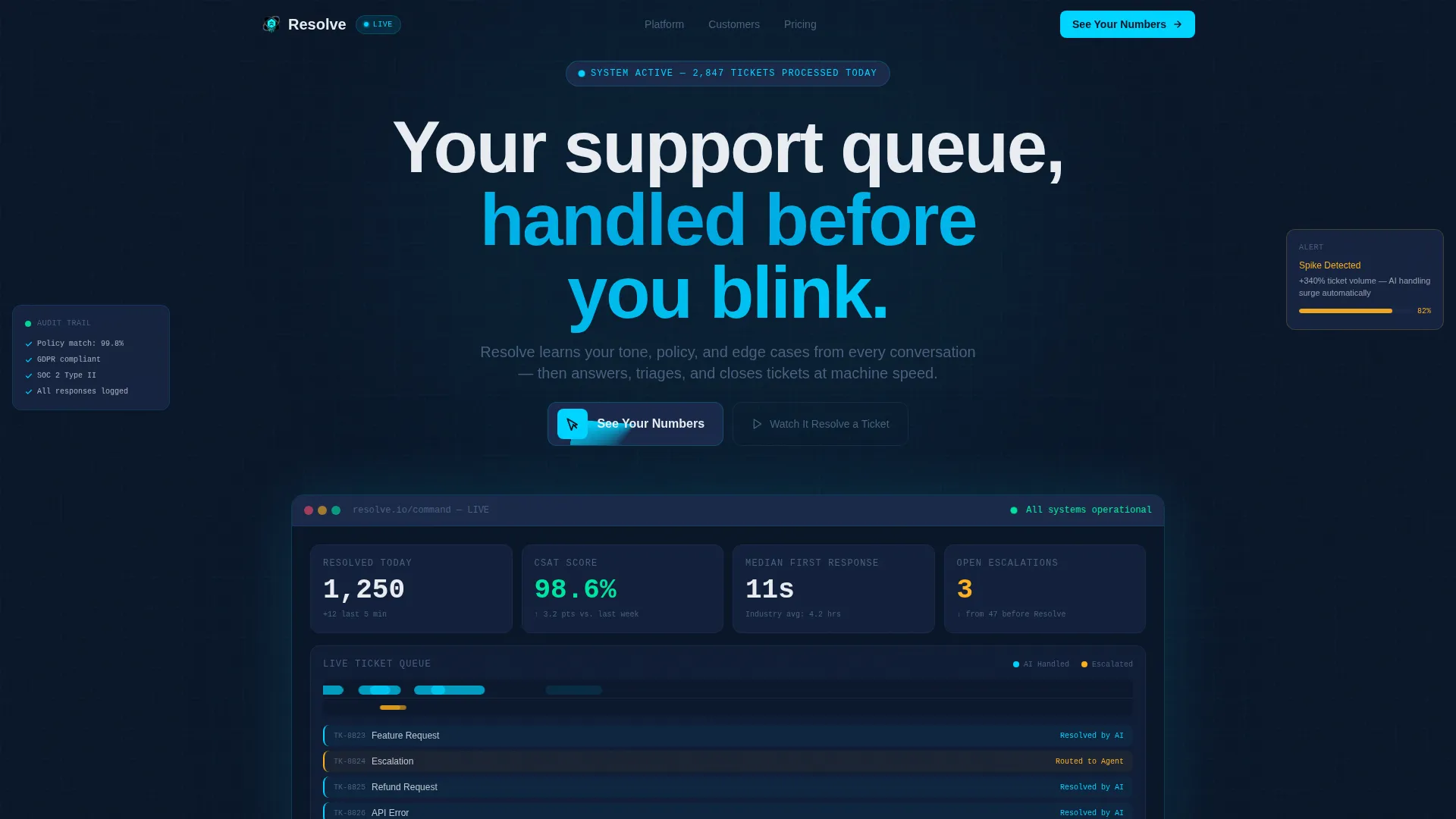
- A viewport-filling dashboard header with animated live metrics including ticket resolution counts, CSAT score, first response time, and open escalation indicators
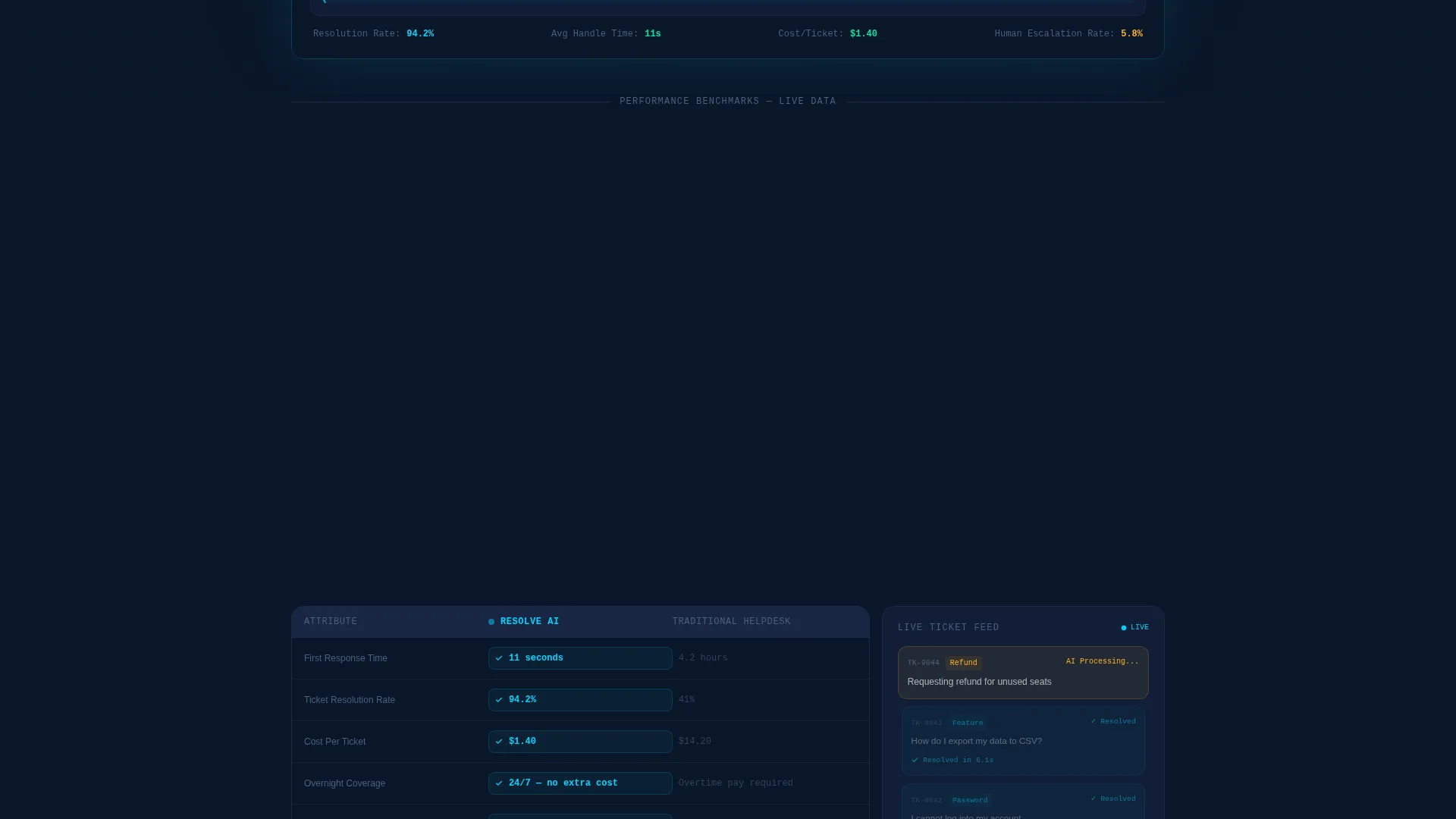
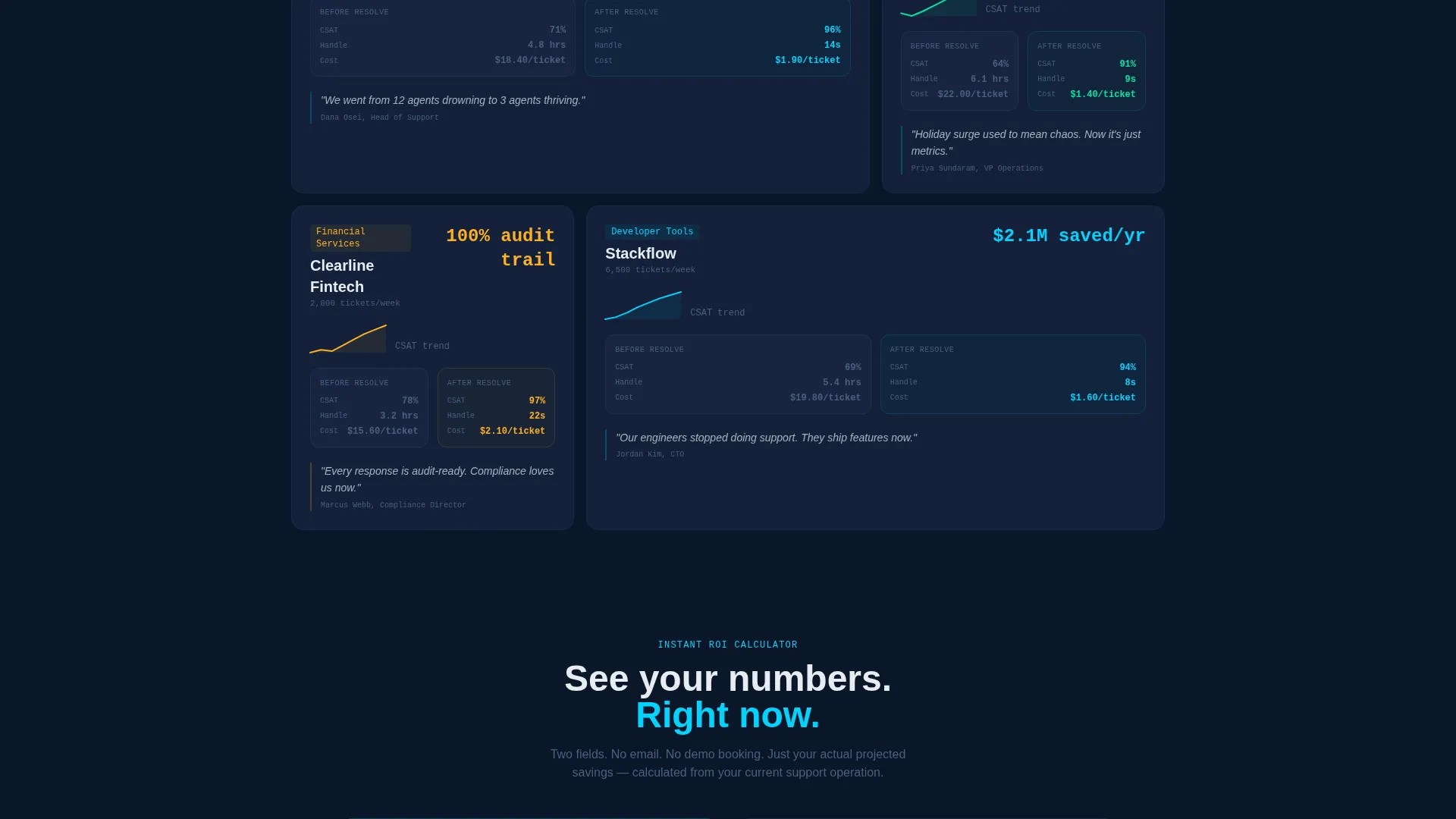
- A three-card metric row, a 14-row AI-versus-helpdesk comparison table, a live ticket feed simulation, and before-and-after case study cards with embedded sparkline graphs
- Two conversion paths: a two-field savings calculator that generates an instant projection on submission, and an inline ticket resolution simulation triggered by a secondary call to action
Feature list
This section covers the core functional and design components built into the Resolve template.
Live Dashboard Hero Header
The header fills the full viewport with a pixel-accurate replica of the platform's command view. It displays four real-time metrics: 1,247 tickets resolved today, 98.6% customer satisfaction score, 11-second median first response time, and three open escalations. A micro-animation pulses the resolution counter upward continuously. The ticket queue visualization shows AI-handled tickets flowing left to right in electric cyan, with a thinner amber stream marking human-escalated tickets.
Stats-First Bento Grid Layout
The first content row after the header places three oversized metric cards side by side. Each card covers a single performance number: resolution rate, cost per ticket, and handle time. Subtle counter animations activate as each card enters the viewport, giving the metrics a sense of live activity rather than static copy.
14-Row AI Versus Helpdesk Comparison Table
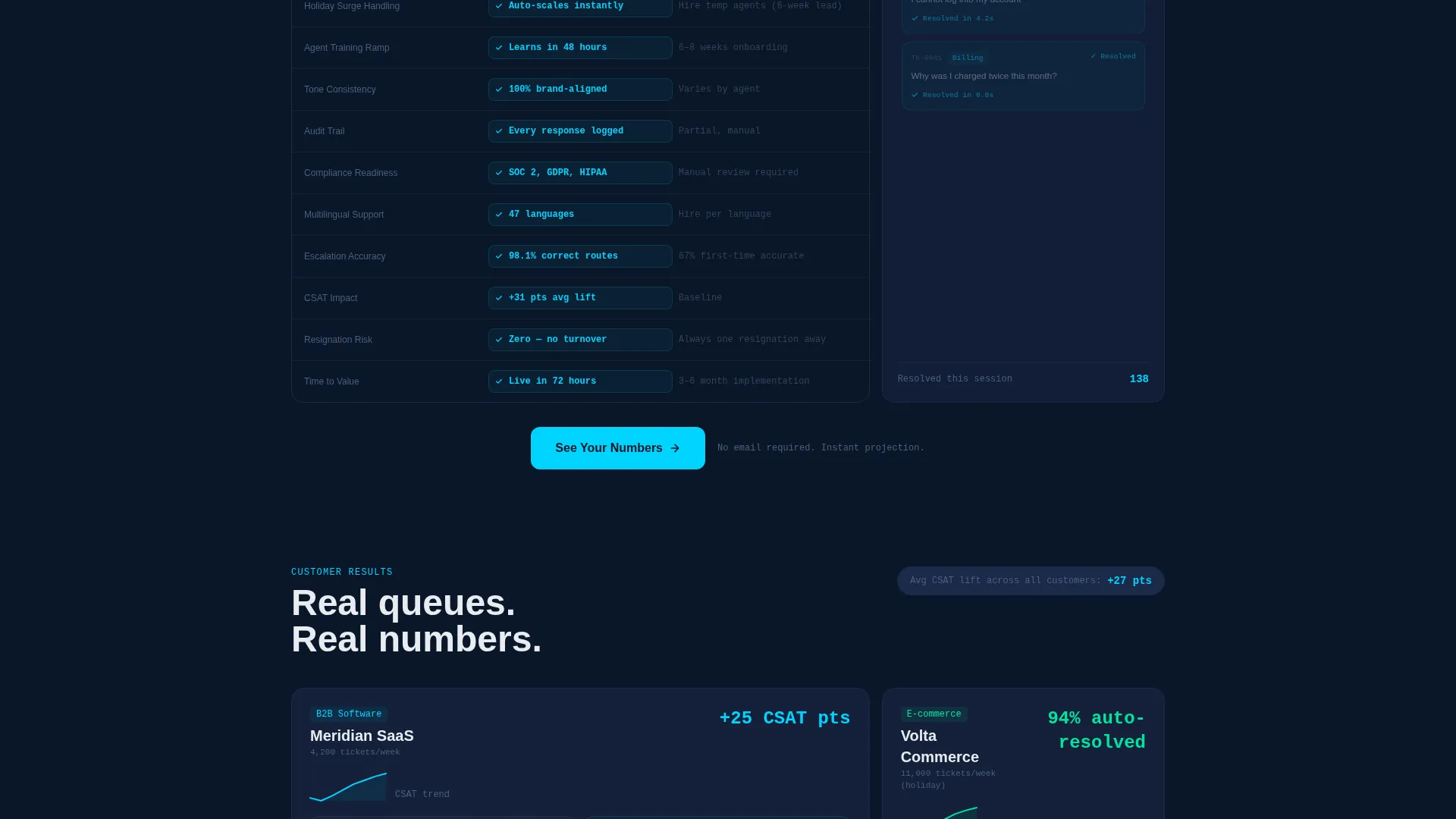
A full-width versus table occupies the left two-thirds of a bento row. It compares an AI agent column against a traditional helpdesk column across 14 line items. These range from first-response speed and overnight coverage to training ramp time. Each row reveals on scroll, with the AI column consistently highlighted in electric cyan against the muted gray competitor column.
Inline Ticket Resolution Simulation
The right third of the comparison row runs a live-feed simulation showing tickets being categorized, answered, and closed in sequence. A secondary call to action, labeled "Watch It Resolve a Ticket," triggers a full inline simulation where the AI handles a sample support conversation in real time. This gives skeptical buyers a tangible product demonstration without leaving the page.
Instant Savings Calculator
The primary call to action, "See Your Numbers," appears at the header and again directly after the versus table. It opens a two-field form asking for monthly ticket volume and current average handle time. On submission, the page instantly generates a projected savings estimate. There is no email gate and no demo booking step required.
Case Study Bento Cards with Sparklines
Further down the page, individual bento cards present before-and-after metrics for named companies. Each card functions as a mini-dashboard with sparkline graphs embedded directly inside the grid cell, showing the performance change in a compact, scannable format.
Page sections overview
| Section | Purpose |
|---|---|
| Dashboard Hero Header | Fills viewport with live platform metrics and animated ticket queue |
| Three Metric Cards | Opens first scroll with resolution rate, cost, and handle time |
| AI Versus Table | Compares AI agent to traditional helpdesk across 14 line items |
| Live Ticket Feed | Simulates real-time ticket categorization, response, and closure |
| Savings Calculator Form | Generates instant projected savings from two visitor-supplied inputs |
| Case Study Cards | Shows before-and-after metrics with embedded sparkline graphs |
| Secondary call to action Simulation | Triggers inline AI ticket resolution demo on button click |
Design & branding system
The template uses a Dashboard Pro theme built on a Midnight Blue color system. The palette is designed to feel like a live operations center at night: cool, precise, and slightly intense.
- Deep terminal navy (#0A1628) for all primary backgrounds, desaturated steel (#1B2A4A) for card surfaces, electric cyan (#00D4FF) for live-data accents and active-state borders, and crisp signal white (#E8ECF1) for typography and metric numerals
- A single warm amber (#FFB020) accent is used exclusively for alert states and comparison highlights, keeping the visual hierarchy unambiguous
- No stock photography or illustration appears anywhere in the layout; the product interface itself serves as the only visual hero element
Mobile & speed optimization
The bento grid layout is structured to adapt across screen sizes without losing the data-dense visual impact. The dashboard header and metric cards are the primary focal points and are given priority in the layout stack.
- Bento grid columns restack on smaller screens so metric cards, the versus table, and case study cards remain individually readable
- Micro-animations on counters and the ticket feed simulation are contained within discrete grid cells, keeping layout shifts predictable as content loads
- The two-field savings calculator form is compact by design, making it usable on any screen size without scrolling past the submission button
How this template helps you convert
The Resolve template is built around a single conversion philosophy: make the visitor's current cost visible before presenting the alternative. Every structural choice supports that goal.
- The stats-first layout ensures that high-intent buyers see hard performance numbers within one scroll, before they read a single line of marketing copy, which reduces early bounce from skeptical visitors.
- The 14-row versus table creates a structured, scroll-driven proof sequence that earns the primary call to action by making the comparison feel earned rather than asserted.
- The friction-free savings calculator removes the biggest barrier for mid-funnel buyers: the mandatory demo. An instant projection on two inputs keeps buyers engaged and on the page.
Other information about this template
The Resolve template is a purpose-built asset for teams in the AI customer service space. It works best when the platform it represents can back up the metrics shown in the hero section with real product data.
- The template style is bento grid, which means individual content blocks can be rearranged or resized to fit different product stories within the same visual system
- The Dashboard Pro theme and Midnight Blue color system are designed for the AI and machine learning technology category, where buyers expect precision and data density rather than soft lifestyle visuals
- The creative direction is Stats-First Impact, meaning the layout is intentionally built to lead with numbers and comparisons rather than narrative or emotional storytelling
- The header concept is a Dashboard Preview, which is a distinct design choice that positions the product interface as the primary trust signal rather than testimonials or brand logos
- The landing page direction is Comparison/Versus, making it particularly effective for markets where buyers are actively evaluating AI customer service tools against their existing helpdesk setup
Theme
Dashboard Pro
Creative direction
Stats-First Impact
Color system
Midnight Blue
Style
Bento Grid
Direction
Comparison/Versus
Page Sections
Live Dashboard Hero Header
Stats-first Bento Grid Layout
Row AI Versus Helpdesk Table
Instant No-gate Savings Calculator
Inline Ticket Resolution Simulation
Case Study Cards with Sparklines
Related questions
Can I change the metrics shown in the dashboard header?
Do I need design or coding skills to edit this template?
Can the savings calculator connect to a real calculation engine?
Is this template suitable for a product still in early access or beta?



