Church & Religious Software Advanced Reviews Website Template
Resolve is a church and religious help desk landing page template built for ministry teams of every size. It combines an interactive request estimator, animated stats, and a live dashboard preview to show how tickets flow from submission to resolution. The design uses a Dynamic Motion theme with a Teal Catalyst color palette, reverent, alive, and built to convert.
by Rocket studio
Quick summary
Resolve is a single-page template designed for church and religious help desk and ticketing platforms. It opens with a congregation-size estimator that animates real-time projections, then guides visitors through a Stats-First narrative showing how ministry requests move from chaos to clarity. The result is a focused, conversion-ready landing page that speaks directly to church administrators and operations teams.
Who this template is for
This template is built for ministry operations teams who need to communicate a help desk product's value quickly and honestly. It serves a wide range of church contexts, from small congregations with no dedicated support staff to large multi-campus organizations.
- Volunteer coordinators and church administrators managing 200-member congregations with no in-house technology team
- Megachurch operations directors routing thousands of weekly requests across multiple campuses
- Diocese offices and denominational leaders tracking facility maintenance across dozens of parishes
What problem this template solves
Church staff spend enormous amounts of time chasing requests that have no organized home. A broken projector, a baptism scheduling question, and a grief counseling referral all land in the same overloaded inbox, and the wrong ones get dropped.
- Ministry teams lack a clear system for categorizing and routing requests, causing delays and missed follow-through
- Volunteer coordinators have no single view of who is responsible for what, leading to duplicated effort or complete gaps
- Prospective users cannot quickly see how a help desk product would improve their specific situation without a hands-on preview
What you get with this template
This template delivers a complete, single-page layout purpose-built for a church ticketing and request management product. Every section is designed to reduce friction and move the right visitor toward starting a free account.
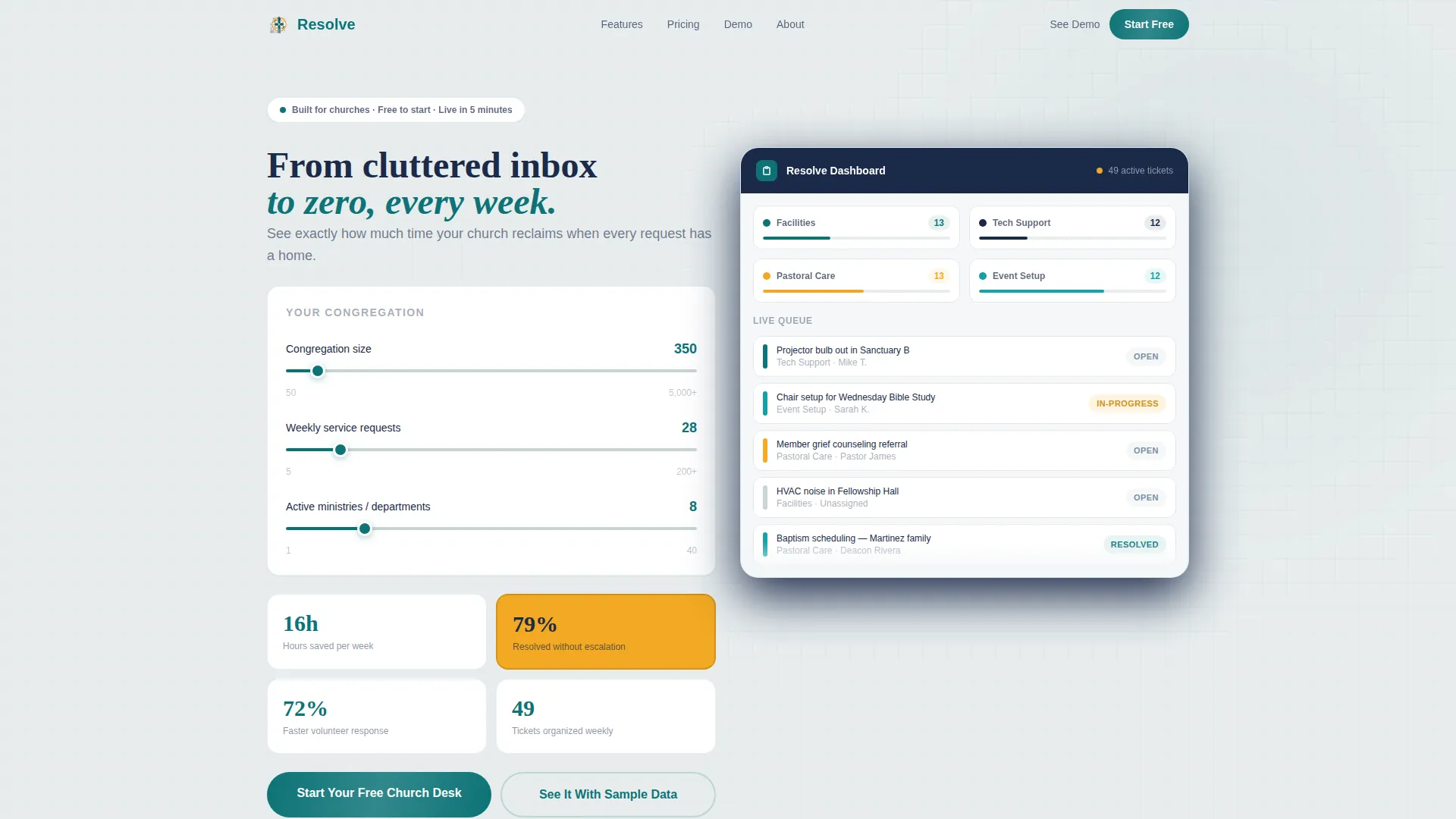
- An interactive congregation-size estimator with animated stat projections and a live mini dashboard preview populated from user inputs
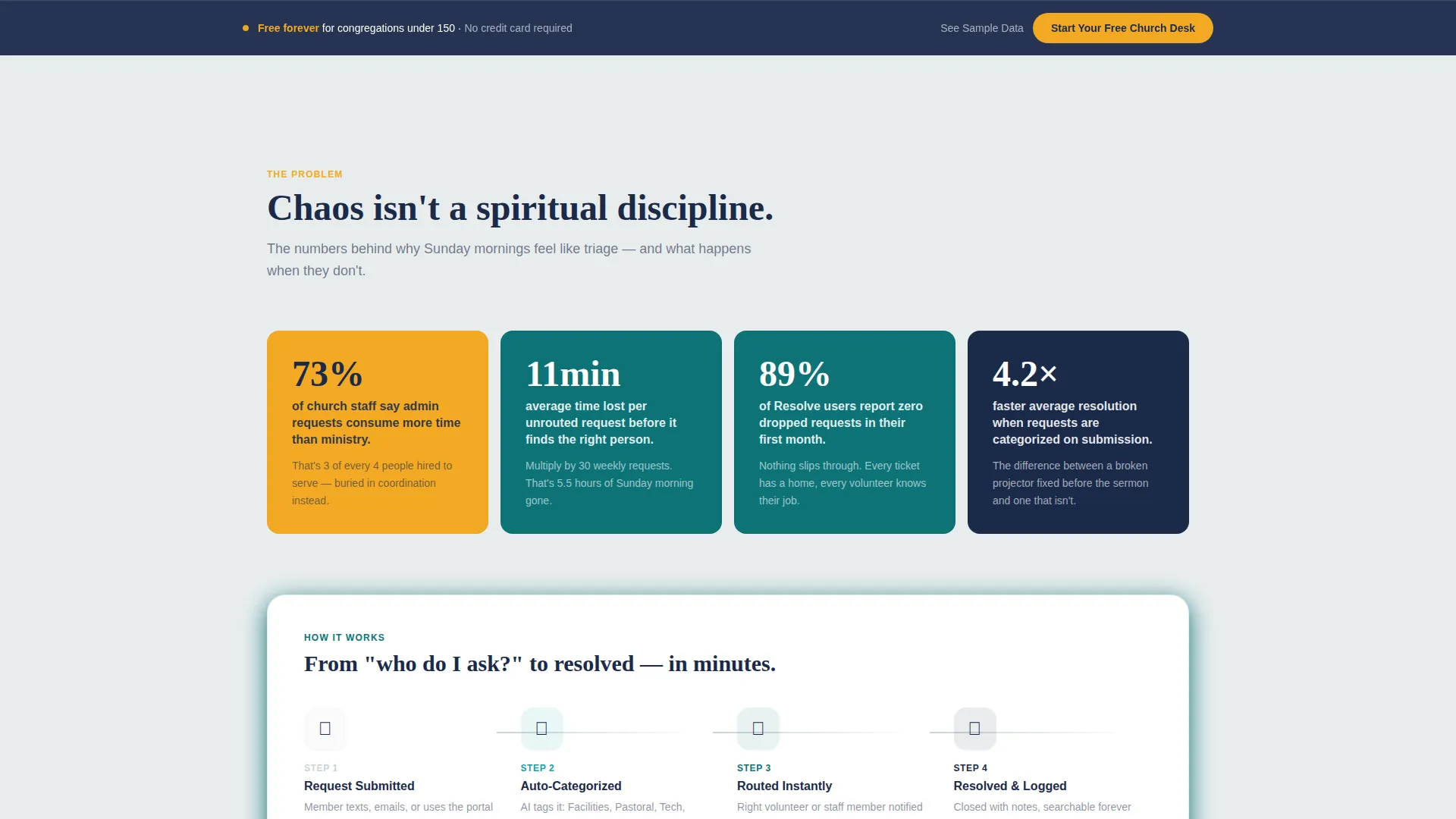
- A Stats-First scroll narrative with kinetic section transitions, animated numbers, and sequential dashboard screenshots that escalate from chaos to clarity
- A freemium conversion flow with a three-field signup form, a fixed bottom call-to-action bar, and a live demo path pre-loaded with realistic church ticket data
Feature list
This template is built around several purposeful components. Each one connects directly to the promise of the product it represents.
Interactive Request Estimator Header
Visitors enter their congregation size, weekly service request count, and ministry count. The tool animates real-time projections: hours saved per week, requests resolved without escalation, and volunteer response time reduction. Numbers roll upward with eased motion, each stat landing with a candlelight amber pulse.
Live Mini Dashboard Preview
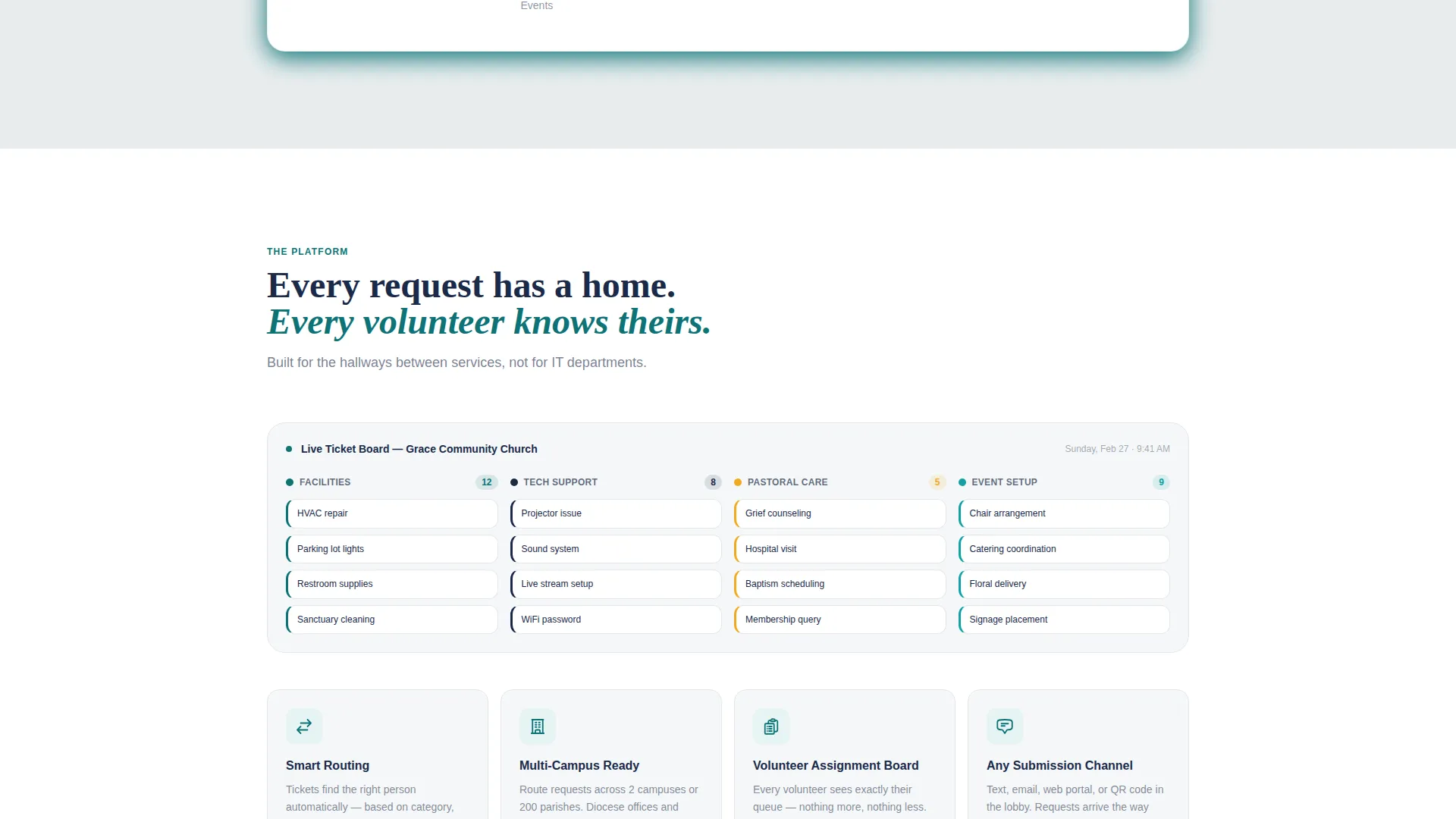
Below the estimator, a miniature dashboard populates with the visitor's own inputs. Ticket categories such as Facilities, Pastoral Care, Event Setup, and Tech Support snap into teal-coded columns, giving visitors a concrete preview of what their organized queue would look like.
Stats-First Scroll Narrative
Each scroll section leads with a bold animated number before context arrives. The narrative moves from chaos metrics to clarity metrics. Motion easing shifts from urgent to calm as visitors scroll deeper, mirroring the product's own promise of resolution.
Freemium Signup Flow
The primary call-to-action, "Start Your Free Church Desk," appears inside the calculator results and as a fixed bottom bar that activates after the first scroll. The signup form asks for church name, congregation size range from a dropdown, and email. No credit card is required.
Live Demo Path
A secondary conversion option labeled "See It With Sample Data" drops visitors into a pre-loaded demo dashboard filled with realistic church tickets. Visitors can click, assign, and resolve tickets before committing to anything, lowering the barrier to trial.
Kinetic Section Transitions
Sections slide in with kinetic energy as the visitor scrolls. The motion design is intentional: urgency fades and calm builds across the page, so the visual experience itself reinforces the product's core message about bringing order to ministry administration.
Page sections overview
| Section | Purpose |
|---|---|
| Estimator Header Widget | Calculates personalized time-saving projections from congregation inputs |
| Mini Dashboard Preview | Shows the visitor's own ticket queue organized into categories |
| Stats Impact Block | Opens each scroll section with an animated metric before the explanation |
| Ticket Flow Grid | Visualizes how requests move from submission through to resolution |
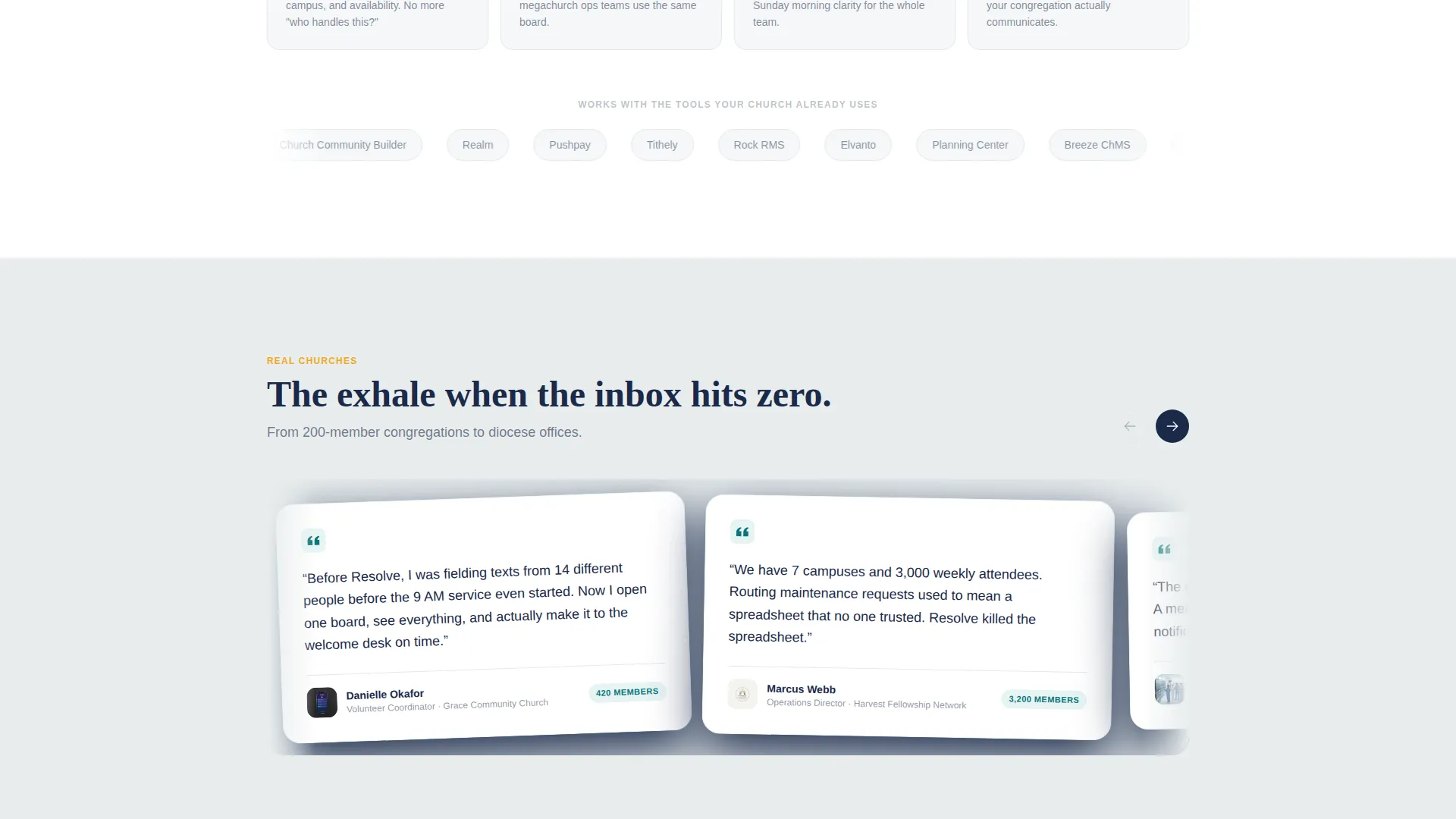
| Dashboard Screenshots | Escalating images showing progressively more organized ticket views |
| Freemium Signup Form | Three-field form capturing church name, size range, and email |
| Fixed Bottom Bar | Persistent call-to-action that activates after the visitor's first scroll |
| Live Demo Path | Secondary entry point pre-loaded with sample church ticket data |
Design & branding system
The visual identity follows a Dynamic Motion theme built on the Teal Catalyst color system. The palette is intentionally reverent but alive, with each color carrying a specific role across the layout.
- Deep sanctuary teal (#0D7377) anchors the primary interface and ticket columns; soft pew-cushion gray (#E8EDEE) provides breathing room across content areas; warm candlelight amber (#F2A922) marks alerts, active states, and animated stat pulses
- Vestment navy (#1B2A4A) grounds the header text and sidebar elements, giving the layout institutional weight without feeling cold or corporate
- The overall effect evokes stained glass catching afternoon light: the amber breaks through the teal the way a single candle cuts through a dim nave, keeping the design emotionally connected to its church context
Mobile & speed optimization
The Dynamic Motion theme is designed to deliver its scroll animations and kinetic transitions cleanly across device sizes. The layout prioritizes usability so that the estimator widget and dashboard preview remain functional whether a visitor is on a desktop or a smaller screen.
- The fixed bottom call-to-action bar is built to remain visible and tappable on mobile viewports without obscuring primary content
- Animated number sequences and section transitions use eased motion curves that maintain visual clarity even on smaller displays
How this template helps you convert
Every design and copy decision in this template is oriented toward moving a church administrator from curiosity to action without friction.
- The estimator personalizes the value proposition immediately. When a visitor sees their own congregation size reflected back in projected time savings, the product stops being abstract and becomes relevant to their specific ministry context.
- The "See It With Sample Data" demo path removes the biggest barrier to trial. Visitors who are not ready to sign up can still experience the product firsthand, increasing the likelihood they return and convert later.
- The fixed bottom call-to-action bar keeps the primary conversion option visible at every scroll depth. Combined with the three-field form and no credit card requirement, the signup path is as low-friction as possible.
Other information about this template
This template is designed to work as a standalone promotional landing page for a church help desk and ticketing product. It does not require a content management system or additional page builds to function as intended.
- The template style is Dashboard and Data Grid, making it well-suited for software products that need to demonstrate organized data visually before a visitor signs up
- The freemium and trial conversion direction means the template is optimized for products that lead with a free tier or no-commitment demo rather than a direct purchase flow
- The congregation size dropdown covers four ranges: under 100, 100 to 500, 500 to 2,000, and 2,000 and above, allowing the signup form to segment new users from the first interaction
Theme
Dynamic Motion
Creative direction
Stats-First Impact
Color system
Teal Catalyst
Style
Dashboard/Data Grid
Direction
Freemium/Trial
Page Sections
Interactive Congregation Estimator
Live Mini Dashboard Preview
Stats-first Scroll Sections
Freemium Three-field Signup
Pre-loaded Demo Dashboard Path
Kinetic Section Transitions
Related questions
Who is this landing page template designed for?
Does the estimator widget require coding to set up?
Can I replace the sample data in the live demo path?
What makes this different from a standard software landing page?
Is a credit card required in the signup form?



