Micro-SaaS & Developer Tools Professional Website Template
Resolve is a scroll-reveal landing page template built for a real-time DNS lookup and management tool. It opens with a fully functional DNS query interface above the fold, then progressively reveals propagation mapping, bulk lookups, WHOIS panels, and monitoring dashboards. The design uses a Tech Glass visual identity with an AI Iridescent color palette, driving visitors toward an app download.
by Rocket studio
Quick summary
Resolve is a single-page, scroll-reveal landing page template designed for a real-time DNS interrogation tool. The header is the product itself, a live DNS lookup interface that runs before visitors scroll. Progressive sections reveal deeper capabilities, from propagation mapping to monitoring dashboards, building toward an app download call to action.
Who this template is for
This template speaks directly to technically fluent audiences who need DNS lookup and management tools they can trust instantly. It skips soft introductions and leads with working functionality.
- DevOps engineers diagnosing production outages who need immediate, reliable DNS data
- System administrators migrating mail servers and validating DNS record changes across providers
- Security researchers tracing domain ownership through WHOIS history and DNS record chains
What problem this template solves
DNS tools are often buried behind signup walls, cluttered dashboards, or slow interfaces that delay the moment of trust. Visitors leave before they see the value. This template solves that by making the tool the headline.
- No email gate or signup wall delays the visitor's first query
- The landing page earns the download by demonstrating real utility before asking for anything
- Progressive scroll reveal builds confidence across each new capability, from single lookups to full infrastructure monitoring
What you get with this template
You get a complete, scroll-reveal landing page layout with a tool-first header and a structured content flow that escalates from quick utility to long-term value. Every section is purposefully ordered to move a skeptical technical visitor toward installing the desktop app.
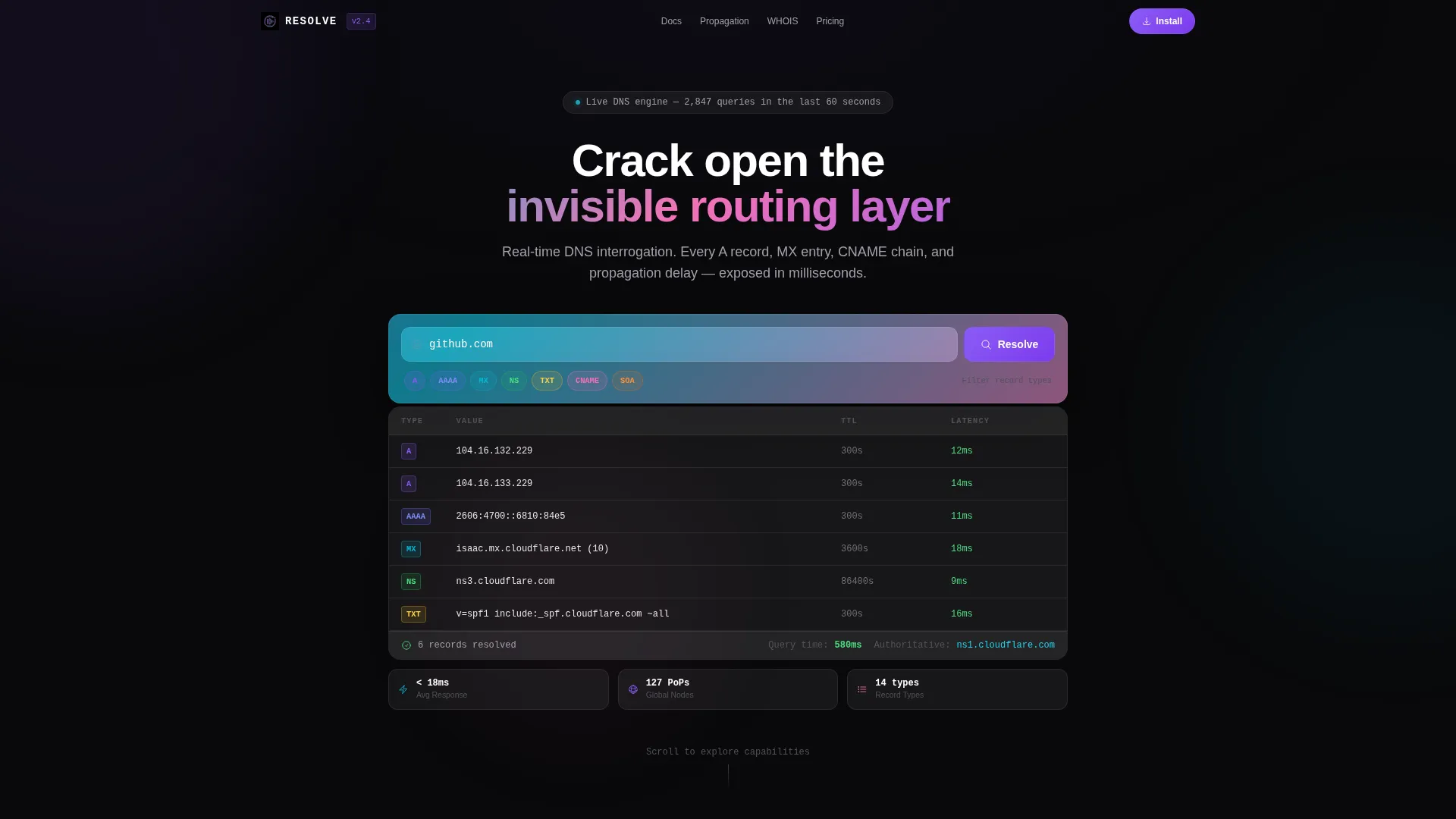
- A fully functional DNS lookup interface pre-built into the hero section, showing live query results in a glass-panel results table
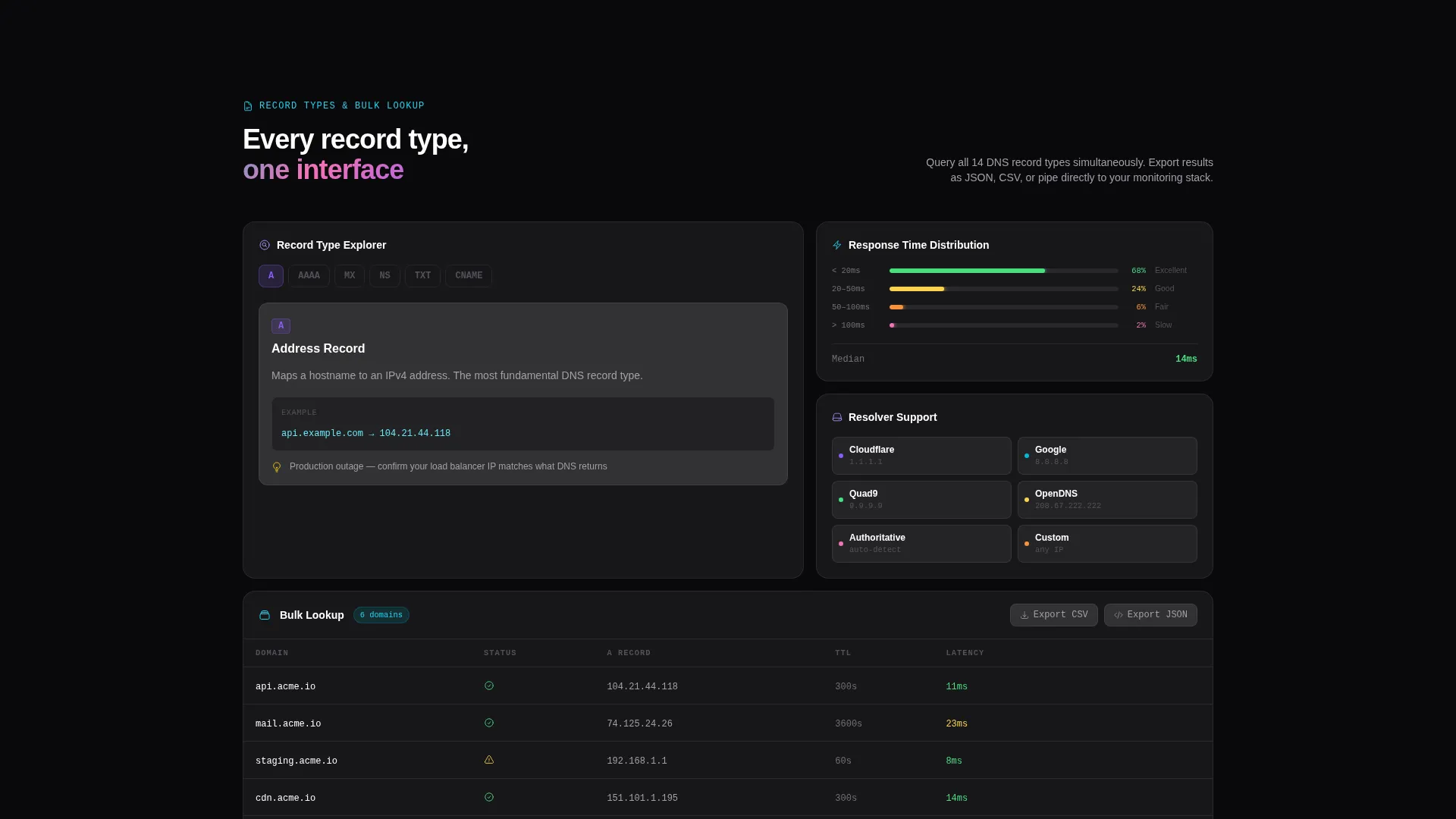
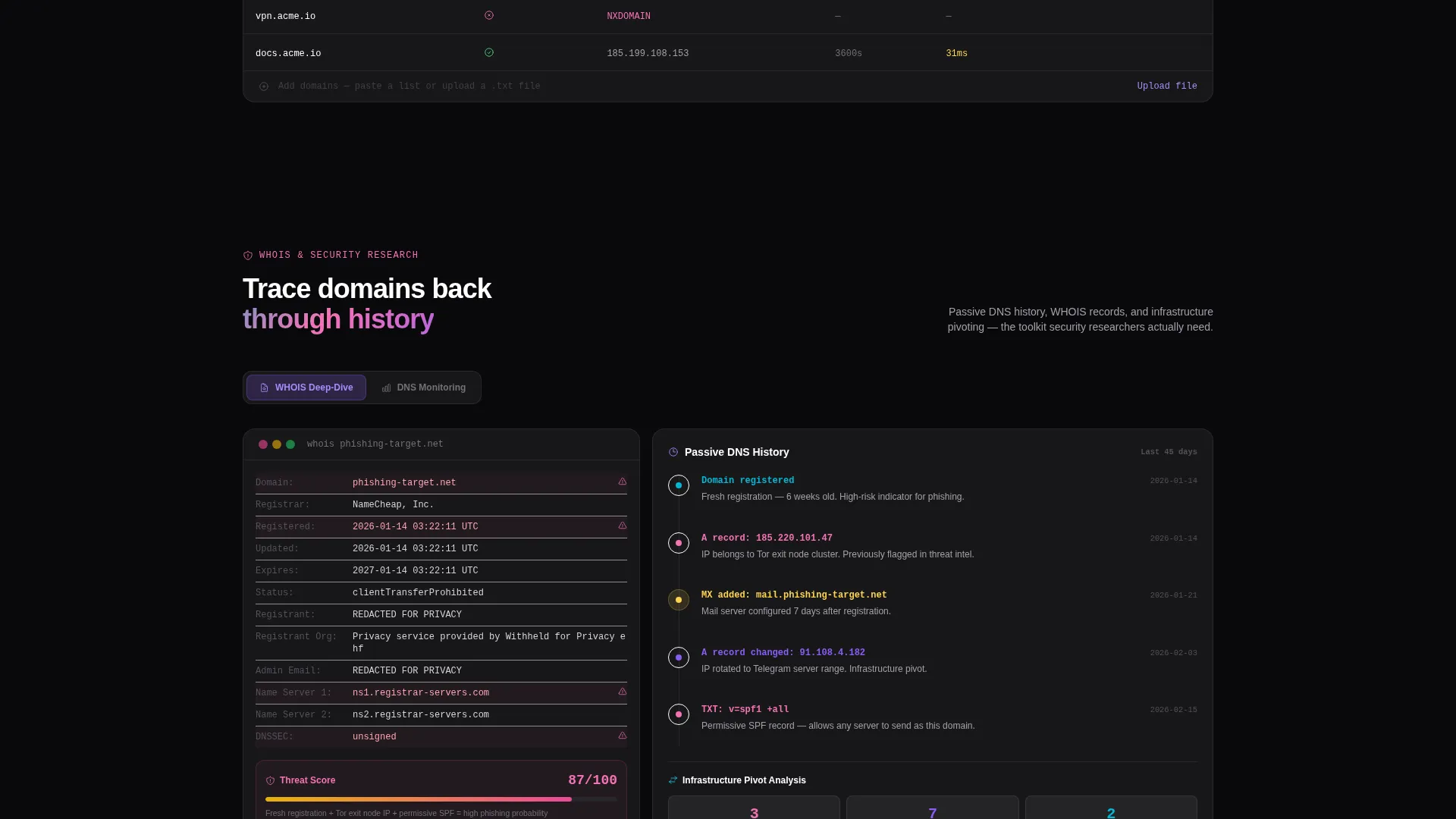
- Progressive scroll sections covering propagation mapping, bulk lookup grids, WHOIS panels, and monitoring dashboards with uptime sparklines
- Platform-detect download buttons for macOS, Windows, and Linux, plus a sticky secondary call to action that keeps the tool accessible during scroll
Feature list
This template delivers a focused set of purpose-built components for a DNS lookup and management landing page.
Live DNS Query Header
The header section is the tool itself. A frosted glass input field comes pre-filled with an animating domain query. Visitors watch A records, AAAA records, MX entries, NS servers, and TTL values load into a glass-panel results table in real time, with each record type color-tagged using iridescent accents.
Progressive Scroll Reveal Layout
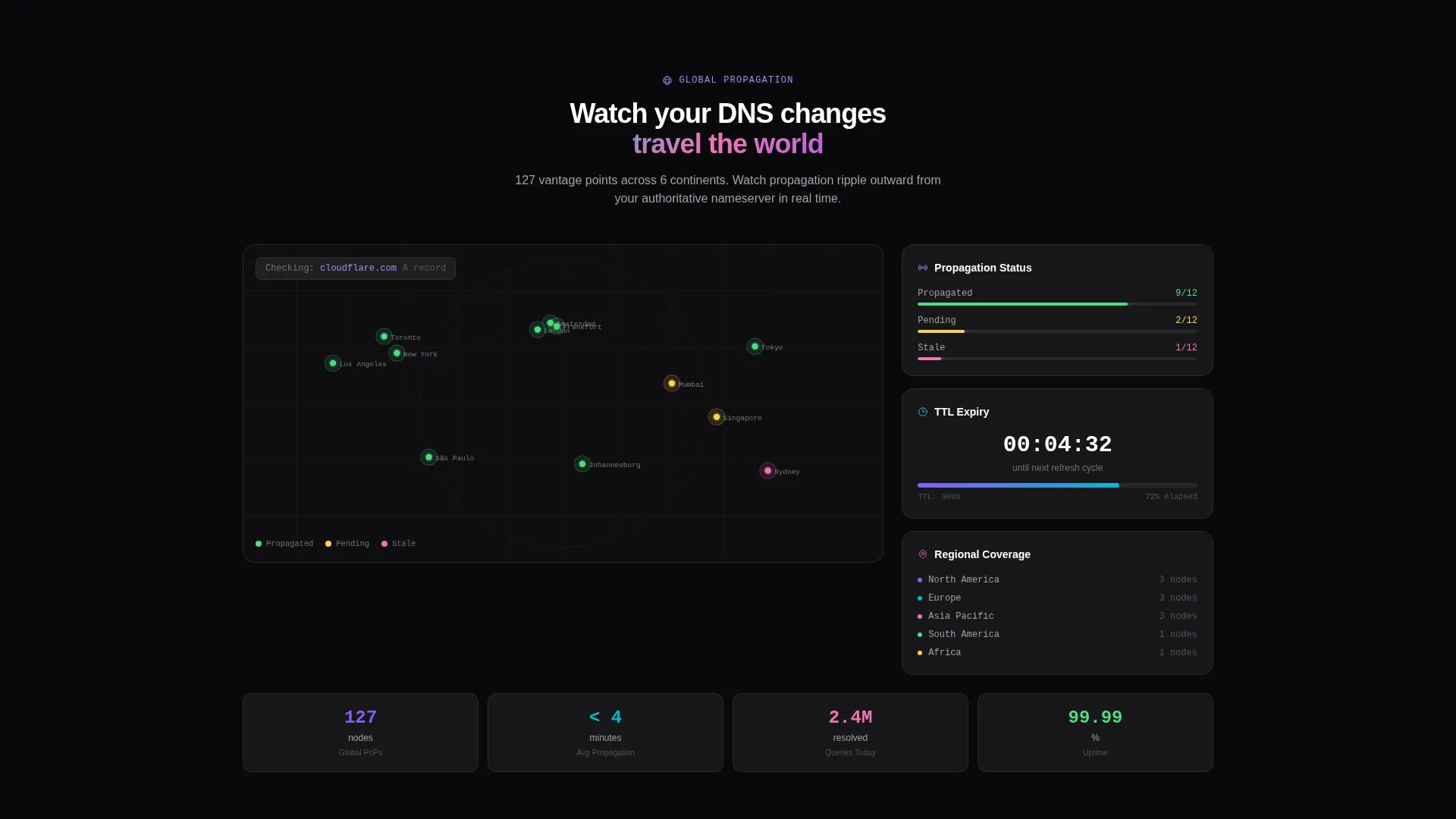
Each section stays soft and blurred until the visitor scrolls into it, mirroring the way the tool itself resolves DNS records. The reveal sequence moves from a single lookup to propagation mapping, then bulk query grids, WHOIS deep-dive panels, and finally DNS monitoring dashboards with uptime sparklines.
Three Free Queries with Soft Conversion Modal
Visitors can run up to three DNS lookups directly on the page at no cost. On the fourth query, a glass modal appears suggesting the desktop app for saved histories, batch queries, and propagation alerts. There is no email gate and no forced signup.
Platform-Detect App Download Buttons
The primary call to action section includes download buttons for macOS, Windows, and Linux. The template is built to auto-highlight the visitor's detected operating system, reducing friction at the final conversion step.
Sticky Secondary Call to Action
A persistent "Run Another Lookup" button stays visible throughout the scroll experience. It keeps the DNS lookup tool within one click at all times, reinforcing the habit of use before the download decision is made.
Dark Globe Propagation Visualization
The first scroll section after the header materializes a dark globe visualization showing DNS propagation mapping. It communicates global infrastructure reach in a visually immediate way without requiring text-heavy explanation.
Page sections overview
| Section | Purpose |
|---|---|
| DNS Lookup Header | Live query tool above the fold |
| Propagation Map Section | Global DNS spread visualization |
| Bulk Lookup Grid | Multi-domain query interface |
| WHOIS Deep-Dive Panel | Domain ownership and history detail |
| Monitoring Dashboard Section | Uptime sparklines and DNS alerts |
| App Download Call to Action | Platform-detect install buttons |
Design & branding system
The visual identity follows a Tech Glass theme using an AI Iridescent color system. The palette feels like a glass prism resting on a server rack, splitting cool light into spectral bands across a near-black surface.
- Core colors include void black (#09090B) for backgrounds, frosted glass panels at 6% white opacity over blur, prismatic violet (#8B5CF6), shifting cyan (#06B6D4), and iridescent rose (#F472B6) for active states and data highlights
- Secondary text renders in cool gray (#A1A1AA), while result values and primary content use pure white for maximum contrast on dark backgrounds
- Interactive elements shimmer between violet and cyan on hover, simulating a refractive light effect across glass card edges
Mobile & speed optimization
The template is designed to feel immediate and responsive, with a layout that translates the scroll-reveal experience cleanly across screen sizes.
- Glass card components and the DNS results table are structured to reflow naturally on smaller viewports
- The sticky secondary call to action and platform-detect buttons remain accessible and clearly tappable on mobile screens
- Scroll reveal animations are sequenced to feel deliberate rather than heavy, keeping the progressive disclosure experience intact on touch devices
How this template helps you convert
This template uses the product itself as the primary persuasion mechanism. Every design and layout decision is oriented around earning the download before asking for it.
- The live DNS lookup tool in the header delivers immediate value, so the visitor's first impression is competence, not a marketing headline
- The three free queries build a usage habit on the page, and the gentle glass modal at the fourth query introduces the desktop app as the natural next step
- Platform-detect download buttons reduce the final decision to a single highlighted tap, removing the friction that causes technical users to abandon download flows
Other information about this template
Resolve is built specifically for the DNS lookup and management niche within the Micro-SaaS and Developer Tools space. It is designed as a single landing page rather than a multi-page site, keeping the entire conversion journey on one scrollable surface.
- The template category is Technology, with a creative direction of Calculator and Tool First, meaning the interactive component drives the entire layout hierarchy
- The scroll-reveal style and Tech Glass theme are matched intersection context fields, meaning the design language and interaction pattern are purpose-selected for developer tool audiences
- This template suits product teams launching a DNS management desktop app, indie developers building DNS utilities, or agencies producing landing pages for infrastructure tooling clients
Theme
Tech Glass
Creative direction
Calculator/Tool First
Color system
AI Iridescent
Style
Scroll Reveal (Progressive)
Direction
App Download
Page Sections
Live DNS Query Hero Interface
Scroll-reveal Section Architecture
Three Free Queries with Modal Upsell
Platform-detect Download Buttons
Dark Globe Propagation Visualization
Sticky Secondary Call to Action
Related questions
What kind of tool is this template designed to showcase?
Does the template include a working DNS lookup tool or just a visual mockup?
What is the primary call to action and how does the conversion flow work?
Who is this template best suited for?
Can this template support a DNS monitoring or infrastructure product?



