Advanced AI for Entertainment Cost Estimator Website Template
Resolve is a scroll-reveal landing page template built for AI-powered entertainment customer service platforms. It opens with a live dashboard hero, hands visitors an ROI calculator before asking for anything, then layers in product depth section by section. The design runs forge-black to gunmetal with signal-green accents, built to convert VP-level support leaders into free-trial signups.
by Rocket studio
Quick summary
Resolve is a single-page, scroll-reveal landing page template for an AI customer service engine serving entertainment companies. It leads with a live support operations dashboard, follows immediately with an ROI calculator, and guides visitors through progressive product reveals until the "Run 1,000 Tickets Free" call to action closes the deal.
Who this template is for
This template is built for teams launching or marketing an AI-driven customer service platform in the entertainment industry. The target visitor is a VP of support operations or a senior support leader at a streaming service, live-event ticketing company, or gaming studio.
- Support operations leaders managing post-launch ticket surges and billing disputes
- Product marketers promoting an AI resolution engine to enterprise entertainment clients
- Founders pitching an entertainment-focused AI support tool to operations buyers
What problem this template solves
Entertainment support teams face enormous ticket floods after game patch failures, concert presales, and streaming outages. Generic product pages fail to convince skeptical operations leaders because they show promises instead of proof.
- Visitors leave before understanding the ROI because no calculator exists on the page
- Dense feature lists bury the core value: tickets resolved before a human agent is needed
- Long signup forms with credit card requirements kill trial conversion at the last step
What you get with this template
You get a fully structured, scroll-reveal landing page that reveals product depth progressively, section by section, as the visitor scrolls. Every panel loads with a fade-and-slide animation that mimics a control room system powering up.
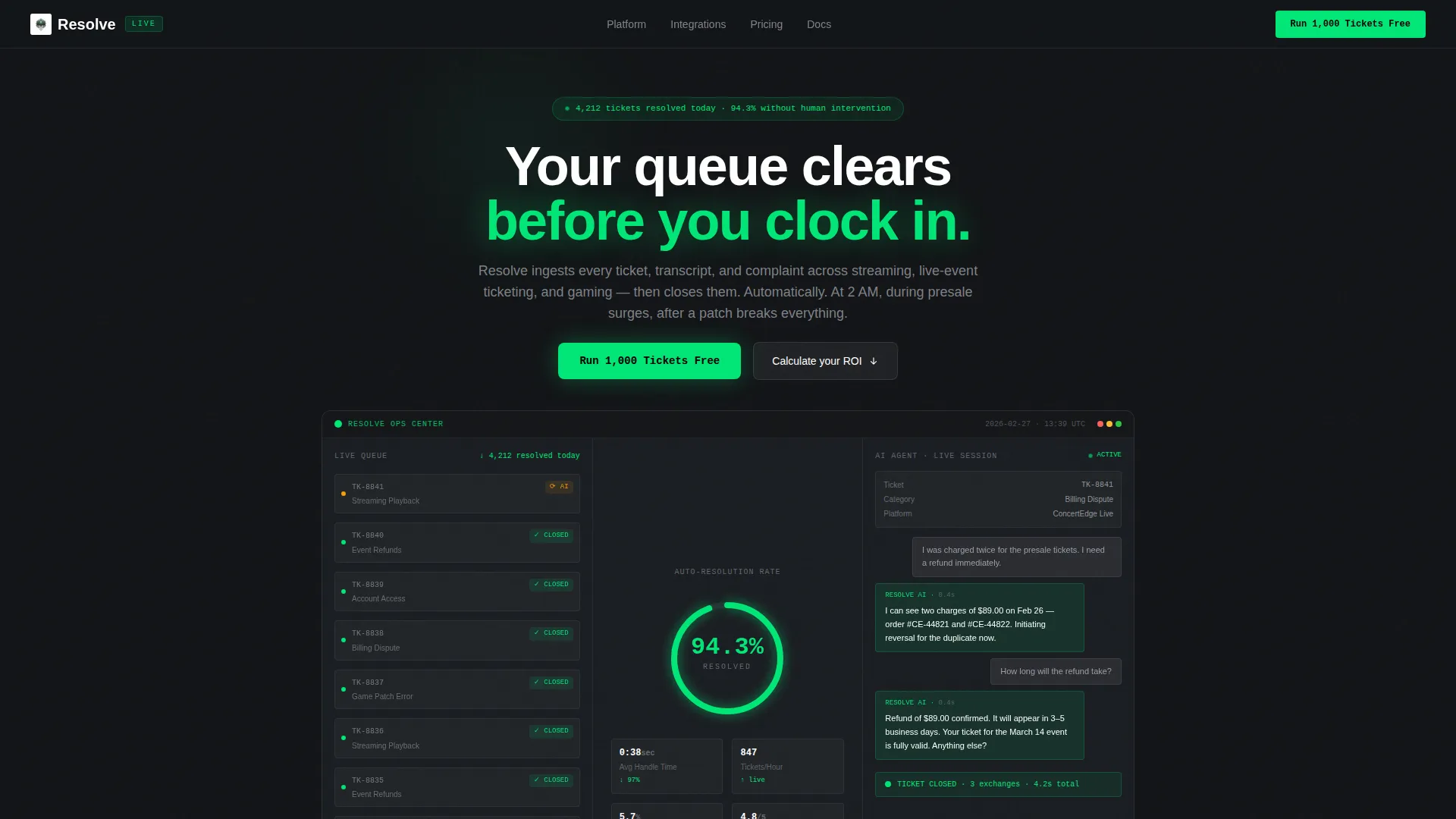
- A live dashboard hero showing real-time ticket resolution data, category breakdowns, and a chat simulation
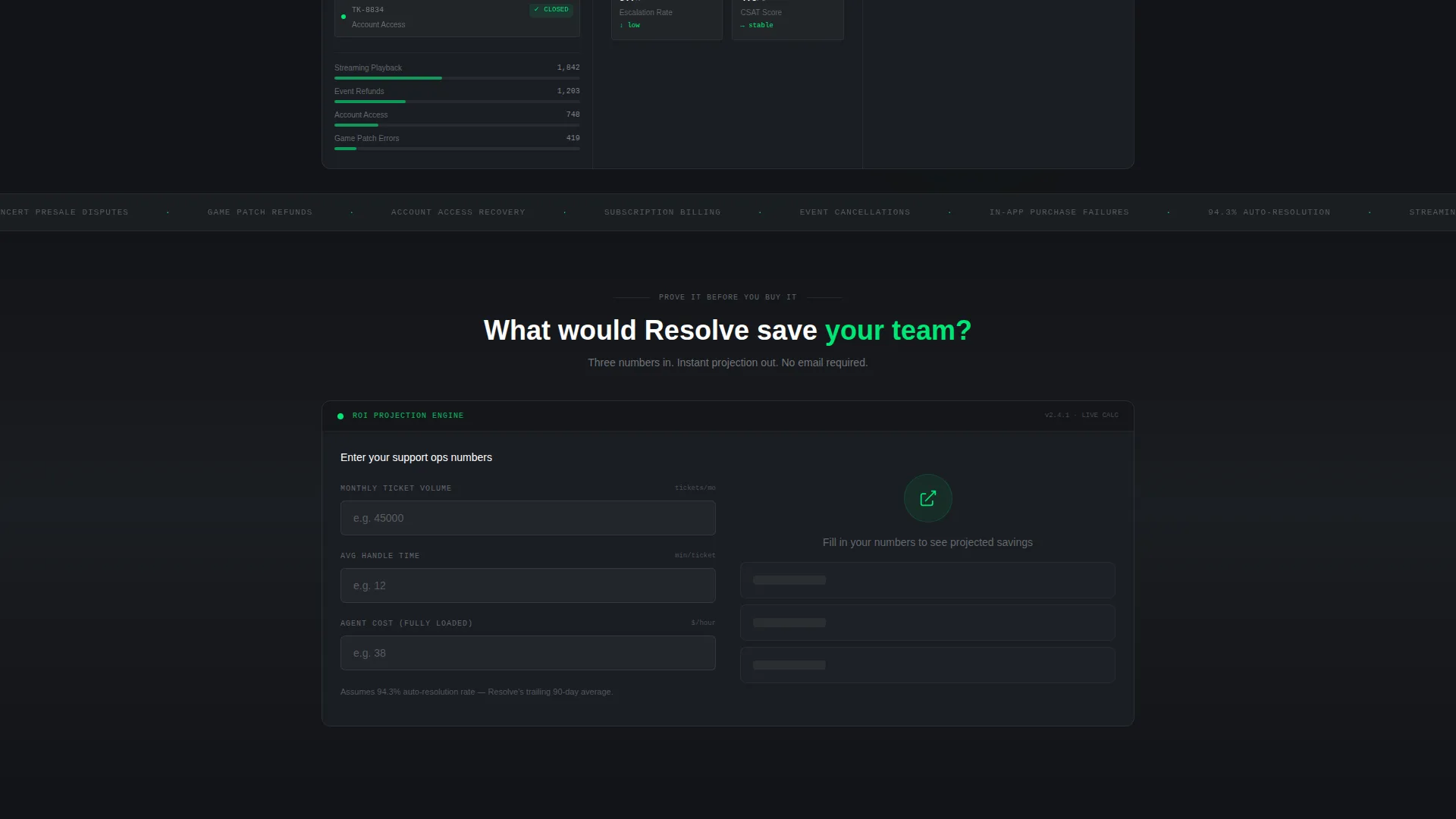
- An embedded ROI calculator with three inputs and instant output rendered in the same dashboard aesthetic
- A two-step, low-friction trial signup form with no credit card and no sales call required
Feature list
This section covers the core built-in components and interaction patterns included in the Resolve template.
Live Dashboard Hero Panel
The header renders a fully styled support operations console. It shows a ticket waterfall feed on the left, a resolution-rate dial climbing past 94% in the center, and a live chat simulation on the right. Specific data points such as "4,212 tickets resolved today" and category labels like "Streaming Playback," "Event Refunds," and "Account Access" are built directly into the layout.
Scroll-Reveal Progressive Sections
Every section below the hero fades and slides into view only as the visitor reaches it. This progressive reveal creates the experience of a system powering up screen by screen. It maintains attention and paces the product story from surface-level proof down to deep technical detail.
Embedded ROI Calculator Module
The second scroll module hands visitors a three-field calculator before asking for anything. Inputs are current monthly ticket volume, average handle time in minutes, and fully loaded agent cost per hour. Output is instant and shows projected tickets auto-resolved, hours saved, and annual cost reduction in the same dark dashboard style.
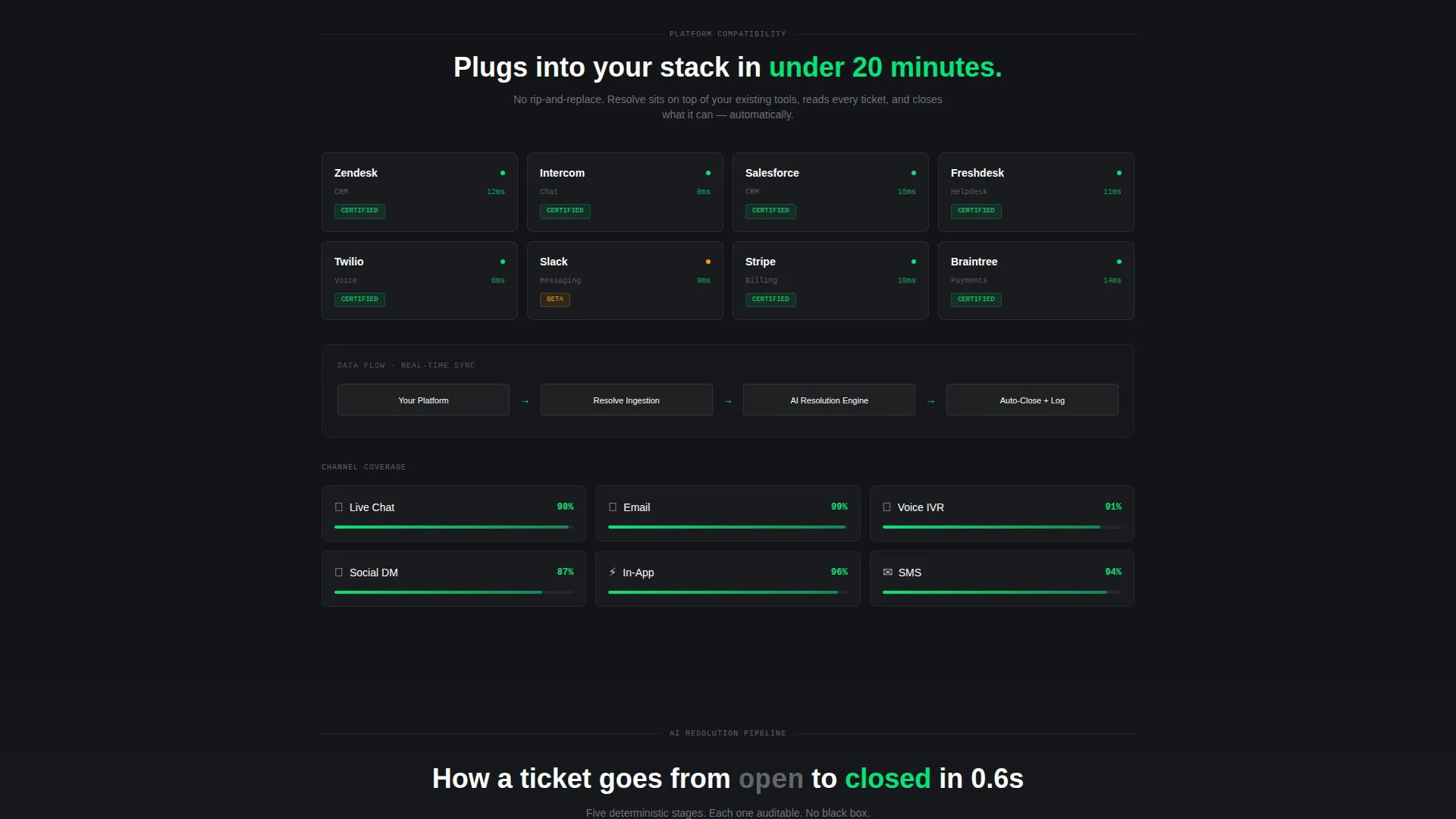
Integration and Channel Coverage Panel
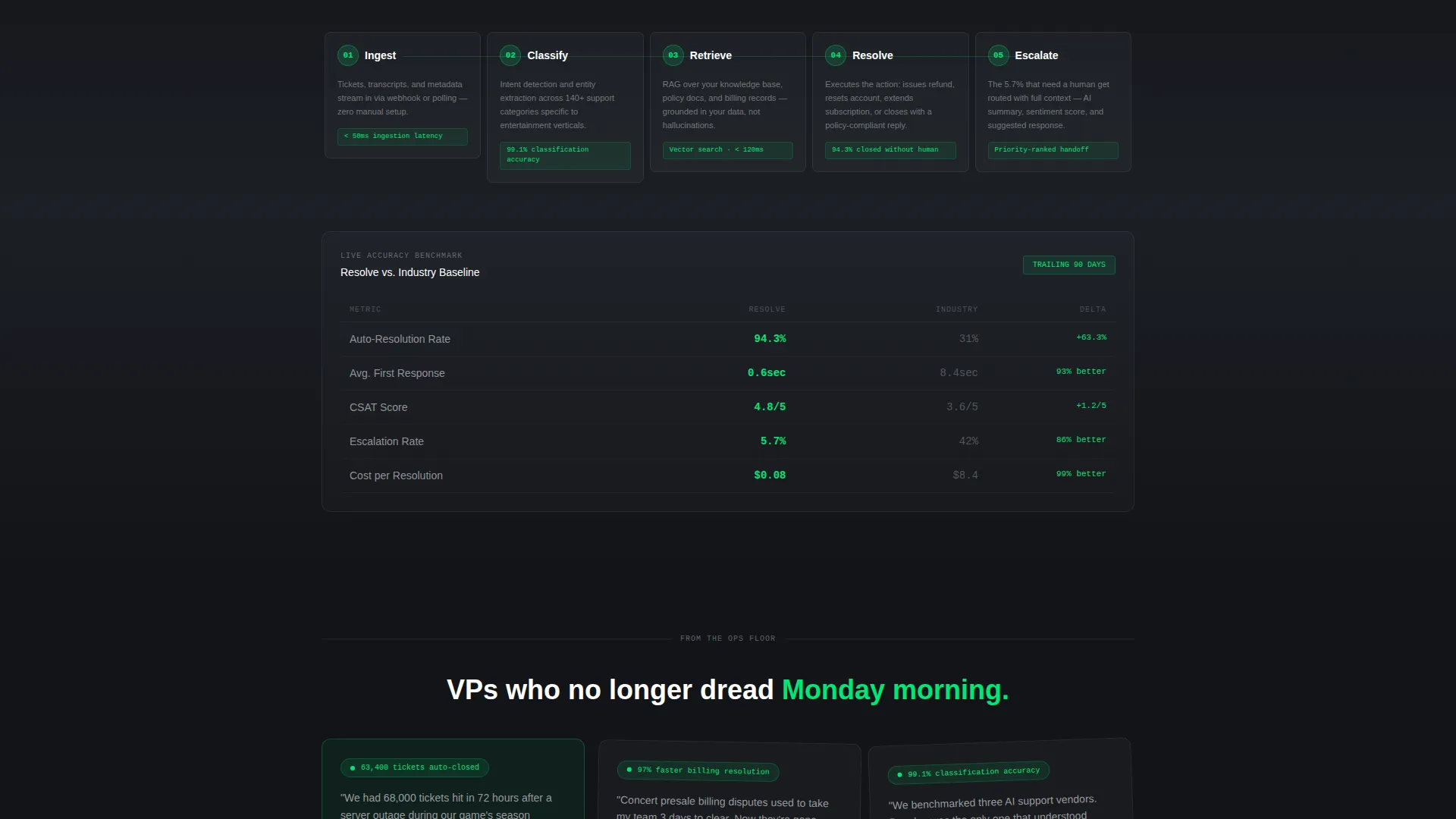
A dedicated section displays the AI training pipeline alongside an integration panel and channel coverage. It covers chat, email, voice, and social channels. A live accuracy benchmark comparison against industry baselines is also included in this section layer.
Persistent call to action Bottom Bar
After a visitor reaches 60% scroll depth, a sticky bottom bar appears carrying the primary "Run 1,000 Tickets Free" call to action in signal-green. This keeps the conversion trigger visible without interrupting the product story during earlier sections.
Two-Step Trial Signup Form
Clicking the primary call to action opens a two-step form. Step one captures work email and company name. Step two asks for primary support platform and average monthly ticket volume. No credit card is required, and no sales call is needed.
Page sections overview
| Section | Purpose |
|---|---|
| Dashboard Hero Panel | Shows live ticket resolution console as the product itself |
| ROI Calculator Module | Lets visitors calculate their own savings before committing |
| AI Training Pipeline | Reveals how the engine learns from ticket queues and transcripts |
| Integration Panel | Shows connector compatibility across support platforms |
| Channel Coverage Section | Covers chat, email, voice, and social resolution scope |
| Accuracy Benchmark Panel | Compares AI resolution rates against industry baselines |
| Primary call to action Block | Places "Run 1,000 Tickets Free" after calculator output |
| Persistent Bottom Bar | Keeps trial call to action visible from 60% scroll depth onward |
| Two-Step Signup Form | Captures lead data across two low-friction steps |
Design & branding system
The visual identity runs on a Monochrome Steel palette that feels like the inside of a server rack at 2 AM. There is no warmth, no decoration, and no stock photography anywhere on the page. The product interface is the visual hero.
- Colors: forge-black (#121417) and brushed gunmetal (#2A2D35) graduate across section backgrounds; body text sits in milled aluminum (#B0B3B8); borders use 8% white opacity
- Signal-green (#00E676) appears only on resolved-state indicators, active toggles, and the primary call-to-action button
- Dividers are barely visible by design, keeping focus on the data and keeping the layout clean and purposeful
Mobile & speed optimization
The template is structured for a smooth scroll experience across screen sizes. The progressive reveal system is designed to work in sequence regardless of viewport, so each section loads cleanly as the visitor reaches it.
- Scroll-reveal animations are section-scoped, meaning each panel triggers independently without waiting for the full page to load
- The ROI calculator is self-contained and renders output instantly without external dependencies
- The persistent bottom bar adapts to smaller screens while keeping the primary call to action always reachable
How this template helps you convert
The conversion strategy in this template is built around proof before ask. The page hands the visitor calculated savings before it ever requests an email address.
- The ROI calculator output creates a personal, specific savings number for each visitor, making the "Run 1,000 Tickets Free" call to action feel like a logical next step rather than a cold pitch
- The persistent bottom bar ensures the trial offer stays in view for every visitor who reaches mid-page, catching those who are convinced but have not yet acted
- The two-step form minimizes friction by splitting data collection into two short steps with no credit card requirement and no sales call gate
Other information about this template
This template is designed specifically for the entertainment AI customer service niche. It is positioned for Freemium and free-trial conversion flows where the product needs to prove value before asking for commitment. The Dashboard Pro theme and Calculator/Tool First creative direction are baked into the layout structure, not applied as surface decoration.
- The template uses a Scroll Reveal (Progressive) style, meaning section animations are part of the structural design, not optional add-ons
- The header concept is a Dashboard Preview, making the product interface itself the visual centerpiece rather than a headline or hero image
- Platforms referenced in the integration panel context include Zendesk, Intercom, and Salesforce as connector examples shown in the brief
Theme
Dashboard Pro
Creative direction
Calculator/Tool First
Color system
Monochrome Steel
Style
Scroll Reveal (Progressive)
Direction
Freemium/Trial
Page Sections
Live Dashboard Hero Panel
Scroll-reveal Progressive Sections
Embedded ROI Calculator Module
Integration and Channel Coverage Panel
Persistent Signal-green Call to Action Bar
Two-step Low-friction Signup Form
Related questions
Who is this landing page template designed for?
Does the ROI calculator require any backend setup?
Can I customize the dashboard hero data points?
Is a credit card required for the free trial signup?
What scroll depth triggers the persistent call to action bar?



