AI-Powered Enterprise Software Directory Website Template
Resolve is a bento grid landing page template built for AI-powered IT service management platforms. It uses dark glass panel aesthetics, live micro-dashboard components, and interactive feature modules to communicate enterprise-grade capability. Designed for IT directors, service desk managers, and CIOs, it drives free-trial signups through a friction-free two-step conversion flow.
by Rocket studio
Quick summary
Resolve is a single-page bento grid template for AI-powered IT service management platforms. It opens with a dark cockpit-style header packed with living micro-dashboards, then guides visitors through interactive feature modules that simulate real ticket triage, change risk assessment, and SLA monitoring. The page closes every loop with a no-credit-card free-tier signup flow.
Who this template is for
This template is built for teams that sell or market enterprise IT service management software with an AI automation layer. It speaks directly to buyers who understand service queues, SLA pressure, and the cost of analyst burnout.
- IT platform founders and product marketers launching an AI-powered service desk tool
- Enterprise software agencies building landing pages for IT operations clients
- SaaS teams repositioning a legacy ITSM product with a new AI-first narrative
What problem this template solves
Most IT software landing pages describe features with static screenshots and bullet points. That approach fails when the product's value only becomes obvious once someone touches it. Resolve replaces passive explanation with interactive proof.
- Visitors struggle to trust AI automation claims they cannot see in action
- Generic hero sections fail to communicate the density and intelligence of an enterprise ITSM platform
- Conversion flows that require demos or sales calls lose prospects who prefer self-service evaluation
What you get with this template
You get a complete, production-ready bento grid landing page with every visual and interactive module already laid out. Nothing needs to be invented from scratch.
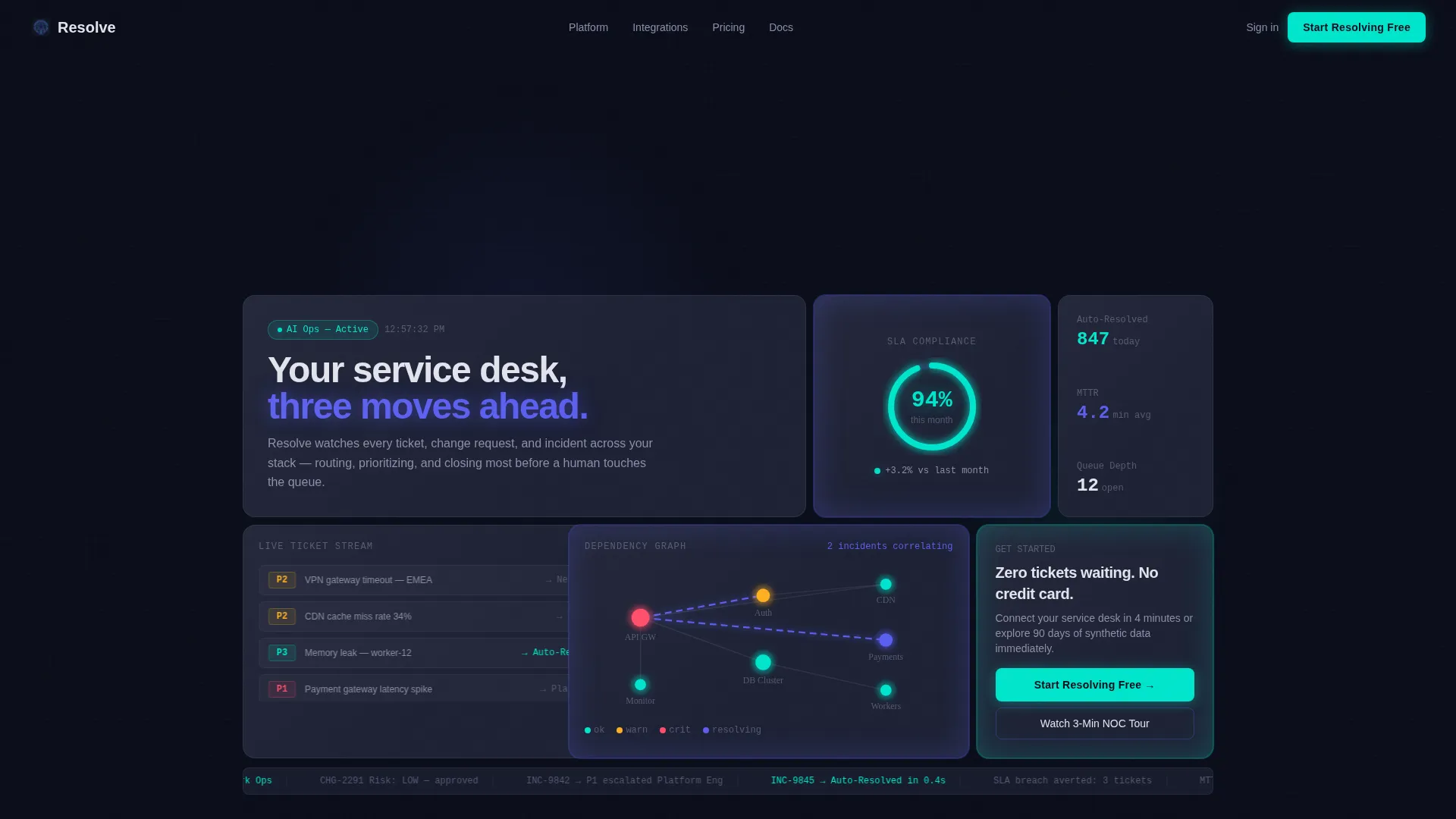
- A dark-glass bento header with three living micro-dashboard panels and a headline spanning the top-left grid cells
- Three interactive explorer modules covering ticket triage simulation, change-risk calculation, and SLA heatmap filtering
- A two-step freemium signup flow with sandbox and live-integration onboarding paths, plus a secondary email-gated video call to action
Feature list
This section covers the core capabilities delivered by the Resolve template as described in the source brief.
Bento Grid Header with Live Micro-Dashboards
The header is a wall of frosted dark-glass panels arranged in a bento grid. Each panel contains a different live data visualization: a ticket waterfall with AI-routed labels, an SLA countdown ring in cyan, and a dependency graph with pulsing indigo nodes. Subtle parallax depth on mouse movement makes the panels appear to float above the surface.
Interactive Ticket Triage Simulator
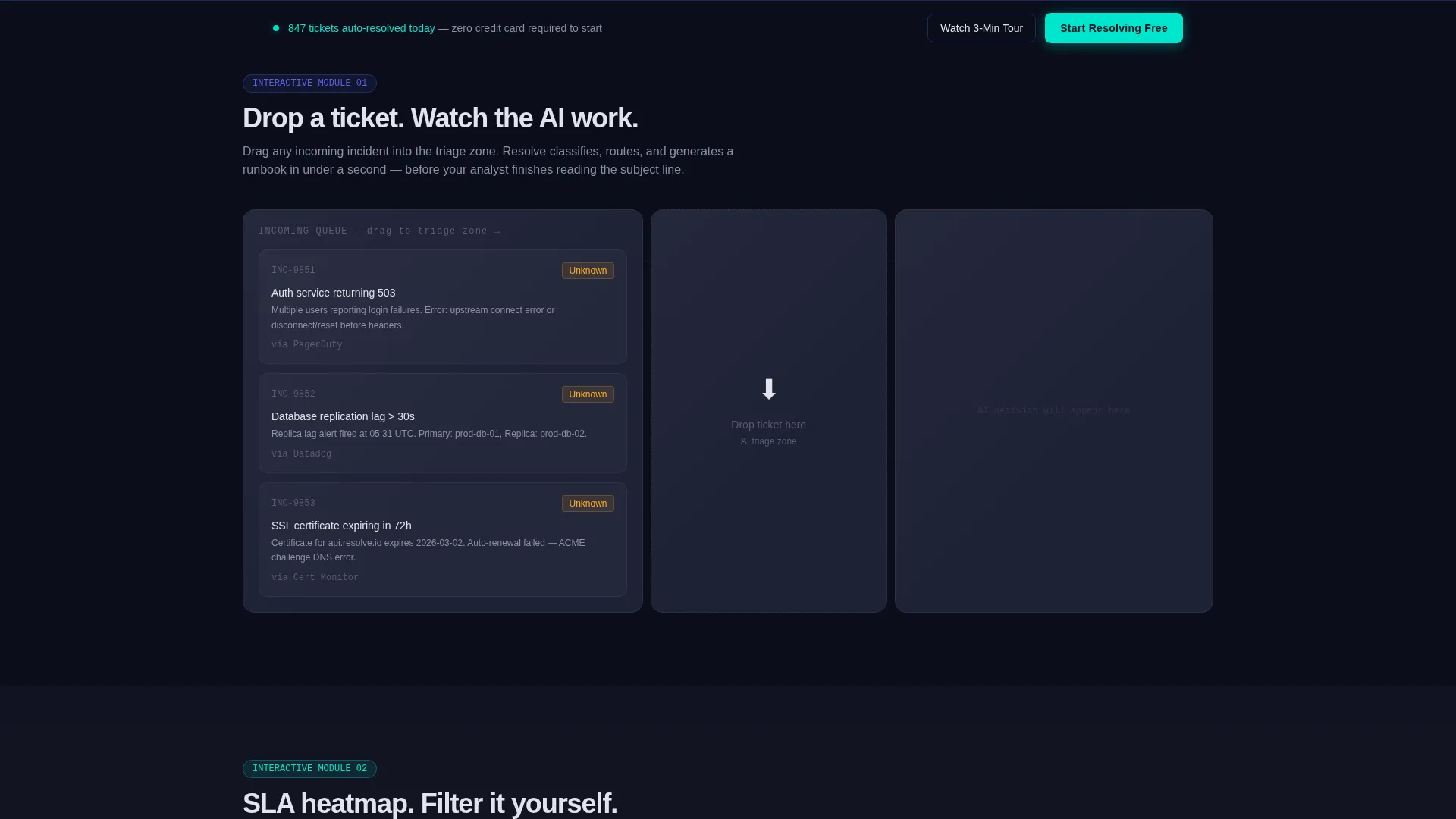
Visitors can drag an incoming incident directly into the triage module and watch the AI classify, route, and suggest a runbook in real time. This module turns a passive feature claim into a hands-on experience. It is positioned early in the scroll sequence to deliver immediate product confidence.
Change Risk Calculator Module
A dedicated bento section lets visitors input a mock Request for Change and receive an instant risk assessment output. The interaction is self-contained and requires no account. It demonstrates the platform's change management intelligence without needing a live environment.
Live SLA Heatmap with Filters
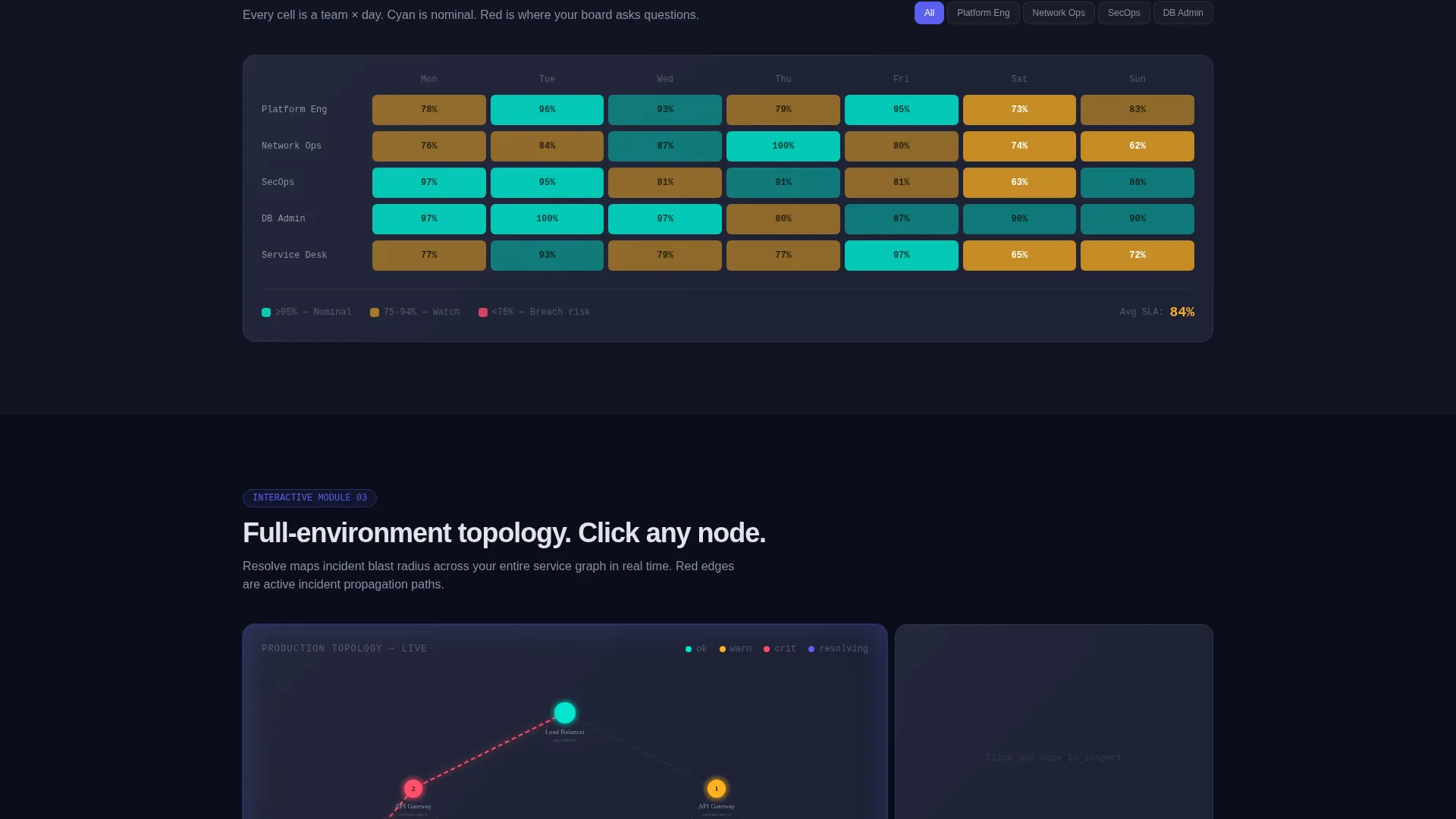
This module renders a filterable SLA heatmap that visitors can sort by team, tier, or time window. It escalates the complexity of the page experience from single-ticket thinking to multi-team operational awareness. The visual density mirrors how the actual product surface would feel in a real NOC.
Two-Step Freemium Conversion Flow
The primary call to action opens a two-step signup: work email and company size in step one, then a choice between connecting a live service desk or exploring a pre-loaded sandbox in step two. The sandbox path requires no credit card, no sales call, and no procurement process.
Secondary Email-Gated Video call to action
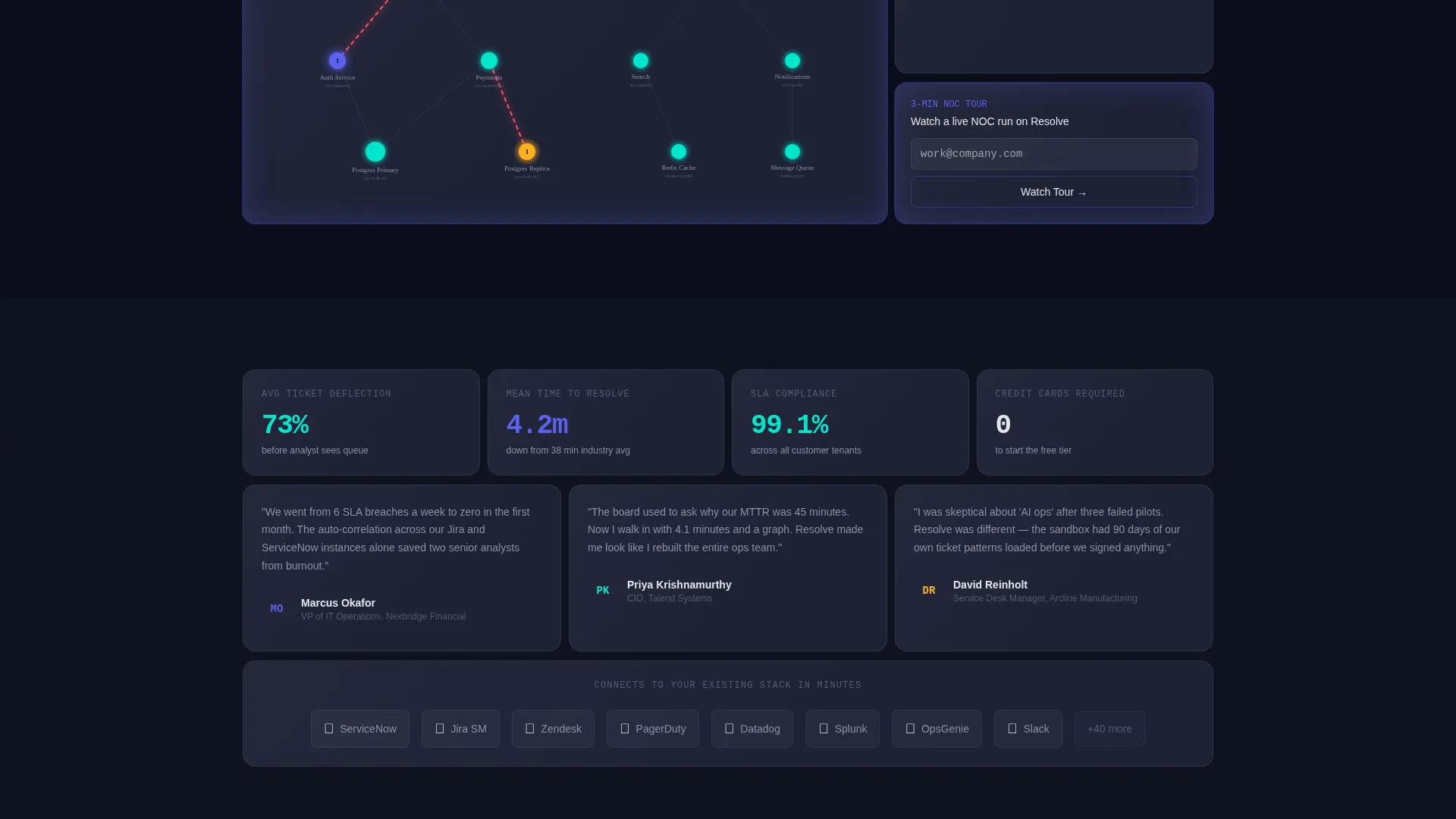
A "Watch the 3-Minute NOC Tour" button sits beneath the dependency-graph panel. It captures an email address before granting access, placing the visitor into a nurture sequence that ends at the free tier. This path supports prospects who need proof before commitment.
Page sections overview
| Section | Purpose |
|---|---|
| Bento Header Panel | Establishes platform identity with three live micro-dashboards and the primary headline |
| Ticket Triage Module | Lets visitors drag and classify an incident to feel AI routing in action |
| Change Risk Calculator | Accepts a mock RFC input and returns an instant risk output |
| SLA Heatmap Explorer | Filterable heatmap showing cross-team SLA performance by tier and time window |
| Dependency Graph Panel | Visualizes multi-incident correlation with a secondary video call to action beneath it |
| Sticky Trial Bar | Persistent signup bar that appears after the first interactive module |
| Two-Step Signup Flow | Collects work email and company size, then routes to sandbox or live integration |
Design & branding system
The visual identity follows the Dashboard Pro theme with an Electric Indigo color system. Every color choice is intentional and carries meaning within the interface.
- Near-black base (#0B0E1A) reads like a terminal running in a dark network operations center; cool slate (#1E2235) surfaces cards as smoked glass lifted off the background; electric indigo (#5B5FEF) marks active states and data lines
- Sharp cyan (#00E5CC) is reserved exclusively for positive-state indicators and calls to action, so it carries the visual weight of "resolved" and "all clear"
- Text is rendered in crisp silver-white (#E2E4ED); medium-weight sans-serif typography keeps the headline readable without competing with the live data panels
Mobile & speed optimization
The bento grid layout and interactive modules are designed to translate across screen sizes without losing the cockpit-style density that defines the template.
- Grid cells reflow for smaller viewports so that each micro-dashboard panel remains readable and tappable on mobile devices
- Interactive modules are self-contained and load independently, which supports progressive rendering as the visitor scrolls deeper into the page
How this template helps you convert
The template treats conversion as a sequence of trust-building steps rather than a single ask at the top of the page.
- The interactive header and bento micro-dashboards create immediate credibility by showing the product in motion before any feature copy appears
- The ticket triage simulator and change-risk calculator deliver hands-on proof that motivates action, then the sticky trial bar presents the primary call to action at peak engagement
- The two-step signup flow and no-credit-card sandbox path eliminate the procurement friction that typically kills enterprise free-trial conversions
Other information about this template
This template is designed for the AI-powered ITSM category inside the broader enterprise software market. It fits platforms that compete in or adjacent to established service management ecosystems.
- The two-step onboarding flow includes pre-built integration paths referencing ServiceNow, Jira Service Management, and Zendesk as named connection options in step two
- The sandbox environment comes pre-loaded with 90 days of synthetic ticket data, giving new users a meaningful evaluation context without requiring a live environment
- The template style is Bento Grid, the theme is Dashboard Pro, the creative direction is Interactive Explorer, and the header concept is Dark Glass Panels
- The freemium conversion direction makes this template particularly well-suited to product-led growth motions common in AI-powered enterprise software
Theme
Dashboard Pro
Creative direction
Interactive Explorer
Color system
Electric Indigo
Style
Bento Grid
Direction
Freemium/Trial
Page Sections
Bento Grid Header with Live Micro-dashboards
Interactive Ticket Triage Simulator
Change Risk Calculator
Live SLA Heatmap Explorer
Two-step Freemium Conversion Flow
Email-gated Video Call to Action
Related questions
Who is the target buyer for this template?
Does the template include the interactive modules already built out?
What does the two-step signup flow include?
Can the color system and branding be customized?
Is this template suitable for a product-led growth strategy?



