Customer Support Portal Landing Page Template
Resolve is a scroll reveal landing page template built for customer support portals. It combines a Data Command visual theme, a Feature Tab Switcher header, and kinetic section reveals to demonstrate your support tool's capabilities before a visitor decides to sign up. The layout guides support leaders from problem recognition to confident action in a single focused scroll.
by Rocket studio
Quick summary
Resolve is a single-page, scroll reveal landing page template for customer support portals. It opens with a three-tab interactive header showcasing Triage, Automate, and Measure views. Each progressive section fires in sequence, building momentum toward one primary call to action. The deep slate and sky blue palette gives it the feel of a mission-critical command center.
Who this template is for
This template was designed for support-focused teams who need to communicate the power of their product quickly and credibly. It speaks directly to decision-makers who live inside ticket queues and own resolution metrics.
- Heads of support at mid-market SaaS companies managing fifteen-agent teams
- Operations directors at e-commerce brands handling high-volume seasonal surges
- Startup customer experience leads who still personally handle escalations
What problem this template solves
Support tools often look like every other dashboard product online. Generic screenshots and bullet-point feature lists fail to show how a tool actually behaves under real ticket pressure. Resolve fixes this by replacing static descriptions with interactive user interface vignettes.
- Visitors can't tell what the product does differently from a list of features alone
- A slow, text-heavy landing page loses high-intent buyers before the second scroll
- Support leaders need to feel the product working before they commit to a demo
What you get with this template
You get a fully structured, single-page landing page template that demonstrates your support portal through live-feeling interface mockups and scroll-triggered motion. Every section is designed to show rather than tell.
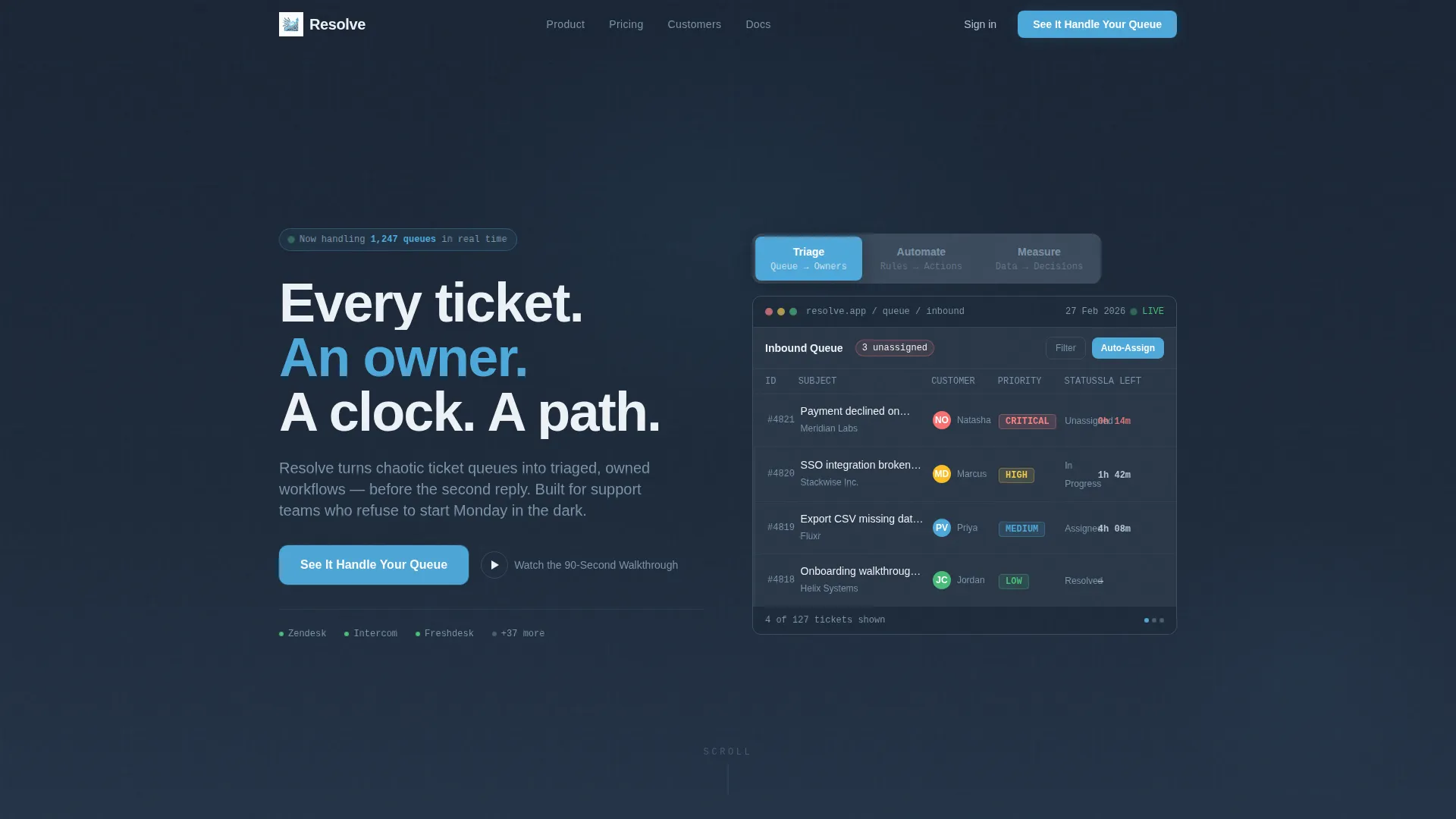
- A three-tab Feature Tab Switcher header with crossfade dashboard views for Triage, Automate, and Measure
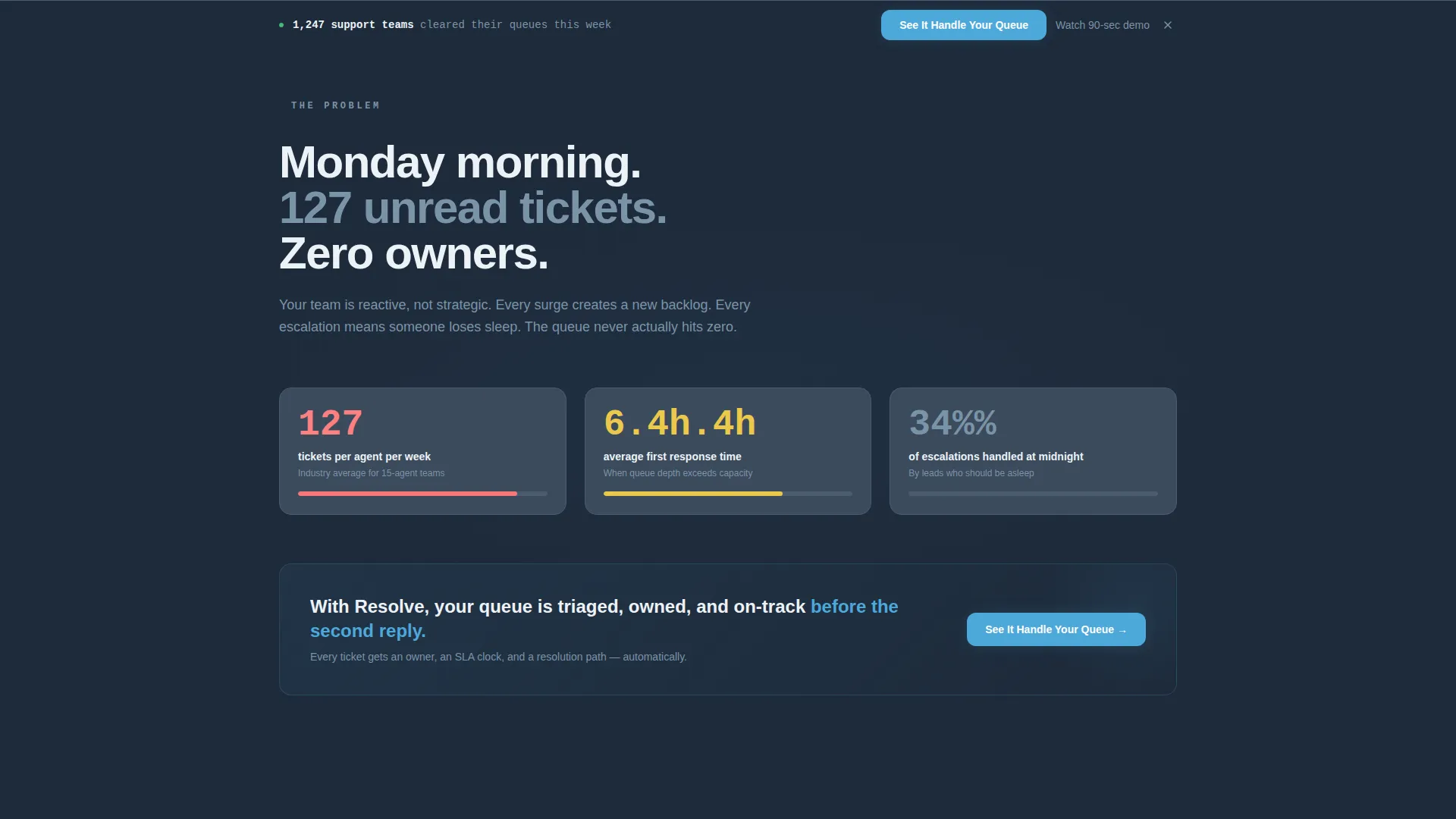
- A scroll reveal section sequence including an animated problem counter, capability vignettes, a social proof ticker, and a three-stat impact banner
- A persistent bottom bar call-to-action that activates after the second scroll reveal, plus a secondary text link for visitors who want a walkthrough first
Feature list
This section covers the core built-in capabilities of the Resolve template as delivered.
Three-Tab Feature Switcher Header
The header places visitors inside the product immediately. Three labeled tabs, Triage, Automate, and Measure, each reveal a distinct dashboard view beneath them using a smooth crossfade transition. The Triage view shows a ticket queue with color-coded priority badges and agent avatars. Automate reveals a drag-and-drop workflow builder with a routing rule snapping into place. Measure displays a real-time CSAT (Customer Satisfaction Score) graph climbing upward with a green pulse on the latest data point.
Scroll Reveal Progressive Layout
Each section of the page slides into view as the visitor scrolls, using kinetic upward motion that builds visual momentum. The sequence is deliberate: the problem lands first, then individual product capabilities arrive one by one. The tempo accelerates as the visitor moves deeper into the page, rewarding attention with increasing energy.
Animated Problem Counter
An animated counter opens the problem section, showing average tickets-per-agent climbing while response time moves into the red zone. This single visual element makes the pain point tangible without using a paragraph of copy.
Capability user interface Vignettes
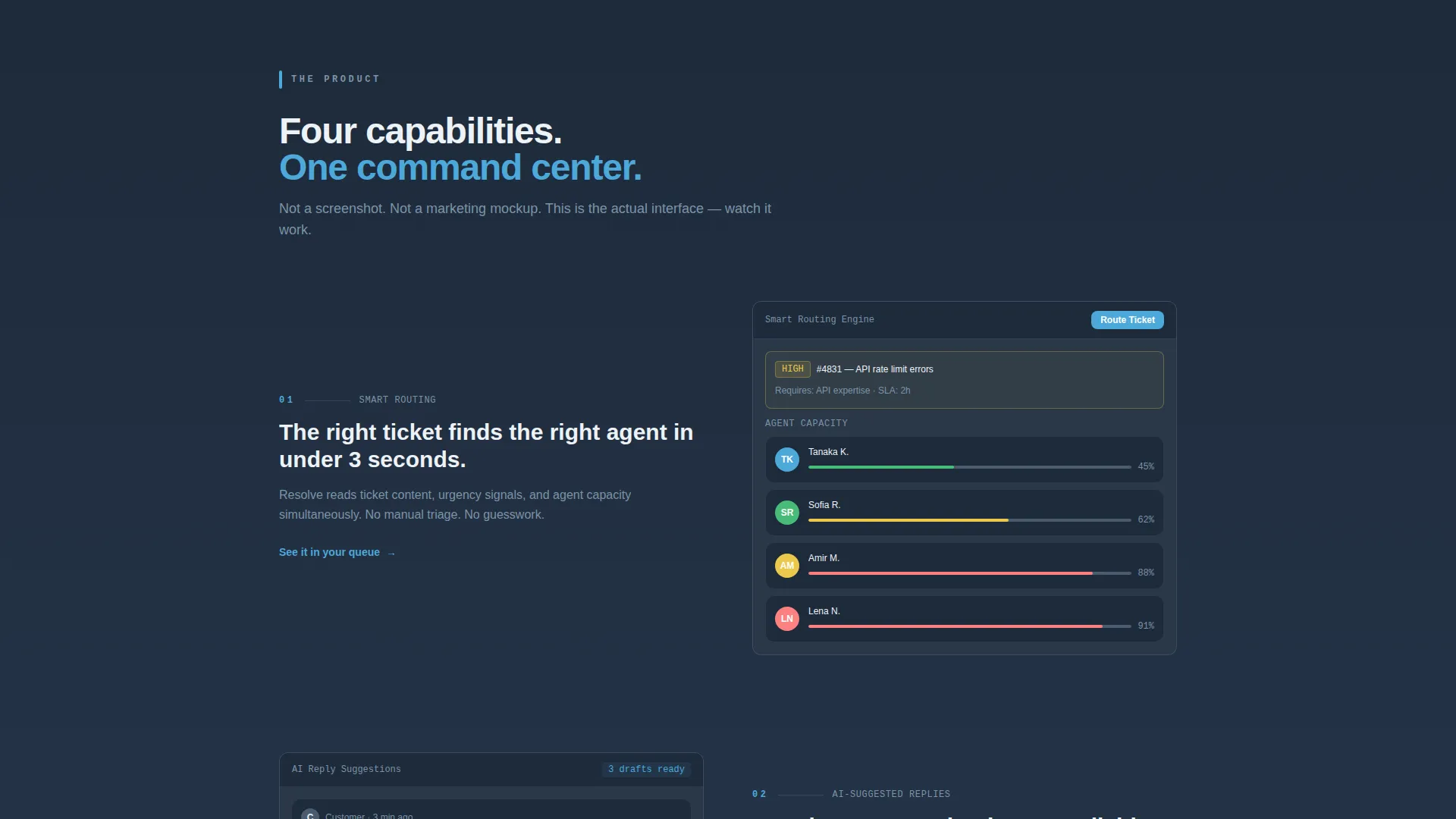
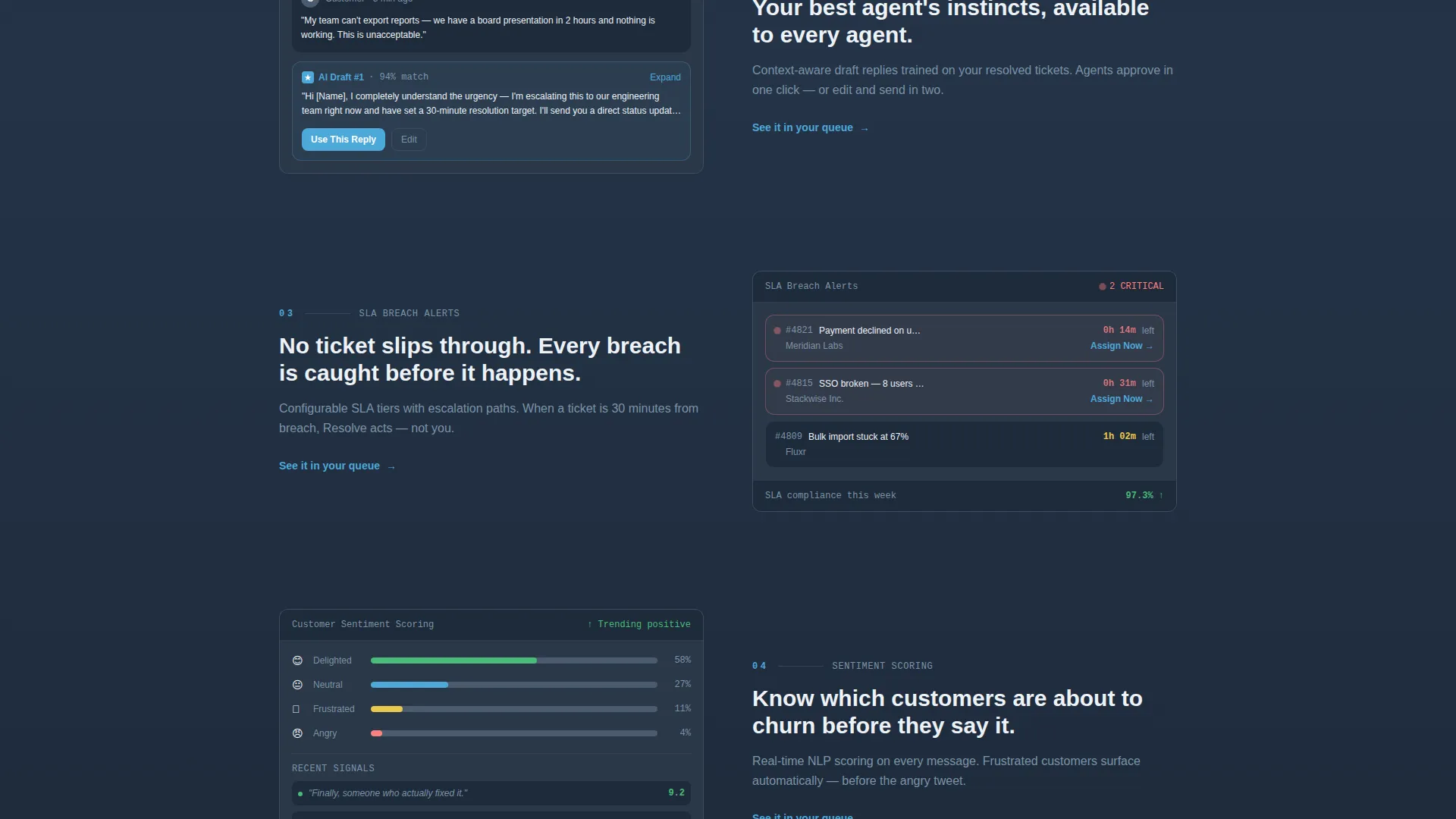
Each product capability, smart routing, AI-suggested replies, SLA (Service Level Agreement) breach alerts, and customer sentiment scoring, is presented as a contained, working interface mockup rather than a screenshot or description. Visitors interact visually with the product before committing to a demo.
Social Proof Ticker and Stat Banner
A horizontal logo ticker streams brand recognition across the page at scroll depth. Immediately following, a three-stat banner renders key metrics, resolution time, CSAT lift, and agent hours saved, in sky blue numbers against the deep slate background for maximum contrast and impact.
Persistent Click-Through call to action Bar
The primary call-to-action button, "See It Handle Your Queue," appears first inside the header tab frame and re-emerges as a persistent bottom bar after the second scroll reveal. A secondary text link, "Watch the 90-Second Walkthrough," sits below the header for visitors who want a low-commitment first step.
Page sections overview
| Section | Purpose |
|---|---|
| Tab Switcher Header | Introduce product through three interactive dashboard views |
| Animated Problem Counter | Make ticket-overload pain visceral and immediate |
| Smart Routing Vignette | Demonstrate intelligent ticket assignment in a live user interface frame |
| AI Reply Vignette | Show suggested reply behavior inside a real-feeling compose view |
| SLA Alert Vignette | Visualize breach detection and priority escalation in context |
| Sentiment Scoring Vignette | Display customer sentiment analysis as an active data layer |
| Social Proof Ticker | Stream recognizable logos to build credibility at scroll depth |
| Three-Stat Impact Banner | Hit resolution time, CSAT lift, and agent hours saved in one beat |
| Persistent call to action Bar | Convert visitors who have seen enough into demo-request clicks |
Design & branding system
The Resolve template uses a Data Command visual theme built on a Slate and Sky color system. The palette is authoritative at the top and progressively more energetic as the visitor scrolls deeper.
- Deep operations slate (#1E2A3A) anchors primary backgrounds; mid-charcoal (#3B4A5C) surfaces card and panel elements
- Crisp sky blue (#4DA8DA) pulses on live data points and interactive elements, intensifying with scroll depth to reward progression
- Clean ice white (#EDF2F7) handles all body text and provides breathing room between dense data components
Mobile & speed optimization
The Resolve template is structured with a mobile-first layout mindset. Scroll reveal animations and user interface vignette components are designed to adapt cleanly across screen sizes.
- Tab switcher interactions and crossfade transitions are touch-friendly and function on smaller viewports
- The persistent call to action bottom bar stays accessible on mobile without obscuring key content
- Stat banners and logo tickers reflow gracefully from wide desktop layouts to narrower mobile columns
How this template helps you convert
Resolve is built around a single conversion goal: getting the visitor to request the guided interactive demo. Every design and layout decision supports that outcome.
- The tab switcher header puts the visitor inside a working product view before they read a single feature claim, creating immediate product familiarity and trust.
- The scroll reveal sequence accelerates visual energy from problem to proof, so by the time the persistent call to action bar appears, the visitor has already seen the product handle real support scenarios.
Other information about this template
This template sits in the Documentation and Support category, within the Help Center and Knowledge Base subcategory, focused on the customer support portal niche. It is a strong fit for teams evaluating how to present a support tool to a sophisticated, data-fluent buyer audience.
- The template style is Scroll Reveal (Progressive), meaning section components animate into view as the visitor scrolls rather than loading all at once
- The creative direction follows a Launch Energy approach: the page builds pressure from problem to proof, releasing it at the final call to action
- The header concept is a Feature Tab Switcher, a high-engagement pattern well suited to tools with multiple distinct workflow modes
- The landing page direction is optimized for Click-Through, with every structural decision pointing toward one guided demo request
- The Data Command theme and Slate and Sky color system make this template a natural fit for support platforms, operations dashboards, and any product where real-time data credibility matters to the buyer
Theme
Data Command
Creative direction
Launch Energy
Color system
Slate & Sky
Style
Scroll Reveal (Progressive)
Direction
Click-Through
Page Sections
Three-tab Feature Switcher Header
Scroll Reveal Progressive Layout
Animated Problem Counter
Capability User Interface Vignettes
Social Proof Ticker and Stat Banner
Persistent Click-through Call to Action Bar
Related questions
Who is the Resolve template best suited for?
Can I replace the demo user interface vignettes with my own product visuals?
Does the tab switcher require custom development to set up?
How does the persistent call to action bar behave?
Is this template suitable for a product with more than three core features?



