Fitness & Gym Software Booking Website Template
Pulse is a hub and spoke fitness landing page built for real-time gym slot discovery. It shows live class openings, trainer availability, and open-gym access across nearby studios in one bold, data-forward layout. The design uses a dark iridescent palette with anchor navigation, filterable card grids, and a sticky batch-booking footer to drive immediate conversions.
by Rocket studio
Quick summary
Pulse is a fitness landing page template designed for local gym discovery platforms. It combines a departures-board hero, filterable class and trainer grids, and a sticky saved-slots footer into one cohesive, mobile-first layout. Every design decision focuses on one conversion goal: get the visitor to tap "Book This Slot" before the spot disappears.
Who this template is for
This template is built for fitness tech founders and studio operators who need a high-performing gym landing page fast. It is equally useful for designers building fitness app landing pages for clients in the health and wellness space.
- Fitness platform builders targeting urban gym-goers who book on their phones
- Studio and gym owners who want to fill last-minute cancellations with a clear, real-time booking surface
- Designers and developers creating personal trainer websites or local fitness discovery tools
What problem this template solves
Finding an open yoga class, a free barbell rack, or a drop-in CrossFit box at 5:45 AM is genuinely difficult. Most gym landing pages bury availability behind login walls or static schedules. Pulse solves that by presenting live slot data front and center, so users never have to guess.
- Visitors leave fitness landing pages that do not show real-time availability quickly
- Personal trainers and studios lose revenue to last-minute cancellations with no recovery tool
- Beginners and traveling athletes struggle to find tailored class options near them in limited time
What you get with this template
You get a fully structured, single-page hub and spoke layout with five distinct spoke sections, each anchored by a sticky navigation tab. The page is ready to customize with your own class data, trainer profiles, studio listings, and pricing details.
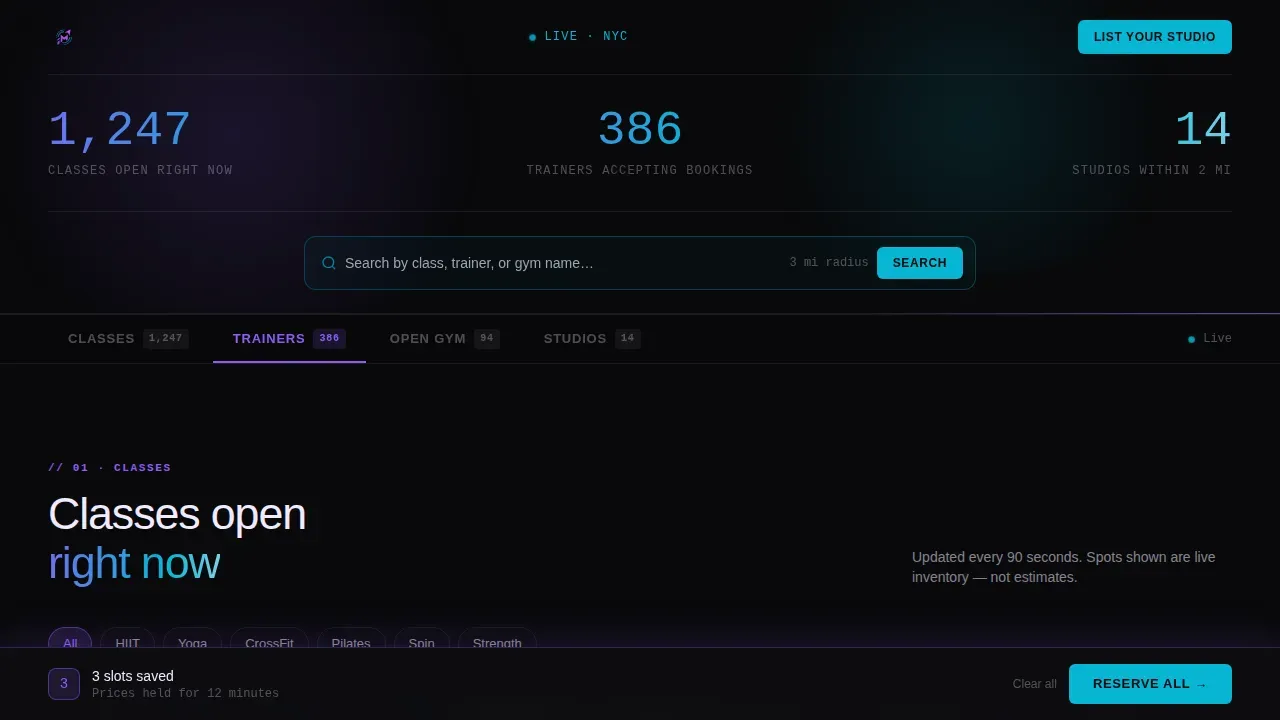
- A live stats hero with counter animations, a pulsing search bar, and beam border effects
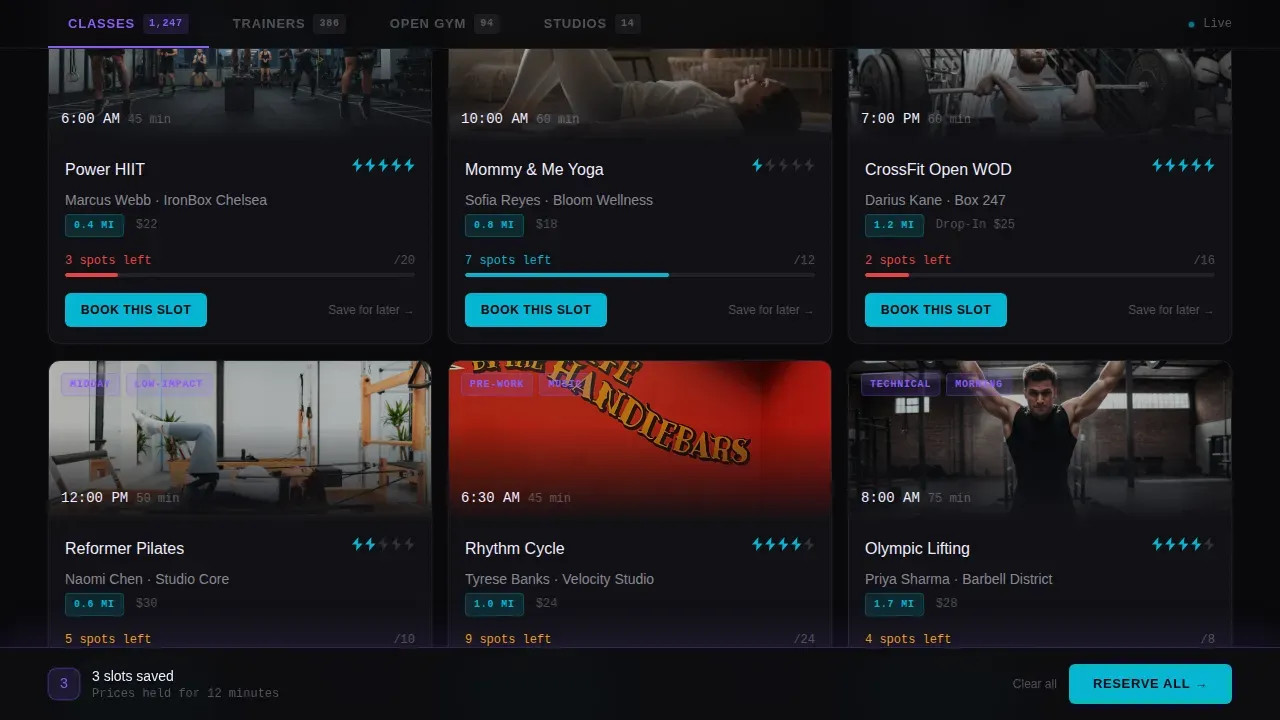
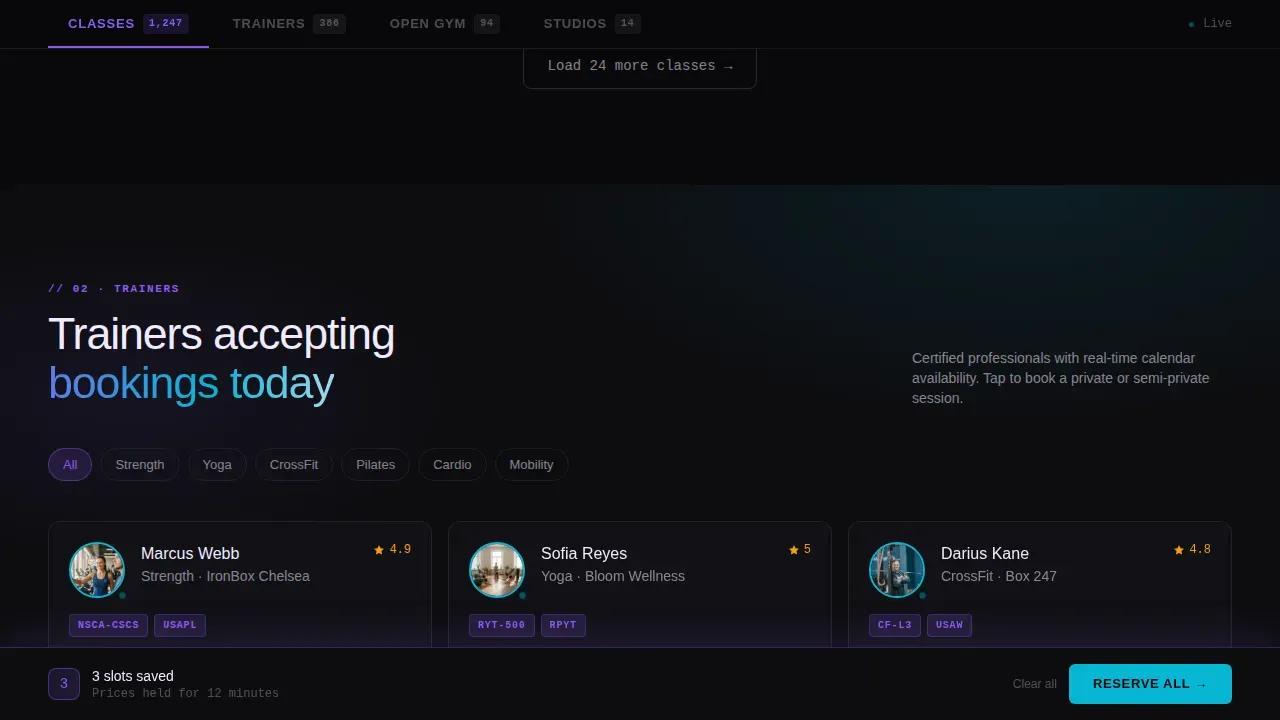
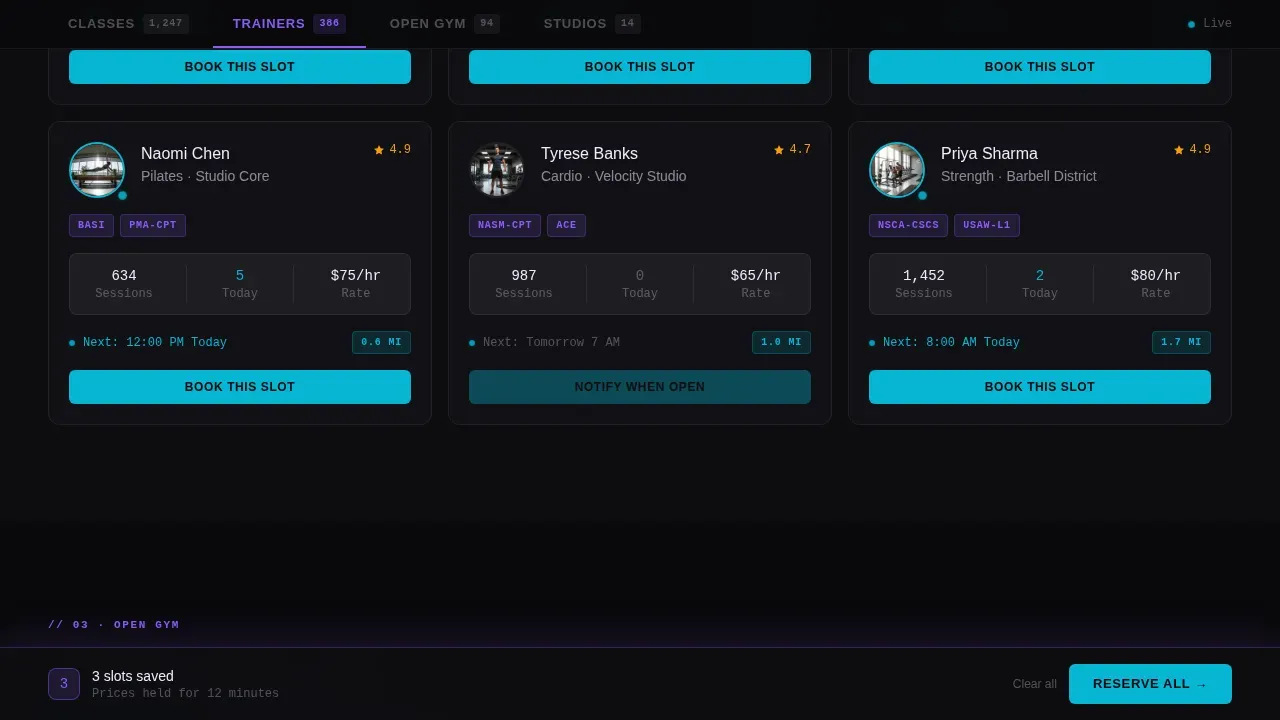
- Filterable card grids for classes, personal trainers, open gym slots, and studio directories
- A sticky footer that batches saved slots into one "Reserve All" action, reducing decision fatigue
Feature list
This template ships with a focused set of features built around the fitness landing page use case. Each feature directly serves the goal of turning a browsing visitor into a confirmed booking.
Real-Time Stats Hero
The hero section functions like a departures board. Bold counters tick upward showing classes open, trainers accepting bookings, and studios nearby. A cyan-pulsing search bar lets users filter by class, trainer, or gym name instantly. The strong call-to-action is visible above the fold, which is essential for increasing conversions on any fitness landing page.
Anchor Navigation Tabs
A sticky anchor nav pins to the top of the page with tabs for Classes, Trainers, Open Gym, and Studios. Users jump directly to the spoke they need without losing context. This design choice improves usability and keeps visitors focused on the relevant section.
Filterable Class and Trainer Grids
Each spoke section reveals a card grid with granular class descriptions: duration, intensity rating shown as one to five bolts, spots remaining, and trainer certification badges. Real-time availability bars deplete like battery indicators. Social proof is baked into every card through live spot counts and visible trainer credentials.
Scarcity and Urgency Signals
Spot counters on each card create a sense of limited time availability. "3 spots left" communicates urgency without extra copy. This approach helps convert visitors who are browsing into visitors who are booking, which directly lifts conversion rates.
Sticky Batch-Booking Footer
A persistent footer bar tracks saved slots across the page. When a user saves multiple options, the footer reads "3 slots saved, Reserve All." This reduces the challenge of decision fatigue and turns multi-session browsing into a single purchase action.
Studio Directory Section
The Studios spoke presents a full directory with distance from the user, listed amenities, and drop-in pricing per location. Each card links directly to the gym's native booking page. This makes the page equally useful for drop-in athletes and regular members comparing wellness options.
Page sections overview
| Section | Purpose |
|---|---|
| Hero Counter Wall | Display live class, trainer, and studio stats with search |
| Classes Card Grid | Browse filterable fitness programs by intensity and time |
| Trainers Availability Grid | View personal trainers with certification badges and booking |
| Open Gym Slots | Show real-time rack and mat availability per studio |
| Studios Directory | List nearby gyms with distance, amenities, and pricing |
| Sticky Batch Footer | Save and reserve multiple slots in one action |
Design & branding system
The visual identity follows a Directory and Discovery theme using an AI Iridescent color system. The palette feels like a gym mirror under LED strip lighting at 5:45 AM, dark and energized. Every color in the design earns its place by signaling something actionable, which keeps branding consistent with the platform's real-time purpose.
- Void black (#09090B) as the primary background, holographic violet (#8B5CF6) for active navigation and hover states, electric cyan (#06B6D4) for availability indicators and call-to-action buttons, and pearl white (#F0EAFF) for card surfaces
- Plus Jakarta Sans for headings, DM Sans for body copy, and JetBrains Mono for counter and data display to create bold typographic clarity
- Iridescent shimmer effects, beam border animations, counter tick-up sequences, and scroll-reveal transitions deliver a high-animation, high-interactivity website design
Mobile & speed optimization
Over 70% of fitness searches happen on mobile devices, and this template is built mobile-first to meet that reality. The layout is optimized for one-thumb use at 5:45 AM, with large tap targets, readable card grids on small screens, and a sticky footer that stays accessible while scrolling.
- GPU-accelerated transforms keep animations smooth across mobile and desktop devices without layout thrashing
- IntersectionObserver-driven scroll reveals load visual effects only when sections enter the viewport, protecting performance
- The card grid and anchor nav reflow cleanly for both mobile and desktop, so the fitness app landing experience feels equally intuitive on any screen size
How this template helps you convert
A good fitness landing page combines eye-catching design with strategic functionality. Pulse does both by building conversion signals directly into the page structure, not as an afterthought. Every section is a conversion surface tailored to fitness platform goals.
- The hero places a bold, benefit-driven headline and a clear call to action above the fold, which is where conversion decisions begin. Dynamic social proof through live counters builds immediate trust with first-time visitors.
- Scarcity signals on every class and trainer card create urgency. Showing exact spots remaining motivates visitors to act before the slot is gone, which directly improves conversion rates.
- The sticky batch-booking footer eliminates a common checkout challenge. Users do not need to choose one option immediately; they can save several and commit at once, making it easy to convert browsers into confirmed bookings.
Other information about this template
This template is built for the fitness and gym appointment scheduling niche within the broader fitness tech category. It is tailored to platforms that operate in urban, zip-code-based discovery contexts similar to what large-scale wellness platforms require.
- Designers can use this template as a foundation for personal trainer websites, yoga studio directories, or multi-gym wellness platforms
- The Spec Sheet creative direction means each spoke section functions like an inventory panel, presenting workout instructions and class descriptions in a structured, scannable format
- Platforms comparable to Equinox discovery tools or independent gym networks can use this layout to present fitness programs with clarity and urgency
- Pulse fitness pages built on this template can include testimonials and success stories to build trust with new users who have not yet visited a listed studio
- Landing page builders such as Moosend, Leadpages, and Unbounce are popular tools for creating fitness pages, but this template provides a ready-made, design-complete starting point for teams that want quality without coding from scratch
- The template supports presenting compelling visuals, bold typography, and automatic counter animations that engage visitors from the first scroll
Theme
Directory & Discovery
Creative direction
Spec Sheet
Color system
AI Iridescent
Style
Hub & Spoke (Anchor Nav)
Direction
Click-Through
Page Sections
Real-time Stats Hero with Search
Anchor Navigation with Spoke Sections
Filterable Card Grids with Scarcity Signals
Studio Directory with Drop-in Pricing
Sticky Batch-booking Footer
AI Iridescent Visual Design System
Related questions
Can I customize the class categories and pricing shown on the cards?
Is this template suitable for beginners who have never built a fitness landing page before?
How does the sticky footer batch-booking feature work?
Does the template include social proof elements?
Can this template work for a yoga studio or personal trainer website?



