Advanced Architecture Firm Software Professional Website Template
The Roster intelligent membership management landing page template is a scroll reveal, single-page design built for architecture firm membership platforms. It guides visitors through a Problem-to-Solution arc, displays a live-feel dashboard preview, and captures leads through a low-friction form. The Tech Glass visual identity uses an AI Iridescent color system across frosted panels, violet-to-teal gradients, and obsidian backgrounds.
by Rocket studio
Quick summary
This landing page template is purpose-built for architecture firm membership management platforms. It follows a scroll reveal structure, opening with a three-quarter perspective dashboard preview and moving visitors through a clear Problem-to-Solution arc. The design uses a Tech Glass identity with an AI Iridescent color system. Admins, licensing coordinators, and firm HR managers all find their pain point addressed before any form appears.
Who this template is for
This template suits teams that manage architecture firm membership at scale. It is designed for users who need to replace fragmented file management with a single, auto-updating platform. The landing page speaks directly to people who feel the weight of renewal deadlines, compliance gaps, and scattered payment records.
- Primary users: AIA chapter administrators managing hundreds of active member records across multiple files
- Secondary users: State licensing board coordinators and firm HR managers who need to verify architect registrations quickly
- Business teams evaluating membership scheduling, dues tracking, and CPD compliance tools for their organization
What problem this template solves
Chapter admins often juggle member data across three or more separate spreadsheet files. Renewals get missed. Dues go unreconciled. Continuing Professional Development (CPD) hours are tracked manually, and compliance gaps only surface after they become violations. The landing page communicates this pain before offering a solution, so visitors recognize their own workflow the moment they arrive at the site.
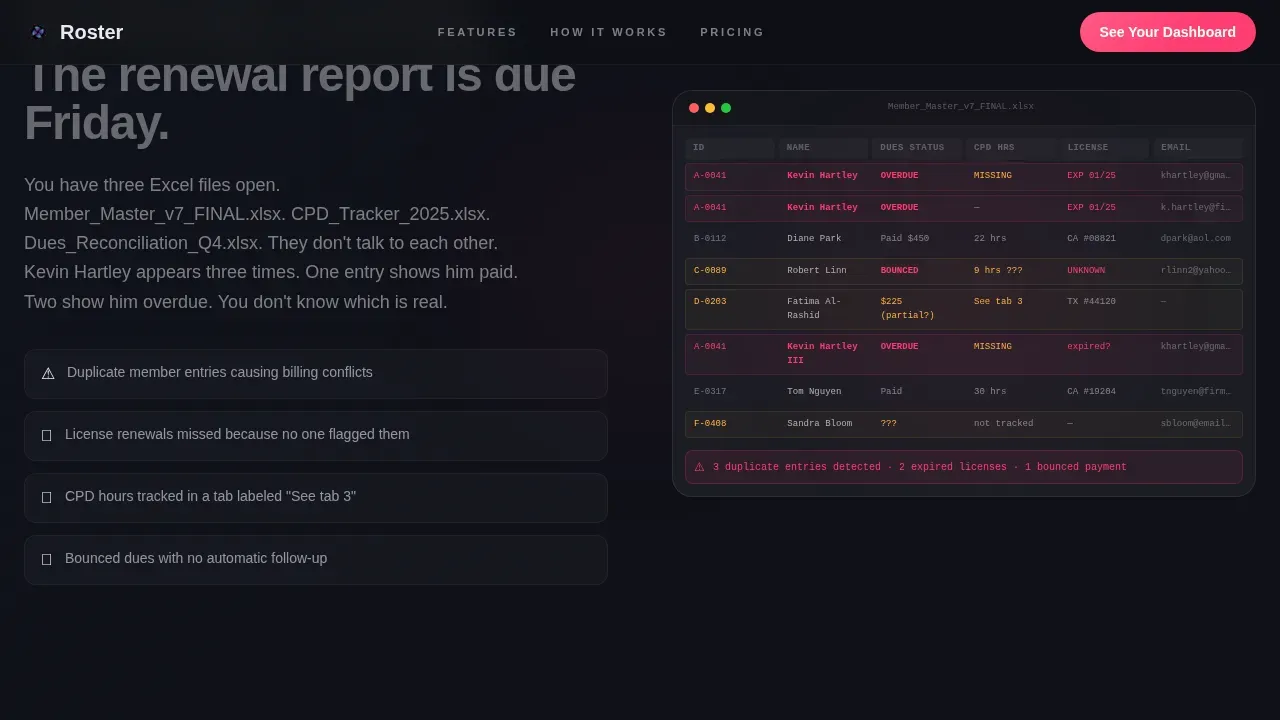
- Duplicate member records, missed renewal dates, and bounced payment rows made visible through a spreadsheet chaos screenshot section
- Manual scheduling of reminder messages replaced by automated, rules-based workflows that keep every account current
- Disconnected community communications consolidated into one platform rather than scattered across separate file exports
What you get with this template
This template gives your team a complete, conversion-focused landing page that is ready to edit and deploy. Every section is structured to move visitors from recognition of pain to confidence in the solution. The design details, interactive components, and lead capture flow are all defined in the source files, so admins and developers can begin building immediately.
- A scroll reveal page layout with six defined sections, from hero dashboard to footer, each with a specific conversion role
- GSAP ScrollTrigger animation specs for iridescent shimmer, perspective transforms, and staggered reveal effects
- A dual-path lead generation form: a primary demo request capturing chapter name, member count via slider, and work email, plus a secondary free download path offering a gated compliance checklist PDF
Feature list
This template is designed around six core capabilities that match the real workflow of architecture firm membership management. Each feature area has a dedicated section or component on the landing page, making the product value visible and specific to every type of visitor.
Perspective Dashboard Hero
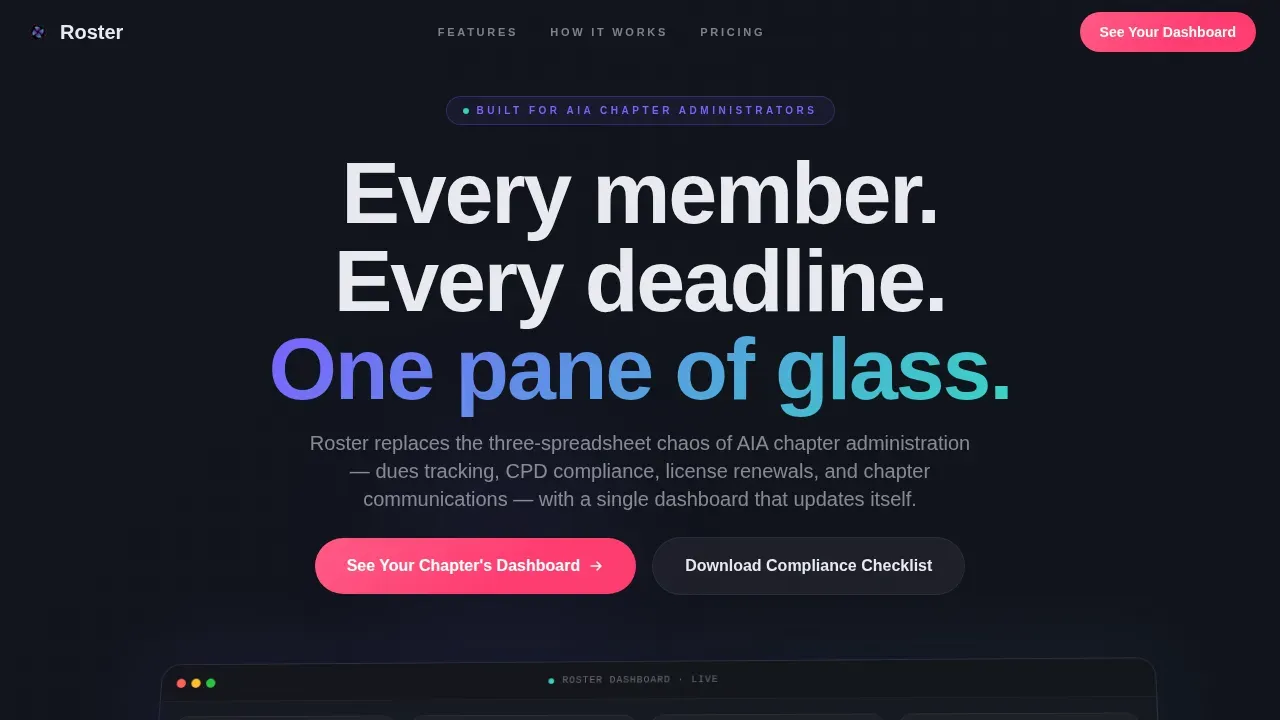
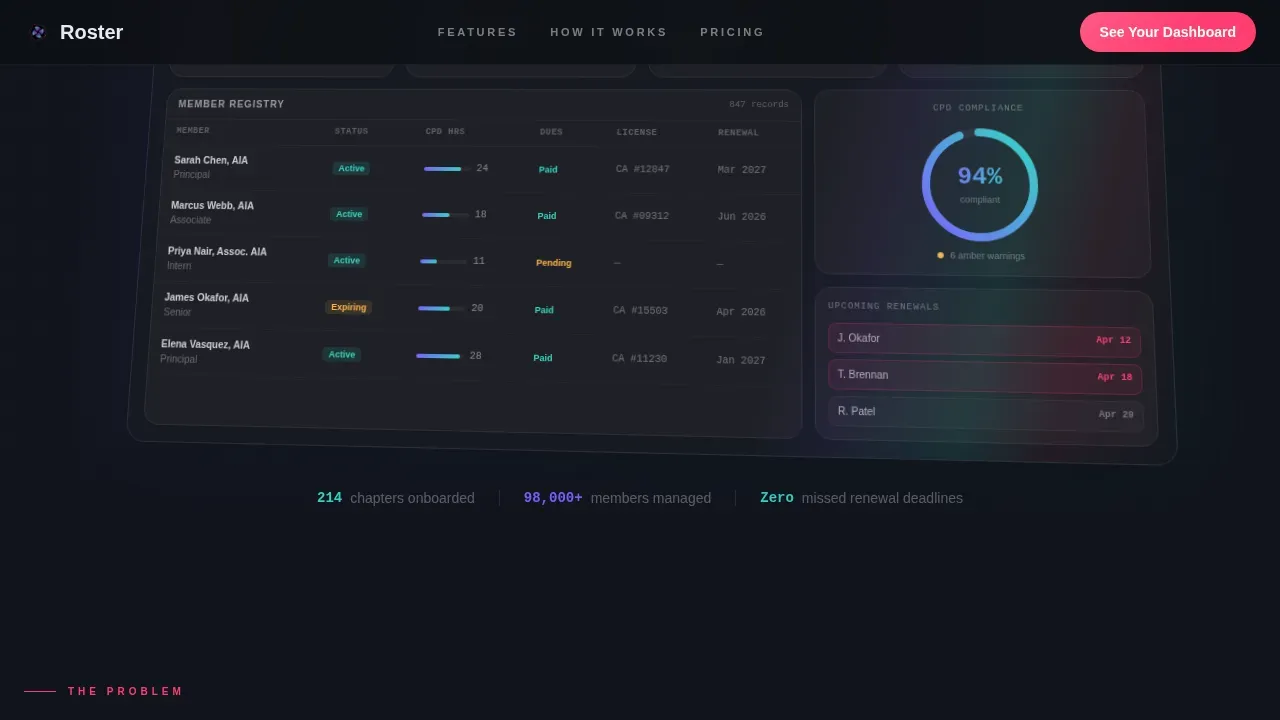
The hero section displays a realistic product interface rendered at three-quarter perspective, as if hovering behind glass. Visible data includes 847 active members, a compliance donut chart at 94%, a renewal timeline with flagged expirations, and a real-time dues ticker showing weekly payment collection. A subtle iridescent shimmer travels across the dashboard surface at intervals, reinforcing the AI-powered intelligence of the platform.
Problem-to-Solution Scroll Arc
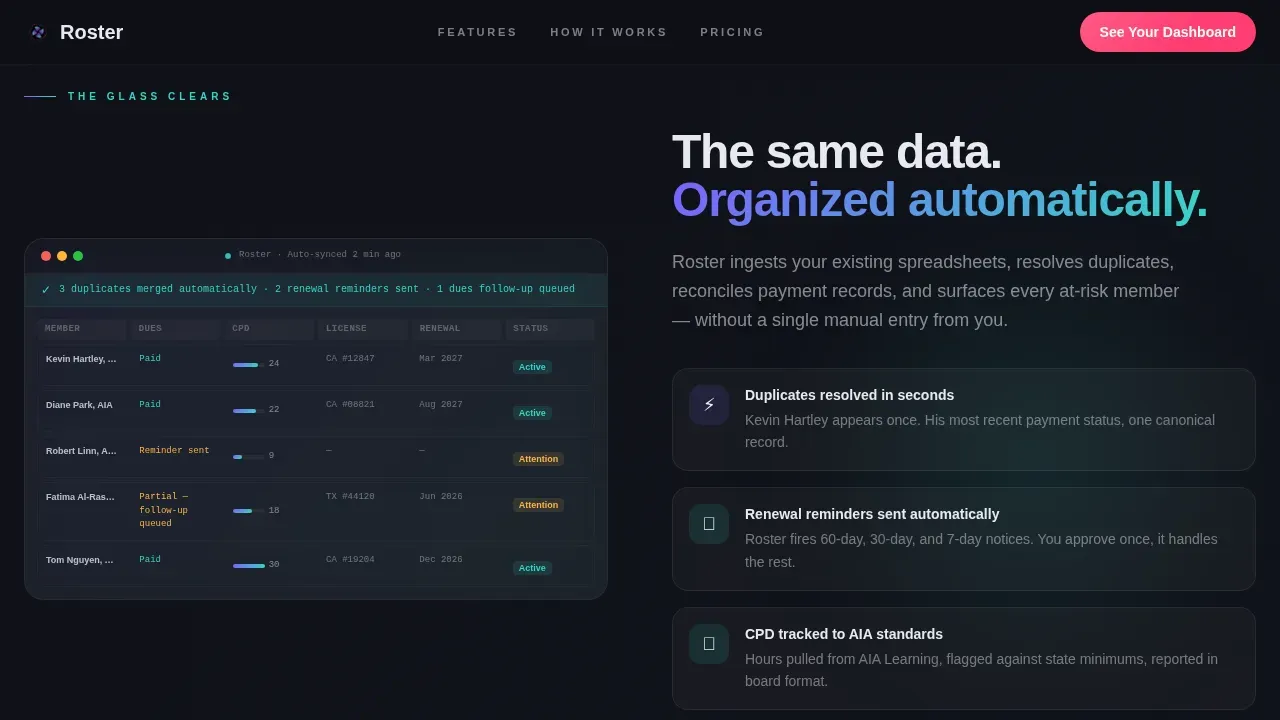
The page begins in pain. A dark section displays a cluttered spreadsheet screenshot with red highlights on duplicate entries, missed renewals, and rejected payment rows. The next reveal clears the glass: the same data reappears inside the platform, automated and resolved. This arc helps visitors connect their daily frustration to the template's core value proposition before any call to action appears.
CPD and Renewals Tracking Display
A dedicated features bento section displays CPD hour tracking, license renewal scheduling, and compliance status for each member. Users can see active, pending, and expired membership statuses at a glance. The design uses the violet-to-teal gradient to trace progress bars and interactive edges, making compliance metrics easy to read and visually distinct from standard CRM-style interfaces.
Bulk Communications Module
The template includes a section dedicated to chapter communications. Admins can understand how the platform sends automated renewal reminders, event confirmations, and membership messages without manual effort. AI-driven segmentation groups members by activity level, allowing targeted outreach to special interest groups, lapsed users, or newly active accounts. This keeps community engagement visible and measurable.
Dual-Path Lead Generation Form
The lead capture section uses a frosted glass card design. The primary path asks for chapter name first, then a member count slider ranging from 10 to 2,000 or more, then a work email. A secondary path offers a free download of the Admin's Compliance Checklist PDF, gated by email and role. This two-path structure ensures the page captures both demo-ready visitors and early-stage researchers.
Social Proof and Metrics Section
A dedicated social proof block displays chapter logos, named testimonials, and specific performance metrics. Data points such as 94% compliance rates and weekly dues collection figures give the template credibility grounded in real-world results. This section is designed to build trust with skeptical visitors before the final call to action anchors at the page bottom.
Page sections overview
| Section | Purpose |
|---|---|
| Hero Dashboard Preview | Display perspective dashboard, shimmer animation, and primary call to action |
| Problem Spreadsheet Section | Show spreadsheet chaos with red-highlighted failures to create visitor recognition |
| Solution Glass Clear | Reveal the same data reorganized automatically inside the platform |
| Features Bento Grid | Display CPD tracking, dues automation, renewal alerts, and bulk communications |
| Social Proof and Form | Show logos, testimonials, metrics, and dual-path lead generation form |
| Footer Linear Row | Provide site navigation, links, and secondary resources |
Design & branding system
The template follows a Tech Glass visual identity using an AI Iridescent color system. The design feels precise and architectural, like light refracting through structural glass, without sacrificing clarity or usability. Every color and typography choice has a defined role, so your brand can be applied consistently across the entire site.
- Color palette: deep obsidian base (#0D0F14), frosted panel white (#E8EAF0), spectral violet (#7B61FF) shifting to iridescent teal (#36D6C3) for gradient accents, and signal pink (#FF3D71) reserved for overdue alerts and primary calls to action
- Typography: Plus Jakarta Sans for body and heading copy, DM Mono for dashboard data readouts and metrics display
- Card and panel treatment: frosted translucent surfaces float over obsidian-to-charcoal backgrounds, with violet-to-teal gradients tracing interactive edges, progress bars, and hover states
Mobile & speed optimization
The template is designed desktop-first, matching how chapter admins and licensing coordinators actually work at their desks. Full mobile support is included so that visitors who discover the landing page on a phone can still navigate the site, interact with the form, and access the free download without friction.
- Desktop-first layout with responsive breakpoints that preserve the frosted panel design and gradient accents on smaller screens
- Client components handle animations and interactive elements such as the member count slider and dashboard ticker, while static sections use server components for faster initial page load
- Minimalist white space usage keeps focus on the call to action and core message, reducing visual noise that can slow perceived load speed
How this template helps you convert
This landing page is structured to earn the click before asking for it. Visitors see the problem, recognize the solution, and trust the metrics before any form appears. The dual-path lead capture ensures that both demo-ready admins and early-stage researchers can convert on their own terms.
- The Problem-to-Solution arc builds emotional recognition early, so visitors are already sold on the value before they reach the scheduling or lead form section
- The primary call to action, "See Your Chapter's Dashboard," appears first as a floating button after the problem section, then again anchored inside a frosted glass card at the page bottom, giving users two natural conversion points without pressure
Other information about this template
This template is built for the roster intelligent membership management landing page use case, where a single landing page must do the work of an entire sales conversation. Roster templates like this one are designed to scale: they accommodate more members and more complex membership tiers without proportional increases in administrative work. The template can suit chapter-level deployments or larger state-wide organizations managing thousands of users.
- Roster templates in this category use AI-driven automation to enhance data accuracy and compliance, applying programmed business rules rather than relying on manual file updates every week
- The membership directory design follows a dynamic structure: rich profile fields help members find peers, connect with sponsors, and interact with special interest groups, making the directory a growth asset rather than a static list
- Admins can export member records into spreadsheets for board reporting, print-ready rosters, or external reference, with the option to filter by status such as active, pending, or expired before they export
- The template supports invoice tracking, payment reconciliation, and dues collection display, helping users understand the full financial picture of their chapter at any point in the week
- Free resources such as the gated compliance checklist PDF give visitors a reason to share their email before they are ready to book a demo, expanding the top of the lead funnel without extra cost
- Chapter logos and testimonial blocks are designed to be easy to edit and update, so the site always reflects the current community of members and partners
- The default footer follows a linear single-row pattern, keeping the bottom of the page clean and focused on navigation rather than competing calls to action
Theme
Tech Glass
Creative direction
Problem→Solution Arc
Color system
AI Iridescent
Style
Scroll Reveal (Progressive)
Direction
Lead Generation
Page Sections
Perspective Dashboard Hero with Live Metrics
Problem-to-solution Scroll Arc
CPD Tracking and Renewal Scheduling Display
Bulk Communications and AI Segmentation
Dual-path Lead Generation Form
Social Proof Block with Chapter Logos and Metrics
Related questions
Can admins export member records from the dashboard section?
Does the template support a free download lead capture path?
How does the template handle membership scheduling and renewal alerts?
Can the landing page be adapted for organizations managing special interest groups?
What trust signals does the template include for skeptical visitors?



